Connection with Ethernet and Wi-Fi both on?


imacken

Well-known member
Member
VIP
Local time
4:33 PM
Posts
156
OS
Windows 11
My ethernet connection takes about 30 seconds to activate on boot up or after sleep, which is a bit annoying.
I always had Wi-Fi switched off, but as it makes an immediate connection, I have been trying out speeds/connections with Wi-Fi on.
What happens then is that Wi-Fi makes immediate connection, and speed is Wi-Fi speed. However, after a minute or so, Wi-Fi disconnects from the network and ethernet takes over as the connection.
Is this expected behaviour?
Thanks.
 
Windows Build/Version
11 24H2

My Computer My Computer

At a glance

Windows 11i7 12700K32GbMSI RTX 4090 Gaming X Trio
OS
Windows 11
Computer type
PC/Desktop
CPU
i7 12700K
Motherboard
ASUS ROG STRYX Z690-A Gaming Wi-Fi D4
Memory
32Gb
Graphics Card(s)
MSI RTX 4090 Gaming X Trio
Sound Card
Sound Blaster Z
Monitor(s) Displays
MSI MPG321UR-QD
Screen Resolution
4K
PSU
Corsair 850W
Just go to the Device Manager and disable the WI-FI card.
 

My Computers My Computers

  • At a glance

    W11, always updated with latest buildsAMD Ryzen 9 9900XG.Skill Trident Z5 Neo RGB 32GB Kit DDR5-6000...ASUS Dual GeForce RTX™ 3060 V2 OC Edition 12G...
    OS
    W11, always updated with latest builds
    Computer type
    PC/Desktop
    Manufacturer/Model
    Self-made
    CPU
    AMD Ryzen 9 9900X
    Motherboard
    ASUS TUF Gaming B850-Plus WiFi
    Memory
    G.Skill Trident Z5 Neo RGB 32GB Kit DDR5-6000 CL30 (F5-6000J3038F16GX2-TZ5NR)
    Graphics Card(s)
    ASUS Dual GeForce RTX™ 3060 V2 OC Edition 12GB GDDR6
    Monitor(s) Displays
    Eizo CS240, Calibrated with Datacolr SpyderX
    Screen Resolution
    1920X1200
    Hard Drives
    Crucial T705 SSD 1TB PCIe Gen5 NVMe M.2- SO+Archive
    Lexar EQ790 1TB SSD M.2 2280 PCIe Gen4x4 NVMe 1.4- LR& PS Workspace
    PHIXERO SSD P5000-512GB M.2 2280 PCIe Gen4- Backups
    Seagate ST8000DM04- Photo Archive, SATA HD
    Western Digital WD2002FAEX- Generic archive, SATA HD
    PSU
    Be Quiet 850W Pure Power 12M per Pc ATX
    Case
    Phanteks XT Pro
    Cooling
    Be quiet Pure loop 2 360mm
    Keyboard
    Logitech
    Mouse
    Logitech
    Internet Speed
    D/L-700/800 Mbps; U/L 250/300 Mbps WiFi 7 from motherboard
    Browser
    Edge
    Antivirus
    Avast
    Other Info
    Mostly used for photo retouching software & some video slideshows.
  • At a glance

    W11, always updated with latest buildsAMD Ryzen 9 9900XG.Skill Trident Z5 Neo RGB 32GB Kit DDR5-6000...ASUS Dual GeForce RTX™ 3060 V2 OC Edition 12G...
    Operating System
    W11, always updated with latest builds
    Computer type
    PC/Desktop
    Manufacturer/Model
    Self built
    CPU
    AMD Ryzen 9 9900X
    Motherboard
    ASUS TUF Gaming B850-Plus WiFi
    Memory
    G.Skill Trident Z5 Neo RGB 32GB Kit DDR5-6000 CL30 (F5-6000J3038F16GX2-TZ5NR)
    Graphics card(s)
    ASUS Dual GeForce RTX™ 3060 V2 OC Edition 12GB GDDR6- From System 1
    Monitor(s) Displays
    Eizo CS240, Calibrated with Datacolr SpyderX
    Screen Resolution
    1920X1200
    Hard Drives
    Crucial T705 SSD 1TB PCIe Gen5 NVMe M.2- SO+Archive
    Lexar EQ790 1TB SSD M.2 2280 PCIe Gen4x4 NVMe 1.4- LR& PS Workspace
    PHIXERO SSD P5000-512GB M.2 2280 PCIe Gen4- Backups
    Seagate ST8000DM04- Photo Archive, SATA HD - From System 1
    Western Digital WD2002FAEX- Generic archive, SATA HD - From System 1
    PSU
    Be Quiet 850W Pure Power 12M per Pc ATX
    Case
    Phanteks XT Pro
    Cooling
    Be quiet Pure loop 2 360mm
    Keyboard
    Logitech
    Mouse
    Logitech
    Internet Speed
    D/L-700/800 Mbps; U/L 250/300 Mbps WiFi 7 from motherboard
    Browser
    Edge
    Antivirus
    Avast
    Other Info
    Mostly used for photo retouching software, some video slideshows.
For the reason above, I don't want to do that.
I'm just asking is this normal behaviour?
 

My Computer My Computer

At a glance

Windows 11i7 12700K32GbMSI RTX 4090 Gaming X Trio
OS
Windows 11
Computer type
PC/Desktop
CPU
i7 12700K
Motherboard
ASUS ROG STRYX Z690-A Gaming Wi-Fi D4
Memory
32Gb
Graphics Card(s)
MSI RTX 4090 Gaming X Trio
Sound Card
Sound Blaster Z
Monitor(s) Displays
MSI MPG321UR-QD
Screen Resolution
4K
PSU
Corsair 850W
For the reason above, I don't want to do that.
I'm just asking is this normal behaviour?

It’s not foreign to me, more so on a Laptop than the desktop.
 

My Computers My Computers

  • At a glance

    Windows 11 Pro 25H2 Build 26200.8655Intel(R) Core(TM) i7-4770K CPU @ 3.50GHz32.0 GB of I forget and the box is in storage.Gigabyte nVidia GeForce GTX 1660 Super OC 6GB
    OS
    Windows 11 Pro 25H2 Build 26200.8655
    Computer type
    PC/Desktop
    Manufacturer/Model
    Sin-built 2013
    CPU
    Intel(R) Core(TM) i7-4770K CPU @ 3.50GHz
    Motherboard
    ASUS ROG Maximus VI Formula
    Memory
    32.0 GB of I forget and the box is in storage.
    Graphics Card(s)
    Gigabyte nVidia GeForce GTX 1660 Super OC 6GB
    Sound Card
    ROG SupremeFX Formula 8-Channel High Definition Audio
    Monitor(s) Displays
    5 x LG 25MS500-B - 1 x 24MK430H-B - 1 x Wacom Pro 22" Touch Screen Tablet
    Screen Resolution
    All over the place
    Hard Drives
    Too many to list. OS on Samsung 1TB 870 QVO SATA
    PSU
    Silverstone 1500
    Case
    NZXT Phantom 820 Full-Tower Case
    Cooling
    Noctua NH-D15 Elite Class Dual Tower CPU Cooler / 6 x EziDIY 120mm / 2 x Corsair 140mm somethings / 1 x 140mm Thermaltake something / 2 x 200mm Corsair.
    Keyboard
    Corsair K95 / Logitech diNovo Edge Wireless
    Mouse
    Logitech: G402 / G502 / Mx Masters / Mx Air Cordless
    Internet Speed
    2000/500Mbps
    Browser
    All sorts
    Antivirus
    Kaspersky Premium
    Other Info
    ㅤㅤㅤㅤㅤㅤㅤㅤㅤㅤㅤㅤㅤㅤㅤㅤㅤㅤㅤㅤㅤㅤㅤㅤㅤㅤㅤㅤㅤㅤㅤㅤㅤㅤㅤㅤㅤㅤㅤㅤ⠀⠀⠀⠀⠀⠀⠀⠀⠀⠀
    TP-Link BE9300 WiFi 7 Bluetooth 5.4 (Archer TBE550E)
    TP-Link TX201 V1 2.5GB Lan

    Grandstream HT812 - VoIP
    ASUS DSL-AX82U - Mesh
    ASUS RT-AC68U - Mesh
    ASUS RT-BE88U Router

    Brother MFC-L2880DW Printer

    I’m on a horse.
  • At a glance

    Windows 11 Pro 25H2 Build 26200.8655 (Wifes)13th Generation Intel® Core™ i5-1340P Process...16GB LPDDR5-52001x Intel® Iris® Xe Graphics
    Operating System
    Windows 11 Pro 25H2 Build 26200.8655 (Wifes)
    Computer type
    Laptop
    Manufacturer/Model
    LENOVO Yoga 7 14IRL8 - Type 82YL
    CPU
    13th Generation Intel® Core™ i5-1340P Processor(Core™ i5-1340P)
    Memory
    16GB LPDDR5-5200
    Graphics card(s)
    1x Intel® Iris® Xe Graphics
    Sound Card
    Optimized with Dolby Atmos®
    Screen Resolution
    QHD 2880 x 1800 OLED
    Hard Drives
    M.2 512 GB SSD PCIe
    Mouse
    Logiteck MX Master 3S
    Internet Speed
    2000/500
    Antivirus
    Defender / Malwarebytes
    Other Info
    …still on a horse.


    Wireless Network: Wi-Fi 6E 2x2 AX; Bluetooth® 5.1 or above
    Ports: 1x 1 Novo button; 2 in 1 Audio Combo jack; Micro SD Card Reader; HDMI 1.4b; 2 x USB Type-C (TBT4)
    USB 3.2 Gen 2 DP 1.4a
    PD 3.0); 1 x USB 3.2 Gen1 Type A
    Camera
    1x 1080P FHD IR/RGB Hybrid with Privacy Shutter and Dual Array Microphone
    Graphics
    1x Intel® Iris® Xe Graphics
    Monitor
    14" WUXGA
    Form Factor
    Convertible Notebook
  • Windows 11 Pro 25H2 Build 26200.8655 (Wifes)

    Yoga 7 2-in-1 14IML9 - Type 83DJ

    Processor: Intel® Core™ Ultra 7 155H Processor(Core™ Ultra 7 155H)

    Memory: 32GB LPD5X-7467

    Hard Drive: 1 TB SSD PCIe

    Wireless Network: 1x Wi-Fi 6E 2x2 AX; Bluetooth® 5.1 or above

    Ports: 1 x HDMI 2.1 TMDS; 1 x Novo Button; 1 x Combo Audio Jack
    2 x USB-C (USB 4.0)
    1 x USB-A 3.2 Gen 1

    Camera: 1080P FHD IR Hybrid with Dual Microphone

    Graphics: Intel® Arc™ Graphics

    Monitor: 14" 2.8K

    ...Where's my horse?
Yes, it is normal.
 

My Computers My Computers

  • At a glance

    Windows 11 Pro 25H2 26200.8737AMD Ryzen 7 5825U with Radeon Graphics16GB
    OS
    Windows 11 Pro 25H2 26200.8737
    Computer type
    Laptop
    Manufacturer/Model
    Acemagic LX15PRO
    CPU
    AMD Ryzen 7 5825U with Radeon Graphics
    Motherboard
    BIOS CT_BI_AMI_LX15PRO_AB8139_A-004
    Memory
    16GB
    Screen Resolution
    1920 x 1080
    Hard Drives
    SSD 2TB
    Internet Speed
    30 Mbps
    Browser
    Brave
    Antivirus
    Webroot SecureAnywhere Complete beta
  • At a glance

    Windows 11 Pro 23H2 22631.2506Atom N450 1.66GHz2GB
    Operating System
    Windows 11 Pro 23H2 22631.2506
    Computer type
    Laptop
    Manufacturer/Model
    HP Mini 210-1090NR PC (bought in late 2009!)
    CPU
    Atom N450 1.66GHz
    Memory
    2GB
    Browser
    Brave
    Antivirus
    Webroot
  • Acer Swift SF114-34 laptop
    OS Windows 11 Pro 26200.8737
    CPU Pentium Silver N6000
    RAM 4GB
    BIOS v1.17
    SSD Samsung 970 EVO Plus SSD 2TB (an upgrade)

My Computer My Computer

At a glance

Windows 11i7 12700K32GbMSI RTX 4090 Gaming X Trio
OS
Windows 11
Computer type
PC/Desktop
CPU
i7 12700K
Motherboard
ASUS ROG STRYX Z690-A Gaming Wi-Fi D4
Memory
32Gb
Graphics Card(s)
MSI RTX 4090 Gaming X Trio
Sound Card
Sound Blaster Z
Monitor(s) Displays
MSI MPG321UR-QD
Screen Resolution
4K
PSU
Corsair 850W
For the reason above, I don't want to do that.
I'm just asking is this normal behaviour?
Sorry, I misunderstood your problem.
 

My Computers My Computers

  • At a glance

    W11, always updated with latest buildsAMD Ryzen 9 9900XG.Skill Trident Z5 Neo RGB 32GB Kit DDR5-6000...ASUS Dual GeForce RTX™ 3060 V2 OC Edition 12G...
    OS
    W11, always updated with latest builds
    Computer type
    PC/Desktop
    Manufacturer/Model
    Self-made
    CPU
    AMD Ryzen 9 9900X
    Motherboard
    ASUS TUF Gaming B850-Plus WiFi
    Memory
    G.Skill Trident Z5 Neo RGB 32GB Kit DDR5-6000 CL30 (F5-6000J3038F16GX2-TZ5NR)
    Graphics Card(s)
    ASUS Dual GeForce RTX™ 3060 V2 OC Edition 12GB GDDR6
    Monitor(s) Displays
    Eizo CS240, Calibrated with Datacolr SpyderX
    Screen Resolution
    1920X1200
    Hard Drives
    Crucial T705 SSD 1TB PCIe Gen5 NVMe M.2- SO+Archive
    Lexar EQ790 1TB SSD M.2 2280 PCIe Gen4x4 NVMe 1.4- LR& PS Workspace
    PHIXERO SSD P5000-512GB M.2 2280 PCIe Gen4- Backups
    Seagate ST8000DM04- Photo Archive, SATA HD
    Western Digital WD2002FAEX- Generic archive, SATA HD
    PSU
    Be Quiet 850W Pure Power 12M per Pc ATX
    Case
    Phanteks XT Pro
    Cooling
    Be quiet Pure loop 2 360mm
    Keyboard
    Logitech
    Mouse
    Logitech
    Internet Speed
    D/L-700/800 Mbps; U/L 250/300 Mbps WiFi 7 from motherboard
    Browser
    Edge
    Antivirus
    Avast
    Other Info
    Mostly used for photo retouching software & some video slideshows.
  • At a glance

    W11, always updated with latest buildsAMD Ryzen 9 9900XG.Skill Trident Z5 Neo RGB 32GB Kit DDR5-6000...ASUS Dual GeForce RTX™ 3060 V2 OC Edition 12G...
    Operating System
    W11, always updated with latest builds
    Computer type
    PC/Desktop
    Manufacturer/Model
    Self built
    CPU
    AMD Ryzen 9 9900X
    Motherboard
    ASUS TUF Gaming B850-Plus WiFi
    Memory
    G.Skill Trident Z5 Neo RGB 32GB Kit DDR5-6000 CL30 (F5-6000J3038F16GX2-TZ5NR)
    Graphics card(s)
    ASUS Dual GeForce RTX™ 3060 V2 OC Edition 12GB GDDR6- From System 1
    Monitor(s) Displays
    Eizo CS240, Calibrated with Datacolr SpyderX
    Screen Resolution
    1920X1200
    Hard Drives
    Crucial T705 SSD 1TB PCIe Gen5 NVMe M.2- SO+Archive
    Lexar EQ790 1TB SSD M.2 2280 PCIe Gen4x4 NVMe 1.4- LR& PS Workspace
    PHIXERO SSD P5000-512GB M.2 2280 PCIe Gen4- Backups
    Seagate ST8000DM04- Photo Archive, SATA HD - From System 1
    Western Digital WD2002FAEX- Generic archive, SATA HD - From System 1
    PSU
    Be Quiet 850W Pure Power 12M per Pc ATX
    Case
    Phanteks XT Pro
    Cooling
    Be quiet Pure loop 2 360mm
    Keyboard
    Logitech
    Mouse
    Logitech
    Internet Speed
    D/L-700/800 Mbps; U/L 250/300 Mbps WiFi 7 from motherboard
    Browser
    Edge
    Antivirus
    Avast
    Other Info
    Mostly used for photo retouching software, some video slideshows.

My Computers My Computers

  • At a glance

    Windows 11 Enterprise 25H2 26200 7462Intel XEON E5-2699 v364GB Teamgroup UD4-3600NVIDIA GeForce GTX 1080 Ti
    OS
    Windows 11 Enterprise 25H2 26200 7462
    Computer type
    PC/Desktop
    Manufacturer/Model
    Custom Build
    CPU
    Intel XEON E5-2699 v3
    Motherboard
    ASUS X99-A
    Memory
    64GB Teamgroup UD4-3600
    Graphics Card(s)
    NVIDIA GeForce GTX 1080 Ti
    Sound Card
    Integrated
    Monitor(s) Displays
    ACER X34 Predator
    Screen Resolution
    3440 x 1440
    Hard Drives
    Crucial CT1000P 3P SSD8 1TB
    Crucial CT1000 BX500 SSD 1TB
    PSU
    GameMax Pro
    Case
    Fractal Design
    Cooling
    Corsair H110iGT + 6 140mm Fans
    Keyboard
    Corsair K4
    Mouse
    G-Skill G502
    Internet Speed
    300MBs
    Browser
    Chrome
    Antivirus
    OEM
    Other Info
    ASUS RT-AC87U Router
  • At a glance

    25H2 26200.50748GB
    Operating System
    25H2 26200.5074
    Computer type
    Laptop
    Manufacturer/Model
    ASUS X555LA
    Memory
    8GB
    Browser
    Chrome
    Antivirus
    OEM
  • Like
Reactions: Gas
My ethernet connection takes about 30 seconds to activate on boot up or after sleep, which is a bit annoying.
It might be caused by DHCP, if you setup static IP, the connection should be instantaneous, the same goes for Wifi.

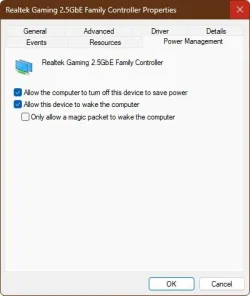
You could also try to disable all power saving nonsense for Ethernet, like energy efficient, green internet, etc.
 

Attachments

  • capture_05042025_165139.webp
    capture_05042025_165139.webp
    14.4 KB · Views: 3
  • capture_05042025_165203.webp
    capture_05042025_165203.webp
    26 KB · Views: 3

My Computer My Computer

At a glance

Home26H2CanAMD Ryzen 5 8600G (07/24)2x32GB Kingston FURY DDR5 5600 MHz CL36 @5200...ASROCK Radeon RX 6600 Challenger D 8G @48FPS ...
OS
Home26H2Can
Computer type
PC/Desktop
CPU
AMD Ryzen 5 8600G (07/24)
Motherboard
ASROCK B650M-HDV/M.2 (07/24) BIOS 4.21 AGESA ComboAM5 1.3.0.1 (04/26)
Memory
2x32GB Kingston FURY DDR5 5600 MHz CL36 @5200 CL36 (07/24)
Graphics Card(s)
ASROCK Radeon RX 6600 Challenger D 8G @48FPS (08/24)
Sound Card
Creative Sound BlasterX AE-5 Plus (05/24)
Monitor(s) Displays
24" Philips 24M1N3200ZS/00 (05/24)
Screen Resolution
1920×1080@165Hz via DP1.4
Hard Drives
Kingston KC3000 NVMe 2TB (05/24)
ADATA XPG GAMMIX S11 Pro 512GB (07/19)
PSU
Seasonic Core GM 550 Gold (04/24)
Case
Fractal Design Define 7 Mini with 3x Noctua NF-P14s/12@555rpm (04/24)
Cooling
Noctua NH-U12S with Noctua NF-P12 (04/24)
Keyboard
HP Pavilion Wired Keyboard 300 (07/24) + Rabalux 76017 Parker (01/24)
Mouse
Logitech M330 Silent Plus (01/26)
Internet Speed
500/100 Mbps via RouterOS (05/21) & TCP Optimizer
Browser
Edge, Brave for YouTube, LibreWolf for FB
Antivirus
NextDNS blocking 1/3 Traffic
Other Info
Phone: Motorola Moto G86 (02/26)
Backup: Hasleo Backup Suite (PreOS)
Headphones: Sennheiser RS170 (09/10)
Chair: Huzaro Force 4.4 Grey Mesh (05/24)
Notifier: Xiaomi Mi Band 9 Milanese (10/24)
FlexCore USB-C 3.2 Gen 1 (M) to LAN (F) (08/25)
With both WiFi and Ethernet enabled that has been normal behavior for many years with Windows.
 

My Computers My Computers

  • At a glance

    Win 11 Pro 25H2, Build 26200.8737Intel Core i5 1450064GB DDR4GeForce RTX 4060
    OS
    Win 11 Pro 25H2, Build 26200.8737
    Computer type
    PC/Desktop
    Manufacturer/Model
    Home Brew
    CPU
    Intel Core i5 14500
    Motherboard
    Gigabyte B760M G P WIFI
    Memory
    64GB DDR4
    Graphics Card(s)
    GeForce RTX 4060
    Sound Card
    Chipset Realtek
    Monitor(s) Displays
    LG 45" Ultragear, Acer 24" 1080p
    Screen Resolution
    5120x1440, 1920x1080
    Hard Drives
    Crucial P310 2TB 2280 PCIe Gen4 3D NAND NVMe M.2 SSD (O/S)
    Silicon Power 2TB US75 NVMe PCIe Gen4 M.2 2280 SSD (backup)
    Crucial BX500 2TB 3D NAND (2nd backup)
    Seagate 4TB Ironwolf, rotating HDD archive files
    External off-line backup Drives: 2 NVMe 4TB drives in external enclosures
    PSU
    Thermaltake Toughpower GF3 750W
    Case
    LIAN LI LANCOOL 216 E-ATX PC Case
    Cooling
    Lots of fans!
    Keyboard
    Microsoft Comfort Curve 2000
    Mouse
    Logitech G305
    Internet Speed
    Verizon FiOS 1GB
    Browser
    Firefox
    Antivirus
    Malware Bytes & Windows Defender Security
  • At a glance

    Win 11 Pro 25H2, Build 26200.8655Intel Core i5 1440032GB DDR5Intel 700 Embedded GPU
    Operating System
    Win 11 Pro 25H2, Build 26200.8655
    Computer type
    PC/Desktop
    Manufacturer/Model
    Home Brew
    CPU
    Intel Core i5 14400
    Motherboard
    Gigabyte B760M DS3H AX
    Memory
    32GB DDR5
    Graphics card(s)
    Intel 700 Embedded GPU
    Sound Card
    Realtek Embedded
    Monitor(s) Displays
    27" HP 1080p
    Screen Resolution
    1920x1080
    Hard Drives
    Crucial P310 2TB 2280 PCIe Gen4 eD NAND PCIe SSD
    Samsung EVO 990 2TB NVMe Gen4 SSD
    Samsung 2TB SATA SSD
    PSU
    Thermaltake Smart BM3 650W
    Case
    Okinos Micro ATX Case
    Cooling
    Fans
    Keyboard
    Microsoft Comfort Curve 2000
    Mouse
    Logitech G305
    Internet Speed
    Verizon FiOS 1GB
    Browser
    Firefox
    Antivirus
    Malware Bytes & Windows Defender Security
  • Nimo N171 17" Laptop, (Intel i3-1215U, 16GB RAM, 2TB NVMe, Win11 Pro)
    Acemagic Vista Mini PC V1 (Intel N150, 16GB RAM, 1TB NVMe, Win11 Pro)
    HP ENVY h8-1540t, (24GB RAM, 2TB SSD, 2TB HDD, Win11 Pro)
For the reason above, I don't want to do that.
I'm just asking is this normal behaviour?
You can disable Wi-Fi for test purposes only to see if your ethernet connection becomes fast enough to make you happy with Wi-Fi disabled. If you are not happy, you can always enable Wi-Fi any time you like. You shouldn't be afraid that your Wi-Fi will not function correctly once you disable and then re-enable it.
 

My Computers My Computers

  • At a glance

    Windows 11 Pro build 26200.8524Intel i7-4790Teams DDR3-1600 4x4 GBMSI Nvidia GeForce GTX 1050Ti
    OS
    Windows 11 Pro build 26200.8524
    Computer type
    PC/Desktop
    Manufacturer/Model
    Home Built
    CPU
    Intel i7-4790
    Motherboard
    Asus H97 Pro Gamer with add-on TPM1.2 module
    Memory
    Teams DDR3-1600 4x4 GB
    Graphics Card(s)
    MSI Nvidia GeForce GTX 1050Ti
    Sound Card
    Realtek ALC1150
    Monitor(s) Displays
    Dell P2425D
    Screen Resolution
    2560 by 1440 pixels
    Hard Drives
    Corsair NVMe M.2 Core XT 1000 GB (Windows 11 v.25H2); Samsung SATA Evo 870 500 GB (Windows 11 v.25H2);
    PSU
    Corsair HX850
    Case
    Gigabyte Solo 210
    Cooling
    Zalman CNPS7X Tower
    Keyboard
    Microsoft AIO Wireless (includes touchpad)
    Mouse
    HP S1000 Plus Wireless
    Internet Speed
    500 Mb fiber optic
    Browser
    Chrome; MS Edge
    Antivirus
    Windows Defender
  • At a glance

    MacOS 12 MontereyIntel Core i58 GBIntel integrated
    Operating System
    MacOS 12 Monterey
    Computer type
    Laptop
    Manufacturer/Model
    Apple Macbook Air
    CPU
    Intel Core i5
    Memory
    8 GB
    Graphics card(s)
    Intel integrated
    Screen Resolution
    1440 by 900 pixels
    Hard Drives
    128 GB
    Keyboard
    Built-in
    Mouse
    Microsoft Wireless
    Internet Speed
    802.11 ac
    Browser
    Chrome; Safari
    Antivirus
    N/A
There's a concept in networking called the routing metric. A routing metric helps determine which network a device should use if there are multiple networks which can equally reach the same destination.

Local area networks (Ethernet) have a lower weighted metric than mobile networks (Wi-Fi/Bluetooth/Cellular modem). Lower metrics are preferred, whenever possible.

If your LAN doesn't get configured at boot time, then your enabled Wi-Fi is the only working route. As soon as the Ethernet eventually gets a DHCP lease, then Windows considers the LAN as better than Wi-Fi and moves traffic over.

As @TairikuOkami points out, the real question is why it takes so long for your Ethernet to get a DHCP lease (the IP address) from your router.
 
Last edited:

My Computer My Computer

At a glance

Windows 7
OS
Windows 7

My Computers My Computers

  • At a glance

    Windows 11 Pro 25H2Intel Core i7-10700K16GB (8GB PC4-19200 DDR4 SDRAM x2)NVIDIA GeForce GTX 1050 TI
    OS
    Windows 11 Pro 25H2
    Computer type
    PC/Desktop
    Manufacturer/Model
    PowerSpec B746
    CPU
    Intel Core i7-10700K
    Motherboard
    ASRock Z490 Phantom Gaming 4/ax
    Memory
    16GB (8GB PC4-19200 DDR4 SDRAM x2)
    Graphics Card(s)
    NVIDIA GeForce GTX 1050 TI
    Sound Card
    Realtek Audio
    Monitor(s) Displays
    #1. LG ULTRAWIDE 34" #2. AOC Q32G2WG3 32"
    Screen Resolution
    #1. 3440 X 1440 #2. 1920 x 1080
    Hard Drives
    NVMe WDC WDS100T2B0C-00PXH0 1TB
    Samsung SSD 860 EVO 1TB
    PSU
    750 Watts (62.5A)
    Case
    PowerSpec/Lian Li ATX 205
    Keyboard
    Logitech K270
    Mouse
    Logitech M185
    Browser
    Microsoft Edge and Firefox
    Antivirus
    Webroot SecureAnywhere CE 26.1
  • At a glance

    Windows 11 Canary ChannelIntel Core i5-8400 CPU @ 2.80GHz16 MB DDR 4-2666
    Operating System
    Windows 11 Canary Channel
    Computer type
    PC/Desktop
    Manufacturer/Model
    PowerSpec G156
    CPU
    Intel Core i5-8400 CPU @ 2.80GHz
    Motherboard
    AsusTeK Prime B360M-A
    Memory
    16 MB DDR 4-2666
    Monitor(s) Displays
    23" Speptre HDMI 75Hz
    Screen Resolution
    1920x1080
    Hard Drives
    Samsung 970 EVO 500GB NVMe
    Keyboard
    Logitek K270
    Mouse
    Logitek M185
    Browser
    Firefox, Edge and Edge Canary
    Antivirus
    Windows Defender
Some people just annoy too easily! Yeesh!
 

My Computers My Computers

  • At a glance

    Windows 11 Pro 25H2 26200.8737AMD Ryzen 7 5825U with Radeon Graphics16GB
    OS
    Windows 11 Pro 25H2 26200.8737
    Computer type
    Laptop
    Manufacturer/Model
    Acemagic LX15PRO
    CPU
    AMD Ryzen 7 5825U with Radeon Graphics
    Motherboard
    BIOS CT_BI_AMI_LX15PRO_AB8139_A-004
    Memory
    16GB
    Screen Resolution
    1920 x 1080
    Hard Drives
    SSD 2TB
    Internet Speed
    30 Mbps
    Browser
    Brave
    Antivirus
    Webroot SecureAnywhere Complete beta
  • At a glance

    Windows 11 Pro 23H2 22631.2506Atom N450 1.66GHz2GB
    Operating System
    Windows 11 Pro 23H2 22631.2506
    Computer type
    Laptop
    Manufacturer/Model
    HP Mini 210-1090NR PC (bought in late 2009!)
    CPU
    Atom N450 1.66GHz
    Memory
    2GB
    Browser
    Brave
    Antivirus
    Webroot
  • Acer Swift SF114-34 laptop
    OS Windows 11 Pro 26200.8737
    CPU Pentium Silver N6000
    RAM 4GB
    BIOS v1.17
    SSD Samsung 970 EVO Plus SSD 2TB (an upgrade)
There's a concept in networking called the routing metric. A routing metric helps determine which network a device should use if there are multiple networks which can equally reach the same destination.

Local area networks (Ethernet) have a lower weighted metric than mobile networks (Wi-Fi/Bluetooth/Cellular modem). Lower metrics are preferred, whenever possible.

If your LAN doesn't get configured at boot time, then your enabled Wi-Fi is the only working route. As soon as the Ethernet eventually gets a DHCP lease, then Windows considers the LAN as better than Wi-Fi and moves traffic over.

As @TairikuOkami points out, the real question is why it takes so long for your Ethernet to get a DHCP lease (the IP address) from your router.
Garlin, around 6 months ago, I was experimenting with this. No matter what metrics I used, I could not force the WiFi adapter to have priority over Ethernet. I'm very familiar with the use of the metric, although it has been a long time since I last had to use, but I simply cannot get that to work any longer, at least not between a WiFi and Ethernet adapter.
 

My Computers My Computers

  • At a glance

    Win11 Pro 25H2 (RTM+)Intel i7-14650HX32 GBNo GPU - Built-in Intel Graphics
    OS
    Win11 Pro 25H2 (RTM+)
    Computer type
    PC/Desktop
    Manufacturer/Model
    Acemagic
    CPU
    Intel i7-14650HX
    Memory
    32 GB
    Graphics Card(s)
    No GPU - Built-in Intel Graphics
    Sound Card
    Integrated
    Monitor(s) Displays
    Varies as machine will often be moved to locations with different monitors
    Screen Resolution
    Varies
    Hard Drives
    1 x 1TB Gen 4 NVMe SSD
    PSU
    120W Power Brick
    Keyboard
    Corsair K70 Max RGB Magnetic Keyboard
    Mouse
    Logitech MX Master 3
    Internet Speed
    1Gb Up / 1 Gb Down
    Browser
    Edge
    Antivirus
    Windows Defender
  • At a glance

    Win11 Pro 25H2 (RTM+)Intel i7-1255U16 GBIntel Iris Xe Graphics
    Operating System
    Win11 Pro 25H2 (RTM+)
    Computer type
    Laptop
    Manufacturer/Model
    Lenovo ThinkBook 13x Gen 2
    CPU
    Intel i7-1255U
    Memory
    16 GB
    Graphics card(s)
    Intel Iris Xe Graphics
    Sound Card
    Realtek® ALC3306-CG codec
    Monitor(s) Displays
    13.3-inch IPS Display
    Screen Resolution
    WQXGA (2560 x 1600)
    Hard Drives
    2 TB 4 x 4 NVMe SSD
    PSU
    USB-C / Thunderbolt 4 Power / Charging
    Keyboard
    Backlit, spill resistant keyboard
    Mouse
    Buttonless Glass Precision Touchpad
    Internet Speed
    1Gb Up / 1Gb Down
    Browser
    Edge
    Antivirus
    Windows Defender
    Other Info
    WiFi 6e / Bluetooth 5.1 / Facial Recognition / Fingerprint Sensor / ToF (Time of Flight) Human Presence Sensor
It is moot to me because any Ethernet connection goes through the same router as the wifi and thus, the two connections have the same speed.

I do realise that many members may have an internet connection faster than their wifi, but this means they need a faster modem/router!
 

My Computers My Computers

  • At a glance

    Windows 11 Pro 25H2 26200.8737AMD Ryzen 7 5825U with Radeon Graphics16GB
    OS
    Windows 11 Pro 25H2 26200.8737
    Computer type
    Laptop
    Manufacturer/Model
    Acemagic LX15PRO
    CPU
    AMD Ryzen 7 5825U with Radeon Graphics
    Motherboard
    BIOS CT_BI_AMI_LX15PRO_AB8139_A-004
    Memory
    16GB
    Screen Resolution
    1920 x 1080
    Hard Drives
    SSD 2TB
    Internet Speed
    30 Mbps
    Browser
    Brave
    Antivirus
    Webroot SecureAnywhere Complete beta
  • At a glance

    Windows 11 Pro 23H2 22631.2506Atom N450 1.66GHz2GB
    Operating System
    Windows 11 Pro 23H2 22631.2506
    Computer type
    Laptop
    Manufacturer/Model
    HP Mini 210-1090NR PC (bought in late 2009!)
    CPU
    Atom N450 1.66GHz
    Memory
    2GB
    Browser
    Brave
    Antivirus
    Webroot
  • Acer Swift SF114-34 laptop
    OS Windows 11 Pro 26200.8737
    CPU Pentium Silver N6000
    RAM 4GB
    BIOS v1.17
    SSD Samsung 970 EVO Plus SSD 2TB (an upgrade)
Garlin, around 6 months ago, I was experimenting with this. No matter what metrics I used, I could not force the WiFi adapter to have priority over Ethernet. I'm very familiar with the use of the metric, although it has been a long time since I last had to use, but I simply cannot get that to work any longer, at least not between a WiFi and Ethernet adapter.
You're not the only one complaining...
Windows 11 Network Internet Metrics no longer work. - Microsoft Q&A
 

My Computer My Computer

At a glance

Windows 7
OS
Windows 7

My Computers My Computers

  • At a glance

    Windows 11 Pro 25H2 26200.8737AMD Ryzen 7 5825U with Radeon Graphics16GB
    OS
    Windows 11 Pro 25H2 26200.8737
    Computer type
    Laptop
    Manufacturer/Model
    Acemagic LX15PRO
    CPU
    AMD Ryzen 7 5825U with Radeon Graphics
    Motherboard
    BIOS CT_BI_AMI_LX15PRO_AB8139_A-004
    Memory
    16GB
    Screen Resolution
    1920 x 1080
    Hard Drives
    SSD 2TB
    Internet Speed
    30 Mbps
    Browser
    Brave
    Antivirus
    Webroot SecureAnywhere Complete beta
  • At a glance

    Windows 11 Pro 23H2 22631.2506Atom N450 1.66GHz2GB
    Operating System
    Windows 11 Pro 23H2 22631.2506
    Computer type
    Laptop
    Manufacturer/Model
    HP Mini 210-1090NR PC (bought in late 2009!)
    CPU
    Atom N450 1.66GHz
    Memory
    2GB
    Browser
    Brave
    Antivirus
    Webroot
  • Acer Swift SF114-34 laptop
    OS Windows 11 Pro 26200.8737
    CPU Pentium Silver N6000
    RAM 4GB
    BIOS v1.17
    SSD Samsung 970 EVO Plus SSD 2TB (an upgrade)
As so often happens, the advice from MS is asinine, useless, irrelevant and off topic. This list is not conclusive or complete.
You've missed the point of the link. Someone else is repeating @hsehestedt's claim that Windows has recently stopped respecting the metric.
 

My Computer My Computer

At a glance

Windows 7
OS
Windows 7
You've missed the point of the link. Someone else is repeating @hsehestedt's claim that Windows has recently stopped respecting the metric.

You've missed the point of the link. Someone else is repeating @hsehestedt's claim that Windows has recently stopped respecting the metric.
I think he is correct. It is you who has missed the point Good night.
 

My Computers My Computers

  • At a glance

    Windows 11 Pro 25H2 26200.8737AMD Ryzen 7 5825U with Radeon Graphics16GB
    OS
    Windows 11 Pro 25H2 26200.8737
    Computer type
    Laptop
    Manufacturer/Model
    Acemagic LX15PRO
    CPU
    AMD Ryzen 7 5825U with Radeon Graphics
    Motherboard
    BIOS CT_BI_AMI_LX15PRO_AB8139_A-004
    Memory
    16GB
    Screen Resolution
    1920 x 1080
    Hard Drives
    SSD 2TB
    Internet Speed
    30 Mbps
    Browser
    Brave
    Antivirus
    Webroot SecureAnywhere Complete beta
  • At a glance

    Windows 11 Pro 23H2 22631.2506Atom N450 1.66GHz2GB
    Operating System
    Windows 11 Pro 23H2 22631.2506
    Computer type
    Laptop
    Manufacturer/Model
    HP Mini 210-1090NR PC (bought in late 2009!)
    CPU
    Atom N450 1.66GHz
    Memory
    2GB
    Browser
    Brave
    Antivirus
    Webroot
  • Acer Swift SF114-34 laptop
    OS Windows 11 Pro 26200.8737
    CPU Pentium Silver N6000
    RAM 4GB
    BIOS v1.17
    SSD Samsung 970 EVO Plus SSD 2TB (an upgrade)

Similar threads

Latest Support Threads

Back
Top Bottom