Solved Contemplating to buy Windows 11


Honestly, just for this (highlighted) it would be worth it. I didn't know that.
But it is incorrect.
You can use Windows 11 Home with local accounts.

If you are happy to stay with Home, continue to use local user accounts and you have Windows 10 already, you did not need any key & you did not need to spend any money at all.
Upgrade to Windows 11 - ElevenForumTutorials
I have upgraded Windows 10 Home to Windows 11 Home without having to use MSAccounts.
It is even possible too avoid them during Clean installs.
Clean Install Windows 11 - includes local account method - ElevenForumTutorials


Denis
 
Last edited:

My Computer

System One

  • OS
    Windows 11 Home x64 Version 25H2 Build 26200.8037
If i remember correctly, in the beginning of Windows 10 it was possible to have a local account very easy but it seems to have changed to make it harder to enable that.
I bought the key and my computer now runs pro, which is nice. No problems, once it was activated it upgraded automatically.
Its all a PC adventure.
Welcome to Eleven Forum.

Home requires you to create the first account as a MS account, even Pro makes it difficult to avoid. If you want just a local account there are two ways, one easy the other harder.

Easy: either set up with an MS account, then when completed switch to a local account....
Switch to Local Account from Microsoft Account in Windows 11
...or create a new local account, make it an administrator, then remove the MS account.

A bit harder: bypass the requirement for a Microsoft account at initial setup and create a local account. See Step 15 in this tutorial.

15 If you are installing a Windows 11 Home or Pro edition and want to set up a local account, then do not click/tap on Skip and follow the steps below:
Clean Install Windows 11
 

My Computers

System One System Two

  • OS
    Windows 11 Home
    Computer type
    Laptop
    Manufacturer/Model
    Acer Aspire 3 A315-23-R9VY
    CPU
    AMD Athlon Silver 3050U
    Memory
    8GB
    Graphics Card(s)
    Radeon Graphics
    Monitor(s) Displays
    laptop screen
    Screen Resolution
    1366x768 native resolution, up to 2560x1440 with Radeon Virtual Super Resolution
    Hard Drives
    1TB Samsung EVO 870 SSD (from April 2026: 250GB EVO 850)
    Internet Speed
    150 Mbps
    Browser
    Edge, Firefox
    Antivirus
    Defender
    Other Info
    fully 'Windows 11 ready' laptop. Windows 10 C: partition migrated from my old unsupported 'main machine' then upgraded to 11. A test migration ran Insider builds for 2 months. When 11 was released on 5th October 2021 it was re-imaged back to 10 and was offered the upgrade in Windows Update on 20th October. Windows Update offered the 22H2 Feature Update on 20th September 2022. It got the 23H2 Feature Update on 4th November 2023 through Windows Update, 24H2 on 3rd October 2024 through Windows Update by setting the Target Release Version for 24H2, and 25H2 on 30th September 2025 through Windows Update by setting the Target Release Version for 25H2.

    UPDATE - 11 April 2026: due to mechanical deterioration this PC has been retired from active duty. The OS with all software and files has been migrated to my System Seven below to carry on as my general purpose 'main machine'.

    My SYSTEM THREE is a Dell Latitude 5410, i7-10610U, 32GB RAM, 512GB NVMe ssd, supported device running Windows 11 Pro.

    My SYSTEM FOUR is a 2-in-1 convertible Lenovo Yoga 11e 20DA, Celeron N2930, 8GB RAM, 256GB ssd. Unsupported device: currently running Win10 Pro, plus Win11 Pro RTM and Insider Dev, Beta, and RP 24H2 as native boot vhdx.

    My SYSTEM FIVE is a Dell Latitude 3190 2-in-1, Pentium Silver N5030, 8GB RAM, 1TB NVMe ssd, supported device running Windows 11 Pro, plus Insider Beta, Dev, and Canary builds (and a few others) as a native boot .vhdx.

    My SYSTEM SIX is a Dell Latitude 5550, Core Ultra 7 165H, 64GB RAM, 1TB NVMe SSD, supported device, Windows 11 Pro 24H2, Hyper-V host machine. Updated to 25H2 on 30th September 2025.

    My SYSTEM SEVEN is a Lenovo Thinkpad T580, Intel Core i7-8650U, 16GB RAM, 512GB NVMe SSD + 2nd 512GB NVMe SSD, a supported device for Windows 11. This is my current general purpose 'main machine'. The installed Windows 11 Home from my System One has been migrated to this machine.
  • Operating System
    Windows 11 Pro
    Computer type
    Laptop
    Manufacturer/Model
    Dell Latitude E4310
    CPU
    Intel® Core™ i5-520M
    Motherboard
    0T6M8G
    Memory
    8GB
    Graphics card(s)
    (integrated graphics) Intel HD Graphics
    Screen Resolution
    1366x768
    Hard Drives
    500GB Crucial MX500 SSD
    Browser
    Firefox, Edge
    Antivirus
    Defender
    Other Info
    unsupported machine: Legacy bios, MBR, TPM 1.2, upgraded from W10 to W11 using W10/W11 hybrid install media workaround. In-place upgrade to 22H2 using ISO and a workaround. Feature Update to 23H2 by manually installing the Enablement Package. In-place upgrade to 24H2 using hybrid 23H2/24H2 install media. Upgraded to 25H2 by Enablement Package. Also running Insider Dev, and Canary builds and Windows 10 as native boot .vhdx.

    My SYSTEM THREE is a Dell Latitude 5410, i7-10610U, 32GB RAM, 512GB NVMe ssd, supported device running Windows 11 Pro.

    My SYSTEM FOUR is a 2-in-1 convertible Lenovo Yoga 11e 20DA, Celeron N2930, 8GB RAM, 256GB ssd. Unsupported device: currently running Win10 Pro, plus Win11 Pro RTM and Insider Dev, Beta, and RP 24H2 as native boot vhdx.

    My SYSTEM FIVE is a Dell Latitude 3190 2-in-1, Pentium Silver N5030, 8GB RAM, 1TB NVMe ssd, supported device running Windows 11 Pro, plus Insider Beta, Dev, and Canary builds (and a few others) as a native boot .vhdx.

    My SYSTEM SIX is a Dell Latitude 5550, Core Ultra 7 165H, 64GB RAM, 1TB NVMe SSD, supported device, Windows 11 Pro 24H2, Hyper-V host machine. Updated to 25H2 on 30th September 2025.

    My SYSTEM SEVEN is a Lenovo Thinkpad T580, Intel Core i7-8650U, 16GB RAM, 512GB NVMe SSD + 2nd 512GB NVMe SSD, a supported device for Windows 11. This is my current general purpose 'main machine'. The installed Windows 11 Home from my System One has been migrated to this machine.
If i remember correctly, in the beginning of Windows 10 it was possible to have a local account very easy but it seems to have changed to make it harder to enable that.
You are remembering correctly. IMO, one of the reasons is that this locates the user folders to OneDrive that has a very limited amount of storage space unless the user pays MS for more storage space if/when needed or knows how to move their user folders back to their local drive.

Edit: I do use OneDrive but only for my documents and pictures. Because I also subscribe to MS 365 I have enough OneDrive space to last a long time.
 

My Computers

System One System Two

  • OS
    Windows 11 Pro 25H2
    Computer type
    PC/Desktop
    Manufacturer/Model
    PowerSpec B746
    CPU
    Intel Core i7-10700K
    Motherboard
    ASRock Z490 Phantom Gaming 4/ax
    Memory
    16GB (8GB PC4-19200 DDR4 SDRAM x2)
    Graphics Card(s)
    NVIDIA GeForce GTX 1050 TI
    Sound Card
    Realtek Audio
    Monitor(s) Displays
    #1. LG ULTRAWIDE 34" #2. AOC Q32G2WG3 32"
    Screen Resolution
    #1. 3440 X 1440 #2. 1920 x 1080
    Hard Drives
    NVMe WDC WDS100T2B0C-00PXH0 1TB
    Samsung SSD 860 EVO 1TB
    PSU
    750 Watts (62.5A)
    Case
    PowerSpec/Lian Li ATX 205
    Keyboard
    Logitech K270
    Mouse
    Logitech M185
    Browser
    Microsoft Edge and Firefox
    Antivirus
    Webroot SecureAnywhere CE 26.1
  • Operating System
    Windows 11 Canary Channel
    Computer type
    PC/Desktop
    Manufacturer/Model
    PowerSpec G156
    CPU
    Intel Core i5-8400 CPU @ 2.80GHz
    Motherboard
    AsusTeK Prime B360M-A
    Memory
    16 MB DDR 4-2666
    Monitor(s) Displays
    23" Speptre HDMI 75Hz
    Screen Resolution
    1920x1080
    Hard Drives
    Samsung 970 EVO 500GB NVMe
    Keyboard
    Logitek K270
    Mouse
    Logitek M185
    Browser
    Firefox, Edge and Edge Canary
    Antivirus
    Windows Defender
Enjoy your Windows 11 Pro :-) One thing that I don't think was mentioned, was Pro has Group Policy editor (apologies if I missed that), in which you can set a policy to prevent Windows upgrading beyond a particular version (if you wish to do so for some reason). I used that on one machine to stay on 23H2 for longer when 24H2 was being pushed.

Also however you set it up, I'm sure you know about doing backups/system images - needed as much today as ever :-)
 

My Computers

System One System Two

  • OS
    Windows 11 Home 25H2
    Computer type
    Laptop
    Manufacturer/Model
    HP Pavilion 14-ce3606sa
    CPU
    Core i5-1035G1
    Memory
    32gb
    Hard Drives
    Samsung 870 evo sata ssd
    Cooling
    Could be better
    Internet Speed
    50 mbps Starlink
    Browser
    Firefox
    Other Info
    Originally came installed with a 500gb H10 Optane ssd
  • Operating System
    Windows 11 Home
    Computer type
    Laptop
    Manufacturer/Model
    HP Pavilion ce3606sa
    CPU
    Intel Core i5-1035G1
    Memory
    16gb
    Hard Drives
    Hynix Gold P31 2TB
    Internet Speed
    200mbps Starlink
    Browser
    Firefox
    Antivirus
    Defender

My Computer

System One

  • OS
    Windows 11 Home x64 Version 25H2 Build 26200.8037
You are remembering correctly. IMO, one of the reasons is that this locates the user folders to OneDrive that has a very limited amount of storage space unless the user pays MS for more storage space if/when needed or knows how to move their user folders back to their local drive.

Edit: I do use OneDrive but only for my documents and pictures. Because I also subscribe to MS 365 I have enough OneDrive space to last a long time.
I have to admit that i never gave it much of a thought, with cloud. Nowadays, i remove it if i can. I don't like that, i have to have it approach. Not everything i like to have synced.
Though, i can see the benefits.
At least my memory isn't bad. lol
 

My Computer

System One

  • OS
    Windows 11
    Computer type
    PC/Desktop
    Manufacturer/Model
    build
    CPU
    AMD Ryzen 5 3600 6-Core Processor, 3600 Mhz,
    Motherboard
    B450 TOMAHAWK MAX II (MS-7C02)
    Memory
    G.SKILL Ripjaws V Series 16GB (2 x 8GB) / 32.0 GB
    Graphics Card(s)
    MSI Ventus GeForce RTX 3060 12GB
    Sound Card
    Creative Sound Blaster Audigy PCIe RX 7.1 Sound Card
    Monitor(s) Displays
    Samsung Odyssey G50A
    Screen Resolution
    2560 x 1440, 144Hz
    Hard Drives
    Samsung SSD 860 EVO 500GB
    Case
    Fractal Design Meshify C Black
    Cooling
    Noctua NH-L9x65 SE-AM4
    Keyboard
    Jlab Epic Mechanical
    Mouse
    MS
    Internet Speed
    400
    Browser
    Vivaldi
    Antivirus
    Defender
Enjoy your Windows 11 Pro :-) One thing that I don't think was mentioned, was Pro has Group Policy editor (apologies if I missed that), in which you can set a policy to prevent Windows upgrading beyond a particular version (if you wish to do so for some reason). I used that on one machine to stay on 23H2 for longer when 24H2 was being pushed.
Also however you set it up, I'm sure you know about doing backups/system images - needed as much today as ever :-)

Backup. Yes, this is a thing.
I have/had an external drive. One day, it fell off the shelf and since has a IO problem. I still kept it because i want to try to recover but it seems, it may not be possible.

Got to have another drive soon.
 

My Computer

System One

  • OS
    Windows 11
    Computer type
    PC/Desktop
    Manufacturer/Model
    build
    CPU
    AMD Ryzen 5 3600 6-Core Processor, 3600 Mhz,
    Motherboard
    B450 TOMAHAWK MAX II (MS-7C02)
    Memory
    G.SKILL Ripjaws V Series 16GB (2 x 8GB) / 32.0 GB
    Graphics Card(s)
    MSI Ventus GeForce RTX 3060 12GB
    Sound Card
    Creative Sound Blaster Audigy PCIe RX 7.1 Sound Card
    Monitor(s) Displays
    Samsung Odyssey G50A
    Screen Resolution
    2560 x 1440, 144Hz
    Hard Drives
    Samsung SSD 860 EVO 500GB
    Case
    Fractal Design Meshify C Black
    Cooling
    Noctua NH-L9x65 SE-AM4
    Keyboard
    Jlab Epic Mechanical
    Mouse
    MS
    Internet Speed
    400
    Browser
    Vivaldi
    Antivirus
    Defender

My Computer

System One

  • OS
    Windows 11
    Computer type
    PC/Desktop
    Manufacturer/Model
    build
    CPU
    AMD Ryzen 5 3600 6-Core Processor, 3600 Mhz,
    Motherboard
    B450 TOMAHAWK MAX II (MS-7C02)
    Memory
    G.SKILL Ripjaws V Series 16GB (2 x 8GB) / 32.0 GB
    Graphics Card(s)
    MSI Ventus GeForce RTX 3060 12GB
    Sound Card
    Creative Sound Blaster Audigy PCIe RX 7.1 Sound Card
    Monitor(s) Displays
    Samsung Odyssey G50A
    Screen Resolution
    2560 x 1440, 144Hz
    Hard Drives
    Samsung SSD 860 EVO 500GB
    Case
    Fractal Design Meshify C Black
    Cooling
    Noctua NH-L9x65 SE-AM4
    Keyboard
    Jlab Epic Mechanical
    Mouse
    MS
    Internet Speed
    400
    Browser
    Vivaldi
    Antivirus
    Defender
One major advantage I use with Win11 Pro vs Win11 Home is the fact that you can use RDC client with Pro. This allows me to sit at my computer and do maintenance on other machines on the network, very handy.
 

My Computers

System One System Two

  • OS
    Win 11 Pro 25H2, Build 26200.8524
    Computer type
    PC/Desktop
    Manufacturer/Model
    Home Brew
    CPU
    Intel Core i5 14500
    Motherboard
    Gigabyte B760M G P WIFI
    Memory
    64GB DDR4
    Graphics Card(s)
    GeForce RTX 4060
    Sound Card
    Chipset Realtek
    Monitor(s) Displays
    LG 45" Ultragear, Acer 24" 1080p
    Screen Resolution
    5120x1440, 1920x1080
    Hard Drives
    Crucial P310 2TB 2280 PCIe Gen4 3D NAND NVMe M.2 SSD (O/S)
    Silicon Power 2TB US75 NVMe PCIe Gen4 M.2 2280 SSD (backup)
    Crucial BX500 2TB 3D NAND (2nd backup)
    Seagate 4TB Ironwolf, rotating HDD archive files
    External off-line backup Drives: 2 NVMe 4TB drives in external enclosures
    PSU
    Thermaltake Toughpower GF3 750W
    Case
    LIAN LI LANCOOL 216 E-ATX PC Case
    Cooling
    Lots of fans!
    Keyboard
    Microsoft Comfort Curve 2000
    Mouse
    Logitech G305
    Internet Speed
    Verizon FiOS 1GB
    Browser
    Firefox
    Antivirus
    Malware Bytes & Windows Defender Security
  • Operating System
    Win 11 Pro 25H2, Build 26200.8524
    Computer type
    PC/Desktop
    Manufacturer/Model
    Home Brew
    CPU
    Intel Core i5 14400
    Motherboard
    Gigabyte B760M DS3H AX
    Memory
    32GB DDR5
    Graphics card(s)
    Intel 700 Embedded GPU
    Sound Card
    Realtek Embedded
    Monitor(s) Displays
    27" HP 1080p
    Screen Resolution
    1920x1080
    Hard Drives
    Crucial P310 2TB 2280 PCIe Gen4 eD NAND PCIe SSD
    Samsung EVO 990 2TB NVMe Gen4 SSD
    Samsung 2TB SATA SSD
    PSU
    Thermaltake Smart BM3 650W
    Case
    Okinos Micro ATX Case
    Cooling
    Fans
    Keyboard
    Microsoft Comfort Curve 2000
    Mouse
    Logitech G305
    Internet Speed
    Verizon FiOS 1GB
    Browser
    Firefox
    Antivirus
    Malware Bytes & Windows Defender Security
Just to get back.
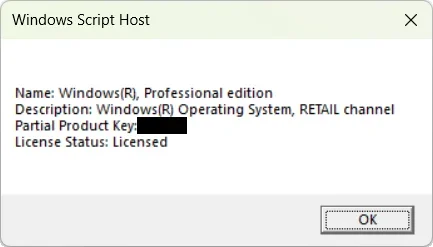
It looks like a legit license. At least that is what i read.
What kind of license does this store actually sell? Just curious.

1757892764235.webp

Code:
slmgr /dli

This was the only way to check. Other commands didn't work, so i would have maybe gotten more details.

p.s. i had seen that there is a PID Checker from MS but the one on Github seems fishy. My browser and windows said, it had a virus. Now, maybe the browser is getting the information from Windows. Not sure. I couldn't find that tool on the MS webpage. Maybe it isn't available anymore.
Are there safe tools that give more information about a license?
 

My Computer

System One

  • OS
    Windows 11
    Computer type
    PC/Desktop
    Manufacturer/Model
    build
    CPU
    AMD Ryzen 5 3600 6-Core Processor, 3600 Mhz,
    Motherboard
    B450 TOMAHAWK MAX II (MS-7C02)
    Memory
    G.SKILL Ripjaws V Series 16GB (2 x 8GB) / 32.0 GB
    Graphics Card(s)
    MSI Ventus GeForce RTX 3060 12GB
    Sound Card
    Creative Sound Blaster Audigy PCIe RX 7.1 Sound Card
    Monitor(s) Displays
    Samsung Odyssey G50A
    Screen Resolution
    2560 x 1440, 144Hz
    Hard Drives
    Samsung SSD 860 EVO 500GB
    Case
    Fractal Design Meshify C Black
    Cooling
    Noctua NH-L9x65 SE-AM4
    Keyboard
    Jlab Epic Mechanical
    Mouse
    MS
    Internet Speed
    400
    Browser
    Vivaldi
    Antivirus
    Defender
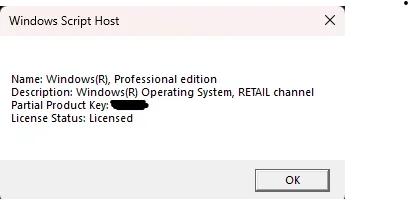
You have a retail license, that's good. You shouldn't have any issue since it appears that it activated. That's what I have.


1757894990386.webp
 

My Computers

System One System Two

  • OS
    Win 11 Pro 25H2, Build 26200.8524
    Computer type
    PC/Desktop
    Manufacturer/Model
    Home Brew
    CPU
    Intel Core i5 14500
    Motherboard
    Gigabyte B760M G P WIFI
    Memory
    64GB DDR4
    Graphics Card(s)
    GeForce RTX 4060
    Sound Card
    Chipset Realtek
    Monitor(s) Displays
    LG 45" Ultragear, Acer 24" 1080p
    Screen Resolution
    5120x1440, 1920x1080
    Hard Drives
    Crucial P310 2TB 2280 PCIe Gen4 3D NAND NVMe M.2 SSD (O/S)
    Silicon Power 2TB US75 NVMe PCIe Gen4 M.2 2280 SSD (backup)
    Crucial BX500 2TB 3D NAND (2nd backup)
    Seagate 4TB Ironwolf, rotating HDD archive files
    External off-line backup Drives: 2 NVMe 4TB drives in external enclosures
    PSU
    Thermaltake Toughpower GF3 750W
    Case
    LIAN LI LANCOOL 216 E-ATX PC Case
    Cooling
    Lots of fans!
    Keyboard
    Microsoft Comfort Curve 2000
    Mouse
    Logitech G305
    Internet Speed
    Verizon FiOS 1GB
    Browser
    Firefox
    Antivirus
    Malware Bytes & Windows Defender Security
  • Operating System
    Win 11 Pro 25H2, Build 26200.8524
    Computer type
    PC/Desktop
    Manufacturer/Model
    Home Brew
    CPU
    Intel Core i5 14400
    Motherboard
    Gigabyte B760M DS3H AX
    Memory
    32GB DDR5
    Graphics card(s)
    Intel 700 Embedded GPU
    Sound Card
    Realtek Embedded
    Monitor(s) Displays
    27" HP 1080p
    Screen Resolution
    1920x1080
    Hard Drives
    Crucial P310 2TB 2280 PCIe Gen4 eD NAND PCIe SSD
    Samsung EVO 990 2TB NVMe Gen4 SSD
    Samsung 2TB SATA SSD
    PSU
    Thermaltake Smart BM3 650W
    Case
    Okinos Micro ATX Case
    Cooling
    Fans
    Keyboard
    Microsoft Comfort Curve 2000
    Mouse
    Logitech G305
    Internet Speed
    Verizon FiOS 1GB
    Browser
    Firefox
    Antivirus
    Malware Bytes & Windows Defender Security
You have a retail license, that's good. You shouldn't have any issue since it appears that it activated. That's what I have.


View attachment 145413
I think i was a little worried because of the cost. That's all. Reading the reviews gives you the impression, everything works. And yes it did. Though i wasn't sure. My worry was, it's OEM. Because it did not say anything in that regard.
In the end, it worked out fine.
 

My Computer

System One

  • OS
    Windows 11
    Computer type
    PC/Desktop
    Manufacturer/Model
    build
    CPU
    AMD Ryzen 5 3600 6-Core Processor, 3600 Mhz,
    Motherboard
    B450 TOMAHAWK MAX II (MS-7C02)
    Memory
    G.SKILL Ripjaws V Series 16GB (2 x 8GB) / 32.0 GB
    Graphics Card(s)
    MSI Ventus GeForce RTX 3060 12GB
    Sound Card
    Creative Sound Blaster Audigy PCIe RX 7.1 Sound Card
    Monitor(s) Displays
    Samsung Odyssey G50A
    Screen Resolution
    2560 x 1440, 144Hz
    Hard Drives
    Samsung SSD 860 EVO 500GB
    Case
    Fractal Design Meshify C Black
    Cooling
    Noctua NH-L9x65 SE-AM4
    Keyboard
    Jlab Epic Mechanical
    Mouse
    MS
    Internet Speed
    400
    Browser
    Vivaldi
    Antivirus
    Defender
Are there safe tools that give more information about a license?
I use either the winver command or ShowKeyPlus. It's in the MS Store and the programmer is a forum member.
 

My Computers

System One System Two

  • OS
    Windows 11 Pro 25H2
    Computer type
    PC/Desktop
    Manufacturer/Model
    PowerSpec B746
    CPU
    Intel Core i7-10700K
    Motherboard
    ASRock Z490 Phantom Gaming 4/ax
    Memory
    16GB (8GB PC4-19200 DDR4 SDRAM x2)
    Graphics Card(s)
    NVIDIA GeForce GTX 1050 TI
    Sound Card
    Realtek Audio
    Monitor(s) Displays
    #1. LG ULTRAWIDE 34" #2. AOC Q32G2WG3 32"
    Screen Resolution
    #1. 3440 X 1440 #2. 1920 x 1080
    Hard Drives
    NVMe WDC WDS100T2B0C-00PXH0 1TB
    Samsung SSD 860 EVO 1TB
    PSU
    750 Watts (62.5A)
    Case
    PowerSpec/Lian Li ATX 205
    Keyboard
    Logitech K270
    Mouse
    Logitech M185
    Browser
    Microsoft Edge and Firefox
    Antivirus
    Webroot SecureAnywhere CE 26.1
  • Operating System
    Windows 11 Canary Channel
    Computer type
    PC/Desktop
    Manufacturer/Model
    PowerSpec G156
    CPU
    Intel Core i5-8400 CPU @ 2.80GHz
    Motherboard
    AsusTeK Prime B360M-A
    Memory
    16 MB DDR 4-2666
    Monitor(s) Displays
    23" Speptre HDMI 75Hz
    Screen Resolution
    1920x1080
    Hard Drives
    Samsung 970 EVO 500GB NVMe
    Keyboard
    Logitek K270
    Mouse
    Logitek M185
    Browser
    Firefox, Edge and Edge Canary
    Antivirus
    Windows Defender
To quickly find your Windows 11 product key, open Command Prompt, PowerShell or Terminal as an administrator and run this command:

wmic path softwarelicensingservice get OA3xOriginalProductKey

This retrieves key if it's embedded in your motherboard.
 

My Computer

System One

  • OS
    Win 7,8.1,10,11, Mint, Kde Plasma, Debian
    Computer type
    Laptop
    Manufacturer/Model
    Dell
    CPU
    Intel(R) Core(TM) i7-6500U CPU @ 2.50GHz
    Memory
    16 GB
    Graphics Card(s)
    Intel(R) HD Graphics 520/Nvidia GeForce 930M
    Sound Card
    Intel(R) Display Audio/RealtekAudio
    Monitor(s) Displays
    Generic Pnp Monitor
    Screen Resolution
    1366 X 768
    Hard Drives
    ST2000LM024-1EJ164
    Keyboard
    Eng (US)
    Mouse
    Sanwa Supply
    Browser
    Firefox
    Antivirus
    Avast One
    Other Info
    Too many laptops with different system specifications.
I used FlyBy11 and was able to freely upgrade several machines to Windows 11, with all data, settings, and applications intact.
 

My Computer

System One

  • OS
    Windows 11 Pro
    Computer type
    PC/Desktop
    Manufacturer/Model
    Custom Build
    CPU
    i5-13400F
    Motherboard
    Gigabyte B-760M
    Memory
    16 GB
    Graphics Card(s)
    RTX 4060
    Sound Card
    internal
    Monitor(s) Displays
    AOC 27 gaming
    Screen Resolution
    1920 x 1080
    Hard Drives
    Kingston 2 TB M.2
    PSU
    Thermaltake 700W
    Case
    DarkFlash C285P
    Cooling
    Kingsman KA-R240 ARGB Liquid Cooling
    Keyboard
    Redragon Kala
    Mouse
    Marvo G945
    Internet Speed
    400 Mbps DL/UL
    Browser
    Firefox, Mullvad
    Antivirus
    Kaspersky Standard
    Other Info
    Adguard for Desktop, Kerish PC Doctor, PerfectDisk Pro with OptiWrite, AOMEI Backupper Pro, Open-Shell, ExplorerPatcher
I have Windows 10 but i am thinking to buy Windows 11 to have a clean install without old garble gib on my drive.
Now, i don't know if this makes sense or if it does.

Also, if i would buy a new copy, what would give the pro version (besides Bitlocker) that Home doesn't have.
I assume that i still don't escape the telemetry and adds that come with Windows nowadays.

I have a fairly ok PC so far. I don't play the newest stuff and everything that i do play, works fine so far.

Anyway, i just don't know if buying Windows 11 makes sense.

Thank you
@coffeeaddicted

I use Windows 11 Pro, and install on all PCs I work on that need Windows 11.
I buy my keys here, and they're around $5 or so. They've all worked perfectly for years, and I use paypal for transactions so I never give CC # out.

Microsoft Windows 11 Professional Digital License OEM – Online Activation
keys4us.com/product/microsoft-windows-11-professional-digital-license-oem-online-activation/

I like Windows 11 Pro the best. Before that, I liked Windows 7 Pro.
I've never had ANY problems with Windows 11 Pro, and I use a local account ALWAYS.

Hope this helps you in some way
 

My Computers

System One System Two

  • OS
    Windows 11 Pro 25H2 (OS Build 26200.8246)
    Computer type
    Laptop
    Manufacturer/Model
    Dell Precision Mobile Workstation
    CPU
    Intel(R) Xeon(R) CPU E3-1535M v5 @ 2.90 Max Turbo 3.80
    Motherboard
    00V5FJ
    Memory
    64GB DDR4 ECC (Error-Correcting Code memory)
    Graphics Card(s)
    NVIDIA Quadro M2000M 4GB GDDR5 & Intel(R) HD Graphics P530
    Sound Card
    Realtek Audio
    Monitor(s) Displays
    15.6" 4K UltraHD
    Screen Resolution
    4K UHD 3840x2160
    Hard Drives
    2TB Crucial NVMe & 2TB Seagate SATA
    PSU
    Dell 180W 19.5V-9.23A
    Keyboard
    Backlit
    Mouse
    Logitech G703 & Logitech G305
    Internet Speed
    WIFI: Intel(R) Wi-Fi 6E AX210NGW(Gig+) 160MHz Bands 2.4GHz(574Mbps), 5GHz 2.4Gbps, 6 GHz (160MHz) 2.4Gbps
    Browser
    Mozilla Firefox
    Antivirus
    Windows Defender/Microsoft Security + additional Anti Spyware, Anti Malware, etc.
    Other Info
    Thunderbolt 3
  • Operating System
    Windows 11 Pro 24H2 (OS Build 26100.6725)
    Computer type
    PC/Desktop
    Manufacturer/Model
    Dell Precision Workstation T5610
    CPU
    Dual (X2) Intel(R) Xeon(R) CPU E5-2690 0 @ 2.90GHz Max Turbo 3.80
    Motherboard
    0WN7Y6
    Memory
    64GB DDR3 ECC (Error-Correcting Code memory)
    Graphics card(s)
    NVIDIA GeForce GTX 970 4GB of GDDR5
    Sound Card
    Realtek Audio & NVIDIA High Definition Audio
    Monitor(s) Displays
    3 Acer Monitors
    Screen Resolution
    1920x1080
    Hard Drives
    2 Seagate Barracuda ST2000DM008-2UB102 (RAID)
    Mouse
    Logitech G305
@coffeeaddicted

I use Windows 11 Pro, and install on all PCs I work on that need Windows 11.
I buy my keys here, and they're around $5 or so. They've all worked perfectly for years, and I use paypal for transactions so I never give CC # out.

Microsoft Windows 11 Professional Digital License OEM – Online Activation
keys4us.com/product/microsoft-windows-11-professional-digital-license-oem-online-activation/

I like Windows 11 Pro the best. Before that, I liked Windows 7 Pro.
I've never had ANY problems with Windows 11 Pro, and I use a local account ALWAYS.

Hope this helps you in some way
This is just new to me.
So i am naturally a little hesitant.
It works for me as well.
 

My Computer

System One

  • OS
    Windows 11
    Computer type
    PC/Desktop
    Manufacturer/Model
    build
    CPU
    AMD Ryzen 5 3600 6-Core Processor, 3600 Mhz,
    Motherboard
    B450 TOMAHAWK MAX II (MS-7C02)
    Memory
    G.SKILL Ripjaws V Series 16GB (2 x 8GB) / 32.0 GB
    Graphics Card(s)
    MSI Ventus GeForce RTX 3060 12GB
    Sound Card
    Creative Sound Blaster Audigy PCIe RX 7.1 Sound Card
    Monitor(s) Displays
    Samsung Odyssey G50A
    Screen Resolution
    2560 x 1440, 144Hz
    Hard Drives
    Samsung SSD 860 EVO 500GB
    Case
    Fractal Design Meshify C Black
    Cooling
    Noctua NH-L9x65 SE-AM4
    Keyboard
    Jlab Epic Mechanical
    Mouse
    MS
    Internet Speed
    400
    Browser
    Vivaldi
    Antivirus
    Defender

Latest Support Threads

Back
Top Bottom