Countdown Timer Done Sound


Ontheroad

Member
Local time
11:19 AM
Posts
3
OS
Windows 11
I'm trying to change the sound of this countdown timer
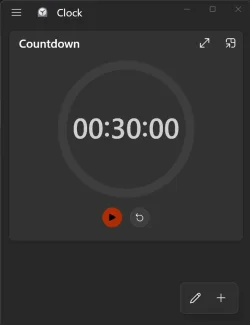
Screenshot 2026-01-25 101543.webp


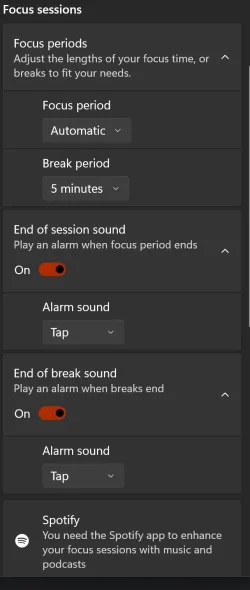
Changing these doesn't work

Screenshot 2026-01-25 101811.webp


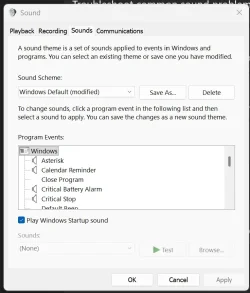
I can't find anything here that applies
Screenshot 2026-01-25 101732.webp

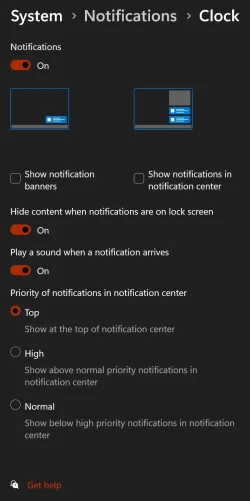
Nothing here either
Screenshot 2026-01-25 101953.webp

Where is the setting for this???
 
Windows Build/Version
Edition Windows 11 Home Version 24H2 Installed on ‎4/‎22/‎2025 OS build 26100.7623 Experience Windows Feature Experience Pack 1000.26100.275.0

My Computer

System One

  • OS
    Windows 11
    Computer type
    PC/Desktop
    Manufacturer/Model
    Gigabyte / self built
    CPU
    Intel(R) Core(TM) i7-9700K CPU @ 3.60GHz (3.60 GHz)
    Motherboard
    Gigabyte Z390 Aorus Pro WIFI
    Memory
    32GB 2133MT/s
    Graphics Card(s)
    NVIDEA GeForce RTX 2060
    Sound Card
    -
    Monitor(s) Displays
    BENQ
    Hard Drives
    5.46TB
    Case
    Coolermaster
    Cooling
    Be Quiet
    Keyboard
    Coolermaster
    Mouse
    Razer Deathadder
    Browser
    Firefox, Duck Duck Go
    Antivirus
    Malwarebytes
Gee, I can't find any sound settings for the (countdown) timer(s) either.
 

My Computer

System One

  • OS
    Windows 11 Pro 25H2 build 26200.8457
    Computer type
    Laptop
    Manufacturer/Model
    Lenovo ThinkPad Workstation P72
    CPU
    Intel i7 8750H @ 2.2 GHz
    Motherboard
    Lenovo 01YU291
    Memory
    16 GB (all Samsung) DDR4-3200 SODIMM (non-ECC) PCIe 3
    Graphics Card(s)
    Intel UHD Graphics 630 & NVIDIA Quadro P600
    Sound Card
    Realtek ALC3286 & Focusrite Saffire 24 Pro DSP
    Monitor(s) Displays
    17.3"
    Screen Resolution
    3840x2160
    Hard Drives
    1TB SSD Samsung 860 EVO SATA 3
    1TB SSD Samsung 970 EVO M.2 NVMe PCIe 3 x 4
    2TB SSD Samsung 990 PRO M.2 NVMe PCIe 3 x 4
    PSU
    230W
    Cooling
    fan
    Keyboard
    UltraNav
    Mouse
    Kensington wireless Orbit
    Internet Speed
    640Mbps
    Browser
    DuckDuckGo and Firefox
    Antivirus
    Defender
    Other Info
    CM246 Chipset
The closest thing I can find: (don't know about the sound?) post back with results, cheers:
Play watch on You tube above
 

My Computer

System One

  • OS
    Windows 11 25H2 (OS Build 26200.8655)
    Computer type
    Laptop
    Manufacturer/Model
    Dell
    CPU
    Processor: 11th Gen Intel(R) Core(TM) i5-1135G7 @ 2.40G
    Motherboard
    64-bit operating system Dell 0XMF7W
    Memory
    12GB
    Graphics Card(s)
    Intel R Iris R XE Graphics family
    Sound Card
    Cirrus Speakers High Definition Audio
    Monitor(s) Displays
    Generic PnP monitor
    Screen Resolution
    1920 x 1080
    Hard Drives
    NVMe 670p SSDPEKNU512GZ NVMe I NTEL 512GB
    Case
    cheap
    Mouse
    Logitech wireless mouse
    Internet Speed
    16 Mps download
    Browser
    Google Chrome
    Antivirus
    Security: Microsoft Defender & Malwarebytes Premium (with browser guard)
    Other Info
    Dell model: Inspiron 15 3511
Yes, that's the app I'm using. It works fine but I can't change the sound.
 

My Computer

System One

  • OS
    Windows 11
    Computer type
    PC/Desktop
    Manufacturer/Model
    Gigabyte / self built
    CPU
    Intel(R) Core(TM) i7-9700K CPU @ 3.60GHz (3.60 GHz)
    Motherboard
    Gigabyte Z390 Aorus Pro WIFI
    Memory
    32GB 2133MT/s
    Graphics Card(s)
    NVIDEA GeForce RTX 2060
    Sound Card
    -
    Monitor(s) Displays
    BENQ
    Hard Drives
    5.46TB
    Case
    Coolermaster
    Cooling
    Be Quiet
    Keyboard
    Coolermaster
    Mouse
    Razer Deathadder
    Browser
    Firefox, Duck Duck Go
    Antivirus
    Malwarebytes
See if your audio driver is updated? That was an issue another user had.......
 

My Computer

System One

  • OS
    Windows 11 25H2 (OS Build 26200.8655)
    Computer type
    Laptop
    Manufacturer/Model
    Dell
    CPU
    Processor: 11th Gen Intel(R) Core(TM) i5-1135G7 @ 2.40G
    Motherboard
    64-bit operating system Dell 0XMF7W
    Memory
    12GB
    Graphics Card(s)
    Intel R Iris R XE Graphics family
    Sound Card
    Cirrus Speakers High Definition Audio
    Monitor(s) Displays
    Generic PnP monitor
    Screen Resolution
    1920 x 1080
    Hard Drives
    NVMe 670p SSDPEKNU512GZ NVMe I NTEL 512GB
    Case
    cheap
    Mouse
    Logitech wireless mouse
    Internet Speed
    16 Mps download
    Browser
    Google Chrome
    Antivirus
    Security: Microsoft Defender & Malwarebytes Premium (with browser guard)
    Other Info
    Dell model: Inspiron 15 3511
restarting your PC, checking physical cable connections, and ensuring the correct output device is selected in Settings > System > Sound. If issues persist, run the audio troubleshooter, update or reinstall audio drivers via Device Manager, and disable audio enhancements.
 

My Computer

System One

  • OS
    Windows 11 25H2 (OS Build 26200.8655)
    Computer type
    Laptop
    Manufacturer/Model
    Dell
    CPU
    Processor: 11th Gen Intel(R) Core(TM) i5-1135G7 @ 2.40G
    Motherboard
    64-bit operating system Dell 0XMF7W
    Memory
    12GB
    Graphics Card(s)
    Intel R Iris R XE Graphics family
    Sound Card
    Cirrus Speakers High Definition Audio
    Monitor(s) Displays
    Generic PnP monitor
    Screen Resolution
    1920 x 1080
    Hard Drives
    NVMe 670p SSDPEKNU512GZ NVMe I NTEL 512GB
    Case
    cheap
    Mouse
    Logitech wireless mouse
    Internet Speed
    16 Mps download
    Browser
    Google Chrome
    Antivirus
    Security: Microsoft Defender & Malwarebytes Premium (with browser guard)
    Other Info
    Dell model: Inspiron 15 3511
See if your audio driver is updated? That was an issue another user had.......

restarting your PC, checking physical cable connections, and ensuring the correct output device is selected in Settings > System > Sound. If issues persist, run the audio troubleshooter, update or reinstall audio drivers via Device Manager, and disable audio enhancements.

Change the sound not that they do not have any sound.

I'm trying to change the sound of this countdown timer
 

My Computer

System One

  • OS
    Windows 11 Pro

Ontheroad


I believe the one you want to change is Alarm09.wav in the C:\Windows\Media folder.

Take the sound you like and name it Alarm09 and rename the current Alarm09.wav to Alarm09.wav.bak or something.

Test it out.

EDIT: In the registry this file is referred to for the looping sound notification so perhaps you could just change it there what file to use instead of renaming a file.

HKEY_CURRENT_USER\AppEvents\Schemes\Apps\.Default\Notification.Looping.Alarm9
 
Last edited:

My Computer

System One

  • OS
    Windows 11 Pro
I couldn't fine C:Windows\Media folder, but I did find a different timer at the Microsoft store that allows sound selection and has an analog face which I prefer. Windows Clock uninstalled, Free Timer installed and in operation.
 

My Computer

System One

  • OS
    Windows 11
    Computer type
    PC/Desktop
    Manufacturer/Model
    Gigabyte / self built
    CPU
    Intel(R) Core(TM) i7-9700K CPU @ 3.60GHz (3.60 GHz)
    Motherboard
    Gigabyte Z390 Aorus Pro WIFI
    Memory
    32GB 2133MT/s
    Graphics Card(s)
    NVIDEA GeForce RTX 2060
    Sound Card
    -
    Monitor(s) Displays
    BENQ
    Hard Drives
    5.46TB
    Case
    Coolermaster
    Cooling
    Be Quiet
    Keyboard
    Coolermaster
    Mouse
    Razer Deathadder
    Browser
    Firefox, Duck Duck Go
    Antivirus
    Malwarebytes
The closest thing I can find: (don't know about the sound?) post back with results, cheers:
Play watch on You tube above

Did you watch that video? It’s only 1 minute long. Has zero to do wit the issue.

restarting your PC, checking physical cable connections, and ensuring the correct output device is selected in Settings > System > Sound. If issues persist, run the audio troubleshooter, update or reinstall audio drivers via Device Manager, and disable audio enhancements.

? They want to change the sound. That’s all.

but I did find a different timer at the Microsoft store

It’s a shame that something as simple as a sound in a Microsoft app, cannot be changed.
 

My Computers

System One System Two

  • OS
    Windows 11 Pro 25H2 Build 26200.8655
    Computer type
    PC/Desktop
    Manufacturer/Model
    Sin-built 2013
    CPU
    Intel(R) Core(TM) i7-4770K CPU @ 3.50GHz
    Motherboard
    ASUS ROG Maximus VI Formula
    Memory
    32.0 GB of I forget and the box is in storage.
    Graphics Card(s)
    Gigabyte nVidia GeForce GTX 1660 Super OC 6GB
    Sound Card
    Onboard thingy
    Monitor(s) Displays
    5 x LG 25MS500-B - 1 x 24MK430H-B - 1 x Wacom Pro 22" Touch Screen Tablet
    Screen Resolution
    All over the place
    Hard Drives
    Too many to list.
    OS on Samsung 1TB 870 QVO SATA
    PSU
    Silverstone 1500
    Case
    NZXT Phantom 820 Full-Tower Case
    Cooling
    Noctua NH-D15 Elite Class Dual Tower CPU Cooler / 6 x EziDIY 120mm / 2 x Corsair 140mm somethings / 1 x 140mm Thermaltake something / 2 x 200mm Corsair.
    Keyboard
    Corsair K95 / Logitech diNovo Edge Wireless
    Mouse
    Logitech: G402 / G502 / Mx Masters / Mx Air Cordless
    Internet Speed
    2000/500Mbps
    Browser
    All sorts
    Antivirus
    Kaspersky Premium
    Other Info
    ㅤㅤㅤㅤㅤㅤㅤㅤㅤㅤㅤㅤㅤㅤㅤㅤㅤㅤㅤㅤㅤㅤㅤㅤㅤㅤㅤㅤㅤㅤㅤㅤㅤㅤㅤㅤㅤㅤㅤㅤ⠀⠀⠀⠀⠀⠀⠀⠀⠀⠀
    TP-Link BE9300 WiFi 7 Bluetooth 5.4 (Archer TBE550E)
    TP-Link TX201 V1 2.5GB Lan

    Grandstream HT812 - VoIP
    ASUS DSL-AX82U - Mesh
    ASUS RT-AC68U - Mesh
    ASUS RT-BE88U Router

    Brother MFC-L2880DW Printer

    I’m on a horse.
  • Operating System
    Windows 11 Pro 25H2 Build 26200.8655
    Computer type
    Laptop
    Manufacturer/Model
    LENOVO Yoga 7 14IRL8 - 7i EVO OLED 14" Touchscreen i5 12 Core 16GB/512GB
    CPU
    Intel Core 12th Gen i5-1240P Processor (1.7 - 4.4GHz)
    Memory
    16GB LPDDR5 RAM
    Graphics card(s)
    Intel Iris Xe Graphics Processor
    Sound Card
    Optimized with Dolby Atmos®
    Screen Resolution
    QHD 2880 x 1800 OLED
    Hard Drives
    M.2 512GB
    Antivirus
    Defender / Malwarebytes
    Other Info
    …still on a horse.
I couldn't fine C:Windows\Media folder, but I did find a different timer at the Microsoft store that allows sound selection and has an analog face which I prefer. Windows Clock uninstalled, Free Timer installed and in operation.


I had a poke around in C:\Program Files\WindowsApps, needed to change permissions and take ownership of that folder... I would not advise.
No .wav or .mp3 file can be found to match the sound. Could be another extension or it could be locked into a .pri file.
Your decision to change the Timer App is a good one.
 

My Computers

System One System Two

  • OS
    Windows 11 Pro 25H2 Build 26200.8655
    Computer type
    PC/Desktop
    Manufacturer/Model
    Sin-built 2013
    CPU
    Intel(R) Core(TM) i7-4770K CPU @ 3.50GHz
    Motherboard
    ASUS ROG Maximus VI Formula
    Memory
    32.0 GB of I forget and the box is in storage.
    Graphics Card(s)
    Gigabyte nVidia GeForce GTX 1660 Super OC 6GB
    Sound Card
    Onboard thingy
    Monitor(s) Displays
    5 x LG 25MS500-B - 1 x 24MK430H-B - 1 x Wacom Pro 22" Touch Screen Tablet
    Screen Resolution
    All over the place
    Hard Drives
    Too many to list.
    OS on Samsung 1TB 870 QVO SATA
    PSU
    Silverstone 1500
    Case
    NZXT Phantom 820 Full-Tower Case
    Cooling
    Noctua NH-D15 Elite Class Dual Tower CPU Cooler / 6 x EziDIY 120mm / 2 x Corsair 140mm somethings / 1 x 140mm Thermaltake something / 2 x 200mm Corsair.
    Keyboard
    Corsair K95 / Logitech diNovo Edge Wireless
    Mouse
    Logitech: G402 / G502 / Mx Masters / Mx Air Cordless
    Internet Speed
    2000/500Mbps
    Browser
    All sorts
    Antivirus
    Kaspersky Premium
    Other Info
    ㅤㅤㅤㅤㅤㅤㅤㅤㅤㅤㅤㅤㅤㅤㅤㅤㅤㅤㅤㅤㅤㅤㅤㅤㅤㅤㅤㅤㅤㅤㅤㅤㅤㅤㅤㅤㅤㅤㅤㅤ⠀⠀⠀⠀⠀⠀⠀⠀⠀⠀
    TP-Link BE9300 WiFi 7 Bluetooth 5.4 (Archer TBE550E)
    TP-Link TX201 V1 2.5GB Lan

    Grandstream HT812 - VoIP
    ASUS DSL-AX82U - Mesh
    ASUS RT-AC68U - Mesh
    ASUS RT-BE88U Router

    Brother MFC-L2880DW Printer

    I’m on a horse.
  • Operating System
    Windows 11 Pro 25H2 Build 26200.8655
    Computer type
    Laptop
    Manufacturer/Model
    LENOVO Yoga 7 14IRL8 - 7i EVO OLED 14" Touchscreen i5 12 Core 16GB/512GB
    CPU
    Intel Core 12th Gen i5-1240P Processor (1.7 - 4.4GHz)
    Memory
    16GB LPDDR5 RAM
    Graphics card(s)
    Intel Iris Xe Graphics Processor
    Sound Card
    Optimized with Dolby Atmos®
    Screen Resolution
    QHD 2880 x 1800 OLED
    Hard Drives
    M.2 512GB
    Antivirus
    Defender / Malwarebytes
    Other Info
    …still on a horse.

Latest Support Threads

Back
Top Bottom