Solved CPU potentially overheating again..


BrandonR

Well-known member
Member
Local time
9:27 PM
Posts
109
OS
Windows 11 Pro x64 25H2
Hello,

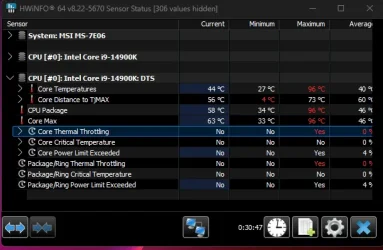
couple of months back I realized my 240mm AIO wasn't good enough for my CPU. so i upgraded... thought i was in the clear with the temps but not sure if this is normal or not. Updated my specs on here and will post what my temps are just by running Cyberpunk 2077 benchmark. I've got the very latest BIOS for the 14th gen and also have both my AIO pump and CPU fans running at full speed via the BIOS...
 

Attachments

  • CPU Temps.webp
    CPU Temps.webp
    28.4 KB · Views: 4

My Computer

System One

  • OS
    Windows 11 Pro x64 25H2
    Computer type
    PC/Desktop
    CPU
    i9 14900k
    Motherboard
    MSI Z790 Gaming Plus WiFi-AMZ Gaming Motherboard
    Memory
    G.SKILL Ripjaws S5 Series DDR5 64gb 6400MT/s
    Graphics Card(s)
    NVIDIA Geforce RTX 5070 Ti OC 16gb
    Sound Card
    HyperX Cloud 3 Wireless Headset , Astro A50 Gen 5 Wireless Gaming Headset
    Monitor(s) Displays
    Acer Prediator x34 X5 QD-OLED Ultrawide 240hz, Portable Monitor 1920x1080p 60hz
    Screen Resolution
    3440x1440p , 1920x1080p
    Hard Drives
    Crucial P3 Plus 500gb NVMe M.2
    WD Black SN750 NVMe SSD 1TB
    WD Black SN7100 NVMe SSD 2TB
    Crucial MX500 1TB
    PSU
    Corsair RMx Series RM1000x ATX 3.1 PCIe 5.1
    Case
    MSI MAG PANO 100L PZ
    Cooling
    ID-COOLING FX360 Pro Liquid CPU Cooler
    Keyboard
    CORSAIR - K70 PRO TKL RGB Hall Effect Gaming Keyboard
    Mouse
    Glorious Model O 2 Pro Wireless Gaming Mouse
    Internet Speed
    https://www.speedtest.net/result/19091168380.png
    Browser
    Firefox
    Antivirus
    Windows Security

Does the CPU temperature throttle when running Cinebench?

In the Hwinfo screenshot it shows no throttling. I don't see anything alarming.
 

My Computers

System One System Two

  • OS
    Windows 11 Pro 25H2
    Computer type
    PC/Desktop
    Manufacturer/Model
    Homebuilt
    CPU
    Intel Core i9 13900K
    Motherboard
    Asus ProArt Z790 Creator WiFi - Bios 3107
    Memory
    Corsair Dominator Platinum 64gb 5600MT/s DDR5 Dual Channel
    Graphics Card(s)
    Sapphire NITRO+ AMD Radeon RX 7900 XTX Vapor-X 24GB
    Sound Card
    External DAC: Cambridge Audio DACMagic200M - Headphone Amp: Topping L50
    Monitor(s) Displays
    Panasonic MX950 Mini LED 55" TV 120hz
    Screen Resolution
    3840 x 2160 120hz
    Hard Drives
    Samsung 980 Pro 2TB (OS)
    Samsung 980 Pro 1TB (Files)
    Lexar NZ790 4TB
    LaCie d2 Professional 6TB external - USB 3.1
    Seagate Expansion 16TB external - USB 3.2
    Seagate One Touch 18TB external HD - USB 3.0
    PSU
    Corsair RM1200x Shift
    Case
    Corsair RGB Smart Case 5000x (white)
    Cooling
    Corsair iCue H150i Elite Capellix XT
    Keyboard
    Incase Ergonomic USB (Microsoft clone)
    Mouse
    Logitech MX Master 3S
    Internet Speed
    Fibre 900/500 Mbps
    Browser
    Microsoft Edge Chromium
    Antivirus
    Bitdefender Total Security
    Other Info
    AMD Radeon Software & Drivers 26.1.1
    Hasleo Backup Suite
    Dashlane password manager
    Kensington Verimark fingerprint reader
    Logitech Brio 4K webcam
    Orico 10-port powered USB 3.0 hub
  • Operating System
    Windows 11 Pro 25H2
    Computer type
    Laptop
    Manufacturer/Model
    Asus Vivobook X1605VA
    CPU
    Intel® Core™ i9-13900H
    Motherboard
    Asus X1605VA bios 309
    Memory
    32GB DDR4-3200 Dual channel
    Graphics card(s)
    *Intel Iris Xᵉ Graphics G7
    Sound Card
    Realtek | Intel SST Bluetooth & USB
    Monitor(s) Displays
    16.0-inch, WUXGA 16:10 aspect ratio, IPS-level Panel
    Screen Resolution
    1920 x 1200 60hz
    Hard Drives
    512GB M.2 NVMe™ PCIe® 3.0 SSD
    Mouse
    Logitech MX Ergo Trackball
    Antivirus
    Bitdefender Total Security
    Other Info
    720p Webcam
    WiFi & USB to ethernet
this is just running around 3-4 minutes of Cinebench... Yikes.
 

Attachments

  • CPU Temps.webp
    CPU Temps.webp
    32.5 KB · Views: 4

My Computer

System One

  • OS
    Windows 11 Pro x64 25H2
    Computer type
    PC/Desktop
    CPU
    i9 14900k
    Motherboard
    MSI Z790 Gaming Plus WiFi-AMZ Gaming Motherboard
    Memory
    G.SKILL Ripjaws S5 Series DDR5 64gb 6400MT/s
    Graphics Card(s)
    NVIDIA Geforce RTX 5070 Ti OC 16gb
    Sound Card
    HyperX Cloud 3 Wireless Headset , Astro A50 Gen 5 Wireless Gaming Headset
    Monitor(s) Displays
    Acer Prediator x34 X5 QD-OLED Ultrawide 240hz, Portable Monitor 1920x1080p 60hz
    Screen Resolution
    3440x1440p , 1920x1080p
    Hard Drives
    Crucial P3 Plus 500gb NVMe M.2
    WD Black SN750 NVMe SSD 1TB
    WD Black SN7100 NVMe SSD 2TB
    Crucial MX500 1TB
    PSU
    Corsair RMx Series RM1000x ATX 3.1 PCIe 5.1
    Case
    MSI MAG PANO 100L PZ
    Cooling
    ID-COOLING FX360 Pro Liquid CPU Cooler
    Keyboard
    CORSAIR - K70 PRO TKL RGB Hall Effect Gaming Keyboard
    Mouse
    Glorious Model O 2 Pro Wireless Gaming Mouse
    Internet Speed
    https://www.speedtest.net/result/19091168380.png
    Browser
    Firefox
    Antivirus
    Windows Security
Has the bios got any "enhanced" power profiles selected and not the Intel Default or suggested, as those tend to supply the CPU way to much power to keep it stable, and more power = More heat.
 

My Computer

System One

  • OS
    Windows 11 Pro
    Computer type
    PC/Desktop
    CPU
    Ryzen 5 5800X
    Motherboard
    Asus B550 Strix gaming
    Memory
    32Gb Corsair 3200
    Graphics Card(s)
    Gigabyte RTX4070-Super
    Screen Resolution
    2x 1440, 1x 1080
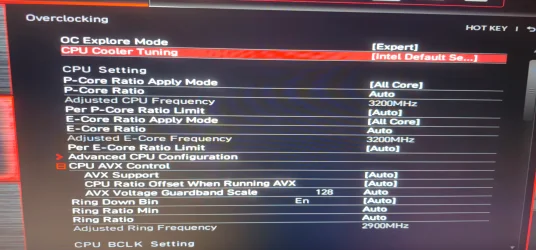
How is the bios setup? Is it using the Intel / motherboard manufacturers defaults?
 

My Computers

System One System Two

  • OS
    Windows 11 Pro 25H2
    Computer type
    PC/Desktop
    Manufacturer/Model
    Homebuilt
    CPU
    Intel Core i9 13900K
    Motherboard
    Asus ProArt Z790 Creator WiFi - Bios 3107
    Memory
    Corsair Dominator Platinum 64gb 5600MT/s DDR5 Dual Channel
    Graphics Card(s)
    Sapphire NITRO+ AMD Radeon RX 7900 XTX Vapor-X 24GB
    Sound Card
    External DAC: Cambridge Audio DACMagic200M - Headphone Amp: Topping L50
    Monitor(s) Displays
    Panasonic MX950 Mini LED 55" TV 120hz
    Screen Resolution
    3840 x 2160 120hz
    Hard Drives
    Samsung 980 Pro 2TB (OS)
    Samsung 980 Pro 1TB (Files)
    Lexar NZ790 4TB
    LaCie d2 Professional 6TB external - USB 3.1
    Seagate Expansion 16TB external - USB 3.2
    Seagate One Touch 18TB external HD - USB 3.0
    PSU
    Corsair RM1200x Shift
    Case
    Corsair RGB Smart Case 5000x (white)
    Cooling
    Corsair iCue H150i Elite Capellix XT
    Keyboard
    Incase Ergonomic USB (Microsoft clone)
    Mouse
    Logitech MX Master 3S
    Internet Speed
    Fibre 900/500 Mbps
    Browser
    Microsoft Edge Chromium
    Antivirus
    Bitdefender Total Security
    Other Info
    AMD Radeon Software & Drivers 26.1.1
    Hasleo Backup Suite
    Dashlane password manager
    Kensington Verimark fingerprint reader
    Logitech Brio 4K webcam
    Orico 10-port powered USB 3.0 hub
  • Operating System
    Windows 11 Pro 25H2
    Computer type
    Laptop
    Manufacturer/Model
    Asus Vivobook X1605VA
    CPU
    Intel® Core™ i9-13900H
    Motherboard
    Asus X1605VA bios 309
    Memory
    32GB DDR4-3200 Dual channel
    Graphics card(s)
    *Intel Iris Xᵉ Graphics G7
    Sound Card
    Realtek | Intel SST Bluetooth & USB
    Monitor(s) Displays
    16.0-inch, WUXGA 16:10 aspect ratio, IPS-level Panel
    Screen Resolution
    1920 x 1200 60hz
    Hard Drives
    512GB M.2 NVMe™ PCIe® 3.0 SSD
    Mouse
    Logitech MX Ergo Trackball
    Antivirus
    Bitdefender Total Security
    Other Info
    720p Webcam
    WiFi & USB to ethernet
I haven't tinkered or messed with the bios settings but it's at Intel default settings.
 

Attachments

  • bios settings.webp
    bios settings.webp
    338.7 KB · Views: 1

My Computer

System One

  • OS
    Windows 11 Pro x64 25H2
    Computer type
    PC/Desktop
    CPU
    i9 14900k
    Motherboard
    MSI Z790 Gaming Plus WiFi-AMZ Gaming Motherboard
    Memory
    G.SKILL Ripjaws S5 Series DDR5 64gb 6400MT/s
    Graphics Card(s)
    NVIDIA Geforce RTX 5070 Ti OC 16gb
    Sound Card
    HyperX Cloud 3 Wireless Headset , Astro A50 Gen 5 Wireless Gaming Headset
    Monitor(s) Displays
    Acer Prediator x34 X5 QD-OLED Ultrawide 240hz, Portable Monitor 1920x1080p 60hz
    Screen Resolution
    3440x1440p , 1920x1080p
    Hard Drives
    Crucial P3 Plus 500gb NVMe M.2
    WD Black SN750 NVMe SSD 1TB
    WD Black SN7100 NVMe SSD 2TB
    Crucial MX500 1TB
    PSU
    Corsair RMx Series RM1000x ATX 3.1 PCIe 5.1
    Case
    MSI MAG PANO 100L PZ
    Cooling
    ID-COOLING FX360 Pro Liquid CPU Cooler
    Keyboard
    CORSAIR - K70 PRO TKL RGB Hall Effect Gaming Keyboard
    Mouse
    Glorious Model O 2 Pro Wireless Gaming Mouse
    Internet Speed
    https://www.speedtest.net/result/19091168380.png
    Browser
    Firefox
    Antivirus
    Windows Security
When running Cinebench what does Hwinfo show for PL1 and PL2 Power Limits? The screenshot below shows for my 13900K when running Cinebench. The number is in watts.

intel-hwinfo pl1-pl2.webp
 
Last edited:

My Computers

System One System Two

  • OS
    Windows 11 Pro 25H2
    Computer type
    PC/Desktop
    Manufacturer/Model
    Homebuilt
    CPU
    Intel Core i9 13900K
    Motherboard
    Asus ProArt Z790 Creator WiFi - Bios 3107
    Memory
    Corsair Dominator Platinum 64gb 5600MT/s DDR5 Dual Channel
    Graphics Card(s)
    Sapphire NITRO+ AMD Radeon RX 7900 XTX Vapor-X 24GB
    Sound Card
    External DAC: Cambridge Audio DACMagic200M - Headphone Amp: Topping L50
    Monitor(s) Displays
    Panasonic MX950 Mini LED 55" TV 120hz
    Screen Resolution
    3840 x 2160 120hz
    Hard Drives
    Samsung 980 Pro 2TB (OS)
    Samsung 980 Pro 1TB (Files)
    Lexar NZ790 4TB
    LaCie d2 Professional 6TB external - USB 3.1
    Seagate Expansion 16TB external - USB 3.2
    Seagate One Touch 18TB external HD - USB 3.0
    PSU
    Corsair RM1200x Shift
    Case
    Corsair RGB Smart Case 5000x (white)
    Cooling
    Corsair iCue H150i Elite Capellix XT
    Keyboard
    Incase Ergonomic USB (Microsoft clone)
    Mouse
    Logitech MX Master 3S
    Internet Speed
    Fibre 900/500 Mbps
    Browser
    Microsoft Edge Chromium
    Antivirus
    Bitdefender Total Security
    Other Info
    AMD Radeon Software & Drivers 26.1.1
    Hasleo Backup Suite
    Dashlane password manager
    Kensington Verimark fingerprint reader
    Logitech Brio 4K webcam
    Orico 10-port powered USB 3.0 hub
  • Operating System
    Windows 11 Pro 25H2
    Computer type
    Laptop
    Manufacturer/Model
    Asus Vivobook X1605VA
    CPU
    Intel® Core™ i9-13900H
    Motherboard
    Asus X1605VA bios 309
    Memory
    32GB DDR4-3200 Dual channel
    Graphics card(s)
    *Intel Iris Xᵉ Graphics G7
    Sound Card
    Realtek | Intel SST Bluetooth & USB
    Monitor(s) Displays
    16.0-inch, WUXGA 16:10 aspect ratio, IPS-level Panel
    Screen Resolution
    1920 x 1200 60hz
    Hard Drives
    512GB M.2 NVMe™ PCIe® 3.0 SSD
    Mouse
    Logitech MX Ergo Trackball
    Antivirus
    Bitdefender Total Security
    Other Info
    720p Webcam
    WiFi & USB to ethernet
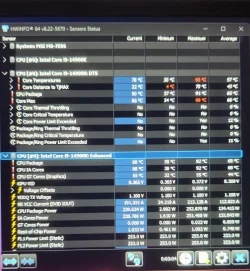
I reset the BIOS to default and ran the test and here is the result.. not much better at all.
 

Attachments

  • CPU temps .webp
    CPU temps .webp
    291.9 KB · Views: 2

My Computer

System One

  • OS
    Windows 11 Pro x64 25H2
    Computer type
    PC/Desktop
    CPU
    i9 14900k
    Motherboard
    MSI Z790 Gaming Plus WiFi-AMZ Gaming Motherboard
    Memory
    G.SKILL Ripjaws S5 Series DDR5 64gb 6400MT/s
    Graphics Card(s)
    NVIDIA Geforce RTX 5070 Ti OC 16gb
    Sound Card
    HyperX Cloud 3 Wireless Headset , Astro A50 Gen 5 Wireless Gaming Headset
    Monitor(s) Displays
    Acer Prediator x34 X5 QD-OLED Ultrawide 240hz, Portable Monitor 1920x1080p 60hz
    Screen Resolution
    3440x1440p , 1920x1080p
    Hard Drives
    Crucial P3 Plus 500gb NVMe M.2
    WD Black SN750 NVMe SSD 1TB
    WD Black SN7100 NVMe SSD 2TB
    Crucial MX500 1TB
    PSU
    Corsair RMx Series RM1000x ATX 3.1 PCIe 5.1
    Case
    MSI MAG PANO 100L PZ
    Cooling
    ID-COOLING FX360 Pro Liquid CPU Cooler
    Keyboard
    CORSAIR - K70 PRO TKL RGB Hall Effect Gaming Keyboard
    Mouse
    Glorious Model O 2 Pro Wireless Gaming Mouse
    Internet Speed
    https://www.speedtest.net/result/19091168380.png
    Browser
    Firefox
    Antivirus
    Windows Security
Has the PC crashed/froze and/or displayed a BSOD?
 

My Computers

System One System Two

  • OS
    Windows 11 Pro 25H2
    Computer type
    PC/Desktop
    Manufacturer/Model
    Homebuilt
    CPU
    Intel Core i9 13900K
    Motherboard
    Asus ProArt Z790 Creator WiFi - Bios 3107
    Memory
    Corsair Dominator Platinum 64gb 5600MT/s DDR5 Dual Channel
    Graphics Card(s)
    Sapphire NITRO+ AMD Radeon RX 7900 XTX Vapor-X 24GB
    Sound Card
    External DAC: Cambridge Audio DACMagic200M - Headphone Amp: Topping L50
    Monitor(s) Displays
    Panasonic MX950 Mini LED 55" TV 120hz
    Screen Resolution
    3840 x 2160 120hz
    Hard Drives
    Samsung 980 Pro 2TB (OS)
    Samsung 980 Pro 1TB (Files)
    Lexar NZ790 4TB
    LaCie d2 Professional 6TB external - USB 3.1
    Seagate Expansion 16TB external - USB 3.2
    Seagate One Touch 18TB external HD - USB 3.0
    PSU
    Corsair RM1200x Shift
    Case
    Corsair RGB Smart Case 5000x (white)
    Cooling
    Corsair iCue H150i Elite Capellix XT
    Keyboard
    Incase Ergonomic USB (Microsoft clone)
    Mouse
    Logitech MX Master 3S
    Internet Speed
    Fibre 900/500 Mbps
    Browser
    Microsoft Edge Chromium
    Antivirus
    Bitdefender Total Security
    Other Info
    AMD Radeon Software & Drivers 26.1.1
    Hasleo Backup Suite
    Dashlane password manager
    Kensington Verimark fingerprint reader
    Logitech Brio 4K webcam
    Orico 10-port powered USB 3.0 hub
  • Operating System
    Windows 11 Pro 25H2
    Computer type
    Laptop
    Manufacturer/Model
    Asus Vivobook X1605VA
    CPU
    Intel® Core™ i9-13900H
    Motherboard
    Asus X1605VA bios 309
    Memory
    32GB DDR4-3200 Dual channel
    Graphics card(s)
    *Intel Iris Xᵉ Graphics G7
    Sound Card
    Realtek | Intel SST Bluetooth & USB
    Monitor(s) Displays
    16.0-inch, WUXGA 16:10 aspect ratio, IPS-level Panel
    Screen Resolution
    1920 x 1200 60hz
    Hard Drives
    512GB M.2 NVMe™ PCIe® 3.0 SSD
    Mouse
    Logitech MX Ergo Trackball
    Antivirus
    Bitdefender Total Security
    Other Info
    720p Webcam
    WiFi & USB to ethernet
No BSOD or freeze or anything like that.
 

My Computer

System One

  • OS
    Windows 11 Pro x64 25H2
    Computer type
    PC/Desktop
    CPU
    i9 14900k
    Motherboard
    MSI Z790 Gaming Plus WiFi-AMZ Gaming Motherboard
    Memory
    G.SKILL Ripjaws S5 Series DDR5 64gb 6400MT/s
    Graphics Card(s)
    NVIDIA Geforce RTX 5070 Ti OC 16gb
    Sound Card
    HyperX Cloud 3 Wireless Headset , Astro A50 Gen 5 Wireless Gaming Headset
    Monitor(s) Displays
    Acer Prediator x34 X5 QD-OLED Ultrawide 240hz, Portable Monitor 1920x1080p 60hz
    Screen Resolution
    3440x1440p , 1920x1080p
    Hard Drives
    Crucial P3 Plus 500gb NVMe M.2
    WD Black SN750 NVMe SSD 1TB
    WD Black SN7100 NVMe SSD 2TB
    Crucial MX500 1TB
    PSU
    Corsair RMx Series RM1000x ATX 3.1 PCIe 5.1
    Case
    MSI MAG PANO 100L PZ
    Cooling
    ID-COOLING FX360 Pro Liquid CPU Cooler
    Keyboard
    CORSAIR - K70 PRO TKL RGB Hall Effect Gaming Keyboard
    Mouse
    Glorious Model O 2 Pro Wireless Gaming Mouse
    Internet Speed
    https://www.speedtest.net/result/19091168380.png
    Browser
    Firefox
    Antivirus
    Windows Security
Not sure if I can suggest much else other than it could be related to a specific bios setting or perhaps to try reapplying the thermal paste to the CPU. The fact that there have so far been no system crashes suggests there isn't anything really serious going on here.
 

My Computers

System One System Two

  • OS
    Windows 11 Pro 25H2
    Computer type
    PC/Desktop
    Manufacturer/Model
    Homebuilt
    CPU
    Intel Core i9 13900K
    Motherboard
    Asus ProArt Z790 Creator WiFi - Bios 3107
    Memory
    Corsair Dominator Platinum 64gb 5600MT/s DDR5 Dual Channel
    Graphics Card(s)
    Sapphire NITRO+ AMD Radeon RX 7900 XTX Vapor-X 24GB
    Sound Card
    External DAC: Cambridge Audio DACMagic200M - Headphone Amp: Topping L50
    Monitor(s) Displays
    Panasonic MX950 Mini LED 55" TV 120hz
    Screen Resolution
    3840 x 2160 120hz
    Hard Drives
    Samsung 980 Pro 2TB (OS)
    Samsung 980 Pro 1TB (Files)
    Lexar NZ790 4TB
    LaCie d2 Professional 6TB external - USB 3.1
    Seagate Expansion 16TB external - USB 3.2
    Seagate One Touch 18TB external HD - USB 3.0
    PSU
    Corsair RM1200x Shift
    Case
    Corsair RGB Smart Case 5000x (white)
    Cooling
    Corsair iCue H150i Elite Capellix XT
    Keyboard
    Incase Ergonomic USB (Microsoft clone)
    Mouse
    Logitech MX Master 3S
    Internet Speed
    Fibre 900/500 Mbps
    Browser
    Microsoft Edge Chromium
    Antivirus
    Bitdefender Total Security
    Other Info
    AMD Radeon Software & Drivers 26.1.1
    Hasleo Backup Suite
    Dashlane password manager
    Kensington Verimark fingerprint reader
    Logitech Brio 4K webcam
    Orico 10-port powered USB 3.0 hub
  • Operating System
    Windows 11 Pro 25H2
    Computer type
    Laptop
    Manufacturer/Model
    Asus Vivobook X1605VA
    CPU
    Intel® Core™ i9-13900H
    Motherboard
    Asus X1605VA bios 309
    Memory
    32GB DDR4-3200 Dual channel
    Graphics card(s)
    *Intel Iris Xᵉ Graphics G7
    Sound Card
    Realtek | Intel SST Bluetooth & USB
    Monitor(s) Displays
    16.0-inch, WUXGA 16:10 aspect ratio, IPS-level Panel
    Screen Resolution
    1920 x 1200 60hz
    Hard Drives
    512GB M.2 NVMe™ PCIe® 3.0 SSD
    Mouse
    Logitech MX Ergo Trackball
    Antivirus
    Bitdefender Total Security
    Other Info
    720p Webcam
    WiFi & USB to ethernet
I'm gonna do some research on it for BIOS settings.. I did e-mail ID-cooling to see if an RMA is possible as it's only been like 2 months.. will also consider a thermal paste reapplying.
 

My Computer

System One

  • OS
    Windows 11 Pro x64 25H2
    Computer type
    PC/Desktop
    CPU
    i9 14900k
    Motherboard
    MSI Z790 Gaming Plus WiFi-AMZ Gaming Motherboard
    Memory
    G.SKILL Ripjaws S5 Series DDR5 64gb 6400MT/s
    Graphics Card(s)
    NVIDIA Geforce RTX 5070 Ti OC 16gb
    Sound Card
    HyperX Cloud 3 Wireless Headset , Astro A50 Gen 5 Wireless Gaming Headset
    Monitor(s) Displays
    Acer Prediator x34 X5 QD-OLED Ultrawide 240hz, Portable Monitor 1920x1080p 60hz
    Screen Resolution
    3440x1440p , 1920x1080p
    Hard Drives
    Crucial P3 Plus 500gb NVMe M.2
    WD Black SN750 NVMe SSD 1TB
    WD Black SN7100 NVMe SSD 2TB
    Crucial MX500 1TB
    PSU
    Corsair RMx Series RM1000x ATX 3.1 PCIe 5.1
    Case
    MSI MAG PANO 100L PZ
    Cooling
    ID-COOLING FX360 Pro Liquid CPU Cooler
    Keyboard
    CORSAIR - K70 PRO TKL RGB Hall Effect Gaming Keyboard
    Mouse
    Glorious Model O 2 Pro Wireless Gaming Mouse
    Internet Speed
    https://www.speedtest.net/result/19091168380.png
    Browser
    Firefox
    Antivirus
    Windows Security
Yeah I am guessing there is some cheeky Load Line Calibration going on somewhere in the Bios, where it boosts up the Core Voltage when needed, and its keeping it stable, but very hot.

Personally that's a little to hot for me. Maybe a re-paste and reseat might help, might just be a bad mounting, it happens.
 

My Computer

System One

  • OS
    Windows 11 Pro
    Computer type
    PC/Desktop
    CPU
    Ryzen 5 5800X
    Motherboard
    Asus B550 Strix gaming
    Memory
    32Gb Corsair 3200
    Graphics Card(s)
    Gigabyte RTX4070-Super
    Screen Resolution
    2x 1440, 1x 1080
Just to double check, I would compare the readings in HWinfo to another thermal monitoring software such as Core Temp to verify you're not getting erroneous readings in HWinfo. Core Temp shows me my temp in my system tray all the time so I can get an idea of my temps at a glance.

coretemp.webp
 

My Computers

System One System Two

  • OS
    Windows 11 Pro 25H2
    Computer type
    PC/Desktop
    Manufacturer/Model
    Dell Optiplex 7080
    CPU
    i9-10900 10 core 20 threads
    Motherboard
    DELL 0J37VM
    Memory
    32 gb
    Graphics Card(s)
    none-Intel UHD Graphics 630
    Sound Card
    Integrated Realtek
    Monitor(s) Displays
    Benq 27
    Screen Resolution
    2560x1440
    Hard Drives
    2x1tb Solidigm m.2 nvme /External drives 512gb Samsung m.2 sata+2tb Kingston m2.nvme
    PSU
    500w
    Case
    MT
    Cooling
    Dell Premium
    Keyboard
    Logitech wired
    Mouse
    Logitech wireless
    Internet Speed
    so slow I'm too embarrassed to tell
    Browser
    #1 Edge #2 Firefox
    Antivirus
    Defender+MWB Premium
  • Operating System
    Windows 11 Pro 24H2 26200.8457
    Computer type
    PC/Desktop
    Manufacturer/Model
    Beelink Mini PC SER5
    CPU
    AMD Ryzen 7 6800U
    Memory
    32 gb
    Graphics card(s)
    integrated
    Sound Card
    integrated
    Monitor(s) Displays
    Benq 27
    Screen Resolution
    2560x1440
    Hard Drives
    1TB Crucial nvme
    Keyboard
    Logitech wired
    Mouse
    Logitech wireless
    Internet Speed
    still too embarrassed to tell
    Browser
    Firefox
    Antivirus
    Defender
    Other Info
    System 3 is non compliant Dell 9020 i7-4770/24gb ram Win11 PRO 26200.8457

My Computers

System One System Two

  • OS
    Win 11 Pro 25H2 26200.8655
    Computer type
    PC/Desktop
    Manufacturer/Model
    Self Built
    CPU
    Intel® Core™ i7-14700K
    Motherboard
    ASUS TUF Z690-PLUS WIFI BIOS 4505 11/29/25
    Memory
    G.SKILL Ripjaws S5 Series 64GB (2 x 32GB) DDR5
    Graphics Card(s)
    ASUS GeForce RTX 4070 Super 12GB
    Sound Card
    Sound Blaster AE-5 Plus
    Monitor(s) Displays
    ASUS TUF Gaming 27" 2K HDR Gaming
    Screen Resolution
    2560 x 1440
    Hard Drives
    Samsung 990 Pro 1TB NVMe (Win 11 25H2)
    SK hynix P41 500GB NVMe 25H2 DEV/Games
    SK hynix P41 2TB NVMe (x3)
    Crucial P3 Plus 4TB
    PSU
    Corsair RM850x Shift
    Case
    Antec Dark Phantom DP502 FLUX
    Cooling
    Corsair Nautilus 360 RS AIO
    Keyboard
    Logitech MK 320
    Mouse
    Razer Basilisk V3
    Internet Speed
    350Mbs
    Browser
    Firefox
    Antivirus
    Winows Security
    Other Info
    MR 8.1 Home

    System 3 Specs
    Win 11 Pro 25H2 26200.8655
    ASUS PRIME Z370-P II BIOS 3004 7/12/21
    Intel Core i7-8700 CPU @ 3.20GHz
    32GB DDR4 RAM (4x8)
    iGPU Intel UHD Graphics 630
  • Operating System
    Win 11 Pro 25H2 26200.8655
    Computer type
    PC/Desktop
    Manufacturer/Model
    Self Built
    CPU
    Intel Core i7-11700F
    Motherboard
    Asus TUF Gaming Z590 Plus WiFi (BIOS 2803)
    Memory
    64 GB DDR4
    Graphics card(s)
    MSI GeForce RTX 3060 Ventus 2X 12GB
    Sound Card
    SoundBlaster Audigy Fx V2
    Monitor(s) Displays
    Samsung F27T350
    Screen Resolution
    1920x1080
    Hard Drives
    Samsung 980 Pro 1TB
    Samsung 970 EVO Plus 2TB
    Samsung 870 EVO 500GB SSD
    PSU
    Corsair HX750
    Case
    Cougar MX330-G Window
    Cooling
    Thermalright Frozen Edge 240 Black AIO
    Internet Speed
    350Mbps
    Browser
    Firefox
    Antivirus
    Windows Security

My Computer

System One

  • OS
    Microsoft Windows 11 Home
    Computer type
    PC/Desktop
    Manufacturer/Model
    MSI MS-7D98
    CPU
    Intel Core i5-13490F
    Motherboard
    MSI B760 GAMING PLUS WIFI
    Memory
    2 x 16 Patriot Memory (PDP Systems) PSD516G560081 6400MT (32-37-37-74); 1.35V)
    Graphics Card(s)
    GIGABYTE GeForce RTX 4070 WINDFORCE OC 12G (GV-N4070WF3OC-12GD)
    Sound Card
    Bluetooth Аудио
    Monitor(s) Displays
    INNOCN 15K1F
    Screen Resolution
    1920 x 1080
    Hard Drives
    WD_BLACK SN770 250GB
    KINGSTON SNV2S1000G (ELFK0S.6)
    PSU
    Thermaltake Toughpower GF3 1000W
    Case
    CG560 - DeepCool
    Cooling
    ID-COOLING SE-224-XTS / 2 x 140Mm Fan - rear and top; 3 x 120Mm - front
    Keyboard
    Corsair K70 RGB TKL
    Mouse
    Corsair KATAR PRO XT
    Internet Speed
    100 Mbps
    Browser
    Firefox
    Antivirus
    Microsoft Defender Antivirus
    Other Info
    https://www.userbenchmark.com/UserRun/66553205
Did some research and determined I needed to change my CPU lite load mode from the default and my temps have went down amazingly. no issues at all now. not sure If I'm allowed to link websites here but it definitely solved my issue.. No performance loss that I noticed in my games and no thermal throttling or overheating. Solved.
 

My Computer

System One

  • OS
    Windows 11 Pro x64 25H2
    Computer type
    PC/Desktop
    CPU
    i9 14900k
    Motherboard
    MSI Z790 Gaming Plus WiFi-AMZ Gaming Motherboard
    Memory
    G.SKILL Ripjaws S5 Series DDR5 64gb 6400MT/s
    Graphics Card(s)
    NVIDIA Geforce RTX 5070 Ti OC 16gb
    Sound Card
    HyperX Cloud 3 Wireless Headset , Astro A50 Gen 5 Wireless Gaming Headset
    Monitor(s) Displays
    Acer Prediator x34 X5 QD-OLED Ultrawide 240hz, Portable Monitor 1920x1080p 60hz
    Screen Resolution
    3440x1440p , 1920x1080p
    Hard Drives
    Crucial P3 Plus 500gb NVMe M.2
    WD Black SN750 NVMe SSD 1TB
    WD Black SN7100 NVMe SSD 2TB
    Crucial MX500 1TB
    PSU
    Corsair RMx Series RM1000x ATX 3.1 PCIe 5.1
    Case
    MSI MAG PANO 100L PZ
    Cooling
    ID-COOLING FX360 Pro Liquid CPU Cooler
    Keyboard
    CORSAIR - K70 PRO TKL RGB Hall Effect Gaming Keyboard
    Mouse
    Glorious Model O 2 Pro Wireless Gaming Mouse
    Internet Speed
    https://www.speedtest.net/result/19091168380.png
    Browser
    Firefox
    Antivirus
    Windows Security
@BrandonR

I don't think there is anything stopping you from posting the link you mentioned.
Also good to hear you solved the issue. (y)
 

My Computers

System One System Two

  • OS
    Windows 11 Pro 25H2
    Computer type
    PC/Desktop
    Manufacturer/Model
    Homebuilt
    CPU
    Intel Core i9 13900K
    Motherboard
    Asus ProArt Z790 Creator WiFi - Bios 3107
    Memory
    Corsair Dominator Platinum 64gb 5600MT/s DDR5 Dual Channel
    Graphics Card(s)
    Sapphire NITRO+ AMD Radeon RX 7900 XTX Vapor-X 24GB
    Sound Card
    External DAC: Cambridge Audio DACMagic200M - Headphone Amp: Topping L50
    Monitor(s) Displays
    Panasonic MX950 Mini LED 55" TV 120hz
    Screen Resolution
    3840 x 2160 120hz
    Hard Drives
    Samsung 980 Pro 2TB (OS)
    Samsung 980 Pro 1TB (Files)
    Lexar NZ790 4TB
    LaCie d2 Professional 6TB external - USB 3.1
    Seagate Expansion 16TB external - USB 3.2
    Seagate One Touch 18TB external HD - USB 3.0
    PSU
    Corsair RM1200x Shift
    Case
    Corsair RGB Smart Case 5000x (white)
    Cooling
    Corsair iCue H150i Elite Capellix XT
    Keyboard
    Incase Ergonomic USB (Microsoft clone)
    Mouse
    Logitech MX Master 3S
    Internet Speed
    Fibre 900/500 Mbps
    Browser
    Microsoft Edge Chromium
    Antivirus
    Bitdefender Total Security
    Other Info
    AMD Radeon Software & Drivers 26.1.1
    Hasleo Backup Suite
    Dashlane password manager
    Kensington Verimark fingerprint reader
    Logitech Brio 4K webcam
    Orico 10-port powered USB 3.0 hub
  • Operating System
    Windows 11 Pro 25H2
    Computer type
    Laptop
    Manufacturer/Model
    Asus Vivobook X1605VA
    CPU
    Intel® Core™ i9-13900H
    Motherboard
    Asus X1605VA bios 309
    Memory
    32GB DDR4-3200 Dual channel
    Graphics card(s)
    *Intel Iris Xᵉ Graphics G7
    Sound Card
    Realtek | Intel SST Bluetooth & USB
    Monitor(s) Displays
    16.0-inch, WUXGA 16:10 aspect ratio, IPS-level Panel
    Screen Resolution
    1920 x 1200 60hz
    Hard Drives
    512GB M.2 NVMe™ PCIe® 3.0 SSD
    Mouse
    Logitech MX Ergo Trackball
    Antivirus
    Bitdefender Total Security
    Other Info
    720p Webcam
    WiFi & USB to ethernet

My Computer

System One

  • OS
    Windows 11 Pro x64 25H2
    Computer type
    PC/Desktop
    CPU
    i9 14900k
    Motherboard
    MSI Z790 Gaming Plus WiFi-AMZ Gaming Motherboard
    Memory
    G.SKILL Ripjaws S5 Series DDR5 64gb 6400MT/s
    Graphics Card(s)
    NVIDIA Geforce RTX 5070 Ti OC 16gb
    Sound Card
    HyperX Cloud 3 Wireless Headset , Astro A50 Gen 5 Wireless Gaming Headset
    Monitor(s) Displays
    Acer Prediator x34 X5 QD-OLED Ultrawide 240hz, Portable Monitor 1920x1080p 60hz
    Screen Resolution
    3440x1440p , 1920x1080p
    Hard Drives
    Crucial P3 Plus 500gb NVMe M.2
    WD Black SN750 NVMe SSD 1TB
    WD Black SN7100 NVMe SSD 2TB
    Crucial MX500 1TB
    PSU
    Corsair RMx Series RM1000x ATX 3.1 PCIe 5.1
    Case
    MSI MAG PANO 100L PZ
    Cooling
    ID-COOLING FX360 Pro Liquid CPU Cooler
    Keyboard
    CORSAIR - K70 PRO TKL RGB Hall Effect Gaming Keyboard
    Mouse
    Glorious Model O 2 Pro Wireless Gaming Mouse
    Internet Speed
    https://www.speedtest.net/result/19091168380.png
    Browser
    Firefox
    Antivirus
    Windows Security
I found the solution.
Now that is a good find and should help a lot of folks. It will be less apt to be found embedded in this thread than it would be if it was in thread title. Why not open another thread and drop the link into it. Then just mark both threads as closed. If you title it as follows, it can easily be found whether one searches by overheating +cpu type or +MSI mobo

Title it
Info Only- solution- overheating Intel 13th-14th gen CPU when using MSI 600/700-series board.
 

My Computers

System One System Two

  • OS
    Windows 11 Pro 25H2
    Computer type
    PC/Desktop
    Manufacturer/Model
    Dell Optiplex 7080
    CPU
    i9-10900 10 core 20 threads
    Motherboard
    DELL 0J37VM
    Memory
    32 gb
    Graphics Card(s)
    none-Intel UHD Graphics 630
    Sound Card
    Integrated Realtek
    Monitor(s) Displays
    Benq 27
    Screen Resolution
    2560x1440
    Hard Drives
    2x1tb Solidigm m.2 nvme /External drives 512gb Samsung m.2 sata+2tb Kingston m2.nvme
    PSU
    500w
    Case
    MT
    Cooling
    Dell Premium
    Keyboard
    Logitech wired
    Mouse
    Logitech wireless
    Internet Speed
    so slow I'm too embarrassed to tell
    Browser
    #1 Edge #2 Firefox
    Antivirus
    Defender+MWB Premium
  • Operating System
    Windows 11 Pro 24H2 26200.8457
    Computer type
    PC/Desktop
    Manufacturer/Model
    Beelink Mini PC SER5
    CPU
    AMD Ryzen 7 6800U
    Memory
    32 gb
    Graphics card(s)
    integrated
    Sound Card
    integrated
    Monitor(s) Displays
    Benq 27
    Screen Resolution
    2560x1440
    Hard Drives
    1TB Crucial nvme
    Keyboard
    Logitech wired
    Mouse
    Logitech wireless
    Internet Speed
    still too embarrassed to tell
    Browser
    Firefox
    Antivirus
    Defender
    Other Info
    System 3 is non compliant Dell 9020 i7-4770/24gb ram Win11 PRO 26200.8457

Latest Support Threads

Back
Top Bottom