Solved Crashing right after bootup!


Thank you for your continued interest in my issue. I had thought that a “hardware-level fault” included driver related problems, driver conflicts etc. as well as tangible hardware (connections, circuit boards, chips, circuit components, excessive temperatures, etc.). Do you have reason to believe that this problem is not related to driver issues but necessarily a tangible hardware issue? If so, may I ask for some explanation on this?

The data from steps 2 - 7 were designed many years ago in Ten Forums to create efficiency.


There is rarely any reason to not optimize the default Windows settings when the computer has instability.


Each of these steps can be performed manually or you can have the script run all of the commands to generate the results.

Code:
sfc /scannow
dism /online /cleanup-image /scanhealth
dism /online /cleanup-image /restorehealth
sfc /scannow
chkdsk /scan

wmic recoveros get autoreboot
wmic recoveros set autoreboot = false
wmic recoveros get autoreboot

wmic recoveros get DebugInfoType
wmic recoveros set DebugInfoType = 7
wmic recoveros get DebugInfoType

wmic pagefile list /format:list

wmic Computersystem where name="%computername%" get AutomaticManagedPagefile
wmic Computersystem where name="%computername%" set AutomaticManagedPagefile=True
wmic Computersystem where name="%computername%" get AutomaticManagedPagefile

bcdedit /enum {badmemory}


The data from the computer files indicate that the most likely cause of the four computer freezes was hardware.

Hardware
a) incompatible
b) misconfigured
c) malfunctioning


I am a little hesitant about steps #3,4 because there is mention of changing settings. I have limited to no knowledge on this and don't know what it takes to get back to original settings or the impact of not doing so.

The steps 5 and 6 are designed to protect the computer user / owner.


If you want to modify the settings for crashes you can use this link:


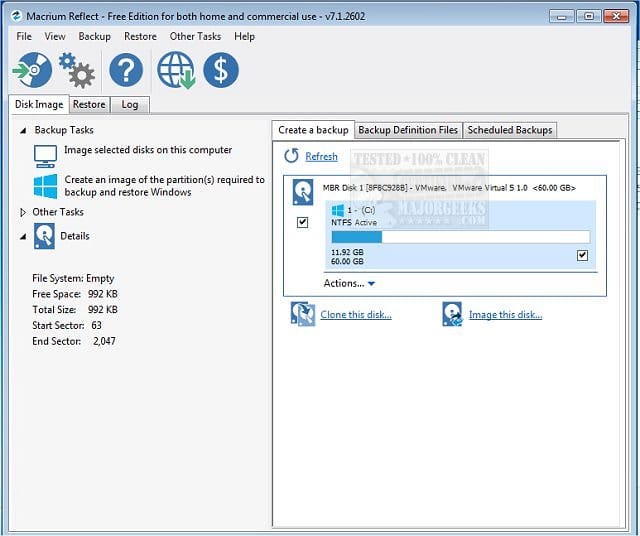
If you want to protect the computer from malware, ransomware, registry or operating system corruption, failure to boot, etc. you then have the option to make and restore backup images.

(Acronis, Aoemi, EaseUS, Hasleo, Macrium, Paragon, etc.)

Macrium is widely used in Ten Forums.

Macrium Software | Your Image is Everything


Backup and Restore with Macrium Reflect


I was able to login for three of the four freezes. No user input was accepted after login. For the Jan 16 freeze, the freeze occurred at the login screen before logging in. At the login screen, I was able to move the mouse cursor about a half inch when the system froze up.

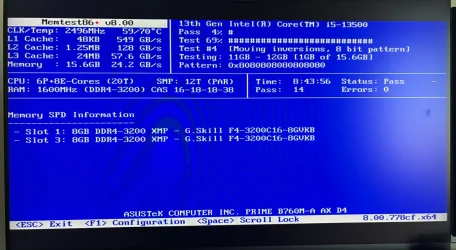
I ran MemTest86 overnight. It passed. See below.


How come the links in step #8 were not used?


8) Run Memtest86+ for 8 or more passes > take pictures > post images or share links

Memtest86+ | The Open-Source Memory Testing Tool

Just 1 error is a test fail and testing can be aborted.

The more the passes the better the testing conditions.

It sometimes takes passes into the 20's to detect malfunctioning RAM.

The RAM can be tested all at one time or one at a time in the same DIMM.

Memtest86+ | The Open-Source Memory Testing Tool

MemTest86+ - Test RAM
 

My Computer

System One

  • OS
    Windows 10
    Computer type
    Laptop
    Manufacturer/Model
    HP
    CPU
    Intel(R) Core(TM) i7-4800MQ CPU @ 2.70GHz
    Motherboard
    Product : 190A Version : KBC Version 94.56
    Memory
    16 GB Total: Manufacturer : Samsung MemoryType : DDR3 FormFactor : SODIMM Capacity : 8GB Speed : 1600
    Graphics Card(s)
    NVIDIA Quadro K3100M; Intel(R) HD Graphics 4600
    Sound Card
    IDT High Definition Audio CODEC; PNP Device ID HDAUDIO\FUNC_01&VEN_111D&DEV_76E0
    Hard Drives
    Model Hitachi HTS727575A9E364
    Antivirus
    Microsoft Defender
    Other Info
    Mobile Workstation
.....The data from the computer files indicate that the most likely cause of the four computer freezes was hardware.

Hardware
a) incompatible
b) misconfigured
c) malfunctioning
....
Does this mean that the problem can include Secure Boot certificates as was suggested in post #4 or do you think Secure Boot can be ruled out as a possible cause at this time?
How come the links in step #8 were not used?
Didn’t see the link for Memtest86+. I’ll run that tonight. There are a few links there, but it looks like they all point to one memory tester which I’ll download and run. Let me know if I’m wrong on that.
If you want to modify the settings for crashes you can use this link:
After this problem is resolved, I may wish to go back to the windows default settings before changes were made for debug. I hope that won’t be difficult to do. Comment?
 

My Computer

System One

  • OS
    Windows 11 Pro, version 25H2 (OS Build 26200.7840)
    Computer type
    PC/Desktop
    Manufacturer/Model
    ASUS user built
    CPU
    i5-13500
    Motherboard
    ASUS Prime B760M-A AX D4
    Memory
    G.SKILL F4-3200C16D-16GVKB
    Graphics Card(s)
    on board
    Sound Card
    on board
    Monitor(s) Displays
    two monitors
    Screen Resolution
    1080p
    Hard Drives
    SSD for OS: Samsung 980 PRO 1TB, NVMe
    PSU
    FSP AURUM S 400, 400W ATX 2.31
    Case
    Antec Sonata II
    Mouse
    ANKER A7852M
    Internet Speed
    200Mbps up/dn
    Browser
    Edge
    Antivirus
    OS Native
Does this mean that the problem can include Secure Boot certificates as was suggested in post #4 or do you think Secure Boot can be ruled out as a possible cause at this time?

Anything can happen.

The logs already reported problems.


Please update the progress with post #2 steps #3 - #7.

After this problem is resolved, I may wish to go back to the windows default settings before changes were made for debug. I hope that won’t be difficult to do. Comment?

That can be done.


For computers that have instability problems the optimal settings are in the script as they will:


a) If and when there are BSODs Windows can automatically restart (computer user typically misses the BSOD).

The modified setting turns off automatically restart so that if available BSOD error messages can be seen.


b) The default settings make it extremely unlikely that Windows can create memory dump files

The modified setting allows Windows to create memory dump files.


If problems with hardware are found there can be swap testing or replacement.

It takes monitoring time for each.

The script settings are again optimal for infinite monitoring.
 
Last edited:

My Computer

System One

  • OS
    Windows 10
    Computer type
    Laptop
    Manufacturer/Model
    HP
    CPU
    Intel(R) Core(TM) i7-4800MQ CPU @ 2.70GHz
    Motherboard
    Product : 190A Version : KBC Version 94.56
    Memory
    16 GB Total: Manufacturer : Samsung MemoryType : DDR3 FormFactor : SODIMM Capacity : 8GB Speed : 1600
    Graphics Card(s)
    NVIDIA Quadro K3100M; Intel(R) HD Graphics 4600
    Sound Card
    IDT High Definition Audio CODEC; PNP Device ID HDAUDIO\FUNC_01&VEN_111D&DEV_76E0
    Hard Drives
    Model Hitachi HTS727575A9E364
    Antivirus
    Microsoft Defender
    Other Info
    Mobile Workstation
Memtest86+ allows unlimited passes.

Memtest86 years ago changed from free to free and pay versions.

The free version only ran 4 passes and fewer tests than the pay version.


Running Memtest86+ will run indefinitely.

Make sure that it runs for at least 8 passes.

The more the passes the better the testing.


Please make sure that you complete the steps in sequence in post #2.

(Post share links into the newest post)
 

My Computer

System One

  • OS
    Windows 10
    Computer type
    Laptop
    Manufacturer/Model
    HP
    CPU
    Intel(R) Core(TM) i7-4800MQ CPU @ 2.70GHz
    Motherboard
    Product : 190A Version : KBC Version 94.56
    Memory
    16 GB Total: Manufacturer : Samsung MemoryType : DDR3 FormFactor : SODIMM Capacity : 8GB Speed : 1600
    Graphics Card(s)
    NVIDIA Quadro K3100M; Intel(R) HD Graphics 4600
    Sound Card
    IDT High Definition Audio CODEC; PNP Device ID HDAUDIO\FUNC_01&VEN_111D&DEV_76E0
    Hard Drives
    Model Hitachi HTS727575A9E364
    Antivirus
    Microsoft Defender
    Other Info
    Mobile Workstation
Thanks.
Ran MemTest86+ overnight. 14-passes. Results below and will add to link seen in post 7. May need to put other debug steps off till things settle out on my side. Will pick it up though.
 

Attachments

  • IMG_1729.webp
    IMG_1729.webp
    202.4 KB · Views: 1

My Computer

System One

  • OS
    Windows 11 Pro, version 25H2 (OS Build 26200.7840)
    Computer type
    PC/Desktop
    Manufacturer/Model
    ASUS user built
    CPU
    i5-13500
    Motherboard
    ASUS Prime B760M-A AX D4
    Memory
    G.SKILL F4-3200C16D-16GVKB
    Graphics Card(s)
    on board
    Sound Card
    on board
    Monitor(s) Displays
    two monitors
    Screen Resolution
    1080p
    Hard Drives
    SSD for OS: Samsung 980 PRO 1TB, NVMe
    PSU
    FSP AURUM S 400, 400W ATX 2.31
    Case
    Antec Sonata II
    Mouse
    ANKER A7852M
    Internet Speed
    200Mbps up/dn
    Browser
    Edge
    Antivirus
    OS Native
Has it frozen/crashed since disabling secure boot?
 

My Computer

System One

  • OS
    Windows 11 Pro 64bit
    Computer type
    Laptop
    Manufacturer/Model
    PC Specialist Optimus VII V17-960 Gaming Laptop.
    CPU
    6th Gen Intel Core i7-6700HQ Quad Core processor.
    Memory
    16GB HyperX IMPACT 1600MHz SODIMM DDR3 (2 x 8GB)
    Graphics Card(s)
    NVIDIA® GeForce® GTX 960M - 2.0GB DDR5 Video RAM - DirectX® 12
    Sound Card
    Intel 2 Channel High Def. Audio + SoundBlaster™ Cinema 2 & Realtek
    Monitor(s) Displays
    Optimus Series: 17.3" Matte Full HD IPS LED Widescreen (1920x1080)
    Screen Resolution
    Full HD IPS display (1920 x 1080).
    Hard Drives
    4TB SSD (internal).
    1x 1TB & 1x 5TB external HDDs.
    Cooling
    STANDARD THERMAL PASTE FOR SUFFICIENT COOLING
    Keyboard
    Logitech K800 wireless keyboard
    Mouse
    Logitech M705 wireless mouse
    Internet Speed
    Upto 100Mbps
    Browser
    Edge.
    Antivirus
    Windows Defender & MalwareBytes pro.
Has it frozen/crashed since disabling secure boot?
No, it hasn't. In your case, did the freeze occur right after booting up (as mine)?? Also, did it happen on every boot or how often did it happen?
 

My Computer

System One

  • OS
    Windows 11 Pro, version 25H2 (OS Build 26200.7840)
    Computer type
    PC/Desktop
    Manufacturer/Model
    ASUS user built
    CPU
    i5-13500
    Motherboard
    ASUS Prime B760M-A AX D4
    Memory
    G.SKILL F4-3200C16D-16GVKB
    Graphics Card(s)
    on board
    Sound Card
    on board
    Monitor(s) Displays
    two monitors
    Screen Resolution
    1080p
    Hard Drives
    SSD for OS: Samsung 980 PRO 1TB, NVMe
    PSU
    FSP AURUM S 400, 400W ATX 2.31
    Case
    Antec Sonata II
    Mouse
    ANKER A7852M
    Internet Speed
    200Mbps up/dn
    Browser
    Edge
    Antivirus
    OS Native
1) Please take pictures of the installed F4-3200C16-8GVKB RAM modules in their DIMMs > post images or share links

2) Post a share link for step #4 (additional dump files)

3) Post a share link for step #3 (tuneup plus)
 

My Computer

System One

  • OS
    Windows 10
    Computer type
    Laptop
    Manufacturer/Model
    HP
    CPU
    Intel(R) Core(TM) i7-4800MQ CPU @ 2.70GHz
    Motherboard
    Product : 190A Version : KBC Version 94.56
    Memory
    16 GB Total: Manufacturer : Samsung MemoryType : DDR3 FormFactor : SODIMM Capacity : 8GB Speed : 1600
    Graphics Card(s)
    NVIDIA Quadro K3100M; Intel(R) HD Graphics 4600
    Sound Card
    IDT High Definition Audio CODEC; PNP Device ID HDAUDIO\FUNC_01&VEN_111D&DEV_76E0
    Hard Drives
    Model Hitachi HTS727575A9E364
    Antivirus
    Microsoft Defender
    Other Info
    Mobile Workstation
No, it hasn't. In your case, did the freeze occur right after booting up (as mine)?? Also, did it happen on every boot or how often did it happen?
It froze within a few seconds of reaching the desktop - a few icons loaded in the notification area & taskbar but always froze - every boot & every time, I uninstalled several programs which I thought may be the case as all was ok in safe mode but even restoring a disk image from July 25 didn’t fix the problem. I had to reset the secure boot certificates back to default which fixed the problem.
 

My Computer

System One

  • OS
    Windows 11 Pro 64bit
    Computer type
    Laptop
    Manufacturer/Model
    PC Specialist Optimus VII V17-960 Gaming Laptop.
    CPU
    6th Gen Intel Core i7-6700HQ Quad Core processor.
    Memory
    16GB HyperX IMPACT 1600MHz SODIMM DDR3 (2 x 8GB)
    Graphics Card(s)
    NVIDIA® GeForce® GTX 960M - 2.0GB DDR5 Video RAM - DirectX® 12
    Sound Card
    Intel 2 Channel High Def. Audio + SoundBlaster™ Cinema 2 & Realtek
    Monitor(s) Displays
    Optimus Series: 17.3" Matte Full HD IPS LED Widescreen (1920x1080)
    Screen Resolution
    Full HD IPS display (1920 x 1080).
    Hard Drives
    4TB SSD (internal).
    1x 1TB & 1x 5TB external HDDs.
    Cooling
    STANDARD THERMAL PASTE FOR SUFFICIENT COOLING
    Keyboard
    Logitech K800 wireless keyboard
    Mouse
    Logitech M705 wireless mouse
    Internet Speed
    Upto 100Mbps
    Browser
    Edge.
    Antivirus
    Windows Defender & MalwareBytes pro.
It froze within a few seconds of reaching the desktop - a few icons loaded in the notification area & taskbar but always froze - every boot & every time, ...
It does sound similar to my case except that mine does not happen every boot. Only four freezes since December 19.
 

My Computer

System One

  • OS
    Windows 11 Pro, version 25H2 (OS Build 26200.7840)
    Computer type
    PC/Desktop
    Manufacturer/Model
    ASUS user built
    CPU
    i5-13500
    Motherboard
    ASUS Prime B760M-A AX D4
    Memory
    G.SKILL F4-3200C16D-16GVKB
    Graphics Card(s)
    on board
    Sound Card
    on board
    Monitor(s) Displays
    two monitors
    Screen Resolution
    1080p
    Hard Drives
    SSD for OS: Samsung 980 PRO 1TB, NVMe
    PSU
    FSP AURUM S 400, 400W ATX 2.31
    Case
    Antec Sonata II
    Mouse
    ANKER A7852M
    Internet Speed
    200Mbps up/dn
    Browser
    Edge
    Antivirus
    OS Native
It does sound similar to my case except that mine does not happen every boot. Only four freezes since December 19.
It’s still a possible cause. Is your rig Windows 11 compatable? Mine isn’t so may have had a worse effect.
 

My Computer

System One

  • OS
    Windows 11 Pro 64bit
    Computer type
    Laptop
    Manufacturer/Model
    PC Specialist Optimus VII V17-960 Gaming Laptop.
    CPU
    6th Gen Intel Core i7-6700HQ Quad Core processor.
    Memory
    16GB HyperX IMPACT 1600MHz SODIMM DDR3 (2 x 8GB)
    Graphics Card(s)
    NVIDIA® GeForce® GTX 960M - 2.0GB DDR5 Video RAM - DirectX® 12
    Sound Card
    Intel 2 Channel High Def. Audio + SoundBlaster™ Cinema 2 & Realtek
    Monitor(s) Displays
    Optimus Series: 17.3" Matte Full HD IPS LED Widescreen (1920x1080)
    Screen Resolution
    Full HD IPS display (1920 x 1080).
    Hard Drives
    4TB SSD (internal).
    1x 1TB & 1x 5TB external HDDs.
    Cooling
    STANDARD THERMAL PASTE FOR SUFFICIENT COOLING
    Keyboard
    Logitech K800 wireless keyboard
    Mouse
    Logitech M705 wireless mouse
    Internet Speed
    Upto 100Mbps
    Browser
    Edge.
    Antivirus
    Windows Defender & MalwareBytes pro.
It’s still a possible cause. Is your rig Windows 11 compatable? Mine isn’t so may have had a worse effect.
Yes, fully compatible. I've got an eye on it. With secure boot disabled, I'm hoping it doesn't return. That would involve a simple solution.
 

My Computer

System One

  • OS
    Windows 11 Pro, version 25H2 (OS Build 26200.7840)
    Computer type
    PC/Desktop
    Manufacturer/Model
    ASUS user built
    CPU
    i5-13500
    Motherboard
    ASUS Prime B760M-A AX D4
    Memory
    G.SKILL F4-3200C16D-16GVKB
    Graphics Card(s)
    on board
    Sound Card
    on board
    Monitor(s) Displays
    two monitors
    Screen Resolution
    1080p
    Hard Drives
    SSD for OS: Samsung 980 PRO 1TB, NVMe
    PSU
    FSP AURUM S 400, 400W ATX 2.31
    Case
    Antec Sonata II
    Mouse
    ANKER A7852M
    Internet Speed
    200Mbps up/dn
    Browser
    Edge
    Antivirus
    OS Native
Yes, fully compatible. I've got an eye on it. With secure boot disabled, I'm hoping it doesn't return. That would involve a simple solution.
I wonder if that’s why it isn’t crashing all the time.
 

My Computer

System One

  • OS
    Windows 11 Pro 64bit
    Computer type
    Laptop
    Manufacturer/Model
    PC Specialist Optimus VII V17-960 Gaming Laptop.
    CPU
    6th Gen Intel Core i7-6700HQ Quad Core processor.
    Memory
    16GB HyperX IMPACT 1600MHz SODIMM DDR3 (2 x 8GB)
    Graphics Card(s)
    NVIDIA® GeForce® GTX 960M - 2.0GB DDR5 Video RAM - DirectX® 12
    Sound Card
    Intel 2 Channel High Def. Audio + SoundBlaster™ Cinema 2 & Realtek
    Monitor(s) Displays
    Optimus Series: 17.3" Matte Full HD IPS LED Widescreen (1920x1080)
    Screen Resolution
    Full HD IPS display (1920 x 1080).
    Hard Drives
    4TB SSD (internal).
    1x 1TB & 1x 5TB external HDDs.
    Cooling
    STANDARD THERMAL PASTE FOR SUFFICIENT COOLING
    Keyboard
    Logitech K800 wireless keyboard
    Mouse
    Logitech M705 wireless mouse
    Internet Speed
    Upto 100Mbps
    Browser
    Edge.
    Antivirus
    Windows Defender & MalwareBytes pro.
Yes, fully compatible. I've got an eye on it. With secure boot disabled, I'm hoping it doesn't return. That would involve a simple solution.
In all honesty that is a workaround, not a solution. If you're having boot issues that disappear with SecureBoot disabled then you should think about the following...
  • You may have bootloader malware on there. This is the kind of thing that SecureBoot prevents. It's not impossible that you're crashing on boot because the malware may be flaky.

  • SecureBoot is almost entirely reliant on the digital signatures of the bootloader executables and of the critical Windows kernel files. You may have a corruption in any other these that causes the signature checks to fail. It's also possible that the public keys you have on the PC are corrupted somehow.
It's your PC of course, but I wouldn't be happy if it only booted properly with SecureBoot disabled, especially on a fully Win11 compatible UEFI system.
 

My Computer

System One

  • OS
    Windows
In all honesty that is a workaround, not a solution.
Thanks for this information. To clarify I disabled Secure Boot not as a fix, but to help identify the problem area. If the problem goes away with disabling SB, then I’ll need to fix SB so that it works properly.
If you're having boot issues that disappear with SecureBoot disabled then you should think about the following...
  • You may have bootloader malware on there. This is the kind of thing that SecureBoot prevents. It's not impossible that you're crashing on boot because the malware may be flaky.
To test for any bootloader malware (is this a rootkit?) will a scan using Malewarebytes in safe mode be sufficient? I have Malwarebytes free. I’ll need to run that overnight, since scanning for rootkits takes hours. I have scanned all drives using Defender. Some things were detected and deleted. Those were not on the system drive, and were associated with older legacy programs. They were not rootkits. A Defender scan of all drives is now clean.
  • SecureBoot is almost entirely reliant on the digital signatures of the bootloader executables and of the critical Windows kernel files. You may have a corruption in any other these that causes the signature checks to fail. It's also possible that the public keys you have on the PC are corrupted somehow.
It's your PC of course, but I wouldn't be happy if it only booted properly with SecureBoot disabled, especially on a fully Win11 compatible UEFI system.
With the benefit of this information, I'm not going to be happy either, should the system continue to work with SB disabled. If that happens, I'll need to continue with added measures to verify system integrity and proper public keys. I'll proceed with the rootkit scan tonight, however.
 

My Computer

System One

  • OS
    Windows 11 Pro, version 25H2 (OS Build 26200.7840)
    Computer type
    PC/Desktop
    Manufacturer/Model
    ASUS user built
    CPU
    i5-13500
    Motherboard
    ASUS Prime B760M-A AX D4
    Memory
    G.SKILL F4-3200C16D-16GVKB
    Graphics Card(s)
    on board
    Sound Card
    on board
    Monitor(s) Displays
    two monitors
    Screen Resolution
    1080p
    Hard Drives
    SSD for OS: Samsung 980 PRO 1TB, NVMe
    PSU
    FSP AURUM S 400, 400W ATX 2.31
    Case
    Antec Sonata II
    Mouse
    ANKER A7852M
    Internet Speed
    200Mbps up/dn
    Browser
    Edge
    Antivirus
    OS Native
I grabbed a few minutes and did the virus scans which ran faster than I expected. I ran two scans. I ran the Microsoft Defender Antivirus (offline scan) and in Safe Mode I scanned the C:\ drive using Malwarebytes with all Scan Options including rootkits selected. Neither scan detected any threats. I hope this means I’m safe. Results are found at the link seen at the bottom of the opening post in the folder “Virus Scans.”
 

My Computer

System One

  • OS
    Windows 11 Pro, version 25H2 (OS Build 26200.7840)
    Computer type
    PC/Desktop
    Manufacturer/Model
    ASUS user built
    CPU
    i5-13500
    Motherboard
    ASUS Prime B760M-A AX D4
    Memory
    G.SKILL F4-3200C16D-16GVKB
    Graphics Card(s)
    on board
    Sound Card
    on board
    Monitor(s) Displays
    two monitors
    Screen Resolution
    1080p
    Hard Drives
    SSD for OS: Samsung 980 PRO 1TB, NVMe
    PSU
    FSP AURUM S 400, 400W ATX 2.31
    Case
    Antec Sonata II
    Mouse
    ANKER A7852M
    Internet Speed
    200Mbps up/dn
    Browser
    Edge
    Antivirus
    OS Native
To test for any bootloader malware (is this a rootkit?) will a scan using Malewarebytes in safe mode be sufficient? I have Malwarebytes free. I’ll need to run that overnight, since scanning for rootkits takes hours. I have scanned all drives using Defender.
Malwarebytes have a separate (and free) rootkit scanner: Rootkit Scanner

Some things were detected and deleted. Those were not on the system drive, and were associated with older legacy programs. They were not rootkits. A Defender scan of all drives is now clean.
What was deleted? Are you 100% certain that they were not required? When you delete stuff and then SecureBoot doesn't work, you have to ask those questions.

With the benefit of this information, I'm not going to be happy either, should the system continue to work with SB disabled. If that happens, I'll need to continue with added measures to verify system integrity and proper public keys. I'll proceed with the rootkit scan tonight, however.
You can manually update the SecureBoot keys, indeed you must because the existing keys expire in June of this year. Windows Update will normally take care of that for you, but you can do it manually: Updating Microsoft Secure Boot keys | Windows IT Pro blog
 

My Computer

System One

  • OS
    Windows
Malwarebytes have a separate (and free) rootkit scanner: Rootkit Scanner
I went to that link and downloaded the MBSetup.exe. It is the same installer file as for Malwarbytes Free which is what I used. The default setting had rootkit scan turned off so I turned it on.
What was deleted? Are you 100% certain that they were not required? When you delete stuff and then SecureBoot doesn't work, you have to ask those questions.
Yes. As I mentioned, they were not on the C: drive. In all cases they were found on files that could be used to install older legacy utility programs but never were used to install. They were just sitting there waiting to be clicked on. Defender deleted them and I deleted any files associated with the programs that Defender found to be safe and did not delete. Also, these were discovered by Defender after the Freeze problem began so the removal is not associated with the freeze problem. Follow up scans showed no threats found.
You can manually update the SecureBoot keys, indeed you must because the existing keys expire in June of this year. Windows Update will normally take care of that for you, but you can do it manually: Updating Microsoft Secure Boot keys | Windows IT Pro blog
Thank you! I figure I'll give it some time for the problem to occur with SB disabled. Either way, I know I'll need to update the keys.
 

My Computer

System One

  • OS
    Windows 11 Pro, version 25H2 (OS Build 26200.7840)
    Computer type
    PC/Desktop
    Manufacturer/Model
    ASUS user built
    CPU
    i5-13500
    Motherboard
    ASUS Prime B760M-A AX D4
    Memory
    G.SKILL F4-3200C16D-16GVKB
    Graphics Card(s)
    on board
    Sound Card
    on board
    Monitor(s) Displays
    two monitors
    Screen Resolution
    1080p
    Hard Drives
    SSD for OS: Samsung 980 PRO 1TB, NVMe
    PSU
    FSP AURUM S 400, 400W ATX 2.31
    Case
    Antec Sonata II
    Mouse
    ANKER A7852M
    Internet Speed
    200Mbps up/dn
    Browser
    Edge
    Antivirus
    OS Native
Just thought I would provide some closure on this issue. It has now been two months since the last freeze event. There were a total of 7 Freeze events starting on December 19, 2025. The space between the Freeze ups ranged from a few days to a maximum of one month. Since it has now been two months since the last Freeze, I think the chances are good that the problem is fixed. I'm assuming that some driver or windows update that affects the way drivers are loaded, was responsible for the freezes and was corrected through a subsequent update process. Other than waiting, none of the actions that I took had any effect.
 

My Computer

System One

  • OS
    Windows 11 Pro, version 25H2 (OS Build 26200.7840)
    Computer type
    PC/Desktop
    Manufacturer/Model
    ASUS user built
    CPU
    i5-13500
    Motherboard
    ASUS Prime B760M-A AX D4
    Memory
    G.SKILL F4-3200C16D-16GVKB
    Graphics Card(s)
    on board
    Sound Card
    on board
    Monitor(s) Displays
    two monitors
    Screen Resolution
    1080p
    Hard Drives
    SSD for OS: Samsung 980 PRO 1TB, NVMe
    PSU
    FSP AURUM S 400, 400W ATX 2.31
    Case
    Antec Sonata II
    Mouse
    ANKER A7852M
    Internet Speed
    200Mbps up/dn
    Browser
    Edge
    Antivirus
    OS Native
Back
Top Bottom