Create a win 11 usb with own settings


koden

New member
Local time
3:50 AM
Posts
9
OS
windows 11
Hi Forum

Many years ago I did this with win 7.

Think I used Nlite to create a bootable win7 installation where I have set some settings so that installation was running itself until it finished.

Is this possible today with win 11?
 

My Computer My Computer

At a glance

windows 11
OS
windows 11
Computer type
Laptop
Manufacturer/Model
lenovo apple

My Computers My Computers

  • At a glance

    Windows 11 Enterprise 25H2 26200 7462Intel XEON E5-2699 v364GB Teamgroup UD4-3600NVIDIA GeForce GTX 1080 Ti
    OS
    Windows 11 Enterprise 25H2 26200 7462
    Computer type
    PC/Desktop
    Manufacturer/Model
    Custom Build
    CPU
    Intel XEON E5-2699 v3
    Motherboard
    ASUS X99-A
    Memory
    64GB Teamgroup UD4-3600
    Graphics Card(s)
    NVIDIA GeForce GTX 1080 Ti
    Sound Card
    Integrated
    Monitor(s) Displays
    ACER X34 Predator
    Screen Resolution
    3440 x 1440
    Hard Drives
    Crucial CT1000P 3P SSD8 1TB
    Crucial CT1000 BX500 SSD 1TB
    PSU
    GameMax Pro
    Case
    Fractal Design
    Cooling
    Corsair H110iGT + 6 140mm Fans
    Keyboard
    Corsair K4
    Mouse
    G-Skill G502
    Internet Speed
    300MBs
    Browser
    Chrome
    Antivirus
    OEM
    Other Info
    ASUS RT-AC87U Router
  • At a glance

    25H2 26200.50748GB
    Operating System
    25H2 26200.5074
    Computer type
    Laptop
    Manufacturer/Model
    ASUS X555LA
    Memory
    8GB
    Browser
    Chrome
    Antivirus
    OEM
Thanks :-)
Is Nlite the recommended way to do it today or is there other solutions?

Is winpe the same?
 

My Computer My Computer

At a glance

windows 11
OS
windows 11
Computer type
Laptop
Manufacturer/Model
lenovo apple

My Computers My Computers

  • At a glance

    Windows 11 Pro 25H2Ryzen 5 3500U8GBVega 8
    OS
    Windows 11 Pro 25H2
    Computer type
    Laptop
    Manufacturer/Model
    Huawei MateBook D15
    CPU
    Ryzen 5 3500U
    Memory
    8GB
    Graphics Card(s)
    Vega 8
    Screen Resolution
    FHD
    Hard Drives
    256GB Samsung SSD + 1TB HDD
    Browser
    Microsoft Edge
    Antivirus
    ESET Smart Security Premium
  • At a glance

    Windows 10 Enterprise LTSC 21H2intel core i7 6700HQ16GBNvidia Geforce GTX1060 (6GB)
    Operating System
    Windows 10 Enterprise LTSC 21H2
    Computer type
    Laptop
    Manufacturer/Model
    MSI GS73 6RF Stealth Pro
    CPU
    intel core i7 6700HQ
    Memory
    16GB
    Graphics card(s)
    Nvidia Geforce GTX1060 (6GB)
    Screen Resolution
    FHD
    Hard Drives
    128GB SSD + 1TB HDD
    Browser
    Microsoft Edge
    Antivirus
    Windows Defender
Thanks ..will follow this as it's long ago :-)


My Computer My Computer

At a glance

windows 11
OS
windows 11
Computer type
Laptop
Manufacturer/Model
lenovo apple
Thanks ..will follow this as it's long ago :-)

You're welcome my friend.
Yeah, it feels really good to tweak Windows yourself and discover a whole new world. You can learn a lot about different parts of Windows, understand how each section depends on others, and what responsibilities they have. But in the end, you realize you shouldn’t have messed with it—because Microsoft totally screwed up making Windows 11.
 

My Computers My Computers

  • At a glance

    Windows 11 Pro 25H2Ryzen 5 3500U8GBVega 8
    OS
    Windows 11 Pro 25H2
    Computer type
    Laptop
    Manufacturer/Model
    Huawei MateBook D15
    CPU
    Ryzen 5 3500U
    Memory
    8GB
    Graphics Card(s)
    Vega 8
    Screen Resolution
    FHD
    Hard Drives
    256GB Samsung SSD + 1TB HDD
    Browser
    Microsoft Edge
    Antivirus
    ESET Smart Security Premium
  • At a glance

    Windows 10 Enterprise LTSC 21H2intel core i7 6700HQ16GBNvidia Geforce GTX1060 (6GB)
    Operating System
    Windows 10 Enterprise LTSC 21H2
    Computer type
    Laptop
    Manufacturer/Model
    MSI GS73 6RF Stealth Pro
    CPU
    intel core i7 6700HQ
    Memory
    16GB
    Graphics card(s)
    Nvidia Geforce GTX1060 (6GB)
    Screen Resolution
    FHD
    Hard Drives
    128GB SSD + 1TB HDD
    Browser
    Microsoft Edge
    Antivirus
    Windows Defender
@Sheikh

Not wishing to dispaarge your efforts -- BUT:

Each to their own but these days Windows is like a revolving door with so many different editions / insider versions -- even the same insider streams are rolling out to different sets of users at different intervals and with different features.

I'd spend the time on other issues --if you want to learn about OS'es, task manager, I/O subsystems, paging, swapping, memory allocation etc just look at any Linux distro where you can get entire public domain source code - or even learn from a great classical OS which was the proper start of modern OS's the older 1970's mainframe IBM MVS/SP2 which is in the public domain -- runs under the FREE Hercues emulator on most PC's and has been updated a bit. There's a lot of source code in that too. Both in the MVS nucleus -- in old IBM speak the nucleus was the kernel and the Hercules emulator -- which actually even runs today's IBM's Z/OS - but that's of course 100% commercial and proprietary.

Still if fiddling around with Windows is what you want to do --fine - but usually all those mods usually make it worse and then on the next update something breaks it. INHO not worth the time.

Have a bit of fun using Python and A.I instead -- good to construct a lot of A.I / robotics and that's where a load of future jobs are going to come from.

Cheers
jimbo
 

My Computer My Computer

At a glance

Windows XP,11 Linux Fedora Rawhide pre-releas...2 X Intel i7
OS
Windows XP,11 Linux Fedora Rawhide pre-release 45
Computer type
PC/Desktop
CPU
2 X Intel i7
Screen Resolution
4KUHD X 2
I agree.. but I just need at bootable windows usb with an answer file and some default programs, so that I can install pc's without all kind of questions in the inst. process.
I had it in win 7 which I was happy about.
Did not have time in win 10 to look at it.
But now I will and now it's win 11
:-)

That it's a rubbish OS is probably right... but it's the one all use, that dont have skills in this branch :-)
 

My Computer My Computer

At a glance

windows 11
OS
windows 11
Computer type
Laptop
Manufacturer/Model
lenovo apple
I agree.. but I just need at bootable windows usb with an answer file and some default programs, so that I can install pc's without all kind of questions in the inst. process.
I had it in win 7 which I was happy about.
Did not have time in win 10 to look at it.
But now I will and now it's win 11
:-)

That it's a rubbish OS is probably right... but it's the one all use, that dont have skills in this branch :-)
search windows10 forum tutorials how to setup an unattended install. Guides work same for Windows 11.
 

My Computer My Computer

At a glance

Windows 11 Pro + Win11 Canary VM.I9 13th gen i9-13900H 2.60 GHZ16 GB solderedIntegrated Intel Iris XE
OS
Windows 11 Pro + Win11 Canary VM.
Computer type
Laptop
Manufacturer/Model
ASUS Zenbook 14
CPU
I9 13th gen i9-13900H 2.60 GHZ
Motherboard
Yep, Laptop has one.
Memory
16 GB soldered
Graphics Card(s)
Integrated Intel Iris XE
Sound Card
Realtek built in
Monitor(s) Displays
laptop OLED screen
Screen Resolution
2880x1800 touchscreen
Hard Drives
1 TB NVME SSD (only weakness is only one slot)
PSU
Internal + 65W thunderbolt USB4 charger
Case
Yep, got one
Cooling
Stella Artois (UK pint cans - 568 ml) - extra cost.
Keyboard
Built in UK keybd
Mouse
Bluetooth , wireless dongled, wired
Internet Speed
900 mbs (ethernet), wifi 6 typical 350-450 mb/s both up and down
Browser
Edge
Antivirus
Defender
Other Info
TPM 2.0, 2xUSB4 thunderbolt, 1xUsb3 (usb a), 1xUsb-c, hdmi out, 3.5 mm audio out/in combo, ASUS backlit trackpad (inc. switchable number pad)

Macrium Reflect Home V8
Office 365 Family (6 users each 1TB onedrive space)
Hyper-V (a vm runs almost as fast as my older laptop)
search windows10 forum tutorials how to setup an unattended install. Guides work same for Windows 11.

I couldn't get it to work after win 11 24H2. I remember something about 24h2 changing something that broke it but my memory isn't great. I still have mine built on 23h2 but luckily is still works because at the step for checking for updates it updates now to 25h2.

You could use this:


Works well. You just dont get the benefit of installing your own software and having it already part of the image
 

My Computers My Computers

  • At a glance

    Windows 11 ProRyzen 7 5700 X3D64 GB DDR4 3600mhz Gskill Ripjaws VRTX 4070 Super , 12GB VRAM Asus EVO Overclock
    OS
    Windows 11 Pro
    Computer type
    PC/Desktop
    Manufacturer/Model
    Custom Built
    CPU
    Ryzen 7 5700 X3D
    Motherboard
    MSI MPG B550 GAMING PLUS
    Memory
    64 GB DDR4 3600mhz Gskill Ripjaws V
    Graphics Card(s)
    RTX 4070 Super , 12GB VRAM Asus EVO Overclock
    Monitor(s) Displays
    Gigabyte M27Q (rev. 2.0) 2560 x 1440 @ 170hz HDR
    Hard Drives
    2TB Samsung nvme ssd
    4TB Western Digital nvme ssd
    PSU
    CORSAIR RMx SHIFT Series™ RM750x 80 PLUS Gold Fully Modular ATX Power Supply
    Case
    CORSAIR 3500X ARGB Mid-Tower ATX PC Case – Black
    Cooling
    ID-COOLING FROSTFLOW X 240 CPU Water Cooler
    Keyboard
    Logitech G213
    Mouse
    Logitech G203
    Internet Speed
    1.2gbps Fiber 😎
  • At a glance

    Chrome OSIntel Pentium Quad Core4GB LPDDR4
    Operating System
    Chrome OS
    Computer type
    Laptop
    Manufacturer/Model
    HP Chromebook
    CPU
    Intel Pentium Quad Core
    Memory
    4GB LPDDR4
    Monitor(s) Displays
    14 Inch HD SVA anti glare micro edge display
    Hard Drives
    64 GB emmc
Why not just create a bog standard Windows to Go usb / external thing and add say a WinPE / WinRE and a stand alone thing like Macrium / other system for system recovery.

Don't bother with ANY PAID software to create a Windows2Go system.

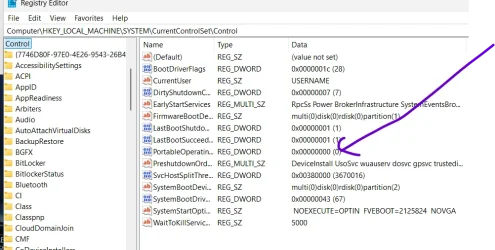
Simply use dism /Apply-Image and install the boot loader via bcdboot.

Note also simply change this reg key after initial boot after OOBE phase. Set it to '0'. It really is as simple as that - and you've got a useful tool far better than 95% of those other things that take a week's load of brainpower to install etc and in the end this Win2Go system is far more useful as you can install anything you like on it just with normal Windows commands and they don't ruin your current OS.

I use a load of these for different languages as I often work in NL, DE, BE, GB, IS, LUX, and FR.

Skjámynd 2025-11-17 145223.webp


Note for Multiple bootable options on this type of system use physical vhdx fles - but for bog standard Windows that's not necessary.

Cheers
jimbo
 

My Computer My Computer

At a glance

Windows XP,11 Linux Fedora Rawhide pre-releas...2 X Intel i7
OS
Windows XP,11 Linux Fedora Rawhide pre-release 45
Computer type
PC/Desktop
CPU
2 X Intel i7
Screen Resolution
4KUHD X 2
Back
Top Bottom