Solved Critical service died again.


Morph000

Well-known member
Member
VIP
Local time
4:28 PM
Posts
250
Location
Australia (best bit)
OS
Windows 11 Pro 24H2
OK, I've had endless issues with 24H2 (w10 on standby :cool:) and now I've uninstalled Kaspersky thinking it was responsible. 2 days on now, running on Win Defender only.
Today - critical process died. Groan. No fix.
No minidump created as usual.
I did a repair install yesterday after removing Kaspersky to be sure. SFC - nothing, DISM - nothing, Chkdsk - nothing.
I ran Passmark's Memtest Pro last week - 25 passes overnight, 15 hours straight - no issues and no other observable issues like black screens or instability of any kind.
No BIOS update available. LG's latest drivers installed.
All I have is the V2 zip for today.
Haven't run Driver Verifier as yet.
Can someone help before I go to Win 10!
 

My Computer

System One

  • OS
    Windows 11 Pro 24H2
    Computer type
    Laptop
    Manufacturer/Model
    LG
    CPU
    i7 Ultra
    Memory
    16GB
    Graphics Card(s)
    Intel
    Sound Card
    Intel Realtek
    Monitor(s) Displays
    Laptop 17" & TB4 Dell 27" QHD Ultrasharp w/integral TB4 hub
    Screen Resolution
    2560x1600
    Hard Drives
    1TB SSD, 5 external WDs
    Mouse
    Logitech Master MX 3S
    Browser
    Vivaldi
    Antivirus
    Kaspersky Premium Suite

My Computer

System One

  • OS
    Windows 10
    Computer type
    Laptop
    Manufacturer/Model
    HP
    CPU
    Intel(R) Core(TM) i7-4800MQ CPU @ 2.70GHz
    Motherboard
    Product : 190A Version : KBC Version 94.56
    Memory
    16 GB Total: Manufacturer : Samsung MemoryType : DDR3 FormFactor : SODIMM Capacity : 8GB Speed : 1600
    Graphics Card(s)
    NVIDIA Quadro K3100M; Intel(R) HD Graphics 4600
    Sound Card
    IDT High Definition Audio CODEC; PNP Device ID HDAUDIO\FUNC_01&VEN_111D&DEV_76E0
    Hard Drives
    Model Hitachi HTS727575A9E364
    Antivirus
    Microsoft Defender
    Other Info
    Mobile Workstation
I did attach....err...maybe not.
Hit "attach Files" really hard!

Also, SSD is fine, temperatures normal in system, Driver verifier says all drivers signed.
 

Attachments

Last edited:

My Computer

System One

  • OS
    Windows 11 Pro 24H2
    Computer type
    Laptop
    Manufacturer/Model
    LG
    CPU
    i7 Ultra
    Memory
    16GB
    Graphics Card(s)
    Intel
    Sound Card
    Intel Realtek
    Monitor(s) Displays
    Laptop 17" & TB4 Dell 27" QHD Ultrasharp w/integral TB4 hub
    Screen Resolution
    2560x1600
    Hard Drives
    1TB SSD, 5 external WDs
    Mouse
    Logitech Master MX 3S
    Browser
    Vivaldi
    Antivirus
    Kaspersky Premium Suite
The logs reported a one day installation with one BSOD.


1) Was Kaspersky AV uninstalled with its uninstall tool?

If not, please run the tool:


2) Add WMIC:

DISM /Online /Add-Capability /CapabilityName:WMIC~~~~


3) Run Tuneup plus > post a share link


4) Enable regback:


5) Create a new restore point:


6) Monitor using: reliability-history


7) For any new BSOD > post a new V2 share link into the newest post


8) See the multiple active threads for upgrading secure boot:

Frequently asked questions about the Secure Boot update process - Microsoft Support
https://techcommunity.microsoft.com...ook-for-certificates-expiring-in-2026/4469235
https://learn.microsoft.com/en-us/w...=windows-11#14-signature-databases-db-and-dbx
https://support.microsoft.com/en-us...-updates-a7be69c9-4634-42e1-9ca1-df06f43f360d
Updating Microsoft Secure Boot keys before expiration in June 2026 | Windows 11 Forum
Secure boot update HowTo | Windows 11 Forum


Code:
Event[1135]
  Log Name: System
  Source: EventLog
  Date: 2026-01-22T14:27:33.9000000Z
  Event ID: 6008
  Task: None
  Level: Error
  Opcode: N/A
  Keyword: Classic,
  User: N/A
  User Name: N/A
  Computer: Gram17
  Description:
The previous system shutdown at 2:24:06 PM on ?1/?22/?2026 was unexpected.

Code:
Event[1147]
  Log Name: System
  Source: volmgr
  Date: 2026-01-22T14:27:08.5400000Z
  Event ID: 161
  Task: None
  Level: Error
  Opcode: N/A
  Keyword: Classic,
  User: N/A
  User Name: N/A
  Computer: Gram17
  Description:
Dump file creation failed due to error during dump creation. BugCheckProgress was: 0x00040049

Code:
Event[1154]
  Log Name: System
  Source: Microsoft-Windows-Kernel-Power
  Date: 2026-01-22T14:27:09.1340000Z
  Event ID: 41
  Task: N/A
  Level: Critical
  Opcode: Info 
  Keyword: N/A
  User: S-1-5-18
  User Name: NT AUTHORITY\SYSTEM
  Computer: Gram17
  Description:
The system has rebooted without cleanly shutting down first. This error could be caused if the system stopped responding, crashed, or lost power unexpectedly.

Code:
Event[1316]
  Log Name: System
  Source: Microsoft-Windows-TPM-WMI
  Date: 2026-01-22T14:32:40.6940000Z
  Event ID: 1801
  Task: N/A
  Level: Error
  Opcode: Info 
  Keyword: N/A
  User: S-1-5-18
  User Name: NT AUTHORITY\SYSTEM
  Computer: Gram17
  Description:
Updated Secure Boot certificates are available on this device but have not yet been applied to the firmware. Review the published guidance to complete the update and maintain full protection. This device signature information is included here.
DeviceAttributes: OEMModelNumber:17Z90S-G.AP78A;OEMModelSystemFamily:gram PC;OEMManufacturerName:LG Electronics;OEMModelSKU:EVO;FirmwareVersion:M1ZI0365 X64;OSArchitecture:amd64;
BucketId: c2a3168906844f78f81536ea33ed569eb14e4111a4e7fe89d4ae84906551096a
BucketConfidenceLevel:
UpdateType:
For more information, please see https://go.microsoft.com/fwlink/?linkid=2301018.
 

My Computer

System One

  • OS
    Windows 10
    Computer type
    Laptop
    Manufacturer/Model
    HP
    CPU
    Intel(R) Core(TM) i7-4800MQ CPU @ 2.70GHz
    Motherboard
    Product : 190A Version : KBC Version 94.56
    Memory
    16 GB Total: Manufacturer : Samsung MemoryType : DDR3 FormFactor : SODIMM Capacity : 8GB Speed : 1600
    Graphics Card(s)
    NVIDIA Quadro K3100M; Intel(R) HD Graphics 4600
    Sound Card
    IDT High Definition Audio CODEC; PNP Device ID HDAUDIO\FUNC_01&VEN_111D&DEV_76E0
    Hard Drives
    Model Hitachi HTS727575A9E364
    Antivirus
    Microsoft Defender
    Other Info
    Mobile Workstation
1. KRemover is for when the install has serious issues , but I ran it anyway.
2. WMIC is already installed and working.
3. Restore point and registry backup created.
4. Reliability report attached.
5. Tuneup plus links require a tenforum account...even the non member link doesn't work.
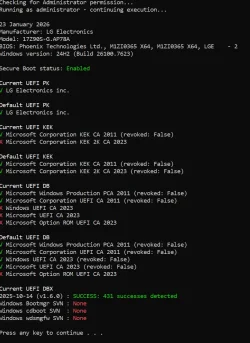
6. Boot cert screencap attached, but I'd prefer for it to rollout via Win updates.Bootcerts.webp
 

Attachments

My Computer

System One

  • OS
    Windows 11 Pro 24H2
    Computer type
    Laptop
    Manufacturer/Model
    LG
    CPU
    i7 Ultra
    Memory
    16GB
    Graphics Card(s)
    Intel
    Sound Card
    Intel Realtek
    Monitor(s) Displays
    Laptop 17" & TB4 Dell 27" QHD Ultrasharp w/integral TB4 hub
    Screen Resolution
    2560x1600
    Hard Drives
    1TB SSD, 5 external WDs
    Mouse
    Logitech Master MX 3S
    Browser
    Vivaldi
    Antivirus
    Kaspersky Premium Suite
Please post images or share links displaying commands with results including any messages and codes for

WMIC and Tuneup plus.


For secure boot please post in the active threads as needed.
 

My Computer

System One

  • OS
    Windows 10
    Computer type
    Laptop
    Manufacturer/Model
    HP
    CPU
    Intel(R) Core(TM) i7-4800MQ CPU @ 2.70GHz
    Motherboard
    Product : 190A Version : KBC Version 94.56
    Memory
    16 GB Total: Manufacturer : Samsung MemoryType : DDR3 FormFactor : SODIMM Capacity : 8GB Speed : 1600
    Graphics Card(s)
    NVIDIA Quadro K3100M; Intel(R) HD Graphics 4600
    Sound Card
    IDT High Definition Audio CODEC; PNP Device ID HDAUDIO\FUNC_01&VEN_111D&DEV_76E0
    Hard Drives
    Model Hitachi HTS727575A9E364
    Antivirus
    Microsoft Defender
    Other Info
    Mobile Workstation
Joined tenforums to get tuneup...
 

Attachments

My Computer

System One

  • OS
    Windows 11 Pro 24H2
    Computer type
    Laptop
    Manufacturer/Model
    LG
    CPU
    i7 Ultra
    Memory
    16GB
    Graphics Card(s)
    Intel
    Sound Card
    Intel Realtek
    Monitor(s) Displays
    Laptop 17" & TB4 Dell 27" QHD Ultrasharp w/integral TB4 hub
    Screen Resolution
    2560x1600
    Hard Drives
    1TB SSD, 5 external WDs
    Mouse
    Logitech Master MX 3S
    Browser
    Vivaldi
    Antivirus
    Kaspersky Premium Suite
Please create a new restore point.

Settings are now configured so that if BSOD occur they are less likely to be missed and more likely to create the optimal files for debugging.

If BSOD reoccur then post a new V2 share link into the newest post.

If there are no BSOD after monitoring for one week then plan to complete the thread.
 
Last edited:

My Computer

System One

  • OS
    Windows 10
    Computer type
    Laptop
    Manufacturer/Model
    HP
    CPU
    Intel(R) Core(TM) i7-4800MQ CPU @ 2.70GHz
    Motherboard
    Product : 190A Version : KBC Version 94.56
    Memory
    16 GB Total: Manufacturer : Samsung MemoryType : DDR3 FormFactor : SODIMM Capacity : 8GB Speed : 1600
    Graphics Card(s)
    NVIDIA Quadro K3100M; Intel(R) HD Graphics 4600
    Sound Card
    IDT High Definition Audio CODEC; PNP Device ID HDAUDIO\FUNC_01&VEN_111D&DEV_76E0
    Hard Drives
    Model Hitachi HTS727575A9E364
    Antivirus
    Microsoft Defender
    Other Info
    Mobile Workstation
And now we wait...:-)
Meanwhile I installed Win 10 on the 2nd NVMe and adding apps. Got True Launch Bar back ! Woo hoo!
 

My Computer

System One

  • OS
    Windows 11 Pro 24H2
    Computer type
    Laptop
    Manufacturer/Model
    LG
    CPU
    i7 Ultra
    Memory
    16GB
    Graphics Card(s)
    Intel
    Sound Card
    Intel Realtek
    Monitor(s) Displays
    Laptop 17" & TB4 Dell 27" QHD Ultrasharp w/integral TB4 hub
    Screen Resolution
    2560x1600
    Hard Drives
    1TB SSD, 5 external WDs
    Mouse
    Logitech Master MX 3S
    Browser
    Vivaldi
    Antivirus
    Kaspersky Premium Suite
So... someone explain something for me. What does tuneup plus do that running chkdsk/sfc/dism doesn't ?
I'm not wading through that batch file code! ;-)
I note in passing that some of the LG apps have been disabled/removed as though they may be problematic.
It's also interesting to note in passing that as per Britec09's recent video on youtube, wiping the system fixed update issues that SFC/DISM can't.
Begs the question - what are SFC and DISM missing or not doing to fix problems.
As per the recent OOB utter fiasco, Microsludge have MAJOR problems with W11, excluding those ultra-rare individuals that claim their system are error free of course. :sneaky:
 

My Computer

System One

  • OS
    Windows 11 Pro 24H2
    Computer type
    Laptop
    Manufacturer/Model
    LG
    CPU
    i7 Ultra
    Memory
    16GB
    Graphics Card(s)
    Intel
    Sound Card
    Intel Realtek
    Monitor(s) Displays
    Laptop 17" & TB4 Dell 27" QHD Ultrasharp w/integral TB4 hub
    Screen Resolution
    2560x1600
    Hard Drives
    1TB SSD, 5 external WDs
    Mouse
    Logitech Master MX 3S
    Browser
    Vivaldi
    Antivirus
    Kaspersky Premium Suite
Commands can be typed to run one at a time.

Sometimes multiple commands can be typed then copied and pasted.

Scripts can be written that run in the background.

Each command of interest can be checked with an internet search.

V2 and BSOD scripts were written years ago.

Each script writer may have their preferred layout for results.

So you can run each command manually or with a script.

Many of the frequently used commands have EF and TF tutorials.
 

My Computer

System One

  • OS
    Windows 10
    Computer type
    Laptop
    Manufacturer/Model
    HP
    CPU
    Intel(R) Core(TM) i7-4800MQ CPU @ 2.70GHz
    Motherboard
    Product : 190A Version : KBC Version 94.56
    Memory
    16 GB Total: Manufacturer : Samsung MemoryType : DDR3 FormFactor : SODIMM Capacity : 8GB Speed : 1600
    Graphics Card(s)
    NVIDIA Quadro K3100M; Intel(R) HD Graphics 4600
    Sound Card
    IDT High Definition Audio CODEC; PNP Device ID HDAUDIO\FUNC_01&VEN_111D&DEV_76E0
    Hard Drives
    Model Hitachi HTS727575A9E364
    Antivirus
    Microsoft Defender
    Other Info
    Mobile Workstation
So... a week on and another BSOD...
Done the usual fluff - chkdsk,sfc,dism, memtest, disable 3rd parties, remove AV. drive health, temperatures, repair install...
Could be a dodgy NVMe, but probably not.
Just how 24H2 is I guess.
I can go back to 23H2 as shipped or W10 which has been working perfectly for a week.
In the absence of a dump file (which W10 DOES do), these issues won't be resolved, and as no-one can explain why dump files aren't being created, that's it.
It's up to MIcrosludge to fix their product.
 
Last edited:

My Computer

System One

  • OS
    Windows 11 Pro 24H2
    Computer type
    Laptop
    Manufacturer/Model
    LG
    CPU
    i7 Ultra
    Memory
    16GB
    Graphics Card(s)
    Intel
    Sound Card
    Intel Realtek
    Monitor(s) Displays
    Laptop 17" & TB4 Dell 27" QHD Ultrasharp w/integral TB4 hub
    Screen Resolution
    2560x1600
    Hard Drives
    1TB SSD, 5 external WDs
    Mouse
    Logitech Master MX 3S
    Browser
    Vivaldi
    Antivirus
    Kaspersky Premium Suite
Please see post #4:

Today is 01/29/2026. Your latest reply was post in an old thread: Sep 15, 2025


From this thread post #4:
For any new BSOD > post a new V2 share link into the newest post


and post #7
If BSOD reoccur then post a new V2 share link into the newest post.


Copied from your Sep 15, 2025 thread:


1) Indicate whether Memory integrity is on or off.

If off > turn on > post any error messages or codes.


2) Run Memtest86+ for 8 or more passes > take pictures > post images or share links

Memtest86+ | The Open-Source Memory Testing Tool
Indicate

Just 1 error is a test fail and testing can be aborted.

The more the passes the better the testing conditions.

It sometimes takes passes into the 20's to detect malfunctioning RAM.

The RAM can be tested all at one time or one at a time in the same DIMM.

Memtest86+ | The Open-Source Memory Testing Tool

MemTest86+ - Test RAM


Please make sure that this very large drive is tested: WD Elements 25A3 USB Device


3) Run Sea Tools Long generic test (all drives) > post images or share links


4) Run HD Tune (all drives) (old version) > post images or share links


a) Health

b) Full error scan


5) Open administrative command prompt and copy and paste:

chkdsk /b /v

Run these chkdsk switches on all drives using the syntax: chkdsk /b /v C: or chkdsk /b /v D: or chkdsk /b /v E: etc.

Make sure that the windows drive runs overnight while sleeping.

C:\WINDOWS\system32>chkdsk /b /v
The type of the file system is NTFS.
Cannot lock current drive.
Chkdsk cannot run because the volume is in use by another
process. Would you like to schedule this volume to be
checked the next time the system restarts? (Y/N)

Type: Y

Reboot as needed.


6) After completing all chkdsk /b /v run:

https://www.tenforums.com/attachmen...-files-use-bsod-debugging-chkdskfromevent.bat

Batch files for use in BSOD debugging - Windows 10 Help Forums

Batch files for use in BSOD debugging - Windows 10 Help Forums


Make sure that this runs only after the prior three steps for each drive.


7) Run HD Sentinel (all drives) > post images or share links (do not run until posting results for each steps 3, 4, 5 and 6)

Hard Disk Sentinel - HDD health and temperature monitoring
a) Overview
b) Temperature
c) SMART


8) Please make sure that all drive testing steps are performed in sequence

These steps / tests can be performed overnight while sleeping:
a) Memtest86+
b) Sea Tools Long generic test
c) HD Tune Full error scan
d) Chkdsk /b /v


Code:
------------------------
Disk & DVD/CD-ROM Drives
------------------------
      Drive: C:
 Free Space: 783.4 GB
Total Space: 951.8 GB
File System: NTFS
      Model: SAMSUNG MZVL41T0HBLB-00B07

      Drive: G:
 Free Space: 5089.8 GB
Total Space: 9537.5 GB
File System: NTFS
      Model: WD Elements 25A3 USB Device


Code:
Location     : Controller0-ChannelA
BankLabel    : BANK 0
Manufacturer : Samsung
MemoryType   : LPDDR5
FormFactor   : Unknown
Capacity     : 2GB
Speed        : 7467
Serial       : 00000000
PartNumber   : K3KL8L80CM-MGCT
ECC          : False
TypeDetail   : {Synchronous}

Location     : Controller0-ChannelB
BankLabel    : BANK 1
Manufacturer : Samsung
MemoryType   : LPDDR5
FormFactor   : Unknown
Capacity     : 2GB
Speed        : 7467
Serial       : 00000000
PartNumber   : K3KL8L80CM-MGCT
ECC          : False
TypeDetail   : {Synchronous}

Location     : Controller0-ChannelC
BankLabel    : BANK 2
Manufacturer : Samsung
MemoryType   : LPDDR5
FormFactor   : Unknown
Capacity     : 2GB
Speed        : 7467
Serial       : 00000000
PartNumber   : K3KL8L80CM-MGCT
ECC          : False
TypeDetail   : {Synchronous}

Location     : Controller0-ChannelD
BankLabel    : BANK 3
Manufacturer : Samsung
MemoryType   : LPDDR5
FormFactor   : Unknown
Capacity     : 2GB
Speed        : 7467
Serial       : 00000000
PartNumber   : K3KL8L80CM-MGCT
ECC          : False
TypeDetail   : {Synchronous}

Location     : Controller1-ChannelA
BankLabel    : BANK 0
Manufacturer : Samsung
MemoryType   : LPDDR5
FormFactor   : Unknown
Capacity     : 2GB
Speed        : 7467
Serial       : 00000000
PartNumber   : K3KL8L80CM-MGCT
ECC          : False
TypeDetail   : {Synchronous}

Location     : Controller1-ChannelB
BankLabel    : BANK 1
Manufacturer : Samsung
MemoryType   : LPDDR5
FormFactor   : Unknown
Capacity     : 2GB
Speed        : 7467
Serial       : 00000000
PartNumber   : K3KL8L80CM-MGCT
ECC          : False
TypeDetail   : {Synchronous}

Location     : Controller1-ChannelC
BankLabel    : BANK 2
Manufacturer : Samsung
MemoryType   : LPDDR5
FormFactor   : Unknown
Capacity     : 2GB
Speed        : 7467
Serial       : 00000000
PartNumber   : K3KL8L80CM-MGCT
ECC          : False
TypeDetail   : {Synchronous}

Location     : Controller1-ChannelD
BankLabel    : BANK 3
Manufacturer : Samsung
MemoryType   : LPDDR5
FormFactor   : Unknown
Capacity     : 2GB
Speed        : 7467
Serial       : 00000000
PartNumber   : K3KL8L80CM-MGCT
ECC          : False
TypeDetail   : {Synchronous}
 
Last edited:

My Computer

System One

  • OS
    Windows 10
    Computer type
    Laptop
    Manufacturer/Model
    HP
    CPU
    Intel(R) Core(TM) i7-4800MQ CPU @ 2.70GHz
    Motherboard
    Product : 190A Version : KBC Version 94.56
    Memory
    16 GB Total: Manufacturer : Samsung MemoryType : DDR3 FormFactor : SODIMM Capacity : 8GB Speed : 1600
    Graphics Card(s)
    NVIDIA Quadro K3100M; Intel(R) HD Graphics 4600
    Sound Card
    IDT High Definition Audio CODEC; PNP Device ID HDAUDIO\FUNC_01&VEN_111D&DEV_76E0
    Hard Drives
    Model Hitachi HTS727575A9E364
    Antivirus
    Microsoft Defender
    Other Info
    Mobile Workstation
Copied to this thread. :rolleyes:

ctually downloaded the Feb update today too and looked good.

But shortly after... BSOD - Critical Process Died (0xEF) again.
No dump file...
Ran V2 log collector. All the other usual fluff (SFC, HD Tune etc etc) run over and over before. No issues. No more time wasting with them!)
Maybe someone can see something in the V2 logs...

Anyone here with actual diagnostic skills, like pc forensics or Windows OS development (since the software parts cannon mindset isn't the way forward)?
 

Attachments

My Computer

System One

  • OS
    Windows 11 Pro 24H2
    Computer type
    Laptop
    Manufacturer/Model
    LG
    CPU
    i7 Ultra
    Memory
    16GB
    Graphics Card(s)
    Intel
    Sound Card
    Intel Realtek
    Monitor(s) Displays
    Laptop 17" & TB4 Dell 27" QHD Ultrasharp w/integral TB4 hub
    Screen Resolution
    2560x1600
    Hard Drives
    1TB SSD, 5 external WDs
    Mouse
    Logitech Master MX 3S
    Browser
    Vivaldi
    Antivirus
    Kaspersky Premium Suite
Today is 02/19/26.

The V2 was 6 days old and dated 02/13.

No share link results from post #13 were posted.


Why not post new results?

Why not follow steps to rule in and rule out problems?

Why not use one thread?

Why not use one forum?


To receive help in this forum and other forums please post share links with results.


My Computer

System One

  • OS
    Windows 10
    Computer type
    Laptop
    Manufacturer/Model
    HP
    CPU
    Intel(R) Core(TM) i7-4800MQ CPU @ 2.70GHz
    Motherboard
    Product : 190A Version : KBC Version 94.56
    Memory
    16 GB Total: Manufacturer : Samsung MemoryType : DDR3 FormFactor : SODIMM Capacity : 8GB Speed : 1600
    Graphics Card(s)
    NVIDIA Quadro K3100M; Intel(R) HD Graphics 4600
    Sound Card
    IDT High Definition Audio CODEC; PNP Device ID HDAUDIO\FUNC_01&VEN_111D&DEV_76E0
    Hard Drives
    Model Hitachi HTS727575A9E364
    Antivirus
    Microsoft Defender
    Other Info
    Mobile Workstation
Marked as solved as it's been a month of solid use and not a single BSOD, or issue of any kind.
The parts-cannon software approach didn't show anything wrong, but I replaced the NVMe drive with a Samsung 990 and it's been perfect since.
The original drive passed every test thrown at it so I suspect an incompatibility with 24H2 as W10 and 23H2 worked fine...
That's 3 too-hard-basket problems I've fixed. :p
 

My Computer

System One

  • OS
    Windows 11 Pro 24H2
    Computer type
    Laptop
    Manufacturer/Model
    LG
    CPU
    i7 Ultra
    Memory
    16GB
    Graphics Card(s)
    Intel
    Sound Card
    Intel Realtek
    Monitor(s) Displays
    Laptop 17" & TB4 Dell 27" QHD Ultrasharp w/integral TB4 hub
    Screen Resolution
    2560x1600
    Hard Drives
    1TB SSD, 5 external WDs
    Mouse
    Logitech Master MX 3S
    Browser
    Vivaldi
    Antivirus
    Kaspersky Premium Suite
Back
Top Bottom