Cursor bug with no apparent solution


CursorBug

Member
Local time
8:07 AM
Posts
7
OS
Windows 11
I need help, I can't find a solution anywhere, my Windows cursor appears with a washed out color, I use an AMD GPU and CPU, it has always been like this, with drivers from Windows Update or from the AMD website itself.
cursorbug.webp
 
Windows Build/Version
Windows 11

My Computer My Computer

At a glance

Windows 11Ryzen 7 5700X3DHyperX Fury Beast 2x16GB 3200MHz DDR4RX 6750 XT
OS
Windows 11
Computer type
PC/Desktop
CPU
Ryzen 7 5700X3D
Motherboard
TUF GAMING X570-PLUS/BR
Memory
HyperX Fury Beast 2x16GB 3200MHz DDR4
Graphics Card(s)
RX 6750 XT
Screen Resolution
1920x1080
Hard Drives
2TB SSD FURY Renegade NVMe M.2
PSU
Corsair RM850x
Try changing the scheme from 'none' to one of the Windows' schemes.
 
Last edited:

My Computers My Computers

  • At a glance

    Windows 11 Pro 25H2 26200.8655AMD Ryzen 7 5825U with Radeon Graphics16GB
    OS
    Windows 11 Pro 25H2 26200.8655
    Computer type
    Laptop
    Manufacturer/Model
    Acemagic LX15PRO
    CPU
    AMD Ryzen 7 5825U with Radeon Graphics
    Memory
    16GB
    Screen Resolution
    1920 x 1080
    Hard Drives
    SSD 2TB
    Internet Speed
    30 Mbps
    Browser
    Brave
    Antivirus
    Webroot Secure Anywhere
    Other Info
    System 3

    Acer Swift SF114-34 laptop
    OS Windows 11 Pro 26200.8524
    CPU Pentium Silver N6000
    RAM 4GB
    SSD Samsung 970 EVO Plus SSD 2TB (an upgrade)
  • At a glance

    Windows 11 Pro 23H2 22631.2506Atom N450 1.66GHz2GB
    Operating System
    Windows 11 Pro 23H2 22631.2506
    Computer type
    Laptop
    Manufacturer/Model
    HP Mini 210-1090NR PC (bought in late 2009!)
    CPU
    Atom N450 1.66GHz
    Memory
    2GB
    Browser
    Brave
    Antivirus
    Webroot
Try changing the scheme from 'none' one of the Widows' schemes.
It continues the same way, it affects all cursors, including downloaded ones
 

My Computer My Computer

At a glance

Windows 11Ryzen 7 5700X3DHyperX Fury Beast 2x16GB 3200MHz DDR4RX 6750 XT
OS
Windows 11
Computer type
PC/Desktop
CPU
Ryzen 7 5700X3D
Motherboard
TUF GAMING X570-PLUS/BR
Memory
HyperX Fury Beast 2x16GB 3200MHz DDR4
Graphics Card(s)
RX 6750 XT
Screen Resolution
1920x1080
Hard Drives
2TB SSD FURY Renegade NVMe M.2
PSU
Corsair RM850x
Can you try diabling the graphics card and using the motherboards builtin graphics?

Ples complete you system specs as you have provided very little info. Motherboard for example.
 

My Computers My Computers

  • At a glance

    Windows 11 Pro 25H2 26200.8655AMD Ryzen 7 5825U with Radeon Graphics16GB
    OS
    Windows 11 Pro 25H2 26200.8655
    Computer type
    Laptop
    Manufacturer/Model
    Acemagic LX15PRO
    CPU
    AMD Ryzen 7 5825U with Radeon Graphics
    Memory
    16GB
    Screen Resolution
    1920 x 1080
    Hard Drives
    SSD 2TB
    Internet Speed
    30 Mbps
    Browser
    Brave
    Antivirus
    Webroot Secure Anywhere
    Other Info
    System 3

    Acer Swift SF114-34 laptop
    OS Windows 11 Pro 26200.8524
    CPU Pentium Silver N6000
    RAM 4GB
    SSD Samsung 970 EVO Plus SSD 2TB (an upgrade)
  • At a glance

    Windows 11 Pro 23H2 22631.2506Atom N450 1.66GHz2GB
    Operating System
    Windows 11 Pro 23H2 22631.2506
    Computer type
    Laptop
    Manufacturer/Model
    HP Mini 210-1090NR PC (bought in late 2009!)
    CPU
    Atom N450 1.66GHz
    Memory
    2GB
    Browser
    Brave
    Antivirus
    Webroot
Can you try diabling the graphics card and using the motherboards builtin graphics?

Ples complete you system specs as you have provided very little info. Motherboard for example.
When my PC is newly formatted and without an internet connection, the cursor remains normal. When I connect to the internet and the Windows Update drivers are automatically downloaded, the cursor returns to this way.
I've completed my specs with some more information, let me know if you need anything else.
 

My Computer My Computer

At a glance

Windows 11Ryzen 7 5700X3DHyperX Fury Beast 2x16GB 3200MHz DDR4RX 6750 XT
OS
Windows 11
Computer type
PC/Desktop
CPU
Ryzen 7 5700X3D
Motherboard
TUF GAMING X570-PLUS/BR
Memory
HyperX Fury Beast 2x16GB 3200MHz DDR4
Graphics Card(s)
RX 6750 XT
Screen Resolution
1920x1080
Hard Drives
2TB SSD FURY Renegade NVMe M.2
PSU
Corsair RM850x
it has always been like this,
There are no integrated graphics with that processor.

When you say always, is this a recent build and issue has existed since day 1? Did you clean install Windows 11 or is it an upgrade from Windows 10?
Does this issue occur when using another user account?

Here are things I would try in no particular order.
Make sure you have no corrupt system files that is causing this problem. Open a command prompt as administrator and type dism /online /cleanup-image /restorehealth
When complete restart. Then open command prompt as admin again and run sfc /scannow
Pay attention to the scan results to see if SFC found anything it could not repair

Boot into clean boot to eliminate software conflict causing the issue. If it doesn't happen in a clean boot, you have some software conflicting with Windows. Brink's procedure will help you weed out which one. Perform a Clean Boot in Windows 11 to Troubleshoot Software Conflicts Tutorial

Boot into safe mode. While everything will appear somewhat off kelter in safe mode as you will be using the MS default graphics driver rather than your graphics card driver so resolution will change, see if the cursor looks about like everything else or is still really womper-jawed when compared to text

I would also create another local user account to test with. If it does not occur using another account, the issue will be some sort of corruption in your user account.

 

My Computers My Computers

  • At a glance

    Windows 11 Pro 25H2 26200.8655i9-10900 10 core 20 threads32 gbnone-Intel UHD Graphics 630
    OS
    Windows 11 Pro 25H2 26200.8655
    Computer type
    PC/Desktop
    Manufacturer/Model
    Dell Optiplex 7080
    CPU
    i9-10900 10 core 20 threads
    Motherboard
    DELL 0J37VM
    Memory
    32 gb
    Graphics Card(s)
    none-Intel UHD Graphics 630
    Sound Card
    Integrated Realtek
    Monitor(s) Displays
    Benq 27
    Screen Resolution
    2560x1440
    Hard Drives
    2x1tb Solidigm m.2 nvme /External drives 512gb Samsung m.2 sata+2tb Kingston m2.nvme
    PSU
    500w
    Case
    MT
    Cooling
    Dell Premium
    Keyboard
    Logitech wired
    Mouse
    Logitech wireless
    Internet Speed
    so slow I'm too embarrassed to tell
    Browser
    #1 Edge #2 Firefox
    Antivirus
    Defender+MWB Premium
  • At a glance

    Windows 11 Pro 24H2 26200.8457AMD Ryzen 7 6800U32 gbintegrated
    Operating System
    Windows 11 Pro 24H2 26200.8457
    Computer type
    PC/Desktop
    Manufacturer/Model
    Beelink Mini PC SER5
    CPU
    AMD Ryzen 7 6800U
    Memory
    32 gb
    Graphics card(s)
    integrated
    Sound Card
    integrated
    Monitor(s) Displays
    Benq 27
    Screen Resolution
    2560x1440
    Hard Drives
    1TB Crucial nvme
    Keyboard
    Logitech wired
    Mouse
    Logitech wireless
    Internet Speed
    still too embarrassed to tell
    Browser
    Firefox
    Antivirus
    Defender
    Other Info
    System 3 is non compliant Dell 9020 i7-4770/24gb ram Win11 PRO 26200.8457
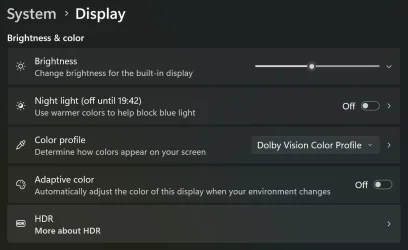
You don't have adaptive color in your display settings and turned on do you? My cursor would get a washed out pinkish hue when I left that turned on.
 

Attachments

  • Screenshot 2025-08-06 104411.webp
    Screenshot 2025-08-06 104411.webp
    38.5 KB · Views: 5

My Computers My Computers

  • At a glance

    Windows 11 25H2Intel Core Ultra 9 275HX (24-Core)64GB DDR5 6400MT/sNVIDIA GeForce RTX 5080 and Intel UHD Graphics
    OS
    Windows 11 25H2
    Computer type
    Laptop
    Manufacturer/Model
    Alienware 18 Area-51
    CPU
    Intel Core Ultra 9 275HX (24-Core)
    Motherboard
    Alienware
    Memory
    64GB DDR5 6400MT/s
    Graphics Card(s)
    NVIDIA GeForce RTX 5080 and Intel UHD Graphics
    Sound Card
    Onboard, Realtek high-performance Audio chips (ALC3329 & ALC1708))
    Monitor(s) Displays
    300HZ 18-inch QHD 500 nit Comfort View+
    Screen Resolution
    2560 x 1600
    Hard Drives
    2TB NVMe M.2 PCIe Gen 5 SSD
    Case
    Magnesium Alloy
    Cooling
    Advanced Cryo-Tech Quad-Fan Cooling system & large vapor chamber
    Keyboard
    Cherry MX ultra low profile mechanical keyboard with per key AlienFX RGB lighting
    Mouse
    Logitech MX Master 4
    Browser
    Vivaldi (main), Firefox, Chrome, Edge
    Antivirus
    MS Defender and Malwarebytes Free
  • At a glance

    Windows 11 25H2Qualcomm Snapdragon X Elite (12 Core) ARM bas...16GB LPDDR5Qualcomm Adreno X1-85
    Operating System
    Windows 11 25H2
    Computer type
    Laptop
    Manufacturer/Model
    Microsoft Surface Laptop 7
    CPU
    Qualcomm Snapdragon X Elite (12 Core) ARM based CPU
    Motherboard
    Microsoft Corp.
    Memory
    16GB LPDDR5
    Graphics card(s)
    Qualcomm Adreno X1-85
    Sound Card
    Omnisonic speakers with Dolby Atmos spatial sound
    Monitor(s) Displays
    120 Hz 13.8-inch 600 nit PixelSense Flow touchscreen
    Screen Resolution
    2304x1536
    Hard Drives
    1TB NVMe Gen 4 SSD
    Case
    Anodized Aluminum
    Cooling
    Traditional active cooling fan system
    Keyboard
    Mechanical QWERTY, backlit when in use
    Mouse
    Logitech MX Master 4 and Surface Arc Mouse
    Browser
    Vivaldi (main), Firefox, Chrome, Edge
    Antivirus
    MS Defender and Malwarebytes Free
There are no integrated graphics with that processor.

When you say always, is this a recent build and issue has existed since day 1? Did you clean install Windows 11 or is it an upgrade from Windows 10?
Does this issue occur when using another user account?

Here are things I would try in no particular order.
Make sure you have no corrupt system files that is causing this problem. Open a command prompt as administrator and type dism /online /cleanup-image /restorehealth
When complete restart. Then open command prompt as admin again and run sfc /scannow
Pay attention to the scan results to see if SFC found anything it could not repair

Boot into clean boot to eliminate software conflict causing the issue. If it doesn't happen in a clean boot, you have some software conflicting with Windows. Brink's procedure will help you weed out which one. Perform a Clean Boot in Windows 11 to Troubleshoot Software Conflicts Tutorial

Boot into safe mode. While everything will appear somewhat off kelter in safe mode as you will be using the MS default graphics driver rather than your graphics card driver so resolution will change, see if the cursor looks about like everything else or is still really womper-jawed when compared to text

I would also create another local user account to test with. If it does not occur using another account, the issue will be some sort of corruption in your user account.
Yes, the problem has been occurring since day 1 on both newly formatted Windows 10 and 11. (after Windows automatically installs the drivers from Windows Update, if I format the computer and do not install any drivers, not even from Windows Update, the cursor does not show this error)
Yes, it occurs when using another user account.
I tried cleanup-image and scannow, both without success.
When starting Windows in mode the problem does not occur.
 

My Computer My Computer

At a glance

Windows 11Ryzen 7 5700X3DHyperX Fury Beast 2x16GB 3200MHz DDR4RX 6750 XT
OS
Windows 11
Computer type
PC/Desktop
CPU
Ryzen 7 5700X3D
Motherboard
TUF GAMING X570-PLUS/BR
Memory
HyperX Fury Beast 2x16GB 3200MHz DDR4
Graphics Card(s)
RX 6750 XT
Screen Resolution
1920x1080
Hard Drives
2TB SSD FURY Renegade NVMe M.2
PSU
Corsair RM850x
You don't have adaptive color in your display settings and turned on do you? My cursor would get a washed out pinkish hue when I left that turned on.
No, it's not on, I even heard something about HDR causing a similar color problem but I don't have HDR turned on either.
 

My Computer My Computer

At a glance

Windows 11Ryzen 7 5700X3DHyperX Fury Beast 2x16GB 3200MHz DDR4RX 6750 XT
OS
Windows 11
Computer type
PC/Desktop
CPU
Ryzen 7 5700X3D
Motherboard
TUF GAMING X570-PLUS/BR
Memory
HyperX Fury Beast 2x16GB 3200MHz DDR4
Graphics Card(s)
RX 6750 XT
Screen Resolution
1920x1080
Hard Drives
2TB SSD FURY Renegade NVMe M.2
PSU
Corsair RM850x
has been occurring since day 1 on both newly formatted Windows 10 and 11. (after Windows automatically installs the drivers from Windows Update, if I format the computer and do not install any drivers, not even from Windows Update, the cursor does not show this error)
This would indicate to me it's probably an outdated driver installed by windows update. Though no way to know for certain, I would suspect graphics driver.
Only way to know is uninstall GPU driver. WU has been known to install out of date drivers.

First Disable include drivers with windows update so it won't undo your change. Enable or Disable Include Drivers with Windows Updates in Windows 11


Use DDU in safe mode to uninstall GPU driver and its software. Display Driver Uninstaller (DDU) download version 18.1.3.0

If the issue does not exist using MS driver, then you know the gpu driver is the problem. Use the manufacturer driver package to reinstall.
If the issue still exists using MS driver, it is not the graphics driver but something else and probably another driver from what you described..
FYI most of us here do not allow WU to update our drivers We manage them ourselves.
 

My Computers My Computers

  • At a glance

    Windows 11 Pro 25H2 26200.8655i9-10900 10 core 20 threads32 gbnone-Intel UHD Graphics 630
    OS
    Windows 11 Pro 25H2 26200.8655
    Computer type
    PC/Desktop
    Manufacturer/Model
    Dell Optiplex 7080
    CPU
    i9-10900 10 core 20 threads
    Motherboard
    DELL 0J37VM
    Memory
    32 gb
    Graphics Card(s)
    none-Intel UHD Graphics 630
    Sound Card
    Integrated Realtek
    Monitor(s) Displays
    Benq 27
    Screen Resolution
    2560x1440
    Hard Drives
    2x1tb Solidigm m.2 nvme /External drives 512gb Samsung m.2 sata+2tb Kingston m2.nvme
    PSU
    500w
    Case
    MT
    Cooling
    Dell Premium
    Keyboard
    Logitech wired
    Mouse
    Logitech wireless
    Internet Speed
    so slow I'm too embarrassed to tell
    Browser
    #1 Edge #2 Firefox
    Antivirus
    Defender+MWB Premium
  • At a glance

    Windows 11 Pro 24H2 26200.8457AMD Ryzen 7 6800U32 gbintegrated
    Operating System
    Windows 11 Pro 24H2 26200.8457
    Computer type
    PC/Desktop
    Manufacturer/Model
    Beelink Mini PC SER5
    CPU
    AMD Ryzen 7 6800U
    Memory
    32 gb
    Graphics card(s)
    integrated
    Sound Card
    integrated
    Monitor(s) Displays
    Benq 27
    Screen Resolution
    2560x1440
    Hard Drives
    1TB Crucial nvme
    Keyboard
    Logitech wired
    Mouse
    Logitech wireless
    Internet Speed
    still too embarrassed to tell
    Browser
    Firefox
    Antivirus
    Defender
    Other Info
    System 3 is non compliant Dell 9020 i7-4770/24gb ram Win11 PRO 26200.8457
This would indicate to me it's probably an outdated driver installed by windows update. Though no way to know for certain, I would suspect graphics driver.
Only way to know is uninstall GPU driver. WU has been known to install out of date drivers.

First Disable include drivers with windows update so it won't undo your change. Enable or Disable Include Drivers with Windows Updates in Windows 11


Use DDU in safe mode to uninstall GPU driver and its software. Display Driver Uninstaller (DDU) download version 18.1.3.0

If the issue does not exist using MS driver, then you know the gpu driver is the problem. Use the manufacturer driver package to reinstall.
If the issue still exists using MS driver, it is not the graphics driver but something else and probably another driver from what you described..
FYI most of us here do not allow WU to update our drivers We manage them ourselves.
When I entered Safe Mode, the cursor no longer presented any problems. I uninstalled the driver via DDU and restarted. When I started Windows with the Ethernet cable disconnected, the cursor did not present any problems. I installed the AMD driver I had previously downloaded, and after the installation was complete, the problem returned!

I checked the work computers for this issue. I had two computers: one with an RX 6750 XT like mine, but from a different manufacturer, and the other with an RX 5500 XT. The cursor did not present any problems on either computer.

Could it be a hardware combination causing this issue? Because my old RX 6600 also had this error. I was using it with an R7 5800X, not my current R7 5700X3D, but the motherboard and RAM were the same.
 

My Computer My Computer

At a glance

Windows 11Ryzen 7 5700X3DHyperX Fury Beast 2x16GB 3200MHz DDR4RX 6750 XT
OS
Windows 11
Computer type
PC/Desktop
CPU
Ryzen 7 5700X3D
Motherboard
TUF GAMING X570-PLUS/BR
Memory
HyperX Fury Beast 2x16GB 3200MHz DDR4
Graphics Card(s)
RX 6750 XT
Screen Resolution
1920x1080
Hard Drives
2TB SSD FURY Renegade NVMe M.2
PSU
Corsair RM850x
I installed the AMD driver I had previously downloaded, and after the installation was complete, the problem returned!
Since the problem disappeared when using the default MS driver, but came back when you installed the manufacturer driver, I would lean into it being the driver rather than the hardware, but of course weird stuff can happen.
Also, according to support site for the RX 6750 XT a new driver and Adrenalin software was issued 2 days ago. Try that one.

Still no joy, I would try an older version of the driver. Start by going back several versions. To find how to find older version click the blue "driver details" then "Learn more" on the driver support page.
 

My Computers My Computers

  • At a glance

    Windows 11 Pro 25H2 26200.8655i9-10900 10 core 20 threads32 gbnone-Intel UHD Graphics 630
    OS
    Windows 11 Pro 25H2 26200.8655
    Computer type
    PC/Desktop
    Manufacturer/Model
    Dell Optiplex 7080
    CPU
    i9-10900 10 core 20 threads
    Motherboard
    DELL 0J37VM
    Memory
    32 gb
    Graphics Card(s)
    none-Intel UHD Graphics 630
    Sound Card
    Integrated Realtek
    Monitor(s) Displays
    Benq 27
    Screen Resolution
    2560x1440
    Hard Drives
    2x1tb Solidigm m.2 nvme /External drives 512gb Samsung m.2 sata+2tb Kingston m2.nvme
    PSU
    500w
    Case
    MT
    Cooling
    Dell Premium
    Keyboard
    Logitech wired
    Mouse
    Logitech wireless
    Internet Speed
    so slow I'm too embarrassed to tell
    Browser
    #1 Edge #2 Firefox
    Antivirus
    Defender+MWB Premium
  • At a glance

    Windows 11 Pro 24H2 26200.8457AMD Ryzen 7 6800U32 gbintegrated
    Operating System
    Windows 11 Pro 24H2 26200.8457
    Computer type
    PC/Desktop
    Manufacturer/Model
    Beelink Mini PC SER5
    CPU
    AMD Ryzen 7 6800U
    Memory
    32 gb
    Graphics card(s)
    integrated
    Sound Card
    integrated
    Monitor(s) Displays
    Benq 27
    Screen Resolution
    2560x1440
    Hard Drives
    1TB Crucial nvme
    Keyboard
    Logitech wired
    Mouse
    Logitech wireless
    Internet Speed
    still too embarrassed to tell
    Browser
    Firefox
    Antivirus
    Defender
    Other Info
    System 3 is non compliant Dell 9020 i7-4770/24gb ram Win11 PRO 26200.8457
Since the problem disappeared when using the default MS driver, but came back when you installed the manufacturer driver, I would lean into it being the driver rather than the hardware, but of course weird stuff can happen.
Also, according to support site for the RX 6750 XT a new driver and Adrenalin software was issued 2 days ago. Try that one.

Still no joy, I would try an older version of the driver. Start by going back several versions. To find how to find older version click the blue "driver details" then "Learn more" on the driver support page.
It seems to be a lottery, on some PCs this happens and on others it doesn't, I was unlucky, I'll have to settle for using the cursor like this, because as I usually play new games I need to keep my video driver updated.
 

My Computer My Computer

At a glance

Windows 11Ryzen 7 5700X3DHyperX Fury Beast 2x16GB 3200MHz DDR4RX 6750 XT
OS
Windows 11
Computer type
PC/Desktop
CPU
Ryzen 7 5700X3D
Motherboard
TUF GAMING X570-PLUS/BR
Memory
HyperX Fury Beast 2x16GB 3200MHz DDR4
Graphics Card(s)
RX 6750 XT
Screen Resolution
1920x1080
Hard Drives
2TB SSD FURY Renegade NVMe M.2
PSU
Corsair RM850x
Back
Top Bottom