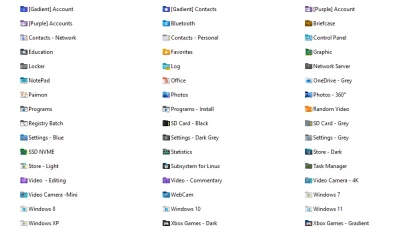
Custom Icons for Windows 11 Thread (Folders, Dropbox, Google Drive, Podcasts, NVME Drive, Steam, Adobe)


Hi,
I have just changed to notepad++ after having used metapad for many years. I do not like the default notepad++ icon because it resembles my image file icons too closely. Therefore, I want to change its icon but I'm having trouble replacing it despite having used 2 different programs specifically designed for the job, Resource Hacker, and manually editing the txtfile icon path in regedit. See How can I change an application's icon?

Any suggestions would be very welcome, please.
 

My Computer

System One

  • OS
    Windows 11
    Computer type
    Laptop
    Manufacturer/Model
    Alienware A51M R2
    CPU
    Intel(R) Core(TM) i9-10900K CPU @ 3.70GHz
    Memory
    32,0 GB
    Graphics Card(s)
    Nvidia GeForce RTX2080 Super
    Sound Card
    Realtek
    Screen Resolution
    4K
    Hard Drives
    2TB (2x 1TB PCle M.2 SSD) RAID 0 [Boot] + 2TB (2x 1TB
    PCle M.2 SSD) Non-Raid [Storage]
New user folder


Users.webp
 

Attachments

My Computer

System One

  • OS
    Windows 11 Pro Version 23H2 (OS Build 22631. 3374)
    Computer type
    PC/Desktop
    Manufacturer/Model
    Custome Built
    CPU
    intel i7 13th 13700k
    Motherboard
    ROG STRIX Z790-F GAMING WIFI
    Memory
    VENGEANCE® 64GB (2x32GB) DDR5 DRAM 5600MT/s CL40 Memory Kit
    Graphics Card(s)
    NVidia founders edition 3080 ti
    Monitor(s) Displays
    27" Odyssey QHD 165Hz 1ms HDR10 Gaming Monitor
    Screen Resolution
    2k
    Keyboard
    Logitech G512
    Mouse
    Logitech G502 Hero
    Internet Speed
    1GB Fibers
    Browser
    Edge
    Antivirus
    ESET Samrt Security
Hi @QuicktellPro,

I've been able to change icons by replacing them directly in the app with ResourceHacker without any trouble.

For example 7zip with a blue folder theme (icons using the app),
and sView Media Player with the original Windows Media Player logo (icons of the app).

You have to run RH as administrator, spot and replace the icon (group).
Check the dimensions of the icon, there could be a difference with the formats used (256, 64, 48, 40...)
There were quite a few in these 2 programs I edited, so I had to adapt them (removed a few and create a 96x96 one...)
I didn't try actually to replace the icon without those changes, so I can't tell if it can work that way.

You may have to Rebuild Icon Cache to see the result applied.
 

My Computers

System One System Two

  • OS
    Windows 10 & 11 LTSC 3xBoot 1809 21H2 24H2
    Computer type
    PC/Desktop
    Manufacturer/Model
    Self-made 2013
    CPU
    Intel Core i5-2550K
    Motherboard
    Intel DH67CL
    Memory
    8 GB
    Graphics Card(s)
    NVIDIA GeForce GTS 450
    Sound Card
    EmuPMX
    Monitor(s) Displays
    16/9 Samsung + 4/3 iiyama
    Screen Resolution
    1360 x 768 + 1024 x 768
    Hard Drives
    Main SSD: Samsung 250 Gb
    Secondary HDDs: Western Digital
    (Purple 4 Tb + Blue 2 Tb) x2
    + Green 0.5 Tb
    Case
    Antec
    Keyboard
    Dell
    Mouse
    Advance
    Browser
    Brave
    Antivirus
    Windows Security
    Other Info
    + Portable Cleanup Utilities :

    AdwCleaner
    ZHP Cleaner (+Diag)
    Kaspersky Virus Removal Tool
    CCleaner
  • Operating System
    Windows 11 Home
    Computer type
    Laptop
    Manufacturer/Model
    HP
    Other Info
    Using W11 OS on customers' computers more and more often, and sometimes on my mum's new laptop.

My Computer

System One

  • OS
    Windows 11
    Computer type
    Laptop
    Manufacturer/Model
    Alienware A51M R2
    CPU
    Intel(R) Core(TM) i9-10900K CPU @ 3.70GHz
    Memory
    32,0 GB
    Graphics Card(s)
    Nvidia GeForce RTX2080 Super
    Sound Card
    Realtek
    Screen Resolution
    4K
    Hard Drives
    2TB (2x 1TB PCle M.2 SSD) RAID 0 [Boot] + 2TB (2x 1TB
    PCle M.2 SSD) Non-Raid [Storage]

Hey all.

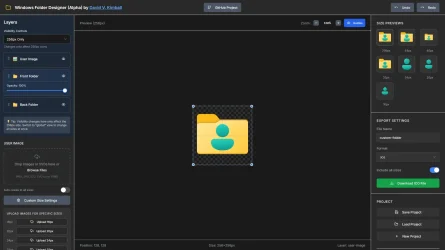
It's in Alpha, and very buggy, but I have a new tool I'm working on:

Drum roll, please.... 🥁

Windows Folder Designer
1755240638154.webp

The main use case is more easily getting particular icons for each size like how Windows handles it - which I haven't found any other tool doing properly that made it easy enough.

You can check it out here:

Windows Folder Designer

And here's the project on GitHub. It's open source so you can see how I just vibe coded my way to its existence.

Pull requests and improvement suggestions are welcome.

I'll update the first post in this thread with a new thread on this piece of software if there's interest.

@jbcarreon123 - maybe you'd be interested?
 

My Computers

System One System Two

  • OS
    Windows 11
    Computer type
    PC/Desktop
    CPU
    Intel Core i7-8700
    Motherboard
    LGA1151 Z370 ATX
    Memory
    Kingston HyperX Fury DDR4 8GB (x4 for 32GB)
    Graphics Card(s)
    NVIDIA - GeForce RTX 4080
    Sound Card
    NVIDIA High Definition Audio
    Monitor(s) Displays
    Monitor 1: ASUS VG248QE 24” (1920x1080 144Hz 1ms), Monitor 2: Dell P2715Q 27” (3840x2160 60Hz), Monitor 3: Dell U2412M (1920x1200 60Hz)
    Screen Resolution
    1920 x 1080, 3840 x 2160, and 1920 x 1200 respesctively.
    Hard Drives
    NVME: HP EX920 M.2 1TB
    SSD: Samsung 680 EVO 4TB
    HDD 1: Hitachi HGST HUH728080ALE600 8TB
    HDD 2: Hitachi HGST HUH728080ALE600 8TB
    PSU
    CORSAIR RM1000x (1000W)
    Case
    Cooler Master HAF 912
    Keyboard
    Ultimate Hacking Keybord 60 V2
    Mouse
    Logitech MX Vertical
    Internet Speed
    1,200 Mbps download, 40 Mbps upload
    Browser
    Mozilla Firefox
    Antivirus
    MalwareBytes
    Other Info
    View full equipment here: http://davidvkimball.com/setup
  • Operating System
    Windows 11 Pro
    Computer type
    Tablet
    Manufacturer/Model
    Microsoft Surface Pro 3
    CPU
    Intel Core i5
    Memory
    4GB
    Monitor(s) Displays
    10.8” ClearType Full HD Plus Display
    Screen Resolution
    1920 x 1280
    Hard Drives
    128GB SSD
    Browser
    Firefox
    Antivirus
    MalwareBytes
    Other Info
    Originally shipped with Windows 8.1 Pro in 2014, upgraded to 10, and now Windows 11.
Woah i want to try as well! where do i download it?
You don't download it.
You use it on line.
 

My Computers

System One System Two

  • OS
    All Branches but Release
    Computer type
    Laptop
    Manufacturer/Model
    Acer Nitro ANV15-51
    CPU
    AMD Ryzen 7 7735HS 3200-4500 Mhz 8 cores x 2
    Motherboard
    Sportage_RBH
    Memory
    32 GB DDR5
    Graphics Card(s)
    Radeon Graphic / NVIDIA GeForce RTX 4060 8 GB GDDR6
    Sound Card
    AMD/Realtek(R) Audio
    Monitor(s) Displays
    Integrated Monitor (15.3"vis)
    Screen Resolution
    FHD 1920X1080 16:9 144Hz
    Hard Drives
    KINGSTON OM8SEP4512Q-AA 1TB
    Western Digital 256GB
    PSU
    19V DC 6.32 A 120 W
    Cooling
    Dual Fans
    Mouse
    MS Bluetooth
    Internet Speed
    Fiber 1GB Cox -us & 1GB Orange-fr
    Browser
    Edge Canary- Firefox Nightly-Chrome Dev-Chrome Dev
    Antivirus
    Windows Defender
  • Operating System
    Windows 11 Beta
    Computer type
    Laptop
    Manufacturer/Model
    Asus X751BP
    CPU
    AMD A9-9420
    Memory
    8 GB of DDR4
    Graphics card(s)
    AMD Radeon R5
    Screen Resolution
    1600x900
    Hard Drives
    Seagate 1 TB
Hey all.

It's in Alpha, and very buggy, but I have a new tool I'm working on:

Drum roll, please.... 🥁

Windows Folder Designer
View attachment 142322

The main use case is more easily getting particular icons for each size like how Windows handles it - which I haven't found any other tool doing properly that made it easy enough.

You can check it out here:

Windows Folder Designer

And here's the project on GitHub. It's open source so you can see how I just vibe coded my way to its existence.

Pull requests and improvement suggestions are welcome.

I'll update the first post in this thread with a new thread on this piece of software if there's interest.

@jbcarreon123 - maybe you'd be interested?
I already have a recommendation. Would it be possible to add the shadow and edge lighting images to the "Front Folder" layer when a custom color is applied?

The shadow and edge lighting images I'm referring to are from this post.

Note: This would only apply when the custom color is active, as the default image already has the shadow and edge lighting. It could also be nice if this was a toggle, if I haven't recommended enough changes.😁
 

My Computer

System One

  • OS
    Windows 11
    Computer type
    Laptop
    Manufacturer/Model
    Lenovo
I already have a recommendation. Would it be possible to add the shadow and edge lighting images to the "Front Folder" layer when a custom color is applied?

The shadow and edge lighting images I'm referring to are from this post.


Note: This would only apply when the custom color is active, as the default image already has the shadow and edge lighting. It could also be nice if this was a toggle, if I haven't recommended enough changes.😁
Yeah that's possible. What I'm noticing though is that shadow and edge lighting don't line up perfectly with my folder versions, is it possible you could get me .PNGs of each of the supported sizes for each one *and* have it lined up in the right spot? Since the front part of the folder was custom-made, the highlight and shadow may need to be moved and adjusted to fit over it first.

Not sure what your capabilities are, but maybe @TizianoMad would be willing to help. I could probably do this myself, but I have limited free time right now.

Once those assets are made, I might be able to add them to it with the behavior you described.
 

My Computers

System One System Two

  • OS
    Windows 11
    Computer type
    PC/Desktop
    CPU
    Intel Core i7-8700
    Motherboard
    LGA1151 Z370 ATX
    Memory
    Kingston HyperX Fury DDR4 8GB (x4 for 32GB)
    Graphics Card(s)
    NVIDIA - GeForce RTX 4080
    Sound Card
    NVIDIA High Definition Audio
    Monitor(s) Displays
    Monitor 1: ASUS VG248QE 24” (1920x1080 144Hz 1ms), Monitor 2: Dell P2715Q 27” (3840x2160 60Hz), Monitor 3: Dell U2412M (1920x1200 60Hz)
    Screen Resolution
    1920 x 1080, 3840 x 2160, and 1920 x 1200 respesctively.
    Hard Drives
    NVME: HP EX920 M.2 1TB
    SSD: Samsung 680 EVO 4TB
    HDD 1: Hitachi HGST HUH728080ALE600 8TB
    HDD 2: Hitachi HGST HUH728080ALE600 8TB
    PSU
    CORSAIR RM1000x (1000W)
    Case
    Cooler Master HAF 912
    Keyboard
    Ultimate Hacking Keybord 60 V2
    Mouse
    Logitech MX Vertical
    Internet Speed
    1,200 Mbps download, 40 Mbps upload
    Browser
    Mozilla Firefox
    Antivirus
    MalwareBytes
    Other Info
    View full equipment here: http://davidvkimball.com/setup
  • Operating System
    Windows 11 Pro
    Computer type
    Tablet
    Manufacturer/Model
    Microsoft Surface Pro 3
    CPU
    Intel Core i5
    Memory
    4GB
    Monitor(s) Displays
    10.8” ClearType Full HD Plus Display
    Screen Resolution
    1920 x 1280
    Hard Drives
    128GB SSD
    Browser
    Firefox
    Antivirus
    MalwareBytes
    Other Info
    Originally shipped with Windows 8.1 Pro in 2014, upgraded to 10, and now Windows 11.
Hi @davidvkimball & @IveBenGamin

I haven't looked at the program yet, but will take time for it this week.

In fact, the folder templates (both separate front & back) should stay in their fixed alignment, in each 8 sizes.
You can easy extract the 8 PNG files of the 4 separate parts I made.
(with IcoFX, select each format, right click > extract > choose PNG /name them xx256, xx48, xx40...)

For example, once you have the 4 separate 256 images, paste them one upon the other, and it will restore identically the original windows folder.
Of course, all separate 8 images of each part respect the correct alignment, so you proceed the same way with them for each size.

David, check them out when you have time, if it can help you correct the alignment, I'll have a look too and come back to you.
It looks you haven't included the 48x48 format, it is pretty essentiel for the desktop and explorer display.

When I edited folders with replacing the color with a custom picture, I first had to convert it (in 8 sizes) and sometimes work on the zoom to get the best pixel fit, and I "kind of" cropped it using the opacity only of the template. Doing this in all 8 sizes x2 (front & back) took me quite a while, and of corse an app which calibrates all this would ease the task consequently to reproduce the exact features of the original, in order to look nice in any dimension in the File explorer and task bar.

The feature of pasting a logo (with transparent background) on top is something that should work in a similar way, with the possibility of readjusting the zoom and (mainly vertical) alignment on each 8 size.

Pasting the opacity of the folder (part) template is just making a "perfect crop" of the original design, I think it's the best concept for custom pics.
Then when you paste the front part upon the back one, there's no glitch, it's clean straight away.

The feature of choosing your own color (in app) and brightness, would be a good thing.
reproducing the same light variation aspect, with for example possible 2 color variation.

Also, the "border effect & shadow" could need some increase depending on the brightness of the color(s) used.
(the ones I made fit the original yellow folder, but I noticed intensity's a bit different with other colors).


That's it for my recommendations today !
I'll be happy to help, maybe try something myself if it's possible.

See you soon David and all the team.
 

My Computers

System One System Two

  • OS
    Windows 10 & 11 LTSC 3xBoot 1809 21H2 24H2
    Computer type
    PC/Desktop
    Manufacturer/Model
    Self-made 2013
    CPU
    Intel Core i5-2550K
    Motherboard
    Intel DH67CL
    Memory
    8 GB
    Graphics Card(s)
    NVIDIA GeForce GTS 450
    Sound Card
    EmuPMX
    Monitor(s) Displays
    16/9 Samsung + 4/3 iiyama
    Screen Resolution
    1360 x 768 + 1024 x 768
    Hard Drives
    Main SSD: Samsung 250 Gb
    Secondary HDDs: Western Digital
    (Purple 4 Tb + Blue 2 Tb) x2
    + Green 0.5 Tb
    Case
    Antec
    Keyboard
    Dell
    Mouse
    Advance
    Browser
    Brave
    Antivirus
    Windows Security
    Other Info
    + Portable Cleanup Utilities :

    AdwCleaner
    ZHP Cleaner (+Diag)
    Kaspersky Virus Removal Tool
    CCleaner
  • Operating System
    Windows 11 Home
    Computer type
    Laptop
    Manufacturer/Model
    HP
    Other Info
    Using W11 OS on customers' computers more and more often, and sometimes on my mum's new laptop.
Yeah that's possible. What I'm noticing though is that shadow and edge lighting don't line up perfectly with my folder versions, is it possible you could get me .PNGs of each of the supported sizes for each one *and* have it lined up in the right spot? Since the front part of the folder was custom-made, the highlight and shadow may need to be moved and adjusted to fit over it first.

Not sure what your capabilities are, but maybe @TizianoMad would be willing to help. I could probably do this myself, but I have limited free time right now.

Once those assets are made, I might be able to add them to it with the behavior you described.
The edge lighting file that @TizianoMad had worked just fine, but the shadow was a little wonky, so I made another one using some of the default Windows icons, then lined it up by referencing the folder designer app. So with that, here is the file for the edge lighting (@TizianoMad's, not mine), the shadow, and another of them combined, which will probably be most useful.

Edge Lighting.webpShadow.webpAll Edge Effects.webp
 

My Computer

System One

  • OS
    Windows 11
    Computer type
    Laptop
    Manufacturer/Model
    Lenovo
The edge lighting file that @TizianoMad had worked just fine, but the shadow was a little wonky, so I made another one using some of the default Windows icons, then lined it up by referencing the folder designer app. So with that, here is the file for the edge lighting (@TizianoMad's, not mine), the shadow, and another of them combined, which will probably be most useful.

View attachment 143425View attachment 143426View attachment 143427
That's very helpful, thank you! However I noticed that it's only on the largest size - it doesn't include the other .ICO sizes. Is it possible to get those as well?
 

My Computers

System One System Two

  • OS
    Windows 11
    Computer type
    PC/Desktop
    CPU
    Intel Core i7-8700
    Motherboard
    LGA1151 Z370 ATX
    Memory
    Kingston HyperX Fury DDR4 8GB (x4 for 32GB)
    Graphics Card(s)
    NVIDIA - GeForce RTX 4080
    Sound Card
    NVIDIA High Definition Audio
    Monitor(s) Displays
    Monitor 1: ASUS VG248QE 24” (1920x1080 144Hz 1ms), Monitor 2: Dell P2715Q 27” (3840x2160 60Hz), Monitor 3: Dell U2412M (1920x1200 60Hz)
    Screen Resolution
    1920 x 1080, 3840 x 2160, and 1920 x 1200 respesctively.
    Hard Drives
    NVME: HP EX920 M.2 1TB
    SSD: Samsung 680 EVO 4TB
    HDD 1: Hitachi HGST HUH728080ALE600 8TB
    HDD 2: Hitachi HGST HUH728080ALE600 8TB
    PSU
    CORSAIR RM1000x (1000W)
    Case
    Cooler Master HAF 912
    Keyboard
    Ultimate Hacking Keybord 60 V2
    Mouse
    Logitech MX Vertical
    Internet Speed
    1,200 Mbps download, 40 Mbps upload
    Browser
    Mozilla Firefox
    Antivirus
    MalwareBytes
    Other Info
    View full equipment here: http://davidvkimball.com/setup
  • Operating System
    Windows 11 Pro
    Computer type
    Tablet
    Manufacturer/Model
    Microsoft Surface Pro 3
    CPU
    Intel Core i5
    Memory
    4GB
    Monitor(s) Displays
    10.8” ClearType Full HD Plus Display
    Screen Resolution
    1920 x 1280
    Hard Drives
    128GB SSD
    Browser
    Firefox
    Antivirus
    MalwareBytes
    Other Info
    Originally shipped with Windows 8.1 Pro in 2014, upgraded to 10, and now Windows 11.
That's very helpful, thank you! However I noticed that it's only on the largest size - it doesn't include the other .ICO sizes. Is it possible to get those as well?
Not with what I know how to do. All I had was the 256px PNGs, and placing it into the folder maker seemed to scale down fine.

TL;DR, I'm not good enough yet to help there.
 

My Computer

System One

  • OS
    Windows 11
    Computer type
    Laptop
    Manufacturer/Model
    Lenovo
There you are.

As I mentioned, both border and shadow may need increasing depending one the color used.
I tried mixing those 2 effect in one image, but it seems to alterate the result. There could be a cleaner way of making it.
 

Attachments

My Computers

System One System Two

  • OS
    Windows 10 & 11 LTSC 3xBoot 1809 21H2 24H2
    Computer type
    PC/Desktop
    Manufacturer/Model
    Self-made 2013
    CPU
    Intel Core i5-2550K
    Motherboard
    Intel DH67CL
    Memory
    8 GB
    Graphics Card(s)
    NVIDIA GeForce GTS 450
    Sound Card
    EmuPMX
    Monitor(s) Displays
    16/9 Samsung + 4/3 iiyama
    Screen Resolution
    1360 x 768 + 1024 x 768
    Hard Drives
    Main SSD: Samsung 250 Gb
    Secondary HDDs: Western Digital
    (Purple 4 Tb + Blue 2 Tb) x2
    + Green 0.5 Tb
    Case
    Antec
    Keyboard
    Dell
    Mouse
    Advance
    Browser
    Brave
    Antivirus
    Windows Security
    Other Info
    + Portable Cleanup Utilities :

    AdwCleaner
    ZHP Cleaner (+Diag)
    Kaspersky Virus Removal Tool
    CCleaner
  • Operating System
    Windows 11 Home
    Computer type
    Laptop
    Manufacturer/Model
    HP
    Other Info
    Using W11 OS on customers' computers more and more often, and sometimes on my mum's new laptop.
There you are.

As I mentioned, both border and shadow may need increasing depending one the color used.
I tried mixing those 2 effect in one image, but it seems to alterate the result. There could be a cleaner way of making it.
Thanks, this is perfect. I'll get to it when I can.
 

My Computers

System One System Two

  • OS
    Windows 11
    Computer type
    PC/Desktop
    CPU
    Intel Core i7-8700
    Motherboard
    LGA1151 Z370 ATX
    Memory
    Kingston HyperX Fury DDR4 8GB (x4 for 32GB)
    Graphics Card(s)
    NVIDIA - GeForce RTX 4080
    Sound Card
    NVIDIA High Definition Audio
    Monitor(s) Displays
    Monitor 1: ASUS VG248QE 24” (1920x1080 144Hz 1ms), Monitor 2: Dell P2715Q 27” (3840x2160 60Hz), Monitor 3: Dell U2412M (1920x1200 60Hz)
    Screen Resolution
    1920 x 1080, 3840 x 2160, and 1920 x 1200 respesctively.
    Hard Drives
    NVME: HP EX920 M.2 1TB
    SSD: Samsung 680 EVO 4TB
    HDD 1: Hitachi HGST HUH728080ALE600 8TB
    HDD 2: Hitachi HGST HUH728080ALE600 8TB
    PSU
    CORSAIR RM1000x (1000W)
    Case
    Cooler Master HAF 912
    Keyboard
    Ultimate Hacking Keybord 60 V2
    Mouse
    Logitech MX Vertical
    Internet Speed
    1,200 Mbps download, 40 Mbps upload
    Browser
    Mozilla Firefox
    Antivirus
    MalwareBytes
    Other Info
    View full equipment here: http://davidvkimball.com/setup
  • Operating System
    Windows 11 Pro
    Computer type
    Tablet
    Manufacturer/Model
    Microsoft Surface Pro 3
    CPU
    Intel Core i5
    Memory
    4GB
    Monitor(s) Displays
    10.8” ClearType Full HD Plus Display
    Screen Resolution
    1920 x 1280
    Hard Drives
    128GB SSD
    Browser
    Firefox
    Antivirus
    MalwareBytes
    Other Info
    Originally shipped with Windows 8.1 Pro in 2014, upgraded to 10, and now Windows 11.
Thanks, this is perfect. I'll get to it when I can.
Welcome David.

By the way, the "Front - no shadow" part should be named "without border effect"
Only the "Back" is original. (note that it is not the propper back "thumbnail folder" wich is strangely offset by 1 pixel in some formats)

I made this separation for 2 main reasons:
  • Changing the color of the folder (with any tool) often reduces these effects, so it's better to work on a plain folder without them and then add them when the colors are set, with some increase if needed.
  • Replacing totally each back & front color with a custom image :
    
In order to crop a custom picture, I had to copy the opacity only from the original template (back + front), and paste it on my picture (using Paint.NET).


I now remember why mixing the 2 effects doesn't suit :
It is because of the rounded and curved lines which have a precise opacity variation.
No other way out, I tryed out different ways and only that combination makes it right.
The "Front" has always priority upon the shadow, and the "Border" has always priority upon the "Front".
(Back >> Shadow >> Front >> Border)
 

My Computers

System One System Two

  • OS
    Windows 10 & 11 LTSC 3xBoot 1809 21H2 24H2
    Computer type
    PC/Desktop
    Manufacturer/Model
    Self-made 2013
    CPU
    Intel Core i5-2550K
    Motherboard
    Intel DH67CL
    Memory
    8 GB
    Graphics Card(s)
    NVIDIA GeForce GTS 450
    Sound Card
    EmuPMX
    Monitor(s) Displays
    16/9 Samsung + 4/3 iiyama
    Screen Resolution
    1360 x 768 + 1024 x 768
    Hard Drives
    Main SSD: Samsung 250 Gb
    Secondary HDDs: Western Digital
    (Purple 4 Tb + Blue 2 Tb) x2
    + Green 0.5 Tb
    Case
    Antec
    Keyboard
    Dell
    Mouse
    Advance
    Browser
    Brave
    Antivirus
    Windows Security
    Other Info
    + Portable Cleanup Utilities :

    AdwCleaner
    ZHP Cleaner (+Diag)
    Kaspersky Virus Removal Tool
    CCleaner
  • Operating System
    Windows 11 Home
    Computer type
    Laptop
    Manufacturer/Model
    HP
    Other Info
    Using W11 OS on customers' computers more and more often, and sometimes on my mum's new laptop.
Hi again,

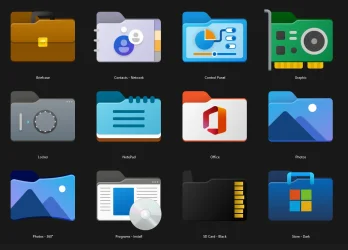
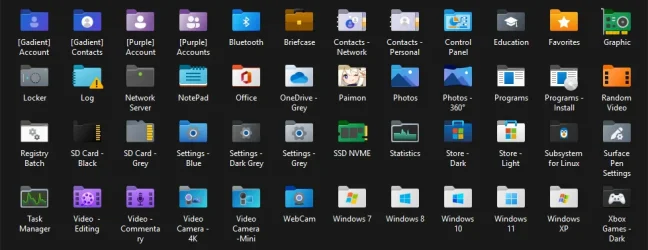
Here are a few icons I reworked quite a while ago, mainly from @JangOetama's amazing pieces of art.
  • Cleaned up effects, lines and details.
  • Repositioning and scaling
  • 7 small conversions recreated


Rework sample Big.webp


Rework sample.webp


Rework sample Small.webp


It took me a lot of time, so I couldn't edit everything from the tread.
I have an "Office pack" which is almost finished.


Quite a few of these can't be created with a basic icon app.
These edited icons will now appear clear and sharp in File Explorer, taskbar and desktop.


Hope you like this sample.
(ready portable folders, hidden icon and desktop.ini file in each of them)
 

Attachments

Last edited:

My Computers

System One System Two

  • OS
    Windows 10 & 11 LTSC 3xBoot 1809 21H2 24H2
    Computer type
    PC/Desktop
    Manufacturer/Model
    Self-made 2013
    CPU
    Intel Core i5-2550K
    Motherboard
    Intel DH67CL
    Memory
    8 GB
    Graphics Card(s)
    NVIDIA GeForce GTS 450
    Sound Card
    EmuPMX
    Monitor(s) Displays
    16/9 Samsung + 4/3 iiyama
    Screen Resolution
    1360 x 768 + 1024 x 768
    Hard Drives
    Main SSD: Samsung 250 Gb
    Secondary HDDs: Western Digital
    (Purple 4 Tb + Blue 2 Tb) x2
    + Green 0.5 Tb
    Case
    Antec
    Keyboard
    Dell
    Mouse
    Advance
    Browser
    Brave
    Antivirus
    Windows Security
    Other Info
    + Portable Cleanup Utilities :

    AdwCleaner
    ZHP Cleaner (+Diag)
    Kaspersky Virus Removal Tool
    CCleaner
  • Operating System
    Windows 11 Home
    Computer type
    Laptop
    Manufacturer/Model
    HP
    Other Info
    Using W11 OS on customers' computers more and more often, and sometimes on my mum's new laptop.
Hey all.

It's in Alpha, and very buggy, but I have a new tool I'm working on:

Drum roll, please.... 🥁

Windows Folder Designer
View attachment 142322

The main use case is more easily getting particular icons for each size like how Windows handles it - which I haven't found any other tool doing properly that made it easy enough.

You can check it out here:

Windows Folder Designer

And here's the project on GitHub. It's open source so you can see how I just vibe coded my way to its existence.

Pull requests and improvement suggestions are welcome.

I'll update the first post in this thread with a new thread on this piece of software if there's interest.

@jbcarreon123 - maybe you'd be interested?
Nice! Is there any chance you could make the color change on the front more fluid? Right now, it just switches colors without any gradients
 

My Computer

System One

  • OS
    Windows 11 Pro Version 23H2 (OS Build 22631. 3374)
    Computer type
    PC/Desktop
    Manufacturer/Model
    Custome Built
    CPU
    intel i7 13th 13700k
    Motherboard
    ROG STRIX Z790-F GAMING WIFI
    Memory
    VENGEANCE® 64GB (2x32GB) DDR5 DRAM 5600MT/s CL40 Memory Kit
    Graphics Card(s)
    NVidia founders edition 3080 ti
    Monitor(s) Displays
    27" Odyssey QHD 165Hz 1ms HDR10 Gaming Monitor
    Screen Resolution
    2k
    Keyboard
    Logitech G512
    Mouse
    Logitech G502 Hero
    Internet Speed
    1GB Fibers
    Browser
    Edge
    Antivirus
    ESET Samrt Security

Latest Support Threads

Back
Top Bottom