Solved Custom minimal partitioning layout... still possible?


nuc

New member
Local time
1:25 AM
Posts
5
OS
Win11 Pro
Hi folks!

I've just attempted to install Win11 for the first time, but it seems Win11 does not accept my custom partitioning layout as it used to!?

My custom (proven) partitioning layout for the last (15?) years has been:
Partition 1Windows (ntfs)
Partition 2Linux
Partition 3Other Linux
Partition 4BOOT,ESP (fat32)

I have always purposely crafted this layout with GParted before attempting any Windows installation, to prevent Windows from "auto-generating" it's own set of partitions.

This has always worked, up to Win10!
But with the Win11 installer I am getting: "There is an error selecting this partition for install. Please select a different partition or refresh selections."
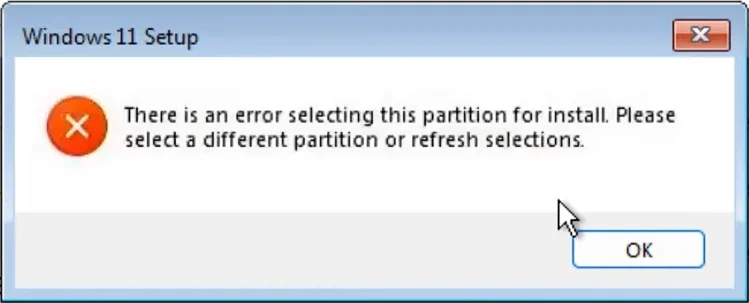
error-part-1343585226.webp

The only workaround I found, was to "Delete Partition 1"in the installer, and then press "Partition".

But this only led Windows to again create it's own set of partitions... (which is what I wanted to prevent):

Partition 1 (added by the installer)"MSR (Reserved)" 16 MB
Partition 2Windows (ntfs)
Partition 3 (added by the installer)Windows Recovery (ntfs) ~800MB
Partition 4Linux
Partition 5Other Linux
Partition 6BOOT,ESP (fat32)

(Not sure Windows actually even used the BOOT partition for it's bootloader??)


Is there any way to make my layout work for Win11?

My ideas:
  • some installer tweak or "hack"?
  • install Win10 first, then upgrade to Win11?
  • an older Win11 ISO?
 
Windows Build/Version
25H2v2 ISO
Last edited:

My Computer My Computer

At a glance

Win11 Pro
OS
Win11 Pro
Computer type
PC/Desktop
Hello @nuc and welcome to ElevenForum. :-)

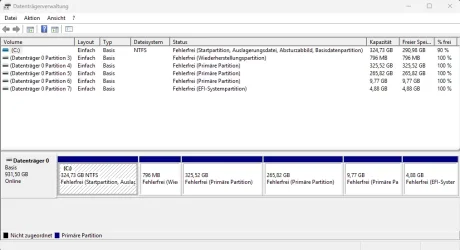
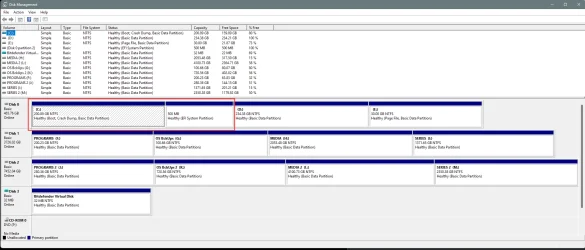
It would help if you posted a screenshot of Disk Management stretched out horizontally, so we can read everything.

The default Win 11 partitions on a GPT disk, look like this...

00000 Default Windows partitions.webp


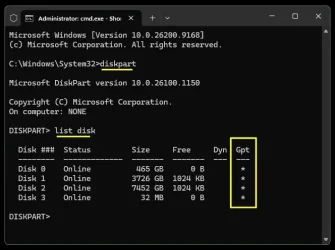
The following commands will tell you if your disks are MBR or GPT...

Image2.webp


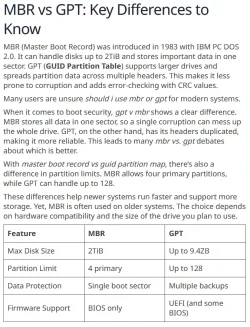
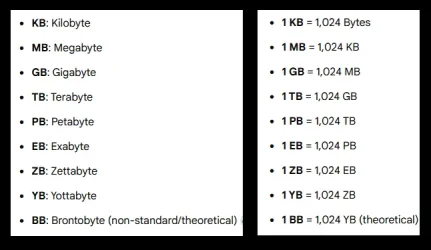
000000 GPT vs MBR.webp Image3.webp


Things we need to know...

1. Whether your disk(s) are MBR or GPT
2. And the Disk Management screenshot
 
Last edited:

My Computers My Computers

  • At a glance

    Win 11 Home ♦♦♦26200.9168 ♦♦♦♦♦♦♦25H2AMD Ryzen 7 3700XG.Skill (F4-3200C14D-16GTZKW)EVGA RTX 2070 (08G-P4-2171-KR)
    OS
    Win 11 Home ♦♦♦26200.9168 ♦♦♦♦♦♦♦25H2
    Computer type
    PC/Desktop
    Manufacturer/Model
    Built by Ghot® [May 2020]
    CPU
    AMD Ryzen 7 3700X
    Motherboard
    Asus Pro WS X570-ACE (BIOS 5302)
    Memory
    G.Skill (F4-3200C14D-16GTZKW)
    Graphics Card(s)
    EVGA RTX 2070 (08G-P4-2171-KR)
    Sound Card
    Realtek ALC1220P / ALC S1220A
    Monitor(s) Displays
    Dell U3011 30"
    Screen Resolution
    2560 x 1600
    Hard Drives
    2x Samsung 860 EVO 500GB,
    WD 4TB Black FZBX - SATA III,
    WD 8TB Black FZBX - SATA III,
    DRW-24B1ST CD/DVD Burner
    PSU
    PC Power & Cooling 750W Quad EPS12V
    Case
    Cooler Master ATCS 840 Tower
    Cooling
    CM Hyper 212 EVO (push/pull)
    Keyboard
    Ducky DK9008 Shine II Blue LED
    Mouse
    Logitech Optical M-100
    Internet Speed
    300/300
    Browser
    Firefox (latest)
    Antivirus
    Bitdefender Total Security
    Other Info
    Speakers: Klipsch Pro Media 2.1
  • At a glance

    Windows XP Pro 32bit w/SP3AMD Athlon 64 X2 5000+ (OC'd @ 3.2Ghz)TWIN2X2048-6400C4DHX (2 x 1GB, DDR2 800)EVGA 256-P2-N758-TR GeForce 8600GT SSC
    Operating System
    Windows XP Pro 32bit w/SP3
    Computer type
    PC/Desktop
    Manufacturer/Model
    Built by Ghot® (not in use)
    CPU
    AMD Athlon 64 X2 5000+ (OC'd @ 3.2Ghz)
    Motherboard
    ASUS M2N32-SLI Deluxe Wireless Edition
    Memory
    TWIN2X2048-6400C4DHX (2 x 1GB, DDR2 800)
    Graphics card(s)
    EVGA 256-P2-N758-TR GeForce 8600GT SSC
    Sound Card
    Onboard
    Monitor(s) Displays
    ViewSonic G90FB Black 19" Professional (CRT)
    Screen Resolution
    up to 2048 x 1536
    Hard Drives
    WD 36GB 10,000rpm Raptor SATA
    Seagate 80GB 7200rpm SATA
    Lite-On LTR-52246S CD/RW
    Lite-On LH-18A1P CD/DVD Burner
    PSU
    PC Power & Cooling Silencer 750 Quad EPS12V
    Case
    Generic Beige case, 80mm fans
    Cooling
    ZALMAN 9500A 92mm CPU Cooler
    Keyboard
    Logitech Classic Keybooard 200
    Mouse
    Logitech Optical M-BT96a
    Internet Speed
    300/300
    Browser
    Firefox 3.x ??
    Antivirus
    Symantec (Norton)
    Other Info
    Still assembled, still runs. Haven't turned it on for 15 years?
  • Like
Reactions: nuc
Hi Ghot thank you, happy to be here! :)

Do you mean this?:
Screenshot 2026-08-21 235702.webp
(the 10GB partition is swap btw, forgot to mention it earlier)
It doesn't show the MSR partition in that tool for some reason (it is there in GParted). But it shows the recovery.

The default Win 11 partitions on a GPT disk, look like this...

View attachment 180589
Ah, that helps a bunch already! So then, Win11 at least uses my pre-deployed EFI partition. It just created the MSR and Recovery.

My disk is using the GPT table:
Screenshot 2026-08-22 000435.webp
 

My Computer My Computer

At a glance

Win11 Pro
OS
Win11 Pro
Computer type
PC/Desktop
The only partitions you MUST have to boot Windows are the C:\ partition and the EFI partition.
The Recovery partition is nice if Windows becomes corrupt, and won't boot.
You don't really need the MSR partition.

I use 3rd party backup software, so I don't keep the Recovery partition.


My Disk Management, looks like this...

Image1.webp


If possible, I would remove everything from your disk (Linux also), and install Windows 11.
Get that setup as you like... THEN install your Linux's

I think all of the dual boot tutorials recommend installing Windows first, then installing Linux.


Others on this forum may have different ideas.
 
Last edited:

My Computers My Computers

  • At a glance

    Win 11 Home ♦♦♦26200.9168 ♦♦♦♦♦♦♦25H2AMD Ryzen 7 3700XG.Skill (F4-3200C14D-16GTZKW)EVGA RTX 2070 (08G-P4-2171-KR)
    OS
    Win 11 Home ♦♦♦26200.9168 ♦♦♦♦♦♦♦25H2
    Computer type
    PC/Desktop
    Manufacturer/Model
    Built by Ghot® [May 2020]
    CPU
    AMD Ryzen 7 3700X
    Motherboard
    Asus Pro WS X570-ACE (BIOS 5302)
    Memory
    G.Skill (F4-3200C14D-16GTZKW)
    Graphics Card(s)
    EVGA RTX 2070 (08G-P4-2171-KR)
    Sound Card
    Realtek ALC1220P / ALC S1220A
    Monitor(s) Displays
    Dell U3011 30"
    Screen Resolution
    2560 x 1600
    Hard Drives
    2x Samsung 860 EVO 500GB,
    WD 4TB Black FZBX - SATA III,
    WD 8TB Black FZBX - SATA III,
    DRW-24B1ST CD/DVD Burner
    PSU
    PC Power & Cooling 750W Quad EPS12V
    Case
    Cooler Master ATCS 840 Tower
    Cooling
    CM Hyper 212 EVO (push/pull)
    Keyboard
    Ducky DK9008 Shine II Blue LED
    Mouse
    Logitech Optical M-100
    Internet Speed
    300/300
    Browser
    Firefox (latest)
    Antivirus
    Bitdefender Total Security
    Other Info
    Speakers: Klipsch Pro Media 2.1
  • At a glance

    Windows XP Pro 32bit w/SP3AMD Athlon 64 X2 5000+ (OC'd @ 3.2Ghz)TWIN2X2048-6400C4DHX (2 x 1GB, DDR2 800)EVGA 256-P2-N758-TR GeForce 8600GT SSC
    Operating System
    Windows XP Pro 32bit w/SP3
    Computer type
    PC/Desktop
    Manufacturer/Model
    Built by Ghot® (not in use)
    CPU
    AMD Athlon 64 X2 5000+ (OC'd @ 3.2Ghz)
    Motherboard
    ASUS M2N32-SLI Deluxe Wireless Edition
    Memory
    TWIN2X2048-6400C4DHX (2 x 1GB, DDR2 800)
    Graphics card(s)
    EVGA 256-P2-N758-TR GeForce 8600GT SSC
    Sound Card
    Onboard
    Monitor(s) Displays
    ViewSonic G90FB Black 19" Professional (CRT)
    Screen Resolution
    up to 2048 x 1536
    Hard Drives
    WD 36GB 10,000rpm Raptor SATA
    Seagate 80GB 7200rpm SATA
    Lite-On LTR-52246S CD/RW
    Lite-On LH-18A1P CD/DVD Burner
    PSU
    PC Power & Cooling Silencer 750 Quad EPS12V
    Case
    Generic Beige case, 80mm fans
    Cooling
    ZALMAN 9500A 92mm CPU Cooler
    Keyboard
    Logitech Classic Keybooard 200
    Mouse
    Logitech Optical M-BT96a
    Internet Speed
    300/300
    Browser
    Firefox 3.x ??
    Antivirus
    Symantec (Norton)
    Other Info
    Still assembled, still runs. Haven't turned it on for 15 years?
  • Like
Reactions: nuc
The only partitions you MUST have to boot Windows are the C:\ partition and the EFI partition.
The Recovery partition is nice if Windows becomes corrupt, and won't boot.
You don't really need the MSR partition.

Thank you, that is re-assuring to know. So that matches what I know from Win10!

If possible, I would remove everything from your disk (Linux also), and install Windows 11.
Get that setup as you like... THEN install your Linux's

I think all of the dual boot tutorials recommend installing Windows first, then installing Linux.

Matter of fact, this is exactly how I am always doing it. It is possible to install Windows later, just it will possibly overwrite the default bootloader, so manual steps may be required. That's why I always install Windows first (but it is not strictly in my experience).

So I always boot up a linux live USB and pre-partition with gparted as I like it (my structure from post 1), and then I install Windows (first).

The issue here is, that the Windows installer wouldn't accept the selected NTFS partition, only after I delete it (in the windows installer), and let it recreate it... but that leads to it creating the MSR and Recovery partitions as well....

So I am not sure why it wouldn't let me install it onto the ntfs partition. I have just tried it gain. Same result.
 

My Computer My Computer

At a glance

Win11 Pro
OS
Win11 Pro
Computer type
PC/Desktop
So I always boot up a linux live USB and pre-partition with gparted

Best just to leave the entire disk... unallocated.
Then install Windows 11.
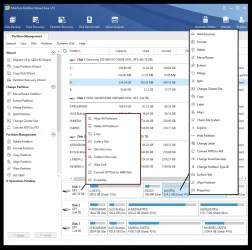
Once Win 11 is installed, you can use Minitool Partition Wizard, to resize, move, delete, and create new partitions, etc.


This pic shows the right click menus for the disk (left), or for the partition (right).

000000 Minitool.webp


Here's some other things that you may find useful...


Last edited:

My Computers My Computers

  • At a glance

    Win 11 Home ♦♦♦26200.9168 ♦♦♦♦♦♦♦25H2AMD Ryzen 7 3700XG.Skill (F4-3200C14D-16GTZKW)EVGA RTX 2070 (08G-P4-2171-KR)
    OS
    Win 11 Home ♦♦♦26200.9168 ♦♦♦♦♦♦♦25H2
    Computer type
    PC/Desktop
    Manufacturer/Model
    Built by Ghot® [May 2020]
    CPU
    AMD Ryzen 7 3700X
    Motherboard
    Asus Pro WS X570-ACE (BIOS 5302)
    Memory
    G.Skill (F4-3200C14D-16GTZKW)
    Graphics Card(s)
    EVGA RTX 2070 (08G-P4-2171-KR)
    Sound Card
    Realtek ALC1220P / ALC S1220A
    Monitor(s) Displays
    Dell U3011 30"
    Screen Resolution
    2560 x 1600
    Hard Drives
    2x Samsung 860 EVO 500GB,
    WD 4TB Black FZBX - SATA III,
    WD 8TB Black FZBX - SATA III,
    DRW-24B1ST CD/DVD Burner
    PSU
    PC Power & Cooling 750W Quad EPS12V
    Case
    Cooler Master ATCS 840 Tower
    Cooling
    CM Hyper 212 EVO (push/pull)
    Keyboard
    Ducky DK9008 Shine II Blue LED
    Mouse
    Logitech Optical M-100
    Internet Speed
    300/300
    Browser
    Firefox (latest)
    Antivirus
    Bitdefender Total Security
    Other Info
    Speakers: Klipsch Pro Media 2.1
  • At a glance

    Windows XP Pro 32bit w/SP3AMD Athlon 64 X2 5000+ (OC'd @ 3.2Ghz)TWIN2X2048-6400C4DHX (2 x 1GB, DDR2 800)EVGA 256-P2-N758-TR GeForce 8600GT SSC
    Operating System
    Windows XP Pro 32bit w/SP3
    Computer type
    PC/Desktop
    Manufacturer/Model
    Built by Ghot® (not in use)
    CPU
    AMD Athlon 64 X2 5000+ (OC'd @ 3.2Ghz)
    Motherboard
    ASUS M2N32-SLI Deluxe Wireless Edition
    Memory
    TWIN2X2048-6400C4DHX (2 x 1GB, DDR2 800)
    Graphics card(s)
    EVGA 256-P2-N758-TR GeForce 8600GT SSC
    Sound Card
    Onboard
    Monitor(s) Displays
    ViewSonic G90FB Black 19" Professional (CRT)
    Screen Resolution
    up to 2048 x 1536
    Hard Drives
    WD 36GB 10,000rpm Raptor SATA
    Seagate 80GB 7200rpm SATA
    Lite-On LTR-52246S CD/RW
    Lite-On LH-18A1P CD/DVD Burner
    PSU
    PC Power & Cooling Silencer 750 Quad EPS12V
    Case
    Generic Beige case, 80mm fans
    Cooling
    ZALMAN 9500A 92mm CPU Cooler
    Keyboard
    Logitech Classic Keybooard 200
    Mouse
    Logitech Optical M-BT96a
    Internet Speed
    300/300
    Browser
    Firefox 3.x ??
    Antivirus
    Symantec (Norton)
    Other Info
    Still assembled, still runs. Haven't turned it on for 15 years?
Best just to leave the entire disk... unallocated.
Then install Windows 11.
Once Win 11 is installed, you can use Minitool Partition Wizard, to resize, move, delete, and create new partitions, etc.
I suppose that this would work, but it sounds very inconvenient in practice - at least to me. I always took the exact opposite approach, in that I created a partition "skeleton" for the Windows installer that would "force" it to use my layout. So basically it would not have any space to create its own partitions, because I already created them and it just has one NTFS (+ ESP) partition to work with. This has always worked best for me!


Luckily, I figured out the main culprit: The change came with the Windows 11 24H2 ISO with the new installer.

So all ISOs until 23H2 will work!

Then, thanks to this forum, I have found that the legacy installer can still be launched by hacking the USB flashed drive – even with the latest Win11 ISO flashed! :)

I have written down my findings and procedure in a tutorial for others to benefit:


My Computer My Computer

At a glance

Win11 Pro
OS
Win11 Pro
Computer type
PC/Desktop
You can use the command prompt after booting from the Windows installation media, and then the DISM /Apply-Image command to apply the Windows image to the partition where you want it installed. Then you will need to add the new Windows to the boot menu using either the BCDBOOT command or GRUB (if Linux is booting).
 

My Computers My Computers

  • At a glance

    Windows 11AMD Ryzen 7 3800XT32GBEVGA GeForce GTX 1080 Ti
    OS
    Windows 11
    Computer type
    PC/Desktop
    Manufacturer/Model
    Homebuilt
    CPU
    AMD Ryzen 7 3800XT
    Motherboard
    ASUS ROG Crosshair VII Hero (WiFi)
    Memory
    32GB
    Graphics Card(s)
    EVGA GeForce GTX 1080 Ti
  • At a glance

    Windows 11 EducationIntel i7-8550U32GBNvidia Geforce MX150
    Operating System
    Windows 11 Education
    Computer type
    Laptop
    Manufacturer/Model
    Dell Inspiron 7773
    CPU
    Intel i7-8550U
    Memory
    32GB
    Graphics card(s)
    Nvidia Geforce MX150
    Sound Card
    Realtek
    Monitor(s) Displays
    17"
    Screen Resolution
    1920 x 1080
    Hard Drives
    Toshiba 512GB NVMe SSD
    SK Hynix 512GB SATA SSD
    Internet Speed
    Fast!
This is what I do:
- Boot the Win 11 installation drive as UEFI
- When ask where to install, create two partitions: The first one for EFI, MSR, Windows, and Recovery and second for Linux and Swap
- Delete the first partition and leave it as an unallocate
- Install Windows on the unallocate space. It will create the EFI, MSR, Windows, and Recovery partitions and install Windows.
- Delete the last partition (the one created to have Linux and Swap)
- Boot from the Linux installation drive as UEFI and install Linux on the unallocated space after the Recovery partition. It will also install Grub on the EFI partition
1787429809105.webp
 

My Computers My Computers

  • At a glance

    Windows 11 Pro - Windows 7 HP 64 - Lubuntui5 6600K - 800MHz to 4400MHz4+4G GSkill DDR4 3000IG - Intel 530
    OS
    Windows 11 Pro - Windows 7 HP 64 - Lubuntu
    Computer type
    PC/Desktop
    Manufacturer/Model
    custom build
    CPU
    i5 6600K - 800MHz to 4400MHz
    Motherboard
    GA-Z170-HD3P
    Memory
    4+4G GSkill DDR4 3000
    Graphics Card(s)
    IG - Intel 530
    Monitor(s) Displays
    Samsung 226BW
    Screen Resolution
    1680x1050
    Hard Drives
    (1) -1 SM951 – 128GB M.2 AHCI PCIe SSD drive for Win 11
    (2) -1 WD SATA 3 - 1T for Data
    (3) -1 WD SATA 3 - 1T for backup
    (4) -1 BX500 SSD - 256G for Windows 7 and Lubuntu
    PSU
    Thermaltake 450W TR2 gold
    Keyboard
    Old and good Chicony mechanical keyboard
    Mouse
    Logitech mX performance - 9 buttons (had to disable some)
    Internet Speed
    500 Mb/s
    Browser
    Firefox 64
  • At a glance

    Windows 11 Proi7-4500U 800- 3000MHz(4+4)G DDR3 1600IG intel 4400 + NVIDIA GeForce GT 745M
    Operating System
    Windows 11 Pro
    Computer type
    Laptop
    Manufacturer/Model
    Asus Q550LF
    CPU
    i7-4500U 800- 3000MHz
    Motherboard
    Asus Q550LF
    Memory
    (4+4)G DDR3 1600
    Graphics card(s)
    IG intel 4400 + NVIDIA GeForce GT 745M
    Sound Card
    Realtek
    Monitor(s) Displays
    LG Display LP156WF4-SPH1
    Screen Resolution
    1920 x 1080
    Hard Drives
    BX500 120G SSD for Windows and programs
    & 1T HDD for data
    Internet Speed
    500 Mb/s
    Browser
    Firefox 64
When dualbooting and if you have several boot drives.. i still think Legacy bios installs is still king.
 

My Computers My Computers

  • At a glance

    Linux: Debian, Kali-linux, Alma, Win:7,10IoT,...i3, i5 and i7 From 2gen to 9th gen... Server ...
    OS
    Linux: Debian, Kali-linux, Alma, Win:7,10IoT,2012R
    Manufacturer/Model
    HP Elitebook 840, AsusX53, Aspire E1-572. AsusUX32A, HP Pro3130mt+3010mt, HP Proliant ML150, 3xCustom-PC, i3, i5, i7
    CPU
    i3, i5 and i7 From 2gen to 9th gen... Server dual Xenon
    Hard Drives
    Sata, M.2, SAS
  • At a glance

    Retro: 2003server.XPpro, Win2000, Win98SE, Wi...Oldest intel 8088 up to P4 dual core
    Operating System
    Retro: 2003server.XPpro, Win2000, Win98SE, Win95, Win3.11, MS-DOS, IBM-DOS
    Manufacturer/Model
    Commodore, AST, Fujitsu, Compaq, etc etc. etc Around 15 desktops and 20 laptops in the collection
    CPU
    Oldest intel 8088 up to P4 dual core
    Hard Drives
    MFM, IDE, SCSI
don't forget this simple windows tool :

Win+R and type msconfig

Then use the little gui pane to select boot or other stuff

Screenshot 2026-08-22 215446.webp

cheers
jimbo
 

My Computer My Computer

At a glance

Windows XP,11 Linux Fedora Rawhide pre-releas...2 X Intel i7
OS
Windows XP,11 Linux Fedora Rawhide pre-release 46
Computer type
PC/Desktop
CPU
2 X Intel i7
Screen Resolution
4KUHD X 2
Back
Top Bottom