Customizing "All Apps" Issue with MS Apps (only)


Landlocked

Member
Local time
7:59 AM
Posts
7
OS
Windows 11 Pro (22H2)
I've sorted out my users All Apps menu shortcuts except for Microsoft Windows and Microsoft Office shortcuts. I obviously can't drag and drop from the menu itself. These shortcuts aren't here:

%AppData%\Microsoft\Windows\Start Menu\Programs
%AppData%\Roaming\Microsoft\Windows\Start Menu\Programs
%ProgramData%\Microsoft\Windows\Start Menu\Programs


Is this impossible to sort out or is there a reg hack or another location they are kept?

Thanks!
Landlocked
 
Windows Build/Version
Windows 11 Pro (22H2)

My Computer My Computer

At a glance

Windows 11 Pro (22H2)AMD Ryzen 9 5900X (12 core) (Overclocked)16 GB x 2AMD RX 6600 (Overclocked)
OS
Windows 11 Pro (22H2)
Computer type
PC/Desktop
Manufacturer/Model
Custom Rig
CPU
AMD Ryzen 9 5900X (12 core) (Overclocked)
Motherboard
MSI X570s
Memory
16 GB x 2
Graphics Card(s)
AMD RX 6600 (Overclocked)
Sound Card
Realtek (Mobo) driving 2.1 speakers
Monitor(s) Displays
Aopen 27HC5R; 240 MHz; 8-Bit
Screen Resolution
1920 x 1080
Hard Drives
2 x Samsung SSD 980 Pro (NVMe); 1 x Samsung SSD 680 Evo
PSU
750 Watts
Case
Lian Li Lancool II
Cooling
DeepCool AK620
Keyboard
ONN (Basic)
Mouse
Microsoft Intellimouse
Internet Speed
480 MB/Sec (Closer to 500 MB/Sec with a tail wind)
Browser
Firefox with a slew of add-ons.
Antivirus
Windows Defender
Other Info
VM - Win 11 Pro (22H2); VM - Ubuntu 22.04.2 LTS; Galaxy S23 Ultra connected via USB.
%AppData%\Roaming\Microsoft\Windows\Start Menu\Programs
%ProgramData%\Microsoft\Windows\Start Menu\Programs
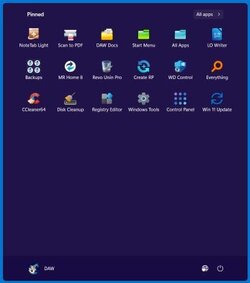
The upper one is the Start Menu itself; the lower, All apps. If you open the latter, you can drag and drop any shortcut into it, and it will stick and show up in All app.

For the start menu, I find that putting a shortcut on the desktop usually (always?) gives me a Pin to Start option in the context menu, so I never have to drag and drop to get things into the Start menu itself.

I use those Programs folders so frequently that I've included them in my Start menu icon-set: Start Menu and All Apps.

Clipboard01.jpg
 

My Computers My Computers

  • At a glance

    11 Pro 24H2 26100.2454i7-9700 @ 3.00GHz32GBDDR4 @ 2666MHzIntel HD 630 Graphics onboard
    OS
    11 Pro 24H2 26100.2454
    Computer type
    PC/Desktop
    Manufacturer/Model
    Lenovo ThinkCentre M920S SFF
    CPU
    i7-9700 @ 3.00GHz
    Motherboard
    Lenovo 3132
    Memory
    32GBDDR4 @ 2666MHz
    Graphics Card(s)
    Intel HD 630 Graphics onboard
    Sound Card
    Realtek HD Audio
    Monitor(s) Displays
    LG E2442
    Screen Resolution
    1920x1080
    Hard Drives
    1 x Samsung 970 EVO PLUS 500GB NVMe SSD, 1 x WD_BLACK SN770
    250GB NVMe SSD (OS and programs), 1 x WD_BLACK SN770
    500GB NVMe SSD (Data)
    Case
    Lenovo SFF
    Keyboard
    Cherry Stream TKL JK-8600US-2 Wired
    Mouse
    LogiTech M510 wireless
    Internet Speed
    Fast (for fixed wireless!)
    Browser
    Chrome, sometimes Firefox
    Antivirus
    Malwarebytes Premium & Defender (working together beautifully!)
  • At a glance

    11 Pro 24H2 26100.2454i5-8400 @ 2.80GHz32GB DDR4 @ 2600MHzIntel HD 630 Graphics onboard
    Operating System
    11 Pro 24H2 26100.2454
    Computer type
    PC/Desktop
    Manufacturer/Model
    Lenovo ThinkCentre M920S SFF
    CPU
    i5-8400 @ 2.80GHz
    Motherboard
    Lenovo 3132
    Memory
    32GB DDR4 @ 2600MHz
    Graphics card(s)
    Intel HD 630 Graphics onboard
    Sound Card
    Realtek High Definition Audio onboard
    Monitor(s) Displays
    LG FULL HD (1920x1080@59Hz)
    Screen Resolution
    1920 x 1080
    Hard Drives
    1 x Samsung 970 EVO PLUS NVMe; 1 x Samsung 980 NVMe SSD
    Case
    Lenovo Think Centre SFF
    Keyboard
    Cherry Stream TKL JK-8600US-2 Wired
    Mouse
    LogiTech M510 wireless
    Internet Speed
    Fast (for fixed wireless!)
    Browser
    Chrome
    Antivirus
    Malwarebytes Premium and MS Defender, beautiful together
Thank you for your reply! I moved the Office icons to the appropriate folder.

The icons that I would love relocate under All Apps (ALL of the Windows apps like Calendar, Clock, and Mail do NOT show up in either of the aforementioned directories, but still reside on All Apps. This is what puzzles me!
 

My Computer My Computer

At a glance

Windows 11 Pro (22H2)AMD Ryzen 9 5900X (12 core) (Overclocked)16 GB x 2AMD RX 6600 (Overclocked)
OS
Windows 11 Pro (22H2)
Computer type
PC/Desktop
Manufacturer/Model
Custom Rig
CPU
AMD Ryzen 9 5900X (12 core) (Overclocked)
Motherboard
MSI X570s
Memory
16 GB x 2
Graphics Card(s)
AMD RX 6600 (Overclocked)
Sound Card
Realtek (Mobo) driving 2.1 speakers
Monitor(s) Displays
Aopen 27HC5R; 240 MHz; 8-Bit
Screen Resolution
1920 x 1080
Hard Drives
2 x Samsung SSD 980 Pro (NVMe); 1 x Samsung SSD 680 Evo
PSU
750 Watts
Case
Lian Li Lancool II
Cooling
DeepCool AK620
Keyboard
ONN (Basic)
Mouse
Microsoft Intellimouse
Internet Speed
480 MB/Sec (Closer to 500 MB/Sec with a tail wind)
Browser
Firefox with a slew of add-ons.
Antivirus
Windows Defender
Other Info
VM - Win 11 Pro (22H2); VM - Ubuntu 22.04.2 LTS; Galaxy S23 Ultra connected via USB.
Ah. If someone else hasn’t already done it, I’ll be glad to say a bit about that a little later. It’s morning coffee time in balmy Southern Ontario. Welcome to the forum.
 

My Computers My Computers

  • At a glance

    11 Pro 24H2 26100.2454i7-9700 @ 3.00GHz32GBDDR4 @ 2666MHzIntel HD 630 Graphics onboard
    OS
    11 Pro 24H2 26100.2454
    Computer type
    PC/Desktop
    Manufacturer/Model
    Lenovo ThinkCentre M920S SFF
    CPU
    i7-9700 @ 3.00GHz
    Motherboard
    Lenovo 3132
    Memory
    32GBDDR4 @ 2666MHz
    Graphics Card(s)
    Intel HD 630 Graphics onboard
    Sound Card
    Realtek HD Audio
    Monitor(s) Displays
    LG E2442
    Screen Resolution
    1920x1080
    Hard Drives
    1 x Samsung 970 EVO PLUS 500GB NVMe SSD, 1 x WD_BLACK SN770
    250GB NVMe SSD (OS and programs), 1 x WD_BLACK SN770
    500GB NVMe SSD (Data)
    Case
    Lenovo SFF
    Keyboard
    Cherry Stream TKL JK-8600US-2 Wired
    Mouse
    LogiTech M510 wireless
    Internet Speed
    Fast (for fixed wireless!)
    Browser
    Chrome, sometimes Firefox
    Antivirus
    Malwarebytes Premium & Defender (working together beautifully!)
  • At a glance

    11 Pro 24H2 26100.2454i5-8400 @ 2.80GHz32GB DDR4 @ 2600MHzIntel HD 630 Graphics onboard
    Operating System
    11 Pro 24H2 26100.2454
    Computer type
    PC/Desktop
    Manufacturer/Model
    Lenovo ThinkCentre M920S SFF
    CPU
    i5-8400 @ 2.80GHz
    Motherboard
    Lenovo 3132
    Memory
    32GB DDR4 @ 2600MHz
    Graphics card(s)
    Intel HD 630 Graphics onboard
    Sound Card
    Realtek High Definition Audio onboard
    Monitor(s) Displays
    LG FULL HD (1920x1080@59Hz)
    Screen Resolution
    1920 x 1080
    Hard Drives
    1 x Samsung 970 EVO PLUS NVMe; 1 x Samsung 980 NVMe SSD
    Case
    Lenovo Think Centre SFF
    Keyboard
    Cherry Stream TKL JK-8600US-2 Wired
    Mouse
    LogiTech M510 wireless
    Internet Speed
    Fast (for fixed wireless!)
    Browser
    Chrome
    Antivirus
    Malwarebytes Premium and MS Defender, beautiful together
The icons that I would love relocate under All Apps (ALL of the Windows apps like Calendar, Clock, and Mail do NOT show up in either of the aforementioned directories, but still reside on All Apps. This is what puzzles me!
Create a shortcut with this as the target and All Apps as name:

explorer.exe shell:AppsFolder
(you don't even need the explorer.exe there unless you want to pin that one too)

Open it and you can pin as your heart desires.
 

My Computers My Computers

  • At a glance

    All Branches but StableAMD Ryzen 7 7735HS 3200-4500 Mhz 8 cores x 232 GB DDR5Radeon Graphic / NVIDIA GeForce RTX 4060 8 GB...
    OS
    All Branches but Stable
    Computer type
    Laptop
    Manufacturer/Model
    Acer Nitro ANV15-51
    CPU
    AMD Ryzen 7 7735HS 3200-4500 Mhz 8 cores x 2
    Motherboard
    Sportage_RBH
    Memory
    32 GB DDR5
    Graphics Card(s)
    Radeon Graphic / NVIDIA GeForce RTX 4060 8 GB GDDR6
    Sound Card
    AMD/Realtek(R) Audio
    Monitor(s) Displays
    Integrated Monitor (15.3"vis)
    Screen Resolution
    FHD 1920X1080 16:9 144Hz
    Hard Drives
    KINGSTON OM8SEP4512Q-AA 1TB
    Western Digital 256GB
    PSU
    19V DC 6.32 A 120 W
    Cooling
    Dual Fans
    Mouse
    MS Bluetooth
    Internet Speed
    Fiber 1GB Cox -us & 1GB Orange-fr
    Browser
    Edge Canary- Firefox Nightly-Chrome Dev-Chrome Dev
    Antivirus
    Windows Defender
  • At a glance

    Windows 11 BetaAMD A9-94208 GB of DDR4AMD Radeon R5
    Operating System
    Windows 11 Beta
    Computer type
    Laptop
    Manufacturer/Model
    Asus X751BP
    CPU
    AMD A9-9420
    Memory
    8 GB of DDR4
    Graphics card(s)
    AMD Radeon R5
    Screen Resolution
    1600x900
    Hard Drives
    Seagate 1 TB
The icons that I would love relocate under All Apps (ALL of the Windows apps like Calendar, Clock, and Mail do NOT show up in either of the aforementioned directories, but still reside on All Apps. This is what puzzles me!
Not clear where you would like to relocate those icons. If you right-click any of them, they will (correctly) offer no "Open file location," entry, because they are not sourced from either of the two Programs folders (in Users and in ProgramData) and the only way you can put them somewhere else is to follow @OAT's guide above and create new desktop icons for them. Then they're yours to fiddle with. Just use the new AllApps icon to bring up the individual icons, right-click any of them, and choose Create Shortcut. That will produce a pop-up that asks whether you want to put the icon on the desktop. Click Yes.
Clipboard01.jpg
 
Last edited:

My Computers My Computers

  • At a glance

    11 Pro 24H2 26100.2454i7-9700 @ 3.00GHz32GBDDR4 @ 2666MHzIntel HD 630 Graphics onboard
    OS
    11 Pro 24H2 26100.2454
    Computer type
    PC/Desktop
    Manufacturer/Model
    Lenovo ThinkCentre M920S SFF
    CPU
    i7-9700 @ 3.00GHz
    Motherboard
    Lenovo 3132
    Memory
    32GBDDR4 @ 2666MHz
    Graphics Card(s)
    Intel HD 630 Graphics onboard
    Sound Card
    Realtek HD Audio
    Monitor(s) Displays
    LG E2442
    Screen Resolution
    1920x1080
    Hard Drives
    1 x Samsung 970 EVO PLUS 500GB NVMe SSD, 1 x WD_BLACK SN770
    250GB NVMe SSD (OS and programs), 1 x WD_BLACK SN770
    500GB NVMe SSD (Data)
    Case
    Lenovo SFF
    Keyboard
    Cherry Stream TKL JK-8600US-2 Wired
    Mouse
    LogiTech M510 wireless
    Internet Speed
    Fast (for fixed wireless!)
    Browser
    Chrome, sometimes Firefox
    Antivirus
    Malwarebytes Premium & Defender (working together beautifully!)
  • At a glance

    11 Pro 24H2 26100.2454i5-8400 @ 2.80GHz32GB DDR4 @ 2600MHzIntel HD 630 Graphics onboard
    Operating System
    11 Pro 24H2 26100.2454
    Computer type
    PC/Desktop
    Manufacturer/Model
    Lenovo ThinkCentre M920S SFF
    CPU
    i5-8400 @ 2.80GHz
    Motherboard
    Lenovo 3132
    Memory
    32GB DDR4 @ 2600MHz
    Graphics card(s)
    Intel HD 630 Graphics onboard
    Sound Card
    Realtek High Definition Audio onboard
    Monitor(s) Displays
    LG FULL HD (1920x1080@59Hz)
    Screen Resolution
    1920 x 1080
    Hard Drives
    1 x Samsung 970 EVO PLUS NVMe; 1 x Samsung 980 NVMe SSD
    Case
    Lenovo Think Centre SFF
    Keyboard
    Cherry Stream TKL JK-8600US-2 Wired
    Mouse
    LogiTech M510 wireless
    Internet Speed
    Fast (for fixed wireless!)
    Browser
    Chrome
    Antivirus
    Malwarebytes Premium and MS Defender, beautiful together
Thank you all for your suggestions!

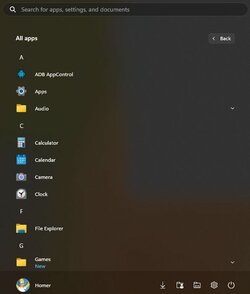
What I was trying to do was simply tidy up my entire list of all apps by dropping shortcuts into respective folders. Apparently that's not an option and I'm forced to scroll forever.

The stoopid MS apps clutter, IMHO.

I should be happy I can at least pin stuff to subfolders off the start menu.
 

Attachments

  • All Apps.jpg
    All Apps.jpg
    16.1 KB · Views: 2

My Computer My Computer

At a glance

Windows 11 Pro (22H2)AMD Ryzen 9 5900X (12 core) (Overclocked)16 GB x 2AMD RX 6600 (Overclocked)
OS
Windows 11 Pro (22H2)
Computer type
PC/Desktop
Manufacturer/Model
Custom Rig
CPU
AMD Ryzen 9 5900X (12 core) (Overclocked)
Motherboard
MSI X570s
Memory
16 GB x 2
Graphics Card(s)
AMD RX 6600 (Overclocked)
Sound Card
Realtek (Mobo) driving 2.1 speakers
Monitor(s) Displays
Aopen 27HC5R; 240 MHz; 8-Bit
Screen Resolution
1920 x 1080
Hard Drives
2 x Samsung SSD 980 Pro (NVMe); 1 x Samsung SSD 680 Evo
PSU
750 Watts
Case
Lian Li Lancool II
Cooling
DeepCool AK620
Keyboard
ONN (Basic)
Mouse
Microsoft Intellimouse
Internet Speed
480 MB/Sec (Closer to 500 MB/Sec with a tail wind)
Browser
Firefox with a slew of add-ons.
Antivirus
Windows Defender
Other Info
VM - Win 11 Pro (22H2); VM - Ubuntu 22.04.2 LTS; Galaxy S23 Ultra connected via USB.
You can uninstall most of those apps -- and then they won't be in your All Apps list at all.


You might look at reply post #4 under that tutorial. I find it very helpful with PowerShell.

And note that a few of the ones that clutter up ALL Apps have a right-click Uninstall option.

Here's to a clean, clear App Apps menu!

But you can't get rid of Get Started. Many of us here have tried, and so far, it's a no-go.
 
Last edited:

My Computers My Computers

  • At a glance

    11 Pro 24H2 26100.2454i7-9700 @ 3.00GHz32GBDDR4 @ 2666MHzIntel HD 630 Graphics onboard
    OS
    11 Pro 24H2 26100.2454
    Computer type
    PC/Desktop
    Manufacturer/Model
    Lenovo ThinkCentre M920S SFF
    CPU
    i7-9700 @ 3.00GHz
    Motherboard
    Lenovo 3132
    Memory
    32GBDDR4 @ 2666MHz
    Graphics Card(s)
    Intel HD 630 Graphics onboard
    Sound Card
    Realtek HD Audio
    Monitor(s) Displays
    LG E2442
    Screen Resolution
    1920x1080
    Hard Drives
    1 x Samsung 970 EVO PLUS 500GB NVMe SSD, 1 x WD_BLACK SN770
    250GB NVMe SSD (OS and programs), 1 x WD_BLACK SN770
    500GB NVMe SSD (Data)
    Case
    Lenovo SFF
    Keyboard
    Cherry Stream TKL JK-8600US-2 Wired
    Mouse
    LogiTech M510 wireless
    Internet Speed
    Fast (for fixed wireless!)
    Browser
    Chrome, sometimes Firefox
    Antivirus
    Malwarebytes Premium & Defender (working together beautifully!)
  • At a glance

    11 Pro 24H2 26100.2454i5-8400 @ 2.80GHz32GB DDR4 @ 2600MHzIntel HD 630 Graphics onboard
    Operating System
    11 Pro 24H2 26100.2454
    Computer type
    PC/Desktop
    Manufacturer/Model
    Lenovo ThinkCentre M920S SFF
    CPU
    i5-8400 @ 2.80GHz
    Motherboard
    Lenovo 3132
    Memory
    32GB DDR4 @ 2600MHz
    Graphics card(s)
    Intel HD 630 Graphics onboard
    Sound Card
    Realtek High Definition Audio onboard
    Monitor(s) Displays
    LG FULL HD (1920x1080@59Hz)
    Screen Resolution
    1920 x 1080
    Hard Drives
    1 x Samsung 970 EVO PLUS NVMe; 1 x Samsung 980 NVMe SSD
    Case
    Lenovo Think Centre SFF
    Keyboard
    Cherry Stream TKL JK-8600US-2 Wired
    Mouse
    LogiTech M510 wireless
    Internet Speed
    Fast (for fixed wireless!)
    Browser
    Chrome
    Antivirus
    Malwarebytes Premium and MS Defender, beautiful together
I'm sorry if I'm not being clear or just not understanding. I'm not the brightest bulb these days. :)

Yes, I did what was suggested in post #4. Yes, I can uninstall some of the apps, but many I want to retain -- just neatly tucked away in a folder off of All Apps. In the image below you'll see I'd love to move the MS/Win apps to a folder called Windows Apps hanging under All Apps. Ideally these remove the single instances at the root of the menu.

And: How the heck did an All Apps shortcut for MSI Center end up there and not in my user or global start menu folder?

Also: Any way of getting rid of "For You -- To show your recent files..." at the bottom of the start menu? I don't see anything in the personalization area.

Thanks again, folks! It's always the trivial things that bug the heck out of me.
 

Attachments

  • Menu.jpg
    Menu.jpg
    31.5 KB · Views: 2

My Computer My Computer

At a glance

Windows 11 Pro (22H2)AMD Ryzen 9 5900X (12 core) (Overclocked)16 GB x 2AMD RX 6600 (Overclocked)
OS
Windows 11 Pro (22H2)
Computer type
PC/Desktop
Manufacturer/Model
Custom Rig
CPU
AMD Ryzen 9 5900X (12 core) (Overclocked)
Motherboard
MSI X570s
Memory
16 GB x 2
Graphics Card(s)
AMD RX 6600 (Overclocked)
Sound Card
Realtek (Mobo) driving 2.1 speakers
Monitor(s) Displays
Aopen 27HC5R; 240 MHz; 8-Bit
Screen Resolution
1920 x 1080
Hard Drives
2 x Samsung SSD 980 Pro (NVMe); 1 x Samsung SSD 680 Evo
PSU
750 Watts
Case
Lian Li Lancool II
Cooling
DeepCool AK620
Keyboard
ONN (Basic)
Mouse
Microsoft Intellimouse
Internet Speed
480 MB/Sec (Closer to 500 MB/Sec with a tail wind)
Browser
Firefox with a slew of add-ons.
Antivirus
Windows Defender
Other Info
VM - Win 11 Pro (22H2); VM - Ubuntu 22.04.2 LTS; Galaxy S23 Ultra connected via USB.
@Landlocked

I don't think the MS apps shortcuts can be foldered. If that could be done, we'd have seen the method posted on the Web in the last couple of years. There is a large market for such a solution.

The MSI Center shortcut is an OEM feature. I suspect (but I do not know) that the only way to get rid of that shortcut is to delete the entire MSI Center utility.

As for the For you ... and Recommendations sections (as well as the Search control at the top of Start), I'd suggest Power Start Menu from the MS Store. It's available in a free Trial edition, and if it's worth it to you, the licensed edition is quite inexpensive. Screenshots below are from that program.

Clipboard01.jpg
Clipboard02.jpg
 

My Computers My Computers

  • At a glance

    11 Pro 24H2 26100.2454i7-9700 @ 3.00GHz32GBDDR4 @ 2666MHzIntel HD 630 Graphics onboard
    OS
    11 Pro 24H2 26100.2454
    Computer type
    PC/Desktop
    Manufacturer/Model
    Lenovo ThinkCentre M920S SFF
    CPU
    i7-9700 @ 3.00GHz
    Motherboard
    Lenovo 3132
    Memory
    32GBDDR4 @ 2666MHz
    Graphics Card(s)
    Intel HD 630 Graphics onboard
    Sound Card
    Realtek HD Audio
    Monitor(s) Displays
    LG E2442
    Screen Resolution
    1920x1080
    Hard Drives
    1 x Samsung 970 EVO PLUS 500GB NVMe SSD, 1 x WD_BLACK SN770
    250GB NVMe SSD (OS and programs), 1 x WD_BLACK SN770
    500GB NVMe SSD (Data)
    Case
    Lenovo SFF
    Keyboard
    Cherry Stream TKL JK-8600US-2 Wired
    Mouse
    LogiTech M510 wireless
    Internet Speed
    Fast (for fixed wireless!)
    Browser
    Chrome, sometimes Firefox
    Antivirus
    Malwarebytes Premium & Defender (working together beautifully!)
  • At a glance

    11 Pro 24H2 26100.2454i5-8400 @ 2.80GHz32GB DDR4 @ 2600MHzIntel HD 630 Graphics onboard
    Operating System
    11 Pro 24H2 26100.2454
    Computer type
    PC/Desktop
    Manufacturer/Model
    Lenovo ThinkCentre M920S SFF
    CPU
    i5-8400 @ 2.80GHz
    Motherboard
    Lenovo 3132
    Memory
    32GB DDR4 @ 2600MHz
    Graphics card(s)
    Intel HD 630 Graphics onboard
    Sound Card
    Realtek High Definition Audio onboard
    Monitor(s) Displays
    LG FULL HD (1920x1080@59Hz)
    Screen Resolution
    1920 x 1080
    Hard Drives
    1 x Samsung 970 EVO PLUS NVMe; 1 x Samsung 980 NVMe SSD
    Case
    Lenovo Think Centre SFF
    Keyboard
    Cherry Stream TKL JK-8600US-2 Wired
    Mouse
    LogiTech M510 wireless
    Internet Speed
    Fast (for fixed wireless!)
    Browser
    Chrome
    Antivirus
    Malwarebytes Premium and MS Defender, beautiful together
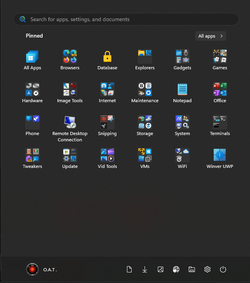
This is my Start with PSM (trial) running:

Clipboard01.jpg
 

My Computers My Computers

  • At a glance

    11 Pro 24H2 26100.2454i7-9700 @ 3.00GHz32GBDDR4 @ 2666MHzIntel HD 630 Graphics onboard
    OS
    11 Pro 24H2 26100.2454
    Computer type
    PC/Desktop
    Manufacturer/Model
    Lenovo ThinkCentre M920S SFF
    CPU
    i7-9700 @ 3.00GHz
    Motherboard
    Lenovo 3132
    Memory
    32GBDDR4 @ 2666MHz
    Graphics Card(s)
    Intel HD 630 Graphics onboard
    Sound Card
    Realtek HD Audio
    Monitor(s) Displays
    LG E2442
    Screen Resolution
    1920x1080
    Hard Drives
    1 x Samsung 970 EVO PLUS 500GB NVMe SSD, 1 x WD_BLACK SN770
    250GB NVMe SSD (OS and programs), 1 x WD_BLACK SN770
    500GB NVMe SSD (Data)
    Case
    Lenovo SFF
    Keyboard
    Cherry Stream TKL JK-8600US-2 Wired
    Mouse
    LogiTech M510 wireless
    Internet Speed
    Fast (for fixed wireless!)
    Browser
    Chrome, sometimes Firefox
    Antivirus
    Malwarebytes Premium & Defender (working together beautifully!)
  • At a glance

    11 Pro 24H2 26100.2454i5-8400 @ 2.80GHz32GB DDR4 @ 2600MHzIntel HD 630 Graphics onboard
    Operating System
    11 Pro 24H2 26100.2454
    Computer type
    PC/Desktop
    Manufacturer/Model
    Lenovo ThinkCentre M920S SFF
    CPU
    i5-8400 @ 2.80GHz
    Motherboard
    Lenovo 3132
    Memory
    32GB DDR4 @ 2600MHz
    Graphics card(s)
    Intel HD 630 Graphics onboard
    Sound Card
    Realtek High Definition Audio onboard
    Monitor(s) Displays
    LG FULL HD (1920x1080@59Hz)
    Screen Resolution
    1920 x 1080
    Hard Drives
    1 x Samsung 970 EVO PLUS NVMe; 1 x Samsung 980 NVMe SSD
    Case
    Lenovo Think Centre SFF
    Keyboard
    Cherry Stream TKL JK-8600US-2 Wired
    Mouse
    LogiTech M510 wireless
    Internet Speed
    Fast (for fixed wireless!)
    Browser
    Chrome
    Antivirus
    Malwarebytes Premium and MS Defender, beautiful together
I don't think the MS apps shortcuts can be foldered.
What? Sorry but using this explorer.exe shell:AppsFolder
You can not only pin them and create shortcuts as you wish.
Screenshot 2023-06-21 165728.png
And the Start Menu with multiple folders.
Screenshot 2023-06-21 165917.png
 

My Computers My Computers

  • At a glance

    All Branches but StableAMD Ryzen 7 7735HS 3200-4500 Mhz 8 cores x 232 GB DDR5Radeon Graphic / NVIDIA GeForce RTX 4060 8 GB...
    OS
    All Branches but Stable
    Computer type
    Laptop
    Manufacturer/Model
    Acer Nitro ANV15-51
    CPU
    AMD Ryzen 7 7735HS 3200-4500 Mhz 8 cores x 2
    Motherboard
    Sportage_RBH
    Memory
    32 GB DDR5
    Graphics Card(s)
    Radeon Graphic / NVIDIA GeForce RTX 4060 8 GB GDDR6
    Sound Card
    AMD/Realtek(R) Audio
    Monitor(s) Displays
    Integrated Monitor (15.3"vis)
    Screen Resolution
    FHD 1920X1080 16:9 144Hz
    Hard Drives
    KINGSTON OM8SEP4512Q-AA 1TB
    Western Digital 256GB
    PSU
    19V DC 6.32 A 120 W
    Cooling
    Dual Fans
    Mouse
    MS Bluetooth
    Internet Speed
    Fiber 1GB Cox -us & 1GB Orange-fr
    Browser
    Edge Canary- Firefox Nightly-Chrome Dev-Chrome Dev
    Antivirus
    Windows Defender
  • At a glance

    Windows 11 BetaAMD A9-94208 GB of DDR4AMD Radeon R5
    Operating System
    Windows 11 Beta
    Computer type
    Laptop
    Manufacturer/Model
    Asus X751BP
    CPU
    AMD A9-9420
    Memory
    8 GB of DDR4
    Graphics card(s)
    AMD Radeon R5
    Screen Resolution
    1600x900
    Hard Drives
    Seagate 1 TB
@OAT

His post #9 makes it clear, I think, that OP wants a triple-shot result:
1. Don't uninstall any apps
2. Don't see any of them individually in All Apps menu, and
3. Have a single icon for all of them in All Apps and only there.

I understood your solution in post #5, but OP's shot in #7 makes it clear that he wants a single icon that will remove Calculator, Calendar, Camera, Clock, Feedback, Get Started, Notebook, Paint, etc. from the All Apps menu without any uninstalls.

It's the removal-consolidation part that OP is focused on.
 

My Computers My Computers

  • At a glance

    11 Pro 24H2 26100.2454i7-9700 @ 3.00GHz32GBDDR4 @ 2666MHzIntel HD 630 Graphics onboard
    OS
    11 Pro 24H2 26100.2454
    Computer type
    PC/Desktop
    Manufacturer/Model
    Lenovo ThinkCentre M920S SFF
    CPU
    i7-9700 @ 3.00GHz
    Motherboard
    Lenovo 3132
    Memory
    32GBDDR4 @ 2666MHz
    Graphics Card(s)
    Intel HD 630 Graphics onboard
    Sound Card
    Realtek HD Audio
    Monitor(s) Displays
    LG E2442
    Screen Resolution
    1920x1080
    Hard Drives
    1 x Samsung 970 EVO PLUS 500GB NVMe SSD, 1 x WD_BLACK SN770
    250GB NVMe SSD (OS and programs), 1 x WD_BLACK SN770
    500GB NVMe SSD (Data)
    Case
    Lenovo SFF
    Keyboard
    Cherry Stream TKL JK-8600US-2 Wired
    Mouse
    LogiTech M510 wireless
    Internet Speed
    Fast (for fixed wireless!)
    Browser
    Chrome, sometimes Firefox
    Antivirus
    Malwarebytes Premium & Defender (working together beautifully!)
  • At a glance

    11 Pro 24H2 26100.2454i5-8400 @ 2.80GHz32GB DDR4 @ 2600MHzIntel HD 630 Graphics onboard
    Operating System
    11 Pro 24H2 26100.2454
    Computer type
    PC/Desktop
    Manufacturer/Model
    Lenovo ThinkCentre M920S SFF
    CPU
    i5-8400 @ 2.80GHz
    Motherboard
    Lenovo 3132
    Memory
    32GB DDR4 @ 2600MHz
    Graphics card(s)
    Intel HD 630 Graphics onboard
    Sound Card
    Realtek High Definition Audio onboard
    Monitor(s) Displays
    LG FULL HD (1920x1080@59Hz)
    Screen Resolution
    1920 x 1080
    Hard Drives
    1 x Samsung 970 EVO PLUS NVMe; 1 x Samsung 980 NVMe SSD
    Case
    Lenovo Think Centre SFF
    Keyboard
    Cherry Stream TKL JK-8600US-2 Wired
    Mouse
    LogiTech M510 wireless
    Internet Speed
    Fast (for fixed wireless!)
    Browser
    Chrome
    Antivirus
    Malwarebytes Premium and MS Defender, beautiful together
  • Like
Reactions: OAT
@OAT

His post #9 makes it clear, I think, that OP wants a triple-shot result:
1. Don't uninstall any apps
2. Don't see any of them individually in All Apps menu, and
3. Have a single icon for all of them in All Apps and only there.

I understood your solution in post #5, but OP's shot in #7 makes it clear that he wants a single icon that will remove Calculator, Calendar, Camera, Clock, Feedback, Get Started, Notebook, Paint, etc. from the All Apps menu without any uninstalls.

It's the removal-consolidation part that OP is focused on.
@Wisewiz
Therefore you are right, and I misunderstood.
What the OP wants can't be done as All Apps is by nature a 'gathering' of everything as its name implies.
 

My Computers My Computers

  • At a glance

    All Branches but StableAMD Ryzen 7 7735HS 3200-4500 Mhz 8 cores x 232 GB DDR5Radeon Graphic / NVIDIA GeForce RTX 4060 8 GB...
    OS
    All Branches but Stable
    Computer type
    Laptop
    Manufacturer/Model
    Acer Nitro ANV15-51
    CPU
    AMD Ryzen 7 7735HS 3200-4500 Mhz 8 cores x 2
    Motherboard
    Sportage_RBH
    Memory
    32 GB DDR5
    Graphics Card(s)
    Radeon Graphic / NVIDIA GeForce RTX 4060 8 GB GDDR6
    Sound Card
    AMD/Realtek(R) Audio
    Monitor(s) Displays
    Integrated Monitor (15.3"vis)
    Screen Resolution
    FHD 1920X1080 16:9 144Hz
    Hard Drives
    KINGSTON OM8SEP4512Q-AA 1TB
    Western Digital 256GB
    PSU
    19V DC 6.32 A 120 W
    Cooling
    Dual Fans
    Mouse
    MS Bluetooth
    Internet Speed
    Fiber 1GB Cox -us & 1GB Orange-fr
    Browser
    Edge Canary- Firefox Nightly-Chrome Dev-Chrome Dev
    Antivirus
    Windows Defender
  • At a glance

    Windows 11 BetaAMD A9-94208 GB of DDR4AMD Radeon R5
    Operating System
    Windows 11 Beta
    Computer type
    Laptop
    Manufacturer/Model
    Asus X751BP
    CPU
    AMD A9-9420
    Memory
    8 GB of DDR4
    Graphics card(s)
    AMD Radeon R5
    Screen Resolution
    1600x900
    Hard Drives
    Seagate 1 TB
Thanks. I hoped I wouldn't offend.

I've gotten rid of all of them except these (that I either don't use at all or have shortcuts for elsewhere, and they are thus, to me, just All Apps "clutter" -- OP's term):

Feedback, Get, Store, Notepad, Paint, Snipping, Terminal, and Security
 

My Computers My Computers

  • At a glance

    11 Pro 24H2 26100.2454i7-9700 @ 3.00GHz32GBDDR4 @ 2666MHzIntel HD 630 Graphics onboard
    OS
    11 Pro 24H2 26100.2454
    Computer type
    PC/Desktop
    Manufacturer/Model
    Lenovo ThinkCentre M920S SFF
    CPU
    i7-9700 @ 3.00GHz
    Motherboard
    Lenovo 3132
    Memory
    32GBDDR4 @ 2666MHz
    Graphics Card(s)
    Intel HD 630 Graphics onboard
    Sound Card
    Realtek HD Audio
    Monitor(s) Displays
    LG E2442
    Screen Resolution
    1920x1080
    Hard Drives
    1 x Samsung 970 EVO PLUS 500GB NVMe SSD, 1 x WD_BLACK SN770
    250GB NVMe SSD (OS and programs), 1 x WD_BLACK SN770
    500GB NVMe SSD (Data)
    Case
    Lenovo SFF
    Keyboard
    Cherry Stream TKL JK-8600US-2 Wired
    Mouse
    LogiTech M510 wireless
    Internet Speed
    Fast (for fixed wireless!)
    Browser
    Chrome, sometimes Firefox
    Antivirus
    Malwarebytes Premium & Defender (working together beautifully!)
  • At a glance

    11 Pro 24H2 26100.2454i5-8400 @ 2.80GHz32GB DDR4 @ 2600MHzIntel HD 630 Graphics onboard
    Operating System
    11 Pro 24H2 26100.2454
    Computer type
    PC/Desktop
    Manufacturer/Model
    Lenovo ThinkCentre M920S SFF
    CPU
    i5-8400 @ 2.80GHz
    Motherboard
    Lenovo 3132
    Memory
    32GB DDR4 @ 2600MHz
    Graphics card(s)
    Intel HD 630 Graphics onboard
    Sound Card
    Realtek High Definition Audio onboard
    Monitor(s) Displays
    LG FULL HD (1920x1080@59Hz)
    Screen Resolution
    1920 x 1080
    Hard Drives
    1 x Samsung 970 EVO PLUS NVMe; 1 x Samsung 980 NVMe SSD
    Case
    Lenovo Think Centre SFF
    Keyboard
    Cherry Stream TKL JK-8600US-2 Wired
    Mouse
    LogiTech M510 wireless
    Internet Speed
    Fast (for fixed wireless!)
    Browser
    Chrome
    Antivirus
    Malwarebytes Premium and MS Defender, beautiful together
  • Like
Reactions: OAT
Obviously the MSI Center installer has elevated permissions to designate that their shortcut can hang on the root of All Apps and not be relocated or deleted. That being said, shouldn't that shortcut location be designated in the registry? I will have to look if so, and how it varies from one manipulate maniuplate.
 

My Computer My Computer

At a glance

Windows 11 Pro (22H2)AMD Ryzen 9 5900X (12 core) (Overclocked)16 GB x 2AMD RX 6600 (Overclocked)
OS
Windows 11 Pro (22H2)
Computer type
PC/Desktop
Manufacturer/Model
Custom Rig
CPU
AMD Ryzen 9 5900X (12 core) (Overclocked)
Motherboard
MSI X570s
Memory
16 GB x 2
Graphics Card(s)
AMD RX 6600 (Overclocked)
Sound Card
Realtek (Mobo) driving 2.1 speakers
Monitor(s) Displays
Aopen 27HC5R; 240 MHz; 8-Bit
Screen Resolution
1920 x 1080
Hard Drives
2 x Samsung SSD 980 Pro (NVMe); 1 x Samsung SSD 680 Evo
PSU
750 Watts
Case
Lian Li Lancool II
Cooling
DeepCool AK620
Keyboard
ONN (Basic)
Mouse
Microsoft Intellimouse
Internet Speed
480 MB/Sec (Closer to 500 MB/Sec with a tail wind)
Browser
Firefox with a slew of add-ons.
Antivirus
Windows Defender
Other Info
VM - Win 11 Pro (22H2); VM - Ubuntu 22.04.2 LTS; Galaxy S23 Ultra connected via USB.
Revo Uninstaller (Free) might have a go at it. I'd use the Windows Apps setting and see whether it shows up in there.

If it doesn't show up in either All Programs or Windows Apps, you can try Hunter Mode: Open a window of MSI Center and drag the Hunter Mode icon into it.

I actually have used Hunter Mode a number of times, but have had only a few successes with it. The rest of Revo works like a charm, though.
 

My Computers My Computers

  • At a glance

    11 Pro 24H2 26100.2454i7-9700 @ 3.00GHz32GBDDR4 @ 2666MHzIntel HD 630 Graphics onboard
    OS
    11 Pro 24H2 26100.2454
    Computer type
    PC/Desktop
    Manufacturer/Model
    Lenovo ThinkCentre M920S SFF
    CPU
    i7-9700 @ 3.00GHz
    Motherboard
    Lenovo 3132
    Memory
    32GBDDR4 @ 2666MHz
    Graphics Card(s)
    Intel HD 630 Graphics onboard
    Sound Card
    Realtek HD Audio
    Monitor(s) Displays
    LG E2442
    Screen Resolution
    1920x1080
    Hard Drives
    1 x Samsung 970 EVO PLUS 500GB NVMe SSD, 1 x WD_BLACK SN770
    250GB NVMe SSD (OS and programs), 1 x WD_BLACK SN770
    500GB NVMe SSD (Data)
    Case
    Lenovo SFF
    Keyboard
    Cherry Stream TKL JK-8600US-2 Wired
    Mouse
    LogiTech M510 wireless
    Internet Speed
    Fast (for fixed wireless!)
    Browser
    Chrome, sometimes Firefox
    Antivirus
    Malwarebytes Premium & Defender (working together beautifully!)
  • At a glance

    11 Pro 24H2 26100.2454i5-8400 @ 2.80GHz32GB DDR4 @ 2600MHzIntel HD 630 Graphics onboard
    Operating System
    11 Pro 24H2 26100.2454
    Computer type
    PC/Desktop
    Manufacturer/Model
    Lenovo ThinkCentre M920S SFF
    CPU
    i5-8400 @ 2.80GHz
    Motherboard
    Lenovo 3132
    Memory
    32GB DDR4 @ 2600MHz
    Graphics card(s)
    Intel HD 630 Graphics onboard
    Sound Card
    Realtek High Definition Audio onboard
    Monitor(s) Displays
    LG FULL HD (1920x1080@59Hz)
    Screen Resolution
    1920 x 1080
    Hard Drives
    1 x Samsung 970 EVO PLUS NVMe; 1 x Samsung 980 NVMe SSD
    Case
    Lenovo Think Centre SFF
    Keyboard
    Cherry Stream TKL JK-8600US-2 Wired
    Mouse
    LogiTech M510 wireless
    Internet Speed
    Fast (for fixed wireless!)
    Browser
    Chrome
    Antivirus
    Malwarebytes Premium and MS Defender, beautiful together
Thanks -- but do those apps simply remove the Win apps? My goal was simply to keep them, but relocate the "hard" shortcuts to the apps to a custom subfolder off of All Apps.
 

My Computer My Computer

At a glance

Windows 11 Pro (22H2)AMD Ryzen 9 5900X (12 core) (Overclocked)16 GB x 2AMD RX 6600 (Overclocked)
OS
Windows 11 Pro (22H2)
Computer type
PC/Desktop
Manufacturer/Model
Custom Rig
CPU
AMD Ryzen 9 5900X (12 core) (Overclocked)
Motherboard
MSI X570s
Memory
16 GB x 2
Graphics Card(s)
AMD RX 6600 (Overclocked)
Sound Card
Realtek (Mobo) driving 2.1 speakers
Monitor(s) Displays
Aopen 27HC5R; 240 MHz; 8-Bit
Screen Resolution
1920 x 1080
Hard Drives
2 x Samsung SSD 980 Pro (NVMe); 1 x Samsung SSD 680 Evo
PSU
750 Watts
Case
Lian Li Lancool II
Cooling
DeepCool AK620
Keyboard
ONN (Basic)
Mouse
Microsoft Intellimouse
Internet Speed
480 MB/Sec (Closer to 500 MB/Sec with a tail wind)
Browser
Firefox with a slew of add-ons.
Antivirus
Windows Defender
Other Info
VM - Win 11 Pro (22H2); VM - Ubuntu 22.04.2 LTS; Galaxy S23 Ultra connected via USB.

I was suggesting you use Revo to get rid of MSI Center, not MS apps.

My post #10 above summarizes my understanding of your wishes until now. Seems I had most of it right. The part I missed is that you want the icon NOT to be on the All Apps list, and you want all of the apps shortcuts in the folder (icon) OFF the All Apps list, too.

Sorry, but I think no-can-do my friend.
 

My Computers My Computers

  • At a glance

    11 Pro 24H2 26100.2454i7-9700 @ 3.00GHz32GBDDR4 @ 2666MHzIntel HD 630 Graphics onboard
    OS
    11 Pro 24H2 26100.2454
    Computer type
    PC/Desktop
    Manufacturer/Model
    Lenovo ThinkCentre M920S SFF
    CPU
    i7-9700 @ 3.00GHz
    Motherboard
    Lenovo 3132
    Memory
    32GBDDR4 @ 2666MHz
    Graphics Card(s)
    Intel HD 630 Graphics onboard
    Sound Card
    Realtek HD Audio
    Monitor(s) Displays
    LG E2442
    Screen Resolution
    1920x1080
    Hard Drives
    1 x Samsung 970 EVO PLUS 500GB NVMe SSD, 1 x WD_BLACK SN770
    250GB NVMe SSD (OS and programs), 1 x WD_BLACK SN770
    500GB NVMe SSD (Data)
    Case
    Lenovo SFF
    Keyboard
    Cherry Stream TKL JK-8600US-2 Wired
    Mouse
    LogiTech M510 wireless
    Internet Speed
    Fast (for fixed wireless!)
    Browser
    Chrome, sometimes Firefox
    Antivirus
    Malwarebytes Premium & Defender (working together beautifully!)
  • At a glance

    11 Pro 24H2 26100.2454i5-8400 @ 2.80GHz32GB DDR4 @ 2600MHzIntel HD 630 Graphics onboard
    Operating System
    11 Pro 24H2 26100.2454
    Computer type
    PC/Desktop
    Manufacturer/Model
    Lenovo ThinkCentre M920S SFF
    CPU
    i5-8400 @ 2.80GHz
    Motherboard
    Lenovo 3132
    Memory
    32GB DDR4 @ 2600MHz
    Graphics card(s)
    Intel HD 630 Graphics onboard
    Sound Card
    Realtek High Definition Audio onboard
    Monitor(s) Displays
    LG FULL HD (1920x1080@59Hz)
    Screen Resolution
    1920 x 1080
    Hard Drives
    1 x Samsung 970 EVO PLUS NVMe; 1 x Samsung 980 NVMe SSD
    Case
    Lenovo Think Centre SFF
    Keyboard
    Cherry Stream TKL JK-8600US-2 Wired
    Mouse
    LogiTech M510 wireless
    Internet Speed
    Fast (for fixed wireless!)
    Browser
    Chrome
    Antivirus
    Malwarebytes Premium and MS Defender, beautiful together

Latest Support Threads

Back
Top Bottom