Data over LAN was working beautifully, now it's not


riffwraith

Well-known member
Member
Local time
4:56 PM
Posts
103
OS
W10
Hi all

Two computers, main is W11, second is W7. Both are plugged in to a Lynksis router.

Running music sw: Cubase and VEPRo. This combo allows me to load and host music sample libraries on the W7 slave, and have the audio travel over the LAN to the W11 comp, without the need for additional audio and MIDI interfaces. This sw is somewhat specialized, so I am not seeking anyone to give me advice there.

Until now, the audio has been flowing smoothly from W7 > W11. Literally, for years. I started having issues about 2 days ago, in the form of stuttering and dropouts. Literally nothing has changed on either computer, no updates, no app installs, nothing. It's not the sw that's at fault here, nor the drives, which are all SSDs. It's the audio moving over the LAN, but why? I am wondering if anyone has any idea as to what I can look at, to see if there is some bottleneck somewhere.

Thanks in advance.
 

My Computer My Computer

At a glance

W10
OS
W10
Try Googling. Search for "audio transfer using VEPRo software fails".

"Literally nothing has changed"
You can't possibly know that with Windows 11 or your two audio apps.
 

My Computer My Computer

At a glance

Depends on the day and my mood. Windows 10.
OS
Depends on the day and my mood. Windows 10.
Computer type
PC/Desktop
Manufacturer/Model
Dell
Thx - will try that search term.

You can't possibly know that with Windows 11 - what makes you say that; I have updates turned off.

or your two audio apps. - absolutely I can.

Cheers.
 

My Computer My Computer

At a glance

W10
OS
W10
What makes me say that:
If you were so knowledgeable to turn off every possible avenue of Win11 updates and changes you wouldn't be asking this question in this forum.
With your very specialized software, you would just go and diagnose the problem and fix it (with help from Google).
Are automatic updates for these apps turned on?
What other audio-related or network-related applications do you have that have automatic updates turned on?
Any changes to the router? Did you reboot the router?
Have you rebooted both your computers?
Is Windows 11 "driver update" feature enabled?
Have you opened Task Manager and observed changes in CPU, network and memory (RAM) usage when this problem occurs?
What other applications are running in the background (on both machines)?
Are you playing an internet game at the same time you're doing the audio transfer?
Do you have enough spare disk storage (on hard drive or SSD)?
What has changed in the audio data you're transferring? Is the audio from a file or streaming?
OK, you get the picture. Don't assume anything. Something changed.
 

My Computer My Computer

At a glance

Depends on the day and my mood. Windows 10.
OS
Depends on the day and my mood. Windows 10.
Computer type
PC/Desktop
Manufacturer/Model
Dell
If you were so knowledgeable to turn off every possible avenue of Win11 updates and changes you wouldn't be asking this question in this forum.

Ok, that's really not necessary.

Are automatic updates for these apps turned on?

VEPro - turned off. Cubase - doesn't have this option. Kontakt - doesn't have this option.

What other audio-related or network-related applications do you have that have automatic updates turned on?

None.

Any changes to the router? Did you reboot the router? Have you rebooted both your computers? Is Windows 11 "driver update" feature enabled?

No, yes, yes, no.

Have you opened Task Manager and observed changes in CPU, network and memory (RAM) usage when this problem occurs?

Yes - no changes.

What other applications are running in the background (on both machines)?

None.

Are you playing an internet game at the same time you're doing the audio transfer?

Well, of course not.

Do you have enough spare disk storage (on hard drive or SSD)?

25% is unused.

What has changed in the audio data you're transferring?

Nothing.

Is the audio from a file or streaming?

Files on the SSD - same ones as always.

Nothing has changed.
 

My Computer My Computer

At a glance

W10
OS
W10
I'm sorry for the dig. I don't know your particular audio software, so I can't say anything more specific.
When a network transfer "stutters" there is a bandwidth degradation or overload.
I would not discount all of the above suggestions for looking for clues. Sometimes it's a timing issue and you have to be persistent and keep looking, particulary monitoring CPU, RAM and network in Task Manager.
Are you doing this over WiFi or all wired Ethernet network. If you're using WiFi, I'd focus on that.
For diagnosis, replace WiFi with Ethernet and see if the problem persists.
Try using different audio files (simpler ones).
Try experimenting with your software buffer sizes and latency settings. Try lower audio quality settings.
When you change settings in the apps do one change at a time so you can see the effect.
Set your Windows Power options to use High Performance and not to put the network to sleep.
Good luck.
 

My Computer My Computer

At a glance

Depends on the day and my mood. Windows 10.
OS
Depends on the day and my mood. Windows 10.
Computer type
PC/Desktop
Manufacturer/Model
Dell
Are you doing this over WiFi or all wired Ethernet network. If you're using WiFi, I'd focus on that.
For diagnosis, replace WiFi with Ethernet and see if the problem persists.
Both are plugged in to a Lynksis router.

You could test bandwidth between the two computers, to see if it is what it should be, based on the capabilities of the two computers and the switch in between.


My Computer My Computer

At a glance

Windows 11 Pro 25H212th Gen Core i7-1260P64 GB Micron PC4-25600Intel Iris Xe Graphics
OS
Windows 11 Pro 25H2
Computer type
PC/Desktop
Manufacturer/Model
Intel NUC12WSHi7
CPU
12th Gen Core i7-1260P
Motherboard
NUC12WSBi7
Memory
64 GB Micron PC4-25600
Graphics Card(s)
Intel Iris Xe Graphics
Sound Card
on-board Realtek HD Audio
Monitor(s) Displays
Dell U3219Q
Screen Resolution
3840 x 2160
Hard Drives
Samsung SSD 990 PRO 1TB
Crucial MX500 2 TB
Keyboard
CODE 104-Key mechanical with Cherry MX Clears
Antivirus
Microsoft Defender
  • Like
Reactions: OAT
I cannot speak for the Windows 7 side as I have not even seen 7 in at least a decade, but on the Windows 11 side, I have fixed weird network behavior several times by simply using the network reset option is settings. That resets all adapters to default settings. As I noted, there have been several times where everything I tried failed to resolve some weird networking issue, but what finally resolved those issues for me was the network reset.
 

My Computers My Computers

  • At a glance

    Win11 Pro 25H2 (RTM+)Intel i7-14650HX32 GBNo GPU - Built-in Intel Graphics
    OS
    Win11 Pro 25H2 (RTM+)
    Computer type
    PC/Desktop
    Manufacturer/Model
    Acemagic
    CPU
    Intel i7-14650HX
    Memory
    32 GB
    Graphics Card(s)
    No GPU - Built-in Intel Graphics
    Sound Card
    Integrated
    Monitor(s) Displays
    Varies as machine will often be moved to locations with different monitors
    Screen Resolution
    Varies
    Hard Drives
    1 x 1TB Gen 4 NVMe SSD
    PSU
    120W Power Brick
    Keyboard
    Corsair K70 Max RGB Magnetic Keyboard
    Mouse
    Logitech MX Master 3
    Internet Speed
    1Gb Up / 1 Gb Down
    Browser
    Edge
    Antivirus
    Windows Defender
  • At a glance

    Win11 Pro 25H2 (RTM+)Intel i7-1255U16 GBIntel Iris Xe Graphics
    Operating System
    Win11 Pro 25H2 (RTM+)
    Computer type
    Laptop
    Manufacturer/Model
    Lenovo ThinkBook 13x Gen 2
    CPU
    Intel i7-1255U
    Memory
    16 GB
    Graphics card(s)
    Intel Iris Xe Graphics
    Sound Card
    Realtek® ALC3306-CG codec
    Monitor(s) Displays
    13.3-inch IPS Display
    Screen Resolution
    WQXGA (2560 x 1600)
    Hard Drives
    2 TB 4 x 4 NVMe SSD
    PSU
    USB-C / Thunderbolt 4 Power / Charging
    Keyboard
    Backlit, spill resistant keyboard
    Mouse
    Buttonless Glass Precision Touchpad
    Internet Speed
    1Gb Up / 1Gb Down
    Browser
    Edge
    Antivirus
    Windows Defender
    Other Info
    WiFi 6e / Bluetooth 5.1 / Facial Recognition / Fingerprint Sensor / ToF (Time of Flight) Human Presence Sensor
please try setting both computers connected to the router with static addressing.

within the router find each system and reserve that address for that system
then on each computer set that IP address as a static address along with
gateway address
subnet mask
IP address (as same as the reserved address within the router)

a restart of each system maybe required
then check the network connection with the music/data you are transmitting

best of luck Steve ..
 

My Computers My Computers

  • At a glance

    Debian 13 KDE .. Windows 11 HomeRyzen 7 5825u64GB DDR4 3200Ryzen 7 5825u
    OS
    Debian 13 KDE .. Windows 11 Home
    Computer type
    PC/Desktop
    Manufacturer/Model
    HP 24" AiO
    CPU
    Ryzen 7 5825u
    Motherboard
    HP
    Memory
    64GB DDR4 3200
    Graphics Card(s)
    Ryzen 7 5825u
    Sound Card
    RealTek
    Monitor(s) Displays
    24" HP AiO
    Screen Resolution
    1920 x 1080 @60 Hz
    Hard Drives
    1TB WD Blue SN580 M2 SSD Partitioned.
    2x 1TB USB HDD External Backup/Storage.
    PSU
    90W external power brick
    Case
    24" All in One
    Cooling
    Default Air Cooling
    Keyboard
    HP WiFi UK extended
    Mouse
    HP WiFi 3 Button
    Internet Speed
    1GB full fibre
    Browser
    Edge & Firefox
    Antivirus
    AVG Internet Security/Windows Defender
    Other Info
    Mainly Open Source Software
  • At a glance

    Ubuntu 22.04.5 LTSi5 7200u16GB DDR4Intel
    Operating System
    Ubuntu 22.04.5 LTS
    Computer type
    Laptop
    Manufacturer/Model
    Dell 13" Latitude 2017
    CPU
    i5 7200u
    Motherboard
    Dell
    Memory
    16GB DDR4
    Graphics card(s)
    Intel
    Sound Card
    Intel
    Monitor(s) Displays
    13" Dell Laptop
    Hard Drives
    250GB Crucial 2.5" SSD
    Mouse
    Generic WiFi 3 button
    Internet Speed
    WiFi only
    Browser
    Firefox
    Antivirus
    ClamAV TK
    Other Info
    Mainly Open Source Software
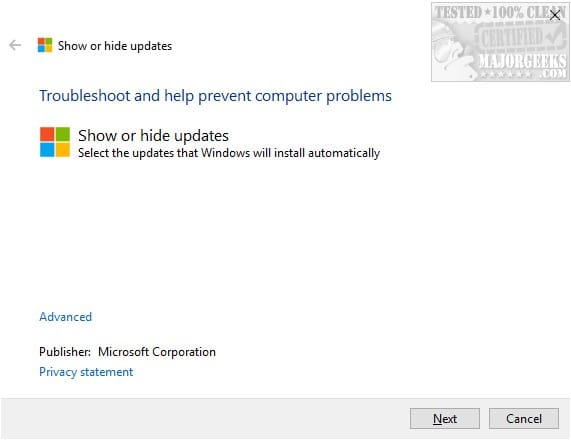
Are you sure Windows Update didn't touch your audio or LAN drivers on either Windows 11 or 7? OK, Windows 7 always ask the user before updating drivers, but you never know. Windows 11 even when set not to update drivers, it might still do so. I don't trust Windows Update. The best option is to make sure you already have installed the latest official audio and LAN drivers from manufacturer so Windows Update won't find anything new and leave them alone. Even if there is a newer driver available in Windows Update, not necessarily better, you can hide it (block it) so it doesn't install with Microsoft Windows Update Show/Hide Tool or Windows Automatic Updates Manager (WAU Manager), both available at Major Geeks:


Just use one of them to search for available updates and present you a list. Check the box for those that you want to hide (block) and apply changes. Of course the update must not have been already installed or it won't be on the list to hide (block).

Also see this thread in case you have to apply the commands suggested so Windows 7 PC can communicate without issues with Windows 11 PC:

Every time Microsoft removes a "legacy feature" to modernize Windows 11 they break compatibility. Thankfully there are guys that have found a workaround and help us restore the damage.
 

My Computers My Computers

  • At a glance

    Windows 11 Pro 23H2 (5699), 25H2 (8655)Mobile DualCore Intel Core 2 Duo T7250, 2000 MHz4GBMobile Intel(R) GMA 4500M (Mobile 4 series)
    OS
    Windows 11 Pro 23H2 (5699), 25H2 (8655)
    Computer type
    Laptop
    Manufacturer/Model
    Acer Extensa 5630EZ
    CPU
    Mobile DualCore Intel Core 2 Duo T7250, 2000 MHz
    Motherboard
    Acer Extensa 5630
    Memory
    4GB
    Graphics Card(s)
    Mobile Intel(R) GMA 4500M (Mobile 4 series)
    Sound Card
    Realtek ALC268 @ Intel 82801IB ICH9 - High Definition Audio Controller
    Monitor(s) Displays
    1
    Screen Resolution
    1280x800
    Hard Drives
    Samsung SSD 850 EVO 250GB SATA Device (250 GB, SATA-III)
    Internet Speed
    VDSL 50 Mbps
    Browser
    MICROSOFT EDGE
    Antivirus
    WINDOWS DEFENDER
    Other Info
    Legacy MBR installation, no TPM, no Secure Boot, no WDDM 2.0 graphics drivers, no SSE4.2, cannot get more unsupported ;) This is only my test laptop. I had installed Windows 11 here before upgrading my main PC. For my main PC I use everyday see my 2nd system specs.
  • At a glance

    Windows 11 Pro v25H2 (build 26200.8655)Intel Core-i7 3770 3.40GHz s1155 (3rd generat...2x Kingston Hyper-X Blu 8GB DDR3-1600GIGABYTE GeForce RTX 3050 WINDFORCE OC V2 6GB...
    Operating System
    Windows 11 Pro v25H2 (build 26200.8655)
    Computer type
    PC/Desktop
    Manufacturer/Model
    Custom-built PC
    CPU
    Intel Core-i7 3770 3.40GHz s1155 (3rd generation)
    Motherboard
    Asus P8H61 s1155 ATX
    Memory
    2x Kingston Hyper-X Blu 8GB DDR3-1600
    Graphics card(s)
    GIGABYTE GeForce RTX 3050 WINDFORCE OC V2 6GB (GV-N3050WF2OCV2-6GD)
    Sound Card
    Realtek HD audio (ALC887)
    Monitor(s) Displays
    Sony Bravia KDL-19L4000 19" LCD TV via VGA
    Screen Resolution
    1440x900 32-bit 60Hz
    Hard Drives
    WD Blue SA510 2.5 1000GB SSD as system disk, Western Digital Caviar Purple 4TB SATA III (WD40PURZ) as second
    PSU
    Thermaltake Litepower RGB 550W Full Wired
    Case
    SUPERCASE MIDI-TOWER
    Cooling
    Deepcool Gamma Archer CPU cooler, 1x 8cm fan at the back
    Keyboard
    Mitsumi 101-key PS/2
    Mouse
    Sunnyline OptiEye PS/2
    Internet Speed
    100Mbps
    Browser
    Microsoft Edge, Mozilla Firefox
    Antivirus
    Microsoft Windows Defender
    Other Info
    Legacy BIOS (MBR) installation, no TPM, no Secure Boot, WDDM 3.0 graphics drivers, WEI score 7.4
Back
Top Bottom