Daum Potplayer: Playlist names are too Dark


ariespaan

Well-known member
Local time
7:07 AM
Posts
65
OS
windows 11
Hi,

I am using Daum Potplayer for a while and it is an excellent Player
The only problem is, that the Filenames in the Playlist are too Dark

I used several skins to see if there are other ways to chance this problem, but with no result
My question is: Is it possible to chance only the brightness of the fonts in the playlist (may be an other color for the tekst?
Has anybody suggestions how to fix that?

Many thanks
 

My Computer

System One

  • OS
    windows 11
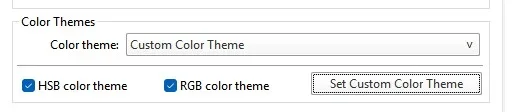
Have you looked at Skin Advanced > color schemes > set custom color scheme?
Might be able to get a combination you like.

Screenshot 2026-04-05 081753.webp
 

My Computer

System One

  • OS
    Windows 11 Pro
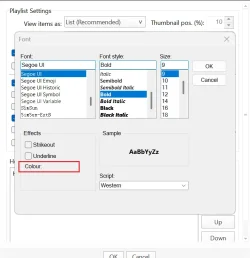
Can't find a way to change the play list text colour but if you right click the playlist and select play list settings. Select the font face box and change to Bold. That should help. Notice the colour setting isn't available. Changing the text size will also help.

Snipaste_2026-04-05_19-15-25.webp
 

My Computers

System One System Two

  • OS
    Win 11 Pro
    Computer type
    Laptop
    Manufacturer/Model
    ASUS Vivobook
    CPU
    AMD Ryzen™ 7 7730U
    Motherboard
    M1605YA
    Memory
    24GB Dual-Channel DDR4 @ 1596MHz (22-22-22-52)
    Graphics Card(s)
    512MB ATI AMD Radeon Graphics (ASUStek Computer Inc)
    Monitor(s) Displays
    Generic PnP Monitor (1920x1200@60Hz) - P1 PLUS (1920x1080@59Hz)
    Screen Resolution
    1920 X 1200
    Hard Drives
    953GB Western Digital WD
    PSU
    45 Watts
    Mouse
    Lenovo Bluetooth.
    Internet Speed
    500 Mbps
    Browser
    Edge
    Antivirus
    Defender
  • Operating System
    Windows 11
    Computer type
    Laptop
    Manufacturer/Model
    ACER NITRO
    CPU
    AMD Ryzen 7 5800H / 3.2 GHz
    Motherboard
    CZ Scala_CAS (FP6)
    Memory
    32 GB DDR4 SDRAM 3200 MHz
    Graphics card(s)
    NVIDIA GeForce RTX 3060 6 GB GDDR6 SDRAM
    Sound Card
    Realtek Audio. NVIDIA High Definition Audio
    Monitor(s) Displays
    15.6" LED backlight 1920 x 1080 (Full HD) 144 Hz
    Screen Resolution
    1920 x 1080 (Full HD)
    Hard Drives
    Samsung 970 Evo Plus 2TB NVMe M.2
    PSU
    180 Watt, 19.5 V
    Mouse
    Lenovo Bluetooth
    Internet Speed
    500 Mbps
    Browser
    Edge
    Antivirus
    Defender
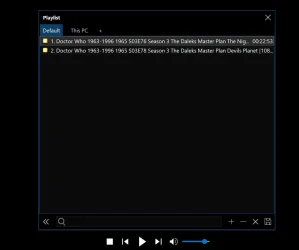
PS, maybe view items as thumbnails?

Snipaste_2026-04-05_19-21-36.webp
 

My Computers

System One System Two

  • OS
    Win 11 Pro
    Computer type
    Laptop
    Manufacturer/Model
    ASUS Vivobook
    CPU
    AMD Ryzen™ 7 7730U
    Motherboard
    M1605YA
    Memory
    24GB Dual-Channel DDR4 @ 1596MHz (22-22-22-52)
    Graphics Card(s)
    512MB ATI AMD Radeon Graphics (ASUStek Computer Inc)
    Monitor(s) Displays
    Generic PnP Monitor (1920x1200@60Hz) - P1 PLUS (1920x1080@59Hz)
    Screen Resolution
    1920 X 1200
    Hard Drives
    953GB Western Digital WD
    PSU
    45 Watts
    Mouse
    Lenovo Bluetooth.
    Internet Speed
    500 Mbps
    Browser
    Edge
    Antivirus
    Defender
  • Operating System
    Windows 11
    Computer type
    Laptop
    Manufacturer/Model
    ACER NITRO
    CPU
    AMD Ryzen 7 5800H / 3.2 GHz
    Motherboard
    CZ Scala_CAS (FP6)
    Memory
    32 GB DDR4 SDRAM 3200 MHz
    Graphics card(s)
    NVIDIA GeForce RTX 3060 6 GB GDDR6 SDRAM
    Sound Card
    Realtek Audio. NVIDIA High Definition Audio
    Monitor(s) Displays
    15.6" LED backlight 1920 x 1080 (Full HD) 144 Hz
    Screen Resolution
    1920 x 1080 (Full HD)
    Hard Drives
    Samsung 970 Evo Plus 2TB NVMe M.2
    PSU
    180 Watt, 19.5 V
    Mouse
    Lenovo Bluetooth
    Internet Speed
    500 Mbps
    Browser
    Edge
    Antivirus
    Defender
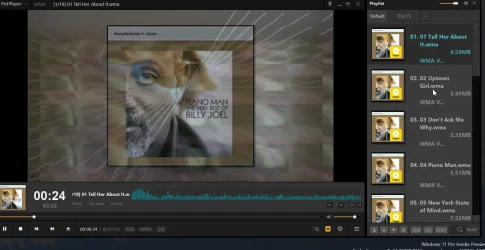
Just had a look at mine and I have no problem at all. Haven't messed around with settings for years. I use the skin "PotXMP 4.0.dsf". Here's a partial screenshot showing the playlist.

1775440317247.webp
 

My Computer

System One

  • OS
    Windows 11 Pro (24H2 - 26100.4484)
    Computer type
    PC/Desktop
    CPU
    Intel Pentium Gold G5400 CPU @ 3.70GHz
    Motherboard
    ASUSTek / PRIME H310M-E R2.0
    Memory
    DDR4 Dual 16GB
    Graphics Card(s)
    NONE - Intel UHD Graphics 610 (onboard)
    Sound Card
    NONE
    Hard Drives
    Samsung SSD 850 EVO - 256GB; Western Digital - 4TB

Latest Support Threads

Back
Top Bottom