DCOM Errors ID 10010 Thumbnail Cache Out of Proc Server and WPN SRUM COM Server


catweazel

Well-known member
Member
VIP
Local time
7:34 PM
Posts
152
Location
Germany
OS
Windows 11
Hallo,
I have have the known errors for a very long time The server "{AB8902B4-09CA-4BB6-B78D-A8F59079A8D5}" could not be registered within the specified time period with DCOM, ( Thumbnail Cache Out of Proc Server ), also with the WPN SRUM COM Server. MS writes that you can ignore them, since Windows 10 annoying this error, does anyone have a solution for it?
 

My Computer My Computer

At a glance

Windows 11Intel I7 6820 HQ QuadCore16 gbIntel HD 530, Nvidia Qudro M1000M
OS
Windows 11
Computer type
Laptop
Manufacturer/Model
Lenovo P50
CPU
Intel I7 6820 HQ QuadCore
Memory
16 gb
Graphics Card(s)
Intel HD 530, Nvidia Qudro M1000M
Sound Card
Realtek High Definition Audio
Monitor(s) Displays
1920x1080
Screen Resolution
Wide viewing angle & High density FlexView Display 1920x1080
Hard Drives
SSD
Hello catweazel
DCOM Errors ID 10010 Thumbnail Cache Out of Proc Server
Check the computer for viruses, then run sfc /scannow from an elevated command prompt .
WPN SRUM COM Server
do you have an Event ID for this error/warning?
 

My Computers My Computers

  • At a glance

    Windows 11AMD Ryzen 5 560016 GBSapphire Radeon RX 6500XT (8 GB version)
    OS
    Windows 11
    Computer type
    PC/Desktop
    CPU
    AMD Ryzen 5 5600
    Motherboard
    MSI B550-A Pro
    Memory
    16 GB
    Graphics Card(s)
    Sapphire Radeon RX 6500XT (8 GB version)
    Monitor(s) Displays
    BenQ Mobuiz EX2710Q QHD, Iiyama ProLite X23377HDS
    Hard Drives
    MSI Spatium M461 4TB
  • At a glance

    Windows 11Intel Celeron N4020
    Operating System
    Windows 11
    Computer type
    Laptop
    Manufacturer/Model
    Acer A114
    CPU
    Intel Celeron N4020
Hallo,
WPN SRUM COM Server the same ID 10010, the system is clean, dism repair commands , sfc, all ok, no adware and virus, System is Win11 22.000.346 uptodate, on Lenovo P50.
 

My Computer My Computer

At a glance

Windows 11Intel I7 6820 HQ QuadCore16 gbIntel HD 530, Nvidia Qudro M1000M
OS
Windows 11
Computer type
Laptop
Manufacturer/Model
Lenovo P50
CPU
Intel I7 6820 HQ QuadCore
Memory
16 gb
Graphics Card(s)
Intel HD 530, Nvidia Qudro M1000M
Sound Card
Realtek High Definition Audio
Monitor(s) Displays
1920x1080
Screen Resolution
Wide viewing angle & High density FlexView Display 1920x1080
Hard Drives
SSD
Hallo,
I have have the known errors for a very long time The server "{AB8902B4-09CA-4BB6-B78D-A8F59079A8D5}" could not be registered within the specified time period with DCOM, ( Thumbnail Cache Out of Proc Server ), also with the WPN SRUM COM Server. MS writes that you can ignore them, since Windows 10 annoying this error, does anyone have a solution for it?
i've got this problem time ago but when i installed windows 11 this error disappeared
 

My Computer My Computer

At a glance

Windows 11Intel Core i5 1040016 gb of sh*tty ramGTX 1050ti
OS
Windows 11
Computer type
PC/Desktop
CPU
Intel Core i5 10400
Motherboard
ASUS Prime H410M-D
Memory
16 gb of sh*tty ram
Graphics Card(s)
GTX 1050ti
PSU
Cooler master mwe v2 700w
Case
Cooler master mb511
Cooling
GAMMAXX v2
Internet Speed
50mbps
Browser
Opera GX
Yes, I know it from win10.
 

My Computer My Computer

At a glance

Windows 11Intel I7 6820 HQ QuadCore16 gbIntel HD 530, Nvidia Qudro M1000M
OS
Windows 11
Computer type
Laptop
Manufacturer/Model
Lenovo P50
CPU
Intel I7 6820 HQ QuadCore
Memory
16 gb
Graphics Card(s)
Intel HD 530, Nvidia Qudro M1000M
Sound Card
Realtek High Definition Audio
Monitor(s) Displays
1920x1080
Screen Resolution
Wide viewing angle & High density FlexView Display 1920x1080
Hard Drives
SSD
Yes, I know it from win10.
Sorry but i don't know how to fix that, but i think that you can disable dcom or something like that
 

My Computer My Computer

At a glance

Windows 11Intel Core i5 1040016 gb of sh*tty ramGTX 1050ti
OS
Windows 11
Computer type
PC/Desktop
CPU
Intel Core i5 10400
Motherboard
ASUS Prime H410M-D
Memory
16 gb of sh*tty ram
Graphics Card(s)
GTX 1050ti
PSU
Cooler master mwe v2 700w
Case
Cooler master mb511
Cooling
GAMMAXX v2
Internet Speed
50mbps
Browser
Opera GX
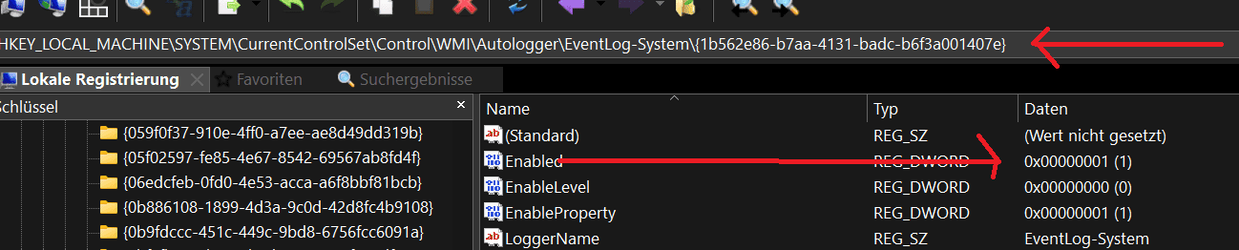
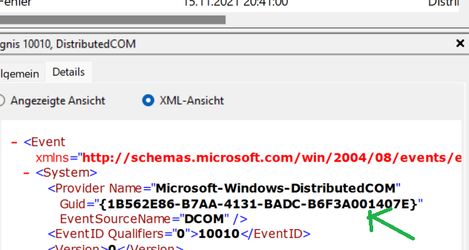
Yes, you can search for this via the Guid in the registry and set enabled to 0. See the green and red arrows in the Pictures. But it hides the Problem. ;)
dcom2.pngdcom10010.png
 

My Computer My Computer

At a glance

Windows 11Intel I7 6820 HQ QuadCore16 gbIntel HD 530, Nvidia Qudro M1000M
OS
Windows 11
Computer type
Laptop
Manufacturer/Model
Lenovo P50
CPU
Intel I7 6820 HQ QuadCore
Memory
16 gb
Graphics Card(s)
Intel HD 530, Nvidia Qudro M1000M
Sound Card
Realtek High Definition Audio
Monitor(s) Displays
1920x1080
Screen Resolution
Wide viewing angle & High density FlexView Display 1920x1080
Hard Drives
SSD
Hallo,
WPN SRUM COM Server the same ID 10010, the system is clean, dism repair commands , sfc, all ok, no adware and virus, System is Win11 22.000.346 uptodate, on Lenovo P50.
Find the Program Name and Vendor that is likely the cause of the error:

Open Regedit, navigate to
Computer\HKEY_CLASSES_ROOT\CLSID\{AB8902B4-09CA-4BB6-B78D-A8F59079A8D5}\LocalServer32
and in the right pane, double click on the Value name called Default, and the Edit String box opens.

Open File Explorer (press Windows key + E ) and use it to Navigate to the location indicated in the Edit String.
Right click on the Program name, then select Properties from drop-down list.
The Properties dialog box for the program is displayed.
Click on the Version Tab, and determine who the program Vendor is.
 

My Computers My Computers

  • At a glance

    Windows 11AMD Ryzen 5 560016 GBSapphire Radeon RX 6500XT (8 GB version)
    OS
    Windows 11
    Computer type
    PC/Desktop
    CPU
    AMD Ryzen 5 5600
    Motherboard
    MSI B550-A Pro
    Memory
    16 GB
    Graphics Card(s)
    Sapphire Radeon RX 6500XT (8 GB version)
    Monitor(s) Displays
    BenQ Mobuiz EX2710Q QHD, Iiyama ProLite X23377HDS
    Hard Drives
    MSI Spatium M461 4TB
  • At a glance

    Windows 11Intel Celeron N4020
    Operating System
    Windows 11
    Computer type
    Laptop
    Manufacturer/Model
    Acer A114
    CPU
    Intel Celeron N4020
Hallo,
thanks for the tip, but there is no way to navigate there via the explorer or my bing translator app translates incorrectly ? :)
thunmbnailcache.png
 

My Computer My Computer

At a glance

Windows 11Intel I7 6820 HQ QuadCore16 gbIntel HD 530, Nvidia Qudro M1000M
OS
Windows 11
Computer type
Laptop
Manufacturer/Model
Lenovo P50
CPU
Intel I7 6820 HQ QuadCore
Memory
16 gb
Graphics Card(s)
Intel HD 530, Nvidia Qudro M1000M
Sound Card
Realtek High Definition Audio
Monitor(s) Displays
1920x1080
Screen Resolution
Wide viewing angle & High density FlexView Display 1920x1080
Hard Drives
SSD
Apologies @catweazel , I quoted wrong location. Try here:
Computer\HKEY_CLASSES_ROOT\CLSID\{AB8902B4-09CA-4BB6-B78D-A8F59079A8D5}\InprocServer32
 

My Computers My Computers

  • At a glance

    Windows 11AMD Ryzen 5 560016 GBSapphire Radeon RX 6500XT (8 GB version)
    OS
    Windows 11
    Computer type
    PC/Desktop
    CPU
    AMD Ryzen 5 5600
    Motherboard
    MSI B550-A Pro
    Memory
    16 GB
    Graphics Card(s)
    Sapphire Radeon RX 6500XT (8 GB version)
    Monitor(s) Displays
    BenQ Mobuiz EX2710Q QHD, Iiyama ProLite X23377HDS
    Hard Drives
    MSI Spatium M461 4TB
  • At a glance

    Windows 11Intel Celeron N4020
    Operating System
    Windows 11
    Computer type
    Laptop
    Manufacturer/Model
    Acer A114
    CPU
    Intel Celeron N4020
Hallo,
I had already looked at the thumbcache.dll, is all ok, by MS, digitally signed.
Meanwhile I have practically only sporadic times 1 -2 messages, the system has probably repaired itself. 😁👌,
Thank you very much, best regards from Germany, i will be back :)
thumbnailcache.jpg

PS:
a big Problem was this:
 

My Computer My Computer

At a glance

Windows 11Intel I7 6820 HQ QuadCore16 gbIntel HD 530, Nvidia Qudro M1000M
OS
Windows 11
Computer type
Laptop
Manufacturer/Model
Lenovo P50
CPU
Intel I7 6820 HQ QuadCore
Memory
16 gb
Graphics Card(s)
Intel HD 530, Nvidia Qudro M1000M
Sound Card
Realtek High Definition Audio
Monitor(s) Displays
1920x1080
Screen Resolution
Wide viewing angle & High density FlexView Display 1920x1080
Hard Drives
SSD
Hallo @catweazel . Okay if you are making progress with this error, then good luck :D .

However, you may also want to check the permissions set on the DCOM server. Navigate to Computer\HKEY_CLASSES_ROOT\CLSID\{AB8902B4-09CA-4BB6-B78D-A8F59079A8D5}, and try this suggestion from @FreeBooter (Post #3):

(Note: Question is about a different Event ID, but the recommended solution is the same.)
 

My Computers My Computers

  • At a glance

    Windows 11AMD Ryzen 5 560016 GBSapphire Radeon RX 6500XT (8 GB version)
    OS
    Windows 11
    Computer type
    PC/Desktop
    CPU
    AMD Ryzen 5 5600
    Motherboard
    MSI B550-A Pro
    Memory
    16 GB
    Graphics Card(s)
    Sapphire Radeon RX 6500XT (8 GB version)
    Monitor(s) Displays
    BenQ Mobuiz EX2710Q QHD, Iiyama ProLite X23377HDS
    Hard Drives
    MSI Spatium M461 4TB
  • At a glance

    Windows 11Intel Celeron N4020
    Operating System
    Windows 11
    Computer type
    Laptop
    Manufacturer/Model
    Acer A114
    CPU
    Intel Celeron N4020
Ahh good, i ave an account in tenforums too, i take nsudo to test it.

Nsudo _ Component Services- Thumbnail Cache Out of Proc Server, Properties-Security- add lokaler dienst, see the Picture:
I must write it in german LOKALER DIENST

thumbnail lokaler dienst.png

with Nsudo ,I have already edited a lot in the component services, good tool. also for the registry.
Now i must waiting for results. 😁
 
Last edited:

My Computer My Computer

At a glance

Windows 11Intel I7 6820 HQ QuadCore16 gbIntel HD 530, Nvidia Qudro M1000M
OS
Windows 11
Computer type
Laptop
Manufacturer/Model
Lenovo P50
CPU
Intel I7 6820 HQ QuadCore
Memory
16 gb
Graphics Card(s)
Intel HD 530, Nvidia Qudro M1000M
Sound Card
Realtek High Definition Audio
Monitor(s) Displays
1920x1080
Screen Resolution
Wide viewing angle & High density FlexView Display 1920x1080
Hard Drives
SSD
Do you use Acronis products?
If yes then ignore this error.
 

My Computer My Computer

At a glance

Windows 11Intel Core I7-1070032 GB RAMNVIDIA Geforce RTX 2070 Super
OS
Windows 11
Computer type
PC/Desktop
Manufacturer/Model
Dell XPS
CPU
Intel Core I7-10700
Motherboard
Dell XPS 8940
Memory
32 GB RAM
Graphics Card(s)
NVIDIA Geforce RTX 2070 Super
Sound Card
Realtek
Monitor(s) Displays
LG 24EN33
Antivirus
GData

My Computer My Computer

At a glance

Windows 11Intel I7 6820 HQ QuadCore16 gbIntel HD 530, Nvidia Qudro M1000M
OS
Windows 11
Computer type
Laptop
Manufacturer/Model
Lenovo P50
CPU
Intel I7 6820 HQ QuadCore
Memory
16 gb
Graphics Card(s)
Intel HD 530, Nvidia Qudro M1000M
Sound Card
Realtek High Definition Audio
Monitor(s) Displays
1920x1080
Screen Resolution
Wide viewing angle & High density FlexView Display 1920x1080
Hard Drives
SSD
So far no more errors after about 6 restarts !!. Goooood, it probably helps.😀
 

My Computer My Computer

At a glance

Windows 11Intel I7 6820 HQ QuadCore16 gbIntel HD 530, Nvidia Qudro M1000M
OS
Windows 11
Computer type
Laptop
Manufacturer/Model
Lenovo P50
CPU
Intel I7 6820 HQ QuadCore
Memory
16 gb
Graphics Card(s)
Intel HD 530, Nvidia Qudro M1000M
Sound Card
Realtek High Definition Audio
Monitor(s) Displays
1920x1080
Screen Resolution
Wide viewing angle & High density FlexView Display 1920x1080
Hard Drives
SSD

My Computers My Computers

  • At a glance

    Windows 11AMD Ryzen 5 560016 GBSapphire Radeon RX 6500XT (8 GB version)
    OS
    Windows 11
    Computer type
    PC/Desktop
    CPU
    AMD Ryzen 5 5600
    Motherboard
    MSI B550-A Pro
    Memory
    16 GB
    Graphics Card(s)
    Sapphire Radeon RX 6500XT (8 GB version)
    Monitor(s) Displays
    BenQ Mobuiz EX2710Q QHD, Iiyama ProLite X23377HDS
    Hard Drives
    MSI Spatium M461 4TB
  • At a glance

    Windows 11Intel Celeron N4020
    Operating System
    Windows 11
    Computer type
    Laptop
    Manufacturer/Model
    Acer A114
    CPU
    Intel Celeron N4020
No more errors so far, the user was still added to the Comp.-Services. All the best😁
 

My Computer My Computer

At a glance

Windows 11Intel I7 6820 HQ QuadCore16 gbIntel HD 530, Nvidia Qudro M1000M
OS
Windows 11
Computer type
Laptop
Manufacturer/Model
Lenovo P50
CPU
Intel I7 6820 HQ QuadCore
Memory
16 gb
Graphics Card(s)
Intel HD 530, Nvidia Qudro M1000M
Sound Card
Realtek High Definition Audio
Monitor(s) Displays
1920x1080
Screen Resolution
Wide viewing angle & High density FlexView Display 1920x1080
Hard Drives
SSD
Back
Top Bottom