Debloat Windows 11 or not?


I don’t bother with ant type of debloat process. Juice not worth the squeeze for me.
 

My Computers

System One System Two

  • OS
    Windows 11 Pro
    Computer type
    PC/Desktop
    Manufacturer/Model
    Beelink SEI8
    CPU
    Intel Core i5-8279u
    Motherboard
    AZW SEI
    Memory
    32GB DDR4 2666Mhz
    Graphics Card(s)
    Intel Iris Plus 655
    Sound Card
    Intel SST
    Monitor(s) Displays
    Asus ProArt PA278QV
    Screen Resolution
    2560x1440
    Hard Drives
    512GB NVMe
    PSU
    NA
    Case
    NA
    Cooling
    NA
    Keyboard
    NA
    Mouse
    NA
    Internet Speed
    500/50
    Browser
    Edge
    Antivirus
    Defender
    Other Info
    Mini PC used for testing Windows 11.
  • Operating System
    Windows 10 Pro
    Computer type
    PC/Desktop
    Manufacturer/Model
    Custom
    CPU
    Ryzen 9 5900x
    Motherboard
    Asus Rog Strix X570-E Gaming
    Memory
    64GB DDR4-3600
    Graphics card(s)
    EVGA GeForce 3080 FT3 Ultra
    Sound Card
    Onboard
    Monitor(s) Displays
    ASUS TUF Gaming VG27AQ. ASUS ProArt Display PA278QV 27” WQHD
    Screen Resolution
    2560x1440
    Hard Drives
    2TB WD SN850 PCI-E Gen 4 NVMe
    2TB Sandisk Ultra 2.5" SATA SSD
    PSU
    Seasonic Focus 850
    Case
    Fractal Meshify S2 in White
    Cooling
    Dark Rock Pro CPU cooler, 3 x 140mm case fans
    Keyboard
    Corsiar K65 RGB Lux
    Mouse
    Logitech G9 Laser Mouse
    Internet Speed
    500/50
    Browser
    Chrome
    Antivirus
    Defender.
Been there done that, it's not working like that. They still eating resource in back unless u uninstall them completely with third party programmes
I think there's one of those "mini nuclear power stations" being built in Wales is probably what you need to power your PC.

My i7 laptop with W11 Pro on it (25H2 - non insider version) with HYPER-V running 2 VM's and passing to KODI (installed on the firestick not the computer ) via a remote fire stick to a remote TV via standard networking a 2160p video with subtitles is barely registering any significant CPU usage and is being powered quite comfortably from an external "mini dock" with a 75 W charging point - plus neither the laptop nor the dock is even warm. !!

Cheers
jimbo
 

My Computer

System One

  • OS
    Windows XP,11 Linux Fedora Rawhide pre-release 45
    Computer type
    PC/Desktop
    CPU
    2 X Intel i7
    Screen Resolution
    4KUHD X 2
I ditch OneDrive, Copilot, Edge, all UWP Apps and the Store..., implement a handful of privacy and reg tweaks..., that's about it.
 

My Computers

System One System Two

  • OS
    Windows 11 Pro
    Computer type
    PC/Desktop
    Manufacturer/Model
    ASUS ROG Strix
  • Operating System
    Windows 11 Pro
    Computer type
    Laptop
    Manufacturer/Model
    ASUS VivoBook
I don't bother either. I buy a premium laptop, and it does everything I want as fast as I want. I like to think the reason I don't have problems is that I run Windows the way the boys at Redmond designed it.
People who have high end devices also experience drive locked outs, random internet cuts, 32 task manager running in back or problems with mouse&keyboards in recovery mode + MANY MORE BUGS. I don't think this is how Redmond want to design it.

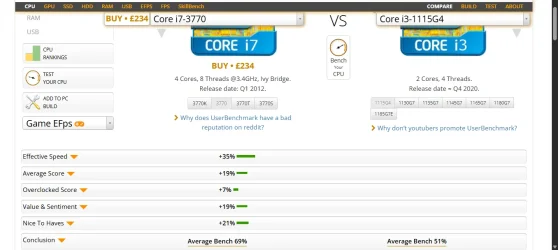
Moreover adding more bloatware(which nobody asked them to) and then claim old systems is not capable of running win 11 is another level joke. Here is the comparison of non premium versus premium system by the way
 

Attachments

  • Screenshot(132).webp
    Screenshot(132).webp
    54.5 KB · Views: 2

My Computers

System One System Two

  • OS
    windows 11 home 23H2 22631.6199
    Computer type
    Laptop
    Manufacturer/Model
    HP
    CPU
    Intel core i7 (2nd gen) Turbo 3.10 ghz
    Memory
    6gb
    Graphics Card(s)
    Amd Radeon HD 7400m 1GB & Intel hd graphics
    Sound Card
    BeatsAudio
    Hard Drives
    128gb SSD
  • Operating System
    macOS Sequoia
    Computer type
    PC/Desktop
    Manufacturer/Model
    iMac 24"
    CPU
    M1 3.2 ghz
    Memory
    8gb onboard
    Graphics card(s)
    igpu
    Monitor(s) Displays
    Retina 4.5K
    Screen Resolution
    4480x2520
    Hard Drives
    512gb SSD
I think there's one of those "mini nuclear power stations" being built in Wales is probably what you need to power your PC.

Instead what about making system which is more user friendly. People simply want to have control on their OWN pcs, want to uninstall some apps which THEY WILL NEVER USE.

Youtube filled with full of debloat win11 videos, it's tragicomic
 

My Computers

System One System Two

  • OS
    windows 11 home 23H2 22631.6199
    Computer type
    Laptop
    Manufacturer/Model
    HP
    CPU
    Intel core i7 (2nd gen) Turbo 3.10 ghz
    Memory
    6gb
    Graphics Card(s)
    Amd Radeon HD 7400m 1GB & Intel hd graphics
    Sound Card
    BeatsAudio
    Hard Drives
    128gb SSD
  • Operating System
    macOS Sequoia
    Computer type
    PC/Desktop
    Manufacturer/Model
    iMac 24"
    CPU
    M1 3.2 ghz
    Memory
    8gb onboard
    Graphics card(s)
    igpu
    Monitor(s) Displays
    Retina 4.5K
    Screen Resolution
    4480x2520
    Hard Drives
    512gb SSD
I don't debloat - why bother as long as your machine is fast enough. A clean install is a kind of debloat if it's a new PC. But I don't debloat Windows itself - however I do go through all the settings and turn OFF anything I don't want or want running in the background. I only really uninstall One Drive and Copilot. Anything there I don't need I just ignore - and set apps not to run in the background. And then just get on with life :-)

There are a lot of settings to think about - turning off autoplay and background apps and various location and privacy settings.
 

My Computers

System One System Two

  • OS
    Windows 11 Home 25H2
    Computer type
    Laptop
    Manufacturer/Model
    HP Pavilion 14-ce3606sa
    CPU
    Core i5-1035G1
    Memory
    32gb
    Hard Drives
    Samsung 870 evo sata ssd
    Cooling
    Could be better
    Internet Speed
    50 mbps Starlink
    Browser
    Firefox
    Other Info
    Originally came installed with a 500gb H10 Optane ssd
  • Operating System
    Windows 11 Home
    Computer type
    Laptop
    Manufacturer/Model
    HP Pavilion ce3606sa
    CPU
    Intel Core i5-1035G1
    Memory
    16gb
    Hard Drives
    Hynix Gold P31 2TB
    Internet Speed
    200mbps Starlink
    Browser
    Firefox
    Antivirus
    Defender
I ditch OneDrive, Copilot, Edge, all UWP Apps and the Store..., implement a handful of privacy and reg tweaks..., that's about it.
Yeah, this could explain why I don’t debloat. I use OneDrive and more so since I have office 365. I do make use of copilot, not heavily at this point but more and more as time goes on. I keep edge around for times when I need to run a browser without an ad blocker or am testing something for work and want a browser where I can clear cache without impacting my normal everyday chrome.
 

My Computers

System One System Two

  • OS
    Windows 11 Pro
    Computer type
    PC/Desktop
    Manufacturer/Model
    Beelink SEI8
    CPU
    Intel Core i5-8279u
    Motherboard
    AZW SEI
    Memory
    32GB DDR4 2666Mhz
    Graphics Card(s)
    Intel Iris Plus 655
    Sound Card
    Intel SST
    Monitor(s) Displays
    Asus ProArt PA278QV
    Screen Resolution
    2560x1440
    Hard Drives
    512GB NVMe
    PSU
    NA
    Case
    NA
    Cooling
    NA
    Keyboard
    NA
    Mouse
    NA
    Internet Speed
    500/50
    Browser
    Edge
    Antivirus
    Defender
    Other Info
    Mini PC used for testing Windows 11.
  • Operating System
    Windows 10 Pro
    Computer type
    PC/Desktop
    Manufacturer/Model
    Custom
    CPU
    Ryzen 9 5900x
    Motherboard
    Asus Rog Strix X570-E Gaming
    Memory
    64GB DDR4-3600
    Graphics card(s)
    EVGA GeForce 3080 FT3 Ultra
    Sound Card
    Onboard
    Monitor(s) Displays
    ASUS TUF Gaming VG27AQ. ASUS ProArt Display PA278QV 27” WQHD
    Screen Resolution
    2560x1440
    Hard Drives
    2TB WD SN850 PCI-E Gen 4 NVMe
    2TB Sandisk Ultra 2.5" SATA SSD
    PSU
    Seasonic Focus 850
    Case
    Fractal Meshify S2 in White
    Cooling
    Dark Rock Pro CPU cooler, 3 x 140mm case fans
    Keyboard
    Corsiar K65 RGB Lux
    Mouse
    Logitech G9 Laser Mouse
    Internet Speed
    500/50
    Browser
    Chrome
    Antivirus
    Defender.
Nope. Waste of time - I never bother with this nonsense and my pc idles at 1% CPU.

It's not about resources consumption alone, even tho - i9-13900H - is far from being a standard CPU - which can be found on the majority of systems (thus, that point - is highly subjective). For some of us - it's also about visual hygiene. By default - a clean Windows 11 install - is the equivalent of...

12.webp
And sure - strong legs (a modern High End CPU) - can carry that just fine., but quite a lot of people - are not ok with that lifestyle.
 

My Computer

System One

  • OS
    WinDOS 25H2
    Computer type
    Laptop
    CPU
    Intel & AMD
    Memory
    SO-DIMM SK Hynix 15.8 GB Dual-Channel DDR4-2666 (2 x 8 GB) 1329MHz (19-19-19-43)
    Graphics Card(s)
    nVidia RTX 2060 6GB Mobile GPU (TU106M)
    Sound Card
    Onbord Realtek ALC1220
    Screen Resolution
    1920 x 1080
    Hard Drives
    1x Samsung PM981 NVMe PCIe M.2 512GB / 1x Seagate Expansion ST1000LM035 1TB
This link takes you to GitHub where I can everything in the universe about WinUtil -- except how to DL it! Can anyone help, or better yet, find a link somewhere else to DL it?
While you can pay for a download (as a way to contribute to the hard work put in by Chris and all the people who have worked on it), the main method of using it is in Powershell. It's a web based app and using the following code in an Admin Powershell window will run the Stable (non-beta) Branch of the app:

Powershell:
irm "https://christitus.com/win" | iex
 

My Computer

System One

  • OS
    Windows 11 Pro 25H2 (26200.8457)
    Computer type
    PC/Desktop
    Manufacturer/Model
    Pre-built
    CPU
    AMD Ryzen 7 7800X3D
    Motherboard
    MSI Pro B650-VC WiFi
    Memory
    32gb Team Group (T-Force) DDR5-6000
    Graphics Card(s)
    Zotac nVidia GeForce RTX 4070 SUPER - 12gb
    Sound Card
    Sound BlasterX G6
    Monitor(s) Displays
    Koorui G2421V and ViewSonic VX2453
    Screen Resolution
    P:2560x1440 S:1920x1080
    Hard Drives
    WD Blue SN5000 - 500gb NVME
    WD Blue SN580 - 2TB NVME
    Seagate 4TB HDD - ST4000VN008-2DR166
    Keyboard
    Mountain Everest
    Mouse
    Logitech G502 Hero
    Internet Speed
    T-Mobile Home Internet
    Browser
    Firefox
    Other Info
    QNAP TS-469 Pro NAS
    TP-Link W7200 (2 unit mesh network)
    Elgato Streamdeck
The only reason I don't use co-pilot is because Chat GPT is so very good and my go-to tool - it has saved me a lot of money on various things in the past year! It's very good on legal things and formal letters. And I like to keep my AI stuff separate from my install.
 

My Computers

System One System Two

  • OS
    Windows 11 Home 25H2
    Computer type
    Laptop
    Manufacturer/Model
    HP Pavilion 14-ce3606sa
    CPU
    Core i5-1035G1
    Memory
    32gb
    Hard Drives
    Samsung 870 evo sata ssd
    Cooling
    Could be better
    Internet Speed
    50 mbps Starlink
    Browser
    Firefox
    Other Info
    Originally came installed with a 500gb H10 Optane ssd
  • Operating System
    Windows 11 Home
    Computer type
    Laptop
    Manufacturer/Model
    HP Pavilion ce3606sa
    CPU
    Intel Core i5-1035G1
    Memory
    16gb
    Hard Drives
    Hynix Gold P31 2TB
    Internet Speed
    200mbps Starlink
    Browser
    Firefox
    Antivirus
    Defender
The only reason I don't use co-pilot is because Chat GPT is so very good and my go-to tool - it has saved me a lot of money on various things in the past year! It's very good on legal things and formal letters. And I like to keep my AI stuff separate from my install.
While I like to consider myself on the front lines (not the bleeding lines) of tech, I'm a little wary of AI and what it can do. I've already seen how terribly wrong it can be when asking questions and I've seen enough AI Slop YouTubes that at least for now, I think it's best that I limit my personal use of AI models and stick to doing the research and such on my own.
 

My Computer

System One

  • OS
    Windows 11 Pro 25H2 (26200.8457)
    Computer type
    PC/Desktop
    Manufacturer/Model
    Pre-built
    CPU
    AMD Ryzen 7 7800X3D
    Motherboard
    MSI Pro B650-VC WiFi
    Memory
    32gb Team Group (T-Force) DDR5-6000
    Graphics Card(s)
    Zotac nVidia GeForce RTX 4070 SUPER - 12gb
    Sound Card
    Sound BlasterX G6
    Monitor(s) Displays
    Koorui G2421V and ViewSonic VX2453
    Screen Resolution
    P:2560x1440 S:1920x1080
    Hard Drives
    WD Blue SN5000 - 500gb NVME
    WD Blue SN580 - 2TB NVME
    Seagate 4TB HDD - ST4000VN008-2DR166
    Keyboard
    Mountain Everest
    Mouse
    Logitech G502 Hero
    Internet Speed
    T-Mobile Home Internet
    Browser
    Firefox
    Other Info
    QNAP TS-469 Pro NAS
    TP-Link W7200 (2 unit mesh network)
    Elgato Streamdeck
Yes it can be inaccurate - it can also be quite good at analysis and problem solving. But always best to use your own brain :-) I say "it" - they do vary a lot.
 

My Computers

System One System Two

  • OS
    Windows 11 Home 25H2
    Computer type
    Laptop
    Manufacturer/Model
    HP Pavilion 14-ce3606sa
    CPU
    Core i5-1035G1
    Memory
    32gb
    Hard Drives
    Samsung 870 evo sata ssd
    Cooling
    Could be better
    Internet Speed
    50 mbps Starlink
    Browser
    Firefox
    Other Info
    Originally came installed with a 500gb H10 Optane ssd
  • Operating System
    Windows 11 Home
    Computer type
    Laptop
    Manufacturer/Model
    HP Pavilion ce3606sa
    CPU
    Intel Core i5-1035G1
    Memory
    16gb
    Hard Drives
    Hynix Gold P31 2TB
    Internet Speed
    200mbps Starlink
    Browser
    Firefox
    Antivirus
    Defender
For me, it's not exactly debloating. More like putting windows in a sandbox so it can't break my applications or itself trying to reinstall the data mining code disguised as 'features' and 'services' that serve no discernible legitimate purpose.
 

My Computer

System One

  • OS
    Windows 11 22H2 Pro (X-lite Micro 11 version)
    Computer type
    Laptop
    Manufacturer/Model
    Dell/ Precision 7680
    CPU
    i7 13850HX (20 cores, 28 threads)
    Motherboard
    Dell
    Memory
    32GB DDR5
    Graphics Card(s)
    Intel UHD/ RTX 1000 ADA
    Sound Card
    Realtek
    Monitor(s) Displays
    4K UHD Touchscreen
    Screen Resolution
    3840 x 2400
    Hard Drives
    Samsung 512GB system drive
    WD Blue 1TB game drive
    PSU
    240W AC adapter, 1800W when docked
    Internet Speed
    1 gigabit symmetrical
    Browser
    Firefox, Librewolf
    Antivirus
    None. Manully configured so nobody except me can change any critical system files. (Don't ask how, it's probably against some rule somewhere)
For those of you wanting to debloat without using a script, this guy explains a lot of it fairly well. I am posting a video, but I used a different one he had made, but now I cannot find it.


My Computers

System One System Two

  • OS
    Windows 10 Home 10.0.22000.318 upgraded to 11 V:21H2 (Currently) 22000.2538
    Computer type
    Laptop
    Manufacturer/Model
    HP Spectre x360 Convertible 15T-eb100
    CPU
    11th Gen Intel(R) Core(TM) i7-1165G7 @ 2.80GHz 2.70 G
    Motherboard
    HP 8812 Version 55.19
    Memory
    16.0 GB (15.6 GB usable)
    Graphics Card(s)
    Intel(R) Iris(R) Xe Graphics (iRISx) - discrete graphics
    Sound Card
    Realtek High Definition Audio
    Monitor(s) Displays
    Dell
    Screen Resolution
    HP Laptop: 3840x2160, Dell external 1680x1050
    Hard Drives
    NVMe KXG60ZNV512G KIOXIA (NTFS) SSD
    external Samsung 980 PRO PCle 4.0 NVMe M.2 SSD
    (want to make this the internal drive somehow)
    PSU
    135 W Smart AC power adapter
    Case
    emerald cut
    Keyboard
    external HP USB slim KB - PH0U
    Mouse
    Logitech M510
    Internet Speed
    10.3 mbps download, 0.91mbps upload
    Browser
    Chrome Version 97.0.4692.99 (Official Build) (64-bit)
    Antivirus
    Norton 360
    Other Info
    1. Power AC input
    2. HDMI 2.0b12
    3. Audio combo jack
    4. MicroSD reader
    5. Webcam Kill Switch
    6. USB 3.2 Gen 2 Type-A
    7. USB 3.2 Gen 2 Type-C™
    8. USB 3.2 Gen 2 Type-C™ with Thunderbolt™ 312
    Synaptics Precision Touchpad
    64-bit operating system, x64-based processor
    Pen and touch support with 10 touch points w/Windows Ink installed
  • Operating System
    Windows 10 Pro 64
    Computer type
    Laptop
    Manufacturer/Model
    HP Spectre x360-15t Touch Convertible
    CPU
    i7
    Memory
    16GB
    Graphics card(s)
    Intel Iris - Inteli76560U Processor Intel HD Graphics 16GB
    Monitor(s) Displays
    15.6" UHD WLED Display -Touch S
    Screen Resolution
    3840x2160
    Hard Drives
    1TB PCIe(R) NVMe M.2 SSD
    Browser
    Chrome
    Antivirus
    Norton
    Other Info
    I am currently locked out of this system by Microsoft. I cannot prove ownership so I an stuck at this point

    Web Cam, Dual Mic's, Active Stylus Pen, Backlit KB
    Thunderbolt 3
    One USB-A 3.0 port, two SuperSpeed USB 10Gbps
Here is the other one.


My Computers

System One System Two

  • OS
    Windows 10 Home 10.0.22000.318 upgraded to 11 V:21H2 (Currently) 22000.2538
    Computer type
    Laptop
    Manufacturer/Model
    HP Spectre x360 Convertible 15T-eb100
    CPU
    11th Gen Intel(R) Core(TM) i7-1165G7 @ 2.80GHz 2.70 G
    Motherboard
    HP 8812 Version 55.19
    Memory
    16.0 GB (15.6 GB usable)
    Graphics Card(s)
    Intel(R) Iris(R) Xe Graphics (iRISx) - discrete graphics
    Sound Card
    Realtek High Definition Audio
    Monitor(s) Displays
    Dell
    Screen Resolution
    HP Laptop: 3840x2160, Dell external 1680x1050
    Hard Drives
    NVMe KXG60ZNV512G KIOXIA (NTFS) SSD
    external Samsung 980 PRO PCle 4.0 NVMe M.2 SSD
    (want to make this the internal drive somehow)
    PSU
    135 W Smart AC power adapter
    Case
    emerald cut
    Keyboard
    external HP USB slim KB - PH0U
    Mouse
    Logitech M510
    Internet Speed
    10.3 mbps download, 0.91mbps upload
    Browser
    Chrome Version 97.0.4692.99 (Official Build) (64-bit)
    Antivirus
    Norton 360
    Other Info
    1. Power AC input
    2. HDMI 2.0b12
    3. Audio combo jack
    4. MicroSD reader
    5. Webcam Kill Switch
    6. USB 3.2 Gen 2 Type-A
    7. USB 3.2 Gen 2 Type-C™
    8. USB 3.2 Gen 2 Type-C™ with Thunderbolt™ 312
    Synaptics Precision Touchpad
    64-bit operating system, x64-based processor
    Pen and touch support with 10 touch points w/Windows Ink installed
  • Operating System
    Windows 10 Pro 64
    Computer type
    Laptop
    Manufacturer/Model
    HP Spectre x360-15t Touch Convertible
    CPU
    i7
    Memory
    16GB
    Graphics card(s)
    Intel Iris - Inteli76560U Processor Intel HD Graphics 16GB
    Monitor(s) Displays
    15.6" UHD WLED Display -Touch S
    Screen Resolution
    3840x2160
    Hard Drives
    1TB PCIe(R) NVMe M.2 SSD
    Browser
    Chrome
    Antivirus
    Norton
    Other Info
    I am currently locked out of this system by Microsoft. I cannot prove ownership so I an stuck at this point

    Web Cam, Dual Mic's, Active Stylus Pen, Backlit KB
    Thunderbolt 3
    One USB-A 3.0 port, two SuperSpeed USB 10Gbps
...but, not the resolution...


As a company - Microsoft ideology is heavily into people pleasing (trying to please the share-holders - by including features which generate profit and also the OEM partners - by officially limiting Windows 11 support with the aim of compelling Windows 7 - 10 clients -
As someone who spent 40 years in enterprise software product management I have to disagree with this statement for multiple reasons:

Supporting an OS and providing patches and updates is extremely expensive. Not something you ca outsource to India or wherever.

Older versions of Windows don't have the full security architecture found in Windows 11. For a corporate customer, it's more expensive to recover from a security breach than to just spend the damn $$$ and get the most secure OS platform.

I'm not taking an issue here with bloating, etc


into buying new hardware, trying to please both the newbs but also the power users - by offering options to disable a lot of features - one might dislike, they're even trying to please - specific Linux dystro users - by offering a dedicated feature for running a Linux dystro within Windows, and so on and so forth... ). My point is, as mentioned in the beginning.... Yes, a fresh install of Windows looks rather nasty this days - "but it's not locked in place (the macOS way of doing things), quite the opposite - you can de-bloat it really close to Windows 10 functionality. They're over-exaggerating - acting as if Windows 10 was more like Windows 2K/XP (far from that). :facepalm:

And sure. using third party tools like O&OShutUp or more complex - like CrapFixer... works too (if you know what you're doing).
 

My Computer

System One

  • OS
    Windows 11 2H25
    Computer type
    PC/Desktop
    Manufacturer/Model
    DIY
    CPU
    AMD 9900X
    Motherboard
    MSI X870E Carbon
    Memory
    64 GB
    Graphics Card(s)
    AMD 9070 XT
    Sound Card
    built-in
    Monitor(s) Displays
    Dell 24"
    Hard Drives
    Sabrent 1 TB NVMe, 4 x SSD (need to check models), 4 x 3.5" HDD, 8-16 TB, all WD
    PSU
    Seasonic 850
    Case
    Fractal Design North XL (which I likw)
    Cooling
    Corsair AIO for CPU, fans for case
    Keyboard
    Das Keyboard 4
    Mouse
    Corsair M65 (white)
    Internet Speed
    1 TB download
    Browser
    Firefox
    Antivirus
    Bitdefender
    Other Info
    Also have Lenovo T14S laptop (me) and Lenovo Slim 71 (wife)
As someone who spent 40 years in enterprise software product management I have to disagree with this statement for multiple reasons:

Supporting an OS and providing patches and updates is extremely expensive. Not something you ca outsource to India or wherever.

Older versions of Windows don't have the full security architecture found in Windows 11. For a corporate customer, it's more expensive to recover from a security breach than to just spend the damn $$$ and get the most secure OS platform.

You misunderstood. I didn't say Microsoft should still support Windows 7 & 10 - it wasn't about the software - but "capable hardware (high end at that time - but even mid-range are more than enough - while entry level CPUs could suffice)" - on which - even Windows 11 can run flawlessly (as proven by many - who bypassed "the Windows 11 Official list of supported CPUs"). With Windows 10 went EOL - a massive number of its user base migrated to Windows 11 recently - while +40% are still on Windows 10) - and slapped with the latest list of supported hardware - just for the sake of Profit (despite having more than highly capable hardware to run Win 11). I would understand - if they tried to avoid the Windows Vista fiasco - the first Windows that was ahead of its time (the software itself was far more demanding - for hardware that used to run Windows '98 - Win XP - cause many installed Win Vista on that hardware - and expected to work the same - thus, the unreasonable customer expectations and misguiding complaints).

But this time around - it's quite the opposite, i mean - they limited even the 7th Gen from Intel - while even 4th gen intel CPUs proven to be "capable" of running Windows 11. The hardware evolution - exploded in past 2 decades - now it's actually the software who's falling behind. Even taking A.I. into account - which is still deemed as an optional feature for majority of users - but it doesn't "need" dedicated A.I. hardware "for the average Windows user (by using it with demanding A.I. features - in need of A.I. Hardware Acceleration - to run reasonably well)".

Maybe, just maybe - if they would rework Windows 12 from the ground-up - while showcasing a new type of software - capable of rendering 3D holographic images and such. Then yes, it would make sense - to impose such limitations - while listing the appropriate hardware to be able to run it in optimal conditions. But Windows 11 - is far from that. You can see that even on this forum - where many did bypass and use it with intel 4th Gen CPUs.
 

My Computer

System One

  • OS
    WinDOS 25H2
    Computer type
    Laptop
    CPU
    Intel & AMD
    Memory
    SO-DIMM SK Hynix 15.8 GB Dual-Channel DDR4-2666 (2 x 8 GB) 1329MHz (19-19-19-43)
    Graphics Card(s)
    nVidia RTX 2060 6GB Mobile GPU (TU106M)
    Sound Card
    Onbord Realtek ALC1220
    Screen Resolution
    1920 x 1080
    Hard Drives
    1x Samsung PM981 NVMe PCIe M.2 512GB / 1x Seagate Expansion ST1000LM035 1TB
You misunderstood. I didn't say Microsoft should still support Windows 7 & 10 - it wasn't about the software - but "capable hardware (high end at that time - but even mid-range are more than enough - while entry level CPUs could suffice)" - on which - even Windows 11 can run flawlessly (as proven by many - who bypassed "the Windows 11 Official list of supported CPUs"). With Windows 10 went EOL - a massive number of its user base migrated to Windows 11 recently - while +40% are still on Windows 10) - and slapped with the latest list of supported hardware - just for the sake of Profit (despite having more than highly capable hardware to run Win 11). I would understand - if they tried to avoid the Windows Vista fiasco - the first Windows that was ahead of its time (the software itself was far more demanding - for hardware that used to run Windows '98 - Win XP - cause many installed Win Vista on that hardware - and expected to work the same - thus, the unreasonable customer expectations and misguiding complaints).

But this time around - it's quite the opposite, i mean - they limited even the 7th Gen from Intel - while even 4th gen intel CPUs proven to be "capable" of running Windows 11. The hardware evolution - exploded in past 2 decades - now it's actually the software who's falling behind. Even taking A.I. into account - which is still deemed as an optional feature for majority of users - but it doesn't "need" dedicated A.I. hardware "for the average Windows user (by using it with demanding A.I. features - in need of A.I. Hardware Acceleration - to run reasonably well)".

Maybe, just maybe - if they would rework Windows 12 from the ground-up - while showcasing a new type of software - capable of rendering 3D holographic images and such. Then yes, it would make sense - to impose such limitations - while listing the appropriate hardware to be able to run it in optimal conditions. But Windows 11 - is far from that. You can see that even on this forum - where many did bypass and use it with intel 4th Gen CPUs.
Windows 11 has been out for 4 years now.

MS have shown no indication that they will change their position, and as time goes on, there will be even less incentive to change.

Windows 10 (2015) is still supported (with ESU) and that is 10 years old.
Even Apple only support devices manufactured since 2017/8!

Compare that with android phones that only get 4 years (some now 7) of support.

It is easy for us to complain about things but the truth is MS provide better support for older devices than its major competitors.
 

My Computer

System One

  • OS
    Windows 11 Pro + Win11 Canary VM.
    Computer type
    Laptop
    Manufacturer/Model
    ASUS Zenbook 14
    CPU
    I9 13th gen i9-13900H 2.60 GHZ
    Motherboard
    Yep, Laptop has one.
    Memory
    16 GB soldered
    Graphics Card(s)
    Integrated Intel Iris XE
    Sound Card
    Realtek built in
    Monitor(s) Displays
    laptop OLED screen
    Screen Resolution
    2880x1800 touchscreen
    Hard Drives
    1 TB NVME SSD (only weakness is only one slot)
    PSU
    Internal + 65W thunderbolt USB4 charger
    Case
    Yep, got one
    Cooling
    Stella Artois (UK pint cans - 568 ml) - extra cost.
    Keyboard
    Built in UK keybd
    Mouse
    Bluetooth , wireless dongled, wired
    Internet Speed
    900 mbs (ethernet), wifi 6 typical 350-450 mb/s both up and down
    Browser
    Edge
    Antivirus
    Defender
    Other Info
    TPM 2.0, 2xUSB4 thunderbolt, 1xUsb3 (usb a), 1xUsb-c, hdmi out, 3.5 mm audio out/in combo, ASUS backlit trackpad (inc. switchable number pad)

    Macrium Reflect Home V8
    Office 365 Family (6 users each 1TB onedrive space)
    Hyper-V (a vm runs almost as fast as my older laptop)
Windows 11 has been out for 4 years now.

MS have shown no indication that they will change their position, and as time goes on, there will be even less incentive to change.

Windows 10 (2015) is still supported (with ESU) and that is 10 years old.
Even Apple only support devices manufactured since 2017/8!

Compare that with android phones that only get 4 years (some now 7) of support.

It is easy for us to complain about things but the truth is MS provide better support for older devices than its major competitors.
I can't see anything wrong with companies building new stuff and why should they continue for many years to support older stuff -- these things can run ad infinitum on VM's if you so wish.

People using this argument of forcing companies to support older things indefinitely would probably still require car companies or even modern space companies to manufacture and support horse shoes / stage coach parts / spares or electric light bulb manufacturers having to make and supply oil lamps and candles etc.

If people are really interested in supporting older stuff then there's always a few individuals providing specialist services.

Windows releases are given enough notice of EOL . XP and W10 got support etc for over / around 20 years for XP and around 12 for W10. These days even 10 years is the equivalent to a geological age in terms of computer hardware and software.

Some people are just nay sayers - doesn't matter what the issue is. I'd bet if Elon Musk out of his Trillion dollar pay decided to give everybody in the USA a Xmas present of $500 some people would still complain -- assuming the Federal Govt Income tax people didn't grab the money first.

Cheers
jimbo
 

My Computer

System One

  • OS
    Windows XP,11 Linux Fedora Rawhide pre-release 45
    Computer type
    PC/Desktop
    CPU
    2 X Intel i7
    Screen Resolution
    4KUHD X 2

My Computers

System One System Two

  • OS
    Windows 11 Pro 25H2
    Computer type
    Laptop
    Manufacturer/Model
    Huawei MateBook D15
    CPU
    Ryzen 5 3500U
    Memory
    8GB
    Graphics Card(s)
    Vega 8
    Screen Resolution
    FHD
    Hard Drives
    256GB Samsung SSD + 1TB HDD
    Browser
    Microsoft Edge
    Antivirus
    ESET Smart Security Premium
  • Operating System
    Windows 10 Enterprise LTSC 21H2
    Computer type
    Laptop
    Manufacturer/Model
    MSI GS73 6RF Stealth Pro
    CPU
    intel core i7 6700HQ
    Memory
    16GB
    Graphics card(s)
    Nvidia Geforce GTX1060 (6GB)
    Screen Resolution
    FHD
    Hard Drives
    128GB SSD + 1TB HDD
    Browser
    Microsoft Edge
    Antivirus
    Windows Defender

Latest Support Threads

Back
Top Bottom