[Pseudo-rant] Windows Update will keep your drivers updated (or not)


eLPuSHeR

Well-known member
Member
VIP
Local time
10:29 AM
Posts
47
OS
Windows 11 25H2
Good day.

Before anyone tell me the best aproach for updating drivers is to go to manufacturer's page, which is perfectly fine on most cases, but not entirely true on systems that "can" run Windows 11 but aren't supported on manufacturer's page beyond windows 10 (your mileage may vary), I have noticed that Windows install a lot of very old drivers upon clean installing. Those drivers seem to never get updated even if you copy the hardware id and paste it into the microsoft catalog (catalog.update.microsoft.com). I have downloaded newer and working versions from there, for several device drivers. I have noticed that with MS built-in drivers at installation my current intel board shuts down every now and then; but it's fine with updated drivers. Why WU don't give you the option to update those drivers if they seem to work just fine?
 

My Computer My Computer

At a glance

Windows 11 25H2i7 7700k16 GB DDR4nVidia GeForce GTX1070 (Pascal)
OS
Windows 11 25H2
Computer type
PC/Desktop
Manufacturer/Model
MSI
CPU
i7 7700k
Motherboard
B250 Bazooka (MS-7A70)
Memory
16 GB DDR4
Graphics Card(s)
nVidia GeForce GTX1070 (Pascal)
Sound Card
Realtek HDA (ALC887)
Monitor(s) Displays
ASUS VG278QR 1920x1080 165Hz 5ms
Screen Resolution
FullHD
Hard Drives
SSD NVMe + Hardisk SATA III
Case
Aerocool
Cooling
Air regular one
Keyboard
Logitech G213
Mouse
Logitech G203 Prodigy
Internet Speed
600Mb/s
Browser
Firefox
Antivirus
Microsoft Defender
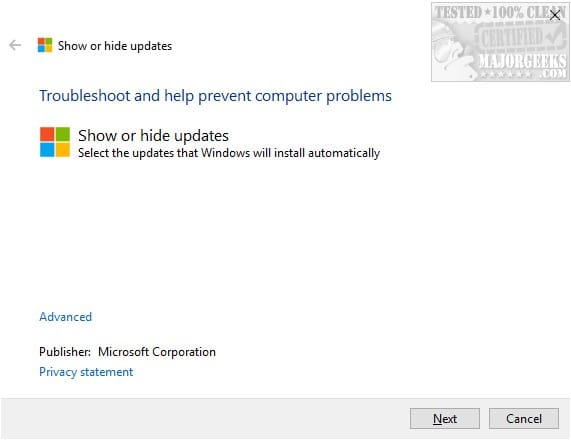
First of all, always prefer official OEM drivers if available. They are more compatible, have better performance and gives you access to all device features, unlike WU drivers which are basic functionality. If there is no Windows 10/11 driver (they are the same), use Windows 8/8.1 64-bit or 7 64-bit. Even Vista 64-bit for very old hardware works, but the newer the better. The exception is Intel graphics drivers for Windows 7 which are locked by Intel to refuse installing on higher Windows versions. If there is a newer WU driver, but you rather keep your older official OEM driver, you can block the respective update using the Microsoft Windows Update Show/Hide Tool or the Windows Automatic Updates Manager (WAU Manager), both available from Major Geeks.


My Computers My Computers

  • At a glance

    Windows 11 Pro 23H2 (5699), 25H2 (8737)Mobile DualCore Intel Core 2 Duo T7250, 2000 MHz4GBMobile Intel(R) GMA 4500M (Mobile 4 series)
    OS
    Windows 11 Pro 23H2 (5699), 25H2 (8737)
    Computer type
    Laptop
    Manufacturer/Model
    Acer Extensa 5630EZ
    CPU
    Mobile DualCore Intel Core 2 Duo T7250, 2000 MHz
    Motherboard
    Acer Extensa 5630
    Memory
    4GB
    Graphics Card(s)
    Mobile Intel(R) GMA 4500M (Mobile 4 series)
    Sound Card
    Realtek ALC268 @ Intel 82801IB ICH9 - High Definition Audio Controller
    Monitor(s) Displays
    1
    Screen Resolution
    1280x800
    Hard Drives
    Samsung SSD 850 EVO 250GB SATA Device (250 GB, SATA-III)
    Internet Speed
    VDSL 50 Mbps
    Browser
    MICROSOFT EDGE
    Antivirus
    WINDOWS DEFENDER
    Other Info
    Legacy MBR installation, no TPM, no Secure Boot, no WDDM 2.0 graphics drivers, no SSE4.2, cannot get more unsupported ;) This is only my test laptop. I had installed Windows 11 here before upgrading my main PC. For my main PC I use everyday see my 2nd system specs.
  • At a glance

    Windows 11 Pro v25H2 (build 26200.8737)Intel Core-i7 3770 3.40GHz s1155 (3rd generat...2x Kingston Hyper-X Blu 8GB DDR3-1600GIGABYTE GeForce RTX 3050 WINDFORCE OC V2 6GB...
    Operating System
    Windows 11 Pro v25H2 (build 26200.8737)
    Computer type
    PC/Desktop
    Manufacturer/Model
    Custom-built PC
    CPU
    Intel Core-i7 3770 3.40GHz s1155 (3rd generation)
    Motherboard
    Asus P8H61 s1155 ATX
    Memory
    2x Kingston Hyper-X Blu 8GB DDR3-1600
    Graphics card(s)
    GIGABYTE GeForce RTX 3050 WINDFORCE OC V2 6GB (GV-N3050WF2OCV2-6GD)
    Sound Card
    Realtek HD audio (ALC887)
    Monitor(s) Displays
    Sony Bravia KDL-19L4000 19" LCD TV via VGA
    Screen Resolution
    1440x900 32-bit 60Hz
    Hard Drives
    WD Blue SA510 2.5 1000GB SSD as system disk, Western Digital Caviar Purple 4TB SATA III (WD40PURZ) as second
    PSU
    Thermaltake Litepower RGB 550W Full Wired
    Case
    SUPERCASE MIDI-TOWER
    Cooling
    Deepcool Gamma Archer CPU cooler, 1x 8cm fan at the back
    Keyboard
    Mitsumi 101-key PS/2
    Mouse
    Sunnyline OptiEye PS/2
    Internet Speed
    100Mbps
    Browser
    Microsoft Edge, Mozilla Firefox
    Antivirus
    Microsoft Windows Defender
    Other Info
    Legacy BIOS (MBR) installation, no TPM, no Secure Boot, WDDM 3.0 graphics drivers, WEI score 7.4
I will keep that in mind. Thanks.
 

My Computer My Computer

At a glance

Windows 11 25H2i7 7700k16 GB DDR4nVidia GeForce GTX1070 (Pascal)
OS
Windows 11 25H2
Computer type
PC/Desktop
Manufacturer/Model
MSI
CPU
i7 7700k
Motherboard
B250 Bazooka (MS-7A70)
Memory
16 GB DDR4
Graphics Card(s)
nVidia GeForce GTX1070 (Pascal)
Sound Card
Realtek HDA (ALC887)
Monitor(s) Displays
ASUS VG278QR 1920x1080 165Hz 5ms
Screen Resolution
FullHD
Hard Drives
SSD NVMe + Hardisk SATA III
Case
Aerocool
Cooling
Air regular one
Keyboard
Logitech G213
Mouse
Logitech G203 Prodigy
Internet Speed
600Mb/s
Browser
Firefox
Antivirus
Microsoft Defender
First of all, always prefer official OEM drivers if available.
I totally agree. However, over the last couple of weeks, I've received quite a lot of Intel driver updates, via Windows Update, relating specifically to my device, that I wouldn't necessarily have received directly (?) from Dell / Intel.
 

My Computer My Computer

At a glance

Windows 11 Pro 25H2 (Build 26200.8737)Intel Core Ultra 9 285 5.6 GHz32.00 GBIntel Integrated Graphics (128 MB)
OS
Windows 11 Pro 25H2 (Build 26200.8737)
Computer type
PC/Desktop
Manufacturer/Model
Dell Pro Max Tower T2 FCT2250
CPU
Intel Core Ultra 9 285 5.6 GHz
Motherboard
64-bit operating system, x64-based processor
Memory
32.00 GB
Graphics Card(s)
Intel Integrated Graphics (128 MB)
Sound Card
Realtek Audio
Monitor(s) Displays
Dell P2714H Monitor
Screen Resolution
1920 x 1080
Hard Drives
1 x 512GB M.2 XG10d SED KIOXIA PCIe solid state drive (Internal)
1 x 2TB Seagate ST2000DM008-2UB102 HDD (Internal)
1 x 4TB Seagate STGX4000400 External HDD
1 x 6TB WD Elements AE 2689 External HDD
PSU
500 Watts
Cooling
Air
Keyboard
Microsoft Wired Keyboard 600
Mouse
Microsoft USB Basic Optical Mouse v2.0
Browser
Firefox
Antivirus
Windows Defender + Malwarebytes Premium
Other Info
BaseBoard Manufacturer Dell Inc.
BaseBoard Product 022RY57
BaseBoard Version A01

Latest Support Threads

Back
Top Bottom