Default Boot Device Missing or Boot Failed...


Peter B

Well-known member
Member
Local time
12:16 AM
Posts
71
Location
West Yorkshire
OS
Windows 11 Pro 25H2 26200.8655
I occasionally receive this message - not at boot, just randomly after my laptop has been in use for a while...using the power button to close down, then restarting gets everything working again.

Just wondering if anyone could suggest what to check, please.

(I have Macrium Reflect Boot enabled, if that's of any consequence)
 
Windows Build/Version
Windows 11 Pro 22H2 22621.819

My Computer My Computer

At a glance

Windows 11 Pro 25H2 26200.8655Intel(R) Core(TM) i7-1195G7 @ 2.90GHz16GBIntel Iris Xe
OS
Windows 11 Pro 25H2 26200.8655
Computer type
Laptop
Manufacturer/Model
PC Specialist 15.6" Initia
CPU
Intel(R) Core(TM) i7-1195G7 @ 2.90GHz
Memory
16GB
Graphics Card(s)
Intel Iris Xe
Screen Resolution
1920 x 1080
Hard Drives
M2 PCIe NVMe 250GB
Internet Speed
910/105 Mbps
Browser
Ecosia Version 149.1.7827.10 (PROD) (64-bit)
Antivirus
Microsoft Defender
Other Info
Macrium Reflect Home v10.0.8843
It could. What is the default boot order?

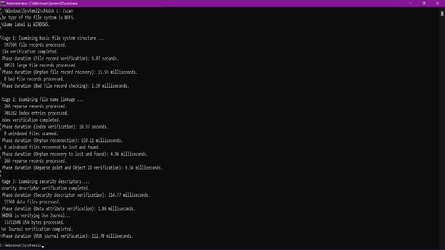
Also I would recommend doing at the command line (cmd.exe)
chkdsk c: /scan
If errors then do:
chkdsk c: /r
This will prompt you for a reboot so it can do the repairs.
DO NOT interrupt the process as it may take a while and may look stuck.
 

My Computers My Computers

  • At a glance

    All Branches but ReleaseAMD Ryzen 7 7735HS 3200-4500 Mhz 8 cores x 232 GB DDR5Radeon Graphic / NVIDIA GeForce RTX 4060 8 GB...
    OS
    All Branches but Release
    Computer type
    Laptop
    Manufacturer/Model
    Acer Nitro ANV15-51
    CPU
    AMD Ryzen 7 7735HS 3200-4500 Mhz 8 cores x 2
    Motherboard
    Sportage_RBH
    Memory
    32 GB DDR5
    Graphics Card(s)
    Radeon Graphic / NVIDIA GeForce RTX 4060 8 GB GDDR6
    Sound Card
    AMD/Realtek(R) Audio
    Monitor(s) Displays
    Integrated Monitor (15.3"vis)
    Screen Resolution
    FHD 1920X1080 16:9 144Hz
    Hard Drives
    KINGSTON OM8SEP4512Q-AA 1TB
    Western Digital 256GB
    PSU
    19V DC 6.32 A 120 W
    Cooling
    Dual Fans
    Mouse
    MS Bluetooth
    Internet Speed
    Fiber 1GB Cox -us & 1GB Orange-fr
    Browser
    Edge Canary- Firefox Nightly-Chrome Dev-Chrome Dev
    Antivirus
    Windows Defender
  • At a glance

    Windows 11 BetaAMD A9-94208 GB of DDR4AMD Radeon R5
    Operating System
    Windows 11 Beta
    Computer type
    Laptop
    Manufacturer/Model
    Asus X751BP
    CPU
    AMD A9-9420
    Memory
    8 GB of DDR4
    Graphics card(s)
    AMD Radeon R5
    Screen Resolution
    1600x900
    Hard Drives
    Seagate 1 TB
Given us, correct error message would help a lot to troubleshoot the boot problem.
 

My Computer My Computer

At a glance

Windows 11AMD Ryzen 7 5700GMicron Technology DDR4-3200 16GBNVIDIA GeForce RTX 3060
OS
Windows 11
Computer type
PC/Desktop
Manufacturer/Model
HP Pavilion
CPU
AMD Ryzen 7 5700G
Motherboard
Erica6
Memory
Micron Technology DDR4-3200 16GB
Graphics Card(s)
NVIDIA GeForce RTX 3060
Sound Card
Realtek ALC671
Monitor(s) Displays
Samsung SyncMaster U28E590
Screen Resolution
3840 x 2160
Hard Drives
SAMSUNG MZVLQ1T0HALB-000H1
OAT - chkdsk reported no errors...file attached.

Freebooter - the error message was the same as the thread title..
 

Attachments

  • Screenshot (16).png
    Screenshot (16).png
    33.8 KB · Views: 1

My Computer My Computer

At a glance

Windows 11 Pro 25H2 26200.8655Intel(R) Core(TM) i7-1195G7 @ 2.90GHz16GBIntel Iris Xe
OS
Windows 11 Pro 25H2 26200.8655
Computer type
Laptop
Manufacturer/Model
PC Specialist 15.6" Initia
CPU
Intel(R) Core(TM) i7-1195G7 @ 2.90GHz
Memory
16GB
Graphics Card(s)
Intel Iris Xe
Screen Resolution
1920 x 1080
Hard Drives
M2 PCIe NVMe 250GB
Internet Speed
910/105 Mbps
Browser
Ecosia Version 149.1.7827.10 (PROD) (64-bit)
Antivirus
Microsoft Defender
Other Info
Macrium Reflect Home v10.0.8843
Good, that's out of the way.
Is the Macrium Boot folder (it is hidden) on the same partition as the OS -on C: root (obviously)?
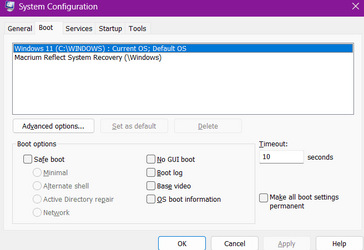
Is the startup item selected as default in msconfig (WinKey+R + msconfig + enter > boot) Windows 11 as in the screenshot below?


Screenshot 2022-11-15 161623.jpg
 

My Computers My Computers

  • At a glance

    All Branches but ReleaseAMD Ryzen 7 7735HS 3200-4500 Mhz 8 cores x 232 GB DDR5Radeon Graphic / NVIDIA GeForce RTX 4060 8 GB...
    OS
    All Branches but Release
    Computer type
    Laptop
    Manufacturer/Model
    Acer Nitro ANV15-51
    CPU
    AMD Ryzen 7 7735HS 3200-4500 Mhz 8 cores x 2
    Motherboard
    Sportage_RBH
    Memory
    32 GB DDR5
    Graphics Card(s)
    Radeon Graphic / NVIDIA GeForce RTX 4060 8 GB GDDR6
    Sound Card
    AMD/Realtek(R) Audio
    Monitor(s) Displays
    Integrated Monitor (15.3"vis)
    Screen Resolution
    FHD 1920X1080 16:9 144Hz
    Hard Drives
    KINGSTON OM8SEP4512Q-AA 1TB
    Western Digital 256GB
    PSU
    19V DC 6.32 A 120 W
    Cooling
    Dual Fans
    Mouse
    MS Bluetooth
    Internet Speed
    Fiber 1GB Cox -us & 1GB Orange-fr
    Browser
    Edge Canary- Firefox Nightly-Chrome Dev-Chrome Dev
    Antivirus
    Windows Defender
  • At a glance

    Windows 11 BetaAMD A9-94208 GB of DDR4AMD Radeon R5
    Operating System
    Windows 11 Beta
    Computer type
    Laptop
    Manufacturer/Model
    Asus X751BP
    CPU
    AMD A9-9420
    Memory
    8 GB of DDR4
    Graphics card(s)
    AMD Radeon R5
    Screen Resolution
    1600x900
    Hard Drives
    Seagate 1 TB
Hi again -seems so,yeah.
 

Attachments

  • Screenshot (17).png
    Screenshot (17).png
    10.4 KB · Views: 1

My Computer My Computer

At a glance

Windows 11 Pro 25H2 26200.8655Intel(R) Core(TM) i7-1195G7 @ 2.90GHz16GBIntel Iris Xe
OS
Windows 11 Pro 25H2 26200.8655
Computer type
Laptop
Manufacturer/Model
PC Specialist 15.6" Initia
CPU
Intel(R) Core(TM) i7-1195G7 @ 2.90GHz
Memory
16GB
Graphics Card(s)
Intel Iris Xe
Screen Resolution
1920 x 1080
Hard Drives
M2 PCIe NVMe 250GB
Internet Speed
910/105 Mbps
Browser
Ecosia Version 149.1.7827.10 (PROD) (64-bit)
Antivirus
Microsoft Defender
Other Info
Macrium Reflect Home v10.0.8843

I hope your drive is not warning you of something.
I am a bit at a loss why you would get this intermittent error.
Faulty drive connector/Motherboard problem?

I don't want to be the bearer of bad news but the only time
I saw that was followed by an actual drive failure.
 

My Computers My Computers

  • At a glance

    All Branches but ReleaseAMD Ryzen 7 7735HS 3200-4500 Mhz 8 cores x 232 GB DDR5Radeon Graphic / NVIDIA GeForce RTX 4060 8 GB...
    OS
    All Branches but Release
    Computer type
    Laptop
    Manufacturer/Model
    Acer Nitro ANV15-51
    CPU
    AMD Ryzen 7 7735HS 3200-4500 Mhz 8 cores x 2
    Motherboard
    Sportage_RBH
    Memory
    32 GB DDR5
    Graphics Card(s)
    Radeon Graphic / NVIDIA GeForce RTX 4060 8 GB GDDR6
    Sound Card
    AMD/Realtek(R) Audio
    Monitor(s) Displays
    Integrated Monitor (15.3"vis)
    Screen Resolution
    FHD 1920X1080 16:9 144Hz
    Hard Drives
    KINGSTON OM8SEP4512Q-AA 1TB
    Western Digital 256GB
    PSU
    19V DC 6.32 A 120 W
    Cooling
    Dual Fans
    Mouse
    MS Bluetooth
    Internet Speed
    Fiber 1GB Cox -us & 1GB Orange-fr
    Browser
    Edge Canary- Firefox Nightly-Chrome Dev-Chrome Dev
    Antivirus
    Windows Defender
  • At a glance

    Windows 11 BetaAMD A9-94208 GB of DDR4AMD Radeon R5
    Operating System
    Windows 11 Beta
    Computer type
    Laptop
    Manufacturer/Model
    Asus X751BP
    CPU
    AMD A9-9420
    Memory
    8 GB of DDR4
    Graphics card(s)
    AMD Radeon R5
    Screen Resolution
    1600x900
    Hard Drives
    Seagate 1 TB
Okay Oat - thanks for your help anyway, much appreciated - que sera, sera I guess. I'll persevere and see what happens over the next couple of weeks.
I backup all of my files daily to an external drive and have them in the cloud too, so they're safe at least.
 

My Computer My Computer

At a glance

Windows 11 Pro 25H2 26200.8655Intel(R) Core(TM) i7-1195G7 @ 2.90GHz16GBIntel Iris Xe
OS
Windows 11 Pro 25H2 26200.8655
Computer type
Laptop
Manufacturer/Model
PC Specialist 15.6" Initia
CPU
Intel(R) Core(TM) i7-1195G7 @ 2.90GHz
Memory
16GB
Graphics Card(s)
Intel Iris Xe
Screen Resolution
1920 x 1080
Hard Drives
M2 PCIe NVMe 250GB
Internet Speed
910/105 Mbps
Browser
Ecosia Version 149.1.7827.10 (PROD) (64-bit)
Antivirus
Microsoft Defender
Other Info
Macrium Reflect Home v10.0.8843

Most probably your hard disk is failing and not always detected by the BIOS and hence the error message. If it is an old fashioned mechanical hard disk it is a good opportunity to upgrade to a ten times faster SSD. See your hard disk properties to see how much space your data occupy and buy a little larger SSD. You can connect the SSD externally with a SATA to USB adapter and clone your old disk to the SSD with Macrium Reflect. Then swap them. If you feel uncomfortable doing it yourself you can ask a professional.
 

My Computers My Computers

  • At a glance

    Windows 11 Pro 23H2 (5699), 25H2 (8655)Mobile DualCore Intel Core 2 Duo T7250, 2000 MHz4GBMobile Intel(R) GMA 4500M (Mobile 4 series)
    OS
    Windows 11 Pro 23H2 (5699), 25H2 (8655)
    Computer type
    Laptop
    Manufacturer/Model
    Acer Extensa 5630EZ
    CPU
    Mobile DualCore Intel Core 2 Duo T7250, 2000 MHz
    Motherboard
    Acer Extensa 5630
    Memory
    4GB
    Graphics Card(s)
    Mobile Intel(R) GMA 4500M (Mobile 4 series)
    Sound Card
    Realtek ALC268 @ Intel 82801IB ICH9 - High Definition Audio Controller
    Monitor(s) Displays
    1
    Screen Resolution
    1280x800
    Hard Drives
    Samsung SSD 850 EVO 250GB SATA Device (250 GB, SATA-III)
    Internet Speed
    VDSL 50 Mbps
    Browser
    MICROSOFT EDGE
    Antivirus
    WINDOWS DEFENDER
    Other Info
    Legacy MBR installation, no TPM, no Secure Boot, no WDDM 2.0 graphics drivers, no SSE4.2, cannot get more unsupported ;) This is only my test laptop. I had installed Windows 11 here before upgrading my main PC. For my main PC I use everyday see my 2nd system specs.
  • At a glance

    Windows 11 Pro v25H2 (build 26200.8655)Intel Core-i7 3770 3.40GHz s1155 (3rd generat...2x Kingston Hyper-X Blu 8GB DDR3-1600GIGABYTE GeForce RTX 3050 WINDFORCE OC V2 6GB...
    Operating System
    Windows 11 Pro v25H2 (build 26200.8655)
    Computer type
    PC/Desktop
    Manufacturer/Model
    Custom-built PC
    CPU
    Intel Core-i7 3770 3.40GHz s1155 (3rd generation)
    Motherboard
    Asus P8H61 s1155 ATX
    Memory
    2x Kingston Hyper-X Blu 8GB DDR3-1600
    Graphics card(s)
    GIGABYTE GeForce RTX 3050 WINDFORCE OC V2 6GB (GV-N3050WF2OCV2-6GD)
    Sound Card
    Realtek HD audio (ALC887)
    Monitor(s) Displays
    Sony Bravia KDL-19L4000 19" LCD TV via VGA
    Screen Resolution
    1440x900 32-bit 60Hz
    Hard Drives
    WD Blue SA510 2.5 1000GB SSD as system disk, Western Digital Caviar Purple 4TB SATA III (WD40PURZ) as second
    PSU
    Thermaltake Litepower RGB 550W Full Wired
    Case
    SUPERCASE MIDI-TOWER
    Cooling
    Deepcool Gamma Archer CPU cooler, 1x 8cm fan at the back
    Keyboard
    Mitsumi 101-key PS/2
    Mouse
    Sunnyline OptiEye PS/2
    Internet Speed
    100Mbps
    Browser
    Microsoft Edge, Mozilla Firefox
    Antivirus
    Microsoft Windows Defender
    Other Info
    Legacy BIOS (MBR) installation, no TPM, no Secure Boot, WDDM 3.0 graphics drivers, WEI score 7.4
CrystalDiskInfo can provide some info about the health of your drive(s).
Reliable & free.
 

My Computers My Computers

  • At a glance

    All Branches but ReleaseAMD Ryzen 7 7735HS 3200-4500 Mhz 8 cores x 232 GB DDR5Radeon Graphic / NVIDIA GeForce RTX 4060 8 GB...
    OS
    All Branches but Release
    Computer type
    Laptop
    Manufacturer/Model
    Acer Nitro ANV15-51
    CPU
    AMD Ryzen 7 7735HS 3200-4500 Mhz 8 cores x 2
    Motherboard
    Sportage_RBH
    Memory
    32 GB DDR5
    Graphics Card(s)
    Radeon Graphic / NVIDIA GeForce RTX 4060 8 GB GDDR6
    Sound Card
    AMD/Realtek(R) Audio
    Monitor(s) Displays
    Integrated Monitor (15.3"vis)
    Screen Resolution
    FHD 1920X1080 16:9 144Hz
    Hard Drives
    KINGSTON OM8SEP4512Q-AA 1TB
    Western Digital 256GB
    PSU
    19V DC 6.32 A 120 W
    Cooling
    Dual Fans
    Mouse
    MS Bluetooth
    Internet Speed
    Fiber 1GB Cox -us & 1GB Orange-fr
    Browser
    Edge Canary- Firefox Nightly-Chrome Dev-Chrome Dev
    Antivirus
    Windows Defender
  • At a glance

    Windows 11 BetaAMD A9-94208 GB of DDR4AMD Radeon R5
    Operating System
    Windows 11 Beta
    Computer type
    Laptop
    Manufacturer/Model
    Asus X751BP
    CPU
    AMD A9-9420
    Memory
    8 GB of DDR4
    Graphics card(s)
    AMD Radeon R5
    Screen Resolution
    1600x900
    Hard Drives
    Seagate 1 TB
Spapakons it is an SSD Drive, less than 2 years old.

OAT - The report from CrystalDisk is attached.
 

Attachments

  • Screenshot (18).png
    Screenshot (18).png
    66.7 KB · Views: 1

My Computer My Computer

At a glance

Windows 11 Pro 25H2 26200.8655Intel(R) Core(TM) i7-1195G7 @ 2.90GHz16GBIntel Iris Xe
OS
Windows 11 Pro 25H2 26200.8655
Computer type
Laptop
Manufacturer/Model
PC Specialist 15.6" Initia
CPU
Intel(R) Core(TM) i7-1195G7 @ 2.90GHz
Memory
16GB
Graphics Card(s)
Intel Iris Xe
Screen Resolution
1920 x 1080
Hard Drives
M2 PCIe NVMe 250GB
Internet Speed
910/105 Mbps
Browser
Ecosia Version 149.1.7827.10 (PROD) (64-bit)
Antivirus
Microsoft Defender
Other Info
Macrium Reflect Home v10.0.8843

Your drive is perfectly good.

You must try to find some kind of a pattern, when it happens, after doing what?
Try to look in the Event Viewer.
 

My Computers My Computers

  • At a glance

    All Branches but ReleaseAMD Ryzen 7 7735HS 3200-4500 Mhz 8 cores x 232 GB DDR5Radeon Graphic / NVIDIA GeForce RTX 4060 8 GB...
    OS
    All Branches but Release
    Computer type
    Laptop
    Manufacturer/Model
    Acer Nitro ANV15-51
    CPU
    AMD Ryzen 7 7735HS 3200-4500 Mhz 8 cores x 2
    Motherboard
    Sportage_RBH
    Memory
    32 GB DDR5
    Graphics Card(s)
    Radeon Graphic / NVIDIA GeForce RTX 4060 8 GB GDDR6
    Sound Card
    AMD/Realtek(R) Audio
    Monitor(s) Displays
    Integrated Monitor (15.3"vis)
    Screen Resolution
    FHD 1920X1080 16:9 144Hz
    Hard Drives
    KINGSTON OM8SEP4512Q-AA 1TB
    Western Digital 256GB
    PSU
    19V DC 6.32 A 120 W
    Cooling
    Dual Fans
    Mouse
    MS Bluetooth
    Internet Speed
    Fiber 1GB Cox -us & 1GB Orange-fr
    Browser
    Edge Canary- Firefox Nightly-Chrome Dev-Chrome Dev
    Antivirus
    Windows Defender
  • At a glance

    Windows 11 BetaAMD A9-94208 GB of DDR4AMD Radeon R5
    Operating System
    Windows 11 Beta
    Computer type
    Laptop
    Manufacturer/Model
    Asus X751BP
    CPU
    AMD A9-9420
    Memory
    8 GB of DDR4
    Graphics card(s)
    AMD Radeon R5
    Screen Resolution
    1600x900
    Hard Drives
    Seagate 1 TB
99% is not perfect but it is not bad either. It is usually because some values of the drive SMART test are outside normal range. Some tools such as Hard Disk Sentinel allows you to modify the normal range to make the disk pass all the SMART test and report 100% health. I would worry only if health drops below 95% or you get frequent BSOD or freezes and other issues. Also a reduction in performance also indicates a problem. If you want you can replace it with a larger and possibly faster SSD and put the old one in a SATA to USB case to make it external. You can use it to transfer files between computers but avoid using it for backup as it is not 100% reliable.
 

My Computers My Computers

  • At a glance

    Windows 11 Pro 23H2 (5699), 25H2 (8655)Mobile DualCore Intel Core 2 Duo T7250, 2000 MHz4GBMobile Intel(R) GMA 4500M (Mobile 4 series)
    OS
    Windows 11 Pro 23H2 (5699), 25H2 (8655)
    Computer type
    Laptop
    Manufacturer/Model
    Acer Extensa 5630EZ
    CPU
    Mobile DualCore Intel Core 2 Duo T7250, 2000 MHz
    Motherboard
    Acer Extensa 5630
    Memory
    4GB
    Graphics Card(s)
    Mobile Intel(R) GMA 4500M (Mobile 4 series)
    Sound Card
    Realtek ALC268 @ Intel 82801IB ICH9 - High Definition Audio Controller
    Monitor(s) Displays
    1
    Screen Resolution
    1280x800
    Hard Drives
    Samsung SSD 850 EVO 250GB SATA Device (250 GB, SATA-III)
    Internet Speed
    VDSL 50 Mbps
    Browser
    MICROSOFT EDGE
    Antivirus
    WINDOWS DEFENDER
    Other Info
    Legacy MBR installation, no TPM, no Secure Boot, no WDDM 2.0 graphics drivers, no SSE4.2, cannot get more unsupported ;) This is only my test laptop. I had installed Windows 11 here before upgrading my main PC. For my main PC I use everyday see my 2nd system specs.
  • At a glance

    Windows 11 Pro v25H2 (build 26200.8655)Intel Core-i7 3770 3.40GHz s1155 (3rd generat...2x Kingston Hyper-X Blu 8GB DDR3-1600GIGABYTE GeForce RTX 3050 WINDFORCE OC V2 6GB...
    Operating System
    Windows 11 Pro v25H2 (build 26200.8655)
    Computer type
    PC/Desktop
    Manufacturer/Model
    Custom-built PC
    CPU
    Intel Core-i7 3770 3.40GHz s1155 (3rd generation)
    Motherboard
    Asus P8H61 s1155 ATX
    Memory
    2x Kingston Hyper-X Blu 8GB DDR3-1600
    Graphics card(s)
    GIGABYTE GeForce RTX 3050 WINDFORCE OC V2 6GB (GV-N3050WF2OCV2-6GD)
    Sound Card
    Realtek HD audio (ALC887)
    Monitor(s) Displays
    Sony Bravia KDL-19L4000 19" LCD TV via VGA
    Screen Resolution
    1440x900 32-bit 60Hz
    Hard Drives
    WD Blue SA510 2.5 1000GB SSD as system disk, Western Digital Caviar Purple 4TB SATA III (WD40PURZ) as second
    PSU
    Thermaltake Litepower RGB 550W Full Wired
    Case
    SUPERCASE MIDI-TOWER
    Cooling
    Deepcool Gamma Archer CPU cooler, 1x 8cm fan at the back
    Keyboard
    Mitsumi 101-key PS/2
    Mouse
    Sunnyline OptiEye PS/2
    Internet Speed
    100Mbps
    Browser
    Microsoft Edge, Mozilla Firefox
    Antivirus
    Microsoft Windows Defender
    Other Info
    Legacy BIOS (MBR) installation, no TPM, no Secure Boot, WDDM 3.0 graphics drivers, WEI score 7.4
Please let's get things right here.
An SSD percentile, unlike a hard drive, will drop as its use progresses.
After 4 years & 26K hours, one of my SSD drives is at 74% because of heavy use.
It is perfectly normal.
It is inaccurate to post that an SSD dropping below 95% is worrisome.
The proof:

Screenshot 2022-11-15 161623.jpg

Please refer to:
SSD case: SSD health decrease by wearout

Even if sounds weird, the health decrease is not bad, exactly the opposite. The health decrease can help us to

  • be prepared for a planned replacement when the health goes too low (for example below 50% or even earlier especially in a mission-critical environment).
  • be notified about possible high amount of writes caused by some applications, Windows updates or similar which can cause degradation.
  • try to minimise the amount of writes to extend the lifetime of the SSD.
 
Last edited:

My Computers My Computers

  • At a glance

    All Branches but ReleaseAMD Ryzen 7 7735HS 3200-4500 Mhz 8 cores x 232 GB DDR5Radeon Graphic / NVIDIA GeForce RTX 4060 8 GB...
    OS
    All Branches but Release
    Computer type
    Laptop
    Manufacturer/Model
    Acer Nitro ANV15-51
    CPU
    AMD Ryzen 7 7735HS 3200-4500 Mhz 8 cores x 2
    Motherboard
    Sportage_RBH
    Memory
    32 GB DDR5
    Graphics Card(s)
    Radeon Graphic / NVIDIA GeForce RTX 4060 8 GB GDDR6
    Sound Card
    AMD/Realtek(R) Audio
    Monitor(s) Displays
    Integrated Monitor (15.3"vis)
    Screen Resolution
    FHD 1920X1080 16:9 144Hz
    Hard Drives
    KINGSTON OM8SEP4512Q-AA 1TB
    Western Digital 256GB
    PSU
    19V DC 6.32 A 120 W
    Cooling
    Dual Fans
    Mouse
    MS Bluetooth
    Internet Speed
    Fiber 1GB Cox -us & 1GB Orange-fr
    Browser
    Edge Canary- Firefox Nightly-Chrome Dev-Chrome Dev
    Antivirus
    Windows Defender
  • At a glance

    Windows 11 BetaAMD A9-94208 GB of DDR4AMD Radeon R5
    Operating System
    Windows 11 Beta
    Computer type
    Laptop
    Manufacturer/Model
    Asus X751BP
    CPU
    AMD A9-9420
    Memory
    8 GB of DDR4
    Graphics card(s)
    AMD Radeon R5
    Screen Resolution
    1600x900
    Hard Drives
    Seagate 1 TB
Thanks again OAT - I'll keep my eyes on Event Viewer if it happens again...
 

My Computer My Computer

At a glance

Windows 11 Pro 25H2 26200.8655Intel(R) Core(TM) i7-1195G7 @ 2.90GHz16GBIntel Iris Xe
OS
Windows 11 Pro 25H2 26200.8655
Computer type
Laptop
Manufacturer/Model
PC Specialist 15.6" Initia
CPU
Intel(R) Core(TM) i7-1195G7 @ 2.90GHz
Memory
16GB
Graphics Card(s)
Intel Iris Xe
Screen Resolution
1920 x 1080
Hard Drives
M2 PCIe NVMe 250GB
Internet Speed
910/105 Mbps
Browser
Ecosia Version 149.1.7827.10 (PROD) (64-bit)
Antivirus
Microsoft Defender
Other Info
Macrium Reflect Home v10.0.8843

Back
Top Bottom