Desktop background slideshow use images from multiple folders?


NickJP

Well-known member
Member
Local time
12:03 AM
Posts
34
OS
Windows 11 Pro
I have many thousands of images arranged in multiple subfolders of the Pictures folder. Is it possible, when personalising my desktop background with a slideshow, to get Windows to pick images from the subfolders - I want to be able to choose the Pictures folder and also see images from subfolders. On my old Win10 PC I have the Pictures folder selected for desktop background slideshow, and I also get images from subfolders, but on the Win11 machine I'm setting up, with the same settings I only get images from the Pictures folder and not from any of the subfolders. Is it possible to get this working on Win11?
 
Windows Build/Version
24H2 build 26100.4652

My Computer My Computer

At a glance

Windows 11 ProIntel i5-12600K128GbnVidia Quadro P1000
OS
Windows 11 Pro
Computer type
PC/Desktop
Manufacturer/Model
Gigabyte
CPU
Intel i5-12600K
Motherboard
Z690 Aorus Pro
Memory
128Gb
Graphics Card(s)
nVidia Quadro P1000
Sound Card
N/A
Monitor(s) Displays
BenQ PD3205U, Eizo EV3237
Screen Resolution
3840x2160, 3840x2160
Hard Drives
Samsung SSD 980 Pro
Samsung SSD 970 EVO Plus
Sabrent Rocket Q
Case
Be Quiet
I think that you would need to get windows to look at your Pictures Library. Have you tried this? It does let you select it.
 

My Computers My Computers

  • At a glance

    Windows 11 25H2 Pro Build 26200i3-1215U8GB
    OS
    Windows 11 25H2 Pro Build 26200
    Computer type
    PC/Desktop
    Manufacturer/Model
    MSI PRO ADL-U Cubi 5 (MS-B0A8)
    CPU
    i3-1215U
    Memory
    8GB
    Monitor(s) Displays
    Sony 43" 4k TV
    Screen Resolution
    3840x2160
    Hard Drives
    250GB NVMe M.2 PCIe Gen 3 SSD
    PSU
    External 65W
    Case
    Mini PC
    Browser
    FireFox
    Antivirus
    MS
  • At a glance

    Windows 11 Pro 25H2Intel i3-910016GB DDR4
    Operating System
    Windows 11 Pro 25H2
    Computer type
    PC/Desktop
    Manufacturer/Model
    Dell Optiplex 3070 SFF
    CPU
    Intel i3-9100
    Memory
    16GB DDR4
    Monitor(s) Displays
    Dell S2721
    Screen Resolution
    3840 x 2160
    Hard Drives
    Samsung 500GB nvMe
    Case
    Dell small form factor
    Keyboard
    Cherry mechanical (Blue)
    Mouse
    Microsoft
    Antivirus
    MS Defender
Thanks, but none of the Windows 10 methods listed in the provided link worked on Windows 11. On Win10 I could run:
Code:
control /name Microsoft.Personalization /page pageWallpaper
which would bring up the Control Panel method which allows subdirs to be part of the slideshow, but on Win11 this just brings up the Settings app, which doesn't allow subdirs. What I did (can't claim originality, I came across this on a web page) was to create a folder separate from Pictures, and run a batch file which scans through my Pictures folder and all subfolders for jpg files and creates hard links to those files. I then pointed the desktop background slideshow to use the folder containing all the hard links.
Code:
SETLOCAL ENABLEDELAYEDEXPANSION
cd <your_pictures_folder>
set m=0
for /R %%f in (*.jpg /b) do (
  echo !m!
  mklink "<your_target_folder>\!m!.jpg" "%%f"
  set /a m = !m!+1
)
Save this as a batch file and run it as administrator. I guess I'll need to periodically re-run it to pick up new images. I didn't realize how many images I had - there are about 37000 hard links in the folder I setup.
 

My Computer My Computer

At a glance

Windows 11 ProIntel i5-12600K128GbnVidia Quadro P1000
OS
Windows 11 Pro
Computer type
PC/Desktop
Manufacturer/Model
Gigabyte
CPU
Intel i5-12600K
Motherboard
Z690 Aorus Pro
Memory
128Gb
Graphics Card(s)
nVidia Quadro P1000
Sound Card
N/A
Monitor(s) Displays
BenQ PD3205U, Eizo EV3237
Screen Resolution
3840x2160, 3840x2160
Hard Drives
Samsung SSD 980 Pro
Samsung SSD 970 EVO Plus
Sabrent Rocket Q
Case
Be Quiet
Thanks, but none of the Windows 10 methods listed in the provided link worked on Windows 11.
Curious. if I run:
shell:::{ED834ED6-4B5A-4bfe-8F11-A626DCB6A921} -Microsoft.Personalization\pageWallpaper
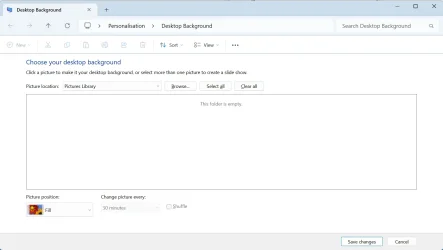
I get an Explorer Window like this:

Screenshot 2025-07-25 145649.webp

and can choose 'Pictures Library', but this doesn't help? (this is a test machine with 24H2, which I thought I'd check as I'd only looked at 23H2 before.)

Technically your script is creating symlinks rather than hard links, but I doubt that makes much difference. It may be easier to deal with if you ever delete any images, as hard links simply provide another name to the same file, and when you delete via one name, the file is still present until you delete the other name.

Rather than symlink the lot, perhaps you could symlink a sample, either randomly chosen, or if your image metadata is good enough, (and your scripting skills are good enough) base your selection on that.
 

My Computers My Computers

  • At a glance

    Windows 11 25H2 Pro Build 26200i3-1215U8GB
    OS
    Windows 11 25H2 Pro Build 26200
    Computer type
    PC/Desktop
    Manufacturer/Model
    MSI PRO ADL-U Cubi 5 (MS-B0A8)
    CPU
    i3-1215U
    Memory
    8GB
    Monitor(s) Displays
    Sony 43" 4k TV
    Screen Resolution
    3840x2160
    Hard Drives
    250GB NVMe M.2 PCIe Gen 3 SSD
    PSU
    External 65W
    Case
    Mini PC
    Browser
    FireFox
    Antivirus
    MS
  • At a glance

    Windows 11 Pro 25H2Intel i3-910016GB DDR4
    Operating System
    Windows 11 Pro 25H2
    Computer type
    PC/Desktop
    Manufacturer/Model
    Dell Optiplex 3070 SFF
    CPU
    Intel i3-9100
    Memory
    16GB DDR4
    Monitor(s) Displays
    Dell S2721
    Screen Resolution
    3840 x 2160
    Hard Drives
    Samsung 500GB nvMe
    Case
    Dell small form factor
    Keyboard
    Cherry mechanical (Blue)
    Mouse
    Microsoft
    Antivirus
    MS Defender

My Computers My Computers

  • At a glance

    Windows 11 Pro
    OS
    Windows 11 Pro
    Computer type
    PC/Desktop
    Manufacturer/Model
    ASUS ROG Strix
  • At a glance

    Windows 11 Pro
    Operating System
    Windows 11 Pro
    Computer type
    Laptop
    Manufacturer/Model
    ASUS VivoBook
  • ASUS VivoBook 'Lite' ~ Windows 11 Home
Windows 11 will only use one folder and no subfolders
I use an app called Dynamic Theme from the Windows Store, you can select multiple folders for the background
 

My Computer My Computer

At a glance

Windows 11 Pro 25H2 (RP channel)AMD Ryzen 7 9800X3D 8-core64GB Corsair Titanium 6000/CL30MSI Suprim 5080 SOC
OS
Windows 11 Pro 25H2 (RP channel)
Computer type
PC/Desktop
Manufacturer/Model
MSI
CPU
AMD Ryzen 7 9800X3D 8-core
Motherboard
MEG X870E Godlike
Memory
64GB Corsair Titanium 6000/CL30
Graphics Card(s)
MSI Suprim 5080 SOC
Sound Card
Soundblaster AE-9
Monitor(s) Displays
ASUS TUF Gaming VG289Q
Screen Resolution
3840x2160
Hard Drives
Samsung 9100 Pro 4TB (gen 5 x4, system drive/games)
Samsung 990 Pro 2TB
Samsung 980 Pro 2TB
Samsung 870 Evo 4TB
Samsung 870 Evo 2TB
Samsung T9 4TB
PSU
Seasonic PX-2200
Case
Bequiet! Dark Base Pro 901
Cooling
Noctua NH-D15S Chromax black
Keyboard
Logitech G915 X (wired)
Mouse
Logitech G903 with PowerPlay charger
Internet Speed
900Mb/sec
Browser
Microsoft Edge
Antivirus
Windows Defender
Curious. if I run:
shell:::{ED834ED6-4B5A-4bfe-8F11-A626DCB6A921} -Microsoft.Personalization\pageWallpaper
I get an Explorer Window like this:
When I run that I get only an error:

>shell:::{ED834ED6-4B5A-4bfe-8F11-A626DCB6A921} -Microsoft.Personalization\pageWallpaper
The filename, directory name, or volume label syntax is incorrect.
 

My Computer My Computer

At a glance

Windows 11 ProIntel i5-12600K128GbnVidia Quadro P1000
OS
Windows 11 Pro
Computer type
PC/Desktop
Manufacturer/Model
Gigabyte
CPU
Intel i5-12600K
Motherboard
Z690 Aorus Pro
Memory
128Gb
Graphics Card(s)
nVidia Quadro P1000
Sound Card
N/A
Monitor(s) Displays
BenQ PD3205U, Eizo EV3237
Screen Resolution
3840x2160, 3840x2160
Hard Drives
Samsung SSD 980 Pro
Samsung SSD 970 EVO Plus
Sabrent Rocket Q
Case
Be Quiet
When I run that I get only an error:

>shell:::{ED834ED6-4B5A-4bfe-8F11-A626DCB6A921} -Microsoft.Personalization\pageWallpaper
The filename, directory name, or volume label syntax is incorrect.
Apolgies for a lack of clarity.

From the comand line it would be
Code:
start shell:::{ED834ED6-4B5A-4bfe-8F11-A626DCB6A921} -Microsoft.Personalization\pageWallpaper

I was using the Run box from Start menu.
 

My Computers My Computers

  • At a glance

    Windows 11 25H2 Pro Build 26200i3-1215U8GB
    OS
    Windows 11 25H2 Pro Build 26200
    Computer type
    PC/Desktop
    Manufacturer/Model
    MSI PRO ADL-U Cubi 5 (MS-B0A8)
    CPU
    i3-1215U
    Memory
    8GB
    Monitor(s) Displays
    Sony 43" 4k TV
    Screen Resolution
    3840x2160
    Hard Drives
    250GB NVMe M.2 PCIe Gen 3 SSD
    PSU
    External 65W
    Case
    Mini PC
    Browser
    FireFox
    Antivirus
    MS
  • At a glance

    Windows 11 Pro 25H2Intel i3-910016GB DDR4
    Operating System
    Windows 11 Pro 25H2
    Computer type
    PC/Desktop
    Manufacturer/Model
    Dell Optiplex 3070 SFF
    CPU
    Intel i3-9100
    Memory
    16GB DDR4
    Monitor(s) Displays
    Dell S2721
    Screen Resolution
    3840 x 2160
    Hard Drives
    Samsung 500GB nvMe
    Case
    Dell small form factor
    Keyboard
    Cherry mechanical (Blue)
    Mouse
    Microsoft
    Antivirus
    MS Defender
I have a folder for images that has many subfolders and thousands of images. I use a paid program called Display Fusion to change the background on both of my monitors every 30min to a different image.

It also has other nice features like a better taskbar on my second monitor and such, but that is one of the things I use it for.
 

My Computer My Computer

At a glance

Windows 11 Pro 25H2 (26200.9168)AMD Ryzen 7 7800X3D32gb Team Group (T-Force) DDR5-6000Zotac nVidia GeForce RTX 4070 SUPER - 12gb
OS
Windows 11 Pro 25H2 (26200.9168)
Computer type
PC/Desktop
Manufacturer/Model
Pre-built
CPU
AMD Ryzen 7 7800X3D
Motherboard
MSI Pro B650-VC WiFi
Memory
32gb Team Group (T-Force) DDR5-6000
Graphics Card(s)
Zotac nVidia GeForce RTX 4070 SUPER - 12gb
Sound Card
Sound BlasterX G6
Monitor(s) Displays
Koorui G2421V and ViewSonic VX2453
Screen Resolution
P:2560x1440 S:1920x1080
Hard Drives
WD Blue SN5000 - 500gb NVME
WD Blue SN580 - 2TB NVME
Seagate 4TB HDD - ST4000VN008-2DR166
Keyboard
Mountain Everest
Mouse
Logitech G502 Hero
Internet Speed
T-Mobile Home Internet
Browser
Firefox
Other Info
QNAP TS-469 Pro NAS
TP-Link W7200 (2 unit mesh network)
Elgato Streamdeck
From the comand line it would be start shell:::{ED834ED6-4B5A-4bfe-8F11-A626DCB6A921} -Microsoft.Personalization\pageWallpaper
When I run that on 24H2 I get nothing at all - no window appears and it just returns to the command prompt with no text appearing. I also tried running "shell:::{ED834ED6-4B5A-4bfe-8F11-A626DCB6A921} -Microsoft.Personalization\pageWallpaper" from the Run box, but nothing happens there either.
 

My Computer My Computer

At a glance

Windows 11 ProIntel i5-12600K128GbnVidia Quadro P1000
OS
Windows 11 Pro
Computer type
PC/Desktop
Manufacturer/Model
Gigabyte
CPU
Intel i5-12600K
Motherboard
Z690 Aorus Pro
Memory
128Gb
Graphics Card(s)
nVidia Quadro P1000
Sound Card
N/A
Monitor(s) Displays
BenQ PD3205U, Eizo EV3237
Screen Resolution
3840x2160, 3840x2160
Hard Drives
Samsung SSD 980 Pro
Samsung SSD 970 EVO Plus
Sabrent Rocket Q
Case
Be Quiet
... from the Run box, but nothing happens there either.
Try explorer shell:::{ED834ED6-4B5A-4bfe-8F11-A626DCB6A921} -Microsoft.Personalization\pageWallpaper
 

My Computers My Computers

  • At a glance

    Windows 11 Pro
    OS
    Windows 11 Pro
    Computer type
    PC/Desktop
    Manufacturer/Model
    ASUS ROG Strix
  • At a glance

    Windows 11 Pro
    Operating System
    Windows 11 Pro
    Computer type
    Laptop
    Manufacturer/Model
    ASUS VivoBook
  • ASUS VivoBook 'Lite' ~ Windows 11 Home
Try explorer shell:::{ED834ED6-4B5A-4bfe-8F11-A626DCB6A921} -Microsoft.Personalization\pageWallpaper
I still don't understand why it doesn't work from the run box, but @Edwin has the right invocation from the command prompt.. Alternatively paste shell:::{ED834ED6-4B5A-4bfe-8F11-A626DCB6A921} -Microsoft.Personalization\pageWallpaper into the address bar of explorer.

Getting to control panel pages and sub pages that MS doesn't really support is tricky. Often the navigation doesn't work.

MS efforts to replace control panel with Settings are painfully slow, and as they focus on simplification some features will vanish,
 

My Computers My Computers

  • At a glance

    Windows 11 25H2 Pro Build 26200i3-1215U8GB
    OS
    Windows 11 25H2 Pro Build 26200
    Computer type
    PC/Desktop
    Manufacturer/Model
    MSI PRO ADL-U Cubi 5 (MS-B0A8)
    CPU
    i3-1215U
    Memory
    8GB
    Monitor(s) Displays
    Sony 43" 4k TV
    Screen Resolution
    3840x2160
    Hard Drives
    250GB NVMe M.2 PCIe Gen 3 SSD
    PSU
    External 65W
    Case
    Mini PC
    Browser
    FireFox
    Antivirus
    MS
  • At a glance

    Windows 11 Pro 25H2Intel i3-910016GB DDR4
    Operating System
    Windows 11 Pro 25H2
    Computer type
    PC/Desktop
    Manufacturer/Model
    Dell Optiplex 3070 SFF
    CPU
    Intel i3-9100
    Memory
    16GB DDR4
    Monitor(s) Displays
    Dell S2721
    Screen Resolution
    3840 x 2160
    Hard Drives
    Samsung 500GB nvMe
    Case
    Dell small form factor
    Keyboard
    Cherry mechanical (Blue)
    Mouse
    Microsoft
    Antivirus
    MS Defender

This will keep the default “Personalise” and also add a “Personalised Classic” to the right click Desktop context menu. As in the picture above.
It also adds other Classic options to it like Classic Themes etc. In a context menu, sub menu under “Personalised Classic”

Download and save both the Add & Remove Reg files. It’s painless.
 
Last edited:

My Computers My Computers

  • At a glance

    Windows 11 Pro 25H2 Build 26200.9168Intel(R) Core(TM) i7-4770K CPU @ 3.50GHz32.0 GB of I forget and the box is in storage.Gigabyte nVidia GeForce GTX 1660 Super OC 6GB
    OS
    Windows 11 Pro 25H2 Build 26200.9168
    Computer type
    PC/Desktop
    Manufacturer/Model
    Sin-built 2013
    CPU
    Intel(R) Core(TM) i7-4770K CPU @ 3.50GHz
    Motherboard
    ASUS ROG Maximus VI Formula
    Memory
    32.0 GB of I forget and the box is in storage.
    Graphics Card(s)
    Gigabyte nVidia GeForce GTX 1660 Super OC 6GB
    Sound Card
    ROG SupremeFX Formula 8-Channel High Definition Audio
    Monitor(s) Displays
    5 x LG 25MS500-B - 1 x 24MK430H-B - 1 x Wacom Pro 22" Touch Screen Tablet
    Screen Resolution
    All over the place
    Hard Drives
    Too many to list. OS on Samsung 1TB 870 QVO SATA
    PSU
    Silverstone 1500
    Case
    NZXT Phantom 820 Full-Tower Case
    Cooling
    Noctua NH-D15 Elite Class Dual Tower CPU Cooler / 6 x EziDIY 120mm / 2 x Corsair 140mm somethings / 1 x 140mm Thermaltake something / 2 x 200mm Corsair.
    Keyboard
    Corsair K95 / Logitech diNovo Edge Wireless
    Mouse
    Logitech: G402 / G502 / Mx Masters / Mx Air Cordless
    Internet Speed
    2000/500Mbps
    Browser
    All sorts
    Antivirus
    Kaspersky Premium
    Other Info
    ㅤㅤㅤㅤㅤㅤㅤㅤㅤㅤㅤㅤㅤㅤㅤㅤㅤㅤㅤㅤㅤㅤㅤㅤㅤㅤㅤㅤㅤㅤㅤㅤㅤㅤㅤㅤㅤㅤㅤㅤ⠀⠀⠀⠀⠀⠀⠀⠀⠀⠀
    TP-Link BE9300 WiFi 7 Bluetooth 5.4 (Archer TBE550E)
    TP-Link TX201 V1 2.5GB Lan

    Grandstream HT812 - VoIP
    ASUS DSL-AX82U - Mesh
    ASUS RT-AC68U - Mesh
    ASUS RT-BE88U Router

    Brother MFC-L2880DW Printer

    I’m on a horse.
  • At a glance

    Windows 11 Pro 25H2 Build 26200.9168 (Wifes)13th Generation Intel® Core™ i5-1340P Process...16GB LPDDR5-52001x Intel® Iris® Xe Graphics
    Operating System
    Windows 11 Pro 25H2 Build 26200.9168 (Wifes)
    Computer type
    Laptop
    Manufacturer/Model
    LENOVO Yoga 7 14IRL8 - Type 82YL
    CPU
    13th Generation Intel® Core™ i5-1340P Processor(Core™ i5-1340P)
    Memory
    16GB LPDDR5-5200
    Graphics card(s)
    1x Intel® Iris® Xe Graphics
    Sound Card
    Optimized with Dolby Atmos®
    Screen Resolution
    QHD 2880 x 1800 OLED
    Hard Drives
    M.2 512 GB SSD PCIe
    Mouse
    Logiteck MX Master 3S
    Internet Speed
    2000/500
    Antivirus
    Defender / Malwarebytes
    Other Info
    …still on a horse.


    Wireless Network: Wi-Fi 6E 2x2 AX; Bluetooth® 5.1 or above
    Ports: 1x 1 Novo button; 2 in 1 Audio Combo jack; Micro SD Card Reader; HDMI 1.4b; 2 x USB Type-C (TBT4)
    USB 3.2 Gen 2 DP 1.4a
    PD 3.0); 1 x USB 3.2 Gen1 Type A
    Camera
    1x 1080P FHD IR/RGB Hybrid with Privacy Shutter and Dual Array Microphone
    Graphics
    1x Intel® Iris® Xe Graphics
    Monitor
    14" WUXGA
    Form Factor
    Convertible Notebook
  • Windows 11 Pro 25H2 Build 26200.9168 (Wifes)

    Yoga 7 2-in-1 14IML9 - Type 83DJ

    Processor: Intel® Core™ Ultra 7 155H Processor(Core™ Ultra 7 155H)

    Memory: 32GB LPD5X-7467

    Hard Drive: 1 TB SSD PCIe

    Wireless Network: 1x Wi-Fi 6E 2x2 AX; Bluetooth® 5.1 or above

    Ports: 1 x HDMI 2.1 TMDS; 1 x Novo Button; 1 x Combo Audio Jack
    2 x USB-C (USB 4.0)
    1 x USB-A 3.2 Gen 1

    Camera: 1080P FHD IR Hybrid with Dual Microphone

    Graphics: Intel® Arc™ Graphics

    Monitor: 14" 2.8K

    ...Where's my horse?

Latest Support Threads

Back
Top Bottom