NotEnoughRage
Well-known member
- Local time
- 7:20 AM
- Posts
- 5
- OS
- Windows 11
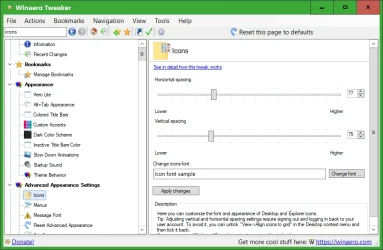
I did a clean un-install of my Nvidia drivers using DDU. Then installed the latest Nvidia driver. Now the desktop icons are spaced further apart than they were before using DDU. I ran DDU again, and it did not change the desktop icons back to the way they were. I want them the way I had it. Small icons that were closer. The size is okay, they are just spaced too far apart.
Is there a way to change them back? I checked the auto arrange and align icons in the View tab. That does not fix it.
Is there a way to change them back? I checked the auto arrange and align icons in the View tab. That does not fix it.
- Windows Build/Version
- Windows 11 25H2
My Computer
At a glance
Windows 11Intel i9 12900KCorsair Dominator DDR5 32GB 5600MHzEVGA RTX 3090 FTW3 Ultra
- OS
- Windows 11
- Computer type
- PC/Desktop
- Manufacturer/Model
- Custom Build
- CPU
- Intel i9 12900K
- Motherboard
- Asus ROG Maximus Z690 Hero
- Memory
- Corsair Dominator DDR5 32GB 5600MHz
- Graphics Card(s)
- EVGA RTX 3090 FTW3 Ultra
- Monitor(s) Displays
- 49 inch Samsung Odyssey G9
- Screen Resolution
- 5120x1440
- Hard Drives
- 2x Samsung 980 Pro NVMe M.2 SSD
- PSU
- EVGA SuperNova 1200W P2
- Case
- Lian Li 011D XL
- Cooling
- EK Quantum Velocity2 and EK Vector2 + ABP set water blocks, Monsoon fittings and tubing
- Keyboard
- Corsair K95 RGB PLatinum XT
- Mouse
- Razer Deathadder V2
- Internet Speed
- 2.2 Gigabit
- Browser
- Brave
- Antivirus
- Windows Defender
- Other Info
- Aquacomputer Octo for fan control and 2 Aquacomputer Farbwerk 360`s for DRGB control.