Desktop icons


gproston

Member
Local time
6:24 PM
Posts
6
OS
Windows 11
I have place the My Computer and Recycle Bin icons on the desktop. No issue. However, when I download a file (via Firefox - the desktop is the location), or copy files to the desktop, they appear between the My Computer and Recycle Bin icons, not below the Recycle Bin icon (which is the desired behavior). What must I change to make this work as desired?
 

My Computer

System One

  • OS
    Windows 11
    Computer type
    Laptop
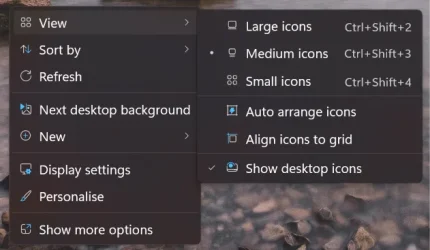
Have you tried turning off auto arrange or align to grid?

Screenshot 2026-06-12 200033.webp

EDIT: Forgot to say, right click the desktop and pick view for those options.
 

My Computer

System One

  • OS
    Windows 11 Pro 25H2 26200.7922
    Computer type
    PC/Desktop
    Manufacturer/Model
    Local shop built (KC Computers Ltd)
    CPU
    Intel Core i9 13900F
    Motherboard
    Gigabyte Z690 Gaming X (rev. 1.0/1.1) - (BIOS: F32 09 18 2025)
    Memory
    2 x Kingston Fury 32gb DDR5 5600 Beast
    Graphics Card(s)
    Gigabyte Eagle (Nvidia) RTX 3060
    Sound Card
    Chord Async USB 44.1kHz - 384kHz 2Qute DAC
    Monitor(s) Displays
    Gigabyte AORUS FO32U2 32” OLED Flat Gaming Monitor, 0.03ms, KVM, 250 cd/m2, FreeSync Premium Pro, HDR True Black 400
    Screen Resolution
    3840 x 2160 (UHD), 240Hz
    Hard Drives
    1 x KINGSTON NVMe M.2 SSDSKC3000D2048G 2TB
    1 x Samsung SSD 870 EVO 250GB
    2 x Crucial CT4000MX500SSD1 4TB
    2 x Crucial CT2000MX500SSD1 2TB
    1 x Crucial CT250MX500SSD1 250.0 GB
    PSU
    Gigabyte 750w
    Case
    Fractal Torrent
    Cooling
    Stock Intel CPU, 2 x Fractal 180mm PWM (front), 3 x Fractal 140mm PWM (bottom)
    Keyboard
    Logitech MX Mechanical Wireless Illuminated Performance Keyboard
    Mouse
    Logitech MX Master 3S Wireless Performance Mouse
    Internet Speed
    900 Mbps/900 Mbps Trooli FTTP
    Browser
    Firefox
    Antivirus
    Eset Nod32

been an issue for a long time in windows. try either:

1) move the recycle bin to the bottom right corner of your desktop and see if that stops the displacement of icons
OR
2) hide the recycle bin icon from your desktop to test and see if it stops the shifting
 

My Computer

System One

  • OS
    Windows 11 Pro
I can try that, but on my Windows 7 machine all of the View boxes are checked and it behaves exactly as desired.
 

My Computer

System One

  • OS
    Windows 11
    Computer type
    Laptop

been an issue for a long time in windows. try either:

1) move the recycle bin to the bottom right corner of your desktop and see if that stops the displacement of icons
OR
2) hide the recycle bin icon from your desktop to test and see if it stops the shifting

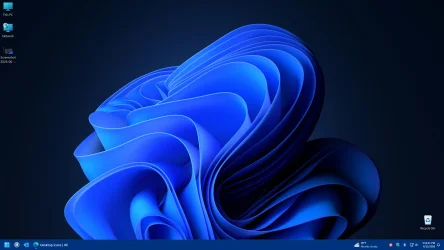
That must be it because I have always had mine that way with: Align Icons to Grid and when I add something new it snaps right in line as displayed below.

Right click on desktop - click on View - click on Align Icons to Grid.


1781291749403.webp
 

My Computers

System One System Two

  • OS
    Windows 11 Pro 25H2 26200.8655
    Computer type
    PC/Desktop
    Manufacturer/Model
    Dell Tower Plus EBT2250, DOB: 06/15/2025
    CPU
    Intel® Core™ Ultra 7 265 1.8GHz to 5.3GHz (Arrow Lake)
    Motherboard
    Dell Inc. 02D3NT A00 (U3E1)
    Memory
    SK Hynix 32GB DDR5 5600 Desktop RAM UDIMM Non-ECC PC5-5600B
    Graphics Card(s)
    Dell NVIDIA® GeForce RTX™ 4060 8GB GDDR6 & (iGPU) Integrated Intel® UHD Graphics
    Sound Card
    Chipset Realtek High-Definition Audio with Dolby Atmos
    Monitor(s) Displays
    Dell Ultra Sharp U2515H 25-Inch Screen LED-Lit
    Screen Resolution
    2560 X 1440
    Hard Drives
    Samsung (NVMe PM9C1a 1024GB) M.2 PCIe NVMe Solid State Drive (OS), with Samsung Piccolo (S4LY022) 6-Core 4 Channel Controller.

    Samsung T7 500GB SSD, USB-C External Drive
    PSU
    Dell 460W
    Case
    Dell Tower Plus EBT 2250
    Cooling
    Fan
    Keyboard
    Dell Wired Keyboard - KB216
    Mouse
    Logitech M510
    Internet Speed
    Intel Killer E3100G 2.5 Gigabit Ethernet Controller
    Browser
    Microsoft Edge
    Antivirus
    Microsoft Windows Security
    Other Info
    The Samsung NVMe PM9C1a 1024GB SSD does not use a Phison NAND controller. Instead, it uses Samsung's in-house developed Piccolo (S4LY022) 6-Core 4 Channel Controller. The PM9C1a utilizes a controller built using Samsung's 5-nanometer process and seventh-generation V-NAND technology. 🤔
  • Operating System
    Windows 11 Pro 25H2 26200.8655
    Computer type
    Laptop
    Manufacturer/Model
    Dell Inspiron 15 7000 (7591) 2-in-1, DOB: 11/30/2019
    CPU
    10th Generation Intel Core i7-10510U Processor (8MB Cache, up to 4.9 GHz) Comet Lake
    Motherboard
    Dell 0NNW5N
    Memory
    16GB DDR4 RAM
    Graphics card(s)
    NVIDIA® GeForce® MX250 with 2GB GDDR5 graphics memory
    Sound Card
    Chipset Realtek ALC3254 🤔🤣
    Monitor(s) Displays
    Dell 15.6-inch UHD Truelife Touch Narrow Border WVA Display with Active Pen support
    Screen Resolution
    3840 x 2160
    Hard Drives
    Intel NVME 512GB SSD with 32GB Intel Optane Memory, M.2 80mm PCIe 3.0 RAID

    SanDisk 256GB Extreme microSDXC UHS-I Memory Card
    PSU
    Dell 4-Cell Battery, 68 Whr (Integrated), 90 Watt AC Adapter
    Case
    Dell Inspiron 15 7000 2-in-1 (7591)
    Cooling
    Standard Dell Case Fan & Havit HV-F2056 USB Powered (3 Fans) Laptop Cooling Pad.
    Keyboard
    Dell
    Mouse
    Logitech Wireless Mouse M650L
    Internet Speed
    Wireless/Wired connectivity (WiFi 6 - 802.11 ax)
    Browser
    Microsoft Edge
    Antivirus
    Microsoft Windows Security
    Other Info
    From Dell: 512GB NVME Solid State Drive accelerated by 32GB Intel Optane Memory are the fastest as compared to NAND SSDs. Intel Optane H10 with SSD offers speedy storage and accelerates opening your programs.
That must be it because I have always had mine that way with: Align Icons to Grid and when I add something new it snaps right in line as displayed below.

Right click on desktop - click on View - click on Align Icons to Grid.

you can use this ahk script (you can download the exe from the source too) that will run in the tray and lock desktop icons in place when active. just doubleclick it's tray icon to turn it off so you can move icons around and double click again to turn it back on (lock them)


script (exe's) code:

Code:
;DeskLock.ahk
; Prevents the moving of desktop icons.
;Skrommel @2006

#SingleInstance,Force
#NoEnv
CoordMode,Mouse,Screen

applicationname=DeskLock

Gosub,INIREAD
Gosub,TRAYMENU

Hotkey,%disable%,SWAP,UseErrorLevel

If startdisabled=1
  Gosub,SWAP

If nomove=1
  Hotkey,~LButton,LBUTTON,On UseErrorLevel

If showinfo=1
  SetTimer,SHOWINFO,100

If norbutton=1
Loop
{
  Sleep,10
  MouseGetPos,,,winid
  WinGetClass,class,ahk_id %winid%
  If class In %classes%
    Hotkey,RButton,RBUTTON,On UseErrorLevel
  Else
    Hotkey,RButton,Off,UseErrorLevel
}
Return


RBUTTON:
Return


LBUTTON:
Loop
{
  x2:=x1
  y2:=y1
  Sleep,0
  MouseGetPos,x2,y2,winid
  WinGetClass,class,ahk_id %winid%
  If class Not In %classes%
    Return

  If class In %classes%
  If (x2<>x1 Or y2<>y1)
  {
    Click,Up,%x1%,%y1%
    MouseMove,%x2%,%y2%
    Return
  }
  GetKeyState,state,LButton,P
  If state=U
    Return
}
Return


SHOWINFO:
MouseGetPos,,,winid
WinGetClass,class,ahk_id %winid%
ToolTip,%class%
Return


INIREAD:
IfNotExist,%applicationname%.ini
{
  nomove=1
  norbutton=1
  classes=Progman
  showinfo=0
  startdisabled=0
  disable=^!D
  Gosub,INIWRITE
}
IniRead,nomove,%applicationname%.ini,Settings,nomove
IniRead,norbutton,%applicationname%.ini,Settings,norbutton
IniRead,classes,%applicationname%.ini,Settings,classes
IniRead,showinfo,%applicationname%.ini,Settings,showinfo
IniRead,startdisabled,%applicationname%.ini,Settings,startdisabled
IniRead,disable,%applicationname%.ini,Settings,disable
Return

INIWRITE:
IniWrite,%nomove%,%applicationname%.ini,Settings,nomove
IniWrite,%norbutton%,%applicationname%.ini,Settings,norbutton
IniWrite,%classes%,%applicationname%.ini,Settings,classes
IniWrite,%showinfo%,%applicationname%.ini,Settings,showinfo
IniWrite,%startdisabled%,%applicationname%.ini,Settings,startdisabled
IniWrite,%disable%,%applicationname%.ini,Settings,disable
Return


TRAYMENU:
Menu,Tray,NoStandard
Menu,Tray,DeleteAll
Menu,Tray,Add,%applicationname%,SWAP
Menu,Tray,Add,
Menu,Tray,Add,&Enabled,SWAP
Menu,Tray,Add,
Menu,Tray,Add,&Settings...,SETTINGS
Menu,Tray,Add,&About...,ABOUT
Menu,Tray,Add,E&xit,EXIT
Menu,Tray,Check,&Enabled
Menu,Tray,Default,%applicationname%
Menu,Tray,Tip,%applicationname%
Return


SWAP:
Menu,Tray,ToggleCheck,&Enabled
Suspend,Toggle
Return


EXIT:
ExitApp


SETTINGS:
HotKey,%disable%,Off,UseErrorLevel
Gui,Destroy
Gui,Add,GroupBox,xm y+10 w220 h95,Settings
Gui,Add,Checkbox,xm+10 yp+20 Checked%nomove% Vvnomove,&Lock icons
Gui,Add,Checkbox,xm+10 y+5 Checked%norbutton% Vvnorbutton,Disable &right mouse button
Gui,Add,Checkbox,xm+10 y+5 Checked%startdisabled% Vvstartdisabled,Start &disabled
Gui,Add,Checkbox,xm+10 y+5 Checked%showinfo% Vvshowinfo,&Show class

Gui,Add,GroupBox,xm y+20 w220 h70,Hotkey to &disable DeskLock
Gui,Add,Hotkey,xm+10 yp+20 w200 vvdisable
StringReplace,current,disable,+,Shift +%A_Space%
StringReplace,current,current,^,Ctrl +%A_Space%
StringReplace,current,current,!,Alt +%A_Space%
Gui,Add,Text,xm+10 y+5,Current hotkey: %current%

Gui,Add,GroupBox,xm y+20 w220 h105,&Classes to lock
Gui,Add,Edit,xm+10 yp+20 h60 w200 Vvclasses,%classes%
Gui,Add,Text,xm+10 y+5,Format: Class1,Class2,Class3

Gui,Add,Button,xm y+20 w75 Default GSETTINGSOK,&OK
Gui,Add,Button,x+5 w75 GSETTINGSCANCEL,&Cancel
Gui,Show,,%applicationname% Settings
Return

SETTINGSOK:
Gui,Submit
nomove:=vnomove
norbutton:=vnorbutton
If classes<>
  classes:=vclasses
showinfo:=vshowinfo
startdisabled:=vstartdisabled
If vdisable<>
  disable:=vdisable
Gosub,INIWRITE
Reload
Return

SETTINGSCANCEL:
Gui,Destroy
HotKey,%disable%,SWAP,On UseErrorLevel
Return


ABOUT:
Gui,Destroy
Gui,Add,Picture,Icon1,%applicationname%.exe
Gui,Font,Bold
Gui,Add,Text,x+10 yp+10,%applicationname% v1.2
Gui,Font
Gui,Add,Text,xm,Prevents the moving of desktop icons.
Gui,Add,Text,xm,- DoubleClick the tray icon to Disable/Enable.
Gui,Add,Text,xm,- Change the settings using Settings in the tray menu.
Gui,Add,Text,y+0,`t

Gui,Add,Picture,xm Icon2,%applicationname%.exe
Gui,Font,Bold
Gui,Add,Text,x+10 yp+10,1 Hour Software by Skrommel
Gui,Font
Gui,Add,Text,xm,For more tools, information and donations, visit
Gui,Font,CBlue Underline
Gui,Add,Text,xm G1HOURSOFTWARE,www.1HourSoftware.com
Gui,Font
Gui,Add,Text,y+0,`t

Gui,Add,Picture,xm Icon5,%applicationname%.exe
Gui,Font,Bold
Gui,Add,Text,x+10 yp+10,DonationCoder
Gui,Font
Gui,Add,Text,xm,Please support the DonationCoder community
Gui,Font,CBlue Underline
Gui,Add,Text,xm GDONATIONCODER,www.DonationCoder.com
Gui,Font
Gui,Add,Text,y+0,`t

Gui,Add,Picture,xm Icon6,%applicationname%.exe
Gui,Font,Bold
Gui,Add,Text,x+10 yp+10,AutoHotkey
Gui,Font
Gui,Add,Text,xm,This program was made using AutoHotkey
Gui,Font,CBlue Underline
Gui,Add,Text,xm GAUTOHOTKEY,www.AutoHotkey.com
Gui,Font
Gui,Add,Text,y+0,`t

Gui,Add,Button,GABOUTOK Default w75,&OK
Gui,Show,,%applicationname% About

hCurs:=DllCall("LoadCursor","UInt",NULL,"Int",32649,"UInt") ;IDC_HAND
OnMessage(0x200,"WM_MOUSEMOVE")
Return

1HOURSOFTWARE:
Run,http://www.1hoursoftware.com,,UseErrorLevel
Return

DONATIONCODER:
Run,http://www.donationcoder.com,,UseErrorLevel
Return

AUTOHOTKEY:
Run,http://www.autohotkey.com,,UseErrorLevel
Return

ABOUTOK:
Gui,Destroy
OnMessage(0x200,"")
DllCall("DestroyCursor","Uint",hCurs)
Return

WM_MOUSEMOVE(wParam,lParam)
{
  Global hCurs
  MouseGetPos,,,,ctrl
  If ctrl in Static10,Static15,Static20
    DllCall("SetCursor","UInt",hCurs)
  Return
}

 

My Computer

System One

  • OS
    Windows 11 Pro
but on my Windows 7 machine
That's comparing apples to oranges. Nothing of what one sees in 7 can be a baseline for what one sees in 11 and vice versa. The GUIs are totally different.

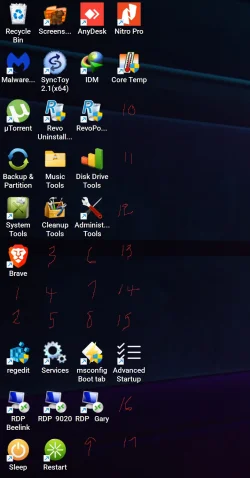
Recycle Bin should be at top left corner of desktop (its default location) From that point, Even if you have auto arrange turned off, any icon added follows a pattern. The added icon will be located in the first vacant spot from top to bottom starting from first vertical column on left side. Once the far left column is populated, it does the same thing in second column, then third column, and so on.

For example here's my desktop. Future icons will automatically go to the positions in the order I have marked. I just manually drag them where I want.
 

Attachments

  • Screenshot 2026-06-12 150836.webp
    Screenshot 2026-06-12 150836.webp
    77.3 KB · Views: 1

My Computers

System One System Two

  • OS
    Windows 11 Pro 25H2 26200.8655
    Computer type
    PC/Desktop
    Manufacturer/Model
    Dell Optiplex 7080
    CPU
    i9-10900 10 core 20 threads
    Motherboard
    DELL 0J37VM
    Memory
    32 gb
    Graphics Card(s)
    none-Intel UHD Graphics 630
    Sound Card
    Integrated Realtek
    Monitor(s) Displays
    Benq 27
    Screen Resolution
    2560x1440
    Hard Drives
    2x1tb Solidigm m.2 nvme /External drives 512gb Samsung m.2 sata+2tb Kingston m2.nvme
    PSU
    500w
    Case
    MT
    Cooling
    Dell Premium
    Keyboard
    Logitech wired
    Mouse
    Logitech wireless
    Internet Speed
    so slow I'm too embarrassed to tell
    Browser
    #1 Edge #2 Firefox
    Antivirus
    Defender+MWB Premium
  • Operating System
    Windows 11 Pro 24H2 26200.8457
    Computer type
    PC/Desktop
    Manufacturer/Model
    Beelink Mini PC SER5
    CPU
    AMD Ryzen 7 6800U
    Memory
    32 gb
    Graphics card(s)
    integrated
    Sound Card
    integrated
    Monitor(s) Displays
    Benq 27
    Screen Resolution
    2560x1440
    Hard Drives
    1TB Crucial nvme
    Keyboard
    Logitech wired
    Mouse
    Logitech wireless
    Internet Speed
    still too embarrassed to tell
    Browser
    Firefox
    Antivirus
    Defender
    Other Info
    System 3 is non compliant Dell 9020 i7-4770/24gb ram Win11 PRO 26200.8457

Latest Support Threads

Back
Top Bottom