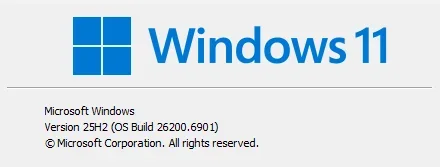
Desktop Windows Manager high memory usage on 6901


Obt1mus

Member
Local time
12:18 AM
Posts
19
OS
Windows 11
1761306099691.webp

Hi everyone,

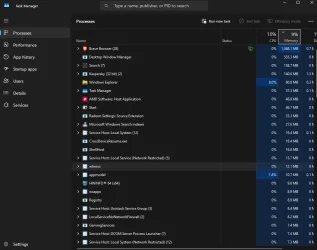
dmw.exe (desktop windows manager) is having high memory usage spikes (sometimes up to 1.5gb). Transparency and effects are off, my drivers up to date

Anyone with the same issue?
 

My Computer

System One

  • OS
    Windows 11
    Computer type
    PC/Desktop
    Manufacturer/Model
    Custom
    CPU
    AMD Ryzen 7 9700X
    Motherboard
    Asus Rog Strix B850-I Gaming Wifi
    Memory
    64gb Gskill Trident z Cl28
    Graphics Card(s)
    Asus TUF Gaming Radeon RX 6800 XT
    Sound Card
    ROG SupremeFX 7.1 Surround Sound High Definition Audio CODEC ALC4080
    Monitor(s) Displays
    Asus TUF Gaming VG27AQ1A
    Screen Resolution
    2560x1440p - 170hz
    Hard Drives
    Lexar SSD NQ790 2TB (2000 GB, PCI-E 4.0 x4)
    Samsumg 850 2tb SSD
    PSU
    Corsair RM850x
    Case
    Lian Li A3 mATX
    Cooling
    Deepcool LT360 AIO
    Keyboard
    Leobog Hi75
    Mouse
    Logitech G Pro X Superlight
    Internet Speed
    100mb/s
    Browser
    Brave, Firefox, Edge
    Antivirus
    Kaspersky Premium
Yeah we did for awhile, but I didn't come up with any brilliant fixes. Just rebooted and it may have come up a couple more times and then stopped.
 

My Computer

System One

  • OS
    Windows 11 Pro
    Computer type
    PC/Desktop
    Manufacturer/Model
    Intel/NUC
Open Command Prompt as an Administrator.
sfc /scannow

Once it finishes, do this:
DISM /Online /Cleanup-image /scanhealth

Then:
DISM /Online /Cleanup-image /restorehealth

Restart the computer.
 

My Computer

System One

  • OS
    Windows 11
    Computer type
    PC/Desktop
    Manufacturer/Model
    Custom Built
Thanks,
Open Command Prompt as an Administrator.
sfc /scannow

Once it finishes, do this:
DISM /Online /Cleanup-image /scanhealth

Then:
DISM /Online /Cleanup-image /restorehealth

Restart the computer.
Thanks, I just repeated this step this morning but It seems the problem is still there. I tried a clean boot without my apps running in the background but nothing change. As long as I open a browser (Edge or Brave), the ram usage goes all over the place. (All of sudden from 60-80mb to 500, 800, 1.2gb....)

Even with just 2 tabs open
1761274616464.webp
 

My Computer

System One

  • OS
    Windows 11
    Computer type
    PC/Desktop
    Manufacturer/Model
    Custom
    CPU
    AMD Ryzen 7 9700X
    Motherboard
    Asus Rog Strix B850-I Gaming Wifi
    Memory
    64gb Gskill Trident z Cl28
    Graphics Card(s)
    Asus TUF Gaming Radeon RX 6800 XT
    Sound Card
    ROG SupremeFX 7.1 Surround Sound High Definition Audio CODEC ALC4080
    Monitor(s) Displays
    Asus TUF Gaming VG27AQ1A
    Screen Resolution
    2560x1440p - 170hz
    Hard Drives
    Lexar SSD NQ790 2TB (2000 GB, PCI-E 4.0 x4)
    Samsumg 850 2tb SSD
    PSU
    Corsair RM850x
    Case
    Lian Li A3 mATX
    Cooling
    Deepcool LT360 AIO
    Keyboard
    Leobog Hi75
    Mouse
    Logitech G Pro X Superlight
    Internet Speed
    100mb/s
    Browser
    Brave, Firefox, Edge
    Antivirus
    Kaspersky Premium
Welcome to the forum


25H2 may have increased baseline usage for DWM

Turning off hardware acceleration in apps like browsers, could reduce the usage.

You could experiment and disable hardware acceleration globaly? And let the software take on the task.

Code:
[HKEY_CURRENT_USER\Software\Microsoft\Avalon.Graphics]
"DisableHWAcceleration"=dword:00000001

If the Avalon.Graphics registry entry is not there:
  • Open Registry Editor
    • Press Win + R, type regedit, and hit Enter.
  • Navigate to:
    • HKEY_CURRENT_USER\Software\Microsoft
  • Create a new key
    • Right-click on Microsoft > New > Key
    • Name it: Avalon.Graphics
  • Create a new DWORD value
    • Right-click on Avalon.Graphics > New > DWORD (32-bit) Value
    • Name it: DisableHWAcceleration
  • Set the value
    • Double-click DisableHWAcceleration
    • Set the value to: 1
Restart your system​
If it doesn’t help, you can delete the key.​
 

My Computers

System One System Two

  • OS
    Windows 11 Pro 25H2 Build 26200.8524
    Computer type
    PC/Desktop
    Manufacturer/Model
    Sin-built 2013
    CPU
    Intel(R) Core(TM) i7-4770K CPU @ 3.50GHz
    Motherboard
    ASUS ROG Maximus VI Formula
    Memory
    32.0 GB of I forget and the box is in storage.
    Graphics Card(s)
    Gigabyte nVidia GeForce GTX 1660 Super OC 6GB
    Sound Card
    Onboard thingy
    Monitor(s) Displays
    5 x LG 25MS500-B - 1 x 24MK430H-B - 1 x Wacom Pro 22" Touch Screen Tablet
    Screen Resolution
    All over the place
    Hard Drives
    Too many to list.
    OS on Samsung 1TB 870 QVO SATA
    PSU
    Silverstone 1500
    Case
    NZXT Phantom 820 Full-Tower Case
    Cooling
    Noctua NH-D15 Elite Class Dual Tower CPU Cooler / 6 x EziDIY 120mm / 2 x Corsair 140mm somethings / 1 x 140mm Thermaltake something / 2 x 200mm Corsair.
    Keyboard
    Corsair K95 / Logitech diNovo Edge Wireless
    Mouse
    Logitech: G402 / G502 / Mx Masters / Mx Air Cordless
    Internet Speed
    2000/500Mbps
    Browser
    All sorts
    Antivirus
    Kaspersky Premium
    Other Info
    ㅤㅤㅤㅤㅤㅤㅤㅤㅤㅤㅤㅤㅤㅤㅤㅤㅤㅤㅤㅤㅤㅤㅤㅤㅤㅤㅤㅤㅤㅤㅤㅤㅤㅤㅤㅤㅤㅤㅤㅤ⠀⠀⠀⠀⠀⠀⠀⠀⠀⠀
    TP-Link BE9300 WiFi 7 Bluetooth 5.4 (Archer TBE550E)
    TP-Link TX201 V1 2.5GB Lan

    Grandstream HT812 - VoIP
    ASUS DSL-AX82U - Mesh
    ASUS RT-AC68U - Mesh
    ASUS RT-BE88U Router

    Brother MFC-L2880DW Printer

    I’m on a horse.
  • Operating System
    Windows 11 Pro 25H2 Build 26200.8524
    Computer type
    Laptop
    Manufacturer/Model
    LENOVO Yoga 7 14IRL8 - 7i EVO OLED 14" Touchscreen i5 12 Core 16GB/512GB
    CPU
    Intel Core 12th Gen i5-1240P Processor (1.7 - 4.4GHz)
    Memory
    16GB LPDDR5 RAM
    Graphics card(s)
    Intel Iris Xe Graphics Processor
    Sound Card
    Optimized with Dolby Atmos®
    Screen Resolution
    QHD 2880 x 1800 OLED
    Hard Drives
    M.2 512GB
    Antivirus
    Defender / Malwarebytes
    Other Info
    …still on a horse.
please check the reliability monitor
control panel > security and maintenance > maintenance > reliability monitor
check for any errors there

then check problem devices
window tools > system information > components > problem devices
check for any problems there

if you have already done an SFC and DISM/restore health
then check indexing and see if that is running
control panel > indexing options
as indexing constantly running can cause similar symptoms

best of luck Steve ..
 

My Computers

System One System Two

  • OS
    Windows 11 Home
    Computer type
    PC/Desktop
    Manufacturer/Model
    HP 24" AiO
    CPU
    Ryzen 7 5825u
    Motherboard
    HP
    Memory
    64GB DDR4 3200
    Graphics Card(s)
    Ryzen 7 5825u
    Sound Card
    RealTek
    Monitor(s) Displays
    24" HP AiO
    Screen Resolution
    1920 x 1080 @60 Hz
    Hard Drives
    1TB WD Blue SN580 M2 SSD Partitioned.
    2x 1TB USB HDD External Backup/Storage.
    PSU
    90W external power brick
    Case
    24" All in One
    Cooling
    Default Air Cooling
    Keyboard
    HP WiFi UK extended
    Mouse
    HP WiFi 3 Button
    Internet Speed
    1GB full fibre
    Browser
    Edge & Firefox
    Antivirus
    AVG Internet Security/Windows Defender
    Other Info
    Mainly Open Source Software
  • Operating System
    Ubuntu 22.04.5 LTS
    Computer type
    Laptop
    Manufacturer/Model
    Dell 13" Latitude 2017
    CPU
    i5 7200u
    Motherboard
    Dell
    Memory
    16GB DDR4
    Graphics card(s)
    Intel
    Sound Card
    Intel
    Monitor(s) Displays
    13" Dell Laptop
    Hard Drives
    250GB Crucial 2.5" SSD
    Mouse
    Generic WiFi 3 button
    Internet Speed
    WiFi only
    Browser
    Firefox
    Antivirus
    ClamAV TK
    Other Info
    Mainly Open Source Software
Welcome to the forum


25H2 may have increased baseline usage for DWM

Turning off hardware acceleration in apps like browsers, could reduce the usage.

You could experiment and disable hardware acceleration globaly? And let the software take on the task.

Code:
[HKEY_CURRENT_USER\Software\Microsoft\Avalon.Graphics]
"DisableHWAcceleration"=dword:00000001

If the Avalon.Graphics registry entry is not there:
  • Open Registry Editor
    • Press Win + R, type regedit, and hit Enter.
  • Navigate to:
    • HKEY_CURRENT_USER\Software\Microsoft
  • Create a new key
    • Right-click on Microsoft > New > Key
    • Name it: Avalon.Graphics
  • Create a new DWORD value
    • Right-click on Avalon.Graphics > New > DWORD (32-bit) Value
    • Name it: DisableHWAcceleration
  • Set the value
    • Double-click DisableHWAcceleration
    • Set the value to: 1
Restart your system​
If it doesn’t help, you can delete the key.​
Thanks! :) I did that yesterday and the registry entry is still present but that didn't fix help unfortunately. I also tried re-installing my GPU drivers using DDU but no chance
 

My Computer

System One

  • OS
    Windows 11
    Computer type
    PC/Desktop
    Manufacturer/Model
    Custom
    CPU
    AMD Ryzen 7 9700X
    Motherboard
    Asus Rog Strix B850-I Gaming Wifi
    Memory
    64gb Gskill Trident z Cl28
    Graphics Card(s)
    Asus TUF Gaming Radeon RX 6800 XT
    Sound Card
    ROG SupremeFX 7.1 Surround Sound High Definition Audio CODEC ALC4080
    Monitor(s) Displays
    Asus TUF Gaming VG27AQ1A
    Screen Resolution
    2560x1440p - 170hz
    Hard Drives
    Lexar SSD NQ790 2TB (2000 GB, PCI-E 4.0 x4)
    Samsumg 850 2tb SSD
    PSU
    Corsair RM850x
    Case
    Lian Li A3 mATX
    Cooling
    Deepcool LT360 AIO
    Keyboard
    Leobog Hi75
    Mouse
    Logitech G Pro X Superlight
    Internet Speed
    100mb/s
    Browser
    Brave, Firefox, Edge
    Antivirus
    Kaspersky Premium
That’s a shame.
Have a look at Steves’ suggestion above, see how you go.
 

My Computers

System One System Two

  • OS
    Windows 11 Pro 25H2 Build 26200.8524
    Computer type
    PC/Desktop
    Manufacturer/Model
    Sin-built 2013
    CPU
    Intel(R) Core(TM) i7-4770K CPU @ 3.50GHz
    Motherboard
    ASUS ROG Maximus VI Formula
    Memory
    32.0 GB of I forget and the box is in storage.
    Graphics Card(s)
    Gigabyte nVidia GeForce GTX 1660 Super OC 6GB
    Sound Card
    Onboard thingy
    Monitor(s) Displays
    5 x LG 25MS500-B - 1 x 24MK430H-B - 1 x Wacom Pro 22" Touch Screen Tablet
    Screen Resolution
    All over the place
    Hard Drives
    Too many to list.
    OS on Samsung 1TB 870 QVO SATA
    PSU
    Silverstone 1500
    Case
    NZXT Phantom 820 Full-Tower Case
    Cooling
    Noctua NH-D15 Elite Class Dual Tower CPU Cooler / 6 x EziDIY 120mm / 2 x Corsair 140mm somethings / 1 x 140mm Thermaltake something / 2 x 200mm Corsair.
    Keyboard
    Corsair K95 / Logitech diNovo Edge Wireless
    Mouse
    Logitech: G402 / G502 / Mx Masters / Mx Air Cordless
    Internet Speed
    2000/500Mbps
    Browser
    All sorts
    Antivirus
    Kaspersky Premium
    Other Info
    ㅤㅤㅤㅤㅤㅤㅤㅤㅤㅤㅤㅤㅤㅤㅤㅤㅤㅤㅤㅤㅤㅤㅤㅤㅤㅤㅤㅤㅤㅤㅤㅤㅤㅤㅤㅤㅤㅤㅤㅤ⠀⠀⠀⠀⠀⠀⠀⠀⠀⠀
    TP-Link BE9300 WiFi 7 Bluetooth 5.4 (Archer TBE550E)
    TP-Link TX201 V1 2.5GB Lan

    Grandstream HT812 - VoIP
    ASUS DSL-AX82U - Mesh
    ASUS RT-AC68U - Mesh
    ASUS RT-BE88U Router

    Brother MFC-L2880DW Printer

    I’m on a horse.
  • Operating System
    Windows 11 Pro 25H2 Build 26200.8524
    Computer type
    Laptop
    Manufacturer/Model
    LENOVO Yoga 7 14IRL8 - 7i EVO OLED 14" Touchscreen i5 12 Core 16GB/512GB
    CPU
    Intel Core 12th Gen i5-1240P Processor (1.7 - 4.4GHz)
    Memory
    16GB LPDDR5 RAM
    Graphics card(s)
    Intel Iris Xe Graphics Processor
    Sound Card
    Optimized with Dolby Atmos®
    Screen Resolution
    QHD 2880 x 1800 OLED
    Hard Drives
    M.2 512GB
    Antivirus
    Defender / Malwarebytes
    Other Info
    …still on a horse.
Side note:

Before you try Steves suggestion, (or after if I am too late) export that key then delete it from the registry.
It’s best to know what actually makes a difference and eliminate what doesn’t
 

My Computers

System One System Two

  • OS
    Windows 11 Pro 25H2 Build 26200.8524
    Computer type
    PC/Desktop
    Manufacturer/Model
    Sin-built 2013
    CPU
    Intel(R) Core(TM) i7-4770K CPU @ 3.50GHz
    Motherboard
    ASUS ROG Maximus VI Formula
    Memory
    32.0 GB of I forget and the box is in storage.
    Graphics Card(s)
    Gigabyte nVidia GeForce GTX 1660 Super OC 6GB
    Sound Card
    Onboard thingy
    Monitor(s) Displays
    5 x LG 25MS500-B - 1 x 24MK430H-B - 1 x Wacom Pro 22" Touch Screen Tablet
    Screen Resolution
    All over the place
    Hard Drives
    Too many to list.
    OS on Samsung 1TB 870 QVO SATA
    PSU
    Silverstone 1500
    Case
    NZXT Phantom 820 Full-Tower Case
    Cooling
    Noctua NH-D15 Elite Class Dual Tower CPU Cooler / 6 x EziDIY 120mm / 2 x Corsair 140mm somethings / 1 x 140mm Thermaltake something / 2 x 200mm Corsair.
    Keyboard
    Corsair K95 / Logitech diNovo Edge Wireless
    Mouse
    Logitech: G402 / G502 / Mx Masters / Mx Air Cordless
    Internet Speed
    2000/500Mbps
    Browser
    All sorts
    Antivirus
    Kaspersky Premium
    Other Info
    ㅤㅤㅤㅤㅤㅤㅤㅤㅤㅤㅤㅤㅤㅤㅤㅤㅤㅤㅤㅤㅤㅤㅤㅤㅤㅤㅤㅤㅤㅤㅤㅤㅤㅤㅤㅤㅤㅤㅤㅤ⠀⠀⠀⠀⠀⠀⠀⠀⠀⠀
    TP-Link BE9300 WiFi 7 Bluetooth 5.4 (Archer TBE550E)
    TP-Link TX201 V1 2.5GB Lan

    Grandstream HT812 - VoIP
    ASUS DSL-AX82U - Mesh
    ASUS RT-AC68U - Mesh
    ASUS RT-BE88U Router

    Brother MFC-L2880DW Printer

    I’m on a horse.
  • Operating System
    Windows 11 Pro 25H2 Build 26200.8524
    Computer type
    Laptop
    Manufacturer/Model
    LENOVO Yoga 7 14IRL8 - 7i EVO OLED 14" Touchscreen i5 12 Core 16GB/512GB
    CPU
    Intel Core 12th Gen i5-1240P Processor (1.7 - 4.4GHz)
    Memory
    16GB LPDDR5 RAM
    Graphics card(s)
    Intel Iris Xe Graphics Processor
    Sound Card
    Optimized with Dolby Atmos®
    Screen Resolution
    QHD 2880 x 1800 OLED
    Hard Drives
    M.2 512GB
    Antivirus
    Defender / Malwarebytes
    Other Info
    …still on a horse.
please check the reliability monitor
control panel > security and maintenance > maintenance > reliability monitor
check for any errors there

then check problem devices
window tools > system information > components > problem devices
check for any problems there

if you have already done an SFC and DISM/restore health
then check indexing and see if that is running
control panel > indexing options
as indexing constantly running can cause similar symptoms

best of luck Steve ..
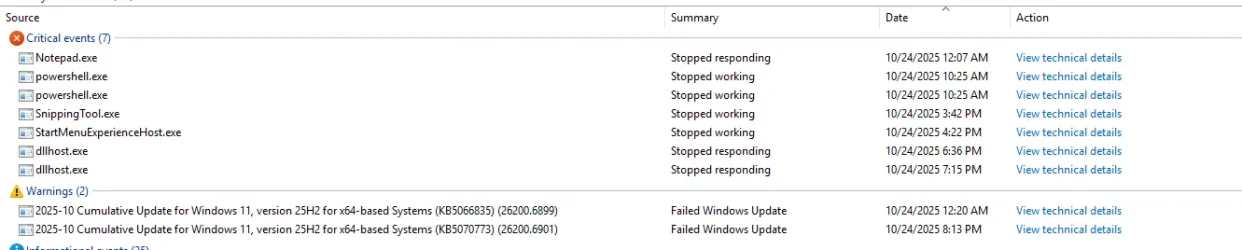
I found some issues under the reliability monitor
1761278232655.webp

Under components > problem devices i got no errors
Not sure why date and time are all wrong there (my date and clock settings are ok)
 

My Computer

System One

  • OS
    Windows 11
    Computer type
    PC/Desktop
    Manufacturer/Model
    Custom
    CPU
    AMD Ryzen 7 9700X
    Motherboard
    Asus Rog Strix B850-I Gaming Wifi
    Memory
    64gb Gskill Trident z Cl28
    Graphics Card(s)
    Asus TUF Gaming Radeon RX 6800 XT
    Sound Card
    ROG SupremeFX 7.1 Surround Sound High Definition Audio CODEC ALC4080
    Monitor(s) Displays
    Asus TUF Gaming VG27AQ1A
    Screen Resolution
    2560x1440p - 170hz
    Hard Drives
    Lexar SSD NQ790 2TB (2000 GB, PCI-E 4.0 x4)
    Samsumg 850 2tb SSD
    PSU
    Corsair RM850x
    Case
    Lian Li A3 mATX
    Cooling
    Deepcool LT360 AIO
    Keyboard
    Leobog Hi75
    Mouse
    Logitech G Pro X Superlight
    Internet Speed
    100mb/s
    Browser
    Brave, Firefox, Edge
    Antivirus
    Kaspersky Premium
Not sure why date and time are all wrong there (my date and clock settings are ok)

Someone reported an issue thay had with time updating/syncing, yesterday. Not sure that it’s a problem. It could be server side.
 

My Computers

System One System Two

  • OS
    Windows 11 Pro 25H2 Build 26200.8524
    Computer type
    PC/Desktop
    Manufacturer/Model
    Sin-built 2013
    CPU
    Intel(R) Core(TM) i7-4770K CPU @ 3.50GHz
    Motherboard
    ASUS ROG Maximus VI Formula
    Memory
    32.0 GB of I forget and the box is in storage.
    Graphics Card(s)
    Gigabyte nVidia GeForce GTX 1660 Super OC 6GB
    Sound Card
    Onboard thingy
    Monitor(s) Displays
    5 x LG 25MS500-B - 1 x 24MK430H-B - 1 x Wacom Pro 22" Touch Screen Tablet
    Screen Resolution
    All over the place
    Hard Drives
    Too many to list.
    OS on Samsung 1TB 870 QVO SATA
    PSU
    Silverstone 1500
    Case
    NZXT Phantom 820 Full-Tower Case
    Cooling
    Noctua NH-D15 Elite Class Dual Tower CPU Cooler / 6 x EziDIY 120mm / 2 x Corsair 140mm somethings / 1 x 140mm Thermaltake something / 2 x 200mm Corsair.
    Keyboard
    Corsair K95 / Logitech diNovo Edge Wireless
    Mouse
    Logitech: G402 / G502 / Mx Masters / Mx Air Cordless
    Internet Speed
    2000/500Mbps
    Browser
    All sorts
    Antivirus
    Kaspersky Premium
    Other Info
    ㅤㅤㅤㅤㅤㅤㅤㅤㅤㅤㅤㅤㅤㅤㅤㅤㅤㅤㅤㅤㅤㅤㅤㅤㅤㅤㅤㅤㅤㅤㅤㅤㅤㅤㅤㅤㅤㅤㅤㅤ⠀⠀⠀⠀⠀⠀⠀⠀⠀⠀
    TP-Link BE9300 WiFi 7 Bluetooth 5.4 (Archer TBE550E)
    TP-Link TX201 V1 2.5GB Lan

    Grandstream HT812 - VoIP
    ASUS DSL-AX82U - Mesh
    ASUS RT-AC68U - Mesh
    ASUS RT-BE88U Router

    Brother MFC-L2880DW Printer

    I’m on a horse.
  • Operating System
    Windows 11 Pro 25H2 Build 26200.8524
    Computer type
    Laptop
    Manufacturer/Model
    LENOVO Yoga 7 14IRL8 - 7i EVO OLED 14" Touchscreen i5 12 Core 16GB/512GB
    CPU
    Intel Core 12th Gen i5-1240P Processor (1.7 - 4.4GHz)
    Memory
    16GB LPDDR5 RAM
    Graphics card(s)
    Intel Iris Xe Graphics Processor
    Sound Card
    Optimized with Dolby Atmos®
    Screen Resolution
    QHD 2880 x 1800 OLED
    Hard Drives
    M.2 512GB
    Antivirus
    Defender / Malwarebytes
    Other Info
    …still on a horse.
Someone reported an issue thay had with time updating/syncing, yesterday. Not sure that it’s a problem. It could be server side.
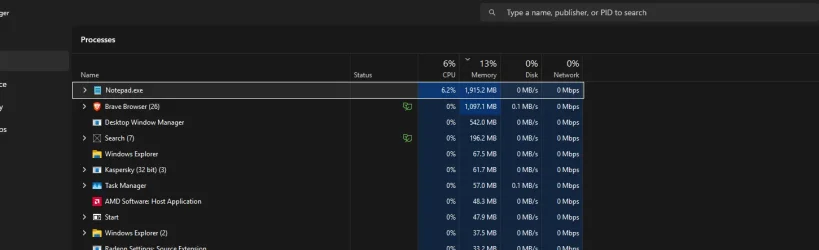
1761278594648.webpso just opened notepad and it certainly have an issue lol. I'm going to try uninstalling it
 

My Computer

System One

  • OS
    Windows 11
    Computer type
    PC/Desktop
    Manufacturer/Model
    Custom
    CPU
    AMD Ryzen 7 9700X
    Motherboard
    Asus Rog Strix B850-I Gaming Wifi
    Memory
    64gb Gskill Trident z Cl28
    Graphics Card(s)
    Asus TUF Gaming Radeon RX 6800 XT
    Sound Card
    ROG SupremeFX 7.1 Surround Sound High Definition Audio CODEC ALC4080
    Monitor(s) Displays
    Asus TUF Gaming VG27AQ1A
    Screen Resolution
    2560x1440p - 170hz
    Hard Drives
    Lexar SSD NQ790 2TB (2000 GB, PCI-E 4.0 x4)
    Samsumg 850 2tb SSD
    PSU
    Corsair RM850x
    Case
    Lian Li A3 mATX
    Cooling
    Deepcool LT360 AIO
    Keyboard
    Leobog Hi75
    Mouse
    Logitech G Pro X Superlight
    Internet Speed
    100mb/s
    Browser
    Brave, Firefox, Edge
    Antivirus
    Kaspersky Premium

My Computers

System One System Two

  • OS
    Windows 11 Pro 25H2 Build 26200.8524
    Computer type
    PC/Desktop
    Manufacturer/Model
    Sin-built 2013
    CPU
    Intel(R) Core(TM) i7-4770K CPU @ 3.50GHz
    Motherboard
    ASUS ROG Maximus VI Formula
    Memory
    32.0 GB of I forget and the box is in storage.
    Graphics Card(s)
    Gigabyte nVidia GeForce GTX 1660 Super OC 6GB
    Sound Card
    Onboard thingy
    Monitor(s) Displays
    5 x LG 25MS500-B - 1 x 24MK430H-B - 1 x Wacom Pro 22" Touch Screen Tablet
    Screen Resolution
    All over the place
    Hard Drives
    Too many to list.
    OS on Samsung 1TB 870 QVO SATA
    PSU
    Silverstone 1500
    Case
    NZXT Phantom 820 Full-Tower Case
    Cooling
    Noctua NH-D15 Elite Class Dual Tower CPU Cooler / 6 x EziDIY 120mm / 2 x Corsair 140mm somethings / 1 x 140mm Thermaltake something / 2 x 200mm Corsair.
    Keyboard
    Corsair K95 / Logitech diNovo Edge Wireless
    Mouse
    Logitech: G402 / G502 / Mx Masters / Mx Air Cordless
    Internet Speed
    2000/500Mbps
    Browser
    All sorts
    Antivirus
    Kaspersky Premium
    Other Info
    ㅤㅤㅤㅤㅤㅤㅤㅤㅤㅤㅤㅤㅤㅤㅤㅤㅤㅤㅤㅤㅤㅤㅤㅤㅤㅤㅤㅤㅤㅤㅤㅤㅤㅤㅤㅤㅤㅤㅤㅤ⠀⠀⠀⠀⠀⠀⠀⠀⠀⠀
    TP-Link BE9300 WiFi 7 Bluetooth 5.4 (Archer TBE550E)
    TP-Link TX201 V1 2.5GB Lan

    Grandstream HT812 - VoIP
    ASUS DSL-AX82U - Mesh
    ASUS RT-AC68U - Mesh
    ASUS RT-BE88U Router

    Brother MFC-L2880DW Printer

    I’m on a horse.
  • Operating System
    Windows 11 Pro 25H2 Build 26200.8524
    Computer type
    Laptop
    Manufacturer/Model
    LENOVO Yoga 7 14IRL8 - 7i EVO OLED 14" Touchscreen i5 12 Core 16GB/512GB
    CPU
    Intel Core 12th Gen i5-1240P Processor (1.7 - 4.4GHz)
    Memory
    16GB LPDDR5 RAM
    Graphics card(s)
    Intel Iris Xe Graphics Processor
    Sound Card
    Optimized with Dolby Atmos®
    Screen Resolution
    QHD 2880 x 1800 OLED
    Hard Drives
    M.2 512GB
    Antivirus
    Defender / Malwarebytes
    Other Info
    …still on a horse.
Uninstalled notepad but the issue haven't disappeared . Oh well... .
 

My Computer

System One

  • OS
    Windows 11
    Computer type
    PC/Desktop
    Manufacturer/Model
    Custom
    CPU
    AMD Ryzen 7 9700X
    Motherboard
    Asus Rog Strix B850-I Gaming Wifi
    Memory
    64gb Gskill Trident z Cl28
    Graphics Card(s)
    Asus TUF Gaming Radeon RX 6800 XT
    Sound Card
    ROG SupremeFX 7.1 Surround Sound High Definition Audio CODEC ALC4080
    Monitor(s) Displays
    Asus TUF Gaming VG27AQ1A
    Screen Resolution
    2560x1440p - 170hz
    Hard Drives
    Lexar SSD NQ790 2TB (2000 GB, PCI-E 4.0 x4)
    Samsumg 850 2tb SSD
    PSU
    Corsair RM850x
    Case
    Lian Li A3 mATX
    Cooling
    Deepcool LT360 AIO
    Keyboard
    Leobog Hi75
    Mouse
    Logitech G Pro X Superlight
    Internet Speed
    100mb/s
    Browser
    Brave, Firefox, Edge
    Antivirus
    Kaspersky Premium
1761284735721.webp

10 to 20% of GPU usage, 2 sometimes 5% of CPU. I regret installing 25H2......... WIndows never cease to disappoint :steam:
 

My Computer

System One

  • OS
    Windows 11
    Computer type
    PC/Desktop
    Manufacturer/Model
    Custom
    CPU
    AMD Ryzen 7 9700X
    Motherboard
    Asus Rog Strix B850-I Gaming Wifi
    Memory
    64gb Gskill Trident z Cl28
    Graphics Card(s)
    Asus TUF Gaming Radeon RX 6800 XT
    Sound Card
    ROG SupremeFX 7.1 Surround Sound High Definition Audio CODEC ALC4080
    Monitor(s) Displays
    Asus TUF Gaming VG27AQ1A
    Screen Resolution
    2560x1440p - 170hz
    Hard Drives
    Lexar SSD NQ790 2TB (2000 GB, PCI-E 4.0 x4)
    Samsumg 850 2tb SSD
    PSU
    Corsair RM850x
    Case
    Lian Li A3 mATX
    Cooling
    Deepcool LT360 AIO
    Keyboard
    Leobog Hi75
    Mouse
    Logitech G Pro X Superlight
    Internet Speed
    100mb/s
    Browser
    Brave, Firefox, Edge
    Antivirus
    Kaspersky Premium
please check the reliability monitor
control panel > security and maintenance > maintenance > reliability monitor
check for any errors there

then check problem devices
window tools > system information > components > problem devices
check for any problems there

if you have already done an SFC and DISM/restore health
then check indexing and see if that is running
control panel > indexing options
as indexing constantly running can cause similar symptoms

best of luck Steve ..
I tried disabling Windows Search. Does not fix the issue, ''Search'' appears to spend 300mb more than when turned it off in services.
 

My Computer

System One

  • OS
    Windows 11
    Computer type
    PC/Desktop
    Manufacturer/Model
    Custom
    CPU
    AMD Ryzen 7 9700X
    Motherboard
    Asus Rog Strix B850-I Gaming Wifi
    Memory
    64gb Gskill Trident z Cl28
    Graphics Card(s)
    Asus TUF Gaming Radeon RX 6800 XT
    Sound Card
    ROG SupremeFX 7.1 Surround Sound High Definition Audio CODEC ALC4080
    Monitor(s) Displays
    Asus TUF Gaming VG27AQ1A
    Screen Resolution
    2560x1440p - 170hz
    Hard Drives
    Lexar SSD NQ790 2TB (2000 GB, PCI-E 4.0 x4)
    Samsumg 850 2tb SSD
    PSU
    Corsair RM850x
    Case
    Lian Li A3 mATX
    Cooling
    Deepcool LT360 AIO
    Keyboard
    Leobog Hi75
    Mouse
    Logitech G Pro X Superlight
    Internet Speed
    100mb/s
    Browser
    Brave, Firefox, Edge
    Antivirus
    Kaspersky Premium
then please try
in a command prompt windows as administrator write

chkntfs c:

press enter and restart the system
windows will do do a complete disk check on restart.

best of luck Steve ..
 

My Computers

System One System Two

  • OS
    Windows 11 Home
    Computer type
    PC/Desktop
    Manufacturer/Model
    HP 24" AiO
    CPU
    Ryzen 7 5825u
    Motherboard
    HP
    Memory
    64GB DDR4 3200
    Graphics Card(s)
    Ryzen 7 5825u
    Sound Card
    RealTek
    Monitor(s) Displays
    24" HP AiO
    Screen Resolution
    1920 x 1080 @60 Hz
    Hard Drives
    1TB WD Blue SN580 M2 SSD Partitioned.
    2x 1TB USB HDD External Backup/Storage.
    PSU
    90W external power brick
    Case
    24" All in One
    Cooling
    Default Air Cooling
    Keyboard
    HP WiFi UK extended
    Mouse
    HP WiFi 3 Button
    Internet Speed
    1GB full fibre
    Browser
    Edge & Firefox
    Antivirus
    AVG Internet Security/Windows Defender
    Other Info
    Mainly Open Source Software
  • Operating System
    Ubuntu 22.04.5 LTS
    Computer type
    Laptop
    Manufacturer/Model
    Dell 13" Latitude 2017
    CPU
    i5 7200u
    Motherboard
    Dell
    Memory
    16GB DDR4
    Graphics card(s)
    Intel
    Sound Card
    Intel
    Monitor(s) Displays
    13" Dell Laptop
    Hard Drives
    250GB Crucial 2.5" SSD
    Mouse
    Generic WiFi 3 button
    Internet Speed
    WiFi only
    Browser
    Firefox
    Antivirus
    ClamAV TK
    Other Info
    Mainly Open Source Software
then please try
in a command prompt windows as administrator write

chkntfs c:

press enter and restart the system
windows will do do a complete disk check on restart.

best of luck Steve ..
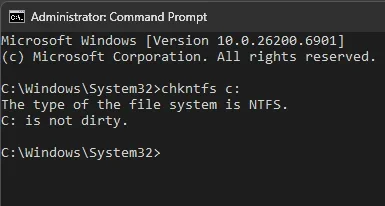
Thanks I tried this (as admin) and I'm left with the message below, restarted after that and nothing happened
1761286875071.webp
 

My Computer

System One

  • OS
    Windows 11
    Computer type
    PC/Desktop
    Manufacturer/Model
    Custom
    CPU
    AMD Ryzen 7 9700X
    Motherboard
    Asus Rog Strix B850-I Gaming Wifi
    Memory
    64gb Gskill Trident z Cl28
    Graphics Card(s)
    Asus TUF Gaming Radeon RX 6800 XT
    Sound Card
    ROG SupremeFX 7.1 Surround Sound High Definition Audio CODEC ALC4080
    Monitor(s) Displays
    Asus TUF Gaming VG27AQ1A
    Screen Resolution
    2560x1440p - 170hz
    Hard Drives
    Lexar SSD NQ790 2TB (2000 GB, PCI-E 4.0 x4)
    Samsumg 850 2tb SSD
    PSU
    Corsair RM850x
    Case
    Lian Li A3 mATX
    Cooling
    Deepcool LT360 AIO
    Keyboard
    Leobog Hi75
    Mouse
    Logitech G Pro X Superlight
    Internet Speed
    100mb/s
    Browser
    Brave, Firefox, Edge
    Antivirus
    Kaspersky Premium
link to check disk

i should have put enter Y then press enter, my bad.
best of luck Steve ..
 

My Computers

System One System Two

  • OS
    Windows 11 Home
    Computer type
    PC/Desktop
    Manufacturer/Model
    HP 24" AiO
    CPU
    Ryzen 7 5825u
    Motherboard
    HP
    Memory
    64GB DDR4 3200
    Graphics Card(s)
    Ryzen 7 5825u
    Sound Card
    RealTek
    Monitor(s) Displays
    24" HP AiO
    Screen Resolution
    1920 x 1080 @60 Hz
    Hard Drives
    1TB WD Blue SN580 M2 SSD Partitioned.
    2x 1TB USB HDD External Backup/Storage.
    PSU
    90W external power brick
    Case
    24" All in One
    Cooling
    Default Air Cooling
    Keyboard
    HP WiFi UK extended
    Mouse
    HP WiFi 3 Button
    Internet Speed
    1GB full fibre
    Browser
    Edge & Firefox
    Antivirus
    AVG Internet Security/Windows Defender
    Other Info
    Mainly Open Source Software
  • Operating System
    Ubuntu 22.04.5 LTS
    Computer type
    Laptop
    Manufacturer/Model
    Dell 13" Latitude 2017
    CPU
    i5 7200u
    Motherboard
    Dell
    Memory
    16GB DDR4
    Graphics card(s)
    Intel
    Sound Card
    Intel
    Monitor(s) Displays
    13" Dell Laptop
    Hard Drives
    250GB Crucial 2.5" SSD
    Mouse
    Generic WiFi 3 button
    Internet Speed
    WiFi only
    Browser
    Firefox
    Antivirus
    ClamAV TK
    Other Info
    Mainly Open Source Software
link to check disk

i should have put enter Y then press enter, my bad.
best of luck Steve ..
No worries, I haven't used that in a while. I just did a reboot with check disk. Restarted it seems disk didn't have any issue. The dwm.exe process is still having huge CPU/RAM usage spikes (792mb now)
 

My Computer

System One

  • OS
    Windows 11
    Computer type
    PC/Desktop
    Manufacturer/Model
    Custom
    CPU
    AMD Ryzen 7 9700X
    Motherboard
    Asus Rog Strix B850-I Gaming Wifi
    Memory
    64gb Gskill Trident z Cl28
    Graphics Card(s)
    Asus TUF Gaming Radeon RX 6800 XT
    Sound Card
    ROG SupremeFX 7.1 Surround Sound High Definition Audio CODEC ALC4080
    Monitor(s) Displays
    Asus TUF Gaming VG27AQ1A
    Screen Resolution
    2560x1440p - 170hz
    Hard Drives
    Lexar SSD NQ790 2TB (2000 GB, PCI-E 4.0 x4)
    Samsumg 850 2tb SSD
    PSU
    Corsair RM850x
    Case
    Lian Li A3 mATX
    Cooling
    Deepcool LT360 AIO
    Keyboard
    Leobog Hi75
    Mouse
    Logitech G Pro X Superlight
    Internet Speed
    100mb/s
    Browser
    Brave, Firefox, Edge
    Antivirus
    Kaspersky Premium

Latest Support Threads

Back
Top Bottom