Desktop Windows Manager high memory usage on 6901


this is the last thing i can think of otherwise it may require a recovery repair

you have already done most of these but at the end of the howto
is a system repair. please try that and see if that works
after that the only other option i can think of is a full recovery repair.

best of luck Steve ..
 

My Computers My Computers

  • At a glance

    Windows 11 HomeRyzen 7 5825u64GB DDR4 3200Ryzen 7 5825u
    OS
    Windows 11 Home
    Computer type
    PC/Desktop
    Manufacturer/Model
    HP 24" AiO
    CPU
    Ryzen 7 5825u
    Motherboard
    HP
    Memory
    64GB DDR4 3200
    Graphics Card(s)
    Ryzen 7 5825u
    Sound Card
    RealTek
    Monitor(s) Displays
    24" HP AiO
    Screen Resolution
    1920 x 1080 @60 Hz
    Hard Drives
    1TB WD Blue SN580 M2 SSD Partitioned.
    2x 1TB USB HDD External Backup/Storage.
    PSU
    90W external power brick
    Case
    24" All in One
    Cooling
    Default Air Cooling
    Keyboard
    HP WiFi UK extended
    Mouse
    HP WiFi 3 Button
    Internet Speed
    1GB full fibre
    Browser
    Edge & Firefox
    Antivirus
    AVG Internet Security/Windows Defender
    Other Info
    Mainly Open Source Software

  • At a glance

    Ubuntu 22.04.5 LTSi5 7200u16GB DDR4Intel
    Operating System
    Ubuntu 22.04.5 LTS
    Computer type
    Laptop
    Manufacturer/Model
    Dell 13" Latitude 2017
    CPU
    i5 7200u
    Motherboard
    Dell
    Memory
    16GB DDR4
    Graphics card(s)
    Intel
    Sound Card
    Intel
    Monitor(s) Displays
    13" Dell Laptop
    Hard Drives
    250GB Crucial 2.5" SSD
    Mouse
    Generic WiFi 3 button
    Internet Speed
    WiFi only
    Browser
    Firefox
    Antivirus
    ClamAV TK
    Other Info
    Mainly Open Source Software

Hi everyone,
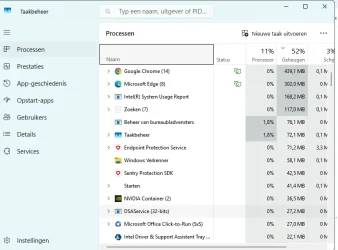
I have the same problem of too much Momory usage when 1 or 2 tabs are open since I upgrade to Windows 11

1761293718161.webp
 

My Computer My Computer

At a glance

Windows 11 Home x64 Build 26200.8894 (25H2)Intel® Core™ i7-4750HQ CPU @ 2.00GHz16 GBNVIDIA GeForce GTX 950M (2 GB); Intel(R) Iris...
OS
Windows 11 Home x64 Build 26200.8894 (25H2)
Computer type
Laptop
Manufacturer/Model
ASUSTeK COMPUTER INC./N751JX
CPU
Intel® Core™ i7-4750HQ CPU @ 2.00GHz
Motherboard
ASUSTeK Computer INC., BIOS version AMI N751JX.211
Memory
16 GB
Graphics Card(s)
NVIDIA GeForce GTX 950M (2 GB); Intel(R) Iris(TM) Pro Graphics 5200 (113 MB)
Sound Card
Realtek High Definition Audio
Internet Speed
250 Mbps
Antivirus
Safe Online (F-Secure)
this is the last thing i can think of otherwise it may require a recovery repair

you have already done most of these but at the end of the howto
is a system repair. please try that and see if that works
after that the only other option i can think of is a full recovery repair.

best of luck Steve ..
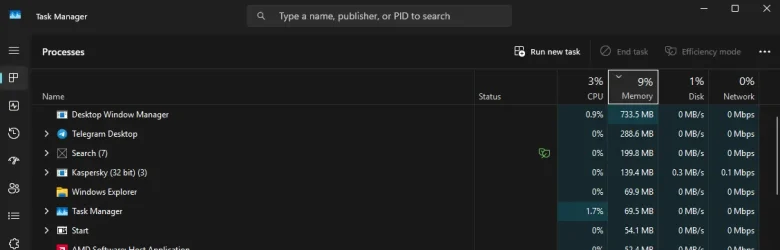
So i tried recovering and repair through 25h2 repair tool. It didn't help at all. Ended up re-doing a fresh install of 24h2 and the issue is still here.... seems to be with Chromium apps (Edge, Discord, Brave, etc.....) and it's still present on 24h2. Lovely stuff....!

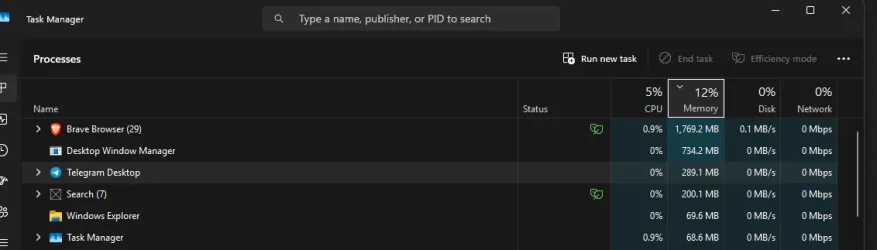
And it feels like a memory leak because the memory usage is never going down. If I close brave, windows or apps it stays there sitting at 700-800mb

Without brave
1761368184391.webp

With Brave open
1761368051482.webp
 

My Computer My Computer

At a glance

Windows 11AMD Ryzen 7 9700X64gb Gskill Trident z Cl28Asus TUF Gaming Radeon RX 6800 XT
OS
Windows 11
Computer type
PC/Desktop
Manufacturer/Model
Custom
CPU
AMD Ryzen 7 9700X
Motherboard
Asus Rog Strix B850-I Gaming Wifi
Memory
64gb Gskill Trident z Cl28
Graphics Card(s)
Asus TUF Gaming Radeon RX 6800 XT
Sound Card
ROG SupremeFX 7.1 Surround Sound High Definition Audio CODEC ALC4080
Monitor(s) Displays
Asus TUF Gaming VG27AQ1A
Screen Resolution
2560x1440p - 170hz
Hard Drives
Lexar SSD NQ790 2TB (2000 GB, PCI-E 4.0 x4)
Samsumg 850 2tb SSD
PSU
Corsair RM850x
Case
Lian Li A3 mATX
Cooling
Deepcool LT360 AIO
Keyboard
Leobog Hi75
Mouse
Logitech G Pro X Superlight
Internet Speed
100mb/s
Browser
Brave, Firefox, Edge
Antivirus
Kaspersky Premium
seems to be with Chromium apps (Edge, Discord, Brave, etc.....)

I believe I may have mentioned disabling hardware acceleration in Browsers.
Give it a try.

I know you tried universally disabling it, regardless…
 

My Computers My Computers

  • At a glance

    Windows 11 Pro 25H2 Build 26200.8894Intel(R) Core(TM) i7-4770K CPU @ 3.50GHz32.0 GB of I forget and the box is in storage.Gigabyte nVidia GeForce GTX 1660 Super OC 6GB
    OS
    Windows 11 Pro 25H2 Build 26200.8894
    Computer type
    PC/Desktop
    Manufacturer/Model
    Sin-built 2013
    CPU
    Intel(R) Core(TM) i7-4770K CPU @ 3.50GHz
    Motherboard
    ASUS ROG Maximus VI Formula
    Memory
    32.0 GB of I forget and the box is in storage.
    Graphics Card(s)
    Gigabyte nVidia GeForce GTX 1660 Super OC 6GB
    Sound Card
    ROG SupremeFX Formula 8-Channel High Definition Audio
    Monitor(s) Displays
    5 x LG 25MS500-B - 1 x 24MK430H-B - 1 x Wacom Pro 22" Touch Screen Tablet
    Screen Resolution
    All over the place
    Hard Drives
    Too many to list. OS on Samsung 1TB 870 QVO SATA
    PSU
    Silverstone 1500
    Case
    NZXT Phantom 820 Full-Tower Case
    Cooling
    Noctua NH-D15 Elite Class Dual Tower CPU Cooler / 6 x EziDIY 120mm / 2 x Corsair 140mm somethings / 1 x 140mm Thermaltake something / 2 x 200mm Corsair.
    Keyboard
    Corsair K95 / Logitech diNovo Edge Wireless
    Mouse
    Logitech: G402 / G502 / Mx Masters / Mx Air Cordless
    Internet Speed
    2000/500Mbps
    Browser
    All sorts
    Antivirus
    Kaspersky Premium
    Other Info
    ㅤㅤㅤㅤㅤㅤㅤㅤㅤㅤㅤㅤㅤㅤㅤㅤㅤㅤㅤㅤㅤㅤㅤㅤㅤㅤㅤㅤㅤㅤㅤㅤㅤㅤㅤㅤㅤㅤㅤㅤ⠀⠀⠀⠀⠀⠀⠀⠀⠀⠀
    TP-Link BE9300 WiFi 7 Bluetooth 5.4 (Archer TBE550E)
    TP-Link TX201 V1 2.5GB Lan

    Grandstream HT812 - VoIP
    ASUS DSL-AX82U - Mesh
    ASUS RT-AC68U - Mesh
    ASUS RT-BE88U Router

    Brother MFC-L2880DW Printer

    I’m on a horse.
  • At a glance

    Windows 11 Pro 25H2 Build 26200.8894 (Wifes)13th Generation Intel® Core™ i5-1340P Process...16GB LPDDR5-52001x Intel® Iris® Xe Graphics
    Operating System
    Windows 11 Pro 25H2 Build 26200.8894 (Wifes)
    Computer type
    Laptop
    Manufacturer/Model
    LENOVO Yoga 7 14IRL8 - Type 82YL
    CPU
    13th Generation Intel® Core™ i5-1340P Processor(Core™ i5-1340P)
    Memory
    16GB LPDDR5-5200
    Graphics card(s)
    1x Intel® Iris® Xe Graphics
    Sound Card
    Optimized with Dolby Atmos®
    Screen Resolution
    QHD 2880 x 1800 OLED
    Hard Drives
    M.2 512 GB SSD PCIe
    Mouse
    Logiteck MX Master 3S
    Internet Speed
    2000/500
    Antivirus
    Defender / Malwarebytes
    Other Info
    …still on a horse.


    Wireless Network: Wi-Fi 6E 2x2 AX; Bluetooth® 5.1 or above
    Ports: 1x 1 Novo button; 2 in 1 Audio Combo jack; Micro SD Card Reader; HDMI 1.4b; 2 x USB Type-C (TBT4)
    USB 3.2 Gen 2 DP 1.4a
    PD 3.0); 1 x USB 3.2 Gen1 Type A
    Camera
    1x 1080P FHD IR/RGB Hybrid with Privacy Shutter and Dual Array Microphone
    Graphics
    1x Intel® Iris® Xe Graphics
    Monitor
    14" WUXGA
    Form Factor
    Convertible Notebook
  • Windows 11 Pro 25H2 Build 26200.8894 (Wifes)

    Yoga 7 2-in-1 14IML9 - Type 83DJ

    Processor: Intel® Core™ Ultra 7 155H Processor(Core™ Ultra 7 155H)

    Memory: 32GB LPD5X-7467

    Hard Drive: 1 TB SSD PCIe

    Wireless Network: 1x Wi-Fi 6E 2x2 AX; Bluetooth® 5.1 or above

    Ports: 1 x HDMI 2.1 TMDS; 1 x Novo Button; 1 x Combo Audio Jack
    2 x USB-C (USB 4.0)
    1 x USB-A 3.2 Gen 1

    Camera: 1080P FHD IR Hybrid with Dual Microphone

    Graphics: Intel® Arc™ Graphics

    Monitor: 14" 2.8K

    ...Where's my horse?
this is a very old trick for memory leakage that now only works for non-Microsoft programs
but its something i use myself.

open the registry and ..

  1. Find the key HKEY_LOCAL_MACHINE\SOFTWARE\Microsoft\Windows\CurrentVersion\Explorer
  2. Create a new DWORD sub-key named > AlwaysUnloadDLL < and set the default value to equal '1' to disable Windows caching the DLL in memory.
  3. Restart Windows for the change to take effect.

then check to see if there is any improvement. you can always delete the registry key if not.
best of luck Steve ..
 

My Computers My Computers

  • At a glance

    Windows 11 HomeRyzen 7 5825u64GB DDR4 3200Ryzen 7 5825u
    OS
    Windows 11 Home
    Computer type
    PC/Desktop
    Manufacturer/Model
    HP 24" AiO
    CPU
    Ryzen 7 5825u
    Motherboard
    HP
    Memory
    64GB DDR4 3200
    Graphics Card(s)
    Ryzen 7 5825u
    Sound Card
    RealTek
    Monitor(s) Displays
    24" HP AiO
    Screen Resolution
    1920 x 1080 @60 Hz
    Hard Drives
    1TB WD Blue SN580 M2 SSD Partitioned.
    2x 1TB USB HDD External Backup/Storage.
    PSU
    90W external power brick
    Case
    24" All in One
    Cooling
    Default Air Cooling
    Keyboard
    HP WiFi UK extended
    Mouse
    HP WiFi 3 Button
    Internet Speed
    1GB full fibre
    Browser
    Edge & Firefox
    Antivirus
    AVG Internet Security/Windows Defender
    Other Info
    Mainly Open Source Software

  • At a glance

    Ubuntu 22.04.5 LTSi5 7200u16GB DDR4Intel
    Operating System
    Ubuntu 22.04.5 LTS
    Computer type
    Laptop
    Manufacturer/Model
    Dell 13" Latitude 2017
    CPU
    i5 7200u
    Motherboard
    Dell
    Memory
    16GB DDR4
    Graphics card(s)
    Intel
    Sound Card
    Intel
    Monitor(s) Displays
    13" Dell Laptop
    Hard Drives
    250GB Crucial 2.5" SSD
    Mouse
    Generic WiFi 3 button
    Internet Speed
    WiFi only
    Browser
    Firefox
    Antivirus
    ClamAV TK
    Other Info
    Mainly Open Source Software
I believe I may have mentioned disabling hardware acceleration in Browsers.
Give it a try.

I know you tried universally disabling it, regardless…

this is a very old trick for memory leakage that now only works for non-Microsoft programs
but its something i use myself.

open the registry and ..

  1. Find the key HKEY_LOCAL_MACHINE\SOFTWARE\Microsoft\Windows\CurrentVersion\Explorer
  2. Create a new DWORD sub-key named > AlwaysUnloadDLL < and set the default value to equal '1' to disable Windows caching the DLL in memory.
  3. Restart Windows for the change to take effect.

then check to see if there is any improvement. you can always delete the registry key if not.
best of luck Steve ..
I have tried these 2 solutions, but no effect whatsoever. Thanks for the help guys. I think I found the culprit. The windows multiplane overlay has been deactivated and I'm not seeing these tremendous amount of ram and cpu spikes anymore.

Windows ''features''.....
 

My Computer My Computer

At a glance

Windows 11AMD Ryzen 7 9700X64gb Gskill Trident z Cl28Asus TUF Gaming Radeon RX 6800 XT
OS
Windows 11
Computer type
PC/Desktop
Manufacturer/Model
Custom
CPU
AMD Ryzen 7 9700X
Motherboard
Asus Rog Strix B850-I Gaming Wifi
Memory
64gb Gskill Trident z Cl28
Graphics Card(s)
Asus TUF Gaming Radeon RX 6800 XT
Sound Card
ROG SupremeFX 7.1 Surround Sound High Definition Audio CODEC ALC4080
Monitor(s) Displays
Asus TUF Gaming VG27AQ1A
Screen Resolution
2560x1440p - 170hz
Hard Drives
Lexar SSD NQ790 2TB (2000 GB, PCI-E 4.0 x4)
Samsumg 850 2tb SSD
PSU
Corsair RM850x
Case
Lian Li A3 mATX
Cooling
Deepcool LT360 AIO
Keyboard
Leobog Hi75
Mouse
Logitech G Pro X Superlight
Internet Speed
100mb/s
Browser
Brave, Firefox, Edge
Antivirus
Kaspersky Premium
I have tried these 2 solutions, but no effect whatsoever. Thanks for the help guys. I think I found the culprit. The windows multiplane overlay has been deactivated and I'm not seeing these tremendous amount of ram and cpu spikes anymore.

Windows ''features''.....
So for anyone with the same issue, make sure you deactivate the MPO with these registry entry:
  1. Navigate to the following registry key: HKEY_LOCAL_MACHINE\SOFTWARE\Microsoft\Windows\Dwm.
  2. Right-click on the right pane, select New, then DWORD (32-bit) Value.
  3. Name the new value OverlayTestMode.
  4. Double-click the newly created OverlayTestMode value and set its data to 5 (ensure it is formatted as 00000005 with seven leading zeros).
  5. Click OK, close the Registry Editor, and restart your computer for the changes to take effect.
 

My Computer My Computer

At a glance

Windows 11AMD Ryzen 7 9700X64gb Gskill Trident z Cl28Asus TUF Gaming Radeon RX 6800 XT
OS
Windows 11
Computer type
PC/Desktop
Manufacturer/Model
Custom
CPU
AMD Ryzen 7 9700X
Motherboard
Asus Rog Strix B850-I Gaming Wifi
Memory
64gb Gskill Trident z Cl28
Graphics Card(s)
Asus TUF Gaming Radeon RX 6800 XT
Sound Card
ROG SupremeFX 7.1 Surround Sound High Definition Audio CODEC ALC4080
Monitor(s) Displays
Asus TUF Gaming VG27AQ1A
Screen Resolution
2560x1440p - 170hz
Hard Drives
Lexar SSD NQ790 2TB (2000 GB, PCI-E 4.0 x4)
Samsumg 850 2tb SSD
PSU
Corsair RM850x
Case
Lian Li A3 mATX
Cooling
Deepcool LT360 AIO
Keyboard
Leobog Hi75
Mouse
Logitech G Pro X Superlight
Internet Speed
100mb/s
Browser
Brave, Firefox, Edge
Antivirus
Kaspersky Premium
Add:

Code:
Windows Registry Editor Version 5.00

[HKEY_LOCAL_MACHINE\SOFTWARE\Microsoft\Windows\Dwm]
"OverlayTestMode"=dword:00000005


Remove:

Code:
Windows Registry Editor Version 5.00

[HKEY_LOCAL_MACHINE\SOFTWARE\Microsoft\Windows\Dwm]
"OverlayTestMode"=-

Alternatively, create reg files for future use. For new comers:


Creating a reg file:

  • Open Notepad
    • Press Windows + R, type notepad, and hit Enter
    • Or search for “Notepad” in the Start menu

  • Paste a registry entry above into the blank Notepad window
    • Not both in the same file. Create one file for each of the above

  • Save the file with a .reg extension
    • Click File > Save As…
    • In "File name" for Add, type something like: add_block_test_overlay.reg
    • In "File name" for Remove, type something like: remove_block_test_overlay.reg
    • In "Save as type", select: All Files (*.*)
    • Click Save

  • Apply the registry file
    • Right-click the .reg file and choose Merge
    • Confirm prompts (admin rights required)
Restart your PC if needed
 

My Computers My Computers

  • At a glance

    Windows 11 Pro 25H2 Build 26200.8894Intel(R) Core(TM) i7-4770K CPU @ 3.50GHz32.0 GB of I forget and the box is in storage.Gigabyte nVidia GeForce GTX 1660 Super OC 6GB
    OS
    Windows 11 Pro 25H2 Build 26200.8894
    Computer type
    PC/Desktop
    Manufacturer/Model
    Sin-built 2013
    CPU
    Intel(R) Core(TM) i7-4770K CPU @ 3.50GHz
    Motherboard
    ASUS ROG Maximus VI Formula
    Memory
    32.0 GB of I forget and the box is in storage.
    Graphics Card(s)
    Gigabyte nVidia GeForce GTX 1660 Super OC 6GB
    Sound Card
    ROG SupremeFX Formula 8-Channel High Definition Audio
    Monitor(s) Displays
    5 x LG 25MS500-B - 1 x 24MK430H-B - 1 x Wacom Pro 22" Touch Screen Tablet
    Screen Resolution
    All over the place
    Hard Drives
    Too many to list. OS on Samsung 1TB 870 QVO SATA
    PSU
    Silverstone 1500
    Case
    NZXT Phantom 820 Full-Tower Case
    Cooling
    Noctua NH-D15 Elite Class Dual Tower CPU Cooler / 6 x EziDIY 120mm / 2 x Corsair 140mm somethings / 1 x 140mm Thermaltake something / 2 x 200mm Corsair.
    Keyboard
    Corsair K95 / Logitech diNovo Edge Wireless
    Mouse
    Logitech: G402 / G502 / Mx Masters / Mx Air Cordless
    Internet Speed
    2000/500Mbps
    Browser
    All sorts
    Antivirus
    Kaspersky Premium
    Other Info
    ㅤㅤㅤㅤㅤㅤㅤㅤㅤㅤㅤㅤㅤㅤㅤㅤㅤㅤㅤㅤㅤㅤㅤㅤㅤㅤㅤㅤㅤㅤㅤㅤㅤㅤㅤㅤㅤㅤㅤㅤ⠀⠀⠀⠀⠀⠀⠀⠀⠀⠀
    TP-Link BE9300 WiFi 7 Bluetooth 5.4 (Archer TBE550E)
    TP-Link TX201 V1 2.5GB Lan

    Grandstream HT812 - VoIP
    ASUS DSL-AX82U - Mesh
    ASUS RT-AC68U - Mesh
    ASUS RT-BE88U Router

    Brother MFC-L2880DW Printer

    I’m on a horse.
  • At a glance

    Windows 11 Pro 25H2 Build 26200.8894 (Wifes)13th Generation Intel® Core™ i5-1340P Process...16GB LPDDR5-52001x Intel® Iris® Xe Graphics
    Operating System
    Windows 11 Pro 25H2 Build 26200.8894 (Wifes)
    Computer type
    Laptop
    Manufacturer/Model
    LENOVO Yoga 7 14IRL8 - Type 82YL
    CPU
    13th Generation Intel® Core™ i5-1340P Processor(Core™ i5-1340P)
    Memory
    16GB LPDDR5-5200
    Graphics card(s)
    1x Intel® Iris® Xe Graphics
    Sound Card
    Optimized with Dolby Atmos®
    Screen Resolution
    QHD 2880 x 1800 OLED
    Hard Drives
    M.2 512 GB SSD PCIe
    Mouse
    Logiteck MX Master 3S
    Internet Speed
    2000/500
    Antivirus
    Defender / Malwarebytes
    Other Info
    …still on a horse.


    Wireless Network: Wi-Fi 6E 2x2 AX; Bluetooth® 5.1 or above
    Ports: 1x 1 Novo button; 2 in 1 Audio Combo jack; Micro SD Card Reader; HDMI 1.4b; 2 x USB Type-C (TBT4)
    USB 3.2 Gen 2 DP 1.4a
    PD 3.0); 1 x USB 3.2 Gen1 Type A
    Camera
    1x 1080P FHD IR/RGB Hybrid with Privacy Shutter and Dual Array Microphone
    Graphics
    1x Intel® Iris® Xe Graphics
    Monitor
    14" WUXGA
    Form Factor
    Convertible Notebook
  • Windows 11 Pro 25H2 Build 26200.8894 (Wifes)

    Yoga 7 2-in-1 14IML9 - Type 83DJ

    Processor: Intel® Core™ Ultra 7 155H Processor(Core™ Ultra 7 155H)

    Memory: 32GB LPD5X-7467

    Hard Drive: 1 TB SSD PCIe

    Wireless Network: 1x Wi-Fi 6E 2x2 AX; Bluetooth® 5.1 or above

    Ports: 1 x HDMI 2.1 TMDS; 1 x Novo Button; 1 x Combo Audio Jack
    2 x USB-C (USB 4.0)
    1 x USB-A 3.2 Gen 1

    Camera: 1080P FHD IR Hybrid with Dual Microphone

    Graphics: Intel® Arc™ Graphics

    Monitor: 14" 2.8K

    ...Where's my horse?
I have tried these 2 solutions, but no effect whatsoever. Thanks for the help guys. I think I found the culprit. The windows multiplane overlay has been deactivated and I'm not seeing these tremendous amount of ram and cpu spikes anymore.

Windows ''features''.....

Q.
how did you find out it was the overlay
i am glad you got it sorted but am just curious

best luck Steve ..
 

My Computers My Computers

  • At a glance

    Windows 11 HomeRyzen 7 5825u64GB DDR4 3200Ryzen 7 5825u
    OS
    Windows 11 Home
    Computer type
    PC/Desktop
    Manufacturer/Model
    HP 24" AiO
    CPU
    Ryzen 7 5825u
    Motherboard
    HP
    Memory
    64GB DDR4 3200
    Graphics Card(s)
    Ryzen 7 5825u
    Sound Card
    RealTek
    Monitor(s) Displays
    24" HP AiO
    Screen Resolution
    1920 x 1080 @60 Hz
    Hard Drives
    1TB WD Blue SN580 M2 SSD Partitioned.
    2x 1TB USB HDD External Backup/Storage.
    PSU
    90W external power brick
    Case
    24" All in One
    Cooling
    Default Air Cooling
    Keyboard
    HP WiFi UK extended
    Mouse
    HP WiFi 3 Button
    Internet Speed
    1GB full fibre
    Browser
    Edge & Firefox
    Antivirus
    AVG Internet Security/Windows Defender
    Other Info
    Mainly Open Source Software
  • At a glance

    Ubuntu 22.04.5 LTSi5 7200u16GB DDR4Intel
    Operating System
    Ubuntu 22.04.5 LTS
    Computer type
    Laptop
    Manufacturer/Model
    Dell 13" Latitude 2017
    CPU
    i5 7200u
    Motherboard
    Dell
    Memory
    16GB DDR4
    Graphics card(s)
    Intel
    Sound Card
    Intel
    Monitor(s) Displays
    13" Dell Laptop
    Hard Drives
    250GB Crucial 2.5" SSD
    Mouse
    Generic WiFi 3 button
    Internet Speed
    WiFi only
    Browser
    Firefox
    Antivirus
    ClamAV TK
    Other Info
    Mainly Open Source Software
Q.
how did you find out it was the overlay
i am glad you got it sorted but am just curious

best luck Steve ..
Thanks, I found a thread on reddit with someone having issues with artifacts and high memory usage and they suggested deactivating MOP
 

My Computer My Computer

At a glance

Windows 11AMD Ryzen 7 9700X64gb Gskill Trident z Cl28Asus TUF Gaming Radeon RX 6800 XT
OS
Windows 11
Computer type
PC/Desktop
Manufacturer/Model
Custom
CPU
AMD Ryzen 7 9700X
Motherboard
Asus Rog Strix B850-I Gaming Wifi
Memory
64gb Gskill Trident z Cl28
Graphics Card(s)
Asus TUF Gaming Radeon RX 6800 XT
Sound Card
ROG SupremeFX 7.1 Surround Sound High Definition Audio CODEC ALC4080
Monitor(s) Displays
Asus TUF Gaming VG27AQ1A
Screen Resolution
2560x1440p - 170hz
Hard Drives
Lexar SSD NQ790 2TB (2000 GB, PCI-E 4.0 x4)
Samsumg 850 2tb SSD
PSU
Corsair RM850x
Case
Lian Li A3 mATX
Cooling
Deepcool LT360 AIO
Keyboard
Leobog Hi75
Mouse
Logitech G Pro X Superlight
Internet Speed
100mb/s
Browser
Brave, Firefox, Edge
Antivirus
Kaspersky Premium
i found this that maybe of help. it requires 2 reg keys to disable MPO

HKEY_LOCAL_MACHINE\SOFTWARE\Microsoft\Windows\Dwm
new DWORD (32)
name >> OverlayTestMode
set to >> 00000005

then ..
HKEY_LOCAL_MACHINE\SYSTEM\CurrentControlSet\Control\GraphicsDrivers
new DWORD (32)
name >> DisableMPO
set to >> 00000001

link

note. i have not come across this problem before.
best of luck Steve ..
 

My Computers My Computers

  • At a glance

    Windows 11 HomeRyzen 7 5825u64GB DDR4 3200Ryzen 7 5825u
    OS
    Windows 11 Home
    Computer type
    PC/Desktop
    Manufacturer/Model
    HP 24" AiO
    CPU
    Ryzen 7 5825u
    Motherboard
    HP
    Memory
    64GB DDR4 3200
    Graphics Card(s)
    Ryzen 7 5825u
    Sound Card
    RealTek
    Monitor(s) Displays
    24" HP AiO
    Screen Resolution
    1920 x 1080 @60 Hz
    Hard Drives
    1TB WD Blue SN580 M2 SSD Partitioned.
    2x 1TB USB HDD External Backup/Storage.
    PSU
    90W external power brick
    Case
    24" All in One
    Cooling
    Default Air Cooling
    Keyboard
    HP WiFi UK extended
    Mouse
    HP WiFi 3 Button
    Internet Speed
    1GB full fibre
    Browser
    Edge & Firefox
    Antivirus
    AVG Internet Security/Windows Defender
    Other Info
    Mainly Open Source Software
  • At a glance

    Ubuntu 22.04.5 LTSi5 7200u16GB DDR4Intel
    Operating System
    Ubuntu 22.04.5 LTS
    Computer type
    Laptop
    Manufacturer/Model
    Dell 13" Latitude 2017
    CPU
    i5 7200u
    Motherboard
    Dell
    Memory
    16GB DDR4
    Graphics card(s)
    Intel
    Sound Card
    Intel
    Monitor(s) Displays
    13" Dell Laptop
    Hard Drives
    250GB Crucial 2.5" SSD
    Mouse
    Generic WiFi 3 button
    Internet Speed
    WiFi only
    Browser
    Firefox
    Antivirus
    ClamAV TK
    Other Info
    Mainly Open Source Software
Back
Top Bottom