Did the Photos app update cause blank icons for anyone else?


JohnnyGui

Well-known member
Member
VIP
Local time
5:19 PM
Posts
228
OS
Windows Pro 11 23H2 Build 22631.3737
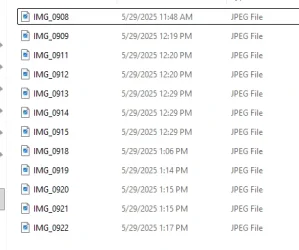
Yesterday the Windows Photos app got updated and now any kind of picture filetype (jpg, png, etc) are shown as blank icons when they are viewed as List or Details in explorer. Normally the icon should be 1757436068497.webp. Thumbnail view works fine though.

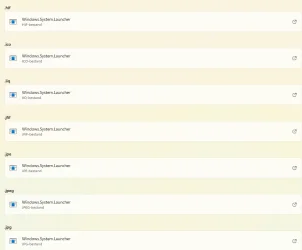
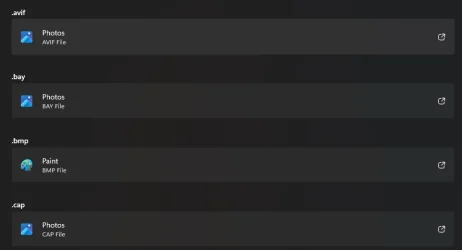
The pictures do open automatically with the Photos app but for some reason they are associated with Windows.System.Launcher in the Default App settings for photos as shown below.

1757435964412.webp

Is this association the same for anyone else here? It's a hell of a job to re-associate all these file types back to the Photos app to show the proper photo icon again.
 
Windows Build/Version
26100.4652

My Computer

System One

  • OS
    Windows Pro 11 23H2 Build 22631.3737
    Computer type
    PC/Desktop
    Manufacturer/Model
    Custom built
    CPU
    i5-12600K
    Motherboard
    Gigabyte Z690 UD DDR4
    Memory
    Transcend 16GB
    Graphics Card(s)
    Zotac 4070Ti Trinity
    Sound Card
    Internal: Realtek® ALC892 codec
    Monitor(s) Displays
    Asus VZ239-H
    Screen Resolution
    1080p
    Hard Drives
    Kingston 500GB nVME
    Case
    Fractal Focus 2 RGB White
    Cooling
    Xilence LQ240PRO Watercooling
    Browser
    Edge Chromium
Is this association the same for anyone else here? It's a hell of a job to re-associate all these file types back to the Photos app to show the proper photo icon again.
Have you tried repairing the App?
 

My Computers

System One System Two

  • OS
    All Branches but Release
    Computer type
    Laptop
    Manufacturer/Model
    Acer Nitro ANV15-51
    CPU
    AMD Ryzen 7 7735HS 3200-4500 Mhz 8 cores x 2
    Motherboard
    Sportage_RBH
    Memory
    32 GB DDR5
    Graphics Card(s)
    Radeon Graphic / NVIDIA GeForce RTX 4060 8 GB GDDR6
    Sound Card
    AMD/Realtek(R) Audio
    Monitor(s) Displays
    Integrated Monitor (15.3"vis)
    Screen Resolution
    FHD 1920X1080 16:9 144Hz
    Hard Drives
    KINGSTON OM8SEP4512Q-AA 1TB
    Western Digital 256GB
    PSU
    19V DC 6.32 A 120 W
    Cooling
    Dual Fans
    Mouse
    MS Bluetooth
    Internet Speed
    Fiber 1GB Cox -us & 1GB Orange-fr
    Browser
    Edge Canary- Firefox Nightly-Chrome Dev-Chrome Dev
    Antivirus
    Windows Defender
  • Operating System
    Windows 11 Beta
    Computer type
    Laptop
    Manufacturer/Model
    Asus X751BP
    CPU
    AMD A9-9420
    Memory
    8 GB of DDR4
    Graphics card(s)
    AMD Radeon R5
    Screen Resolution
    1600x900
    Hard Drives
    Seagate 1 TB
Have you tried repairing the App?
Will try this, did you notice the same association with Windows.System.Launcher in the settings?
 

My Computer

System One

  • OS
    Windows Pro 11 23H2 Build 22631.3737
    Computer type
    PC/Desktop
    Manufacturer/Model
    Custom built
    CPU
    i5-12600K
    Motherboard
    Gigabyte Z690 UD DDR4
    Memory
    Transcend 16GB
    Graphics Card(s)
    Zotac 4070Ti Trinity
    Sound Card
    Internal: Realtek® ALC892 codec
    Monitor(s) Displays
    Asus VZ239-H
    Screen Resolution
    1080p
    Hard Drives
    Kingston 500GB nVME
    Case
    Fractal Focus 2 RGB White
    Cooling
    Xilence LQ240PRO Watercooling
    Browser
    Edge Chromium
I can see in Microsoft store that my Microsoft photos app updated yesterday.

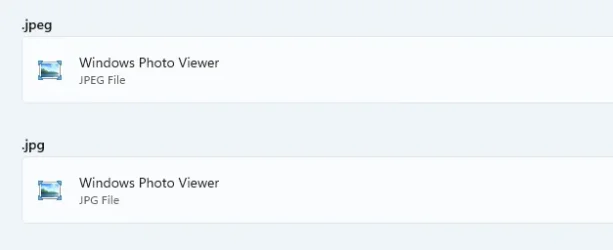
Normally, I use Windows photo viewer as default viewer for .jpeg/.jpg files:


1.webp


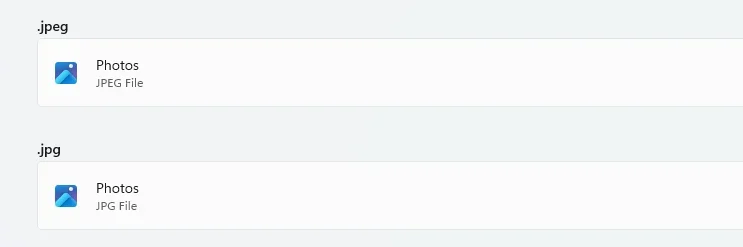
But If I switch to Windows photos as default it shows:


2.webp


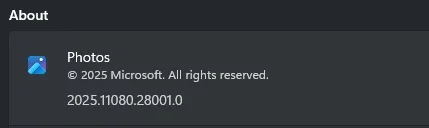
Photos app version:

Screenshot 2025-09-09 155621.webp
 
Last edited:

My Computer

System One

  • OS
    Windows 11 Home ‎Version󠀮󠀮➝25H2 Build➝26200.8037
    Computer type
    Laptop
    Manufacturer/Model
    HP 15-fd0027st
    CPU
    Intel® Core™ i3-N305 up to 3.8 GHz with Intel® Turbo B
    Motherboard
    8DDB 62.51
    Memory
    8 GB DDR4-3200 MT/s (1 x 8 GB) Transfer rates up to 3200 MT/s. 1 x 8 GB

    Graphics Card(s)
    Intel(R) UHD Graphics
    Sound Card
    Realtek High Definition Audio
    Screen Resolution
    1366 x 768
    Hard Drives
    256 GB PCIe® NVMe™ M.2 SSD
    Keyboard
    Logitech K345
    Mouse
    Logitech M275
    Internet Speed
    600 Mbps down
    Browser
    Chrome and Firefox
    Antivirus
    Windows Defender
Will try this, did you notice the same association with Windows.System.Launcher in the settings?
I do not use MS Photos App at all. The installed version is 2025.11080.28001.0
For the few associations left I see this:

photos.webp

Have you tried logging in under another user to see if the issue gets duplicated?
 

My Computers

System One System Two

  • OS
    All Branches but Release
    Computer type
    Laptop
    Manufacturer/Model
    Acer Nitro ANV15-51
    CPU
    AMD Ryzen 7 7735HS 3200-4500 Mhz 8 cores x 2
    Motherboard
    Sportage_RBH
    Memory
    32 GB DDR5
    Graphics Card(s)
    Radeon Graphic / NVIDIA GeForce RTX 4060 8 GB GDDR6
    Sound Card
    AMD/Realtek(R) Audio
    Monitor(s) Displays
    Integrated Monitor (15.3"vis)
    Screen Resolution
    FHD 1920X1080 16:9 144Hz
    Hard Drives
    KINGSTON OM8SEP4512Q-AA 1TB
    Western Digital 256GB
    PSU
    19V DC 6.32 A 120 W
    Cooling
    Dual Fans
    Mouse
    MS Bluetooth
    Internet Speed
    Fiber 1GB Cox -us & 1GB Orange-fr
    Browser
    Edge Canary- Firefox Nightly-Chrome Dev-Chrome Dev
    Antivirus
    Windows Defender
  • Operating System
    Windows 11 Beta
    Computer type
    Laptop
    Manufacturer/Model
    Asus X751BP
    CPU
    AMD A9-9420
    Memory
    8 GB of DDR4
    Graphics card(s)
    AMD Radeon R5
    Screen Resolution
    1600x900
    Hard Drives
    Seagate 1 TB
They also look fine on my end in list view in explorer (when set to "photos").

Screenshot 2025-09-09 153600.webp
 
Last edited:

My Computer

System One

  • OS
    Windows 11 Home ‎Version󠀮󠀮➝25H2 Build➝26200.8037
    Computer type
    Laptop
    Manufacturer/Model
    HP 15-fd0027st
    CPU
    Intel® Core™ i3-N305 up to 3.8 GHz with Intel® Turbo B
    Motherboard
    8DDB 62.51
    Memory
    8 GB DDR4-3200 MT/s (1 x 8 GB) Transfer rates up to 3200 MT/s. 1 x 8 GB
    Graphics Card(s)
    Intel(R) UHD Graphics
    Sound Card
    Realtek High Definition Audio
    Screen Resolution
    1366 x 768
    Hard Drives
    256 GB PCIe® NVMe™ M.2 SSD
    Keyboard
    Logitech K345
    Mouse
    Logitech M275
    Internet Speed
    600 Mbps down
    Browser
    Chrome and Firefox
    Antivirus
    Windows Defender

Latest Support Threads

Back
Top Bottom