Did you manually update your Secure Boot Keys ?


Are you condoning software piracy? Because LTSC isn't a legitimate option for 95% of the users on this forum.
You don't have to necessary pirate LTSC, if you know an IT person that works for a Hospital or Hospital system, you can get it that way. It may not be the correct legit way, but it's certainly not piracy.
 

My Computer

System One

  • OS
    Windows XP (Stable, iconic) 7/8.1/10/ Tiny11 25H2
    Computer type
    PC/Desktop
    Manufacturer/Model
    Alienware PC
    CPU
    Intel i7 4790K
    Motherboard
    ASROCK Z97 EXTREME4
    Memory
    32GB DDR3 1600 MHz
    Graphics Card(s)
    ATI Radeon HD 7770 2GB GDDR5
    Sound Card
    Onboard
    Monitor(s) Displays
    SAMSUNG UE57 Series 28-Inch 4K UHD
    Hard Drives
    SAMSUNG 860 EVO 250 gigabyte SSD
    PSU
    EVGA 850 watt
    Case
    Alienware Area 51 Black Tower Case
    Keyboard
    HyperX - Alloy Elite 2 Mechanical Gaming Keyboard.
    Mouse
    Microsoft Wireless
    Internet Speed
    1.2 GHz
    Browser
    Chrome..Edge..Firefox
You don't have to necessary pirate LTSC, if you know an IT person that works for a Hospital or Hospital system, you can get it that way. It may not be the correct legit way, but it's certainly not piracy.
And you're asking said friend for licensing help, because that's the piracy part. Everyone dances around that aspect, but as a public forum (run by a MVP) you'd have to expect the mods to keep it clean.
 

My Computer

System One

  • OS
    Windows 7
And you're asking said friend for licensing help, because that's the piracy part. Everyone dances around that aspect, but as a public forum (run by a MVP) you'd have to expect the mods to keep it clean.
Personally, I didn't ask anyone for any licensing help, blaming folks for these things are just as bad, on a forum (run by a MVP) you should keep your blaming clean.
 

My Computer

System One

  • OS
    Windows XP (Stable, iconic) 7/8.1/10/ Tiny11 25H2
    Computer type
    PC/Desktop
    Manufacturer/Model
    Alienware PC
    CPU
    Intel i7 4790K
    Motherboard
    ASROCK Z97 EXTREME4
    Memory
    32GB DDR3 1600 MHz
    Graphics Card(s)
    ATI Radeon HD 7770 2GB GDDR5
    Sound Card
    Onboard
    Monitor(s) Displays
    SAMSUNG UE57 Series 28-Inch 4K UHD
    Hard Drives
    SAMSUNG 860 EVO 250 gigabyte SSD
    PSU
    EVGA 850 watt
    Case
    Alienware Area 51 Black Tower Case
    Keyboard
    HyperX - Alloy Elite 2 Mechanical Gaming Keyboard.
    Mouse
    Microsoft Wireless
    Internet Speed
    1.2 GHz
    Browser
    Chrome..Edge..Firefox
I believe garlin was using you as an impersonal pronoun, the same way that you did ("You don't have to necessary pirate LTSC, if you know an IT person that works for a Hospital or Hospital system, you can get it that way").
 

My Computer

System One

  • OS
    Windows 11 Pro 25H2
    Computer type
    PC/Desktop
    Manufacturer/Model
    Intel NUC12WSHi7
    CPU
    12th Gen Core i7-1260P
    Motherboard
    NUC12WSBi7
    Memory
    64 GB Micron PC4-25600
    Graphics Card(s)
    Intel Iris Xe Graphics
    Sound Card
    on-board Realtek HD Audio
    Monitor(s) Displays
    Dell U3219Q
    Screen Resolution
    3840 x 2160
    Hard Drives
    Samsung SSD 990 PRO 1TB
    Crucial MX500 2 TB
    Antivirus
    Microsoft Defender
I believe garlin was using you as an impersonal pronoun, the same way that you did ("You don't have to necessary pirate LTSC, if you know an IT person that works for a Hospital or Hospital system, you can get it that way").
I understand, but if you buy, or given a computer from a hospital, or anyone for that matter, and the OS is tied to the OEM machine/hardware there is nothing illegal here. I'm guessing he probably wasn't thinking about this, or maybe just didn't know. Jumping to a conclusion, without knowing the details is what I had an issue with.
 

My Computer

System One

  • OS
    Windows XP (Stable, iconic) 7/8.1/10/ Tiny11 25H2
    Computer type
    PC/Desktop
    Manufacturer/Model
    Alienware PC
    CPU
    Intel i7 4790K
    Motherboard
    ASROCK Z97 EXTREME4
    Memory
    32GB DDR3 1600 MHz
    Graphics Card(s)
    ATI Radeon HD 7770 2GB GDDR5
    Sound Card
    Onboard
    Monitor(s) Displays
    SAMSUNG UE57 Series 28-Inch 4K UHD
    Hard Drives
    SAMSUNG 860 EVO 250 gigabyte SSD
    PSU
    EVGA 850 watt
    Case
    Alienware Area 51 Black Tower Case
    Keyboard
    HyperX - Alloy Elite 2 Mechanical Gaming Keyboard.
    Mouse
    Microsoft Wireless
    Internet Speed
    1.2 GHz
    Browser
    Chrome..Edge..Firefox
Well I'm not sure about the legality of reselling OEM licenses; I've never looked into it. Just saying I don't think garlin meant you specifically; he was using it generically. I don't want to be in the position of defending garlin though; he still hates me for my excessive shilling for ProcMon. :winkt:
 

My Computer

System One

  • OS
    Windows 11 Pro 25H2
    Computer type
    PC/Desktop
    Manufacturer/Model
    Intel NUC12WSHi7
    CPU
    12th Gen Core i7-1260P
    Motherboard
    NUC12WSBi7
    Memory
    64 GB Micron PC4-25600
    Graphics Card(s)
    Intel Iris Xe Graphics
    Sound Card
    on-board Realtek HD Audio
    Monitor(s) Displays
    Dell U3219Q
    Screen Resolution
    3840 x 2160
    Hard Drives
    Samsung SSD 990 PRO 1TB
    Crucial MX500 2 TB
    Antivirus
    Microsoft Defender
Well I'm not sure about the legality of reselling OEM licenses; I've never looked into it. Just saying I don't think garlin meant you specifically; he was using it generically. I don't want to be in the position of defending garlin though; he still hates me for my excessive shilling for ProcMon. :winkt:
I'm not upset at him, I understand, we all can make mistakes, but IT people are "usually" not dumb, they normally know the legality of these things.
 

My Computer

System One

  • OS
    Windows XP (Stable, iconic) 7/8.1/10/ Tiny11 25H2
    Computer type
    PC/Desktop
    Manufacturer/Model
    Alienware PC
    CPU
    Intel i7 4790K
    Motherboard
    ASROCK Z97 EXTREME4
    Memory
    32GB DDR3 1600 MHz
    Graphics Card(s)
    ATI Radeon HD 7770 2GB GDDR5
    Sound Card
    Onboard
    Monitor(s) Displays
    SAMSUNG UE57 Series 28-Inch 4K UHD
    Hard Drives
    SAMSUNG 860 EVO 250 gigabyte SSD
    PSU
    EVGA 850 watt
    Case
    Alienware Area 51 Black Tower Case
    Keyboard
    HyperX - Alloy Elite 2 Mechanical Gaming Keyboard.
    Mouse
    Microsoft Wireless
    Internet Speed
    1.2 GHz
    Browser
    Chrome..Edge..Firefox
Let's remove the corner cases, a vast majority of non-IT users talking about LTSC or Enterprise will eventually realize they can't legitimately license the product. Purchasing LTSC from an OEM reseller its a grey area, if they're not a MS Partner.

My point is it's bad suggesting to everyday users, that they should switch to LTSC just to solve a different problem with Windows.
 

My Computer

System One

  • OS
    Windows 7
Purchasing LTSC from an OEM reseller its a grey area, if they're not a MS Partner.
Not that I need to explain any further, but I will. I was given "not bought" 5 outdated machines from a hospital, that was being put to rest, these are machines were bought with this OS on them from the mfg. There is no grey area here, if so please can you link me to something regarding this?
 

My Computer

System One

  • OS
    Windows XP (Stable, iconic) 7/8.1/10/ Tiny11 25H2
    Computer type
    PC/Desktop
    Manufacturer/Model
    Alienware PC
    CPU
    Intel i7 4790K
    Motherboard
    ASROCK Z97 EXTREME4
    Memory
    32GB DDR3 1600 MHz
    Graphics Card(s)
    ATI Radeon HD 7770 2GB GDDR5
    Sound Card
    Onboard
    Monitor(s) Displays
    SAMSUNG UE57 Series 28-Inch 4K UHD
    Hard Drives
    SAMSUNG 860 EVO 250 gigabyte SSD
    PSU
    EVGA 850 watt
    Case
    Alienware Area 51 Black Tower Case
    Keyboard
    HyperX - Alloy Elite 2 Mechanical Gaming Keyboard.
    Mouse
    Microsoft Wireless
    Internet Speed
    1.2 GHz
    Browser
    Chrome..Edge..Firefox
Your situation is an unique case. Most people are not friends with someone disposing or transferring PC's with existing licenses. A more typically scenario is a hospital (or a large organization) sends their outdated PC's for PC recycling or to a reseller of refurbished PC's.

I'm not try to offend you, but pointing out this isn't the norm. And your first reply didn't explain you acquired an entire PC and not LTSC separately.
 

My Computer

System One

  • OS
    Windows 7
Your situation is an unique case. Most people are not friends with someone disposing or transferring PC's with existing licenses. A more typically scenario is a hospital (or a large organization) sends their outdated PC's for PC recycling or to a reseller of refurbished PC's.

I'm not try to offend you, but pointing out this isn't the norm. And your first reply didn't explain you acquired an entire PC and not LTSC separately.
No problem, I'm not upset with you, and you're right, my case is a unique case, and I knew that. Yes, my first post was pretty vague, but I really had no idea it was going to bring down the house. :LOL:
 

My Computer

System One

  • OS
    Windows XP (Stable, iconic) 7/8.1/10/ Tiny11 25H2
    Computer type
    PC/Desktop
    Manufacturer/Model
    Alienware PC
    CPU
    Intel i7 4790K
    Motherboard
    ASROCK Z97 EXTREME4
    Memory
    32GB DDR3 1600 MHz
    Graphics Card(s)
    ATI Radeon HD 7770 2GB GDDR5
    Sound Card
    Onboard
    Monitor(s) Displays
    SAMSUNG UE57 Series 28-Inch 4K UHD
    Hard Drives
    SAMSUNG 860 EVO 250 gigabyte SSD
    PSU
    EVGA 850 watt
    Case
    Alienware Area 51 Black Tower Case
    Keyboard
    HyperX - Alloy Elite 2 Mechanical Gaming Keyboard.
    Mouse
    Microsoft Wireless
    Internet Speed
    1.2 GHz
    Browser
    Chrome..Edge..Firefox
In powershell console opened as administrator, you must run the following commands, one at a time:

Set-ItemProperty -Path “HKLM:\SYSTEM\CurrentControlSet\Control\SecureBoot” -Name “AvailableUpdates” -Value 0x40

Start-ScheduledTask -TaskName “\Microsoft\Windows\PI\Secure-Boot-Update”

After you run the commands, you have to restart your PC twice for the update to take effect.

To check if the update is successful, you must run the following command in a powershell console with admin privileges:

[System.Text.Encoding]::ASCII.GetString((Get-SecureBootUEFI db).bytes) -match ‘Windows UEFI CA 2023’
I just followed these instruction which resulted in a False report. I did run both of the first 2 commands separately using Powershell in Administer mode then restarted twice as stated above, and ran the check command also in Administrator mode using Powershell.

My system in unsupported being an HP Spectre 360 13" from February 2016.. Windows 11 24H3 build 26100.4652 Secure Boot is enabled.

I noticed in the thread's supporting documentation a requirement seems to be for "Supported PCs." Is this why the instructions above didn't work for me?
 
Last edited:

My Computers

System One System Two

  • OS
    Windows 11 Home, ver 25H2 build 26200.8246
    Computer type
    Laptop
    Manufacturer/Model
    Hewlett-Packard Spectre 13-4001 x360 convertable
    CPU
    Intel Core i5 5200U @ 2.20GH
    Motherboard
    Hewlett-Packard 802D
    Memory
    4 GB
    Graphics Card(s)
    Intel HD Graphics 5500 on board
    Sound Card
    Intel Smart Sound Technology (Intel SST)
    Hard Drives
    Micron 256GB M.2 2280 NGFF SSD MTFDDAV256TBN, (SATA 6.0 Gb/s)
    Keyboard
    Model # G01KB
    Antivirus
    Microsoft Defender
    Other Info
    born on date: 25 Feb 2016
  • Operating System
    Win 11 Home 25H2 build 26200.7922
    Computer type
    PC/Desktop
    Manufacturer/Model
    Asus Desktop model M32AD-US019S (DOM: 6/9/2014 )
    CPU
    Intel Core i7 4th Gen 4790 (3.60GHz), Haswell 22nm Technology, SOCKET 1150
    Motherboard
    H81M-E/M51AD/DP_MB
    Memory
    Samsung 16 GB DDR3 (8GB in 2 modules)
    Graphics card(s)
    NVIDIA GeForce GTX 760, 3GB, and on-board Intel HD Graphics 4600 Rev 6
    Monitor(s) Displays
    HP EliteDisplay E241i LED; HP EliteDisplay E243
    Hard Drives
    Samsung 500GB SSD, 870 EVO (SATA 6.0 )
    Micron 250GB SSD, CT250MX500
    Toshiba HDD, 3GB (original drive w/PC)
    Case
    ASUS
    Keyboard
    ASUS-------------------------
    Antivirus
    MS Defender
    Other Info
    Additional Laptops:

    HEWLETT PACKARD
    HP OmniBook X Flip NGAI (Next Gen AI),
    Model: 16-as0023dx
    PT# B5UH1UA#ABA Product #: B5UH1UA
    delivered and setup 7/25/25
    16" 2K Touch-Screen Laptop
    Intel Core Ultra 7 256V '24 Series 2 - CPU
    Boost Clock Frequency 4.8 gigahertz; Neural Processing Unit (NPU) Yes;
    16GB Memory, LPDDR5X
    1TB SSD PCIe 4.0
    Graphics: Intel Arc 140V
    1 x HDMI 2.1
    1 x Thunderbolt 4
    2K Touch-Screen display, LED, IPS; 1920 x 1200 (Full HD+)
    USB Ports: 1 x USB-C 3.1, 2 x USB-A 3.1
    Wi-Fi 6E
    weight 4.15 pounds

    DELL
    Model:I7591-7483BLK-PUS 2-in-1 (7000 Series)
    purchased 12/3/2019,
    15.6 inch 2-IN-1;
    4K Ultra HD Touch-Screen, 3840 x 2160,
    Intel Core i7 10510U CPU 1.80GHz,
    16GB RAM DDR4 SDRAM 2400 megahert (2 slots),
    dedicated graphics Nvidia GeForce MX250 2 GB Graphics,
    PCIe 512GB Intel SSD + 32GB Optane Memory (Intel Optane Memory H10 with solid-state storage),
    wireless-AX & Bluetooth
    Battery: 68wh, Type 4VGMP 4 cell
I will apply for the extra year of security updates to Windows 10, when the option has appeared in my Control Panel.

When that year has passed, I will attempt to install Windows 11, because people say Microsoft unofficially supports the version of my "TPM" (1.2).

I noticed that Windows 11 costs $139 USD, here:
https://www.microsoft.com/en-us/d/windows-11-home/dg7gmgf0krt0

That's cheaper than buying a new computer.

My current computer can play my favorite games smoothly, even very recent ones, so I would need to pay much more than $139 to buy an equal-or-better computer.

I wouldn't use an "LTSC" version of Windows 10 because it's illegal, and I am afraid of the possibility of a virus being in a thief's file. And even if that stolen file doesn't have a virus, Microsoft could discover that it is stolen and disable my copy, so buying Windows 11 is the only real answer.

Windows 11 - Wikipedia

"There also exists an official bypass method provided directly by Microsoft (whereas the installation itself remains unofficially supported)."
 
Last edited:

My Computer

System One

  • OS
    Windows 10
    Computer type
    PC/Desktop
    Manufacturer/Model
    HP
W10 22H2 has the same changes provided in the current Monthly Update. The difference is retail W10 will enter End-of-Life in October, unless you've signed up for the ESU promotion with MS points. It's not clear if MS will force the revocation on W10 PC's with time running out.

Nope, I got the update for it right here:


It took about 10 minutes to complete. End-of-life or no, they're still updating it.

I do plan to do ESR for both machines when it comes out.
 

My Computers

System One System Two

  • OS
    Windows 11 Pro 25H2 build: (26200.7623)
    Computer type
    Laptop
    Manufacturer/Model
    Microsoft Surface Pro
    Memory
    32GB
  • Operating System
    Microsoft 25H2 Pro
    Computer type
    Laptop
    Manufacturer/Model
    Dell Pro 14 - PC14250
    CPU
    Intel Core Ultra 7
    Memory
    64GB
    Graphics card(s)
    Intel Integrated Graphics
    Hard Drives
    Micron 1TB SSD
I just followed these instruction which resulted in a False report. I did run both of the first 2 commands separately using Powershell in Administer mode then restarted twice as stated above, and ran the check command also in Administrator mode using Powershell.

My system in unsupported being an HP Spectre 360 13" from February 2016.. Windows 11 24H3 build 26100.4652 Secure Boot is enabled.

I noticed in the thread's supporting documentation a requirement seems to be for "Supported PCs." Is this why the instructions above didn't work for me?

Have you checked the CA 2023 certificate? Check_EFIBootFile.ps1?

Any hardware with secure boot will support the new certificate.
 

My Computer

System One

  • OS
    Windows 11, version 25H2 (26200)
    Computer type
    PC/Desktop
    CPU
    AMD Ryzen 9 9950X 16-Core Processor
    Motherboard
    ASRock B650M PG Riptide
    Memory
    DDR5-6000 (CL36) 64.0 GB
    Graphics Card(s)
    NVIDIA GeForce RTX 4090
    PSU
    1200W
    Case
    Phanteks Enthoo Pro 2
    Cooling
    Noctua NH-D12L
This is what I did:
  • Open Powershell as Administrator
  • Run the following commands, one at a time:
    • Click commands below to copy to the clipboard & paste into Powershell
Set-ItemProperty -Path “HKLM:\SYSTEM\CurrentControlSet\Control\SecureBoot” -Name “AvailableUpdates” -Value 0x40
Start-ScheduledTask -TaskName “\Microsoft\Windows\PI\Secure-Boot-Update”

  • After you run the commands, you have to restart your PC twice for the update to take effect.
  • To check if the update is successful, openPowersherll as Administrator and run:

[System.Text.Encoding]::ASCII.GetString((Get-SecureBootUEFI db).bytes) -match ‘Windows UEFI CA 2023’
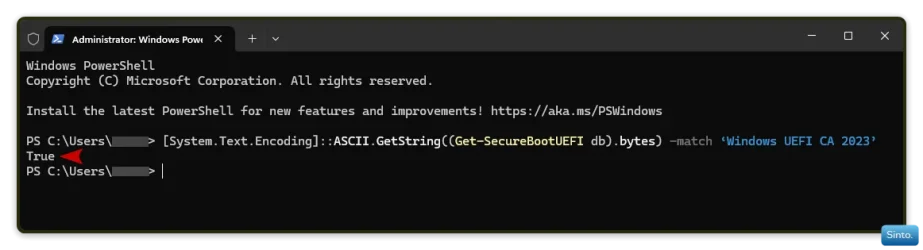
Win-1818.webp

  • Ran the following:

Powershell:
powershell -nop -ep bypass -f "C:\TEMP\Check_EFIBootFileUpdated.ps1"

  • Returned result:

Powershell:
Windows PowerShell
Copyright (C) Microsoft Corporation. All rights reserved.

Install the latest PowerShell for new features and improvements! https://aka.ms/PSWindows

PS C:\Users\*****> powershell -nop -ep bypass -f "C:\TEMP\Check_EFIBootFileUpdated.ps1"
Secure Boot: ENABLED

EFI DB Certificates
-------------------
    Microsoft Corporation UEFI CA 2011
    Microsoft Windows Production PCA 2011
    Windows UEFI CA 2023

EFI KEK Certificates
--------------------
    Microsoft Corporation KEK CA 2011

EFI DBX Certificates
--------------------

AvailableUpdates: 0x0
---------------------
Mount the EFI partition to label X:
The directory is not empty.
Get-PfxCertificate : Command cannot find any of the specified files.
At C:\TEMP\Check_EFIBootFileUpdated.ps1:164 char:14
+     $null = (Get-PfxCertificate -FilePath $FileName).Issuer -match $C ...
+              ~~~~~~~~~~~~~~~~~~~~~~~~~~~~~~~~~~~~~~
    + CategoryInfo          : ObjectNotFound: (:) [Get-PfxCertificate], FileNotFoundException
    + FullyQualifiedErrorId : GetPfxCertCommandNoneOfTheFilesFound,Microsoft.PowerShell.Commands.GetPfxCertificateComm
   and

Validate that X:\EFI\Microsoft\Boot\bootmgfw.efi file is signed by the Microsoft Corporation KEK CA 2011 certificate!
Unmount X: EFI partition!

EFI Files
---------
Boot Manager [Microsoft Corporation KEK CA 2011] on Disk  is banned.

PS C:\Users\*****>


And this is where I like to get technical; I have no idea what I am doing.
 

My Computers

System One System Two

  • OS
    Windows 11 Pro 25H2 Build 26200.8655
    Computer type
    PC/Desktop
    Manufacturer/Model
    Sin-built 2013
    CPU
    Intel(R) Core(TM) i7-4770K CPU @ 3.50GHz
    Motherboard
    ASUS ROG Maximus VI Formula
    Memory
    32.0 GB of I forget and the box is in storage.
    Graphics Card(s)
    Gigabyte nVidia GeForce GTX 1660 Super OC 6GB
    Sound Card
    Onboard thingy
    Monitor(s) Displays
    5 x LG 25MS500-B - 1 x 24MK430H-B - 1 x Wacom Pro 22" Touch Screen Tablet
    Screen Resolution
    All over the place
    Hard Drives
    Too many to list.
    OS on Samsung 1TB 870 QVO SATA
    PSU
    Silverstone 1500
    Case
    NZXT Phantom 820 Full-Tower Case
    Cooling
    Noctua NH-D15 Elite Class Dual Tower CPU Cooler / 6 x EziDIY 120mm / 2 x Corsair 140mm somethings / 1 x 140mm Thermaltake something / 2 x 200mm Corsair.
    Keyboard
    Corsair K95 / Logitech diNovo Edge Wireless
    Mouse
    Logitech: G402 / G502 / Mx Masters / Mx Air Cordless
    Internet Speed
    2000/500Mbps
    Browser
    All sorts
    Antivirus
    Kaspersky Premium
    Other Info
    ㅤㅤㅤㅤㅤㅤㅤㅤㅤㅤㅤㅤㅤㅤㅤㅤㅤㅤㅤㅤㅤㅤㅤㅤㅤㅤㅤㅤㅤㅤㅤㅤㅤㅤㅤㅤㅤㅤㅤㅤ⠀⠀⠀⠀⠀⠀⠀⠀⠀⠀
    TP-Link BE9300 WiFi 7 Bluetooth 5.4 (Archer TBE550E)
    TP-Link TX201 V1 2.5GB Lan

    Grandstream HT812 - VoIP
    ASUS DSL-AX82U - Mesh
    ASUS RT-AC68U - Mesh
    ASUS RT-BE88U Router

    Brother MFC-L2880DW Printer

    I’m on a horse.
  • Operating System
    Windows 11 Pro 25H2 Build 26200.8655
    Computer type
    Laptop
    Manufacturer/Model
    LENOVO Yoga 7 14IRL8 - 7i EVO OLED 14" Touchscreen i5 12 Core 16GB/512GB
    CPU
    Intel Core 12th Gen i5-1240P Processor (1.7 - 4.4GHz)
    Memory
    16GB LPDDR5 RAM
    Graphics card(s)
    Intel Iris Xe Graphics Processor
    Sound Card
    Optimized with Dolby Atmos®
    Screen Resolution
    QHD 2880 x 1800 OLED
    Hard Drives
    M.2 512GB
    Antivirus
    Defender / Malwarebytes
    Other Info
    …still on a horse.
I don't haven't a file: Check_EFIBootFileUpdated.ps1 I have, though, installed Check_EFIBootFile.ps1 to check if Secure Boot is enabled and it is enabled.
 

My Computers

System One System Two

  • OS
    Windows 11 Home, ver 25H2 build 26200.8246
    Computer type
    Laptop
    Manufacturer/Model
    Hewlett-Packard Spectre 13-4001 x360 convertable
    CPU
    Intel Core i5 5200U @ 2.20GH
    Motherboard
    Hewlett-Packard 802D
    Memory
    4 GB
    Graphics Card(s)
    Intel HD Graphics 5500 on board
    Sound Card
    Intel Smart Sound Technology (Intel SST)
    Hard Drives
    Micron 256GB M.2 2280 NGFF SSD MTFDDAV256TBN, (SATA 6.0 Gb/s)
    Keyboard
    Model # G01KB
    Antivirus
    Microsoft Defender
    Other Info
    born on date: 25 Feb 2016
  • Operating System
    Win 11 Home 25H2 build 26200.7922
    Computer type
    PC/Desktop
    Manufacturer/Model
    Asus Desktop model M32AD-US019S (DOM: 6/9/2014 )
    CPU
    Intel Core i7 4th Gen 4790 (3.60GHz), Haswell 22nm Technology, SOCKET 1150
    Motherboard
    H81M-E/M51AD/DP_MB
    Memory
    Samsung 16 GB DDR3 (8GB in 2 modules)
    Graphics card(s)
    NVIDIA GeForce GTX 760, 3GB, and on-board Intel HD Graphics 4600 Rev 6
    Monitor(s) Displays
    HP EliteDisplay E241i LED; HP EliteDisplay E243
    Hard Drives
    Samsung 500GB SSD, 870 EVO (SATA 6.0 )
    Micron 250GB SSD, CT250MX500
    Toshiba HDD, 3GB (original drive w/PC)
    Case
    ASUS
    Keyboard
    ASUS-------------------------
    Antivirus
    MS Defender
    Other Info
    Additional Laptops:

    HEWLETT PACKARD
    HP OmniBook X Flip NGAI (Next Gen AI),
    Model: 16-as0023dx
    PT# B5UH1UA#ABA Product #: B5UH1UA
    delivered and setup 7/25/25
    16" 2K Touch-Screen Laptop
    Intel Core Ultra 7 256V '24 Series 2 - CPU
    Boost Clock Frequency 4.8 gigahertz; Neural Processing Unit (NPU) Yes;
    16GB Memory, LPDDR5X
    1TB SSD PCIe 4.0
    Graphics: Intel Arc 140V
    1 x HDMI 2.1
    1 x Thunderbolt 4
    2K Touch-Screen display, LED, IPS; 1920 x 1200 (Full HD+)
    USB Ports: 1 x USB-C 3.1, 2 x USB-A 3.1
    Wi-Fi 6E
    weight 4.15 pounds

    DELL
    Model:I7591-7483BLK-PUS 2-in-1 (7000 Series)
    purchased 12/3/2019,
    15.6 inch 2-IN-1;
    4K Ultra HD Touch-Screen, 3840 x 2160,
    Intel Core i7 10510U CPU 1.80GHz,
    16GB RAM DDR4 SDRAM 2400 megahert (2 slots),
    dedicated graphics Nvidia GeForce MX250 2 GB Graphics,
    PCIe 512GB Intel SSD + 32GB Optane Memory (Intel Optane Memory H10 with solid-state storage),
    wireless-AX & Bluetooth
    Battery: 68wh, Type 4VGMP 4 cell
Have you checked the CA 2023 certificate? Check_EFIBootFile.ps1?

Any hardware with secure boot will support the new certificate.
Yes, it only shows the 2011 cert
 

My Computers

System One System Two

  • OS
    Windows 11 Home, ver 25H2 build 26200.8246
    Computer type
    Laptop
    Manufacturer/Model
    Hewlett-Packard Spectre 13-4001 x360 convertable
    CPU
    Intel Core i5 5200U @ 2.20GH
    Motherboard
    Hewlett-Packard 802D
    Memory
    4 GB
    Graphics Card(s)
    Intel HD Graphics 5500 on board
    Sound Card
    Intel Smart Sound Technology (Intel SST)
    Hard Drives
    Micron 256GB M.2 2280 NGFF SSD MTFDDAV256TBN, (SATA 6.0 Gb/s)
    Keyboard
    Model # G01KB
    Antivirus
    Microsoft Defender
    Other Info
    born on date: 25 Feb 2016
  • Operating System
    Win 11 Home 25H2 build 26200.7922
    Computer type
    PC/Desktop
    Manufacturer/Model
    Asus Desktop model M32AD-US019S (DOM: 6/9/2014 )
    CPU
    Intel Core i7 4th Gen 4790 (3.60GHz), Haswell 22nm Technology, SOCKET 1150
    Motherboard
    H81M-E/M51AD/DP_MB
    Memory
    Samsung 16 GB DDR3 (8GB in 2 modules)
    Graphics card(s)
    NVIDIA GeForce GTX 760, 3GB, and on-board Intel HD Graphics 4600 Rev 6
    Monitor(s) Displays
    HP EliteDisplay E241i LED; HP EliteDisplay E243
    Hard Drives
    Samsung 500GB SSD, 870 EVO (SATA 6.0 )
    Micron 250GB SSD, CT250MX500
    Toshiba HDD, 3GB (original drive w/PC)
    Case
    ASUS
    Keyboard
    ASUS-------------------------
    Antivirus
    MS Defender
    Other Info
    Additional Laptops:

    HEWLETT PACKARD
    HP OmniBook X Flip NGAI (Next Gen AI),
    Model: 16-as0023dx
    PT# B5UH1UA#ABA Product #: B5UH1UA
    delivered and setup 7/25/25
    16" 2K Touch-Screen Laptop
    Intel Core Ultra 7 256V '24 Series 2 - CPU
    Boost Clock Frequency 4.8 gigahertz; Neural Processing Unit (NPU) Yes;
    16GB Memory, LPDDR5X
    1TB SSD PCIe 4.0
    Graphics: Intel Arc 140V
    1 x HDMI 2.1
    1 x Thunderbolt 4
    2K Touch-Screen display, LED, IPS; 1920 x 1200 (Full HD+)
    USB Ports: 1 x USB-C 3.1, 2 x USB-A 3.1
    Wi-Fi 6E
    weight 4.15 pounds

    DELL
    Model:I7591-7483BLK-PUS 2-in-1 (7000 Series)
    purchased 12/3/2019,
    15.6 inch 2-IN-1;
    4K Ultra HD Touch-Screen, 3840 x 2160,
    Intel Core i7 10510U CPU 1.80GHz,
    16GB RAM DDR4 SDRAM 2400 megahert (2 slots),
    dedicated graphics Nvidia GeForce MX250 2 GB Graphics,
    PCIe 512GB Intel SSD + 32GB Optane Memory (Intel Optane Memory H10 with solid-state storage),
    wireless-AX & Bluetooth
    Battery: 68wh, Type 4VGMP 4 cell
I will apply for the extra year of security updates to Windows 10, when the option has appeared in my Control Panel.

When that year has passed, I will attempt to install Windows 11, because people say Microsoft unofficially supports the version of my "TPM" (1.2).

I noticed that Windows 11 costs $139 USD, here:
https://www.microsoft.com/en-us/d/windows-11-home/dg7gmgf0krt0

That's cheaper than buying a new computer.

My current computer can play my favorite games smoothly, even very recent ones, so I would need to pay much more than $139 to buy an equal-or-better computer.

I wouldn't use an "LTSC" version of Windows 10 because it's illegal, and I am afraid of the possibility of a virus being in a thief's file. And even if that stolen file doesn't have a virus, Microsoft could discover that it is stolen and disable my copy, so buying Windows 11 is the only real answer.

Windows 11 - Wikipedia

What? LTSC is NOT illegal, otherwise why would MS have it as a product?
 

My Computer

System One

  • OS
    Win 11 Pro 25H2 26200.8728
    Computer type
    PC/Desktop
    Manufacturer/Model
    Custom
    CPU
    Intel i5-12400F
    Motherboard
    MSI PRO B760M P
    Memory
    2 x16gb DDR4 Patriot Viper Elite II 4000MHz
    Graphics Card(s)
    ASUS GeForce RTX 3060 Dual OC 12GB
    Sound Card
    onboard Realtek
    Monitor(s) Displays
    KTC 32 inch 180Hz Curved Gaming Monitor
    Screen Resolution
    2560x1440
    Hard Drives
    1x SP 512GB NVME (Windows)
    1x 2TB SSD (Downloads)
    1x 2TB BX500 (Games)
    1x 2TB NVME (Steam)
    1x 1TB NVME (Macrium, Stuff)
    PSU
    CORSAIR RM750e (2025) Platinum Fully Modular
    Case
    CORSAIR Frame 4000D RS White
    Cooling
    Thermalright Assassin X120 SE ARGB White
    Keyboard
    Z-88 RGB Mechanical White
    Mouse
    Red Dragon 612 Predator RGB
    Internet Speed
    750/50
    Browser
    Chrome
    Antivirus
    Windows
Back
Top Bottom





