Did you manually update your Secure Boot Keys ?


What? LTSC is NOT illegal, otherwise why would MS have it as a product?
If you have a valid license - it's NOT illegal as @Dwarfr66 says -- It's a perfectly valid Ms product. You won't be able to get those Enterprise multi license things at retail of course - but piracy etc is another issue.

@AncientParadise

You can get a MiniPC with W11 Pro already installed on it for around €160 these days !!! so even if you don't want the computer you've got a W11 Pro system. !! (Usually these are retail versions too not OEM so are transferrable to other hardware).

Cheers
jimbo
 

My Computer My Computer

At a glance

Windows XP,11 Linux Fedora Rawhide pre-releas...2 X Intel i7
OS
Windows XP,11 Linux Fedora Rawhide pre-release 45
Computer type
PC/Desktop
CPU
2 X Intel i7
Screen Resolution
4KUHD X 2
Are you condoning software piracy? Because LTSC isn't a legitimate option for 95% of the users on this forum.
No it has a 90 day limit as I remember. enough time to find a way to upgrade and not loosing privacy and security updates during these 3 months.
I don't recommend windows cracking due to some security concerns.
Also if you are working in a company you can borrow their license on you own pc if you use that pc only for your job.
 

My Computers My Computers

  • At a glance

    Windows 11 Pro 25H2Ryzen 5 3500U8GBVega 8
    OS
    Windows 11 Pro 25H2
    Computer type
    Laptop
    Manufacturer/Model
    Huawei MateBook D15
    CPU
    Ryzen 5 3500U
    Memory
    8GB
    Graphics Card(s)
    Vega 8
    Screen Resolution
    FHD
    Hard Drives
    256GB Samsung SSD + 1TB HDD
    Browser
    Microsoft Edge
    Antivirus
    ESET Smart Security Premium
  • At a glance

    Windows 10 Enterprise LTSC 21H2intel core i7 6700HQ16GBNvidia Geforce GTX1060 (6GB)
    Operating System
    Windows 10 Enterprise LTSC 21H2
    Computer type
    Laptop
    Manufacturer/Model
    MSI GS73 6RF Stealth Pro
    CPU
    intel core i7 6700HQ
    Memory
    16GB
    Graphics card(s)
    Nvidia Geforce GTX1060 (6GB)
    Screen Resolution
    FHD
    Hard Drives
    128GB SSD + 1TB HDD
    Browser
    Microsoft Edge
    Antivirus
    Windows Defender
What? LTSC is NOT illegal, otherwise why would MS have it as a product?
LTSC itself is of course not illegal, but using it on a PC at home almost always is.
 

My Computer My Computer

At a glance

Windows 11 Enterprise 25H2 [rev. 8893]
OS
Windows 11 Enterprise 25H2 [rev. 8893]
IoT Enterprise LTSC is not illegal to use on a home pc. It’s recommended for internet of things and kiosks. So there is no limitation that says this license is only for a kiosk pc and you’re not allowed to use it in your home. Do you have any proof?
But finding a way to buy an IoT ltsc license is as hard as finding Nemo!
I know a way to crack it using hardware id (massgrave.dev) but as I said I don’t trust such ways for my main pc.
LTSC itself is of course not illegal, but using it on a PC at home almost always is.
 

My Computers My Computers

  • At a glance

    Windows 11 Pro 25H2Ryzen 5 3500U8GBVega 8
    OS
    Windows 11 Pro 25H2
    Computer type
    Laptop
    Manufacturer/Model
    Huawei MateBook D15
    CPU
    Ryzen 5 3500U
    Memory
    8GB
    Graphics Card(s)
    Vega 8
    Screen Resolution
    FHD
    Hard Drives
    256GB Samsung SSD + 1TB HDD
    Browser
    Microsoft Edge
    Antivirus
    ESET Smart Security Premium
  • At a glance

    Windows 10 Enterprise LTSC 21H2intel core i7 6700HQ16GBNvidia Geforce GTX1060 (6GB)
    Operating System
    Windows 10 Enterprise LTSC 21H2
    Computer type
    Laptop
    Manufacturer/Model
    MSI GS73 6RF Stealth Pro
    CPU
    intel core i7 6700HQ
    Memory
    16GB
    Graphics card(s)
    Nvidia Geforce GTX1060 (6GB)
    Screen Resolution
    FHD
    Hard Drives
    128GB SSD + 1TB HDD
    Browser
    Microsoft Edge
    Antivirus
    Windows Defender
Do you know what almost means? If you’re going to quote me, respond to what I actually said.
 

My Computer My Computer

At a glance

Windows 11 Enterprise 25H2 [rev. 8893]
OS
Windows 11 Enterprise 25H2 [rev. 8893]
i had to install PowerShell preview on my wife's system to get this secure boot update to install.
as the old PowerShell just wouldn't do the upgrade.
i have no idea why?

best of luck, Steve ..
Seems no matter how many times I run these commands in Powershell Administrative mode I get a false result. I'm running 24H2 build 26100.5064 but it is unsupported. (It is system one in the Specs tab below) I can only suppose that's the reason the Secure Boot keys are not being updated - maybe a Microsoft deterrent to unsupported devices? I also installed the Powershell Preview Steve suggested with no success.

Per instructions, I ran the 2 lines of code separately seen below which ran without error then rebooted twice, then ran the last line seen below resulting in False. I suppose when the time comes in 2026 I'll just disable Secure Boot and live with it.

Code:
PS C:\WINDOWS\system32> [System.Text.Encoding]::ASCII.GetString((Get-SecureBootUEFI db).bytes) -match ‘Windows UEFI CA 2023’
False
PS C:\WINDOWS\system32> Confirm-SecureBootUEFI
True
PS C:\WINDOWS\system32> Set-ItemProperty -Path “HKLM:\SYSTEM\CurrentControlSet\Control\SecureBoot” -Name “AvailableUpdates” -Value 0x40
PS C:\WINDOWS\system32> Start-ScheduledTask -TaskName “\Microsoft\Windows\PI\Secure-Boot-Update”
PS C:\WINDOWS\system32> [System.Text.Encoding]::ASCII.GetString((Get-SecureBootUEFI db).bytes) -match ‘Windows UEFI CA 2023’
False
PS C:\WINDOWS\system32>
 

My Computers My Computers

  • At a glance

    Windows 11 Home, ver 25H2 build 26200.8246Intel Core i5 5200U @ 2.20GH4 GBIntel HD Graphics 5500 on board
    OS
    Windows 11 Home, ver 25H2 build 26200.8246
    Computer type
    Laptop
    Manufacturer/Model
    Hewlett-Packard Spectre 13-4001 x360 convertable
    CPU
    Intel Core i5 5200U @ 2.20GH
    Motherboard
    Hewlett-Packard 802D
    Memory
    4 GB
    Graphics Card(s)
    Intel HD Graphics 5500 on board
    Sound Card
    Intel Smart Sound Technology (Intel SST)
    Hard Drives
    Micron 256GB M.2 2280 NGFF SSD MTFDDAV256TBN, (SATA 6.0 Gb/s)
    Keyboard
    Model # G01KB
    Antivirus
    Microsoft Defender
    Other Info
    born on date: 25 Feb 2016
  • At a glance

    Win 11 Home 25H2 build 26200.7922Intel Core i7 4th Gen 4790 (3.60GHz), Haswell...Samsung 16 GB DDR3 (8GB in 2 modules)NVIDIA GeForce GTX 760, 3GB, and on-board Int...
    Operating System
    Win 11 Home 25H2 build 26200.7922
    Computer type
    PC/Desktop
    Manufacturer/Model
    Asus Desktop model M32AD-US019S (DOM: 6/9/2014 )
    CPU
    Intel Core i7 4th Gen 4790 (3.60GHz), Haswell 22nm Technology, SOCKET 1150
    Motherboard
    H81M-E/M51AD/DP_MB
    Memory
    Samsung 16 GB DDR3 (8GB in 2 modules)
    Graphics card(s)
    NVIDIA GeForce GTX 760, 3GB, and on-board Intel HD Graphics 4600 Rev 6
    Monitor(s) Displays
    HP EliteDisplay E241i LED; HP EliteDisplay E243
    Hard Drives
    Samsung 500GB SSD, 870 EVO (SATA 6.0 )
    Micron 250GB SSD, CT250MX500
    Toshiba HDD, 3GB (original drive w/PC)
    Case
    ASUS
    Keyboard
    ASUS-------------------------
    Antivirus
    MS Defender
    Other Info
    Additional Laptops:

    HEWLETT PACKARD
    HP OmniBook X Flip NGAI (Next Gen AI),
    Model: 16-as0023dx
    PT# B5UH1UA#ABA Product #: B5UH1UA
    delivered and setup 7/25/25
    16" 2K Touch-Screen Laptop
    Intel Core Ultra 7 256V '24 Series 2 - CPU
    Boost Clock Frequency 4.8 gigahertz; Neural Processing Unit (NPU) Yes;
    16GB Memory, LPDDR5X
    1TB SSD PCIe 4.0
    Graphics: Intel Arc 140V
    1 x HDMI 2.1
    1 x Thunderbolt 4
    2K Touch-Screen display, LED, IPS; 1920 x 1200 (Full HD+)
    USB Ports: 1 x USB-C 3.1, 2 x USB-A 3.1
    Wi-Fi 6E
    weight 4.15 pounds

    DELL
    Model:I7591-7483BLK-PUS 2-in-1 (7000 Series)
    purchased 12/3/2019,
    15.6 inch 2-IN-1;
    4K Ultra HD Touch-Screen, 3840 x 2160,
    Intel Core i7 10510U CPU 1.80GHz,
    16GB RAM DDR4 SDRAM 2400 megahert (2 slots),
    dedicated graphics Nvidia GeForce MX250 2 GB Graphics,
    PCIe 512GB Intel SSD + 32GB Optane Memory (Intel Optane Memory H10 with solid-state storage),
    wireless-AX & Bluetooth
    Battery: 68wh, Type 4VGMP 4 cell
damm after 4 semsters of cardiology i did not think anything could be worse . ! have a pouding headache after reading this and trying .
I am on a older unsuported pc after a bios upgrade I do have secure boot. the issue is with secure boot my video card does not support the efi or some crap. On board graphics do allow me to use secure boot. but the video quality suxs . i am wondering if i run the efi boot file command if the 2023 would show under secure boot enabled ? i am just to lazzy to pull the video card and reset the cmos in order to use the video card
 

My Computer My Computer

At a glance

WINDOWS 11 WINDOWS 10Intel(R) Core(TM) i7 -3770K CPU 3.50 GZ 3501 ...32.0 GB (31.9 GB usable)AMD RADEON TM R5240 INTELL HD GRAPHICS 4600 T...
OS
WINDOWS 11 WINDOWS 10
Computer type
PC/Desktop
Manufacturer/Model
HP H8 1360T
CPU
Intel(R) Core(TM) i7 -3770K CPU 3.50 GZ 3501 4 CORE
Motherboard
PEGATRON 2AD5
Memory
32.0 GB (31.9 GB usable)
Graphics Card(s)
AMD RADEON TM R5240 INTELL HD GRAPHICS 4600 TIGER 1+1 USB
Sound Card
AMD HD . IDT
Monitor(s) Displays
AOC WAL MART SPECIAL . HP 2311 IX IPS LED DELL 1708 FP
Screen Resolution
1920 X 1080 1600X900 1280X940
Hard Drives
1 FAXING S 100 512GB 1 KINGSTON 120 GB SSD 1 X12 SSD 512 GB
PSU
300 WATT HP
Case
FULL
Cooling
ON BOARD FAN
Keyboard
LOGITEC K 520 WIRELESS
Mouse
LOGITEC M 510 WIRELESS
Internet Speed
55 UP 11.2 DOWN
Browser
CHROME EDGE
Antivirus
WINDOWS SECUIRTY
Other Info
NON SUPPORTED HARDWARE FOR WINDOWS 11

My Computers My Computers

  • At a glance

    Win 11 Pro 25H2, Build 26200.8894Intel Core i5 1450064GB DDR4GeForce RTX 4060
    OS
    Win 11 Pro 25H2, Build 26200.8894
    Computer type
    PC/Desktop
    Manufacturer/Model
    Home Brew
    CPU
    Intel Core i5 14500
    Motherboard
    Gigabyte B760M G P WIFI
    Memory
    64GB DDR4
    Graphics Card(s)
    GeForce RTX 4060
    Sound Card
    Chipset Realtek
    Monitor(s) Displays
    LG 45" Ultragear, Acer 24" 1080p
    Screen Resolution
    5120x1440, 1920x1080
    Hard Drives
    Crucial P310 2TB 2280 PCIe Gen4 3D NAND NVMe M.2 SSD (O/S)
    Silicon Power 2TB US75 NVMe PCIe Gen4 M.2 2280 SSD (backup)
    Crucial BX500 2TB 3D NAND (2nd backup)
    Seagate 4TB Ironwolf, rotating HDD archive files
    External off-line backup Drives: 2 NVMe 4TB drives in external enclosures
    PSU
    Thermaltake Toughpower GF3 750W
    Case
    LIAN LI LANCOOL 216 E-ATX PC Case
    Cooling
    Lots of fans!
    Keyboard
    Microsoft Comfort Curve 2000
    Mouse
    Logitech G305
    Internet Speed
    Verizon FiOS 1GB
    Browser
    Firefox
    Antivirus
    Malware Bytes & Windows Defender Security
  • At a glance

    Win 11 Pro 25H2, Build 26200.8894Intel Core i5 1440032GB DDR5Intel 700 Embedded GPU
    Operating System
    Win 11 Pro 25H2, Build 26200.8894
    Computer type
    PC/Desktop
    Manufacturer/Model
    Home Brew
    CPU
    Intel Core i5 14400
    Motherboard
    Gigabyte B760M DS3H AX
    Memory
    32GB DDR5
    Graphics card(s)
    Intel 700 Embedded GPU
    Sound Card
    Realtek Embedded
    Monitor(s) Displays
    27" HP 1080p
    Screen Resolution
    1920x1080
    Hard Drives
    Crucial P310 2TB 2280 PCIe Gen4 eD NAND PCIe SSD
    Samsung EVO 990 2TB NVMe Gen4 SSD
    Samsung 2TB SATA SSD
    PSU
    Thermaltake Smart BM3 650W
    Case
    Okinos Micro ATX Case
    Cooling
    Fans
    Keyboard
    Microsoft Comfort Curve 2000
    Mouse
    Logitech G305
    Internet Speed
    Verizon FiOS 1GB
    Browser
    Firefox
    Antivirus
    Malware Bytes & Windows Defender Security
  • Nimo N171 17" Laptop, (Intel i3-1215U, 16GB RAM, 2TB NVMe, Win11 Pro)
    Acemagic Vista Mini PC V1 (Intel N150, 16GB RAM, 1TB NVMe, Win11 Pro)
    HP ENVY h8-1540t, (24GB RAM, 2TB SSD, 2TB HDD, Win11 Pro)
i am just to lazzy to pull the video card and reset the cmos in order to use the video card

Well, it’s really hard to help people who don’t want to help themselves.
Why do you need to remove the video card to reset the CMOS?
 

My Computers My Computers

  • At a glance

    Windows 11 Pro 25H2 Build 26200.8894Intel(R) Core(TM) i7-4770K CPU @ 3.50GHz32.0 GB of I forget and the box is in storage.Gigabyte nVidia GeForce GTX 1660 Super OC 6GB
    OS
    Windows 11 Pro 25H2 Build 26200.8894
    Computer type
    PC/Desktop
    Manufacturer/Model
    Sin-built 2013
    CPU
    Intel(R) Core(TM) i7-4770K CPU @ 3.50GHz
    Motherboard
    ASUS ROG Maximus VI Formula
    Memory
    32.0 GB of I forget and the box is in storage.
    Graphics Card(s)
    Gigabyte nVidia GeForce GTX 1660 Super OC 6GB
    Sound Card
    ROG SupremeFX Formula 8-Channel High Definition Audio
    Monitor(s) Displays
    5 x LG 25MS500-B - 1 x 24MK430H-B - 1 x Wacom Pro 22" Touch Screen Tablet
    Screen Resolution
    All over the place
    Hard Drives
    Too many to list. OS on Samsung 1TB 870 QVO SATA
    PSU
    Silverstone 1500
    Case
    NZXT Phantom 820 Full-Tower Case
    Cooling
    Noctua NH-D15 Elite Class Dual Tower CPU Cooler / 6 x EziDIY 120mm / 2 x Corsair 140mm somethings / 1 x 140mm Thermaltake something / 2 x 200mm Corsair.
    Keyboard
    Corsair K95 / Logitech diNovo Edge Wireless
    Mouse
    Logitech: G402 / G502 / Mx Masters / Mx Air Cordless
    Internet Speed
    2000/500Mbps
    Browser
    All sorts
    Antivirus
    Kaspersky Premium
    Other Info
    ㅤㅤㅤㅤㅤㅤㅤㅤㅤㅤㅤㅤㅤㅤㅤㅤㅤㅤㅤㅤㅤㅤㅤㅤㅤㅤㅤㅤㅤㅤㅤㅤㅤㅤㅤㅤㅤㅤㅤㅤ⠀⠀⠀⠀⠀⠀⠀⠀⠀⠀
    TP-Link BE9300 WiFi 7 Bluetooth 5.4 (Archer TBE550E)
    TP-Link TX201 V1 2.5GB Lan

    Grandstream HT812 - VoIP
    ASUS DSL-AX82U - Mesh
    ASUS RT-AC68U - Mesh
    ASUS RT-BE88U Router

    Brother MFC-L2880DW Printer

    I’m on a horse.
  • At a glance

    Windows 11 Pro 25H2 Build 26200.8894 (Wifes)13th Generation Intel® Core™ i5-1340P Process...16GB LPDDR5-52001x Intel® Iris® Xe Graphics
    Operating System
    Windows 11 Pro 25H2 Build 26200.8894 (Wifes)
    Computer type
    Laptop
    Manufacturer/Model
    LENOVO Yoga 7 14IRL8 - Type 82YL
    CPU
    13th Generation Intel® Core™ i5-1340P Processor(Core™ i5-1340P)
    Memory
    16GB LPDDR5-5200
    Graphics card(s)
    1x Intel® Iris® Xe Graphics
    Sound Card
    Optimized with Dolby Atmos®
    Screen Resolution
    QHD 2880 x 1800 OLED
    Hard Drives
    M.2 512 GB SSD PCIe
    Mouse
    Logiteck MX Master 3S
    Internet Speed
    2000/500
    Antivirus
    Defender / Malwarebytes
    Other Info
    …still on a horse.


    Wireless Network: Wi-Fi 6E 2x2 AX; Bluetooth® 5.1 or above
    Ports: 1x 1 Novo button; 2 in 1 Audio Combo jack; Micro SD Card Reader; HDMI 1.4b; 2 x USB Type-C (TBT4)
    USB 3.2 Gen 2 DP 1.4a
    PD 3.0); 1 x USB 3.2 Gen1 Type A
    Camera
    1x 1080P FHD IR/RGB Hybrid with Privacy Shutter and Dual Array Microphone
    Graphics
    1x Intel® Iris® Xe Graphics
    Monitor
    14" WUXGA
    Form Factor
    Convertible Notebook
  • Windows 11 Pro 25H2 Build 26200.8894 (Wifes)

    Yoga 7 2-in-1 14IML9 - Type 83DJ

    Processor: Intel® Core™ Ultra 7 155H Processor(Core™ Ultra 7 155H)

    Memory: 32GB LPD5X-7467

    Hard Drive: 1 TB SSD PCIe

    Wireless Network: 1x Wi-Fi 6E 2x2 AX; Bluetooth® 5.1 or above

    Ports: 1 x HDMI 2.1 TMDS; 1 x Novo Button; 1 x Combo Audio Jack
    2 x USB-C (USB 4.0)
    1 x USB-A 3.2 Gen 1

    Camera: 1080P FHD IR Hybrid with Dual Microphone

    Graphics: Intel® Arc™ Graphics

    Monitor: 14" 2.8K

    ...Where's my horse?
because i have big hands and the cmos slot is behind the card . and in order to use the nvida graphics card. i have to reest the bios before i can boot using the card.
 

My Computer My Computer

At a glance

WINDOWS 11 WINDOWS 10Intel(R) Core(TM) i7 -3770K CPU 3.50 GZ 3501 ...32.0 GB (31.9 GB usable)AMD RADEON TM R5240 INTELL HD GRAPHICS 4600 T...
OS
WINDOWS 11 WINDOWS 10
Computer type
PC/Desktop
Manufacturer/Model
HP H8 1360T
CPU
Intel(R) Core(TM) i7 -3770K CPU 3.50 GZ 3501 4 CORE
Motherboard
PEGATRON 2AD5
Memory
32.0 GB (31.9 GB usable)
Graphics Card(s)
AMD RADEON TM R5240 INTELL HD GRAPHICS 4600 TIGER 1+1 USB
Sound Card
AMD HD . IDT
Monitor(s) Displays
AOC WAL MART SPECIAL . HP 2311 IX IPS LED DELL 1708 FP
Screen Resolution
1920 X 1080 1600X900 1280X940
Hard Drives
1 FAXING S 100 512GB 1 KINGSTON 120 GB SSD 1 X12 SSD 512 GB
PSU
300 WATT HP
Case
FULL
Cooling
ON BOARD FAN
Keyboard
LOGITEC K 520 WIRELESS
Mouse
LOGITEC M 510 WIRELESS
Internet Speed
55 UP 11.2 DOWN
Browser
CHROME EDGE
Antivirus
WINDOWS SECUIRTY
Other Info
NON SUPPORTED HARDWARE FOR WINDOWS 11
because i have big hands and the cmos slot is behind the card . and in order to use the nvida graphics card. i have to reest the bios before i can boot using the card.

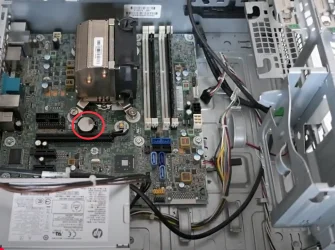
Where's the battery located in regards to the Motherboard?
You can’t access the Battery or the jumper because of the GPU? I’ve had that problem before.

If this is your PC, I can see the battery below the GPU, you should be able to unplug and disconnect everything then remove the battery for 30 seconds or more.

This is what I see:


My Computers My Computers

  • At a glance

    Windows 11 Pro 25H2 Build 26200.8894Intel(R) Core(TM) i7-4770K CPU @ 3.50GHz32.0 GB of I forget and the box is in storage.Gigabyte nVidia GeForce GTX 1660 Super OC 6GB
    OS
    Windows 11 Pro 25H2 Build 26200.8894
    Computer type
    PC/Desktop
    Manufacturer/Model
    Sin-built 2013
    CPU
    Intel(R) Core(TM) i7-4770K CPU @ 3.50GHz
    Motherboard
    ASUS ROG Maximus VI Formula
    Memory
    32.0 GB of I forget and the box is in storage.
    Graphics Card(s)
    Gigabyte nVidia GeForce GTX 1660 Super OC 6GB
    Sound Card
    ROG SupremeFX Formula 8-Channel High Definition Audio
    Monitor(s) Displays
    5 x LG 25MS500-B - 1 x 24MK430H-B - 1 x Wacom Pro 22" Touch Screen Tablet
    Screen Resolution
    All over the place
    Hard Drives
    Too many to list. OS on Samsung 1TB 870 QVO SATA
    PSU
    Silverstone 1500
    Case
    NZXT Phantom 820 Full-Tower Case
    Cooling
    Noctua NH-D15 Elite Class Dual Tower CPU Cooler / 6 x EziDIY 120mm / 2 x Corsair 140mm somethings / 1 x 140mm Thermaltake something / 2 x 200mm Corsair.
    Keyboard
    Corsair K95 / Logitech diNovo Edge Wireless
    Mouse
    Logitech: G402 / G502 / Mx Masters / Mx Air Cordless
    Internet Speed
    2000/500Mbps
    Browser
    All sorts
    Antivirus
    Kaspersky Premium
    Other Info
    ㅤㅤㅤㅤㅤㅤㅤㅤㅤㅤㅤㅤㅤㅤㅤㅤㅤㅤㅤㅤㅤㅤㅤㅤㅤㅤㅤㅤㅤㅤㅤㅤㅤㅤㅤㅤㅤㅤㅤㅤ⠀⠀⠀⠀⠀⠀⠀⠀⠀⠀
    TP-Link BE9300 WiFi 7 Bluetooth 5.4 (Archer TBE550E)
    TP-Link TX201 V1 2.5GB Lan

    Grandstream HT812 - VoIP
    ASUS DSL-AX82U - Mesh
    ASUS RT-AC68U - Mesh
    ASUS RT-BE88U Router

    Brother MFC-L2880DW Printer

    I’m on a horse.
  • At a glance

    Windows 11 Pro 25H2 Build 26200.8894 (Wifes)13th Generation Intel® Core™ i5-1340P Process...16GB LPDDR5-52001x Intel® Iris® Xe Graphics
    Operating System
    Windows 11 Pro 25H2 Build 26200.8894 (Wifes)
    Computer type
    Laptop
    Manufacturer/Model
    LENOVO Yoga 7 14IRL8 - Type 82YL
    CPU
    13th Generation Intel® Core™ i5-1340P Processor(Core™ i5-1340P)
    Memory
    16GB LPDDR5-5200
    Graphics card(s)
    1x Intel® Iris® Xe Graphics
    Sound Card
    Optimized with Dolby Atmos®
    Screen Resolution
    QHD 2880 x 1800 OLED
    Hard Drives
    M.2 512 GB SSD PCIe
    Mouse
    Logiteck MX Master 3S
    Internet Speed
    2000/500
    Antivirus
    Defender / Malwarebytes
    Other Info
    …still on a horse.


    Wireless Network: Wi-Fi 6E 2x2 AX; Bluetooth® 5.1 or above
    Ports: 1x 1 Novo button; 2 in 1 Audio Combo jack; Micro SD Card Reader; HDMI 1.4b; 2 x USB Type-C (TBT4)
    USB 3.2 Gen 2 DP 1.4a
    PD 3.0); 1 x USB 3.2 Gen1 Type A
    Camera
    1x 1080P FHD IR/RGB Hybrid with Privacy Shutter and Dual Array Microphone
    Graphics
    1x Intel® Iris® Xe Graphics
    Monitor
    14" WUXGA
    Form Factor
    Convertible Notebook
  • Windows 11 Pro 25H2 Build 26200.8894 (Wifes)

    Yoga 7 2-in-1 14IML9 - Type 83DJ

    Processor: Intel® Core™ Ultra 7 155H Processor(Core™ Ultra 7 155H)

    Memory: 32GB LPD5X-7467

    Hard Drive: 1 TB SSD PCIe

    Wireless Network: 1x Wi-Fi 6E 2x2 AX; Bluetooth® 5.1 or above

    Ports: 1 x HDMI 2.1 TMDS; 1 x Novo Button; 1 x Combo Audio Jack
    2 x USB-C (USB 4.0)
    1 x USB-A 3.2 Gen 1

    Camera: 1080P FHD IR Hybrid with Dual Microphone

    Graphics: Intel® Arc™ Graphics

    Monitor: 14" 2.8K

    ...Where's my horse?
IMG_5723.webp
 

My Computers My Computers

  • At a glance

    Windows 11 Pro 25H2 Build 26200.8894Intel(R) Core(TM) i7-4770K CPU @ 3.50GHz32.0 GB of I forget and the box is in storage.Gigabyte nVidia GeForce GTX 1660 Super OC 6GB
    OS
    Windows 11 Pro 25H2 Build 26200.8894
    Computer type
    PC/Desktop
    Manufacturer/Model
    Sin-built 2013
    CPU
    Intel(R) Core(TM) i7-4770K CPU @ 3.50GHz
    Motherboard
    ASUS ROG Maximus VI Formula
    Memory
    32.0 GB of I forget and the box is in storage.
    Graphics Card(s)
    Gigabyte nVidia GeForce GTX 1660 Super OC 6GB
    Sound Card
    ROG SupremeFX Formula 8-Channel High Definition Audio
    Monitor(s) Displays
    5 x LG 25MS500-B - 1 x 24MK430H-B - 1 x Wacom Pro 22" Touch Screen Tablet
    Screen Resolution
    All over the place
    Hard Drives
    Too many to list. OS on Samsung 1TB 870 QVO SATA
    PSU
    Silverstone 1500
    Case
    NZXT Phantom 820 Full-Tower Case
    Cooling
    Noctua NH-D15 Elite Class Dual Tower CPU Cooler / 6 x EziDIY 120mm / 2 x Corsair 140mm somethings / 1 x 140mm Thermaltake something / 2 x 200mm Corsair.
    Keyboard
    Corsair K95 / Logitech diNovo Edge Wireless
    Mouse
    Logitech: G402 / G502 / Mx Masters / Mx Air Cordless
    Internet Speed
    2000/500Mbps
    Browser
    All sorts
    Antivirus
    Kaspersky Premium
    Other Info
    ㅤㅤㅤㅤㅤㅤㅤㅤㅤㅤㅤㅤㅤㅤㅤㅤㅤㅤㅤㅤㅤㅤㅤㅤㅤㅤㅤㅤㅤㅤㅤㅤㅤㅤㅤㅤㅤㅤㅤㅤ⠀⠀⠀⠀⠀⠀⠀⠀⠀⠀
    TP-Link BE9300 WiFi 7 Bluetooth 5.4 (Archer TBE550E)
    TP-Link TX201 V1 2.5GB Lan

    Grandstream HT812 - VoIP
    ASUS DSL-AX82U - Mesh
    ASUS RT-AC68U - Mesh
    ASUS RT-BE88U Router

    Brother MFC-L2880DW Printer

    I’m on a horse.
  • At a glance

    Windows 11 Pro 25H2 Build 26200.8894 (Wifes)13th Generation Intel® Core™ i5-1340P Process...16GB LPDDR5-52001x Intel® Iris® Xe Graphics
    Operating System
    Windows 11 Pro 25H2 Build 26200.8894 (Wifes)
    Computer type
    Laptop
    Manufacturer/Model
    LENOVO Yoga 7 14IRL8 - Type 82YL
    CPU
    13th Generation Intel® Core™ i5-1340P Processor(Core™ i5-1340P)
    Memory
    16GB LPDDR5-5200
    Graphics card(s)
    1x Intel® Iris® Xe Graphics
    Sound Card
    Optimized with Dolby Atmos®
    Screen Resolution
    QHD 2880 x 1800 OLED
    Hard Drives
    M.2 512 GB SSD PCIe
    Mouse
    Logiteck MX Master 3S
    Internet Speed
    2000/500
    Antivirus
    Defender / Malwarebytes
    Other Info
    …still on a horse.


    Wireless Network: Wi-Fi 6E 2x2 AX; Bluetooth® 5.1 or above
    Ports: 1x 1 Novo button; 2 in 1 Audio Combo jack; Micro SD Card Reader; HDMI 1.4b; 2 x USB Type-C (TBT4)
    USB 3.2 Gen 2 DP 1.4a
    PD 3.0); 1 x USB 3.2 Gen1 Type A
    Camera
    1x 1080P FHD IR/RGB Hybrid with Privacy Shutter and Dual Array Microphone
    Graphics
    1x Intel® Iris® Xe Graphics
    Monitor
    14" WUXGA
    Form Factor
    Convertible Notebook
  • Windows 11 Pro 25H2 Build 26200.8894 (Wifes)

    Yoga 7 2-in-1 14IML9 - Type 83DJ

    Processor: Intel® Core™ Ultra 7 155H Processor(Core™ Ultra 7 155H)

    Memory: 32GB LPD5X-7467

    Hard Drive: 1 TB SSD PCIe

    Wireless Network: 1x Wi-Fi 6E 2x2 AX; Bluetooth® 5.1 or above

    Ports: 1 x HDMI 2.1 TMDS; 1 x Novo Button; 1 x Combo Audio Jack
    2 x USB-C (USB 4.0)
    1 x USB-A 3.2 Gen 1

    Camera: 1080P FHD IR Hybrid with Dual Microphone

    Graphics: Intel® Arc™ Graphics

    Monitor: 14" 2.8K

    ...Where's my horse?
Isn't the reset CMOS jumper some distance from the battery in those? Both of my motherboards have the "clear CMOS" jumper down along the edge with the other I/O connections.

I attached what purport's to be the HP EliteDesk 800 G1 parts manual that shows a CMOS clear button.
 

Attachments

My Computers My Computers

  • At a glance

    Win 11 Pro 25H2, Build 26200.8894Intel Core i5 1450064GB DDR4GeForce RTX 4060
    OS
    Win 11 Pro 25H2, Build 26200.8894
    Computer type
    PC/Desktop
    Manufacturer/Model
    Home Brew
    CPU
    Intel Core i5 14500
    Motherboard
    Gigabyte B760M G P WIFI
    Memory
    64GB DDR4
    Graphics Card(s)
    GeForce RTX 4060
    Sound Card
    Chipset Realtek
    Monitor(s) Displays
    LG 45" Ultragear, Acer 24" 1080p
    Screen Resolution
    5120x1440, 1920x1080
    Hard Drives
    Crucial P310 2TB 2280 PCIe Gen4 3D NAND NVMe M.2 SSD (O/S)
    Silicon Power 2TB US75 NVMe PCIe Gen4 M.2 2280 SSD (backup)
    Crucial BX500 2TB 3D NAND (2nd backup)
    Seagate 4TB Ironwolf, rotating HDD archive files
    External off-line backup Drives: 2 NVMe 4TB drives in external enclosures
    PSU
    Thermaltake Toughpower GF3 750W
    Case
    LIAN LI LANCOOL 216 E-ATX PC Case
    Cooling
    Lots of fans!
    Keyboard
    Microsoft Comfort Curve 2000
    Mouse
    Logitech G305
    Internet Speed
    Verizon FiOS 1GB
    Browser
    Firefox
    Antivirus
    Malware Bytes & Windows Defender Security
  • At a glance

    Win 11 Pro 25H2, Build 26200.8894Intel Core i5 1440032GB DDR5Intel 700 Embedded GPU
    Operating System
    Win 11 Pro 25H2, Build 26200.8894
    Computer type
    PC/Desktop
    Manufacturer/Model
    Home Brew
    CPU
    Intel Core i5 14400
    Motherboard
    Gigabyte B760M DS3H AX
    Memory
    32GB DDR5
    Graphics card(s)
    Intel 700 Embedded GPU
    Sound Card
    Realtek Embedded
    Monitor(s) Displays
    27" HP 1080p
    Screen Resolution
    1920x1080
    Hard Drives
    Crucial P310 2TB 2280 PCIe Gen4 eD NAND PCIe SSD
    Samsung EVO 990 2TB NVMe Gen4 SSD
    Samsung 2TB SATA SSD
    PSU
    Thermaltake Smart BM3 650W
    Case
    Okinos Micro ATX Case
    Cooling
    Fans
    Keyboard
    Microsoft Comfort Curve 2000
    Mouse
    Logitech G305
    Internet Speed
    Verizon FiOS 1GB
    Browser
    Firefox
    Antivirus
    Malware Bytes & Windows Defender Security
  • Nimo N171 17" Laptop, (Intel i3-1215U, 16GB RAM, 2TB NVMe, Win11 Pro)
    Acemagic Vista Mini PC V1 (Intel N150, 16GB RAM, 1TB NVMe, Win11 Pro)
    HP ENVY h8-1540t, (24GB RAM, 2TB SSD, 2TB HDD, Win11 Pro)
thanks for all the help . that computer is doa but i am planning on getting another one . i am refurbing a hp 8 1360 t. Using rufus i was able to get 11 25h2 installed no problem. And i am getting all updates from windows
After a bios flash i am able to get secure boot enabled.
My 3 biggest issues i am trying to fix are 1. the new secure certi
2. the nvida ge force gt 640 will not work/ boot when its installed with secure boot enabled .
The only way is to use the intergrated on board card . since the need to reset the cmos in order to use the nvida card.
3. Finding a cheap replacement for the gt 640 that will allow the pc to boot and use with the repalcement gpu when in secure boot .
 
Last edited:

My Computer My Computer

At a glance

WINDOWS 11 WINDOWS 10Intel(R) Core(TM) i7 -3770K CPU 3.50 GZ 3501 ...32.0 GB (31.9 GB usable)AMD RADEON TM R5240 INTELL HD GRAPHICS 4600 T...
OS
WINDOWS 11 WINDOWS 10
Computer type
PC/Desktop
Manufacturer/Model
HP H8 1360T
CPU
Intel(R) Core(TM) i7 -3770K CPU 3.50 GZ 3501 4 CORE
Motherboard
PEGATRON 2AD5
Memory
32.0 GB (31.9 GB usable)
Graphics Card(s)
AMD RADEON TM R5240 INTELL HD GRAPHICS 4600 TIGER 1+1 USB
Sound Card
AMD HD . IDT
Monitor(s) Displays
AOC WAL MART SPECIAL . HP 2311 IX IPS LED DELL 1708 FP
Screen Resolution
1920 X 1080 1600X900 1280X940
Hard Drives
1 FAXING S 100 512GB 1 KINGSTON 120 GB SSD 1 X12 SSD 512 GB
PSU
300 WATT HP
Case
FULL
Cooling
ON BOARD FAN
Keyboard
LOGITEC K 520 WIRELESS
Mouse
LOGITEC M 510 WIRELESS
Internet Speed
55 UP 11.2 DOWN
Browser
CHROME EDGE
Antivirus
WINDOWS SECUIRTY
Other Info
NON SUPPORTED HARDWARE FOR WINDOWS 11
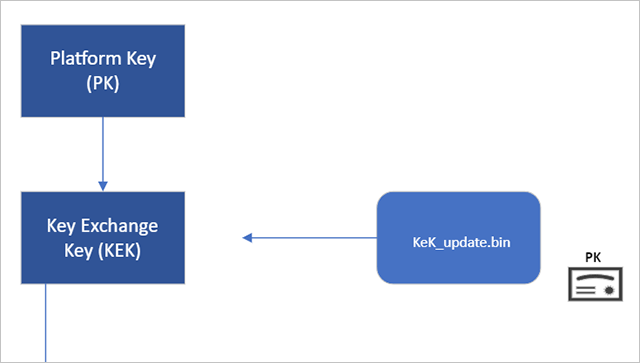
Some machines may be missing the Microsoft Corporation KEK 2K CA 2023 certificate, which is a newer certificate that replaced the Microsoft Corporation KEK CA 2011. I don't know how Microsoft will update this important KEK certificate. If the old KEK certificate expires, the user's machine will not be able to continue to update DB/DBX in the future.

My machine is missing the Microsoft Corporation KEK 2K CA 2023 certificate. I manually imported it using the Secure Boot option in the BIOS.

Microsoft now offers several Key-Encryption-Key (KEK) update binaries signed by each known Platform Key (PK) in its secureboot_objects GitHub repository. In fact, there is a combined KEK update binary located in C:\Windows\System32\SecureBootUpdates named KEKUpdateCombined.bin (although I don't know how to parse that bundle and/or force Windows to apply it).

What I've managed to do is manually apply the binary corresponding to my device's PK from that GitHub repository, allowing me to add the new Microsoft Corporation KEK 2K CA 2023 certificate. To do this, I proceeded as follows:

0) First of all, two PowerShell functions must be defined before performing the KEK update process:

a) Get-UEFIDatabaseSignatures (to parse UEFI database signatures):
Powershell:
# Original script by cjee21 (https://github.com/cjee21/Check-UEFISecureBootVariables/blob/main/Get-UEFIDatabaseSignatures.ps1)
# From https://gist.github.com/out0xb2/f8e0bae94214889a89ac67fceb37f8c0?permalink_comment_id=4572467#gistcomment-4572467

function Get-UEFIDatabaseSignatures {
<#
.SYNOPSIS
Parses UEFI Signature Databases into logical Powershell objects
.DESCRIPTION
Original Author: Matthew Graeber (@mattifestation)
Modified By: Jeremiah Cox (@int0x6)
Modified By: Joel Roth (@nafai)
Additional Source: https://gist.github.com/mattifestation/991a0bea355ec1dc19402cef1b0e3b6f
Additional Source: https://www.powershellgallery.com/packages/SplitDbxContent/1.0
License: BSD 3-Clause
.PARAMETER Variable
Specifies a UEFI variable, an instance of which is returned by calling the Get-SecureBootUEFI cmdlet. Only 'db' and 'dbx' are supported.
.PARAMETER BytesIn
Specifies a byte array consisting of the PK, KEK, db, or dbx UEFI vairable contents.
.EXAMPLE
$DbxBytes = [IO.File]::ReadAllBytes('.\dbx.bin')
Get-UEFIDatabaseSignatures -BytesIn $DbxBytes
.EXAMPLE
Get-UEFIDatabaseSignatures -Filename ".\DBXUpdate-20230314.x64.bin"
.EXAMPLE
Get-SecureBootUEFI -Name db | Get-UEFIDatabaseSignatures
.EXAMPLE
Get-SecureBootUEFI -Name dbx | Get-UEFIDatabaseSignatures
.EXAMPLE
Get-SecureBootUEFI -Name pk | Get-UEFIDatabaseSignatures
.EXAMPLE
Get-SecureBootUEFI -Name kek | Get-UEFIDatabaseSignatures
.INPUTS
Microsoft.SecureBoot.Commands.UEFIEnvironmentVariable
Accepts the output of Get-SecureBootUEFI over the pipeline.
.OUTPUTS
UefiSignatureDatabase
Outputs an array of custom powershell objects describing a UEFI Signature Database. "77fa9abd-0359-4d32-bd60-28f4e78f784b" refers to Microsoft as the owner.
#>

    [CmdletBinding()]
    param (
        [Parameter(Mandatory, ValueFromPipeline, ParameterSetName = 'UEFIVariable')]
        [ValidateScript({ ($_.GetType().Fullname -eq 'Microsoft.SecureBoot.Commands.UEFIEnvironmentVariable') -and ($_.Name -in "kek","pk","db","dbx") })]
        $Variable,

        [Parameter(Mandatory, ParameterSetName = 'ByteArray')]
        [Byte[]]
        [ValidateNotNullOrEmpty()]
        $BytesIn,

        [Parameter(Mandatory, ParameterSetName = 'File')]
        [string]
        [ValidateScript({ (Resolve-Path "$_").where({Test-Path $_}).Path })]
        $Filename,

        [Parameter(Mandatory = $false)]
        [switch]
        $ExportCertificates
    )
    
    $SignatureTypeMapping = @{
        'C1C41626-504C-4092-ACA9-41F936934328' = 'EFI_CERT_SHA256_GUID' # Most often used for dbx
        'A5C059A1-94E4-4AA7-87B5-AB155C2BF072' = 'EFI_CERT_X509_GUID'   # Most often used for db
    }

    $CurrentPath = Get-Location

    $Bytes = $null

    if ($Filename)
    {
        $Bytes = Get-Content -Encoding Byte $Filename -ErrorAction Stop
    }
    elseif ($Variable)
    {
        $Bytes = $Variable.Bytes
    }
    else
    {
        $Bytes = $BytesIn
    }

    # Modified from Split-Dbx
    if (($Bytes[40] -eq 0x30) -and ($Bytes[41] -eq 0x82 ))
    {
        Write-Debug "Removing signature."

        # Signature is known to be ASN size plus header of 4 bytes
        $sig_length = $Bytes[42] * 256 + $Bytes[43] + 4
        if ($sig_length -gt ($Bytes.Length + 40)) {
            Write-Error "Signature longer than file size!" -ErrorAction Stop
        }
            
        ## Unsigned db store
        [System.Byte[]]$Bytes = @($Bytes[($sig_length+40)..($Bytes.Length - 1)].Clone())
    }
    else
    {
        Write-Debug "Signature not found. Assuming it's already split."
    }

    try
    {
        $MemoryStream = New-Object -TypeName IO.MemoryStream -ArgumentList @(,$Bytes)
        $BinaryReader = New-Object -TypeName IO.BinaryReader -ArgumentList $MemoryStream, ([Text.Encoding]::Unicode)
    }
    catch
    {
        throw $_
        return
    }

    # What follows will be an array of EFI_SIGNATURE_LIST structs

    while ($BinaryReader.PeekChar() -ne -1) {
        $SignatureType = $SignatureTypeMapping[([Guid][Byte[]] $BinaryReader.ReadBytes(16)).Guid]
        $SignatureListSize = $BinaryReader.ReadUInt32()
        $SignatureHeaderSize = $BinaryReader.ReadUInt32()
        $SignatureSize = $BinaryReader.ReadUInt32()

        $SignatureHeader = $BinaryReader.ReadBytes($SignatureHeaderSize)

        # 0x1C is the size of the EFI_SIGNATURE_LIST header
        $SignatureCount = ($SignatureListSize - 0x1C) / $SignatureSize

        $SignatureList = 1..$SignatureCount | ForEach-Object {
            $SignatureDataBytes = $BinaryReader.ReadBytes($SignatureSize)

            $SignatureOwner = [Guid][Byte[]] $SignatureDataBytes[0..15]

            switch ($SignatureType) {
                'EFI_CERT_SHA256_GUID' {
                    $SignatureData = ([Byte[]] $SignatureDataBytes[0x10..0x2F] | ForEach-Object { $_.ToString('X2') }) -join ''
                }

                'EFI_CERT_X509_GUID' {
                    $SignatureDataRaw = ([Byte[]] $SignatureDataBytes[16..($SignatureDataBytes.Count - 1)])
                    $SignatureData = New-Object Security.Cryptography.X509Certificates.X509Certificate2 -ArgumentList @(,$SignatureDataRaw)

                    if ($ExportCertificates) {
                        $SignatureDataFilename = $SignatureData.Thumbprint + '.der'
                        $SignatureDataExportPath = Join-Path -Path $CurrentPath -ChildPath $SignatureDataFilename

                        if (-not (Test-Path -Path $SignatureDataExportPath)) {
                            Set-Content -Path $SignatureDataExportPath -Value $SignatureDataRaw -Encoding Byte
                            Write-Debug "$SignatureDataFilename has been exported."
                        } else {
                            Write-Debug "$SignatureDataFilename already exported!"
                        }
                    }
                }
            }

            [PSCustomObject] @{
                PSTypeName = 'EFI.SignatureData'
                SignatureOwner = $SignatureOwner
                SignatureData = $SignatureData
            }
        }

        [PSCustomObject] @{
            PSTypeName = 'EFI.SignatureList'
            SignatureType = $SignatureType
            SignatureList = $SignatureList
        }
    }
}

b) Split-DbxContent (to split the signature and the content of a Secure Boot update):
Powershell:
# Based on original script written by the "Microsoft Secure Boot Team" (https://www.powershellgallery.com/packages/SplitDbxContent/1.0)
# Optimizations made based on cjee21's script (https://github.com/cjee21/Check-UEFISecureBootVariables/blob/main/Get-UEFIDatabaseSignatures.ps1)

function Split-DbxContent {

<#
.DESCRIPTION
 Splits a DBX update package into the new DBX variable contents and the signature authorizing the change.
 To apply an update using the output files of this script, try:
 Set-SecureBootUEFI -Name dbx -ContentFilePath .\content.bin -SignedFilePath .\signature.p7 -Time 2010-03-06T19:17:21Z -AppendWrite'
.EXAMPLE
Split-DbxContent DbxUpdate_x64.bin
#>

    # Get file from script input
    $Bytes = Get-Content -Encoding Byte $args[0]

    # Identify file signature
    if (($Bytes[40] -ne 0x30) -or ($Bytes[41] -ne 0x82 )) {
        Write-Error "Cannot find signature!" -ErrorAction Stop
    }

    # Signature is known to be ASN size plus header of 4 bytes
    $sig_length = $Bytes[42] * 256 + $Bytes[43] + 4
    if ($sig_length -gt ($Bytes.Length + 40)) {
        Write-Error "Signature longer than file size!" -ErrorAction Stop
    }

    # Build and write signature output file
    Set-Content -Encoding Byte -Path ".\signature.p7" -Value ([Byte[]] $Bytes[40..($sig_length + 40 - 1)]) -ErrorAction Stop
    Write-Output "Successfully created output file .\signature.p7"

    # Build and write variable content output file
    Set-Content -Encoding Byte -Path ".\content.bin" -Value ([Byte[]] $Bytes[($sig_length + 40)..($Bytes.Length - 1)]) -ErrorAction Stop
    Write-Output "Successfully created output file .\content.bin"
    
}

1) Retrieve the PK's Thumbprint using the defined Get-UEFIDatabaseSignatures function by running this command (as ADMIN):
Powershell:
Get-SecureBootUEFI -Name pk | Get-UEFIDatabaseSignatures | Format-List

Output example:
Code:
SignatureType : EFI_CERT_X509_GUID
SignatureList : @{SignatureOwner=e04fd794-033e-46a0-81d2-048e8da1432e; SignatureData=[Subject]
                  CN=Ideapad Products

                [Issuer]
                  CN=Trust - Lenovo Certificate

                [Serial Number]
                  994F8B12DB0C8DB2496ED70FFB2DD913

                [Not Before]
                  20/06/2012 4:16:47

                [Not After]
                  01/01/2040 0:59:59

                [Thumbprint]
                  5F11EECCB10336E653088CBA0ABC62F2533271A6
                }

2) Knowing PK's thumbprint, now we need to know which binary to use. To do this, we search for the Thumbprint in KEKUpdate_map.json (available in Microsoft's GitHub repository):
JSON:
{
    ...
    "5f11eeccb10336e653088cba0abc62f2533271a6": {
        "KEKUpdate": "Lenovo\\KEKUpdate_Lenovo_PK255.bin",
        "Certificate": {
            "serial_number": 203784895555750606179079273201565292819,
            "issued_to": "CN=Ideapad Products",
            "issued_by": "CN=Trust - Lenovo Certificate"
        }
    },
    ...
}

3) Once the needed binary is identified and downloaded, we use the defined Split-DbxContent function to split the signature from the content:
Powershell:
Split-DbxContent .\KEKUpdate_Lenovo_PK255.bin # Replace it with the filename of the downloaded binary you need to use

Expected output:
Code:
Successfully created output file .\signature.p7
Successfully created output file .\content.bin

4) Finally, we append the new KEK with this command (as ADMIN), then restart:
Powershell:
Set-SecureBootUEFI -Name kek -ContentFilePath .\content.bin -SignedFilePath .\signature.p7 -Time 2010-03-06T19:17:21Z -AppendWrite

Expected output example:
Code:
Name Bytes                  Attributes
---- -----                  ----------
KEK  {161, 89, 192, 165...} NON VOLATILE...

5) After restarting, we check that the new KEK is, indeed, enrolled (as ADMIN):
Powershell:
Get-SecureBootUEFI -Name kek | Get-UEFIDatabaseSignatures | Format-List

Output example (Microsoft Corporation KEK 2K CA 2023 should be present):
Code:
SignatureType : EFI_CERT_X509_GUID
SignatureList : @{SignatureOwner=77fa9abd-0359-4d32-bd60-28f4e78f784b; SignatureData=[Subject]
                  CN=Microsoft Corporation KEK CA 2011, O=Microsoft Corporation, L=Redmond, S=Washington, C=US

                [Issuer]
                  CN=Microsoft Corporation Third Party Marketplace Root, O=Microsoft Corporation, L=Redmond, S=Washington, C=US

                [Serial Number]
                  610AD188000000000003

                [Not Before]
                  24/06/2011 22:41:29

                [Not After]
                  24/06/2026 22:51:29

                [Thumbprint]
                  31590BFD89C9D74ED087DFAC66334B3931254B30
                }

SignatureType : EFI_CERT_X509_GUID
SignatureList : @{SignatureOwner=77fa9abd-0359-4d32-bd60-28f4e78f784b; SignatureData=[Subject]
                  CN=Microsoft Corporation KEK 2K CA 2023, O=Microsoft Corporation, C=US

                [Issuer]
                  CN=Microsoft RSA Devices Root CA 2021, O=Microsoft Corporation, C=US

                [Serial Number]
                  33000000131416B8616D82824B000000000013

                [Not Before]
                  02/03/2023 21:21:35

                [Not After]
                  02/03/2038 21:31:35

                [Thumbprint]
                  459AB6FB5E284D272D5E3E6ABC8ED663829D632B
                }

I guess BitLocker-enabled devices must temporary disable it, so proceed with caution.
 

My Computer My Computer

At a glance

Win11v24H2
OS
Win11v24H2
Hi.

Current Microsoft Secure Boot Keys will expire in 2026. Therefore, it may be advisable to update the keys manually in advance.

I did the update and it was successful.

If you have bitlocker enabled, you are advised to save your bitlocker keys. You will need them after the secure boot key update. I don't have bitlocker enabled.

In powershell console opened as administrator, you must run the following commands, one at a time:

Set-ItemProperty -Path “HKLM:\SYSTEM\CurrentControlSet\Control\SecureBoot” -Name “AvailableUpdates” -Value 0x40

Start-ScheduledTask -TaskName “\Microsoft\Windows\PI\Secure-Boot-Update”

After you run the commands, you have to restart your PC twice for the update to take effect.

To check if the update is successful, you must run the following command in a powershell console with admin privileges:

[System.Text.Encoding]::ASCII.GetString((Get-SecureBootUEFI db).bytes) -match ‘Windows UEFI CA 2023’

This command should return the value TRUE. The below screenshot is from my PC. It returned a True value.

View attachment 135085

For further information, you may refer to the following Microsoft Windows IT Pro Blog:

Updating Microsoft Secure Boot keys | Windows IT Pro blog

Hope you find this post helpful.
I had to do this, because it unexpectedly returned "False" I was thinking it should have been updated already in 2024!


My Computers My Computers

  • At a glance

    Windows 11 Pro x64 24H2Ryzen 9 5900X64 GB G.Skill RipJaws V F4-3200C16D-64GVKASRock Steel Legend Arc B580 12 GB
    OS
    Windows 11 Pro x64 24H2
    Computer type
    PC/Desktop
    CPU
    Ryzen 9 5900X
    Motherboard
    ASRock B550 PG Velocita (UEFI-BIOS 3.90)
    Memory
    64 GB G.Skill RipJaws V F4-3200C16D-64GVK
    Graphics Card(s)
    ASRock Steel Legend Arc B580 12 GB
    Monitor(s) Displays
    Alienware AW3423DWF OLED ultrawide
    Hard Drives
    Samsung 990 Pro 1 TB NVMe SSD
    PSU
    eVGA Supernova 750 G3
    Case
    Corsair 275R
    Internet Speed
    VTel FTTH 1 Gb down and 1 Gb up
  • At a glance

    Windows 11 Home x64 25H2Ryzen 7 5800X3D32 GB (2x16 GB G.Skill TridentZ Neo)Sapphire Nitro+ Radeon RX 6750 XT
    Operating System
    Windows 11 Home x64 25H2
    Computer type
    PC/Desktop
    CPU
    Ryzen 7 5800X3D
    Motherboard
    Asus ROG Strix B550-F Gaming (UEFI-BIOS version 3636)
    Memory
    32 GB (2x16 GB G.Skill TridentZ Neo)
    Graphics card(s)
    Sapphire Nitro+ Radeon RX 6750 XT
    Hard Drives
    Samsung 970 Pro 512 GB NVMe SSD
    PSU
    Corsair RM850x
    Case
    Fractal Focus G
3. Finding a cheap replacement for the gt 640 that will allow the pc to boot and use with the repalcement gpu when in secure boot .
I think you need newer, such as a GeForce GTX 1050, at least. Almost anything puts a GT 640 to shame!
 

My Computers My Computers

  • At a glance

    Windows 11 Pro x64 24H2Ryzen 9 5900X64 GB G.Skill RipJaws V F4-3200C16D-64GVKASRock Steel Legend Arc B580 12 GB
    OS
    Windows 11 Pro x64 24H2
    Computer type
    PC/Desktop
    CPU
    Ryzen 9 5900X
    Motherboard
    ASRock B550 PG Velocita (UEFI-BIOS 3.90)
    Memory
    64 GB G.Skill RipJaws V F4-3200C16D-64GVK
    Graphics Card(s)
    ASRock Steel Legend Arc B580 12 GB
    Monitor(s) Displays
    Alienware AW3423DWF OLED ultrawide
    Hard Drives
    Samsung 990 Pro 1 TB NVMe SSD
    PSU
    eVGA Supernova 750 G3
    Case
    Corsair 275R
    Internet Speed
    VTel FTTH 1 Gb down and 1 Gb up
  • At a glance

    Windows 11 Home x64 25H2Ryzen 7 5800X3D32 GB (2x16 GB G.Skill TridentZ Neo)Sapphire Nitro+ Radeon RX 6750 XT
    Operating System
    Windows 11 Home x64 25H2
    Computer type
    PC/Desktop
    CPU
    Ryzen 7 5800X3D
    Motherboard
    Asus ROG Strix B550-F Gaming (UEFI-BIOS version 3636)
    Memory
    32 GB (2x16 GB G.Skill TridentZ Neo)
    Graphics card(s)
    Sapphire Nitro+ Radeon RX 6750 XT
    Hard Drives
    Samsung 970 Pro 512 GB NVMe SSD
    PSU
    Corsair RM850x
    Case
    Fractal Focus G
Yep, I think the GT 640 has had it's day in the sun.

Even the embedded graphics on my Intel I5 beat the pants off it!

1757273260397.webp

I decent midrange modern card buries the GT 640!

1757273385949.webp
 

My Computers My Computers

  • At a glance

    Win 11 Pro 25H2, Build 26200.8894Intel Core i5 1450064GB DDR4GeForce RTX 4060
    OS
    Win 11 Pro 25H2, Build 26200.8894
    Computer type
    PC/Desktop
    Manufacturer/Model
    Home Brew
    CPU
    Intel Core i5 14500
    Motherboard
    Gigabyte B760M G P WIFI
    Memory
    64GB DDR4
    Graphics Card(s)
    GeForce RTX 4060
    Sound Card
    Chipset Realtek
    Monitor(s) Displays
    LG 45" Ultragear, Acer 24" 1080p
    Screen Resolution
    5120x1440, 1920x1080
    Hard Drives
    Crucial P310 2TB 2280 PCIe Gen4 3D NAND NVMe M.2 SSD (O/S)
    Silicon Power 2TB US75 NVMe PCIe Gen4 M.2 2280 SSD (backup)
    Crucial BX500 2TB 3D NAND (2nd backup)
    Seagate 4TB Ironwolf, rotating HDD archive files
    External off-line backup Drives: 2 NVMe 4TB drives in external enclosures
    PSU
    Thermaltake Toughpower GF3 750W
    Case
    LIAN LI LANCOOL 216 E-ATX PC Case
    Cooling
    Lots of fans!
    Keyboard
    Microsoft Comfort Curve 2000
    Mouse
    Logitech G305
    Internet Speed
    Verizon FiOS 1GB
    Browser
    Firefox
    Antivirus
    Malware Bytes & Windows Defender Security
  • At a glance

    Win 11 Pro 25H2, Build 26200.8894Intel Core i5 1440032GB DDR5Intel 700 Embedded GPU
    Operating System
    Win 11 Pro 25H2, Build 26200.8894
    Computer type
    PC/Desktop
    Manufacturer/Model
    Home Brew
    CPU
    Intel Core i5 14400
    Motherboard
    Gigabyte B760M DS3H AX
    Memory
    32GB DDR5
    Graphics card(s)
    Intel 700 Embedded GPU
    Sound Card
    Realtek Embedded
    Monitor(s) Displays
    27" HP 1080p
    Screen Resolution
    1920x1080
    Hard Drives
    Crucial P310 2TB 2280 PCIe Gen4 eD NAND PCIe SSD
    Samsung EVO 990 2TB NVMe Gen4 SSD
    Samsung 2TB SATA SSD
    PSU
    Thermaltake Smart BM3 650W
    Case
    Okinos Micro ATX Case
    Cooling
    Fans
    Keyboard
    Microsoft Comfort Curve 2000
    Mouse
    Logitech G305
    Internet Speed
    Verizon FiOS 1GB
    Browser
    Firefox
    Antivirus
    Malware Bytes & Windows Defender Security
  • Nimo N171 17" Laptop, (Intel i3-1215U, 16GB RAM, 2TB NVMe, Win11 Pro)
    Acemagic Vista Mini PC V1 (Intel N150, 16GB RAM, 1TB NVMe, Win11 Pro)
    HP ENVY h8-1540t, (24GB RAM, 2TB SSD, 2TB HDD, Win11 Pro)
I think you need newer, such as a GeForce GTX 1050, at least. Almost anything puts a GT 640 to shame

om;y issue is that card is a ddr 5 and mine is ddr 3 .
 

My Computer My Computer

At a glance

WINDOWS 11 WINDOWS 10Intel(R) Core(TM) i7 -3770K CPU 3.50 GZ 3501 ...32.0 GB (31.9 GB usable)AMD RADEON TM R5240 INTELL HD GRAPHICS 4600 T...
OS
WINDOWS 11 WINDOWS 10
Computer type
PC/Desktop
Manufacturer/Model
HP H8 1360T
CPU
Intel(R) Core(TM) i7 -3770K CPU 3.50 GZ 3501 4 CORE
Motherboard
PEGATRON 2AD5
Memory
32.0 GB (31.9 GB usable)
Graphics Card(s)
AMD RADEON TM R5240 INTELL HD GRAPHICS 4600 TIGER 1+1 USB
Sound Card
AMD HD . IDT
Monitor(s) Displays
AOC WAL MART SPECIAL . HP 2311 IX IPS LED DELL 1708 FP
Screen Resolution
1920 X 1080 1600X900 1280X940
Hard Drives
1 FAXING S 100 512GB 1 KINGSTON 120 GB SSD 1 X12 SSD 512 GB
PSU
300 WATT HP
Case
FULL
Cooling
ON BOARD FAN
Keyboard
LOGITEC K 520 WIRELESS
Mouse
LOGITEC M 510 WIRELESS
Internet Speed
55 UP 11.2 DOWN
Browser
CHROME EDGE
Antivirus
WINDOWS SECUIRTY
Other Info
NON SUPPORTED HARDWARE FOR WINDOWS 11

My Computers My Computers

  • At a glance

    Win 11 Pro 25H2, Build 26200.8894Intel Core i5 1450064GB DDR4GeForce RTX 4060
    OS
    Win 11 Pro 25H2, Build 26200.8894
    Computer type
    PC/Desktop
    Manufacturer/Model
    Home Brew
    CPU
    Intel Core i5 14500
    Motherboard
    Gigabyte B760M G P WIFI
    Memory
    64GB DDR4
    Graphics Card(s)
    GeForce RTX 4060
    Sound Card
    Chipset Realtek
    Monitor(s) Displays
    LG 45" Ultragear, Acer 24" 1080p
    Screen Resolution
    5120x1440, 1920x1080
    Hard Drives
    Crucial P310 2TB 2280 PCIe Gen4 3D NAND NVMe M.2 SSD (O/S)
    Silicon Power 2TB US75 NVMe PCIe Gen4 M.2 2280 SSD (backup)
    Crucial BX500 2TB 3D NAND (2nd backup)
    Seagate 4TB Ironwolf, rotating HDD archive files
    External off-line backup Drives: 2 NVMe 4TB drives in external enclosures
    PSU
    Thermaltake Toughpower GF3 750W
    Case
    LIAN LI LANCOOL 216 E-ATX PC Case
    Cooling
    Lots of fans!
    Keyboard
    Microsoft Comfort Curve 2000
    Mouse
    Logitech G305
    Internet Speed
    Verizon FiOS 1GB
    Browser
    Firefox
    Antivirus
    Malware Bytes & Windows Defender Security
  • At a glance

    Win 11 Pro 25H2, Build 26200.8894Intel Core i5 1440032GB DDR5Intel 700 Embedded GPU
    Operating System
    Win 11 Pro 25H2, Build 26200.8894
    Computer type
    PC/Desktop
    Manufacturer/Model
    Home Brew
    CPU
    Intel Core i5 14400
    Motherboard
    Gigabyte B760M DS3H AX
    Memory
    32GB DDR5
    Graphics card(s)
    Intel 700 Embedded GPU
    Sound Card
    Realtek Embedded
    Monitor(s) Displays
    27" HP 1080p
    Screen Resolution
    1920x1080
    Hard Drives
    Crucial P310 2TB 2280 PCIe Gen4 eD NAND PCIe SSD
    Samsung EVO 990 2TB NVMe Gen4 SSD
    Samsung 2TB SATA SSD
    PSU
    Thermaltake Smart BM3 650W
    Case
    Okinos Micro ATX Case
    Cooling
    Fans
    Keyboard
    Microsoft Comfort Curve 2000
    Mouse
    Logitech G305
    Internet Speed
    Verizon FiOS 1GB
    Browser
    Firefox
    Antivirus
    Malware Bytes & Windows Defender Security
  • Nimo N171 17" Laptop, (Intel i3-1215U, 16GB RAM, 2TB NVMe, Win11 Pro)
    Acemagic Vista Mini PC V1 (Intel N150, 16GB RAM, 1TB NVMe, Win11 Pro)
    HP ENVY h8-1540t, (24GB RAM, 2TB SSD, 2TB HDD, Win11 Pro)

Latest Support Threads

Back
Top Bottom