
Someone, anyone, please deliver me from Edge Version 156.0.4314.42 I got today


barreleye

Well-known member
Member
VIP
Local time
4:38 PM
Posts
377
OS
Windows 11
First thing I noticed was the new, purposeful color background to my workspace bar, which was formerly the same color as the rest of the window background, blended in seamessly, and was JUST FINE the way it was. I mean, I never gave it a single thought until today. I said to myself, "Well, that's a choice", but I plodded on.

1792873034315.webp


Next thing, my tab highlight color is now BRIGHT RED. Are you kidding me? ARE YOU KIDDING ME. No, Microsoft is not.
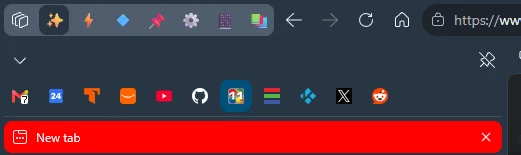
1792873106707.webp


And of course, an ongoing issue remains, the huge flyout infolabels that can't be suppressed and flit back and forth between the left edge of the vertical tabs pane and the right edge, sometimes appearing simultaneously with the traditional small tooltips. This isn't useful. This is distracting and stress-inducing when you move over the tabs at normal speed, as I do toward the end of the video.


Does Microsoft have a department whose mission statement is, "What can we do to make things worse this week?" Because garbage like this makes me really curious.

I've been through Edge://flags and Settings and found nothing that affects any of this. I restarted Edge, and that didn't help. Any suggestions?
 

My Computer My Computer

At a glance

Windows 11
OS
Windows 11
I upgraded to .42 yesterday, and didn't see any changes.

I'd try rolling back to a previous System Restore point.

Failng that, download the .MSI of the version you previously ran.

Then, run the following in an elevated Command prompt...

msiexec /I Path\FileName.msi /qn ALLOWDOWNGRADE=1

I'd suggest either creating a Group Policy setting, or a Defender Firewall rule to block automatic Edge updates.
 

My Computer My Computer

At a glance

Windows 11 Pro 26H2
OS
Windows 11 Pro 26H2
Computer type
Laptop
Manufacturer/Model
Toshiba
Antivirus
Defender
It all survives a reboot, too. Switching to light mode in Edge darkens the red tabs and workspace bar background. This all seems very deliberate.
 

My Computer My Computer

At a glance

Windows 11
OS
Windows 11
Create a second edge profile just to see if the red tab still shows. If not it’s probably tied to an extension or theme you have installed.

The flyout should be controlled by Tab Hover Cards in settings
 

My Computer My Computer

At a glance

Windows 11 Pro
OS
Windows 11 Pro
"Show tab preview on hover" is off. I turned that off a long time ago when I investigated a way to stop the distracting nonsense recorded in my video. It doesn't help. I didn't find anything else that did. The other stuff is new, as in, today, when Edge proudly announced its new release version to me. The only extension I run is uBlock Origin LIght.
 

My Computer My Computer

At a glance

Windows 11
OS
Windows 11
I've used Edge for more than five years. I have the latest upgrade, and I don't see what you're seeing.

Microsoft Edge is up to date.
Version 156.0.4314.42 (Official build) (64-bit)
 

My Computers My Computers

  • At a glance

    Windows 11 ProIntel Series 3 Core Ultra X9 388H64GB LPDDR5x 9600 MT/sIntel Arc graphics B390 Panther Lake
    OS
    Windows 11 Pro
    Computer type
    Laptop
    Manufacturer/Model
    Dell XPS 16 DA16260
    CPU
    Intel Series 3 Core Ultra X9 388H
    Memory
    64GB LPDDR5x 9600 MT/s
    Graphics Card(s)
    Intel Arc graphics B390 Panther Lake
    Monitor(s) Displays
    16" 3.2K Tandem OLED Infinity Edge
    Screen Resolution
    3200 x 2000 16:10 236 PPI
    Hard Drives
    1 Terabyte M.2 PCIe NVMe SSD
    Case
    Black Anodized Aluminum
    Cooling
    Vapor Chamber Cooling
    Mouse
    None
    Internet Speed
    942 Mbps Netgear Mesh + 2 Satellites
    Browser
    Microsoft Edge (Chromium)
    Antivirus
    Windows Security (Defender)
    Other Info
    NPU delivering 67 TOPS
    Microsoft 365 subscription
    Microsoft Office 365
    Microsoft OneDrive 1TB Cloud
    Microsoft Visual Studio
    Microsoft Visual Studio Code
    Microsoft Sysinternals Suite
    Microsoft BitLocker
    Microsoft Copilot
    Dell Support Assist
    Dell Command | Update
    Macrium Reflect X subscription
    1Password Password Manager
    Amazon Kindle for PC
    Lightroom/Photoshop subscription
    Interactive Brokers Trader Workstation
  • At a glance

    Windows 11 ProSnapdragon® X Elite (12 Core) with Hexagon NP...32GB LPDDR5x 8448 MT/sIntegrated Adreno GPU
    Operating System
    Windows 11 Pro
    Computer type
    Laptop
    Manufacturer/Model
    Microsoft Surface Laptop 7
    CPU
    Snapdragon® X Elite (12 Core) with Hexagon NPU delivering 45 TOPS
    Memory
    32GB LPDDR5x 8448 MT/s
    Graphics card(s)
    Integrated Adreno GPU
    Sound Card
    Omnisonic speakers with Dolby Atmos spatial sound
    Monitor(s) Displays
    13.8″ PixelSense Flow touchscreen 120 Hz 600 NIT
    Screen Resolution
    2304 × 1536 (201 PPI), 3:2 aspect ratio
    Hard Drives
    1 TB PCIe NVMe Gen 4 SSD
    Case
    Black Anodized Aluminum
    Cooling
    Vapor Chamber Cooling
    Mouse
    None
    Internet Speed
    942 Mbps Netgear Mesh + 2 Satellites
    Browser
    Microsoft Edge (Chromium)
    Antivirus
    Windows Security (Defender)
    Other Info
    Microsoft 365 subscription (Office)
    Microsoft Office 365
    Microsoft OneDrive 1TB Cloud
    Microsoft Visual Studio 2026
    Microsoft Visual Studio Code
    Lightroom/Photoshop subscription
    1Password Password Manager
    Microsoft Sysinternals Suite
    Amazon Kindle for PC
    Microsoft BitLocker
    Microsoft Copilot
    Interactive Brokers Trader Workstation

Latest Support Threads

Back
Top Bottom




