Did you manually update your Secure Boot Keys ?


My Computers My Computers

  • At a glance

    Win 11 Pro 25H2 Build 26200.8894, Zorin OS ProIntel® Core™ i7-12700KF 12th Gen. (S1700)32GB DDR5 5600-36 Vengeance (2x16)PCIe4.0 Asus NVIDIA RTX3060Ti
    OS
    Win 11 Pro 25H2 Build 26200.8894, Zorin OS Pro
    Computer type
    PC/Desktop
    Manufacturer/Model
    Self built
    CPU
    Intel® Core™ i7-12700KF 12th Gen. (S1700)
    Motherboard
    ASUS Prime Z690-A, BIOS v4505 (Z690 Intel Chipset)
    Memory
    32GB DDR5 5600-36 Vengeance (2x16)
    Graphics Card(s)
    PCIe4.0 Asus NVIDIA RTX3060Ti
    Sound Card
    Onboard; Realtek
    Monitor(s) Displays
    34" LG 34UC79G-B Curved 21:9 144Hz
    Screen Resolution
    2560x1080 (No HDR)
    Hard Drives
    250Gb Samsung 870PRO NVMe (Win 11 Pro)
    1Tb Samsung 980PRO NVMe
    1Tb Samsung 970EVO NVMe
    2Tb Samsung 990PRO NVMe with heatsink.
    4Tb WDC WD40EZRZ Blue SATA (Int.)
    4Tb WDC WD40EZRZ Blue SATA (Int.)
    3Tb WDC WD30EFRZ Red SATA (Int.)
    256Gb Samsung 840PRO SSD (RHEL 9,5)
    256Gb Samsung 850PRO SSD (Zorin OS Pro 18)
    PSU
    Coolermaster 850W V2 Gold with internal 12cm exaust fan
    Case
    Be-Quiet Pure Base 600.
    Cooling
    3x Be-Quiet! 12/14cm "Silent Wings 4" casefans, 1x Arctic Freezer i35 CPU towerblock with fan.
    Keyboard
    Steelseries APEX 7 keyboard.
    Mouse
    Logitech G-502 Hero
    Internet Speed
    1Gb
    Browser
    Brave
    Antivirus
    F-Secure
    Other Info
    No Noise system.
    256Gb Kingston Travler USB 3.0 drive.
    64Gb Sandisk USB 3.2 drive. (Ventoy)
    8Gb Philips USB 3.0 drive. (Win. Inst.)
    8Gb Philips USB 3.0 drive. (Rescue disk)
    2Tb WD USB 3.0 Passport drive.
    USB Ext. 500Gb WD SATA drive.
    External USB 3.0 C.A. CD/DVD* burner.
  • At a glance

    Windows 11 Pro 25H2Intel® Core™ i7-6700K 6th Gen. (S1151)32Gb DDR4 2400 Corsair Vengeance (4x8)ASUS GeForce GTX1080
    Operating System
    Windows 11 Pro 25H2
    Computer type
    PC/Desktop
    Manufacturer/Model
    Selfbuild
    CPU
    Intel® Core™ i7-6700K 6th Gen. (S1151)
    Motherboard
    ASUS Maximus VIII Ranger (Intel Chipset Z170)
    Memory
    32Gb DDR4 2400 Corsair Vengeance (4x8)
    Graphics card(s)
    ASUS GeForce GTX1080
    Sound Card
    Onboard; Realtek
    Monitor(s) Displays
    LG IPS277L 27" WideLED, IPS
    Screen Resolution
    1920x1080
    Hard Drives
    Samsung 850 Pro SSD
    PSU
    Zalman ZM600-HP with internal exhaust fan. Heatpipes & Modular cables.
    Case
    Cooler Master Aero
    Cooling
    Scythe Mugen 4 dual fan towerblock.
    Keyboard
    Red Dragon
    Mouse
    Red Dragon
    Internet Speed
    1Gb
    Browser
    Chrome
    Antivirus
    F-Secure
Remember; PowerShell must run as admin. As the screendump already said; Not enough privileges to execute the command. I don't see "Administrator: Powershell" in the powershell box screendump you are referring too. Correct it. The end-result must be; True or False.
Done exactly as instructed again but remembered my image.
-
11.webp
 

My Computer My Computer

At a glance

Windows 11 Home 25H2 64-BitIntel(R) Core(TM) i5-1035G1 CPU @ 1.00GHz 1.1...8.00GB HDDStandard Monitor on Intel UHD Graphics
OS
Windows 11 Home 25H2 64-Bit
Computer type
Laptop
Manufacturer/Model
asus f515ja
CPU
Intel(R) Core(TM) i5-1035G1 CPU @ 1.00GHz 1.19 GHz
Motherboard
ASUSTeK COMPUTER INC. X515JA (U3E1)
Memory
8.00GB HDD
Graphics Card(s)
Standard Monitor on Intel UHD Graphics
Sound Card
Realtek HDA
Screen Resolution
1366 x 768 x 60
Hard Drives
1HDD 2 Partitions
Mouse
Logitech Cordless
Internet Speed
38mbps
Browser
Chrome+FF
Antivirus
Malwarebytes (Premium)
Other Info
When I find it.
Note @mccmw: About the KEK issue; I saw a red cross (had trouble with reading because of the spaces issue in the screendump) at the item: "Microsoft Corporation KEK 2K CA 2023" The Dell UEFI PK and KEK of the manufacturer seems to alright; green. The current UEFI KEK from "Microsoft Corporation KEK 2K CA 2023" not. (red) I saw a document I thought would solve that issue also; Download the "Microsoft Corporation KEK 2K CA 2023" from Microsoft themself.

The doc: Windows Secure Boot Key Creation and Management Guidance

Search for Microsoft Corporation KEK 2K CA 2023. The .cer can be download by the link below. BUT... It's based on a root certificate Microsoft RSA Devices Root CA 2021 (valid until 2046) OEM's can use this to sign it based on the new CA 2023 certificate. So this is no use because that RSA certificate is not the Windows trusted certificate store. Use certmgr.msc to view all the root and intermediate certificates.

I think you have to wait until the CA2023 is implemented. This whole exercise was to prepare (on a non MS way) us until this certificate is re-signed for all programs (needs to be replaced by an Windows update) that needs be verified by the new CA2023 certificate. As far as I can see; all files now are still pointing to the old PCA 2011 certificate. The issue you can solve are the red crosses at the EUFI Current values at DB and DBX.
Well...I unexpectedly inched a step closer. I went to update Windows 11 (Tuesday Security update) on that machine. I noticed that it now shows that the CA 2023 cert is active and Windows is using it. I think, the only step left is how to get the KEK 2023 certificate installed.
 

My Computers My Computers

  • At a glance

    Windows 11Intel i7-7700K32GB 2666Mhz (Kingston Hyper X Fury)Asus Nvidia 1050Ti
    OS
    Windows 11
    Computer type
    PC/Desktop
    Manufacturer/Model
    Custom
    CPU
    Intel i7-7700K
    Motherboard
    Asus Prime Z-270A
    Memory
    32GB 2666Mhz (Kingston Hyper X Fury)
    Graphics Card(s)
    Asus Nvidia 1050Ti
    Sound Card
    N/A
    Monitor(s) Displays
    Samsung C27F390
    Screen Resolution
    1920 x 1080
    Hard Drives
    1TB Western Digital SN770 (System) and 2TB Western Digital SN770 (Storage)
    Antivirus
    Windows Security
  • At a glance

    Windows 11 Homei9-11900H32GBIntegrated Intel and Nvidia 3050Ti
    Operating System
    Windows 11 Home
    Computer type
    Laptop
    Manufacturer/Model
    Dell/XPS 15 9510
    CPU
    i9-11900H
    Motherboard
    Unknown
    Memory
    32GB
    Graphics card(s)
    Integrated Intel and Nvidia 3050Ti
    Sound Card
    Integrated (Realtek)
    Monitor(s) Displays
    None
    Screen Resolution
    1920 x 1200 (non-Touch)
    Hard Drives
    2TB SK Hynix P41 Platinum
    Antivirus
    Windows Security
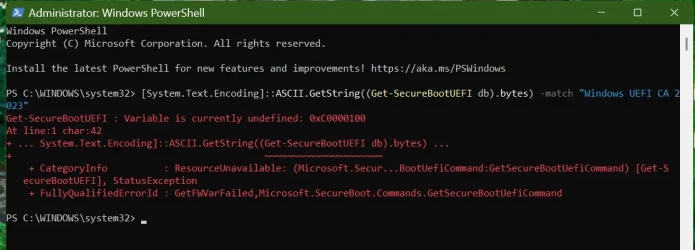
Done exactly as instructed again but remembered my image.
-
View attachment 156281
This is an different error message. The one you referring to had a "not enough rights" problem. The devil is in the details....

If you leave out the -match etc. part you will see a lot of "Garbage" strings return. What this command does is searching trough that "garbage" and looking (through the EUFI DB part) for that string "Windows UEFI CA 2023" It's can't find it. Most likely UEFI is not turned on or/and secure boot is not enabled.

You have to go to your BIOS and change the following settings; UEFI Only (or Both) and CSM (Compatibility Support Module) Support = NO. Then you can set Secure boot = enabled.

Look at your manual for those 2 BIOS settings and it's values and conditions; Those settings have a close relationship with each other.
- Secure Boot
- UEFI/Legacy boot
After the change you can query for that value again.

This post talks about the same error; (older article but still valid) UEFI with secure boot disabled - Windows 10 Help Forums (If possible; make sure you have the latest BIOS version for your motherboard to make sure you do not run against other problems later on)
 

My Computers My Computers

  • At a glance

    Win 11 Pro 25H2 Build 26200.8894, Zorin OS ProIntel® Core™ i7-12700KF 12th Gen. (S1700)32GB DDR5 5600-36 Vengeance (2x16)PCIe4.0 Asus NVIDIA RTX3060Ti
    OS
    Win 11 Pro 25H2 Build 26200.8894, Zorin OS Pro
    Computer type
    PC/Desktop
    Manufacturer/Model
    Self built
    CPU
    Intel® Core™ i7-12700KF 12th Gen. (S1700)
    Motherboard
    ASUS Prime Z690-A, BIOS v4505 (Z690 Intel Chipset)
    Memory
    32GB DDR5 5600-36 Vengeance (2x16)
    Graphics Card(s)
    PCIe4.0 Asus NVIDIA RTX3060Ti
    Sound Card
    Onboard; Realtek
    Monitor(s) Displays
    34" LG 34UC79G-B Curved 21:9 144Hz
    Screen Resolution
    2560x1080 (No HDR)
    Hard Drives
    250Gb Samsung 870PRO NVMe (Win 11 Pro)
    1Tb Samsung 980PRO NVMe
    1Tb Samsung 970EVO NVMe
    2Tb Samsung 990PRO NVMe with heatsink.
    4Tb WDC WD40EZRZ Blue SATA (Int.)
    4Tb WDC WD40EZRZ Blue SATA (Int.)
    3Tb WDC WD30EFRZ Red SATA (Int.)
    256Gb Samsung 840PRO SSD (RHEL 9,5)
    256Gb Samsung 850PRO SSD (Zorin OS Pro 18)
    PSU
    Coolermaster 850W V2 Gold with internal 12cm exaust fan
    Case
    Be-Quiet Pure Base 600.
    Cooling
    3x Be-Quiet! 12/14cm "Silent Wings 4" casefans, 1x Arctic Freezer i35 CPU towerblock with fan.
    Keyboard
    Steelseries APEX 7 keyboard.
    Mouse
    Logitech G-502 Hero
    Internet Speed
    1Gb
    Browser
    Brave
    Antivirus
    F-Secure
    Other Info
    No Noise system.
    256Gb Kingston Travler USB 3.0 drive.
    64Gb Sandisk USB 3.2 drive. (Ventoy)
    8Gb Philips USB 3.0 drive. (Win. Inst.)
    8Gb Philips USB 3.0 drive. (Rescue disk)
    2Tb WD USB 3.0 Passport drive.
    USB Ext. 500Gb WD SATA drive.
    External USB 3.0 C.A. CD/DVD* burner.
  • At a glance

    Windows 11 Pro 25H2Intel® Core™ i7-6700K 6th Gen. (S1151)32Gb DDR4 2400 Corsair Vengeance (4x8)ASUS GeForce GTX1080
    Operating System
    Windows 11 Pro 25H2
    Computer type
    PC/Desktop
    Manufacturer/Model
    Selfbuild
    CPU
    Intel® Core™ i7-6700K 6th Gen. (S1151)
    Motherboard
    ASUS Maximus VIII Ranger (Intel Chipset Z170)
    Memory
    32Gb DDR4 2400 Corsair Vengeance (4x8)
    Graphics card(s)
    ASUS GeForce GTX1080
    Sound Card
    Onboard; Realtek
    Monitor(s) Displays
    LG IPS277L 27" WideLED, IPS
    Screen Resolution
    1920x1080
    Hard Drives
    Samsung 850 Pro SSD
    PSU
    Zalman ZM600-HP with internal exhaust fan. Heatpipes & Modular cables.
    Case
    Cooler Master Aero
    Cooling
    Scythe Mugen 4 dual fan towerblock.
    Keyboard
    Red Dragon
    Mouse
    Red Dragon
    Internet Speed
    1Gb
    Browser
    Chrome
    Antivirus
    F-Secure
My final post in this thread is just to say a big thanks to all for your knowledgeable messages.
Sadly none worked, nor did trying to contact Asus. Getting into Fort Knox might be easier.
 

My Computer My Computer

At a glance

Windows 11 Home 25H2 64-BitIntel(R) Core(TM) i5-1035G1 CPU @ 1.00GHz 1.1...8.00GB HDDStandard Monitor on Intel UHD Graphics
OS
Windows 11 Home 25H2 64-Bit
Computer type
Laptop
Manufacturer/Model
asus f515ja
CPU
Intel(R) Core(TM) i5-1035G1 CPU @ 1.00GHz 1.19 GHz
Motherboard
ASUSTeK COMPUTER INC. X515JA (U3E1)
Memory
8.00GB HDD
Graphics Card(s)
Standard Monitor on Intel UHD Graphics
Sound Card
Realtek HDA
Screen Resolution
1366 x 768 x 60
Hard Drives
1HDD 2 Partitions
Mouse
Logitech Cordless
Internet Speed
38mbps
Browser
Chrome+FF
Antivirus
Malwarebytes (Premium)
Other Info
When I find it.
My final post in this thread is just to say a big thanks to all for your knowledgeable messages.
Sadly none worked, nor did trying to contact Asus. Getting into Fort Knox might be easier.
OK. Giving up. Secure boot is an optional security feature. It's not mandatory. You can still use Windows as is. You don't have to contact ASUS for that; they will point back at Windows. You can still look at the latest BIOS version on their site and check. If it doesn't is there anymore than your motherboard is too old and out of service. Buying a recent (new/secondhand) one maybe an option but with no further details we can't help you here any further on this subject. Having a good antivirusprogram is your last line of defense.

Make sure Windows is error free (DISM /ScanHealth & SFC /Scannow) and be up-to-date with the builds. Latest one came in today; 26200.7462
 

My Computers My Computers

  • At a glance

    Win 11 Pro 25H2 Build 26200.8894, Zorin OS ProIntel® Core™ i7-12700KF 12th Gen. (S1700)32GB DDR5 5600-36 Vengeance (2x16)PCIe4.0 Asus NVIDIA RTX3060Ti
    OS
    Win 11 Pro 25H2 Build 26200.8894, Zorin OS Pro
    Computer type
    PC/Desktop
    Manufacturer/Model
    Self built
    CPU
    Intel® Core™ i7-12700KF 12th Gen. (S1700)
    Motherboard
    ASUS Prime Z690-A, BIOS v4505 (Z690 Intel Chipset)
    Memory
    32GB DDR5 5600-36 Vengeance (2x16)
    Graphics Card(s)
    PCIe4.0 Asus NVIDIA RTX3060Ti
    Sound Card
    Onboard; Realtek
    Monitor(s) Displays
    34" LG 34UC79G-B Curved 21:9 144Hz
    Screen Resolution
    2560x1080 (No HDR)
    Hard Drives
    250Gb Samsung 870PRO NVMe (Win 11 Pro)
    1Tb Samsung 980PRO NVMe
    1Tb Samsung 970EVO NVMe
    2Tb Samsung 990PRO NVMe with heatsink.
    4Tb WDC WD40EZRZ Blue SATA (Int.)
    4Tb WDC WD40EZRZ Blue SATA (Int.)
    3Tb WDC WD30EFRZ Red SATA (Int.)
    256Gb Samsung 840PRO SSD (RHEL 9,5)
    256Gb Samsung 850PRO SSD (Zorin OS Pro 18)
    PSU
    Coolermaster 850W V2 Gold with internal 12cm exaust fan
    Case
    Be-Quiet Pure Base 600.
    Cooling
    3x Be-Quiet! 12/14cm "Silent Wings 4" casefans, 1x Arctic Freezer i35 CPU towerblock with fan.
    Keyboard
    Steelseries APEX 7 keyboard.
    Mouse
    Logitech G-502 Hero
    Internet Speed
    1Gb
    Browser
    Brave
    Antivirus
    F-Secure
    Other Info
    No Noise system.
    256Gb Kingston Travler USB 3.0 drive.
    64Gb Sandisk USB 3.2 drive. (Ventoy)
    8Gb Philips USB 3.0 drive. (Win. Inst.)
    8Gb Philips USB 3.0 drive. (Rescue disk)
    2Tb WD USB 3.0 Passport drive.
    USB Ext. 500Gb WD SATA drive.
    External USB 3.0 C.A. CD/DVD* burner.
  • At a glance

    Windows 11 Pro 25H2Intel® Core™ i7-6700K 6th Gen. (S1151)32Gb DDR4 2400 Corsair Vengeance (4x8)ASUS GeForce GTX1080
    Operating System
    Windows 11 Pro 25H2
    Computer type
    PC/Desktop
    Manufacturer/Model
    Selfbuild
    CPU
    Intel® Core™ i7-6700K 6th Gen. (S1151)
    Motherboard
    ASUS Maximus VIII Ranger (Intel Chipset Z170)
    Memory
    32Gb DDR4 2400 Corsair Vengeance (4x8)
    Graphics card(s)
    ASUS GeForce GTX1080
    Sound Card
    Onboard; Realtek
    Monitor(s) Displays
    LG IPS277L 27" WideLED, IPS
    Screen Resolution
    1920x1080
    Hard Drives
    Samsung 850 Pro SSD
    PSU
    Zalman ZM600-HP with internal exhaust fan. Heatpipes & Modular cables.
    Case
    Cooler Master Aero
    Cooling
    Scythe Mugen 4 dual fan towerblock.
    Keyboard
    Red Dragon
    Mouse
    Red Dragon
    Internet Speed
    1Gb
    Browser
    Chrome
    Antivirus
    F-Secure
OK. Giving up. Secure boot is an optional security feature. It's not mandatory. You can still use Windows as is.
To be clear: it is sort of optional.

Even though Win11 runs with it disabled (even in non-UEFI compatibility mode and with MBR system drive partitioning) Microsoft does want it enabled. Some people have voiced opinions they may require it at some point in the future. There also are currently a few games (and probably more coming) that require secure boot enabled to play as part of their "anti-cheat" system.
 
Last edited:

My Computers My Computers

  • At a glance

    Windows 11 ProRyzen 7 5800XGSkill 3200, 2x8GBMSI RX 6800 XT Gaming Z
    OS
    Windows 11 Pro
    Computer type
    PC/Desktop
    Manufacturer/Model
    DIY
    CPU
    Ryzen 7 5800X
    Motherboard
    Gigabyte B550M Aorus Pro
    Memory
    GSkill 3200, 2x8GB
    Graphics Card(s)
    MSI RX 6800 XT Gaming Z
    Sound Card
    on-board Realtek
    Monitor(s) Displays
    MSI 180hz
    Screen Resolution
    1440p
    Hard Drives
    Samsung 980 Pro, Samsung 870 Evo, generic PCIe NVME, WD 1TB 2.5" laptop spinner
    PSU
    Corsair RM 650
    Case
    mATX
    Cooling
    BeQuiet 240mm AIO and a bunch of case fans
    Keyboard
    one that clacks softly
    Mouse
    logitech
    Internet Speed
    bunches of bps
    Browser
    Firefox
    Antivirus
    Windows' own
  • At a glance

    Win11 ProRyzen 7 170016GB DDR4RX-480
    Operating System
    Win11 Pro
    Computer type
    PC/Desktop
    Manufacturer/Model
    DIY
    CPU
    Ryzen 7 1700
    Motherboard
    GA-AB350M G-3
    Memory
    16GB DDR4
    Graphics card(s)
    RX-480
    Sound Card
    In-Built Realtek
    Monitor(s) Displays
    Samsung
    Screen Resolution
    1440p
    Hard Drives
    NVME/SSD's
    PSU
    Thermaltake BX1 550W
    Case
    Some junky thing
    Cooling
    ThermalTake Assassin(?)
    Browser
    FF/Edge
    Antivirus
    Whatever Windows does
    Other Info
    Secure Boot enabled updated to 2023 CA keys, TPM2.0 enabled with system drive Bitlocker'd.
Hi hader, I have 2 ASUS Win 11 Home laptops, the slightly older one has Bitlocker and Secure Boot Enabled & Active.
My main one is the one I am writing about. Both are well under 2 years old.
I use Windows AV on both. I check for updates daily. I also use Ghostery & McAfee Web Advisor.
 

My Computer My Computer

At a glance

Windows 11 Home 25H2 64-BitIntel(R) Core(TM) i5-1035G1 CPU @ 1.00GHz 1.1...8.00GB HDDStandard Monitor on Intel UHD Graphics
OS
Windows 11 Home 25H2 64-Bit
Computer type
Laptop
Manufacturer/Model
asus f515ja
CPU
Intel(R) Core(TM) i5-1035G1 CPU @ 1.00GHz 1.19 GHz
Motherboard
ASUSTeK COMPUTER INC. X515JA (U3E1)
Memory
8.00GB HDD
Graphics Card(s)
Standard Monitor on Intel UHD Graphics
Sound Card
Realtek HDA
Screen Resolution
1366 x 768 x 60
Hard Drives
1HDD 2 Partitions
Mouse
Logitech Cordless
Internet Speed
38mbps
Browser
Chrome+FF
Antivirus
Malwarebytes (Premium)
Other Info
When I find it.
Hi hader, I have 2 ASUS Win 11 Home laptops, the slightly older one has Bitlocker and Secure Boot Enabled & Active.
My main one is the one I am writing about. Both are well under 2 years old.
I use Windows AV on both. I check for updates daily. I also use Ghostery & McAfee Web Advisor.
One day when you have time and feel adventurous, save a backup image of the problematic laptop, wipe the drive and do a fresh clean install of Windows. You may find the results interesting.
 

My Computer My Computer

At a glance

Windows 11
OS
Windows 11
One day when you have time and feel adventurous, save a backup image of the problematic laptop, wipe the drive and do a fresh clean install of Windows. You may find the results interesting.
I recently had Bitlocker trouble and I paid to have new Windows installed.
-
Edition Windows 11 Home
Version 25H2
Installed on ‎09/‎08/‎2025
OS build 26200.7462
Experience Windows Feature Experience Pack 1000.26100.275.0
 

My Computer My Computer

At a glance

Windows 11 Home 25H2 64-BitIntel(R) Core(TM) i5-1035G1 CPU @ 1.00GHz 1.1...8.00GB HDDStandard Monitor on Intel UHD Graphics
OS
Windows 11 Home 25H2 64-Bit
Computer type
Laptop
Manufacturer/Model
asus f515ja
CPU
Intel(R) Core(TM) i5-1035G1 CPU @ 1.00GHz 1.19 GHz
Motherboard
ASUSTeK COMPUTER INC. X515JA (U3E1)
Memory
8.00GB HDD
Graphics Card(s)
Standard Monitor on Intel UHD Graphics
Sound Card
Realtek HDA
Screen Resolution
1366 x 768 x 60
Hard Drives
1HDD 2 Partitions
Mouse
Logitech Cordless
Internet Speed
38mbps
Browser
Chrome+FF
Antivirus
Malwarebytes (Premium)
Other Info
When I find it.
I recently had Bitlocker trouble and I paid to have new Windows installed.
...
Try the below attached applet instead.

Unzip it to a folder. Right click on "Check UEFI PK, KEK, DB and DBX.cmd" and run as Admin. It will give you a fairly busy display: you're interested in seeing which certificates (keys) are loaded in the CURRENT PK, KEK and DB.

The DEFAULT of these are what your machine's BIOS would restore if you had to "Restore Default Keys" (assuming it's capable of that).
 

Attachments

My Computers My Computers

  • At a glance

    Windows 11 ProRyzen 7 5800XGSkill 3200, 2x8GBMSI RX 6800 XT Gaming Z
    OS
    Windows 11 Pro
    Computer type
    PC/Desktop
    Manufacturer/Model
    DIY
    CPU
    Ryzen 7 5800X
    Motherboard
    Gigabyte B550M Aorus Pro
    Memory
    GSkill 3200, 2x8GB
    Graphics Card(s)
    MSI RX 6800 XT Gaming Z
    Sound Card
    on-board Realtek
    Monitor(s) Displays
    MSI 180hz
    Screen Resolution
    1440p
    Hard Drives
    Samsung 980 Pro, Samsung 870 Evo, generic PCIe NVME, WD 1TB 2.5" laptop spinner
    PSU
    Corsair RM 650
    Case
    mATX
    Cooling
    BeQuiet 240mm AIO and a bunch of case fans
    Keyboard
    one that clacks softly
    Mouse
    logitech
    Internet Speed
    bunches of bps
    Browser
    Firefox
    Antivirus
    Windows' own
  • At a glance

    Win11 ProRyzen 7 170016GB DDR4RX-480
    Operating System
    Win11 Pro
    Computer type
    PC/Desktop
    Manufacturer/Model
    DIY
    CPU
    Ryzen 7 1700
    Motherboard
    GA-AB350M G-3
    Memory
    16GB DDR4
    Graphics card(s)
    RX-480
    Sound Card
    In-Built Realtek
    Monitor(s) Displays
    Samsung
    Screen Resolution
    1440p
    Hard Drives
    NVME/SSD's
    PSU
    Thermaltake BX1 550W
    Case
    Some junky thing
    Cooling
    ThermalTake Assassin(?)
    Browser
    FF/Edge
    Antivirus
    Whatever Windows does
    Other Info
    Secure Boot enabled updated to 2023 CA keys, TPM2.0 enabled with system drive Bitlocker'd.
My final post in this thread is just to say a big thanks to all for your knowledgeable messages.
Sadly none worked, nor did trying to contact Asus. Getting into Fort Knox might be easier.

i am in the process of updating an ASUS 21" all in one for a family friend
i cant do this until tomorrow as they forgot to leave me the password.

i shall report back on how it goes.
best of luck Steve ..

edit.
i have updated the Asus all in one using the Secure boot update HowTo
and now the system is booting from the secure boot 2023 cert.
 
Last edited:

My Computers My Computers

  • At a glance

    Windows 11 HomeRyzen 7 5825u64GB DDR4 3200Ryzen 7 5825u
    OS
    Windows 11 Home
    Computer type
    PC/Desktop
    Manufacturer/Model
    HP 24" AiO
    CPU
    Ryzen 7 5825u
    Motherboard
    HP
    Memory
    64GB DDR4 3200
    Graphics Card(s)
    Ryzen 7 5825u
    Sound Card
    RealTek
    Monitor(s) Displays
    24" HP AiO
    Screen Resolution
    1920 x 1080 @60 Hz
    Hard Drives
    1TB WD Blue SN580 M2 SSD Partitioned.
    2x 1TB USB HDD External Backup/Storage.
    PSU
    90W external power brick
    Case
    24" All in One
    Cooling
    Default Air Cooling
    Keyboard
    HP WiFi UK extended
    Mouse
    HP WiFi 3 Button
    Internet Speed
    1GB full fibre
    Browser
    Edge & Firefox
    Antivirus
    AVG Internet Security/Windows Defender
    Other Info
    Mainly Open Source Software
  • At a glance

    Ubuntu 22.04.5 LTSi5 7200u16GB DDR4Intel
    Operating System
    Ubuntu 22.04.5 LTS
    Computer type
    Laptop
    Manufacturer/Model
    Dell 13" Latitude 2017
    CPU
    i5 7200u
    Motherboard
    Dell
    Memory
    16GB DDR4
    Graphics card(s)
    Intel
    Sound Card
    Intel
    Monitor(s) Displays
    13" Dell Laptop
    Hard Drives
    250GB Crucial 2.5" SSD
    Mouse
    Generic WiFi 3 button
    Internet Speed
    WiFi only
    Browser
    Firefox
    Antivirus
    ClamAV TK
    Other Info
    Mainly Open Source Software
Success...finally...on the ancient Dell XPS referenced above:) Thank you Akeo! I noticed the recent Mosby 2.8 update and decided to try it. It ran successfully and now I have the KEK and DB certificates (and 2023 is active), and the Dell UEFI cert was replaced with Mosby. Now I can wait longer for RAM prices to go down before biting the bullet and buying a new laptop for the kids:)
 

My Computers My Computers

  • At a glance

    Windows 11Intel i7-7700K32GB 2666Mhz (Kingston Hyper X Fury)Asus Nvidia 1050Ti
    OS
    Windows 11
    Computer type
    PC/Desktop
    Manufacturer/Model
    Custom
    CPU
    Intel i7-7700K
    Motherboard
    Asus Prime Z-270A
    Memory
    32GB 2666Mhz (Kingston Hyper X Fury)
    Graphics Card(s)
    Asus Nvidia 1050Ti
    Sound Card
    N/A
    Monitor(s) Displays
    Samsung C27F390
    Screen Resolution
    1920 x 1080
    Hard Drives
    1TB Western Digital SN770 (System) and 2TB Western Digital SN770 (Storage)
    Antivirus
    Windows Security
  • At a glance

    Windows 11 Homei9-11900H32GBIntegrated Intel and Nvidia 3050Ti
    Operating System
    Windows 11 Home
    Computer type
    Laptop
    Manufacturer/Model
    Dell/XPS 15 9510
    CPU
    i9-11900H
    Motherboard
    Unknown
    Memory
    32GB
    Graphics card(s)
    Integrated Intel and Nvidia 3050Ti
    Sound Card
    Integrated (Realtek)
    Monitor(s) Displays
    None
    Screen Resolution
    1920 x 1200 (non-Touch)
    Hard Drives
    2TB SK Hynix P41 Platinum
    Antivirus
    Windows Security
Success...finally...on the ancient Dell XPS referenced above:) Thank you Akeo! I noticed the recent Mosby 2.8 update and decided to try it. It ran successfully and now I have the KEK and DB certificates (and 2023 is active), and the Dell UEFI cert was replaced with Mosby. Now I can wait longer for RAM prices to go down before biting the bullet and buying a new laptop for the kids:)
Curious, how old was your Dell XPS? Also intrigued about your experience of using Mosby 2.8? What was different that made it successful? I'm assuming you were running into some issues previously, can't remember if you had previously posted the specific details? Great new though, happy it worked out for you!
 

My Computer My Computer

At a glance

Windows 11
OS
Windows 11
Curious, how old was your Dell XPS? Also intrigued about your experience of using Mosby 2.8? What was different that made it successful? I'm assuming you were running into some issues previously, can't remember if you had previously posted the specific details? Great new though, happy it worked out for you!
The Dell is a XPS 13 9350 (circa 2015)...kids use it for educational games, learning to type, learning web browsing, etc. Knowing it would never get another BIOS update, I struggled to get it to update secure boot certificates. Eventually, I was able to get everything except the KEK. Mosby 2.7 kept returning and error and would not update the UEFI or KEK certs. I noticed earlier today, that the 2.8 changelog included fixes for older Dells and other manufacturers...allegedly with the same issue. This time, it made it all the way through. The only error was the first time I ran it I forgot to delete all of the existing certs so it wasn't in BIOS "Setup Mode." As soon as I cleared them...it was fast and complete. Also...despite its age, and for what it's being used for...it runs 25H2 (unsupported of course) just fine.
 

My Computers My Computers

  • At a glance

    Windows 11Intel i7-7700K32GB 2666Mhz (Kingston Hyper X Fury)Asus Nvidia 1050Ti
    OS
    Windows 11
    Computer type
    PC/Desktop
    Manufacturer/Model
    Custom
    CPU
    Intel i7-7700K
    Motherboard
    Asus Prime Z-270A
    Memory
    32GB 2666Mhz (Kingston Hyper X Fury)
    Graphics Card(s)
    Asus Nvidia 1050Ti
    Sound Card
    N/A
    Monitor(s) Displays
    Samsung C27F390
    Screen Resolution
    1920 x 1080
    Hard Drives
    1TB Western Digital SN770 (System) and 2TB Western Digital SN770 (Storage)
    Antivirus
    Windows Security
  • At a glance

    Windows 11 Homei9-11900H32GBIntegrated Intel and Nvidia 3050Ti
    Operating System
    Windows 11 Home
    Computer type
    Laptop
    Manufacturer/Model
    Dell/XPS 15 9510
    CPU
    i9-11900H
    Motherboard
    Unknown
    Memory
    32GB
    Graphics card(s)
    Integrated Intel and Nvidia 3050Ti
    Sound Card
    Integrated (Realtek)
    Monitor(s) Displays
    None
    Screen Resolution
    1920 x 1200 (non-Touch)
    Hard Drives
    2TB SK Hynix P41 Platinum
    Antivirus
    Windows Security
The Dell is a XPS 13 9350 (circa 2015)...kids use it for educational games, learning to type, learning web browsing, etc. Knowing it would never get another BIOS update, I struggled to get it to update secure boot certificates. Eventually, I was able to get everything except the KEK. Mosby 2.7 kept returning and error and would not update the UEFI or KEK certs. I noticed earlier today, that the 2.8 changelog included fixes for older Dells and other manufacturers...allegedly with the same issue. This time, it made it all the way through. The only error was the first time I ran it I forgot to delete all of the existing certs so it wasn't in BIOS "Setup Mode." As soon as I cleared them...it was fast and complete. Also...despite its age, and for what it's being used for...it runs 25H2 (unsupported of course) just fine.
Thanks for sharing, I'll maybe give it another shot on the Lenovo T460. Clearing all the keys after turning off secure boot makes sense.
 

My Computer My Computer

At a glance

Windows 11
OS
Windows 11
Curious, how old was your Dell XPS? Also intrigued about your experience of using Mosby 2.8? What was different that made it successful? I'm assuming you were running into some issues previously, can't remember if you had previously posted the specific details? Great new though, happy it worked out for you!
@Akeo had reported that he had found a number machine BIOS's have an improper (or at least non-standard) UEFI implementation that made it impossible to append or update to the KEK variable using methods outlined in UEFI specs. These included some Lenovo, Dell, MSI and (I think) HP laptops, maybe more and typically older ones. MOSBY Ver 2.8 includes a work-around for the problem.

I can't speak to how well it works for that problem or what he did to make it work. But I can say it includes the latest SVN updates. I just MOSBY'd another older system I cobbled together with perfect results: all the 2023 and 2011 keys as there should be, no manufacturer keys left behind, SVN up to the latest rev.
 

My Computers My Computers

  • At a glance

    Windows 11 ProRyzen 7 5800XGSkill 3200, 2x8GBMSI RX 6800 XT Gaming Z
    OS
    Windows 11 Pro
    Computer type
    PC/Desktop
    Manufacturer/Model
    DIY
    CPU
    Ryzen 7 5800X
    Motherboard
    Gigabyte B550M Aorus Pro
    Memory
    GSkill 3200, 2x8GB
    Graphics Card(s)
    MSI RX 6800 XT Gaming Z
    Sound Card
    on-board Realtek
    Monitor(s) Displays
    MSI 180hz
    Screen Resolution
    1440p
    Hard Drives
    Samsung 980 Pro, Samsung 870 Evo, generic PCIe NVME, WD 1TB 2.5" laptop spinner
    PSU
    Corsair RM 650
    Case
    mATX
    Cooling
    BeQuiet 240mm AIO and a bunch of case fans
    Keyboard
    one that clacks softly
    Mouse
    logitech
    Internet Speed
    bunches of bps
    Browser
    Firefox
    Antivirus
    Windows' own
  • At a glance

    Win11 ProRyzen 7 170016GB DDR4RX-480
    Operating System
    Win11 Pro
    Computer type
    PC/Desktop
    Manufacturer/Model
    DIY
    CPU
    Ryzen 7 1700
    Motherboard
    GA-AB350M G-3
    Memory
    16GB DDR4
    Graphics card(s)
    RX-480
    Sound Card
    In-Built Realtek
    Monitor(s) Displays
    Samsung
    Screen Resolution
    1440p
    Hard Drives
    NVME/SSD's
    PSU
    Thermaltake BX1 550W
    Case
    Some junky thing
    Cooling
    ThermalTake Assassin(?)
    Browser
    FF/Edge
    Antivirus
    Whatever Windows does
    Other Info
    Secure Boot enabled updated to 2023 CA keys, TPM2.0 enabled with system drive Bitlocker'd.
@Akeo had reported that he had found a number machine BIOS's have an improper (or at least non-standard) UEFI implementation that made it impossible to append or update to the KEK variable using methods outlined in UEFI specs. These included some Lenovo, Dell, MSI and (I think) HP laptops, maybe more and typically older ones. MOSBY Ver 2.8 includes a work-around for the problem.

I can't speak to how well it works for that problem or what he did to make it work. But I can say it includes the latest SVN updates. I just MOSBY'd another older system I cobbled together with perfect results: all the 2023 and 2011 keys as there should be, no manufacturer keys left behind, SVN up to the latest rev.
Great insight, thanks. I just downloaded Mosby 2.8 from GitHub, extracted the contents. How do I build a USB using the downloaded files. I have previously used Rufus and selected the download option to build the USB using UEFI Shell 2.2, is it the same v2.8? Maybe I've been doing it all wrong.
 

My Computer My Computer

At a glance

Windows 11
OS
Windows 11
How do I build a USB using the downloaded files. I have previously used Rufus and selected the download option to build the USB using UEFI Shell 2.2

Do just that.

Then download the latest Mosby_v#.#.zip from Releases · pbatard/Mosby and extract the content from that zip archive to the top of the USB you created (it should prompt you to overwrite existing files -- say yes to that).

That's it. You know have a UEFI Shell bootable USB with the latest Mosby.
 

My Computer My Computer

At a glance

Windows 11
OS
Windows 11
Computer type
PC/Desktop
Manufacturer/Model
Home Built
Screen Resolution
4k

Latest Support Threads

Back
Top Bottom