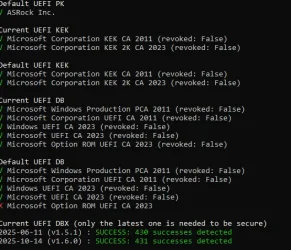
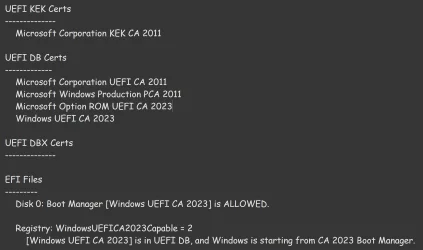
According to your next message with that screendump; things look OK to me. Don't worry about expiring that CA2011 certificate in Nov. 2026. It has been replaced by a new one CA2023. The validation has pushed forwards again. CA2011 was valid from 2011 til 2026. That's 15 Years. With the new CA2023 the expiration date is pushed forwards 2038. There is nothing to find inside your BIOS except the option secure boot on or off. Windows will look at that setting and decides to make use of secure boot yes or no. When yes that the bootmanager will look at every driver it is loading if it's certificate chain is OK. If one driver doesn't have the right certificate chain; Windows will not load that driver. Someone or something has been tampering with it. Can be a virus of a trojan that disguises itself as being a driver.
This secure boot is a Microsoft safety thing. It uses a chain of certificates just like website with their https certificates has. Trusted. In the web-world you have 3 certificates; Root certificate - Intermediate certificate - Website certificate. The expiration dates vary. A root certificate can last for a large time, the intermediate certificate some 10 years or longer, the website certificate will last for one year. That last one needs to be replaced every year. If you forgot that than the validation chain is broken and browsers are starting to complain that there is something wrong with the safety of that site. Can't be trusted anymore. Had in the past worked as a webadmin for many sites in my company. Had to yearly replace them before the expiration date.
In the case with Windows that same chain is also there. CA2011 or CA2023 is a combination of Root and Intermediate certificate in 1. Some drivers are digital signed. (If you look inside c:\windows\system32\drivers you will see that a lot of drivers from Microsoft and other vendors have their drivers digital signed and pointing to the CA2011 certificate at the moment to make sure that the driver isn't tempert with.) All vendors and Microsoft has by updating stuff pointing towards the new CA2023 before Oct. 2026. Microsoft will have to replace all signed drivers that is still pointing towards the old CA2011. They have to resign every one and let them point towards the new CA2023 certificate. (Videocard, etc. manufactures has to do this also in order to keep thing working. (If they also have drivers that are signed also) ) In order to do that that CA2023 certificate must be present on all systems.
Normally we should see nothing of this proces. It should be implemented slowly by regular updates of Windows. But someone became to exited and pushed a part of this complex mechanism ahead of the rest. After 26200.6899 i saw WMI-TPM errors appear in my Windows logbook. Was solved by hand by getting that CA2023 certificate. Later on something else was not updated also. A updated DBX had to downloaded from MS. DBX: Secure Boot Revoked Signature Database.
Once that was done everything seems to be OK. This whole thing affects only systems where secure boot is turned on obviously. What will happen if thing are not solved after Oct. 2026? Nothing. Your system will probably boot but your system is marked "not trusted" The bootloader will not update things until the situation has been resolved. This can be a security problem if some criminal want to misuse this security gap....
In the screendump you made you saw the option "Microsoft Option ROM UEFI CA 2023" marked red. It's inside the default UEFI DB section. That UEFI KEK, DB and DBX stuff is not located inside your BIOS but inside some NVRAM flash memory on your motherboard. This is where also the BIOS settings will be stored for the BIOS. (If you tell your BIOS to load it's default values; It will replace every setting in that NVRAM with default values.) If you would reset KEK, DB and DBX is will have these default values also. So more important is it's current value (that has been changed for a while I suspect) These are the settings right now. And as you can see it's marked green. Also the DBX is successful updated also (that was the point of this exercise) Hope shed some light onto the subject. It's complex.
Some more info about Secure boot, KEK, CA, DB and DBX:
Windows Secure Boot certificate expiration and CA updates - Microsoft Support