Did you manually update your Secure Boot Keys ?


My Computer My Computer

At a glance

Windows 11 ProCore i7-13700K64 GB Kingston Fury Beast DDR5Gigabyte GeForce RTX 2060 Super Gaming OC 8G
OS
Windows 11 Pro
Computer type
PC/Desktop
Manufacturer/Model
Self build
CPU
Core i7-13700K
Motherboard
Asus TUF Gaming Plus WiFi Z790
Memory
64 GB Kingston Fury Beast DDR5
Graphics Card(s)
Gigabyte GeForce RTX 2060 Super Gaming OC 8G
Sound Card
Realtek S1200A
Monitor(s) Displays
Viewsonic VP2770 & Dell (secondary)
Screen Resolution
2560 x 1440
Hard Drives
Kingston KC3000 2TB NVME SSD & SATA HDDs & SSD
PSU
EVGA SuperNova G2 850W
Case
Nanoxia Deep Silence 1
Cooling
Noctua NH-D14
Keyboard
Microsoft Digital Media Pro
Mouse
Logitech Wireless
Internet Speed
80 Mb / s
Browser
Chrome
Antivirus
Defender, Malwarebytes Free & AdwCleaner
I would do nothing and rely on Windows Updates!
This is for older, unsupported machines. There isn't going to be a BIOS or Windows Update that fixes them I don't think.
 

My Computers My Computers

  • At a glance

    Windows 11Intel i7-7700K32GB 2666Mhz (Kingston Hyper X Fury)Asus Nvidia 1050Ti
    OS
    Windows 11
    Computer type
    PC/Desktop
    Manufacturer/Model
    Custom
    CPU
    Intel i7-7700K
    Motherboard
    Asus Prime Z-270A
    Memory
    32GB 2666Mhz (Kingston Hyper X Fury)
    Graphics Card(s)
    Asus Nvidia 1050Ti
    Sound Card
    N/A
    Monitor(s) Displays
    Samsung C27F390
    Screen Resolution
    1920 x 1080
    Hard Drives
    1TB Western Digital SN770 (System) and 2TB Western Digital SN770 (Storage)
    Antivirus
    Windows Security
  • At a glance

    Windows 11 Homei9-11900H32GBIntegrated Intel and Nvidia 3050Ti
    Operating System
    Windows 11 Home
    Computer type
    Laptop
    Manufacturer/Model
    Dell/XPS 15 9510
    CPU
    i9-11900H
    Motherboard
    Unknown
    Memory
    32GB
    Graphics card(s)
    Integrated Intel and Nvidia 3050Ti
    Sound Card
    Integrated (Realtek)
    Monitor(s) Displays
    None
    Screen Resolution
    1920 x 1200 (non-Touch)
    Hard Drives
    2TB SK Hynix P41 Platinum
    Antivirus
    Windows Security
I was partially successful today. On an older HP laptop, currently running Mint (but I wanted to leave the option to run Windows again), I was able to get Mosby to successfully complete. However, I was only partially successful on a Dell XPS 9350 laptop that my kids use for educational stuff. The BIOS has more settings. I was able to 1) disable Secure Boot and remove/delete existing keys (via Custom Key section) and 2) boot to the Mosby UEFI disk. I ran "Mosby" and got messages on some certificates installing, but an error at the end that a Secure Boot parameter was invalid. I restarted and went to reenable Secure Boot in the BIOS...I got the message that a Platform key was missing and that while Secure Boot would turn on, it would not be enabled. When I booted into Windows this was the case...it shows Secure Boot = Off. I ran the Powershell script posted earlier and it shows that there are both 2023 and 2011 DB certificates...but...the KEK is still only 2011. I'm assuming that is the issue. Is there another setting(s) in Dell BIOS that I need to check/uncheck and run again?
 

My Computers My Computers

  • At a glance

    Windows 11Intel i7-7700K32GB 2666Mhz (Kingston Hyper X Fury)Asus Nvidia 1050Ti
    OS
    Windows 11
    Computer type
    PC/Desktop
    Manufacturer/Model
    Custom
    CPU
    Intel i7-7700K
    Motherboard
    Asus Prime Z-270A
    Memory
    32GB 2666Mhz (Kingston Hyper X Fury)
    Graphics Card(s)
    Asus Nvidia 1050Ti
    Sound Card
    N/A
    Monitor(s) Displays
    Samsung C27F390
    Screen Resolution
    1920 x 1080
    Hard Drives
    1TB Western Digital SN770 (System) and 2TB Western Digital SN770 (Storage)
    Antivirus
    Windows Security
  • At a glance

    Windows 11 Homei9-11900H32GBIntegrated Intel and Nvidia 3050Ti
    Operating System
    Windows 11 Home
    Computer type
    Laptop
    Manufacturer/Model
    Dell/XPS 15 9510
    CPU
    i9-11900H
    Motherboard
    Unknown
    Memory
    32GB
    Graphics card(s)
    Integrated Intel and Nvidia 3050Ti
    Sound Card
    Integrated (Realtek)
    Monitor(s) Displays
    None
    Screen Resolution
    1920 x 1200 (non-Touch)
    Hard Drives
    2TB SK Hynix P41 Platinum
    Antivirus
    Windows Security
I was partially successful today. On an older HP laptop, currently running Mint (but I wanted to leave the option to run Windows again), I was able to get Mosby to successfully complete. However, I was only partially successful on a Dell XPS 9350 laptop that my kids use for educational stuff. The BIOS has more settings. I was able to 1) disable Secure Boot and remove/delete existing keys (via Custom Key section) and 2) boot to the Mosby UEFI disk. I ran "Mosby" and got messages on some certificates installing, but an error at the end that a Secure Boot parameter was invalid. I restarted and went to reenable Secure Boot in the BIOS...I got the message that a Platform key was missing and that while Secure Boot would turn on, it would not be enabled. When I booted into Windows this was the case...it shows Secure Boot = Off. I ran the Powershell script posted earlier and it shows that there are both 2023 and 2011 DB certificates...but...the KEK is still only 2011. I'm assuming that is the issue. Is there another setting(s) in Dell BIOS that I need to check/uncheck and run again?

Did you also try the garlin method that I suggested to you earlier on?


Denis
 

My Computer My Computer

At a glance

Windows 11 Home x64 Version 25H2 Build 26200....
OS
Windows 11 Home x64 Version 25H2 Build 26200.8037
If I'm understanding the procedure...than yes...I have run the Powershell Commands and get the "True" response with respect to Windows. However, I'm trying to work on the next step...which is get the certificates operational in my BIOS/UEFI. That is where I'm stuck...and where running the Mosby command while booted into UEFI Shell isn't working/taking.
 

My Computers My Computers

  • At a glance

    Windows 11Intel i7-7700K32GB 2666Mhz (Kingston Hyper X Fury)Asus Nvidia 1050Ti
    OS
    Windows 11
    Computer type
    PC/Desktop
    Manufacturer/Model
    Custom
    CPU
    Intel i7-7700K
    Motherboard
    Asus Prime Z-270A
    Memory
    32GB 2666Mhz (Kingston Hyper X Fury)
    Graphics Card(s)
    Asus Nvidia 1050Ti
    Sound Card
    N/A
    Monitor(s) Displays
    Samsung C27F390
    Screen Resolution
    1920 x 1080
    Hard Drives
    1TB Western Digital SN770 (System) and 2TB Western Digital SN770 (Storage)
    Antivirus
    Windows Security
  • At a glance

    Windows 11 Homei9-11900H32GBIntegrated Intel and Nvidia 3050Ti
    Operating System
    Windows 11 Home
    Computer type
    Laptop
    Manufacturer/Model
    Dell/XPS 15 9510
    CPU
    i9-11900H
    Motherboard
    Unknown
    Memory
    32GB
    Graphics card(s)
    Integrated Intel and Nvidia 3050Ti
    Sound Card
    Integrated (Realtek)
    Monitor(s) Displays
    None
    Screen Resolution
    1920 x 1200 (non-Touch)
    Hard Drives
    2TB SK Hynix P41 Platinum
    Antivirus
    Windows Security
I was partially successful today. On an older HP laptop, currently running Mint (but I wanted to leave the option to run Windows again), I was able to get Mosby to successfully complete. However, I was only partially successful on a Dell XPS 9350 laptop that my kids use for educational stuff. The BIOS has more settings. I was able to 1) disable Secure Boot and remove/delete existing keys (via Custom Key section) and 2) boot to the Mosby UEFI disk. I ran "Mosby" and got messages on some certificates installing, but an error at the end that a Secure Boot parameter was invalid. I restarted and went to reenable Secure Boot in the BIOS...I got the message that a Platform key was missing and that while Secure Boot would turn on, it would not be enabled. When I booted into Windows this was the case...it shows Secure Boot = Off. I ran the Powershell script posted earlier and it shows that there are both 2023 and 2011 DB certificates...but...the KEK is still only 2011. I'm assuming that is the issue. Is there another setting(s) in Dell BIOS that I need to check/uncheck and run again?
Did you check what is needed to enable secure boot options? You went into the BIOS and turned it on, and later it said off? Really? The BIOS setting is what forces whatever any OS will see. And still Windows says; off. Go back into the BIOS. Is it still on? If it is, Windows is telling you the wrong things. But why? Normally it should detect that setting and say also "it's on!" If not? Then some condition under windows has not passed their bill to say also "yes"

Unknown the reason why. Do a in-place-instalment to get back to a fresh and new environment then. It will install the basic engine of windows and does not mess with your personal data. I have addressed that certificate issue also. Many questions arround it. I don't think your KEK issue is a problem. Run the program as I mention in my post at a different thread. That will look at your problem on a serious level. Not my design. Have to give all the credits to cjee21 in this case. I just to start to understand more what lies underneath the windows engine....


My Computers My Computers

  • At a glance

    Win 11 Pro 25H2 Build 26200.8894, Zorin OS ProIntel® Core™ i7-12700KF 12th Gen. (S1700)32GB DDR5 5600-36 Vengeance (2x16)PCIe4.0 Asus NVIDIA RTX3060Ti
    OS
    Win 11 Pro 25H2 Build 26200.8894, Zorin OS Pro
    Computer type
    PC/Desktop
    Manufacturer/Model
    Self built
    CPU
    Intel® Core™ i7-12700KF 12th Gen. (S1700)
    Motherboard
    ASUS Prime Z690-A, BIOS v4505 (Z690 Intel Chipset)
    Memory
    32GB DDR5 5600-36 Vengeance (2x16)
    Graphics Card(s)
    PCIe4.0 Asus NVIDIA RTX3060Ti
    Sound Card
    Onboard; Realtek
    Monitor(s) Displays
    34" LG 34UC79G-B Curved 21:9 144Hz
    Screen Resolution
    2560x1080 (No HDR)
    Hard Drives
    250Gb Samsung 870PRO NVMe (Win 11 Pro)
    1Tb Samsung 980PRO NVMe
    1Tb Samsung 970EVO NVMe
    2Tb Samsung 990PRO NVMe with heatsink.
    4Tb WDC WD40EZRZ Blue SATA (Int.)
    4Tb WDC WD40EZRZ Blue SATA (Int.)
    3Tb WDC WD30EFRZ Red SATA (Int.)
    256Gb Samsung 840PRO SSD (RHEL 9,5)
    256Gb Samsung 850PRO SSD (Zorin OS Pro 18)
    PSU
    Coolermaster 850W V2 Gold with internal 12cm exaust fan
    Case
    Be-Quiet Pure Base 600.
    Cooling
    3x Be-Quiet! 12/14cm "Silent Wings 4" casefans, 1x Arctic Freezer i35 CPU towerblock with fan.
    Keyboard
    Steelseries APEX 7 keyboard.
    Mouse
    Logitech G-502 Hero
    Internet Speed
    1Gb
    Browser
    Brave
    Antivirus
    F-Secure
    Other Info
    No Noise system.
    256Gb Kingston Travler USB 3.0 drive.
    64Gb Sandisk USB 3.2 drive. (Ventoy)
    8Gb Philips USB 3.0 drive. (Win. Inst.)
    8Gb Philips USB 3.0 drive. (Rescue disk)
    2Tb WD USB 3.0 Passport drive.
    USB Ext. 500Gb WD SATA drive.
    External USB 3.0 C.A. CD/DVD* burner.
  • At a glance

    Windows 11 Pro 25H2Intel® Core™ i7-6700K 6th Gen. (S1151)32Gb DDR4 2400 Corsair Vengeance (4x8)ASUS GeForce GTX1080
    Operating System
    Windows 11 Pro 25H2
    Computer type
    PC/Desktop
    Manufacturer/Model
    Selfbuild
    CPU
    Intel® Core™ i7-6700K 6th Gen. (S1151)
    Motherboard
    ASUS Maximus VIII Ranger (Intel Chipset Z170)
    Memory
    32Gb DDR4 2400 Corsair Vengeance (4x8)
    Graphics card(s)
    ASUS GeForce GTX1080
    Sound Card
    Onboard; Realtek
    Monitor(s) Displays
    LG IPS277L 27" WideLED, IPS
    Screen Resolution
    1920x1080
    Hard Drives
    Samsung 850 Pro SSD
    PSU
    Zalman ZM600-HP with internal exhaust fan. Heatpipes & Modular cables.
    Case
    Cooler Master Aero
    Cooling
    Scythe Mugen 4 dual fan towerblock.
    Keyboard
    Red Dragon
    Mouse
    Red Dragon
    Internet Speed
    1Gb
    Browser
    Chrome
    Antivirus
    F-Secure
Okay, everything is working, the message disappeared after following the guide sent here. But what if the 2011 keys expire in 2026, and I clear the CMOS? By default, I don't have 'Option ROM UEFI CA 2023' in the BIOS; I only received it after following the guide.
 

My Computer My Computer

At a glance

Windows 11
OS
Windows 11
Computer type
PC/Desktop
Manufacturer/Model
Asrock b760 pro rs
^ I got that „Option ROM UEFI CA 2023” but after doing the guide^ I got that „Option ROM UEFI CA 2023” but after doing the guide1764989587298.webp
 

My Computer My Computer

At a glance

Windows 11
OS
Windows 11
Computer type
PC/Desktop
Manufacturer/Model
Asrock b760 pro rs
Do you
I was partially successful today. On an older HP laptop, currently running Mint (but I wanted to leave the option to run Windows again), I was able to get Mosby to successfully complete. However, I was only partially successful on a Dell XPS 9350 laptop that my kids use for educational stuff. The BIOS has more settings. I was able to 1) disable Secure Boot and remove/delete existing keys (via Custom Key section) and 2) boot to the Mosby UEFI disk. I ran "Mosby" and got messages on some certificates installing, but an error at the end that a Secure Boot parameter was invalid. I restarted and went to reenable Secure Boot in the BIOS...I got the message that a Platform key was missing and that while Secure Boot would turn on, it would not be enabled. When I booted into Windows this was the case...it shows Secure Boot = Off. I ran the Powershell script posted earlier and it shows that there are both 2023 and 2011 DB certificates...but...the KEK is still only 2011. I'm assuming that is the issue. Is there another setting(s) in Dell BIOS that I need to check/uncheck and run again?
Did you check what is needed to enable secure boot options? You went into the BIOS and turned it on, and later it said off? Really? The BIOS setting is what forces whatever any OS will see. And still Windows says; off. Go back into the BIOS. Is it still on? If it is, Windows is telling you the wrong things. But why? Normally it should detect that setting and say also "it's on!" If not? Then some condition under windows has not passed their bill to say also "yes"

Unknown the reason why. Do a in-place-instalment to get back to a fresh and new environment then. It will install the basic engine of windows and does not mess with your personal data. I have addressed that certificate issue also. Many questions arround it. I don't think your KEK issue is a problem. Run the program as I mention in my post at a different thread. That will look at your problem on a serious level. Not my design. Have to give all the credits to cree21 in this case. I just to start to understand more what lies underneath the windows engine....
 

My Computers My Computers

  • At a glance

    Win 11 Pro 25H2 Build 26200.8894, Zorin OS ProIntel® Core™ i7-12700KF 12th Gen. (S1700)32GB DDR5 5600-36 Vengeance (2x16)PCIe4.0 Asus NVIDIA RTX3060Ti
    OS
    Win 11 Pro 25H2 Build 26200.8894, Zorin OS Pro
    Computer type
    PC/Desktop
    Manufacturer/Model
    Self built
    CPU
    Intel® Core™ i7-12700KF 12th Gen. (S1700)
    Motherboard
    ASUS Prime Z690-A, BIOS v4505 (Z690 Intel Chipset)
    Memory
    32GB DDR5 5600-36 Vengeance (2x16)
    Graphics Card(s)
    PCIe4.0 Asus NVIDIA RTX3060Ti
    Sound Card
    Onboard; Realtek
    Monitor(s) Displays
    34" LG 34UC79G-B Curved 21:9 144Hz
    Screen Resolution
    2560x1080 (No HDR)
    Hard Drives
    250Gb Samsung 870PRO NVMe (Win 11 Pro)
    1Tb Samsung 980PRO NVMe
    1Tb Samsung 970EVO NVMe
    2Tb Samsung 990PRO NVMe with heatsink.
    4Tb WDC WD40EZRZ Blue SATA (Int.)
    4Tb WDC WD40EZRZ Blue SATA (Int.)
    3Tb WDC WD30EFRZ Red SATA (Int.)
    256Gb Samsung 840PRO SSD (RHEL 9,5)
    256Gb Samsung 850PRO SSD (Zorin OS Pro 18)
    PSU
    Coolermaster 850W V2 Gold with internal 12cm exaust fan
    Case
    Be-Quiet Pure Base 600.
    Cooling
    3x Be-Quiet! 12/14cm "Silent Wings 4" casefans, 1x Arctic Freezer i35 CPU towerblock with fan.
    Keyboard
    Steelseries APEX 7 keyboard.
    Mouse
    Logitech G-502 Hero
    Internet Speed
    1Gb
    Browser
    Brave
    Antivirus
    F-Secure
    Other Info
    No Noise system.
    256Gb Kingston Travler USB 3.0 drive.
    64Gb Sandisk USB 3.2 drive. (Ventoy)
    8Gb Philips USB 3.0 drive. (Win. Inst.)
    8Gb Philips USB 3.0 drive. (Rescue disk)
    2Tb WD USB 3.0 Passport drive.
    USB Ext. 500Gb WD SATA drive.
    External USB 3.0 C.A. CD/DVD* burner.
  • At a glance

    Windows 11 Pro 25H2Intel® Core™ i7-6700K 6th Gen. (S1151)32Gb DDR4 2400 Corsair Vengeance (4x8)ASUS GeForce GTX1080
    Operating System
    Windows 11 Pro 25H2
    Computer type
    PC/Desktop
    Manufacturer/Model
    Selfbuild
    CPU
    Intel® Core™ i7-6700K 6th Gen. (S1151)
    Motherboard
    ASUS Maximus VIII Ranger (Intel Chipset Z170)
    Memory
    32Gb DDR4 2400 Corsair Vengeance (4x8)
    Graphics card(s)
    ASUS GeForce GTX1080
    Sound Card
    Onboard; Realtek
    Monitor(s) Displays
    LG IPS277L 27" WideLED, IPS
    Screen Resolution
    1920x1080
    Hard Drives
    Samsung 850 Pro SSD
    PSU
    Zalman ZM600-HP with internal exhaust fan. Heatpipes & Modular cables.
    Case
    Cooler Master Aero
    Cooling
    Scythe Mugen 4 dual fan towerblock.
    Keyboard
    Red Dragon
    Mouse
    Red Dragon
    Internet Speed
    1Gb
    Browser
    Chrome
    Antivirus
    F-Secure
Okay, everything is working, the message disappeared after following the guide sent here. But what if the 2011 keys expire in 2026, and I clear the CMOS? By default, I don't have 'Option ROM UEFI CA 2023' in the BIOS; I only received it after following the guide.
According to your next message with that screendump; things look OK to me. Don't worry about expiring that CA2011 certificate in Nov. 2026. It has been replaced by a new one CA2023. The validation has pushed forwards again. CA2011 was valid from 2011 til 2026. That's 15 Years. With the new CA2023 the expiration date is pushed forwards 2038. There is nothing to find inside your BIOS except the option secure boot on or off. Windows will look at that setting and decides to make use of secure boot yes or no. When yes that the bootmanager will look at every driver it is loading if it's certificate chain is OK. If one driver doesn't have the right certificate chain; Windows will not load that driver. Someone or something has been tampering with it. Can be a virus of a trojan that disguises itself as being a driver.

This secure boot is a Microsoft safety thing. It uses a chain of certificates just like website with their https certificates has. Trusted. In the web-world you have 3 certificates; Root certificate - Intermediate certificate - Website certificate. The expiration dates vary. A root certificate can last for a large time, the intermediate certificate some 10 years or longer, the website certificate will last for one year. That last one needs to be replaced every year. If you forgot that than the validation chain is broken and browsers are starting to complain that there is something wrong with the safety of that site. Can't be trusted anymore. Had in the past worked as a webadmin for many sites in my company. Had to yearly replace them before the expiration date.

In the case with Windows that same chain is also there. CA2011 or CA2023 is a combination of Root and Intermediate certificate in 1. Some drivers are digital signed. (If you look inside c:\windows\system32\drivers you will see that a lot of drivers from Microsoft and other vendors have their drivers digital signed and pointing to the CA2011 certificate at the moment to make sure that the driver isn't tempert with.) All vendors and Microsoft has by updating stuff pointing towards the new CA2023 before Oct. 2026. Microsoft will have to replace all signed drivers that is still pointing towards the old CA2011. They have to resign every one and let them point towards the new CA2023 certificate. (Videocard, etc. manufactures has to do this also in order to keep thing working. (If they also have drivers that are signed also) ) In order to do that that CA2023 certificate must be present on all systems.

Normally we should see nothing of this proces. It should be implemented slowly by regular updates of Windows. But someone became to exited and pushed a part of this complex mechanism ahead of the rest. After 26200.6899 i saw WMI-TPM errors appear in my Windows logbook. Was solved by hand by getting that CA2023 certificate. Later on something else was not updated also. A updated DBX had to downloaded from MS. DBX: Secure Boot Revoked Signature Database.

Once that was done everything seems to be OK. This whole thing affects only systems where secure boot is turned on obviously. What will happen if thing are not solved after Oct. 2026? Nothing. Your system will probably boot but your system is marked "not trusted" The bootloader will not update things until the situation has been resolved. This can be a security problem if some criminal want to misuse this security gap....

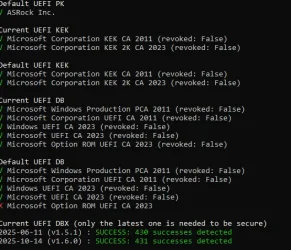
In the screendump you made you saw the option "Microsoft Option ROM UEFI CA 2023" marked red. It's inside the default UEFI DB section. That UEFI KEK, DB and DBX stuff is not located inside your BIOS but inside some NVRAM flash memory on your motherboard. This is where also the BIOS settings will be stored for the BIOS. (If you tell your BIOS to load it's default values; It will replace every setting in that NVRAM with default values.) If you would reset KEK, DB and DBX is will have these default values also. So more important is it's current value (that has been changed for a while I suspect) These are the settings right now. And as you can see it's marked green. Also the DBX is successful updated also (that was the point of this exercise) Hope shed some light onto the subject. It's complex.

Some more info about Secure boot, KEK, CA, DB and DBX: Windows Secure Boot certificate expiration and CA updates - Microsoft Support

 

My Computers My Computers

  • At a glance

    Win 11 Pro 25H2 Build 26200.8894, Zorin OS ProIntel® Core™ i7-12700KF 12th Gen. (S1700)32GB DDR5 5600-36 Vengeance (2x16)PCIe4.0 Asus NVIDIA RTX3060Ti
    OS
    Win 11 Pro 25H2 Build 26200.8894, Zorin OS Pro
    Computer type
    PC/Desktop
    Manufacturer/Model
    Self built
    CPU
    Intel® Core™ i7-12700KF 12th Gen. (S1700)
    Motherboard
    ASUS Prime Z690-A, BIOS v4505 (Z690 Intel Chipset)
    Memory
    32GB DDR5 5600-36 Vengeance (2x16)
    Graphics Card(s)
    PCIe4.0 Asus NVIDIA RTX3060Ti
    Sound Card
    Onboard; Realtek
    Monitor(s) Displays
    34" LG 34UC79G-B Curved 21:9 144Hz
    Screen Resolution
    2560x1080 (No HDR)
    Hard Drives
    250Gb Samsung 870PRO NVMe (Win 11 Pro)
    1Tb Samsung 980PRO NVMe
    1Tb Samsung 970EVO NVMe
    2Tb Samsung 990PRO NVMe with heatsink.
    4Tb WDC WD40EZRZ Blue SATA (Int.)
    4Tb WDC WD40EZRZ Blue SATA (Int.)
    3Tb WDC WD30EFRZ Red SATA (Int.)
    256Gb Samsung 840PRO SSD (RHEL 9,5)
    256Gb Samsung 850PRO SSD (Zorin OS Pro 18)
    PSU
    Coolermaster 850W V2 Gold with internal 12cm exaust fan
    Case
    Be-Quiet Pure Base 600.
    Cooling
    3x Be-Quiet! 12/14cm "Silent Wings 4" casefans, 1x Arctic Freezer i35 CPU towerblock with fan.
    Keyboard
    Steelseries APEX 7 keyboard.
    Mouse
    Logitech G-502 Hero
    Internet Speed
    1Gb
    Browser
    Brave
    Antivirus
    F-Secure
    Other Info
    No Noise system.
    256Gb Kingston Travler USB 3.0 drive.
    64Gb Sandisk USB 3.2 drive. (Ventoy)
    8Gb Philips USB 3.0 drive. (Win. Inst.)
    8Gb Philips USB 3.0 drive. (Rescue disk)
    2Tb WD USB 3.0 Passport drive.
    USB Ext. 500Gb WD SATA drive.
    External USB 3.0 C.A. CD/DVD* burner.
  • At a glance

    Windows 11 Pro 25H2Intel® Core™ i7-6700K 6th Gen. (S1151)32Gb DDR4 2400 Corsair Vengeance (4x8)ASUS GeForce GTX1080
    Operating System
    Windows 11 Pro 25H2
    Computer type
    PC/Desktop
    Manufacturer/Model
    Selfbuild
    CPU
    Intel® Core™ i7-6700K 6th Gen. (S1151)
    Motherboard
    ASUS Maximus VIII Ranger (Intel Chipset Z170)
    Memory
    32Gb DDR4 2400 Corsair Vengeance (4x8)
    Graphics card(s)
    ASUS GeForce GTX1080
    Sound Card
    Onboard; Realtek
    Monitor(s) Displays
    LG IPS277L 27" WideLED, IPS
    Screen Resolution
    1920x1080
    Hard Drives
    Samsung 850 Pro SSD
    PSU
    Zalman ZM600-HP with internal exhaust fan. Heatpipes & Modular cables.
    Case
    Cooler Master Aero
    Cooling
    Scythe Mugen 4 dual fan towerblock.
    Keyboard
    Red Dragon
    Mouse
    Red Dragon
    Internet Speed
    1Gb
    Browser
    Chrome
    Antivirus
    F-Secure
According to your next message with that screendump; things look OK to me. Don't worry about expiring that CA2011 certificate in Nov. 2026. It has been replaced by a new one CA2023. The validation has pushed forwards again. CA2011 was valid from 2011 til 2026. That's 15 Years. With the new CA2023 the expiration date is pushed forwards 2038. There is nothing to find inside your BIOS except the option secure boot on or off. Windows will look at that setting and decides to make use of secure boot yes or no. When yes that the bootmanager will look at every driver it is loading if it's certificate chain is OK. If one driver doesn't have the right certificate chain; Windows will not load that driver. Someone or something has been tampering with it. Can be a virus of a trojan that disguises itself as being a driver.

This secure boot is a Microsoft safety thing. It uses a chain of certificates just like website with their https certificates has. Trusted. In the web-world you have 3 certificates; Root certificate - Intermediate certificate - Website certificate. The expiration dates vary. A root certificate can last for a large time, the intermediate certificate some 10 years or longer, the website certificate will last for one year. That last one needs to be replaced every year. If you forgot that than the validation chain is broken and browsers are starting to complain that there is something wrong with the safety of that site. Can't be trusted anymore. Had in the past worked as a webadmin for many sites in my company. Had to yearly replace them before the expiration date.

In the case with Windows that same chain is also there. CA2011 or CA2023 is a combination of Root and Intermediate certificate in 1. Some drivers are digital signed. (If you look inside c:\windows\system32\drivers you will see that a lot of drivers from Microsoft and other vendors have their drivers digital signed and pointing to the CA2011 certificate at the moment to make sure that the driver isn't tempert with.) All vendors and Microsoft has by updating stuff pointing towards the new CA2023 before Oct. 2026. Microsoft will have to replace all signed drivers that is still pointing towards the old CA2011. They have to resign every one and let them point towards the new CA2023 certificate. (Videocard, etc. manufactures has to do this also in order to keep thing working. (If they also have drivers that are signed also) ) In order to do that that CA2023 certificate must be present on all systems.

Normally we should see nothing of this proces. It should be implemented slowly by regular updates of Windows. But someone became to exited and pushed a part of this complex mechanism ahead of the rest. After 26200.6899 i saw WMI-TPM errors appear in my Windows logbook. Was solved by hand by getting that CA2023 certificate. Later on something else was not updated also. A updated DBX had to downloaded from MS. DBX: Secure Boot Revoked Signature Database.

Once that was done everything seems to be OK. This whole thing affects only systems where secure boot is turned on obviously. What will happen if thing are not solved after Oct. 2026? Nothing. Your system will probably boot but your system is marked "not trusted" The bootloader will not update things until the situation has been resolved. This can be a security problem if some criminal want to misuse this security gap....

In the screendump you made you saw the option "Microsoft Option ROM UEFI CA 2023" marked red. It's inside the default UEFI DB section. That UEFI KEK, DB and DBX stuff is not located inside your BIOS but inside some NVRAM flash memory on your motherboard. This is where also the BIOS settings will be stored for the BIOS. (If you tell your BIOS to load it's default values; It will replace every setting in that NVRAM with default values.) If you would reset KEK, DB and DBX is will have these default values also. So more important is it's current value (that has been changed for a while I suspect) These are the settings right now. And as you can see it's marked green. Also the DBX is successful updated also (that was the point of this exercise) Hope shed some light onto the subject. It's complex.

Some more info about Secure boot, KEK, CA, DB and DBX: Windows Secure Boot certificate expiration and CA updates - Microsoft Support
Okay, thanks for your answer and the time you spent on it. One thing I’m wondering about is this: my BIOS doesn’t include the “Option ROM UEFI CA 2023” key by default. If I restore the Secure Boot keys to their default values, it will be removed so what happens then? Will it be added automatically during the Windows installation?
 

My Computer My Computer

At a glance

Windows 11
OS
Windows 11
Computer type
PC/Desktop
Manufacturer/Model
Asrock b760 pro rs
Okay, thanks for your answer and the time you spent on it. One thing I’m wondering about is this: my BIOS doesn’t include the “Option ROM UEFI CA 2023” key by default. If I restore the Secure Boot keys to their default values, it will be removed so what happens then? Will it be added automatically during the Windows installation?
That "option" is a software one. It's located inside that NVRAM mentioned earlier. If you reset these values and install Windows again. These values will be present. So don't reset these values than. If you do a fresh install of Windows again you have to view for yourself (by running that script) if they are still there. An installation will not reset those values. Turning secure boot in your BIOS on or off will not change those values also.

There is no need to reset these values stored in that NVRAM memory of your motherboard. Even if you reinstall Windows; those values are now good and wil not change. These values is not a part of any Windows installation. When secured boot is enabled windows will retrieve that information from that NVRAM memory. The only thing that maybe has to be done is getting that CA2023 certificate. In the current downloadable ISO of 25H2 at Microsoft there is still that old CA2011 certificate. Maybe MS will update that ISO to have CA2023 certificate incorporated. If not? In future updates it will be done automatically and incorporated inside the latest build updates. When this will be the case is unknown.
 

My Computers My Computers

  • At a glance

    Win 11 Pro 25H2 Build 26200.8894, Zorin OS ProIntel® Core™ i7-12700KF 12th Gen. (S1700)32GB DDR5 5600-36 Vengeance (2x16)PCIe4.0 Asus NVIDIA RTX3060Ti
    OS
    Win 11 Pro 25H2 Build 26200.8894, Zorin OS Pro
    Computer type
    PC/Desktop
    Manufacturer/Model
    Self built
    CPU
    Intel® Core™ i7-12700KF 12th Gen. (S1700)
    Motherboard
    ASUS Prime Z690-A, BIOS v4505 (Z690 Intel Chipset)
    Memory
    32GB DDR5 5600-36 Vengeance (2x16)
    Graphics Card(s)
    PCIe4.0 Asus NVIDIA RTX3060Ti
    Sound Card
    Onboard; Realtek
    Monitor(s) Displays
    34" LG 34UC79G-B Curved 21:9 144Hz
    Screen Resolution
    2560x1080 (No HDR)
    Hard Drives
    250Gb Samsung 870PRO NVMe (Win 11 Pro)
    1Tb Samsung 980PRO NVMe
    1Tb Samsung 970EVO NVMe
    2Tb Samsung 990PRO NVMe with heatsink.
    4Tb WDC WD40EZRZ Blue SATA (Int.)
    4Tb WDC WD40EZRZ Blue SATA (Int.)
    3Tb WDC WD30EFRZ Red SATA (Int.)
    256Gb Samsung 840PRO SSD (RHEL 9,5)
    256Gb Samsung 850PRO SSD (Zorin OS Pro 18)
    PSU
    Coolermaster 850W V2 Gold with internal 12cm exaust fan
    Case
    Be-Quiet Pure Base 600.
    Cooling
    3x Be-Quiet! 12/14cm "Silent Wings 4" casefans, 1x Arctic Freezer i35 CPU towerblock with fan.
    Keyboard
    Steelseries APEX 7 keyboard.
    Mouse
    Logitech G-502 Hero
    Internet Speed
    1Gb
    Browser
    Brave
    Antivirus
    F-Secure
    Other Info
    No Noise system.
    256Gb Kingston Travler USB 3.0 drive.
    64Gb Sandisk USB 3.2 drive. (Ventoy)
    8Gb Philips USB 3.0 drive. (Win. Inst.)
    8Gb Philips USB 3.0 drive. (Rescue disk)
    2Tb WD USB 3.0 Passport drive.
    USB Ext. 500Gb WD SATA drive.
    External USB 3.0 C.A. CD/DVD* burner.
  • At a glance

    Windows 11 Pro 25H2Intel® Core™ i7-6700K 6th Gen. (S1151)32Gb DDR4 2400 Corsair Vengeance (4x8)ASUS GeForce GTX1080
    Operating System
    Windows 11 Pro 25H2
    Computer type
    PC/Desktop
    Manufacturer/Model
    Selfbuild
    CPU
    Intel® Core™ i7-6700K 6th Gen. (S1151)
    Motherboard
    ASUS Maximus VIII Ranger (Intel Chipset Z170)
    Memory
    32Gb DDR4 2400 Corsair Vengeance (4x8)
    Graphics card(s)
    ASUS GeForce GTX1080
    Sound Card
    Onboard; Realtek
    Monitor(s) Displays
    LG IPS277L 27" WideLED, IPS
    Screen Resolution
    1920x1080
    Hard Drives
    Samsung 850 Pro SSD
    PSU
    Zalman ZM600-HP with internal exhaust fan. Heatpipes & Modular cables.
    Case
    Cooler Master Aero
    Cooling
    Scythe Mugen 4 dual fan towerblock.
    Keyboard
    Red Dragon
    Mouse
    Red Dragon
    Internet Speed
    1Gb
    Browser
    Chrome
    Antivirus
    F-Secure
I've tried several time to run the registry command that is supposed to update the KEK (also setting up the task to run)

reg add HKEY_LOCAL_MACHINE\SYSTEM\CurrentControlSet\Control\Secureboot /v AvailableUpdates /t REG_DWORD /d 0x5944 /f

The problem I have is about 30 seconds after a reboot, the system hardlocks. Restated: when my system tries to run the task to update the cert, it hardlocks.
I have to reboot then quickly delete the reg entry or the system will freeze again. I am currently booting from UEFI on the 2023 cert

cert.webp
 

My Computer My Computer

At a glance

Windows 11 25H2Broadwell-e 6850K 4.5ghz @1.36v32GB Corsair LPM 3600 C16EVGA RTX 3080Ti FTW
OS
Windows 11 25H2
Computer type
PC/Desktop
Manufacturer/Model
EVGA home brew
CPU
Broadwell-e 6850K 4.5ghz @1.36v
Motherboard
EVGA X99 FTW K
Memory
32GB Corsair LPM 3600 C16
Graphics Card(s)
EVGA RTX 3080Ti FTW
Sound Card
Asus Centurion true 7.1 headset. (5 speakers in each earpeice)
Monitor(s) Displays
LG C4 55"
Screen Resolution
4K 144hz
Hard Drives
Various models of SSDs ~10TB No HDDs installed.
PSU
be quiet! BN516 Straight Power 12-1000w 80 Plus Platinum
Case
Corsair 780T modified to dual 200mm intake fans
Cooling
Corsair H110i
Keyboard
Corsair K95 Platinum
Mouse
Corsair M65 RGB Elite
Internet Speed
50Mbs
I've tried several time to run the registry command that is supposed to update the KEK (also setting up the task to run)

reg add HKEY_LOCAL_MACHINE\SYSTEM\CurrentControlSet\Control\Secureboot /v AvailableUpdates /t REG_DWORD /d 0x5944 /f

The problem I have is about 30 seconds after a reboot, the system hardlocks. Restated: when my system tries to run the task to update the cert, it hardlocks.
I have to reboot then quickly delete the reg entry or the system will freeze again. I am currently booting from UEFI on the 2023 cert

An securityscript inside the tasks list will at a certain interval (runs every 12hrs) looks at this value. (it is not immediately) If it sees 0x5944 then the script is triggered and will update. After the update it will reset this value to 0x0000. You can also force it to do in now; Start a CMD-box as admin. Issue the following command;
- schtasks /run /tn "\Microsoft\Windows\PI\Secure-Boot-Update" (Location of that script matches the scripts inside the taskmanager list)

If it still fails; look at this document: Registry key updates for Secure Boot: Windows devices with IT-managed updates - Microsoft Support (You can also query other values to see if there is something wrong)

Make sure your system has no errors; Use Dism /Online /Cleanup-Image /RestoreHealth and SFC /scannow to make sure.
Note: If CA2023 is already successfully installed there is no need to do it again.
 

My Computers My Computers

  • At a glance

    Win 11 Pro 25H2 Build 26200.8894, Zorin OS ProIntel® Core™ i7-12700KF 12th Gen. (S1700)32GB DDR5 5600-36 Vengeance (2x16)PCIe4.0 Asus NVIDIA RTX3060Ti
    OS
    Win 11 Pro 25H2 Build 26200.8894, Zorin OS Pro
    Computer type
    PC/Desktop
    Manufacturer/Model
    Self built
    CPU
    Intel® Core™ i7-12700KF 12th Gen. (S1700)
    Motherboard
    ASUS Prime Z690-A, BIOS v4505 (Z690 Intel Chipset)
    Memory
    32GB DDR5 5600-36 Vengeance (2x16)
    Graphics Card(s)
    PCIe4.0 Asus NVIDIA RTX3060Ti
    Sound Card
    Onboard; Realtek
    Monitor(s) Displays
    34" LG 34UC79G-B Curved 21:9 144Hz
    Screen Resolution
    2560x1080 (No HDR)
    Hard Drives
    250Gb Samsung 870PRO NVMe (Win 11 Pro)
    1Tb Samsung 980PRO NVMe
    1Tb Samsung 970EVO NVMe
    2Tb Samsung 990PRO NVMe with heatsink.
    4Tb WDC WD40EZRZ Blue SATA (Int.)
    4Tb WDC WD40EZRZ Blue SATA (Int.)
    3Tb WDC WD30EFRZ Red SATA (Int.)
    256Gb Samsung 840PRO SSD (RHEL 9,5)
    256Gb Samsung 850PRO SSD (Zorin OS Pro 18)
    PSU
    Coolermaster 850W V2 Gold with internal 12cm exaust fan
    Case
    Be-Quiet Pure Base 600.
    Cooling
    3x Be-Quiet! 12/14cm "Silent Wings 4" casefans, 1x Arctic Freezer i35 CPU towerblock with fan.
    Keyboard
    Steelseries APEX 7 keyboard.
    Mouse
    Logitech G-502 Hero
    Internet Speed
    1Gb
    Browser
    Brave
    Antivirus
    F-Secure
    Other Info
    No Noise system.
    256Gb Kingston Travler USB 3.0 drive.
    64Gb Sandisk USB 3.2 drive. (Ventoy)
    8Gb Philips USB 3.0 drive. (Win. Inst.)
    8Gb Philips USB 3.0 drive. (Rescue disk)
    2Tb WD USB 3.0 Passport drive.
    USB Ext. 500Gb WD SATA drive.
    External USB 3.0 C.A. CD/DVD* burner.
  • At a glance

    Windows 11 Pro 25H2Intel® Core™ i7-6700K 6th Gen. (S1151)32Gb DDR4 2400 Corsair Vengeance (4x8)ASUS GeForce GTX1080
    Operating System
    Windows 11 Pro 25H2
    Computer type
    PC/Desktop
    Manufacturer/Model
    Selfbuild
    CPU
    Intel® Core™ i7-6700K 6th Gen. (S1151)
    Motherboard
    ASUS Maximus VIII Ranger (Intel Chipset Z170)
    Memory
    32Gb DDR4 2400 Corsair Vengeance (4x8)
    Graphics card(s)
    ASUS GeForce GTX1080
    Sound Card
    Onboard; Realtek
    Monitor(s) Displays
    LG IPS277L 27" WideLED, IPS
    Screen Resolution
    1920x1080
    Hard Drives
    Samsung 850 Pro SSD
    PSU
    Zalman ZM600-HP with internal exhaust fan. Heatpipes & Modular cables.
    Case
    Cooler Master Aero
    Cooling
    Scythe Mugen 4 dual fan towerblock.
    Keyboard
    Red Dragon
    Mouse
    Red Dragon
    Internet Speed
    1Gb
    Browser
    Chrome
    Antivirus
    F-Secure
The only thing that maybe has to be done is getting that CA2023 certificate. In the current downloadable ISO of 25H2 at Microsoft there is still that old CA2011 certificate. Maybe MS will update that ISO to have CA2023 certificate incorporated. If not? In future updates it will be done automatically and incorporated inside the latest build updates. When this will be the case is unknown.
Have to correct myself; CA2023 is incorporated within the 25H2 ISO. (Installed under VMWare a new Windows 25H2 VM.)

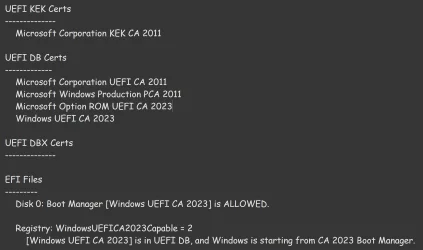
Status WindowsUEFICA2023Capable give 0x2. That means: Windows UEFI CA 2023 certificate is in the DB and the system is starting from the 2023 signed boot manager.
Status UEFICA2023Status gives NotStarted because the update proces has not been invoked yet. That's OK because WindowsUEFICA2023Capable is updated.

I also checked "Check UEFI PK, KEK, DB and DBX.cmd" It gave me a red cross at "Microsoft Option ROM UEFI CA 2023" on both current and default values. If gave also a FAIL on both v1.5.1 and v1.6.0. entry's of the DBX values.

Rebooted the system and let Windows Update getting the latest build; 26200.7171 and update the system. After the reboot ran the "Check UEFI PK, KEK, DB and DBX.cmd" script again. Both red crosses stayed on red, but the DBX part has successfully been updated; Succes.... So the update was inside that 26200.7171 update. We don't have to do this all when we do an new install or a in-place-installment. The update will correct everything.

About those 2 red crosses. It is possible that VMWare emulate that NVRAM. On my system itself only the default value was red.
Ran "Apply DB update (restart required).reg" and rebooted. After "Check UEFI PK, KEK, DB and DBX.cmd" The current value changed also to green. The situation is now identical om my VM as on my real system.....
 

My Computers My Computers

  • At a glance

    Win 11 Pro 25H2 Build 26200.8894, Zorin OS ProIntel® Core™ i7-12700KF 12th Gen. (S1700)32GB DDR5 5600-36 Vengeance (2x16)PCIe4.0 Asus NVIDIA RTX3060Ti
    OS
    Win 11 Pro 25H2 Build 26200.8894, Zorin OS Pro
    Computer type
    PC/Desktop
    Manufacturer/Model
    Self built
    CPU
    Intel® Core™ i7-12700KF 12th Gen. (S1700)
    Motherboard
    ASUS Prime Z690-A, BIOS v4505 (Z690 Intel Chipset)
    Memory
    32GB DDR5 5600-36 Vengeance (2x16)
    Graphics Card(s)
    PCIe4.0 Asus NVIDIA RTX3060Ti
    Sound Card
    Onboard; Realtek
    Monitor(s) Displays
    34" LG 34UC79G-B Curved 21:9 144Hz
    Screen Resolution
    2560x1080 (No HDR)
    Hard Drives
    250Gb Samsung 870PRO NVMe (Win 11 Pro)
    1Tb Samsung 980PRO NVMe
    1Tb Samsung 970EVO NVMe
    2Tb Samsung 990PRO NVMe with heatsink.
    4Tb WDC WD40EZRZ Blue SATA (Int.)
    4Tb WDC WD40EZRZ Blue SATA (Int.)
    3Tb WDC WD30EFRZ Red SATA (Int.)
    256Gb Samsung 840PRO SSD (RHEL 9,5)
    256Gb Samsung 850PRO SSD (Zorin OS Pro 18)
    PSU
    Coolermaster 850W V2 Gold with internal 12cm exaust fan
    Case
    Be-Quiet Pure Base 600.
    Cooling
    3x Be-Quiet! 12/14cm "Silent Wings 4" casefans, 1x Arctic Freezer i35 CPU towerblock with fan.
    Keyboard
    Steelseries APEX 7 keyboard.
    Mouse
    Logitech G-502 Hero
    Internet Speed
    1Gb
    Browser
    Brave
    Antivirus
    F-Secure
    Other Info
    No Noise system.
    256Gb Kingston Travler USB 3.0 drive.
    64Gb Sandisk USB 3.2 drive. (Ventoy)
    8Gb Philips USB 3.0 drive. (Win. Inst.)
    8Gb Philips USB 3.0 drive. (Rescue disk)
    2Tb WD USB 3.0 Passport drive.
    USB Ext. 500Gb WD SATA drive.
    External USB 3.0 C.A. CD/DVD* burner.
  • At a glance

    Windows 11 Pro 25H2Intel® Core™ i7-6700K 6th Gen. (S1151)32Gb DDR4 2400 Corsair Vengeance (4x8)ASUS GeForce GTX1080
    Operating System
    Windows 11 Pro 25H2
    Computer type
    PC/Desktop
    Manufacturer/Model
    Selfbuild
    CPU
    Intel® Core™ i7-6700K 6th Gen. (S1151)
    Motherboard
    ASUS Maximus VIII Ranger (Intel Chipset Z170)
    Memory
    32Gb DDR4 2400 Corsair Vengeance (4x8)
    Graphics card(s)
    ASUS GeForce GTX1080
    Sound Card
    Onboard; Realtek
    Monitor(s) Displays
    LG IPS277L 27" WideLED, IPS
    Screen Resolution
    1920x1080
    Hard Drives
    Samsung 850 Pro SSD
    PSU
    Zalman ZM600-HP with internal exhaust fan. Heatpipes & Modular cables.
    Case
    Cooler Master Aero
    Cooling
    Scythe Mugen 4 dual fan towerblock.
    Keyboard
    Red Dragon
    Mouse
    Red Dragon
    Internet Speed
    1Gb
    Browser
    Chrome
    Antivirus
    F-Secure
Did you check what is needed to enable secure boot options? You went into the BIOS and turned it on, and later it said off? Really? The BIOS setting is what forces whatever any OS will see. And still Windows says; off. Go back into the BIOS. Is it still on? If it is, Windows is telling you the wrong things. But why? Normally it should detect that setting and say also "it's on!" If not? Then some condition under windows has not passed their bill to say also "yes"

Unknown the reason why. Do a in-place-instalment to get back to a fresh and new environment then. It will install the basic engine of windows and does not mess with your personal data. I have addressed that certificate issue also. Many questions arround it. I don't think your KEK issue is a problem. Run the program as I mention in my post at a different thread. That will look at your problem on a serious level. Not my design. Have to give all the credits to cjee21 in this case. I just to start to understand more what lies underneath the windows engine....

Attached is as far as I seem to be able to get....It might have something to do with the Windows UEFICA23Capable registry value. I haven't checked my wife's HP laptop (though it is only 2 years old...should get updated via BIOS update), but my other machines seem to be good now...with the exception of waiting to revoke the 2011 certificates. Here is the best I can get this stubborn Dell XPS 13 9350 (kid's laptop) to:

Secure Boot: ON
BitLocker on (C:) OFF

UEFI KEK Certs
--------------
Microsoft Corporation KEK CA 2011

UEFI DB Certs
-------------
Microsoft Corporation UEFI CA 2011
Microsoft Windows Production PCA 2011
Microsoft Option ROM UEFI CA 2023
Microsoft UEFI CA 2023
Windows UEFI CA 2023

UEFI DBX Certs
--------------
Microsoft Windows PCA 2010

EFI Files
---------
Disk 0: Boot Manager [Production PCA 2011] is ALLOWED.

Registry: WindowsUEFICA2023Capable = 1
[Windows UEFI CA 2023] is in UEFI DB.

That result is from using the Powershell scripts from ElevenForum. I can't get the UEFI KEK cert to install, nor get the machine to boot from 2023 certificate.
 

My Computers My Computers

  • At a glance

    Windows 11Intel i7-7700K32GB 2666Mhz (Kingston Hyper X Fury)Asus Nvidia 1050Ti
    OS
    Windows 11
    Computer type
    PC/Desktop
    Manufacturer/Model
    Custom
    CPU
    Intel i7-7700K
    Motherboard
    Asus Prime Z-270A
    Memory
    32GB 2666Mhz (Kingston Hyper X Fury)
    Graphics Card(s)
    Asus Nvidia 1050Ti
    Sound Card
    N/A
    Monitor(s) Displays
    Samsung C27F390
    Screen Resolution
    1920 x 1080
    Hard Drives
    1TB Western Digital SN770 (System) and 2TB Western Digital SN770 (Storage)
    Antivirus
    Windows Security
  • At a glance

    Windows 11 Homei9-11900H32GBIntegrated Intel and Nvidia 3050Ti
    Operating System
    Windows 11 Home
    Computer type
    Laptop
    Manufacturer/Model
    Dell/XPS 15 9510
    CPU
    i9-11900H
    Motherboard
    Unknown
    Memory
    32GB
    Graphics card(s)
    Integrated Intel and Nvidia 3050Ti
    Sound Card
    Integrated (Realtek)
    Monitor(s) Displays
    None
    Screen Resolution
    1920 x 1200 (non-Touch)
    Hard Drives
    2TB SK Hynix P41 Platinum
    Antivirus
    Windows Security
@mccmw
please have a look at this post it may help with updating your DELL 9350

on part A give it about 5 minutes between reboots

then wait about another 5 minutes before attempting part B

after completing both parts A and B then check your systems secure boot registry keys.
best of luck Steve ..
 

My Computers My Computers

  • At a glance

    Windows 11 HomeRyzen 7 5825u64GB DDR4 3200Ryzen 7 5825u
    OS
    Windows 11 Home
    Computer type
    PC/Desktop
    Manufacturer/Model
    HP 24" AiO
    CPU
    Ryzen 7 5825u
    Motherboard
    HP
    Memory
    64GB DDR4 3200
    Graphics Card(s)
    Ryzen 7 5825u
    Sound Card
    RealTek
    Monitor(s) Displays
    24" HP AiO
    Screen Resolution
    1920 x 1080 @60 Hz
    Hard Drives
    1TB WD Blue SN580 M2 SSD Partitioned.
    2x 1TB USB HDD External Backup/Storage.
    PSU
    90W external power brick
    Case
    24" All in One
    Cooling
    Default Air Cooling
    Keyboard
    HP WiFi UK extended
    Mouse
    HP WiFi 3 Button
    Internet Speed
    1GB full fibre
    Browser
    Edge & Firefox
    Antivirus
    AVG Internet Security/Windows Defender
    Other Info
    Mainly Open Source Software
  • At a glance

    Ubuntu 22.04.5 LTSi5 7200u16GB DDR4Intel
    Operating System
    Ubuntu 22.04.5 LTS
    Computer type
    Laptop
    Manufacturer/Model
    Dell 13" Latitude 2017
    CPU
    i5 7200u
    Motherboard
    Dell
    Memory
    16GB DDR4
    Graphics card(s)
    Intel
    Sound Card
    Intel
    Monitor(s) Displays
    13" Dell Laptop
    Hard Drives
    250GB Crucial 2.5" SSD
    Mouse
    Generic WiFi 3 button
    Internet Speed
    WiFi only
    Browser
    Firefox
    Antivirus
    ClamAV TK
    Other Info
    Mainly Open Source Software
That result is from using the Powershell scripts from ElevenForum. I can't get the UEFI KEK cert to install, nor get the machine to boot from 2023 certificate.
Can you run "Check UEFI PK, KEK, DB and DBX.cmd" as part of the github solution. (Download the zip-file) GitHub - cjee21/Check-UEFISecureBootVariables: PowerShell scripts to check the UEFI KEK, DB and DBX Secure Boot variables. And send us the screendump of it's result? The UEFI KEK part is not maintained by Windows but usually by the manufacturer. (OEM) (BIOS update?)

The scripts are able to update the UEFI DB and UEFI DBX. For more information about UEFI KEK; Understanding UEFI Secure Boot and how it helps to secure the Windows 10 boot process

Note#1 - I explained the usage of those cjee21 scripts earlier in an other thread. How to check if your Secure Boot certs are updated. (two methods)
Note#2 - Make sure that secure boot is turned on inside your BIOS.
 

My Computers My Computers

  • At a glance

    Win 11 Pro 25H2 Build 26200.8894, Zorin OS ProIntel® Core™ i7-12700KF 12th Gen. (S1700)32GB DDR5 5600-36 Vengeance (2x16)PCIe4.0 Asus NVIDIA RTX3060Ti
    OS
    Win 11 Pro 25H2 Build 26200.8894, Zorin OS Pro
    Computer type
    PC/Desktop
    Manufacturer/Model
    Self built
    CPU
    Intel® Core™ i7-12700KF 12th Gen. (S1700)
    Motherboard
    ASUS Prime Z690-A, BIOS v4505 (Z690 Intel Chipset)
    Memory
    32GB DDR5 5600-36 Vengeance (2x16)
    Graphics Card(s)
    PCIe4.0 Asus NVIDIA RTX3060Ti
    Sound Card
    Onboard; Realtek
    Monitor(s) Displays
    34" LG 34UC79G-B Curved 21:9 144Hz
    Screen Resolution
    2560x1080 (No HDR)
    Hard Drives
    250Gb Samsung 870PRO NVMe (Win 11 Pro)
    1Tb Samsung 980PRO NVMe
    1Tb Samsung 970EVO NVMe
    2Tb Samsung 990PRO NVMe with heatsink.
    4Tb WDC WD40EZRZ Blue SATA (Int.)
    4Tb WDC WD40EZRZ Blue SATA (Int.)
    3Tb WDC WD30EFRZ Red SATA (Int.)
    256Gb Samsung 840PRO SSD (RHEL 9,5)
    256Gb Samsung 850PRO SSD (Zorin OS Pro 18)
    PSU
    Coolermaster 850W V2 Gold with internal 12cm exaust fan
    Case
    Be-Quiet Pure Base 600.
    Cooling
    3x Be-Quiet! 12/14cm "Silent Wings 4" casefans, 1x Arctic Freezer i35 CPU towerblock with fan.
    Keyboard
    Steelseries APEX 7 keyboard.
    Mouse
    Logitech G-502 Hero
    Internet Speed
    1Gb
    Browser
    Brave
    Antivirus
    F-Secure
    Other Info
    No Noise system.
    256Gb Kingston Travler USB 3.0 drive.
    64Gb Sandisk USB 3.2 drive. (Ventoy)
    8Gb Philips USB 3.0 drive. (Win. Inst.)
    8Gb Philips USB 3.0 drive. (Rescue disk)
    2Tb WD USB 3.0 Passport drive.
    USB Ext. 500Gb WD SATA drive.
    External USB 3.0 C.A. CD/DVD* burner.
  • At a glance

    Windows 11 Pro 25H2Intel® Core™ i7-6700K 6th Gen. (S1151)32Gb DDR4 2400 Corsair Vengeance (4x8)ASUS GeForce GTX1080
    Operating System
    Windows 11 Pro 25H2
    Computer type
    PC/Desktop
    Manufacturer/Model
    Selfbuild
    CPU
    Intel® Core™ i7-6700K 6th Gen. (S1151)
    Motherboard
    ASUS Maximus VIII Ranger (Intel Chipset Z170)
    Memory
    32Gb DDR4 2400 Corsair Vengeance (4x8)
    Graphics card(s)
    ASUS GeForce GTX1080
    Sound Card
    Onboard; Realtek
    Monitor(s) Displays
    LG IPS277L 27" WideLED, IPS
    Screen Resolution
    1920x1080
    Hard Drives
    Samsung 850 Pro SSD
    PSU
    Zalman ZM600-HP with internal exhaust fan. Heatpipes & Modular cables.
    Case
    Cooler Master Aero
    Cooling
    Scythe Mugen 4 dual fan towerblock.
    Keyboard
    Red Dragon
    Mouse
    Red Dragon
    Internet Speed
    1Gb
    Browser
    Chrome
    Antivirus
    F-Secure
Sorry; Had to revise my last respons (time limit) This is the corrected version with some more information;

That result is from using the Powershell scripts from ElevenForum. I can't get the UEFI KEK cert to install, nor get the machine to boot from 2023 certificate.
Can you run "Check UEFI PK, KEK, DB and DBX.cmd" as part of the github solution. (Download the zip-file) GitHub - cjee21/Check-UEFISecureBootVariables: PowerShell scripts to check the UEFI KEK, DB and DBX Secure Boot variables. And send us the screendump of it's result? The UEFI KEK part is not maintained by Windows but usually by the manufacturer. (OEM) (BIOS update?)

The scripts are able to update the UEFI DB and UEFI DBX. For more information about UEFI KEK; Understanding UEFI Secure Boot and how it helps to secure the Windows 10 boot process

Note#1 - I explained the usage of those cjee21 scripts earlier in an other thread. How to check if your Secure Boot certs are updated. (two methods)
Note#2 - Secure boot is turned on, WindowsUEFICA2023Capable = 0x0001. Should be 0x0002; That's your current issue!!!!

Just run the following commands inside a DOS-box as admin to verify it's status; "Check Windows State.cmd" (as part of cjee21 scripts)
Result must be;
UEFISecureBootEnabled : 1 (0; Not enabled, 1; Enabled)
AvailableUpdates : 0x0000 (0; No updates requested or finished; 2; Update requested)
UEFICA2023Status : Updated (Updated; Already updated. NotStarted; no need to update. InProgress; Update is pending.)
WindowsUEFICA2023Capable : Windows UEFI CA 2023 cert is in DB, system is starting from 2023 signed boot manager

Possible values;
0x0 - Windows UEFI CA 2023 certificate is not in the DB (or key does not exist).
0x1 - Windows UEFI CA 2023 certificate is in the DB.
0x2 - Windows UEFI CA 2023 cert is in DB, system is starting from 2023 signed boot manager

According to those cjee21 scripts (and the output of "Check UEFI PK, KEK, DB and DBX.cmd") you have to run "Apply DBX update (restart required).reg" and or "Apply DBX update (restart required).reg" If UEFI DBX said FAIL; DBX update and if there is a red cross inside the UEFI DB current value section; DB update.

Reboot. If the status is still "InProgress"? Forget rebooting a couple of times. The status of the above scripts will stay a long time (will run somewhere in a 12 hour window) on "InProgress" Just run the following command to force that task of the taskmanager that will update the status a couple of times. (DOS-box as admin) schtasks /run /tn "\Microsoft\Windows\PI\Secure-Boot-Update" Run "Check Windows State.cmd" to see it progress. The status will change very quickly from "InProgress" into "Updated".
 
Last edited:

My Computers My Computers

  • At a glance

    Win 11 Pro 25H2 Build 26200.8894, Zorin OS ProIntel® Core™ i7-12700KF 12th Gen. (S1700)32GB DDR5 5600-36 Vengeance (2x16)PCIe4.0 Asus NVIDIA RTX3060Ti
    OS
    Win 11 Pro 25H2 Build 26200.8894, Zorin OS Pro
    Computer type
    PC/Desktop
    Manufacturer/Model
    Self built
    CPU
    Intel® Core™ i7-12700KF 12th Gen. (S1700)
    Motherboard
    ASUS Prime Z690-A, BIOS v4505 (Z690 Intel Chipset)
    Memory
    32GB DDR5 5600-36 Vengeance (2x16)
    Graphics Card(s)
    PCIe4.0 Asus NVIDIA RTX3060Ti
    Sound Card
    Onboard; Realtek
    Monitor(s) Displays
    34" LG 34UC79G-B Curved 21:9 144Hz
    Screen Resolution
    2560x1080 (No HDR)
    Hard Drives
    250Gb Samsung 870PRO NVMe (Win 11 Pro)
    1Tb Samsung 980PRO NVMe
    1Tb Samsung 970EVO NVMe
    2Tb Samsung 990PRO NVMe with heatsink.
    4Tb WDC WD40EZRZ Blue SATA (Int.)
    4Tb WDC WD40EZRZ Blue SATA (Int.)
    3Tb WDC WD30EFRZ Red SATA (Int.)
    256Gb Samsung 840PRO SSD (RHEL 9,5)
    256Gb Samsung 850PRO SSD (Zorin OS Pro 18)
    PSU
    Coolermaster 850W V2 Gold with internal 12cm exaust fan
    Case
    Be-Quiet Pure Base 600.
    Cooling
    3x Be-Quiet! 12/14cm "Silent Wings 4" casefans, 1x Arctic Freezer i35 CPU towerblock with fan.
    Keyboard
    Steelseries APEX 7 keyboard.
    Mouse
    Logitech G-502 Hero
    Internet Speed
    1Gb
    Browser
    Brave
    Antivirus
    F-Secure
    Other Info
    No Noise system.
    256Gb Kingston Travler USB 3.0 drive.
    64Gb Sandisk USB 3.2 drive. (Ventoy)
    8Gb Philips USB 3.0 drive. (Win. Inst.)
    8Gb Philips USB 3.0 drive. (Rescue disk)
    2Tb WD USB 3.0 Passport drive.
    USB Ext. 500Gb WD SATA drive.
    External USB 3.0 C.A. CD/DVD* burner.
  • At a glance

    Windows 11 Pro 25H2Intel® Core™ i7-6700K 6th Gen. (S1151)32Gb DDR4 2400 Corsair Vengeance (4x8)ASUS GeForce GTX1080
    Operating System
    Windows 11 Pro 25H2
    Computer type
    PC/Desktop
    Manufacturer/Model
    Selfbuild
    CPU
    Intel® Core™ i7-6700K 6th Gen. (S1151)
    Motherboard
    ASUS Maximus VIII Ranger (Intel Chipset Z170)
    Memory
    32Gb DDR4 2400 Corsair Vengeance (4x8)
    Graphics card(s)
    ASUS GeForce GTX1080
    Sound Card
    Onboard; Realtek
    Monitor(s) Displays
    LG IPS277L 27" WideLED, IPS
    Screen Resolution
    1920x1080
    Hard Drives
    Samsung 850 Pro SSD
    PSU
    Zalman ZM600-HP with internal exhaust fan. Heatpipes & Modular cables.
    Case
    Cooler Master Aero
    Cooling
    Scythe Mugen 4 dual fan towerblock.
    Keyboard
    Red Dragon
    Mouse
    Red Dragon
    Internet Speed
    1Gb
    Browser
    Chrome
    Antivirus
    F-Secure
The UEFI KEK part is not maintained by Windows but usually by the manufacturer. (OEM) (BIOS update?)
I think it's a little more nuanced....

The Microsoft UEFI 2023 KEK distributed with these secure boot updates is issued by Microsoft Corp and then signed by the system (or motherboard) manufacturer using the system's PK that they control and then returned to Microsoft to be distributed in their updates. It is also included in BIOS updates by the manufacturer.

That seems to be the reason for at least some of the problems people have experienced getting KEK's for systems where the OEM has decided to not support.
 
Last edited:

My Computers My Computers

  • At a glance

    Windows 11 ProRyzen 7 5800XGSkill 3200, 2x8GBMSI RX 6800 XT Gaming Z
    OS
    Windows 11 Pro
    Computer type
    PC/Desktop
    Manufacturer/Model
    DIY
    CPU
    Ryzen 7 5800X
    Motherboard
    Gigabyte B550M Aorus Pro
    Memory
    GSkill 3200, 2x8GB
    Graphics Card(s)
    MSI RX 6800 XT Gaming Z
    Sound Card
    on-board Realtek
    Monitor(s) Displays
    MSI 180hz
    Screen Resolution
    1440p
    Hard Drives
    Samsung 980 Pro, Samsung 870 Evo, generic PCIe NVME, WD 1TB 2.5" laptop spinner
    PSU
    Corsair RM 650
    Case
    mATX
    Cooling
    BeQuiet 240mm AIO and a bunch of case fans
    Keyboard
    one that clacks softly
    Mouse
    logitech
    Internet Speed
    bunches of bps
    Browser
    Firefox
    Antivirus
    Windows' own
  • At a glance

    Win11 ProRyzen 7 170016GB DDR4RX-480
    Operating System
    Win11 Pro
    Computer type
    PC/Desktop
    Manufacturer/Model
    DIY
    CPU
    Ryzen 7 1700
    Motherboard
    GA-AB350M G-3
    Memory
    16GB DDR4
    Graphics card(s)
    RX-480
    Sound Card
    In-Built Realtek
    Monitor(s) Displays
    Samsung
    Screen Resolution
    1440p
    Hard Drives
    NVME/SSD's
    PSU
    Thermaltake BX1 550W
    Case
    Some junky thing
    Cooling
    ThermalTake Assassin(?)
    Browser
    FF/Edge
    Antivirus
    Whatever Windows does
    Other Info
    Secure Boot enabled updated to 2023 CA keys, TPM2.0 enabled with system drive Bitlocker'd.

Latest Support Threads

Back
Top Bottom