Solved Different desktops but the same icons


Dexpot does exact the same as windows desktops
No it does not, or, it shouldn't!
the icons are the same on every desktop.
System Icons such as Recycle Bin, etc., yes.
If you delete something on desktop1 is also disappears on the other desktops.
Nope, you're doing something wrong.
Creating an empty desktop2 and fill it with applications that only are visible on desktop2
That's how it works.
My 4 Dexpot Desktops:
Different isolated folders, files and applications running..., can't close or delete items on one from another...

4.webp
 

My Computers

System One System Two

  • OS
    Windows 11 Pro
    Computer type
    PC/Desktop
    Manufacturer/Model
    ASUS ROG Strix
  • Operating System
    Windows 11 Pro
    Computer type
    Laptop
    Manufacturer/Model
    ASUS VivoBook
With 6 monitors, I don't use Virtual Desktops that much, unless one of the kids wants to do something on an isolated Desktop.

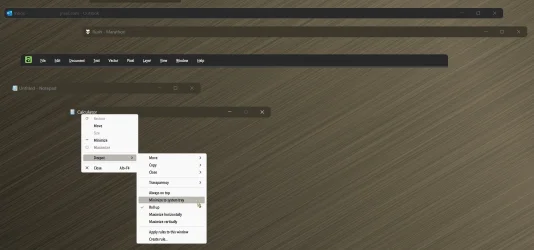
I do like the Rollup and Minimize To System Tray features though!

0008253.webp
 

My Computers

System One System Two

  • OS
    Windows 11 Pro
    Computer type
    PC/Desktop
    Manufacturer/Model
    ASUS ROG Strix
  • Operating System
    Windows 11 Pro
    Computer type
    Laptop
    Manufacturer/Model
    ASUS VivoBook
Yes I have, and I see two icons. These two icons I also see on my other desktops.
So now you understand what's going on you can fix it.
Shortcuts in the Public desktop folder get shown on all desktops. That is what the Public desktop is designed to do.
In all the examples I have seen, the Public desktop shortcuts have been created by application installations.


Denis
 

My Computer

System One

  • OS
    Windows 11 Home x64 Version 25H2 Build 26200.8037
no. it does exactly what you're asking for. i just tested it on a spare pc.
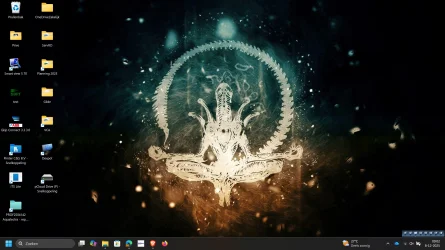
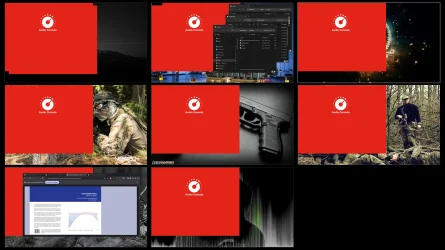
??? I don't understand. I have now 8 desktops, every desktop that i create has the same icons on it like desktop1, the original windows dekstop. If i creat an map, or delete an map, the results are exactly the samen on al 8 desktops. I put a screenshot of my first desktop and an 8 screen overview. Maybe I am missing someting. I have abdolute no experoience with Dexpopt so I hope somebody casn help to clear the desktops. Opening an application stays only on the desktop where you open it, so thats good.
 

Attachments

  • Desktop1.webp
    Desktop1.webp
    320.5 KB · Views: 2
  • Overview desktop 1-8.webp
    Overview desktop 1-8.webp
    363.3 KB · Views: 2

My Computer

System One

  • OS
    Windows 11 25H2 build 26200.7309
    Computer type
    Laptop
    Manufacturer/Model
    Asus Vivobook
    CPU
    12th Gen Intel Core i7 1255U
    Motherboard
    Asus X1505ZA
    Memory
    16 GB DDR4
    Graphics Card(s)
    Intel Iris XE
    Sound Card
    Intel Alder Lake
    Monitor(s) Displays
    Samsung ATNA56AC01-0
    Screen Resolution
    2880x1620 OLED
    Antivirus
    Sophos
... every desktop that i create has the same icons on it...
Did you do as @dacrone suggested, create a different folder for each Desktop?
It's like creating numerous user accounts, sort of...
 

My Computers

System One System Two

  • OS
    Windows 11 Pro
    Computer type
    PC/Desktop
    Manufacturer/Model
    ASUS ROG Strix
  • Operating System
    Windows 11 Pro
    Computer type
    Laptop
    Manufacturer/Model
    ASUS VivoBook
There is an app for Windows 11 now.
It's called MultiDesk and it does exactly what I need: multiple workspaces with dedicated icons.


My Computer

System One

  • OS
    Win 11
    Computer type
    PC/Desktop
Back
Top Bottom