Solved Disable Microsoft Edge blocking of downloads of certain file extensions (xml, ps1, reg)


AsadAlrafidain

Well-known member
Member
Local time
12:04 AM
Posts
99
OS
Windows 11 24H2 Version 10.0.26100.2605
Hello


Untitled.png
is there a registry tweak to disable this? I'm trying to integrate the tweak into NTLite
I've searched the internet but only came up with this reg file that disable this feature for a single filetype


Windows Registry Editor Version 5.00

[HKEY_LOCAL_MACHINE\SOFTWARE\Policies\Microsoft\Edge\ExemptFileTypeDownloadWarnings ]
"1"="{\"file_extension\": \"exe\", \"domains\": [\"*\"]}"


the problem is that I want to disable this feature for multiple filetypes (exe, msi, ps1, xml, reg, py)...can this be done? I've tried using separaters between file extensions ( , ; | )
but it didn't work


edit: I've already disabled smartscreen from edge settings and from defender settings
 
Last edited:

My Computer My Computer

At a glance

Windows 11 24H2 Version 10.0.26100.2605Core I5 66002 x 8 HeperX Fury DDR4 2666 HZNvidia GTX 1070 ti
OS
Windows 11 24H2 Version 10.0.26100.2605
Computer type
PC/Desktop
CPU
Core I5 6600
Motherboard
Gigabyte Z170x Gaming 5
Memory
2 x 8 HeperX Fury DDR4 2666 HZ
Graphics Card(s)
Nvidia GTX 1070 ti
Monitor(s) Displays
165 HZ Gigabyte GS32QC
Screen Resolution
1440p
Hard Drives
1TB NVME M.2 Samsung 990 Pro

It's Windows Defender smart screen blocking the files for your protection.


My Computer My Computer

At a glance

Windows 11AMD Ryzen 7 5700GMicron Technology DDR4-3200 16GBNVIDIA GeForce RTX 3060
OS
Windows 11
Computer type
PC/Desktop
Manufacturer/Model
HP Pavilion
CPU
AMD Ryzen 7 5700G
Motherboard
Erica6
Memory
Micron Technology DDR4-3200 16GB
Graphics Card(s)
NVIDIA GeForce RTX 3060
Sound Card
Realtek ALC671
Monitor(s) Displays
Samsung SyncMaster U28E590
Screen Resolution
3840 x 2160
Hard Drives
SAMSUNG MZVLQ1T0HALB-000H1
It's Windows Defender smart screen blocking the files for your protection.

I've already disabled smartscreen from edge settings and from defender settings
 

My Computer My Computer

At a glance

Windows 11 24H2 Version 10.0.26100.2605Core I5 66002 x 8 HeperX Fury DDR4 2666 HZNvidia GTX 1070 ti
OS
Windows 11 24H2 Version 10.0.26100.2605
Computer type
PC/Desktop
CPU
Core I5 6600
Motherboard
Gigabyte Z170x Gaming 5
Memory
2 x 8 HeperX Fury DDR4 2666 HZ
Graphics Card(s)
Nvidia GTX 1070 ti
Monitor(s) Displays
165 HZ Gigabyte GS32QC
Screen Resolution
1440p
Hard Drives
1TB NVME M.2 Samsung 990 Pro

Disabling SmartScreen is terrible idea if you enjoy secure browsing.

This is the correct reg file format:
Code:
[HKEY_LOCAL_MACHINE\SOFTWARE\Policies\Microsoft\Edge\ExemptFileTypeDownloadWarnings]
"1"="{\"file_extension\": \"exe\", \"domains\": [\"*\"]}"
"2"="{\"file_extension\": \"reg\", \"domains\": [\"*\"]}"
"3"="{\"file_extension\": \"ps1\", \"domains\": [\"*\"]}"
"4"="{\"file_extension\": \"xml\", \"domains\": [\"*\"]}"

Depending on your Edge version, it might be the older:
Code:
[HKEY_LOCAL_MACHINE\SOFTWARE\Policies\Microsoft\Edge\ExemptDomainFileTypePairsFromFileTypeDownloadWarnings]
 

My Computer My Computer

At a glance

Windows 7
OS
Windows 7
Disabling SmartScreen is terrible idea if you enjoy secure browsing.

This is the correct reg file format:
Code:
[HKEY_LOCAL_MACHINE\SOFTWARE\Policies\Microsoft\Edge\ExemptFileTypeDownloadWarnings]
"1"="{\"file_extension\": \"exe\", \"domains\": [\"*\"]}"
"2"="{\"file_extension\": \"reg\", \"domains\": [\"*\"]}"
"3"="{\"file_extension\": \"ps1\", \"domains\": [\"*\"]}"
"4"="{\"file_extension\": \"xml\", \"domains\": [\"*\"]}"

Depending on your Edge version, it might be the older:
Code:
[HKEY_LOCAL_MACHINE\SOFTWARE\Policies\Microsoft\Edge\ExemptDomainFileTypePairsFromFileTypeDownloadWarnings]
Unfortunately, this didn't work....and tried using both "ExemptFileTypeDownloadWarnings" and "ExemptDomainFileTypePairsFromFileTypeDownloadWarnings"........


Untitled.png
 

My Computer My Computer

At a glance

Windows 11 24H2 Version 10.0.26100.2605Core I5 66002 x 8 HeperX Fury DDR4 2666 HZNvidia GTX 1070 ti
OS
Windows 11 24H2 Version 10.0.26100.2605
Computer type
PC/Desktop
CPU
Core I5 6600
Motherboard
Gigabyte Z170x Gaming 5
Memory
2 x 8 HeperX Fury DDR4 2666 HZ
Graphics Card(s)
Nvidia GTX 1070 ti
Monitor(s) Displays
165 HZ Gigabyte GS32QC
Screen Resolution
1440p
Hard Drives
1TB NVME M.2 Samsung 990 Pro

MS is intentionally trying to make life harder for users, you can just use a download manager.
 

My Computer My Computer

At a glance

Home26H2CanAMD Ryzen 5 8600G (07/24)2x32GB Kingston FURY DDR5 5600 MHz CL36 @5200...ASROCK Radeon RX 6600 Challenger D 8G @48FPS ...
OS
Home26H2Can
Computer type
PC/Desktop
CPU
AMD Ryzen 5 8600G (07/24)
Motherboard
ASROCK B650M-HDV/M.2 (07/24) BIOS 4.21 AGESA ComboAM5 1.3.0.1 (04/26)
Memory
2x32GB Kingston FURY DDR5 5600 MHz CL36 @5200 CL36 (07/24)
Graphics Card(s)
ASROCK Radeon RX 6600 Challenger D 8G @48FPS (08/24)
Sound Card
Creative Sound BlasterX AE-5 Plus (05/24)
Monitor(s) Displays
24" Philips 24M1N3200ZS/00 (05/24)
Screen Resolution
1920×1080@165Hz via DP1.4
Hard Drives
Kingston KC3000 NVMe 2TB (05/24)
ADATA XPG GAMMIX S11 Pro 512GB (07/19)
PSU
Seasonic Core GM 550 Gold (04/24)
Case
Fractal Design Define 7 Mini with 3x Noctua NF-P14s/12@555rpm (04/24)
Cooling
Noctua NH-U12S with Noctua NF-P12 (04/24)
Keyboard
HP Pavilion Wired Keyboard 300 (07/24) + Rabalux 76017 Parker (01/24)
Mouse
Logitech M330 Silent Plus (01/26)
Internet Speed
500/100 Mbps via RouterOS (05/21) & TCP Optimizer
Browser
Edge, Brave for YouTube, LibreWolf for FB
Antivirus
NextDNS blocking 1/3 Traffic
Other Info
Phone: Motorola Moto G86 (02/26)
Backup: Hasleo Backup Suite (PreOS)
Headphones: Sennheiser RS170 (09/10)
Chair: Huzaro Force 4.4 Grey Mesh (05/24)
Notifier: Xiaomi Mi Band 9 Milanese (10/24)
FlexCore USB-C 3.2 Gen 1 (M) to LAN (F) (08/25)
MS is intentionally trying to make life harder for users, you can just use a download manager.
I've installed it but edge still blocks the downloads and I have to do the extra step of clicking on "keep"

Untitled.png

Frankly, even if it did work it still wouldn't be a viable option for me.....I moved away from download managers long ago, and I'm trying to operate on as minimum background processes as possible
 

My Computer My Computer

At a glance

Windows 11 24H2 Version 10.0.26100.2605Core I5 66002 x 8 HeperX Fury DDR4 2666 HZNvidia GTX 1070 ti
OS
Windows 11 24H2 Version 10.0.26100.2605
Computer type
PC/Desktop
CPU
Core I5 6600
Motherboard
Gigabyte Z170x Gaming 5
Memory
2 x 8 HeperX Fury DDR4 2666 HZ
Graphics Card(s)
Nvidia GTX 1070 ti
Monitor(s) Displays
165 HZ Gigabyte GS32QC
Screen Resolution
1440p
Hard Drives
1TB NVME M.2 Samsung 990 Pro

Disabling SmartScreen is terrible idea if you enjoy secure browsing.

This is the correct reg file format:
Code:
[HKEY_LOCAL_MACHINE\SOFTWARE\Policies\Microsoft\Edge\ExemptFileTypeDownloadWarnings]
"1"="{\"file_extension\": \"exe\", \"domains\": [\"*\"]}"
"2"="{\"file_extension\": \"reg\", \"domains\": [\"*\"]}"
"3"="{\"file_extension\": \"ps1\", \"domains\": [\"*\"]}"
"4"="{\"file_extension\": \"xml\", \"domains\": [\"*\"]}"

Depending on your Edge version, it might be the older:
Code:
[HKEY_LOCAL_MACHINE\SOFTWARE\Policies\Microsoft\Edge\ExemptDomainFileTypePairsFromFileTypeDownloadWarnings]
I was wrong.... your method works, sir!
I don't know why it didn't work previously...maybe a system reboot was needed (which I did)
Thank you !!
 

My Computer My Computer

At a glance

Windows 11 24H2 Version 10.0.26100.2605Core I5 66002 x 8 HeperX Fury DDR4 2666 HZNvidia GTX 1070 ti
OS
Windows 11 24H2 Version 10.0.26100.2605
Computer type
PC/Desktop
CPU
Core I5 6600
Motherboard
Gigabyte Z170x Gaming 5
Memory
2 x 8 HeperX Fury DDR4 2666 HZ
Graphics Card(s)
Nvidia GTX 1070 ti
Monitor(s) Displays
165 HZ Gigabyte GS32QC
Screen Resolution
1440p
Hard Drives
1TB NVME M.2 Samsung 990 Pro
Update (August 2024)
after fresh windows 11 install, it seems this path is the working one:
Code:
[HKEY_LOCAL_MACHINE\SOFTWARE\Policies\Microsoft\Edge\ExemptDomainFileTypePairsFromFileTypeDownloadWarnings]
 

My Computer My Computer

At a glance

Windows 11 24H2 Version 10.0.26100.2605Core I5 66002 x 8 HeperX Fury DDR4 2666 HZNvidia GTX 1070 ti
OS
Windows 11 24H2 Version 10.0.26100.2605
Computer type
PC/Desktop
CPU
Core I5 6600
Motherboard
Gigabyte Z170x Gaming 5
Memory
2 x 8 HeperX Fury DDR4 2666 HZ
Graphics Card(s)
Nvidia GTX 1070 ti
Monitor(s) Displays
165 HZ Gigabyte GS32QC
Screen Resolution
1440p
Hard Drives
1TB NVME M.2 Samsung 990 Pro
Good info got me on the right track

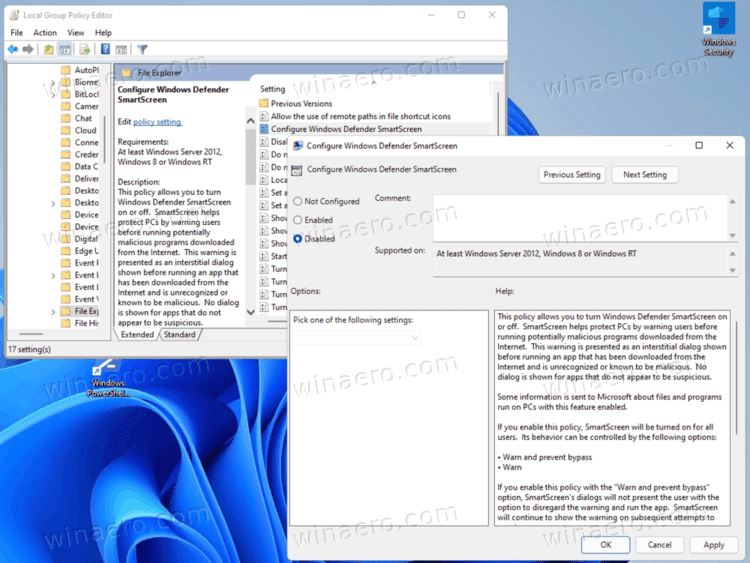
Wanted to add the settings can be found under group policy for edge. You can download the policies from Edge for Business
All policies are the same so "Download Windows 64-bit Policy" is the same as "Download Windows 32-bit Policy"
ADMX go under “%systemroot%\PolicyDefinitions“
ADML go under “%systemroot%\PolicyDefinitions\en-US“

Looks like the policy has been renamed to:
Computer Configuration / Administrative Templates / Microsoft Edge / SmartScreen settings
Disable SmartScreen AppRep based warnings for specified file types on specified domains
Format would be as follows:
Code:
[{"domains": ["https://contoso.com", "contoso2.com"], "file_extension": "msi"}, {"domains": ["*"], "file_extension": "vbe"}]
Hope this helps anyone searching for a bypass to always hitting the KEEP button like me.

Another good setting
Allow insecure content on specified sites
if you run into http redirects from https sites

SmartScreen can be a real pain if you are downloading older files that have not been added to the trust list
Happy Downloading
 

My Computer My Computer

At a glance

Windows 10
OS
Windows 10
Computer type
Laptop
Manufacturer/Model
Dell
Back
Top Bottom