Solved Disable Microsoft Edge blocking of downloads of certain file extensions (xml, ps1, reg)


AsadAlrafidain

Well-known member
Member
Local time
11:27 AM
Posts
99
OS
Windows 11 24H2 Version 10.0.26100.2605
Hello


Untitled.png
is there a registry tweak to disable this? I'm trying to integrate the tweak into NTLite
I've searched the internet but only came up with this reg file that disable this feature for a single filetype


Windows Registry Editor Version 5.00

[HKEY_LOCAL_MACHINE\SOFTWARE\Policies\Microsoft\Edge\ExemptFileTypeDownloadWarnings ]
"1"="{\"file_extension\": \"exe\", \"domains\": [\"*\"]}"


the problem is that I want to disable this feature for multiple filetypes (exe, msi, ps1, xml, reg, py)...can this be done? I've tried using separaters between file extensions ( , ; | )
but it didn't work


edit: I've already disabled smartscreen from edge settings and from defender settings
 
Last edited:

My Computer

System One

  • OS
    Windows 11 24H2 Version 10.0.26100.2605
    Computer type
    PC/Desktop
    CPU
    Core I5 6600
    Motherboard
    Gigabyte Z170x Gaming 5
    Memory
    2 x 8 HeperX Fury DDR4 2666 HZ
    Graphics Card(s)
    Nvidia GTX 1070 ti
    Monitor(s) Displays
    165 HZ Gigabyte GS32QC
    Screen Resolution
    1440p
    Hard Drives
    1TB NVME M.2 Samsung 990 Pro

It's Windows Defender smart screen blocking the files for your protection.


My Computer

System One

  • OS
    Windows 11
    Computer type
    PC/Desktop
    Manufacturer/Model
    HP Pavilion
    CPU
    AMD Ryzen 7 5700G
    Motherboard
    Erica6
    Memory
    Micron Technology DDR4-3200 16GB
    Graphics Card(s)
    NVIDIA GeForce RTX 3060
    Sound Card
    Realtek ALC671
    Monitor(s) Displays
    Samsung SyncMaster U28E590
    Screen Resolution
    3840 x 2160
    Hard Drives
    SAMSUNG MZVLQ1T0HALB-000H1
It's Windows Defender smart screen blocking the files for your protection.

I've already disabled smartscreen from edge settings and from defender settings
 

My Computer

System One

  • OS
    Windows 11 24H2 Version 10.0.26100.2605
    Computer type
    PC/Desktop
    CPU
    Core I5 6600
    Motherboard
    Gigabyte Z170x Gaming 5
    Memory
    2 x 8 HeperX Fury DDR4 2666 HZ
    Graphics Card(s)
    Nvidia GTX 1070 ti
    Monitor(s) Displays
    165 HZ Gigabyte GS32QC
    Screen Resolution
    1440p
    Hard Drives
    1TB NVME M.2 Samsung 990 Pro

Disabling SmartScreen is terrible idea if you enjoy secure browsing.

This is the correct reg file format:
Code:
[HKEY_LOCAL_MACHINE\SOFTWARE\Policies\Microsoft\Edge\ExemptFileTypeDownloadWarnings]
"1"="{\"file_extension\": \"exe\", \"domains\": [\"*\"]}"
"2"="{\"file_extension\": \"reg\", \"domains\": [\"*\"]}"
"3"="{\"file_extension\": \"ps1\", \"domains\": [\"*\"]}"
"4"="{\"file_extension\": \"xml\", \"domains\": [\"*\"]}"

Depending on your Edge version, it might be the older:
Code:
[HKEY_LOCAL_MACHINE\SOFTWARE\Policies\Microsoft\Edge\ExemptDomainFileTypePairsFromFileTypeDownloadWarnings]
 

My Computer

System One

  • OS
    Windows 7
Disabling SmartScreen is terrible idea if you enjoy secure browsing.

This is the correct reg file format:
Code:
[HKEY_LOCAL_MACHINE\SOFTWARE\Policies\Microsoft\Edge\ExemptFileTypeDownloadWarnings]
"1"="{\"file_extension\": \"exe\", \"domains\": [\"*\"]}"
"2"="{\"file_extension\": \"reg\", \"domains\": [\"*\"]}"
"3"="{\"file_extension\": \"ps1\", \"domains\": [\"*\"]}"
"4"="{\"file_extension\": \"xml\", \"domains\": [\"*\"]}"

Depending on your Edge version, it might be the older:
Code:
[HKEY_LOCAL_MACHINE\SOFTWARE\Policies\Microsoft\Edge\ExemptDomainFileTypePairsFromFileTypeDownloadWarnings]
Unfortunately, this didn't work....and tried using both "ExemptFileTypeDownloadWarnings" and "ExemptDomainFileTypePairsFromFileTypeDownloadWarnings"........


Untitled.png
 

My Computer

System One

  • OS
    Windows 11 24H2 Version 10.0.26100.2605
    Computer type
    PC/Desktop
    CPU
    Core I5 6600
    Motherboard
    Gigabyte Z170x Gaming 5
    Memory
    2 x 8 HeperX Fury DDR4 2666 HZ
    Graphics Card(s)
    Nvidia GTX 1070 ti
    Monitor(s) Displays
    165 HZ Gigabyte GS32QC
    Screen Resolution
    1440p
    Hard Drives
    1TB NVME M.2 Samsung 990 Pro

My Computer

System One

  • OS
    Home26H2Can
    Computer type
    PC/Desktop
    CPU
    AMD Ryzen 5 8600G (07/24)
    Motherboard
    ASROCK B650M-HDV/M.2 (07/24) BIOS 4.21 AGESA ComboAM5 1.3.0.1 (04/26)
    Memory
    2x32GB Kingston FURY DDR5 5600 MHz CL36 @5200 CL36 (07/24)
    Graphics Card(s)
    ASROCK Radeon RX 6600 Challenger D 8G @48FPS (08/24)
    Sound Card
    Creative Sound BlasterX AE-5 Plus (05/24)
    Monitor(s) Displays
    24" Philips 24M1N3200ZS/00 (05/24)
    Screen Resolution
    1920×1080@165Hz via DP1.4
    Hard Drives
    Kingston KC3000 NVMe 2TB (05/24)
    ADATA XPG GAMMIX S11 Pro 512GB (07/19)
    PSU
    Seasonic Core GM 550 Gold (04/24)
    Case
    Fractal Design Define 7 Mini with 3x Noctua NF-P14s/12@555rpm (04/24)
    Cooling
    Noctua NH-U12S with Noctua NF-P12 (04/24)
    Keyboard
    HP Pavilion Wired Keyboard 300 (07/24) + Rabalux 76017 Parker (01/24)
    Mouse
    Logitech M330 Silent Plus (01/26)
    Internet Speed
    500/100 Mbps via RouterOS (05/21) & TCP Optimizer
    Browser
    Edge, Brave for YouTube, LibreWolf for FB
    Antivirus
    NextDNS blocking 1/3 Traffic
    Other Info
    Phone: Motorola Moto G86 (02/26)
    Backup: Hasleo Backup Suite (PreOS)
    Headphones: Sennheiser RS170 (09/10)
    Chair: Huzaro Force 4.4 Grey Mesh (05/24)
    Notifier: Xiaomi Mi Band 9 Milanese (10/24)
    FlexCore USB-C 3.2 Gen 1 (M) to LAN (F) (08/25)
MS is intentionally trying to make life harder for users, you can just use a download manager.
I've installed it but edge still blocks the downloads and I have to do the extra step of clicking on "keep"

Untitled.png

Frankly, even if it did work it still wouldn't be a viable option for me.....I moved away from download managers long ago, and I'm trying to operate on as minimum background processes as possible
 

My Computer

System One

  • OS
    Windows 11 24H2 Version 10.0.26100.2605
    Computer type
    PC/Desktop
    CPU
    Core I5 6600
    Motherboard
    Gigabyte Z170x Gaming 5
    Memory
    2 x 8 HeperX Fury DDR4 2666 HZ
    Graphics Card(s)
    Nvidia GTX 1070 ti
    Monitor(s) Displays
    165 HZ Gigabyte GS32QC
    Screen Resolution
    1440p
    Hard Drives
    1TB NVME M.2 Samsung 990 Pro

Disabling SmartScreen is terrible idea if you enjoy secure browsing.

This is the correct reg file format:
Code:
[HKEY_LOCAL_MACHINE\SOFTWARE\Policies\Microsoft\Edge\ExemptFileTypeDownloadWarnings]
"1"="{\"file_extension\": \"exe\", \"domains\": [\"*\"]}"
"2"="{\"file_extension\": \"reg\", \"domains\": [\"*\"]}"
"3"="{\"file_extension\": \"ps1\", \"domains\": [\"*\"]}"
"4"="{\"file_extension\": \"xml\", \"domains\": [\"*\"]}"

Depending on your Edge version, it might be the older:
Code:
[HKEY_LOCAL_MACHINE\SOFTWARE\Policies\Microsoft\Edge\ExemptDomainFileTypePairsFromFileTypeDownloadWarnings]
I was wrong.... your method works, sir!
I don't know why it didn't work previously...maybe a system reboot was needed (which I did)
Thank you !!
 

My Computer

System One

  • OS
    Windows 11 24H2 Version 10.0.26100.2605
    Computer type
    PC/Desktop
    CPU
    Core I5 6600
    Motherboard
    Gigabyte Z170x Gaming 5
    Memory
    2 x 8 HeperX Fury DDR4 2666 HZ
    Graphics Card(s)
    Nvidia GTX 1070 ti
    Monitor(s) Displays
    165 HZ Gigabyte GS32QC
    Screen Resolution
    1440p
    Hard Drives
    1TB NVME M.2 Samsung 990 Pro
Update (August 2024)
after fresh windows 11 install, it seems this path is the working one:
Code:
[HKEY_LOCAL_MACHINE\SOFTWARE\Policies\Microsoft\Edge\ExemptDomainFileTypePairsFromFileTypeDownloadWarnings]
 

My Computer

System One

  • OS
    Windows 11 24H2 Version 10.0.26100.2605
    Computer type
    PC/Desktop
    CPU
    Core I5 6600
    Motherboard
    Gigabyte Z170x Gaming 5
    Memory
    2 x 8 HeperX Fury DDR4 2666 HZ
    Graphics Card(s)
    Nvidia GTX 1070 ti
    Monitor(s) Displays
    165 HZ Gigabyte GS32QC
    Screen Resolution
    1440p
    Hard Drives
    1TB NVME M.2 Samsung 990 Pro
Good info got me on the right track

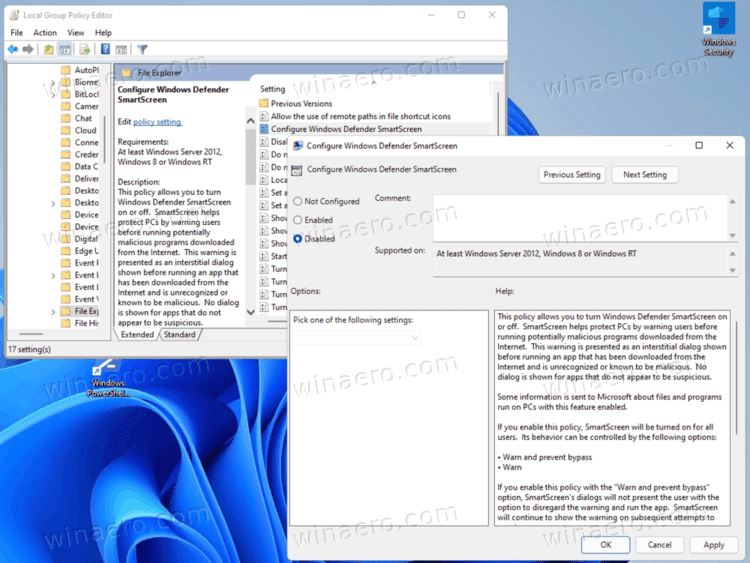
Wanted to add the settings can be found under group policy for edge. You can download the policies from Edge for Business
All policies are the same so "Download Windows 64-bit Policy" is the same as "Download Windows 32-bit Policy"
ADMX go under “%systemroot%\PolicyDefinitions“
ADML go under “%systemroot%\PolicyDefinitions\en-US“

Looks like the policy has been renamed to:
Computer Configuration / Administrative Templates / Microsoft Edge / SmartScreen settings
Disable SmartScreen AppRep based warnings for specified file types on specified domains
Format would be as follows:
Code:
[{"domains": ["https://contoso.com", "contoso2.com"], "file_extension": "msi"}, {"domains": ["*"], "file_extension": "vbe"}]
Hope this helps anyone searching for a bypass to always hitting the KEEP button like me.

Another good setting
Allow insecure content on specified sites
if you run into http redirects from https sites

SmartScreen can be a real pain if you are downloading older files that have not been added to the trust list
Happy Downloading
 

My Computer

System One

  • OS
    Windows 10
    Computer type
    Laptop
    Manufacturer/Model
    Dell

Latest Support Threads

Back
Top Bottom