Disable Ribbon in Windows 11


linguaccia22

Well-known member
Member
Local time
5:41 PM
Posts
99
Location
Italy
OS
Windows 11 Pro 24H2
Hi everyone, I installed ExplorerPatcher to customize the folder to my liking.
I set ExplorerPatcher in the File Explorer section "Windows 10 Ribbon" the bars with I used were removed but I can't remove the last bar which I don't like
this:

Immagine 2024-06-18 234553.png

Can't I find the entry on ExplorerPatcher or is it not possible to disable it?
if not how could I do it?
Thank you
 

My Computer My Computer

At a glance

Windows 11 Pro 24H2Intel Core i7-7700K 4.2GHzCorsair Vengeance (32 GB) DDR4, 3000 MHzMSI GeForce GTX 1080 Ti
OS
Windows 11 Pro 24H2
Computer type
PC/Desktop
CPU
Intel Core i7-7700K 4.2GHz
Motherboard
MSI Z270 Tomahawk
Memory
Corsair Vengeance (32 GB) DDR4, 3000 MHz
Graphics Card(s)
MSI GeForce GTX 1080 Ti
Sound Card
built-in Realtek HD audio
Monitor(s) Displays
LG 21:9
Screen Resolution
2560x1080 75Hz
Hard Drives
Samsung 980 PRO, 1 TB
Samsung 960 EVO, 250 GB
Western Digital Red 4TB
PSU
Evga Supernova 650 G3 Gold
Case
Kolink Unity Arena ARGB Case Mid-Tower
Cooling
Corsair Hydro H100i CW-9060025-WW
Keyboard
Logitech G512
Mouse
Logitech G G502 HERO
Internet Speed
1 Gigabit/s
Browser
Microsoft Edge
Antivirus
Windows Security

Change explorer to windwos 7 version if you can, as you just can't remove elements from explorer like that.
 

My Computers My Computers

  • At a glance

    Windows 11 Pro 25H2 (WinMac v1.4.0)Intel Core i5-12400F16 GB (DDR4, 3200 MHz)NVIDIA GeForce RTX 2070 Super
    OS
    Windows 11 Pro 25H2 (WinMac v1.4.0)
    Computer type
    PC/Desktop
    CPU
    Intel Core i5-12400F
    Motherboard
    B760 GAMING X DDR4
    Memory
    16 GB (DDR4, 3200 MHz)
    Graphics Card(s)
    NVIDIA GeForce RTX 2070 Super
    Screen Resolution
    2560x1440 @ 240Hz
    Other Info
    I loved modding and customizing operating systems since very young age, gaining experience from all important systems, including Windows, Ubuntu, MacOS and Android, which led to creation of Windows 11 mod called WinMac. Seamlessly blending the elegance of macOS with the versatility of Windows, my customized interface elevates user experience through meticulously crafted modifications and UI enhancements.

    With WinMac, every interaction with Windows 11 environment is imbued with a touch of sophistication, where the boundaries between the Windows and Mac universes blur, offering a sublime computing experience that transcends conventional limitations of Windows 11.
  • At a glance

    macOS SonomaApple M3 Pro18 GB
    Operating System
    macOS Sonoma
    Computer type
    Laptop
    Manufacturer/Model
    Apple MacBook Pro
    CPU
    Apple M3 Pro
    Memory
    18 GB
If I change the interface to "Windows 7 Command bar"
I get this bar
Immagine 2024-06-19 131653.png

if I set ExplorerPatcher to "Windows 7 Command bar" is it possible to disable that bar that begins with the Organize item?

I have these options enabled on ExplorerPatcher
Immagine 2024-06-19 131849.png
 

My Computer My Computer

At a glance

Windows 11 Pro 24H2Intel Core i7-7700K 4.2GHzCorsair Vengeance (32 GB) DDR4, 3000 MHzMSI GeForce GTX 1080 Ti
OS
Windows 11 Pro 24H2
Computer type
PC/Desktop
CPU
Intel Core i7-7700K 4.2GHz
Motherboard
MSI Z270 Tomahawk
Memory
Corsair Vengeance (32 GB) DDR4, 3000 MHz
Graphics Card(s)
MSI GeForce GTX 1080 Ti
Sound Card
built-in Realtek HD audio
Monitor(s) Displays
LG 21:9
Screen Resolution
2560x1080 75Hz
Hard Drives
Samsung 980 PRO, 1 TB
Samsung 960 EVO, 250 GB
Western Digital Red 4TB
PSU
Evga Supernova 650 G3 Gold
Case
Kolink Unity Arena ARGB Case Mid-Tower
Cooling
Corsair Hydro H100i CW-9060025-WW
Keyboard
Logitech G512
Mouse
Logitech G G502 HERO
Internet Speed
1 Gigabit/s
Browser
Microsoft Edge
Antivirus
Windows Security

I set ExplorerPatcher in the File Explorer section "Windows 10 Ribbon" the bars with I used were removed but I can't remove the last bar which I don't like
In Windows 10 File Explorer, it was not possible to remove that bar either.

if I set ExplorerPatcher to "Windows 7 Command bar" is it possible to disable that bar that begins with the Organize item?
No, in Windows 7 File Explorer, it was not possible to remove that bar too.
It only was possible to remove some commands from the bar by setting registry values.
Some you could remove, some you could not.

As far as I know, the only thing ExplorerPatcher does, is switching over to the old File Explorer UI of Windows 10 or Windows 7, that still is somewhere in the Windows 11 operating system. It does no other modifications to that program.
Either you accept the Window11 File Explorer or the File Explorer of Windows 10 / 7.

If you would want to have other user interfaces, you might have a look at (third party) alternatives for the File Explorer. Which all have their advantages and disadvantages (besides the fact that some of them you have to pay for). You'll find a topic where some of those apps were described here:


There certainly are other topics in the forum, but I did not search for them. A long time ago I myself decided to accept the Windows 11 File Explorer as it is and now got used to it.
 

My Computer My Computer

At a glance

Windows 11 Pro 25H2AMD Ryzen 7 5700GKingston FURY Beast 2x16GB DIMM DDR4 2666 CL16MSI GeForce GT 730 2GB LP V1
OS
Windows 11 Pro 25H2
Computer type
PC/Desktop
Manufacturer/Model
Build by vendor to my specs
CPU
AMD Ryzen 7 5700G
Motherboard
MSI PRO B550M-P Gen3
Memory
Kingston FURY Beast 2x16GB DIMM DDR4 2666 CL16
Graphics Card(s)
MSI GeForce GT 730 2GB LP V1
Sound Card
Creative Sound Blaster Audigy FX
Monitor(s) Displays
Samsung S24E450F 24"
Screen Resolution
1920 x 1080
Hard Drives
1. SSD Crucial P5 Plus 500GB PCIe M.2
2. SSD-SATA Crucial MX500-2TB
PSU
Corsair CV650W
Case
Cooler Master Silencio S400
Cooling
Cooler Master Hyper H412R with Be Quiet Pure Wings 2 PWM BL038 fan
Keyboard
Cherry Stream (wired, scissor keys)
Mouse
Asus WT465 (wireless)
Internet Speed
70 Mbps down / 80 Mbps up
Browser
Firefox 130.0
Antivirus
F-Secure (Internetprovider version)
Other Info
Router: FRITZBox 7490
Oracle VirtualBox 7 for testing software on Win 10 or 11
I am also willing to purchase a paid program, in the past I purchased StartAllBack which removed the bars that I don't use but when purchasing another Start11 program there is a compatibility problem between the two programs.
Because StartAllBack was good but I use Start11 as default program, but due to incompatibility I had to uninstall it :(

What paid program would be good to achieve such a result
Immagine 2024-06-19 150718.png

I like to remove all the bars and keep just the address bar and the search bar. I don't use anything else
 

My Computer My Computer

At a glance

Windows 11 Pro 24H2Intel Core i7-7700K 4.2GHzCorsair Vengeance (32 GB) DDR4, 3000 MHzMSI GeForce GTX 1080 Ti
OS
Windows 11 Pro 24H2
Computer type
PC/Desktop
CPU
Intel Core i7-7700K 4.2GHz
Motherboard
MSI Z270 Tomahawk
Memory
Corsair Vengeance (32 GB) DDR4, 3000 MHz
Graphics Card(s)
MSI GeForce GTX 1080 Ti
Sound Card
built-in Realtek HD audio
Monitor(s) Displays
LG 21:9
Screen Resolution
2560x1080 75Hz
Hard Drives
Samsung 980 PRO, 1 TB
Samsung 960 EVO, 250 GB
Western Digital Red 4TB
PSU
Evga Supernova 650 G3 Gold
Case
Kolink Unity Arena ARGB Case Mid-Tower
Cooling
Corsair Hydro H100i CW-9060025-WW
Keyboard
Logitech G512
Mouse
Logitech G G502 HERO
Internet Speed
1 Gigabit/s
Browser
Microsoft Edge
Antivirus
Windows Security

My Computers My Computers

  • At a glance

    11 Homei7 13650HX16GB DDR5GeForce RTX 4060 Mobile
    OS
    11 Home
    Computer type
    Laptop
    Manufacturer/Model
    Asus TUF Gaming F16 (2024)
    CPU
    i7 13650HX
    Memory
    16GB DDR5
    Graphics Card(s)
    GeForce RTX 4060 Mobile
    Sound Card
    Eastern Electric MiniMax DAC Supreme; Emotiva UMC-200; Astell & Kern AK240
    Monitor(s) Displays
    Sony Bravia XR-55X90J
    Screen Resolution
    3840×2160
    Hard Drives
    512GB SSD internal
    37TB external
    PSU
    Li-ion
    Cooling
    2× Arc Flow Fans, 4× exhaust vents, 5× heatpipes
    Keyboard
    Logitech K800
    Mouse
    Logitech G402
    Internet Speed
    30Mbit/s up, 500Mbit/s down
    Browser
    FF
    Antivirus
    What's an antivirus?
  • At a glance

    11 Homei5 1135G716GB DDR4Intel Iris Xe
    Operating System
    11 Home
    Computer type
    Laptop
    Manufacturer/Model
    Medion S15450
    CPU
    i5 1135G7
    Memory
    16GB DDR4
    Graphics card(s)
    Intel Iris Xe
    Sound Card
    Eastern Electric MiniMax DAC Supreme; Emotiva UMC-200; Astell & Kern AK240
    Monitor(s) Displays
    Sony Bravia XR-55X90J
    Screen Resolution
    3840×2160
    Hard Drives
    2TB SSD internal
    37TB external
    PSU
    Li-ion
    Keyboard
    Logitech K800
    Mouse
    Logitech G402
    Internet Speed
    30Mbit/s up, 500Mbit/s down
    Browser
    FF

My Computers My Computers

  • At a glance

    11 Homei7 13650HX16GB DDR5GeForce RTX 4060 Mobile
    OS
    11 Home
    Computer type
    Laptop
    Manufacturer/Model
    Asus TUF Gaming F16 (2024)
    CPU
    i7 13650HX
    Memory
    16GB DDR5
    Graphics Card(s)
    GeForce RTX 4060 Mobile
    Sound Card
    Eastern Electric MiniMax DAC Supreme; Emotiva UMC-200; Astell & Kern AK240
    Monitor(s) Displays
    Sony Bravia XR-55X90J
    Screen Resolution
    3840×2160
    Hard Drives
    512GB SSD internal
    37TB external
    PSU
    Li-ion
    Cooling
    2× Arc Flow Fans, 4× exhaust vents, 5× heatpipes
    Keyboard
    Logitech K800
    Mouse
    Logitech G402
    Internet Speed
    30Mbit/s up, 500Mbit/s down
    Browser
    FF
    Antivirus
    What's an antivirus?
  • At a glance

    11 Homei5 1135G716GB DDR4Intel Iris Xe
    Operating System
    11 Home
    Computer type
    Laptop
    Manufacturer/Model
    Medion S15450
    CPU
    i5 1135G7
    Memory
    16GB DDR4
    Graphics card(s)
    Intel Iris Xe
    Sound Card
    Eastern Electric MiniMax DAC Supreme; Emotiva UMC-200; Astell & Kern AK240
    Monitor(s) Displays
    Sony Bravia XR-55X90J
    Screen Resolution
    3840×2160
    Hard Drives
    2TB SSD internal
    37TB external
    PSU
    Li-ion
    Keyboard
    Logitech K800
    Mouse
    Logitech G402
    Internet Speed
    30Mbit/s up, 500Mbit/s down
    Browser
    FF
I am also willing to purchase a paid program, in the past I purchased StartAllBack which removed the bars that I don't use but when purchasing another Start11 program there is a compatibility problem between the two programs.
Because StartAllBack was good but I use Start11 as default program, but due to incompatibility I had to uninstall it :(

What paid program would be good to achieve such a result
View attachment 99548

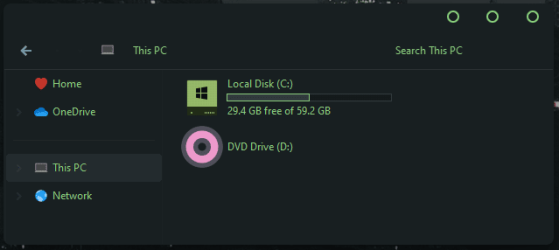
I like to remove all the bars and keep just the address bar and the search bar. I don't use anything else
I'm pretty sure it's a Niivu's custom theme is it ?
If so , you could achieve that with 3 steps but if you are not skilled I don't recommend you to try .

1) you have to patch system files to be able to use custom visual styles

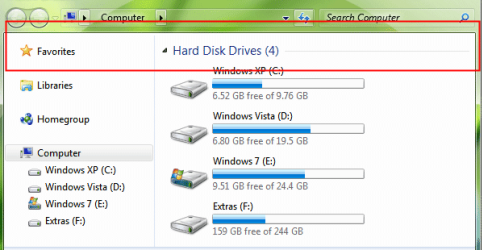
2) He surely uses OldNewExplorer to get the old win 7 command bar and get rid of all the ribbons / toolbars ( win 10 / 11 )

Snap2.png

OldNewExplorer still works under windows 11 ( I tested it on last 23h2 )

3) Last step is the tricky one : you have to hack the shellstyle.dll file of your custom theme you want to use to get rid of that command bar and make it invisible ( located in C:\Windows\Resources\Themes\aero\Shell\NormalColor ) . Here is the final résult you want I think - no more any bar between window titlebar and the explorer main window - only adress bar and search field .

Snap3.png

As I don't hack / custom anymore for now I got some screens elsewhere to show you.
Beginners can screw their rig ( no boot or black screen ) if your custom theme is not correctly applied or you did errors with shellstyle.dll hacked
 
Last edited:

My Computer My Computer

At a glance

windows
OS
windows
 

My Computer My Computer

At a glance

Windows 11 Pro
OS
Windows 11 Pro

Latest Support Threads

Back
Top Bottom