Solved Disabling signin on startup screen


highstream

Active member
Local time
1:23 AM
Posts
163
OS
Windows 11 Pro
New install of Win 11 Pro 24H2 yesterday. The option box to bypass signin on startup seems to no longer exist. On the Accounts>Sign-in Options page, there are just a list of ways to sign in. I'm using a PIN right now. If I click Remove on it, does that eliminate it generally or only on computer startup. The page is confusing.
 

Attachments
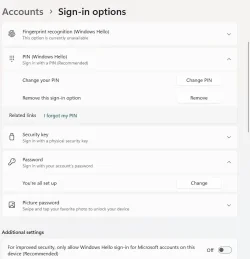
  • Windows 11 Signin Options.webp
    Windows 11 Signin Options.webp
    32.3 KB · Views: 2

My Computers

System One System Two

  • OS
    Windows 11 Pro
    Computer type
    PC/Desktop
    CPU
    i5
    Motherboard
    Asus
    Memory
    16.0 GB
    Monitor(s) Displays
    Samsung T45F
    Screen Resolution
    1920x1200
    Hard Drives
    Samsung Evo SSDs and Western HDDs
    Keyboard
    IBM Model M
    Mouse
    Bornd
    Antivirus
    Windows and MBAM Premium
  • Operating System
    Win 11 Pro
    Computer type
    Laptop
    Manufacturer/Model
    Lenovo Thinkpad
Hello, :alien:

You can use option 1 in the tutorial below to setup netplwiz to automatically sign in to your account at startup.


My Computers

System One System Two

  • OS
    Windows 11 Pro for Workstations
    Computer type
    PC/Desktop
    Manufacturer/Model
    Custom self build
    CPU
    Intel i7-8700K 5 GHz
    Motherboard
    ASUS ROG Maximus XI Formula Z390
    Memory
    64 GB (4x16GB) G.SKILL TridentZ RGB DDR4 3600 MHz (F4-3600C18D-32GTZR)
    Graphics Card(s)
    ASUS ROG-STRIX-GTX1080TI-O11G-GAMING (11GB GDDR5X)
    Sound Card
    Integrated Digital Audio (S/PDIF)
    Monitor(s) Displays
    2 x Samsung Odyssey G75 27"
    Screen Resolution
    2560x1440
    Hard Drives
    1TB Samsung 990 PRO M.2,
    4TB Samsung 990 PRO M.2,
    TerraMaster F8 SSD Plus NAS
    PSU
    Seasonic Prime Titanium 850W
    Case
    Thermaltake Core P3 wall mounted
    Cooling
    Corsair Hydro H115i
    Keyboard
    Amazon Basics Wired Full Keyboard MD005
    Mouse
    Logitech MX Master 4
    Internet Speed
    2 Gbps Download and 100 Mbps Upload
    Browser
    Chrome and Edge
    Antivirus
    Microsoft Defender
    Other Info
    Logitech Z625 speaker system,
    Logitech BRIO 4K Pro webcam,
    HP Color LaserJet Pro MFP M477fdn,
    CyberPower CP1500PFCLCD
    Galaxy S23 Plus phone
  • Operating System
    Windows 11 Pro
    Computer type
    Laptop
    Manufacturer/Model
    Surface Laptop 7 Copilot+ PC
    CPU
    Snapdragon X Elite (12 core) 3.42 GHz
    Memory
    16 GB LPDDR5x-7467 MHz
    Monitor(s) Displays
    15" HDR
    Screen Resolution
    2496 x 1664
    Hard Drives
    1 TB SSD
    Internet Speed
    Wi-Fi 7 and Bluetooth 5.4
    Browser
    Chrome and Edge
    Antivirus
    Microsoft Defender
Doesn't work -- and worse. Now I get the following message: "We are unable to connect right now. Please check your network and try again later." I click OK and enter a password and in I go. Something else must be going on.

The worse: There are now two listings of my name down on the lower left of the start screen after clicking OK. This is exactly what happened earlier this week after I did an in-place upgrade from Win 10. The suggested fixes here led to Windows fatally crashing and having to do a direct install (there are three threads about what happened in the course of it).

Not sure what to make of it all.
 

My Computers

System One System Two

  • OS
    Windows 11 Pro
    Computer type
    PC/Desktop
    CPU
    i5
    Motherboard
    Asus
    Memory
    16.0 GB
    Monitor(s) Displays
    Samsung T45F
    Screen Resolution
    1920x1200
    Hard Drives
    Samsung Evo SSDs and Western HDDs
    Keyboard
    IBM Model M
    Mouse
    Bornd
    Antivirus
    Windows and MBAM Premium
  • Operating System
    Win 11 Pro
    Computer type
    Laptop
    Manufacturer/Model
    Lenovo Thinkpad
Usually when you see two instances of your account at sign in after using netplwiz, it's from either changing the account's password or computer name afterwards.

Checking the box in netplwiz will stop this.
 

My Computers

System One System Two

  • OS
    Windows 11 Pro for Workstations
    Computer type
    PC/Desktop
    Manufacturer/Model
    Custom self build
    CPU
    Intel i7-8700K 5 GHz
    Motherboard
    ASUS ROG Maximus XI Formula Z390
    Memory
    64 GB (4x16GB) G.SKILL TridentZ RGB DDR4 3600 MHz (F4-3600C18D-32GTZR)
    Graphics Card(s)
    ASUS ROG-STRIX-GTX1080TI-O11G-GAMING (11GB GDDR5X)
    Sound Card
    Integrated Digital Audio (S/PDIF)
    Monitor(s) Displays
    2 x Samsung Odyssey G75 27"
    Screen Resolution
    2560x1440
    Hard Drives
    1TB Samsung 990 PRO M.2,
    4TB Samsung 990 PRO M.2,
    TerraMaster F8 SSD Plus NAS
    PSU
    Seasonic Prime Titanium 850W
    Case
    Thermaltake Core P3 wall mounted
    Cooling
    Corsair Hydro H115i
    Keyboard
    Amazon Basics Wired Full Keyboard MD005
    Mouse
    Logitech MX Master 4
    Internet Speed
    2 Gbps Download and 100 Mbps Upload
    Browser
    Chrome and Edge
    Antivirus
    Microsoft Defender
    Other Info
    Logitech Z625 speaker system,
    Logitech BRIO 4K Pro webcam,
    HP Color LaserJet Pro MFP M477fdn,
    CyberPower CP1500PFCLCD
    Galaxy S23 Plus phone
  • Operating System
    Windows 11 Pro
    Computer type
    Laptop
    Manufacturer/Model
    Surface Laptop 7 Copilot+ PC
    CPU
    Snapdragon X Elite (12 core) 3.42 GHz
    Memory
    16 GB LPDDR5x-7467 MHz
    Monitor(s) Displays
    15" HDR
    Screen Resolution
    2496 x 1664
    Hard Drives
    1 TB SSD
    Internet Speed
    Wi-Fi 7 and Bluetooth 5.4
    Browser
    Chrome and Edge
    Antivirus
    Microsoft Defender
I did change the password several weeks ago on getting a new laptop, but that one hasn't been recognized recently. So I've been using the previous one lately.

Checking the netplwiz box may stop the double names, but leaves signin at boot. Am I stuck, or is there something else going on here?
 

My Computers

System One System Two

  • OS
    Windows 11 Pro
    Computer type
    PC/Desktop
    CPU
    i5
    Motherboard
    Asus
    Memory
    16.0 GB
    Monitor(s) Displays
    Samsung T45F
    Screen Resolution
    1920x1200
    Hard Drives
    Samsung Evo SSDs and Western HDDs
    Keyboard
    IBM Model M
    Mouse
    Bornd
    Antivirus
    Windows and MBAM Premium
  • Operating System
    Win 11 Pro
    Computer type
    Laptop
    Manufacturer/Model
    Lenovo Thinkpad
You could try switching to a local account then switching back to a Microsoft account afterwards to see if it may toggle it to recognize the new password.

If it does, then you can setup netplwiz again.


My Computers

System One System Two

  • OS
    Windows 11 Pro for Workstations
    Computer type
    PC/Desktop
    Manufacturer/Model
    Custom self build
    CPU
    Intel i7-8700K 5 GHz
    Motherboard
    ASUS ROG Maximus XI Formula Z390
    Memory
    64 GB (4x16GB) G.SKILL TridentZ RGB DDR4 3600 MHz (F4-3600C18D-32GTZR)
    Graphics Card(s)
    ASUS ROG-STRIX-GTX1080TI-O11G-GAMING (11GB GDDR5X)
    Sound Card
    Integrated Digital Audio (S/PDIF)
    Monitor(s) Displays
    2 x Samsung Odyssey G75 27"
    Screen Resolution
    2560x1440
    Hard Drives
    1TB Samsung 990 PRO M.2,
    4TB Samsung 990 PRO M.2,
    TerraMaster F8 SSD Plus NAS
    PSU
    Seasonic Prime Titanium 850W
    Case
    Thermaltake Core P3 wall mounted
    Cooling
    Corsair Hydro H115i
    Keyboard
    Amazon Basics Wired Full Keyboard MD005
    Mouse
    Logitech MX Master 4
    Internet Speed
    2 Gbps Download and 100 Mbps Upload
    Browser
    Chrome and Edge
    Antivirus
    Microsoft Defender
    Other Info
    Logitech Z625 speaker system,
    Logitech BRIO 4K Pro webcam,
    HP Color LaserJet Pro MFP M477fdn,
    CyberPower CP1500PFCLCD
    Galaxy S23 Plus phone
  • Operating System
    Windows 11 Pro
    Computer type
    Laptop
    Manufacturer/Model
    Surface Laptop 7 Copilot+ PC
    CPU
    Snapdragon X Elite (12 core) 3.42 GHz
    Memory
    16 GB LPDDR5x-7467 MHz
    Monitor(s) Displays
    15" HDR
    Screen Resolution
    2496 x 1664
    Hard Drives
    1 TB SSD
    Internet Speed
    Wi-Fi 7 and Bluetooth 5.4
    Browser
    Chrome and Edge
    Antivirus
    Microsoft Defender
I ended up doing a repair install and that solved it the startup problem I posed here, as well stopping the black desktop icons after restarts (fingers crossed). The only thing remaining, and the reason for the repair, is that Notifications (in Settings) doesn't show a list of apps, which it's supposed to, Whether or not that would turn off notifications and sound for my email program (Sylpheed) thus remains up in the air, although an MS customer support rep (chat) thought it would, after first saying that this is a known Win 11 issue where some apps, especially older or non-UWP (Universal Windows Platform) ones, do not register themselves properly with Windows' notification system.

@Brink, while I'm summarizing here, I had trouble with your "Rebuild the Icon Cache in Windows 11" page. Some of it seemed out of date -- it is four years old -- the batch file kept trying to save as an html file here, and some of the command prompt strings in Option 3 returned error messages. In the end, I took the text for the batch file you thankfully supplied and created my own that worked temporarily at least, until what was creating the black desktop icons was solved with a proper repair install (shutting down MBAM first).
 

My Computers

System One System Two

  • OS
    Windows 11 Pro
    Computer type
    PC/Desktop
    CPU
    i5
    Motherboard
    Asus
    Memory
    16.0 GB
    Monitor(s) Displays
    Samsung T45F
    Screen Resolution
    1920x1200
    Hard Drives
    Samsung Evo SSDs and Western HDDs
    Keyboard
    IBM Model M
    Mouse
    Bornd
    Antivirus
    Windows and MBAM Premium
  • Operating System
    Win 11 Pro
    Computer type
    Laptop
    Manufacturer/Model
    Lenovo Thinkpad
Great news. I'm glad you got it sorted out. :shawn:
 

My Computers

System One System Two

  • OS
    Windows 11 Pro for Workstations
    Computer type
    PC/Desktop
    Manufacturer/Model
    Custom self build
    CPU
    Intel i7-8700K 5 GHz
    Motherboard
    ASUS ROG Maximus XI Formula Z390
    Memory
    64 GB (4x16GB) G.SKILL TridentZ RGB DDR4 3600 MHz (F4-3600C18D-32GTZR)
    Graphics Card(s)
    ASUS ROG-STRIX-GTX1080TI-O11G-GAMING (11GB GDDR5X)
    Sound Card
    Integrated Digital Audio (S/PDIF)
    Monitor(s) Displays
    2 x Samsung Odyssey G75 27"
    Screen Resolution
    2560x1440
    Hard Drives
    1TB Samsung 990 PRO M.2,
    4TB Samsung 990 PRO M.2,
    TerraMaster F8 SSD Plus NAS
    PSU
    Seasonic Prime Titanium 850W
    Case
    Thermaltake Core P3 wall mounted
    Cooling
    Corsair Hydro H115i
    Keyboard
    Amazon Basics Wired Full Keyboard MD005
    Mouse
    Logitech MX Master 4
    Internet Speed
    2 Gbps Download and 100 Mbps Upload
    Browser
    Chrome and Edge
    Antivirus
    Microsoft Defender
    Other Info
    Logitech Z625 speaker system,
    Logitech BRIO 4K Pro webcam,
    HP Color LaserJet Pro MFP M477fdn,
    CyberPower CP1500PFCLCD
    Galaxy S23 Plus phone
  • Operating System
    Windows 11 Pro
    Computer type
    Laptop
    Manufacturer/Model
    Surface Laptop 7 Copilot+ PC
    CPU
    Snapdragon X Elite (12 core) 3.42 GHz
    Memory
    16 GB LPDDR5x-7467 MHz
    Monitor(s) Displays
    15" HDR
    Screen Resolution
    2496 x 1664
    Hard Drives
    1 TB SSD
    Internet Speed
    Wi-Fi 7 and Bluetooth 5.4
    Browser
    Chrome and Edge
    Antivirus
    Microsoft Defender

Latest Support Threads

Back
Top Bottom