
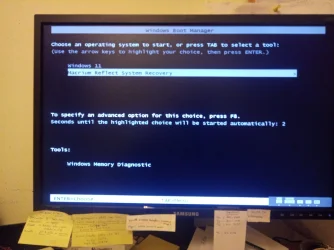
Solved Problem startup screen when booting up


barryman

Member
Member
Local time
7:32 PM
Posts
59
OS
Windows 11 Home build 10.0.22631
I recently made a couple of recovery bootable USB sticks which seem to work. One of them was a Macrium bootable USB. The problem now is that every time I boot up I get the screen (in photo below). I have Macrium still installed on my PC but no recovery stick is present at boot up.....

How and what do I change to just boot straight up into Windows (which is working fine)

Thanks
 

Attachments
  • Boot up screen.webp
    Boot up screen.webp
    1.2 MB · Views: 1

My Computer My Computer

At a glance

Windows 11 Home build 10.0.2263116gbbuilt-in
OS
Windows 11 Home build 10.0.22631
Computer type
PC/Desktop
Manufacturer/Model
HP 290 G1 SFF Business PC
Motherboard
HP 843F 00
Memory
16gb
Graphics Card(s)
built-in
Browser
chrome
Press WindowsKey + R. This will open the "Run" box. Type in "msconfig" and hit Enter. Go to the "Boot" tab. Select your Windows OS by clicking it and then make that the default by clicking on "Set as default". Once you have done that you can select the Macrium Reflect entry by clicking it and then select "Delete" if you wish. Click on "OK".
 

My Computers My Computers

  • At a glance

    Win11 Pro 25H2 (RTM+)Intel i7-14650HX32 GBNo GPU - Built-in Intel Graphics
    OS
    Win11 Pro 25H2 (RTM+)
    Computer type
    PC/Desktop
    Manufacturer/Model
    Acemagic
    CPU
    Intel i7-14650HX
    Memory
    32 GB
    Graphics Card(s)
    No GPU - Built-in Intel Graphics
    Sound Card
    Integrated
    Monitor(s) Displays
    Varies as machine will often be moved to locations with different monitors
    Screen Resolution
    Varies
    Hard Drives
    1 x 1TB Gen 4 NVMe SSD
    PSU
    120W Power Brick
    Keyboard
    Corsair K70 Max RGB Magnetic Keyboard
    Mouse
    Logitech MX Master 3
    Internet Speed
    1Gb Up / 1 Gb Down
    Browser
    Edge
    Antivirus
    Windows Defender
  • At a glance

    Win11 Pro 25H2 (RTM+)Intel i7-1255U16 GBIntel Iris Xe Graphics
    Operating System
    Win11 Pro 25H2 (RTM+)
    Computer type
    Laptop
    Manufacturer/Model
    Lenovo ThinkBook 13x Gen 2
    CPU
    Intel i7-1255U
    Memory
    16 GB
    Graphics card(s)
    Intel Iris Xe Graphics
    Sound Card
    Realtek® ALC3306-CG codec
    Monitor(s) Displays
    13.3-inch IPS Display
    Screen Resolution
    WQXGA (2560 x 1600)
    Hard Drives
    2 TB 4 x 4 NVMe SSD
    PSU
    USB-C / Thunderbolt 4 Power / Charging
    Keyboard
    Backlit, spill resistant keyboard
    Mouse
    Buttonless Glass Precision Touchpad
    Internet Speed
    1Gb Up / 1Gb Down
    Browser
    Edge
    Antivirus
    Windows Defender
    Other Info
    WiFi 6e / Bluetooth 5.1 / Facial Recognition / Fingerprint Sensor / ToF (Time of Flight) Human Presence Sensor

Latest Support Threads

Back
Top Bottom




