New Wallpaper not immediately loading when booting up


NewsReader17

New member
Local time
12:28 AM
Posts
2
OS
Windows 11 Home
When I log into my user account, my desktop is displaying my old wallpaper for about 20 seconds before it switches to the one I set it to recently. I recently updated windows. Is there anywhere I should check for more info? Would the Event Viewer display anything related to this issue?
 
Windows Build/Version
Windows 11 Home

My Computer

System One

  • OS
    Windows 11 Home
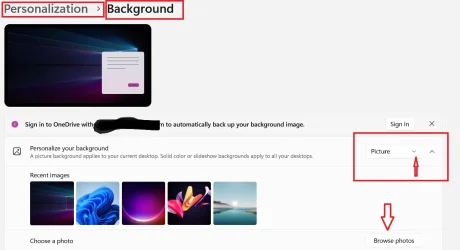
settings>personalization>background>select Picture (not slideshow)>browse photos>choose photo
If that is set correctly and it still happens, IMO it's more than likely related to Onedrive lag in some way.

If you are using a Microsoft account the files in your user folders (desktop, documents, pictures, videos) default to Onedrive. They are not on your system drive.

I would choose a photo located at some location on your system drive. I would also NOT sync the desktop itself to Onedrive. When you do, if you lose internet your desktop is inoperable. The instructions on dealing with Onedrive have been posted many times here...depending on whether you want to to sync all your folders, some of your folders, or none of your folders to Onedrive.
 

Attachments

  • Screenshot 2025-12-29 125742.webp
    Screenshot 2025-12-29 125742.webp
    41.3 KB · Views: 1

My Computers

System One System Two

  • OS
    Windows 11 Pro 25H2
    Computer type
    PC/Desktop
    Manufacturer/Model
    Dell Optiplex 7080
    CPU
    i9-10900 10 core 20 threads
    Motherboard
    DELL 0J37VM
    Memory
    32 gb
    Graphics Card(s)
    none-Intel UHD Graphics 630
    Sound Card
    Integrated Realtek
    Monitor(s) Displays
    Benq 27
    Screen Resolution
    2560x1440
    Hard Drives
    2x1tb Solidigm m.2 nvme /External drives 512gb Samsung m.2 sata+2tb Kingston m2.nvme
    PSU
    500w
    Case
    MT
    Cooling
    Dell Premium
    Keyboard
    Logitech wired
    Mouse
    Logitech wireless
    Internet Speed
    so slow I'm too embarrassed to tell
    Browser
    #1 Edge #2 Firefox
    Antivirus
    Defender+MWB Premium
  • Operating System
    Windows 11 Pro 24H2 26200.8457
    Computer type
    PC/Desktop
    Manufacturer/Model
    Beelink Mini PC SER5
    CPU
    AMD Ryzen 7 6800U
    Memory
    32 gb
    Graphics card(s)
    integrated
    Sound Card
    integrated
    Monitor(s) Displays
    Benq 27
    Screen Resolution
    2560x1440
    Hard Drives
    1TB Crucial nvme
    Keyboard
    Logitech wired
    Mouse
    Logitech wireless
    Internet Speed
    still too embarrassed to tell
    Browser
    Firefox
    Antivirus
    Defender
    Other Info
    System 3 is non compliant Dell 9020 i7-4770/24gb ram Win11 PRO 26200.8457
Back
Top Bottom