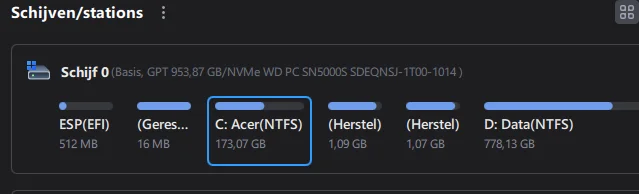
partitions before and after an upgrade


Brownyboy70

Well-known member
Member
VIP
Local time
10:21 PM
Posts
35
OS
Windows 11 Home 25H2- 07-09-‎2026 26220 9472
This afternoon I hav upgradede my W11 Home to W11 pro,ev'ry thing was going smootly, but before there were 5 partitons and after there were 6 partitins, I have now 2 recovery partitons so I dont know wich one to keep and wich one to delete. I hope to get some suggestion.

Greetz Brownyboy
1792779704679.webp
 

My Computer My Computer

At a glance

Windows 11 Home 25H2- 07-09-‎2026 26220 947213th Gen Intel(R) Core(TM) i7-13620H (2.40 GHz)16 gigIntel(R) Iris(R) Xe Graphics, NVIDIA Geforce ...
OS
Windows 11 Home 25H2- 07-09-‎2026 26220 9472
Computer type
Laptop
Manufacturer/Model
Acer/Aspire 17
CPU
13th Gen Intel(R) Core(TM) i7-13620H (2.40 GHz)
Motherboard
64-bits besturingssysteem, x64-processor
Memory
16 gig
Graphics Card(s)
Intel(R) Iris(R) Xe Graphics, NVIDIA Geforce MX450
Sound Card
Realtek (R) Audio
Monitor(s) Displays
17.3
Screen Resolution
1920*1080
Hard Drives
Micron_2210_MTFDHBA1T0QFD (SSD) 953,86GB C = 247 D = 705
Mouse
m220 logitech
Internet Speed
1000 Mbps
Browser
Edge chromium
Antivirus
Windows Defender, Malwarebytes
I have now 2 recovery partitons so I dont know wich one to keep


Ok, do this...

1. Open a command prompt as Administrator
2. Type: reagentc /disable
3. Open your partition software. The partition that is now... empty, is the one you need to keep.
4. Delete the other partition, and add that unallocated space to C: or D: whichever is adjacent.
5. Then in a command prompt as Administrator, type: reagentc /enable ...this will fill the partition that was empty.


I did this 2-3 weeks ago. I used Minitool Partition Wizard (free).


NOTE: You have to close and reopen the partition software to SEE the changes.
 
Last edited:

My Computers My Computers

  • At a glance

    Win 11 Home 26H2 26300.9711AMD Ryzen 7 3700XG.Skill (F4-3200C14D-16GTZKW)EVGA RTX 2070 (08G-P4-2171-KR)
    OS
    Win 11 Home 26H2 26300.9711
    Computer type
    PC/Desktop
    Manufacturer/Model
    Built by Ghot® [May 2020]
    CPU
    AMD Ryzen 7 3700X
    Motherboard
    Asus Pro WS X570-ACE (BIOS 5302)
    Memory
    G.Skill (F4-3200C14D-16GTZKW)
    Graphics Card(s)
    EVGA RTX 2070 (08G-P4-2171-KR)
    Sound Card
    Realtek ALC1220P / ALC S1220A
    Monitor(s) Displays
    Dell U3011 30"
    Screen Resolution
    2560 x 1600
    Hard Drives
    2x Samsung 860 EVO 500GB,
    WD 4TB Black FZBX - SATA III,
    WD 8TB Black FZBX - SATA III,
    DRW-24B1ST CD/DVD Burner
    PSU
    PC Power & Cooling 750W Quad EPS12V
    Case
    Cooler Master ATCS 840 Tower
    Cooling
    CM Hyper 212 EVO (push/pull)
    Keyboard
    Ducky DK9008 Shine II Blue LED
    Mouse
    Logitech Optical M-100
    Internet Speed
    300/300
    Browser
    Firefox (latest)
    Antivirus
    Bitdefender Total Security
    Other Info
    Speakers: Klipsch Pro Media 2.1
  • At a glance

    Windows XP Pro 32bit w/SP3AMD Athlon 64 X2 5000+ (OC'd @ 3.2Ghz)TWIN2X2048-6400C4DHX (2 x 1GB, DDR2 800)EVGA 256-P2-N758-TR GeForce 8600GT SSC
    Operating System
    Windows XP Pro 32bit w/SP3
    Computer type
    PC/Desktop
    Manufacturer/Model
    Built by Ghot® (not in use)
    CPU
    AMD Athlon 64 X2 5000+ (OC'd @ 3.2Ghz)
    Motherboard
    ASUS M2N32-SLI Deluxe Wireless Edition
    Memory
    TWIN2X2048-6400C4DHX (2 x 1GB, DDR2 800)
    Graphics card(s)
    EVGA 256-P2-N758-TR GeForce 8600GT SSC
    Sound Card
    Onboard
    Monitor(s) Displays
    ViewSonic G90FB Black 19" Professional (CRT)
    Screen Resolution
    up to 2048 x 1536
    Hard Drives
    WD 36GB 10,000rpm Raptor SATA
    Seagate 80GB 7200rpm SATA
    Lite-On LTR-52246S CD/RW
    Lite-On LH-18A1P CD/DVD Burner
    PSU
    PC Power & Cooling Silencer 750 Quad EPS12V
    Case
    Generic Beige case, 80mm fans
    Cooling
    ZALMAN 9500A 92mm CPU Cooler
    Keyboard
    Logitech Classic Keybooard 200
    Mouse
    Logitech Optical M-BT96a
    Internet Speed
    300/300
    Browser
    Firefox 3.x ??
    Antivirus
    Symantec (Norton)
    Other Info
    Still assembled, still runs. Haven't turned it on for 15 years?
I would not expect a new Recovery partition to be created as a result of doing that.

However, as you say you see 2 (I can't tell from your non-English screenshot), there are a couple of ways to find out which one is the older/not in use.

1. The 'cheat' method.
Use Minitool Partition Wizard to explore the partitions.
(Rt click the partition, click Explore) :
1.webp


You can compare the dates for the two partitions. The older will be the one you don't need.

2. Admin command prompt:
1.webp

2.webp
 

My Computer My Computer

At a glance

Windows 11 Proi7-8650U16GBIntel UHD 620
OS
Windows 11 Pro
Computer type
Laptop
Manufacturer/Model
Lenovo t480s
CPU
i7-8650U
Memory
16GB
Graphics Card(s)
Intel UHD 620
Screen Resolution
1920x1080
Hard Drives
C SN810 SDCPNRY-512G-1006
Browser
Edge, Firefox
Antivirus
Defender
The extra recovery partition can be confirmed /deleted and the C: partition expanded using diskpart commands.


Please run > post a share link


My Computer My Computer

At a glance

Windows 10Intel(R) Core(TM) i7-4800MQ CPU @ 2.70GHz16 GB Total: Manufacturer : Samsung MemoryTyp...NVIDIA Quadro K3100M; Intel(R) HD Graphics 4600
OS
Windows 10
Computer type
Laptop
Manufacturer/Model
HP
CPU
Intel(R) Core(TM) i7-4800MQ CPU @ 2.70GHz
Motherboard
Product : 190A Version : KBC Version 94.56
Memory
16 GB Total: Manufacturer : Samsung MemoryType : DDR3 FormFactor : SODIMM Capacity : 8GB Speed : 1600
Graphics Card(s)
NVIDIA Quadro K3100M; Intel(R) HD Graphics 4600
Sound Card
IDT High Definition Audio CODEC; PNP Device ID HDAUDIO\FUNC_01&VEN_111D&DEV_76E0
Hard Drives
Model Hitachi HTS727575A9E364
Antivirus
Microsoft Defender
Other Info
Mobile Workstation
I would not expect a new Recovery partition to be created as a result of doing that.

I didn't either, but it worked like a charm. ^^
Keep in mind, that the WinRE files are still there, even with the Recovery partition disabled.

So when you do reagentc /enable it re-creates the Recovery partition in the only place it can... the partition you "didn't" delete.


I know, I know... it goes against everything we've learned in the past.
But it works !!


From Google AI...

    • If you run reagentc /disable, the active 'real' recovery partition will become completely empty, allowing you to clearly distinguish it from leftover or duplicate partitions.
    • Remember to run reagentc /enable afterward to turn the Windows Recovery Environment back on


Here's where the magic first happened...


Hermoine blank.webp
 
Last edited:

My Computers My Computers

  • At a glance

    Win 11 Home 26H2 26300.9711AMD Ryzen 7 3700XG.Skill (F4-3200C14D-16GTZKW)EVGA RTX 2070 (08G-P4-2171-KR)
    OS
    Win 11 Home 26H2 26300.9711
    Computer type
    PC/Desktop
    Manufacturer/Model
    Built by Ghot® [May 2020]
    CPU
    AMD Ryzen 7 3700X
    Motherboard
    Asus Pro WS X570-ACE (BIOS 5302)
    Memory
    G.Skill (F4-3200C14D-16GTZKW)
    Graphics Card(s)
    EVGA RTX 2070 (08G-P4-2171-KR)
    Sound Card
    Realtek ALC1220P / ALC S1220A
    Monitor(s) Displays
    Dell U3011 30"
    Screen Resolution
    2560 x 1600
    Hard Drives
    2x Samsung 860 EVO 500GB,
    WD 4TB Black FZBX - SATA III,
    WD 8TB Black FZBX - SATA III,
    DRW-24B1ST CD/DVD Burner
    PSU
    PC Power & Cooling 750W Quad EPS12V
    Case
    Cooler Master ATCS 840 Tower
    Cooling
    CM Hyper 212 EVO (push/pull)
    Keyboard
    Ducky DK9008 Shine II Blue LED
    Mouse
    Logitech Optical M-100
    Internet Speed
    300/300
    Browser
    Firefox (latest)
    Antivirus
    Bitdefender Total Security
    Other Info
    Speakers: Klipsch Pro Media 2.1
  • At a glance

    Windows XP Pro 32bit w/SP3AMD Athlon 64 X2 5000+ (OC'd @ 3.2Ghz)TWIN2X2048-6400C4DHX (2 x 1GB, DDR2 800)EVGA 256-P2-N758-TR GeForce 8600GT SSC
    Operating System
    Windows XP Pro 32bit w/SP3
    Computer type
    PC/Desktop
    Manufacturer/Model
    Built by Ghot® (not in use)
    CPU
    AMD Athlon 64 X2 5000+ (OC'd @ 3.2Ghz)
    Motherboard
    ASUS M2N32-SLI Deluxe Wireless Edition
    Memory
    TWIN2X2048-6400C4DHX (2 x 1GB, DDR2 800)
    Graphics card(s)
    EVGA 256-P2-N758-TR GeForce 8600GT SSC
    Sound Card
    Onboard
    Monitor(s) Displays
    ViewSonic G90FB Black 19" Professional (CRT)
    Screen Resolution
    up to 2048 x 1536
    Hard Drives
    WD 36GB 10,000rpm Raptor SATA
    Seagate 80GB 7200rpm SATA
    Lite-On LTR-52246S CD/RW
    Lite-On LH-18A1P CD/DVD Burner
    PSU
    PC Power & Cooling Silencer 750 Quad EPS12V
    Case
    Generic Beige case, 80mm fans
    Cooling
    ZALMAN 9500A 92mm CPU Cooler
    Keyboard
    Logitech Classic Keybooard 200
    Mouse
    Logitech Optical M-BT96a
    Internet Speed
    300/300
    Browser
    Firefox 3.x ??
    Antivirus
    Symantec (Norton)
    Other Info
    Still assembled, still runs. Haven't turned it on for 15 years?
Ok, do this...

1. Open a command prompt as Administrator
2. Type: reagentc /disable
3. Open your partition software. The partition that is now... empty, is the one you need to keep.
4. Delete the other partition, and add that unallocated space to C: or D: whichever is adjacent.
5. Then in a command prompt as Administrator, type: reagentc /enable ...this will fill the partition that was empty.


I did this 2-3 weeks ago. I used Minitool Partition Wizard (free).


NOTE: You have to close and reopen the partition software to SEE the changes.
I have done the above but I think its not going the right way, not its says the partiton is not assigned (niet toegewezen)
1792785405070.webp
 

My Computer My Computer

At a glance

Windows 11 Home 25H2- 07-09-‎2026 26220 947213th Gen Intel(R) Core(TM) i7-13620H (2.40 GHz)16 gigIntel(R) Iris(R) Xe Graphics, NVIDIA Geforce ...
OS
Windows 11 Home 25H2- 07-09-‎2026 26220 9472
Computer type
Laptop
Manufacturer/Model
Acer/Aspire 17
CPU
13th Gen Intel(R) Core(TM) i7-13620H (2.40 GHz)
Motherboard
64-bits besturingssysteem, x64-processor
Memory
16 gig
Graphics Card(s)
Intel(R) Iris(R) Xe Graphics, NVIDIA Geforce MX450
Sound Card
Realtek (R) Audio
Monitor(s) Displays
17.3
Screen Resolution
1920*1080
Hard Drives
Micron_2210_MTFDHBA1T0QFD (SSD) 953,86GB C = 247 D = 705
Mouse
m220 logitech
Internet Speed
1000 Mbps
Browser
Edge chromium
Antivirus
Windows Defender, Malwarebytes

Latest Support Threads

Back
Top Bottom