Display system fonts


budeone

Well-known member
Member
Local time
5:27 PM
Posts
77
Location
Chicago burbs
OS
windows 11
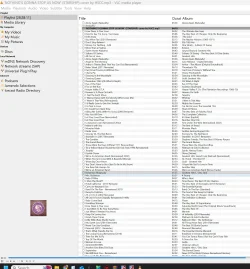
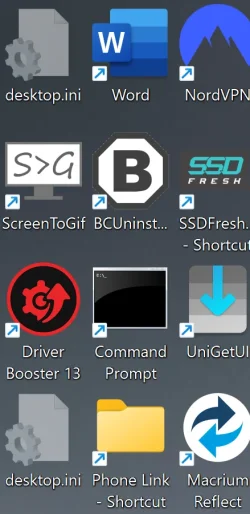
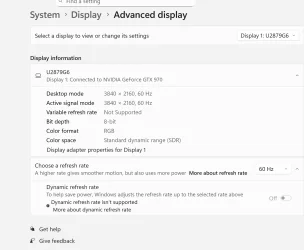
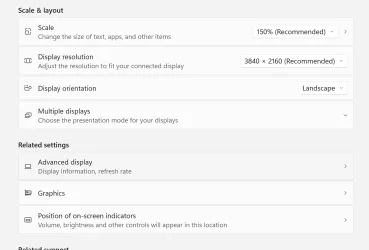
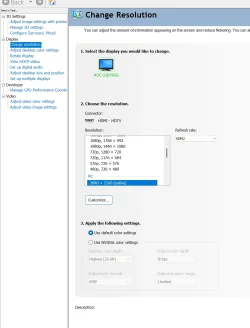
I am quite sure it is me being a old dude.. I cant get some of my system fonts to increase the font size... I can do it on just about everything just not system. I cant read winrar and other programs. I just sent a sample of what I see. Some dialog boxes are so small I have no idea what it says.. If you have any ideas it would be great.

windows11
27954
250919
 

Attachments

  • 2025-06-06 16_53_17-Amazon.com_ Wolezek Red Light Therapy Lamp with Lamp Holder, 660nm Red an...webp
    2025-06-06 16_53_17-Amazon.com_ Wolezek Red Light Therapy Lamp with Lamp Holder, 660nm Red an...webp
    407.5 KB · Views: 1
  • 2025-10-04 19_41_35-NVIDIA GeForce Overlay.webp
    2025-10-04 19_41_35-NVIDIA GeForce Overlay.webp
    42.9 KB · Views: 1
  • 2025-10-04 19_46_23-Settings.webp
    2025-10-04 19_46_23-Settings.webp
    76.8 KB · Views: 2
  • 2025-10-04 19_47_01-Settings.webp
    2025-10-04 19_47_01-Settings.webp
    47.6 KB · Views: 2
  • 2025-10-04 19_48_26-NVIDIA Control Panel.webp
    2025-10-04 19_48_26-NVIDIA Control Panel.webp
    75.5 KB · Views: 1

My Computer

System One

  • OS
    windows 11
    Computer type
    PC/Desktop
    Manufacturer/Model
    home
    CPU
    AMD Ryzen 9 Granite Ridge 4nm Technology
    Motherboard
    ASUSTeK COMPUTER INC. ROG STRIX X870E-E GAMING WIFI Rev 1.xx
    Memory
    32.0GB Dual-Channel @ 2999MHz (36-44-44-96)
    Graphics Card(s)
    VX2753 SERIES (1920x1080@60Hz) 4095MB NVIDIA GeForce GTX 970 (EVGA)
    Sound Card
    NVIDIA High Definition Audio
    Monitor(s) Displays
    AOC u2879g6
    Screen Resolution
    Current Resolution 3840x2160
    Hard Drives
    7452GB Western Digital WDC WD80EFZX-68UW8N0 (SATA ) 31 °C
    7452GB Seagate ST8000VN004-3CP101 (SATA ) 29 °C
    223GB INTEL SSDSC2CW240A3 (SATA (SSD))
    223GB INTEL SSDSC2CW240A (SATA (SSD))
    476GB Samsung SSD 950 PRO 512GB (Unknown (SSD))
    1863GB Western Digital WDC WD20EARS-00MVWB0 (SATA ) 25 °C
    931GB Seagate ST31000528AS (SATA ) 27 °C
    11176GB Seagate ST12000VN0007-2GS116 (SATA ) 30 °C
    PSU
    850
    Internet Speed
    1100
I'm sorry, but I do not know what you are calling system font. From what I see in the screenshots, #2, #3, and #4 are using system font setting.
If you compare them with say, a screenshot of file explorer, I believe they will be the same.
#1 and #5 are using the font setting that is embedded into those apps (which appear to be VLC media player and an app that controls your monitor..
Some 3rd party apps embed their own fonts and sizes into the app. It's up to the developer whether there are options within the app to change its font size.

One thing you can try is to change resolution for specific applications in Windows by right-clicking the application's executable file, going to Properties > Compatibility, and using the "Change high DPI settings" option to override the default scaling behavior
 

My Computers

System One System Two

  • OS
    Windows 11 Pro 25H2
    Computer type
    PC/Desktop
    Manufacturer/Model
    Dell Optiplex 7080
    CPU
    i9-10900 10 core 20 threads
    Motherboard
    DELL 0J37VM
    Memory
    32 gb
    Graphics Card(s)
    none-Intel UHD Graphics 630
    Sound Card
    Integrated Realtek
    Monitor(s) Displays
    Benq 27
    Screen Resolution
    2560x1440
    Hard Drives
    2x1tb Solidigm m.2 nvme /External drives 512gb Samsung m.2 sata+2tb Kingston m2.nvme
    PSU
    500w
    Case
    MT
    Cooling
    Dell Premium
    Keyboard
    Logitech wired
    Mouse
    Logitech wireless
    Internet Speed
    so slow I'm too embarrassed to tell
    Browser
    #1 Edge #2 Firefox
    Antivirus
    Defender+MWB Premium
  • Operating System
    Windows 11 Pro 24H2 26200.8457
    Computer type
    PC/Desktop
    Manufacturer/Model
    Beelink Mini PC SER5
    CPU
    AMD Ryzen 7 6800U
    Memory
    32 gb
    Graphics card(s)
    integrated
    Sound Card
    integrated
    Monitor(s) Displays
    Benq 27
    Screen Resolution
    2560x1440
    Hard Drives
    1TB Crucial nvme
    Keyboard
    Logitech wired
    Mouse
    Logitech wireless
    Internet Speed
    still too embarrassed to tell
    Browser
    Firefox
    Antivirus
    Defender
    Other Info
    System 3 is non compliant Dell 9020 i7-4770/24gb ram Win11 PRO 26200.8457
Have you tried in Settings > Accessibility > Text size.
 

My Computer

System One

  • OS
    Windows 11 Pro.(25H2)
    Computer type
    PC/Desktop
    Manufacturer/Model
    Self build
    CPU
    Ryzen 5 9600X
    Motherboard
    Aorus elite wifi7 B850
    Memory
    T-Create expert 2 x 16GB 6000 CL30-36-36.
    Graphics Card(s)
    RX9070XT Hellhound
    Sound Card
    Onboard/Logitech Z313 speakers
    Monitor(s) Displays
    Samsung G5 Odyssey 27in.
    Screen Resolution
    2560 x 1440, 144Hz
    Hard Drives
    Lexar NM790 2TB
    PSU
    Corsair RM850 (2019 model)
    Case
    Kendomen Titanium, 5 x 120mm fans
    Cooling
    Phantom Spirit 120 SE Black CPU cooler
    Keyboard
    Logitech MK120
    Mouse
    Logitech M90
    Browser
    Edge, Chrome
    Antivirus
    Defender
Have you tried in Settings > Accessibility > Text size.

Scale up the text for comfortable reading without big print.
 

My Computers

System One System Two

  • OS
    Windows 11 Education For 25H2
    Computer type
    Laptop
    Manufacturer/Model
    HP ZBook G2
    CPU
    Intel® Core i7 5500u
    Motherboard
    HP
    Memory
    8 GB
    Graphics Card(s)
    Intel HD Family Graphics 5500 AMD Firepro 4150M
    Sound Card
    Realtek High Audio
    Hard Drives
    1 TB SSD
    Mouse
    HP USB Mouse
    Antivirus
    Windows Defender
  • Operating System
    Windows 11 Pro For Workstations 25H2
    Computer type
    Laptop
    Manufacturer/Model
    HP Zbook G4
    CPU
    Xeon 1535m v6
    Motherboard
    HP
    Memory
    32 GB
    Graphics card(s)
    AMD Quadro Pro 4100
    Sound Card
    Bang and Olufson Audio
    Hard Drives
    1TB SSD
    Mouse
    HP USB Mouse
    Antivirus
    Windows Defender
If you have any ideas it would be great.
Is the monitor in question a 28" 4K monitor?
Is it an external monitor, or is it the only monitor?

Try boosting the scale to 200%

Also, some apps are still not dpi aware, the VLC window for instance.
 

My Computers

System One System Two

  • OS
    Windows 11 Pro
    Computer type
    PC/Desktop
    Manufacturer/Model
    ASUS ROG Strix
  • Operating System
    Windows 11 Pro
    Computer type
    Laptop
    Manufacturer/Model
    ASUS VivoBook
If you have some apps like browsers that don't use the system font, change it from whatever its using.
 

My Computers

System One System Two

  • OS
    Windows 11 Education For 25H2
    Computer type
    Laptop
    Manufacturer/Model
    HP ZBook G2
    CPU
    Intel® Core i7 5500u
    Motherboard
    HP
    Memory
    8 GB
    Graphics Card(s)
    Intel HD Family Graphics 5500 AMD Firepro 4150M
    Sound Card
    Realtek High Audio
    Hard Drives
    1 TB SSD
    Mouse
    HP USB Mouse
    Antivirus
    Windows Defender
  • Operating System
    Windows 11 Pro For Workstations 25H2
    Computer type
    Laptop
    Manufacturer/Model
    HP Zbook G4
    CPU
    Xeon 1535m v6
    Motherboard
    HP
    Memory
    32 GB
    Graphics card(s)
    AMD Quadro Pro 4100
    Sound Card
    Bang and Olufson Audio
    Hard Drives
    1TB SSD
    Mouse
    HP USB Mouse
    Antivirus
    Windows Defender

My Computer

System One

  • OS
    windows 11
    Computer type
    PC/Desktop
    Manufacturer/Model
    home
    CPU
    AMD Ryzen 9 Granite Ridge 4nm Technology
    Motherboard
    ASUSTeK COMPUTER INC. ROG STRIX X870E-E GAMING WIFI Rev 1.xx
    Memory
    32.0GB Dual-Channel @ 2999MHz (36-44-44-96)
    Graphics Card(s)
    VX2753 SERIES (1920x1080@60Hz) 4095MB NVIDIA GeForce GTX 970 (EVGA)
    Sound Card
    NVIDIA High Definition Audio
    Monitor(s) Displays
    AOC u2879g6
    Screen Resolution
    Current Resolution 3840x2160
    Hard Drives
    7452GB Western Digital WDC WD80EFZX-68UW8N0 (SATA ) 31 °C
    7452GB Seagate ST8000VN004-3CP101 (SATA ) 29 °C
    223GB INTEL SSDSC2CW240A3 (SATA (SSD))
    223GB INTEL SSDSC2CW240A (SATA (SSD))
    476GB Samsung SSD 950 PRO 512GB (Unknown (SSD))
    1863GB Western Digital WDC WD20EARS-00MVWB0 (SATA ) 25 °C
    931GB Seagate ST31000528AS (SATA ) 27 °C
    11176GB Seagate ST12000VN0007-2GS116 (SATA ) 30 °C
    PSU
    850
    Internet Speed
    1100
I'm sorry, but I do not know what you are calling system font. From what I see in the screenshots, #2, #3, and #4 are using system font setting.
If you compare them with say, a screenshot of file explorer, I believe they will be the same.
#1 and #5 are using the font setting that is embedded into those apps (which appear to be VLC media player and an app that controls your monitor..
Some 3rd party apps embed their own fonts and sizes into the app. It's up to the developer whether there are options within the app to change its font size.

One thing you can try is to change resolution for specific applications in Windows by right-clicking the application's executable file, going to Properties > Compatibility, and using the "Change high DPI settings" option to override the default scaling behavior
I never knew that... It is.. Just certain apps.. I Will try your suggestion when I get back.. That must be why no matter try some apps just won't change.. Ty
 

My Computer

System One

  • OS
    windows 11
    Computer type
    PC/Desktop
    Manufacturer/Model
    home
    CPU
    AMD Ryzen 9 Granite Ridge 4nm Technology
    Motherboard
    ASUSTeK COMPUTER INC. ROG STRIX X870E-E GAMING WIFI Rev 1.xx
    Memory
    32.0GB Dual-Channel @ 2999MHz (36-44-44-96)
    Graphics Card(s)
    VX2753 SERIES (1920x1080@60Hz) 4095MB NVIDIA GeForce GTX 970 (EVGA)
    Sound Card
    NVIDIA High Definition Audio
    Monitor(s) Displays
    AOC u2879g6
    Screen Resolution
    Current Resolution 3840x2160
    Hard Drives
    7452GB Western Digital WDC WD80EFZX-68UW8N0 (SATA ) 31 °C
    7452GB Seagate ST8000VN004-3CP101 (SATA ) 29 °C
    223GB INTEL SSDSC2CW240A3 (SATA (SSD))
    223GB INTEL SSDSC2CW240A (SATA (SSD))
    476GB Samsung SSD 950 PRO 512GB (Unknown (SSD))
    1863GB Western Digital WDC WD20EARS-00MVWB0 (SATA ) 25 °C
    931GB Seagate ST31000528AS (SATA ) 27 °C
    11176GB Seagate ST12000VN0007-2GS116 (SATA ) 30 °C
    PSU
    850
    Internet Speed
    1100
Is the monitor in question a 28" 4K monitor?
Is it an external monitor, or is it the only monitor?

Try boosting the scale to 200%

Also, some apps are still not dpi aware, the VLC window for instance.
That's what I'm reading now... I never knew that some apps won't adjust
 

My Computer

System One

  • OS
    windows 11
    Computer type
    PC/Desktop
    Manufacturer/Model
    home
    CPU
    AMD Ryzen 9 Granite Ridge 4nm Technology
    Motherboard
    ASUSTeK COMPUTER INC. ROG STRIX X870E-E GAMING WIFI Rev 1.xx
    Memory
    32.0GB Dual-Channel @ 2999MHz (36-44-44-96)
    Graphics Card(s)
    VX2753 SERIES (1920x1080@60Hz) 4095MB NVIDIA GeForce GTX 970 (EVGA)
    Sound Card
    NVIDIA High Definition Audio
    Monitor(s) Displays
    AOC u2879g6
    Screen Resolution
    Current Resolution 3840x2160
    Hard Drives
    7452GB Western Digital WDC WD80EFZX-68UW8N0 (SATA ) 31 °C
    7452GB Seagate ST8000VN004-3CP101 (SATA ) 29 °C
    223GB INTEL SSDSC2CW240A3 (SATA (SSD))
    223GB INTEL SSDSC2CW240A (SATA (SSD))
    476GB Samsung SSD 950 PRO 512GB (Unknown (SSD))
    1863GB Western Digital WDC WD20EARS-00MVWB0 (SATA ) 25 °C
    931GB Seagate ST31000528AS (SATA ) 27 °C
    11176GB Seagate ST12000VN0007-2GS116 (SATA ) 30 °C
    PSU
    850
    Internet Speed
    1100

Latest Support Threads

Back
Top Bottom