.DLL timestamps are suspicious


redrum

New member
Local time
1:56 PM
Posts
3
OS
Windows 11
procmon64.exe output:
Code:
Description:    Host Process for Windows Services

Company:    Microsoft Corporation

Name:    svchost.exe

Version:    10.0.26100.1 (WinBuild.160101.0800)

Path:    C:\WINDOWS\system32\svchost.exe

PID:    1412

Parent PID:    1152

Session ID:    2

User:    [REDACTED]

Auth ID:    00000000:0194f507

Architecture:    64-bit

Virtualized:    False

Integrity:    Medium

Started:    8/21/2025 1:47:20 PM

Ended:    (Running)

Modules:

svchost.exe    0x7ff7390d0000    0x13000    C:\WINDOWS\system32\svchost.exe    Microsoft Corporation    10.0.26100.1 (WinBuild.160101.0800)    1/1/1918 4:51:09 AM

windows.applicationmodel.datatransfer.dll    0x7ffd02810000    0xc1000    C:\Windows\System32\windows.applicationmodel.datatransfer.dll    Microsoft Corporation    10.0.26100.1 (WinBuild.160101.0800)    1/26/1988 9:12:07 AM

cbdhsvc.dll    0x7ffd05740000    0xe6000    c:\windows\system32\cbdhsvc.dll    Microsoft Corporation    10.0.26100.1 (WinBuild.160101.0800)    3/4/2001 2:28:05 PM

windows.staterepositoryclient.dll    0x7ffd077e0000    0x50000    C:\WINDOWS\SYSTEM32\windows.staterepositoryclient.dll    Microsoft Corporation    10.0.26100.4768 (WinBuild.160101.0800)    1/7/1929 9:47:21 PM

cdp.dll    0x7ffd09e20000    0x59f000    c:\windows\system32\cdp.dll    Microsoft Corporation    10.0.26100.1 (WinBuild.160101.0800)    4/14/1949 6:56:53 AM

InputHost.dll    0x7ffd0c290000    0x1e2000    C:\Windows\System32\InputHost.dll    Microsoft Corporation    10.0.26100.4946 (WinBuild.160101.0800)    5/20/1924 1:33:22 PM

appresolver.dll    0x7ffd0e720000    0xb6000    C:\Windows\System32\appresolver.dll    Microsoft Corporation    10.0.26100.1 (WinBuild.160101.0800)    5/18/1911 9:49:20 PM

LINKINFO.dll    0x7ffd111b0000    0xf000    C:\WINDOWS\System32\LINKINFO.dll    Microsoft Corporation    10.0.26100.1 (WinBuild.160101.0800)    10/28/1911 12:22:15 AM

Windows.Web.dll    0x7ffd11690000    0x9b000    C:\Windows\System32\Windows.Web.dll    Microsoft Corporation    10.0.26100.3037 (WinBuild.160101.0800)    12/28/1955 3:12:41 PM

edputil.dll    0x7ffd11730000    0x29000    C:\WINDOWS\SYSTEM32\edputil.dll    Microsoft Corporation    10.0.26100.1 (WinBuild.160101.0800)    11/19/2025 10:16:22 PM

Windows.Shell.ServiceHostBuilder.dll    0x7ffd13090000    0x1f000    C:\Windows\System32\Windows.Shell.ServiceHostBuilder.dll    Microsoft Corporation    10.0.26100.3912 (WinBuild.160101.0800)    8/19/1957 3:01:03 AM

OneCoreCommonProxyStub.dll    0x7ffd13400000    0xbd000    C:\Windows\System32\OneCoreCommonProxyStub.dll    Microsoft Corporation    10.0.26100.4768 (WinBuild.160101.0800)    10/24/1990 11:32:33 PM

Windows.StateRepositoryPS.dll    0x7ffd16b80000    0xc4000    C:\Windows\System32\Windows.StateRepositoryPS.dll    Microsoft Corporation    10.0.26100.4768 (WinBuild.160101.0800)    8/24/1981 6:45:31 AM

Windows.UI.dll    0x7ffd17ca0000    0x158000    C:\Windows\System32\Windows.UI.dll    Microsoft Corporation    10.0.26100.1 (WinBuild.160101.0800)    5/13/1903 2:08:22 PM

windows.staterepositorycore.dll    0x7ffd18140000    0x1a000    C:\WINDOWS\SYSTEM32\windows.staterepositorycore.dll    Microsoft Corporation    10.0.26100.4768 (WinBuild.160101.0800)    10/31/1955 7:13:34 PM

OneCoreUAPCommonProxyStub.dll    0x7ffd193e0000    0x644000    C:\Windows\System32\OneCoreUAPCommonProxyStub.dll    Microsoft Corporation    10.0.26100.4768 (WinBuild.160101.0800)    10/25/2021 1:59:46 AM

twinapi.appcore.dll    0x7ffd19bf0000    0x238000    C:\Windows\System32\twinapi.appcore.dll    Microsoft Corporation    10.0.26100.1 (WinBuild.160101.0800)    6/14/1925 2:52:33 PM

Bcp47Langs.dll    0x7ffd1d020000    0x5e000    C:\Windows\System32\Bcp47Langs.dll    Microsoft Corporation    10.0.26100.3624 (WinBuild.160101.0800)    1/16/1918 8:40:32 PM

CoreUIComponents.dll    0x7ffd1e470000    0x2e3000    c:\windows\system32\CoreUIComponents.dll    Microsoft Corporation    10.0.26100.4768    11/25/1947 10:07:21 PM

propsys.dll    0x7ffd1fbb0000    0x10d000    C:\WINDOWS\system32\propsys.dll    Microsoft Corporation    7.0.26100.4768 (WinBuild.160101.0800)    1/4/1942 9:57:04 AM

msvcp110_win.dll    0x7ffd20910000    0x91000    c:\windows\system32\msvcp110_win.dll    Microsoft Corporation    10.0.26100.1150 (WinBuild.160101.0800)    9/4/1943 5:38:34 AM

policymanager.dll    0x7ffd20c30000    0xb4000    C:\WINDOWS\SYSTEM32\policymanager.dll    Microsoft Corporation    10.0.26100.4768 (WinBuild.160101.0800)    4/18/1921 1:44:39 PM

CoreMessaging.dll    0x7ffd22b30000    0x125000    C:\Windows\System32\CoreMessaging.dll    Microsoft Corporation    10.0.26100.4202 (WinBuild.160101.0800)    5/26/1954 8:15:43 AM

uxtheme.dll    0x7ffd23330000    0xaf000    C:\WINDOWS\system32\uxtheme.dll    Microsoft Corporation    10.0.26100.1 (WinBuild.160101.0800)    9/19/2004 1:58:07 PM

Windows.Storage.dll    0x7ffd23df0000    0x860000    C:\Windows\System32\Windows.Storage.dll    Microsoft Corporation    10.0.26100.1457 (WinBuild.160101.0800)    12/16/1974 8:09:35 AM

kernel.appcore.dll    0x7ffd24f70000    0x1b000    C:\WINDOWS\SYSTEM32\kernel.appcore.dll    Microsoft Corporation    10.0.26100.4768 (WinBuild.160101.0800)    5/16/1964 11:13:11 AM

USERENV.dll    0x7ffd25580000    0x2b000    C:\Windows\System32\USERENV.dll    Microsoft Corporation    10.0.26100.1 (WinBuild.160101.0800)    4/30/1961 7:48:08 AM

CRYPTBASE.DLL    0x7ffd258a0000    0xc000    C:\WINDOWS\SYSTEM32\CRYPTBASE.DLL    Microsoft Corporation    10.0.26100.4768 (WinBuild.160101.0800)    12/13/1996 10:56:44 PM

CFGMGR32.dll    0x7ffd25d80000    0x57000    C:\Windows\System32\CFGMGR32.dll    Microsoft Corporation    10.0.26100.4202 (WinBuild.160101.0800)    6/30/1996 6:17:11 AM

UMPDC.dll    0x7ffd26070000    0x14000    C:\WINDOWS\SYSTEM32\UMPDC.dll    Microsoft Corporation    10.0.26100.1301 (WinBuild.160101.0800)    9/20/1976 4:55:10 AM

powrprof.dll    0x7ffd26090000    0x5e000    C:\WINDOWS\SYSTEM32\powrprof.dll    Microsoft Corporation    10.0.26100.4202 (WinBuild.160101.0800)    6/26/1924 3:25:39 PM

bcrypt.dll    0x7ffd26150000    0x26000    C:\WINDOWS\system32\bcrypt.dll    Microsoft Corporation    10.0.26100.1 (WinBuild.160101.0800)    9/20/1929 6:18:38 AM

msvcp_win.dll    0x7ffd26230000    0xa3000    C:\WINDOWS\System32\msvcp_win.dll    Microsoft Corporation    10.0.26100.4768 (WinBuild.160101.0800)    11/23/1904 10:14:26 PM

KERNELBASE.dll    0x7ffd26370000    0x3f0000    C:\WINDOWS\System32\KERNELBASE.dll    Microsoft Corporation    10.0.26100.4768 (WinBuild.160101.0800)    9/24/2030 7:17:35 PM

ucrtbase.dll    0x7ffd26770000    0x14b000    C:\WINDOWS\System32\ucrtbase.dll    Microsoft Corporation    10.0.26100.4768 (WinBuild.160101.0800)    9/15/1950 4:02:55 PM

bcryptPrimitives.dll    0x7ffd26980000    0x99000    C:\WINDOWS\System32\bcryptPrimitives.dll    Microsoft Corporation    10.0.26100.4768 (WinBuild.160101.0800)    1/19/1939 12:56:22 AM

WinTypes.dll    0x7ffd26a20000    0x173000    C:\WINDOWS\System32\WinTypes.dll    Microsoft Corporation    10.0.26100.1 (WinBuild.160101.0800)    9/27/1949 12:09:03 PM

gdi32full.dll    0x7ffd26ba0000    0x138000    C:\WINDOWS\System32\gdi32full.dll    Microsoft Corporation    10.0.26100.4768 (WinBuild.160101.0800)    11/5/1967 4:05:42 AM

win32u.dll    0x7ffd26ce0000    0x27000    C:\WINDOWS\System32\win32u.dll    Microsoft Corporation    10.0.26100.4946 (WinBuild.160101.0800)    3/11/1963 5:00:34 PM

msvcrt.dll    0x7ffd26e90000    0xa9000    C:\WINDOWS\System32\msvcrt.dll    Microsoft Corporation    7.0.26100.4768 (WinBuild.160101.0800)    5/14/1917 5:25:02 PM

SHLWAPI.dll    0x7ffd26fc0000    0x6a000    C:\WINDOWS\System32\SHLWAPI.dll    Microsoft Corporation    10.0.26100.1 (WinBuild.160101.0800)    7/26/1970 5:56:57 AM

clbcatq.dll    0x7ffd27220000    0xa8000    C:\WINDOWS\System32\clbcatq.dll    Microsoft Corporation    2001.12.10941.16384 (WinBuild.160101.0800)    9/15/2020 1:57:13 PM

sechost.dll    0x7ffd27760000    0xa6000    C:\WINDOWS\System32\sechost.dll    Microsoft Corporation    10.0.26100.1 (WinBuild.160101.0800)    2/13/1999 10:03:27 PM

IMM32.DLL    0x7ffd27810000    0x2f000    C:\WINDOWS\System32\IMM32.DLL    Microsoft Corporation    10.0.26100.4484 (WinBuild.160101.0800)    6/20/1921 1:34:26 PM

SHELL32.dll    0x7ffd27870000    0x74d000    C:\WINDOWS\System32\SHELL32.dll    Microsoft Corporation    10.0.26100.4768 (WinBuild.160101.0800)    2/23/2000 1:56:08 AM

ole32.dll    0x7ffd27fc0000    0x1a0000    C:\WINDOWS\System32\ole32.dll    Microsoft Corporation    10.0.26100.1 (WinBuild.160101.0800)    1/10/1999 9:53:06 PM

combase.dll    0x7ffd28170000    0x385000    C:\WINDOWS\System32\combase.dll    Microsoft Corporation    10.0.26100.1 (WinBuild.160101.0800)    4/4/1991 7:51:22 AM

advapi32.dll    0x7ffd287f0000    0xb4000    C:\WINDOWS\System32\advapi32.dll    Microsoft Corporation    10.0.26100.3624 (WinBuild.160101.0800)    5/12/1925 8:55:32 AM

RPCRT4.dll    0x7ffd288c0000    0x118000    C:\WINDOWS\System32\RPCRT4.dll    Microsoft Corporation    10.0.26100.1 (WinBuild.160101.0800)    12/14/1993 5:05:42 PM

OLEAUT32.dll    0x7ffd289e0000    0xe0000    C:\WINDOWS\System32\OLEAUT32.dll    Microsoft Corporation    10.0.26100.4768 (WinBuild.160101.0800)    3/6/1922 8:56:56 PM

KERNEL32.DLL    0x7ffd28ad0000    0xc9000    C:\WINDOWS\System32\KERNEL32.DLL    Microsoft Corporation    10.0.26100.4768 (WinBuild.160101.0800)    12/23/1923 12:27:04 PM

GDI32.dll    0x7ffd28c30000    0x2b000    C:\WINDOWS\System32\GDI32.dll    Microsoft Corporation    10.0.26100.4768 (WinBuild.160101.0800)    3/4/1977 10:33:34 PM

shcore.dll    0x7ffd28df0000    0xf5000    C:\WINDOWS\System32\shcore.dll    Microsoft Corporation    10.0.26100.1 (WinBuild.160101.0800)    7/10/1993 11:18:02 AM

user32.dll    0x7ffd28ef0000    0x1c5000    C:\WINDOWS\System32\user32.dll    Microsoft Corporation    10.0.26100.1 (WinBuild.160101.0800)    10/27/1947 4:46:47 AM

ntdll.dll    0x7ffd29100000    0x267000    C:\WINDOWS\SYSTEM32\ntdll.dll    Microsoft Corporation    10.0.26100.4768 (WinBuild.160101.0800)    7/11/1913 6:08:24 PM

Manual check output (script provided):
Powershell:
PS C:\WINDOWS\system32> $files = @(
>>     "C:\Windows\System32\ntdll.dll",
>>     "C:\Windows\System32\kernel32.dll",
>>     "C:\Windows\System32\ucrtbase.dll",
>>     "C:\Windows\System32\bcryptPrimitives.dll",
>>     "C:\Windows\System32\gdi32full.dll"
>> )
>>
>> foreach ($file in $files) {
>>     if (Test-Path $file) {
>>         $stream = [System.IO.File]::OpenRead($file)
>>         $reader = New-Object System.IO.BinaryReader($stream)
>>
>>         $stream.Position = 0x3C
>>         $peOffset = $reader.ReadInt32()
>>
>>         $stream.Position = $peOffset + 8
>>         $timestamp = $reader.ReadInt32()
>>
>>         $reader.Close()
>>         $stream.Close()
>>
>>         $dt = (Get-Date "1/1/1970").AddSeconds($timestamp).ToLocalTime()
>>         Write-Output "$file - Compiled: $dt"
>>     } else {
>>         Write-Output "$file - Not Found"
>>     }
>> }

C:\Windows\System32\ntdll.dll - Compiled: 07/11/1913 18:08:24
C:\Windows\System32\kernel32.dll - Compiled: 12/23/1923 11:27:04
C:\Windows\System32\ucrtbase.dll - Compiled: 09/15/1950 16:02:55
C:\Windows\System32\bcryptPrimitives.dll - Compiled: 01/18/1939 23:56:22
C:\Windows\System32\gdi32full.dll - Compiled: 11/05/1967 03:05:42

All timestamps appear normal within procexp64.exe.

DLLs are all signed by Microsoft.

Scheduled task \Microsoft\Windows\Hotpatch\Monitoring to run %systemroot%\system32\hpatchmonTask.cmd was discovered with Autoruns64.exe (appears to be legitimate, but no mention of it on the Internet)

Contents of hpatchmonTask.cmd:


Batch:
@echo off
setlocal enabledelayedexpansion

REM Initialize secure system is running flag
set secureSystemIsRunning=false

REM Initilize hotpatch registered flag
set hotPatchesRegistered=false

REM Initialize service name
set serviceName=hpatchmon

REM Initialize server installed flag
set serviceInstalled=false

REM Initialize service desired start type
set autoStart=false

REM Initialize force start flag
set forceStart=false


call :checkSecureSystemIsRunning
if "%secureSystemIsRunning%" equ "false" ( goto end )

call :checkHotPatchAreRegistered

call :checkServiceInstalled
if "%serviceInstalled%" equ "false" ( goto end )

if "%hotPatchesRegistered%" equ "false" (
    call :checkServiceDemandStart  
    goto end  
)

if "%hotPatchesRegistered%" equ "true" (
    call :checkServiceAutoStart
)

if "%forceStart%" equ "true" (
    call :checkServiceRunning
    goto end
)

goto end


REM -----------------------------------------------------------------------------
REM Function: checkSecureSystemIsRunning
REM Description: This function checks if the "Secure System" process is running.
REM              It uses the tasklist command to list all running processes and
REM              filters the output to find the "Secure System" process.
REM              If the process is not found, it prints a message and exits with
REM              an error code 1. If the process is found, it prints a message
REM              and exits with a success code 0.
REM -----------------------------------------------------------------------------
:checkSecureSystemIsRunning
tasklist /FI "IMAGENAME eq Secure System" /v /FO list | findstr /i "Image Name:   Secure System" > nul
if !errorlevel! neq 0 (
    echo Secure System is not running, exiting.
    set secureSystemIsRunning=false
    exit /b 1
)
echo Secure System is running.
set secureSystemIsRunning=true
exit /b 0

REM -----------------------------------------------------------------------------
REM Function: checkHotPatchAreRegistered
REM Description: This function checks if hotpatches are registered in the system.
REM              It queries the registry subkeys key under parent registry key
REM              "HKEY_LOCAL_MACHINE\SYSTEM\CurrentControlSet\Control\HotPatch".
REM              If the parent registry  key does not exist or the subkey count
REM              is zero (error level not equal to 0), it prints a message
REM              indicating that hotpatches are not registered and exits with a
REM              status code of 1.
REM -----------------------------------------------------------------------------
:checkHotPatchAreRegistered
REM Initialize hotpatch registry key and pattern to match subkeys for findstr
set subkeyCount=0
set hotPatchKey="HKEY_LOCAL_MACHINE\SYSTEM\CurrentControlSet\Control\HotPatch"
reg query %hotPatchKey% > nul 2>&1
if !errorlevel! neq 0 (
    echo Hotpatches are not registered.
    set hotPatchesRegistered=false
    exit /b 1
)

for /f "tokens=*" %%i in ('reg query %hotPatchKey% /s ^| findstr /r /c:"HKEY_LOCAL_MACHINE\\SYSTEM\\CurrentControlSet\\Control\\HotPatch*"') do ( set /a subkeyCount+=1 )

if %subkeyCount% equ 0 (
    echo No hotpatches are registered.
    set hotPatchesRegistered=false
    exit /b 1
)

echo Hotpatches are registered.
set hotPatchesRegistered=true
set forceStart=true
set errorlevel=0
exit /b 0

REM -----------------------------------------------------------------------------
REM Function: checkServiceInstalled
REM Description: This function checks if a specified service is installed on the system.
REM              It uses the 'sc qc' command to query the service configuration.
REM              If the service is not installed (error level 1060), it outputs a message
REM              and exits with code 1. If the service is installed, it exits with code 0.
REM -----------------------------------------------------------------------------
:checkServiceInstalled
sc qc %serviceName% > nul 2>&1
if !errorlevel! equ 1060 (
    echo The service:%serviceName% is not installed.
    set serviceInstalled=false
    exit /b 1
)
set serviceInstalled=true
exit /b 0

REM -----------------------------------------------------------------------------
REM Function: checkServiceAutoStart
REM Description: This function checks if a specified service is set to start
REM              automatically. If the service is not set to auto start, it
REM              configures the service to start automatically.
REM Parameters:
REM   %serviceName% - The name of the service to check and configure.
REM -----------------------------------------------------------------------------
:checkServiceAutoStart
sc qc %serviceName% | findstr /i "AUTO_START" > nul
if !errorlevel! neq 0 (
    echo The service:%serviceName% is not set to auto start. Configuring it now...
    sc config %serviceName% start= auto > nul 2>&1
    if !errorlevel! neq 0 (
        echo could not configure service:%serviceName% to auto start.
        exit /b 1
    )
    echo The service:%serviceName% has been configured to auto start.
    exit /b 0
)
echo The service:%serviceName% is already set to auto start.
exit /b 0

REM -----------------------------------------------------------------------------
REM Function: checkServiceDemandStart
REM Description: This function checks if a specified service is set to start
REM              on demand. If the service is not set to demand start, it
REM              configures the service to demand start.
REM Parameters:
REM   %serviceName% - The name of the service to check and configure.
REM -----------------------------------------------------------------------------
:checkServiceDemandStart
sc qc %serviceName% | findstr /i "DEMAND_START" > nul
if !errorlevel! neq 0 (
    echo The service:%serviceName% is not set to demand start. Configuring it now...
    sc config %serviceName% start= demand > nul 2>&1
    if !errorlevel! neq 0 (
        echo could not configure service:%serviceName% to demand start.
        exit /b 1  
    )
    echo The service:%serviceName% has been configured to demand start.
    exit /b 0
)

echo The service:%serviceName% is already set to demand start.
exit /b 0


REM -----------------------------------------------------------------------------
REM Function: checkServiceRunning
REM Description: This function starts the service.
REM Parameters:
REM   %serviceName% - The name of the service to check and start.
REM -----------------------------------------------------------------------------
:checkServiceRunning
echo starting service:%serviceName%
SC start %serviceName% > nul 2>&1
if !errorlevel! neq 0 (
echo could not start service:%serviceName%
    exit /b 1
)

echo service:%serviceName% started successfully
exit /b 0

:end
endlocal
 
Windows Build/Version
Version 24H2 (OS Build 26100.4946)
Last edited:

My Computer

System One

  • OS
    Windows 11
    Computer type
    PC/Desktop
Hi, welcome.


Manual check output (script provided):
Powershell:
PS C:\WINDOWS\system32> $files = @(
>>     "C:\Windows\System32\ntdll.dll",
>>     "C:\Windows\System32\kernel32.dll",
>>     "C:\Windows\System32\ucrtbase.dll",
>>     "C:\Windows\System32\bcryptPrimitives.dll",
>>     "C:\Windows\System32\gdi32full.dll"
>> )
>>
>> foreach ($file in $files) {
>>     if (Test-Path $file) {
>>         $stream = [System.IO.File]::OpenRead($file)
>>         $reader = New-Object System.IO.BinaryReader($stream)
>>
>>         $stream.Position = 0x3C
>>         $peOffset = $reader.ReadInt32()
>>
>>         $stream.Position = $peOffset + 8
>>         $timestamp = $reader.ReadInt32()
>>
>>         $reader.Close()
>>         $stream.Close()
>>
>>         $dt = (Get-Date "1/1/1970").AddSeconds($timestamp).ToLocalTime()
>>         Write-Output "$file - Compiled: $dt"
>>     } else {
>>         Write-Output "$file - Not Found"
>>     }
>> }

C:\Windows\System32\ntdll.dll - Compiled: 07/11/1913 18:08:24
C:\Windows\System32\kernel32.dll - Compiled: 12/23/1923 11:27:04
C:\Windows\System32\ucrtbase.dll - Compiled: 09/15/1950 16:02:55
C:\Windows\System32\bcryptPrimitives.dll - Compiled: 01/18/1939 23:56:22
C:\Windows\System32\gdi32full.dll - Compiled: 11/05/1967 03:05:42


As a test, replace:

Powershell:
$timestamp = $reader.ReadInt32()

With:

Powershell:
$timestamp = [System.BitConverter]::ToUInt32($reader.ReadBytes(4),0)
 

My Computers

System One System Two

  • OS
    Windows 11 Pro 25H2 Build 26200.8655
    Computer type
    PC/Desktop
    Manufacturer/Model
    Sin-built 2013
    CPU
    Intel(R) Core(TM) i7-4770K CPU @ 3.50GHz
    Motherboard
    ASUS ROG Maximus VI Formula
    Memory
    32.0 GB of I forget and the box is in storage.
    Graphics Card(s)
    Gigabyte nVidia GeForce GTX 1660 Super OC 6GB
    Sound Card
    Onboard thingy
    Monitor(s) Displays
    5 x LG 25MS500-B - 1 x 24MK430H-B - 1 x Wacom Pro 22" Touch Screen Tablet
    Screen Resolution
    All over the place
    Hard Drives
    Too many to list.
    OS on Samsung 1TB 870 QVO SATA
    PSU
    Silverstone 1500
    Case
    NZXT Phantom 820 Full-Tower Case
    Cooling
    Noctua NH-D15 Elite Class Dual Tower CPU Cooler / 6 x EziDIY 120mm / 2 x Corsair 140mm somethings / 1 x 140mm Thermaltake something / 2 x 200mm Corsair.
    Keyboard
    Corsair K95 / Logitech diNovo Edge Wireless
    Mouse
    Logitech: G402 / G502 / Mx Masters / Mx Air Cordless
    Internet Speed
    2000/500Mbps
    Browser
    All sorts
    Antivirus
    Kaspersky Premium
    Other Info
    ㅤㅤㅤㅤㅤㅤㅤㅤㅤㅤㅤㅤㅤㅤㅤㅤㅤㅤㅤㅤㅤㅤㅤㅤㅤㅤㅤㅤㅤㅤㅤㅤㅤㅤㅤㅤㅤㅤㅤㅤ⠀⠀⠀⠀⠀⠀⠀⠀⠀⠀
    TP-Link BE9300 WiFi 7 Bluetooth 5.4 (Archer TBE550E)
    TP-Link TX201 V1 2.5GB Lan

    Grandstream HT812 - VoIP
    ASUS DSL-AX82U - Mesh
    ASUS RT-AC68U - Mesh
    ASUS RT-BE88U Router

    Brother MFC-L2880DW Printer

    I’m on a horse.
  • Operating System
    Windows 11 Pro 25H2 Build 26200.8655
    Computer type
    Laptop
    Manufacturer/Model
    LENOVO Yoga 7 14IRL8 - 7i EVO OLED 14" Touchscreen i5 12 Core 16GB/512GB
    CPU
    Intel Core 12th Gen i5-1240P Processor (1.7 - 4.4GHz)
    Memory
    16GB LPDDR5 RAM
    Graphics card(s)
    Intel Iris Xe Graphics Processor
    Sound Card
    Optimized with Dolby Atmos®
    Screen Resolution
    QHD 2880 x 1800 OLED
    Hard Drives
    M.2 512GB
    Antivirus
    Defender / Malwarebytes
    Other Info
    …still on a horse.
This is a possible explanation, I found.

  • In a Windows PE header, at offset 0x3C you correctly get the PE signature offset.
  • At PE + 8, the field you’re reading is indeed the time/date stamp.
  • That field is a Unix-style timestamp, but it’s in seconds since 1 Jan 1970 UTC.
  • The issue: .NET’s BinaryReader.ReadInt32() reads a signed32-bit integer.
    • If the timestamp is larger than 2,147,483,647, it rolls into negative territory.
    • When you pass that negative number into .AddSeconds(), you land back in the early 1900s.
That’s why your output looks like Windows was secretly compiling DLLs in 1913.
 

My Computers

System One System Two

  • OS
    Windows 11 Pro 25H2 Build 26200.8655
    Computer type
    PC/Desktop
    Manufacturer/Model
    Sin-built 2013
    CPU
    Intel(R) Core(TM) i7-4770K CPU @ 3.50GHz
    Motherboard
    ASUS ROG Maximus VI Formula
    Memory
    32.0 GB of I forget and the box is in storage.
    Graphics Card(s)
    Gigabyte nVidia GeForce GTX 1660 Super OC 6GB
    Sound Card
    Onboard thingy
    Monitor(s) Displays
    5 x LG 25MS500-B - 1 x 24MK430H-B - 1 x Wacom Pro 22" Touch Screen Tablet
    Screen Resolution
    All over the place
    Hard Drives
    Too many to list.
    OS on Samsung 1TB 870 QVO SATA
    PSU
    Silverstone 1500
    Case
    NZXT Phantom 820 Full-Tower Case
    Cooling
    Noctua NH-D15 Elite Class Dual Tower CPU Cooler / 6 x EziDIY 120mm / 2 x Corsair 140mm somethings / 1 x 140mm Thermaltake something / 2 x 200mm Corsair.
    Keyboard
    Corsair K95 / Logitech diNovo Edge Wireless
    Mouse
    Logitech: G402 / G502 / Mx Masters / Mx Air Cordless
    Internet Speed
    2000/500Mbps
    Browser
    All sorts
    Antivirus
    Kaspersky Premium
    Other Info
    ㅤㅤㅤㅤㅤㅤㅤㅤㅤㅤㅤㅤㅤㅤㅤㅤㅤㅤㅤㅤㅤㅤㅤㅤㅤㅤㅤㅤㅤㅤㅤㅤㅤㅤㅤㅤㅤㅤㅤㅤ⠀⠀⠀⠀⠀⠀⠀⠀⠀⠀
    TP-Link BE9300 WiFi 7 Bluetooth 5.4 (Archer TBE550E)
    TP-Link TX201 V1 2.5GB Lan

    Grandstream HT812 - VoIP
    ASUS DSL-AX82U - Mesh
    ASUS RT-AC68U - Mesh
    ASUS RT-BE88U Router

    Brother MFC-L2880DW Printer

    I’m on a horse.
  • Operating System
    Windows 11 Pro 25H2 Build 26200.8655
    Computer type
    Laptop
    Manufacturer/Model
    LENOVO Yoga 7 14IRL8 - 7i EVO OLED 14" Touchscreen i5 12 Core 16GB/512GB
    CPU
    Intel Core 12th Gen i5-1240P Processor (1.7 - 4.4GHz)
    Memory
    16GB LPDDR5 RAM
    Graphics card(s)
    Intel Iris Xe Graphics Processor
    Sound Card
    Optimized with Dolby Atmos®
    Screen Resolution
    QHD 2880 x 1800 OLED
    Hard Drives
    M.2 512GB
    Antivirus
    Defender / Malwarebytes
    Other Info
    …still on a horse.
This is a possible explanation, I found.

  • In a Windows PE header, at offset 0x3C you correctly get the PE signature offset.
  • At PE + 8, the field you’re reading is indeed the time/date stamp.
  • That field is a Unix-style timestamp, but it’s in seconds since 1 Jan 1970 UTC.
  • The issue: .NET’s BinaryReader.ReadInt32() reads a signed32-bit integer.
    • If the timestamp is larger than 2,147,483,647, it rolls into negative territory.
    • When you pass that negative number into .AddSeconds(), you land back in the early 1900s.
That’s why your output looks like Windows was secretly compiling DLLs in 1913.

Adjustment to account for unsigned 32-bit integers results in us getting the following timestamps:

Code:
C:\Windows\System32\ntdll.dll - Compiled: 08/17/2049 00:36:40
C:\Windows\System32\ucrtbase.dll - Compiled: 10/21/2086 22:31:11
C:\Windows\System32\bcryptPrimitives.dll - Compiled: 02/24/2075 06:24:38
C:\Windows\System32\gdi32full.dll - Compiled: 12/12/2103 09:33:58
 

My Computer

System One

  • OS
    Windows 11
    Computer type
    PC/Desktop
1 point for being correct, 9 points for bringing in Raymond Chen.
 

My Computer

System One

  • OS
    Windows 11 Pro 25H2
    Computer type
    PC/Desktop
    Manufacturer/Model
    Intel NUC12WSHi7
    CPU
    12th Gen Core i7-1260P
    Motherboard
    NUC12WSBi7
    Memory
    64 GB Micron PC4-25600
    Graphics Card(s)
    Intel Iris Xe Graphics
    Sound Card
    on-board Realtek HD Audio
    Monitor(s) Displays
    Dell U3219Q
    Screen Resolution
    3840 x 2160
    Hard Drives
    Samsung SSD 990 PRO 1TB
    Crucial MX500 2 TB
    Antivirus
    Microsoft Defender
Adjustment to account for unsigned 32-bit integers results in us getting the following timestamps:

Code:
C:\Windows\System32\ntdll.dll - Compiled: 08/17/2049 00:36:40
C:\Windows\System32\ucrtbase.dll - Compiled: 10/21/2086 22:31:11
C:\Windows\System32\bcryptPrimitives.dll - Compiled: 02/24/2075 06:24:38
C:\Windows\System32\gdi32full.dll - Compiled: 12/12/2103 09:33:58


In response — And another test:

PE TimeDateStamp shows “future dates”
  • On modern Windows builds, the PE header’s TimeDateStamp is often deterministic/hash-based, not a real build time.
  • These values can have the high bit set (0x80000000). If you decode them as Unix seconds, they land decades in the future (e.g., 2049/2086/2103).
  • Use this field only as a content identity for binding/uniqueness — not as a compile timestamp.
  • If you need a human date, prefer:
    • File metadata: version + LastWriteTime (rough “when this file on disk was produced/serviced”).
    • Authenticode signing: the signature’s timestamp (when it was signed/published), if present.

PowerShell: inspect TimeDateStamp and flag determinism

Powershell:
# Files to inspect
$files = @(
    "C:\Windows\System32\ntdll.dll",
    "C:\Windows\System32\kernel32.dll",
    "C:\Windows\System32\ucrtbase.dll",
    "C:\Windows\System32\bcryptPrimitives.dll",
    "C:\Windows\System32\gdi32full.dll"
)

foreach ($file in $files) {
    if (-not (Test-Path $file)) {
        Write-Output "$file - Not Found"
        continue
    }

    # Read PE COFF TimeDateStamp (UInt32, little-endian)
    $fs = [System.IO.File]::OpenRead($file)
    try {
        $br = New-Object System.IO.BinaryReader($fs)
        $fs.Position = 0x3C
        $peOffset = $br.ReadInt32()
        $fs.Position = $peOffset + 8
        $ts = [System.BitConverter]::ToUInt32($br.ReadBytes(4), 0)
    } finally {
        $br.Close()
        $fs.Close()
    }

    $hex = ('0x{0:X8}' -f $ts)
    $isDeterministic = ($ts -band 0x80000000) -ne 0

    # Only decode to a human date if it looks like a classic (non-deterministic) stamp
    $stampInfo = if ($isDeterministic) {
        "deterministic/hash-based (not a real clock time)"
    } else {
        $dt = [DateTimeOffset]::FromUnixTimeSeconds([int64]$ts).ToLocalTime()
        "classic linker time: $($dt.ToString('yyyy-MM-dd HH:mm:ss')) (local)"
    }

    $fi   = Get-Item $file
    $ver  = $fi.VersionInfo.FileVersion
    $lw   = $fi.LastWriteTime.ToString("yyyy-MM-dd HH:mm:ss")

    "{0} - TimeDateStamp={1} ({2}); FileVersion={3}; LastWrite={4}" -f $file, $hex, $stampInfo, $ver, $lw
}

  • Expect many Windows 10/11 system DLLs to report “deterministic/hash-based”.
  • For publishing timelines, check the digital signature timestamp (if present) or reference the OS build that delivered the file.
 

My Computers

System One System Two

  • OS
    Windows 11 Pro 25H2 Build 26200.8655
    Computer type
    PC/Desktop
    Manufacturer/Model
    Sin-built 2013
    CPU
    Intel(R) Core(TM) i7-4770K CPU @ 3.50GHz
    Motherboard
    ASUS ROG Maximus VI Formula
    Memory
    32.0 GB of I forget and the box is in storage.
    Graphics Card(s)
    Gigabyte nVidia GeForce GTX 1660 Super OC 6GB
    Sound Card
    Onboard thingy
    Monitor(s) Displays
    5 x LG 25MS500-B - 1 x 24MK430H-B - 1 x Wacom Pro 22" Touch Screen Tablet
    Screen Resolution
    All over the place
    Hard Drives
    Too many to list.
    OS on Samsung 1TB 870 QVO SATA
    PSU
    Silverstone 1500
    Case
    NZXT Phantom 820 Full-Tower Case
    Cooling
    Noctua NH-D15 Elite Class Dual Tower CPU Cooler / 6 x EziDIY 120mm / 2 x Corsair 140mm somethings / 1 x 140mm Thermaltake something / 2 x 200mm Corsair.
    Keyboard
    Corsair K95 / Logitech diNovo Edge Wireless
    Mouse
    Logitech: G402 / G502 / Mx Masters / Mx Air Cordless
    Internet Speed
    2000/500Mbps
    Browser
    All sorts
    Antivirus
    Kaspersky Premium
    Other Info
    ㅤㅤㅤㅤㅤㅤㅤㅤㅤㅤㅤㅤㅤㅤㅤㅤㅤㅤㅤㅤㅤㅤㅤㅤㅤㅤㅤㅤㅤㅤㅤㅤㅤㅤㅤㅤㅤㅤㅤㅤ⠀⠀⠀⠀⠀⠀⠀⠀⠀⠀
    TP-Link BE9300 WiFi 7 Bluetooth 5.4 (Archer TBE550E)
    TP-Link TX201 V1 2.5GB Lan

    Grandstream HT812 - VoIP
    ASUS DSL-AX82U - Mesh
    ASUS RT-AC68U - Mesh
    ASUS RT-BE88U Router

    Brother MFC-L2880DW Printer

    I’m on a horse.
  • Operating System
    Windows 11 Pro 25H2 Build 26200.8655
    Computer type
    Laptop
    Manufacturer/Model
    LENOVO Yoga 7 14IRL8 - 7i EVO OLED 14" Touchscreen i5 12 Core 16GB/512GB
    CPU
    Intel Core 12th Gen i5-1240P Processor (1.7 - 4.4GHz)
    Memory
    16GB LPDDR5 RAM
    Graphics card(s)
    Intel Iris Xe Graphics Processor
    Sound Card
    Optimized with Dolby Atmos®
    Screen Resolution
    QHD 2880 x 1800 OLED
    Hard Drives
    M.2 512GB
    Antivirus
    Defender / Malwarebytes
    Other Info
    …still on a horse.
TimeDateStamp results

Future or nonsensical dates appear because many Windows 10/11 system DLLs are built with deterministic hashing, so the TimeDateStamp is not a real compile time. Only “classic linker time” values are genuine.

  • C:\Windows\System32\ntdll.dll
    TimeDateStamp=0xCD40B687 → deterministic/hash-based (not a real clock time)
    FileVersion=10.0.22621.5624 (WinBuild.160101.0800)
    LastWrite=2025-07-10 11:58:29

  • C:\Windows\System32\kernel32.dll
    TimeDateStamp=0xE4CACA22 → deterministic/hash-based (not a real clock time)
    FileVersion=10.0.22621.5624 (WinBuild.160101.0800)
    LastWrite=2025-06-12 15:06:14

  • C:\Windows\System32\ucrtbase.dll
    TimeDateStamp=0x10C46E71 → classic linker time: 1978-12-01 07:19:45 (local)
    FileVersion=10.0.22621.3593 (WinBuild.160101.0800)
    LastWrite=2024-06-27 10:23:27

  • C:\Windows\System32\bcryptPrimitives.dll
    TimeDateStamp=0x23A2A800 → classic linker time: 1988-12-12 02:53:20 (local)
    FileVersion=10.0.22621.4317 (WinBuild.160101.0800)
    LastWrite=2025-01-15 18:42:13

  • C:\Windows\System32\gdi32full.dll
    TimeDateStamp=0x9580C791 → deterministic/hash-based (not a real clock time)
    FileVersion=10.0.22621.5697 (WinBuild.160101.0800)
    LastWrite=2025-08-14 13:22:37
 

My Computers

System One System Two

  • OS
    Windows 11 Pro 25H2 Build 26200.8655
    Computer type
    PC/Desktop
    Manufacturer/Model
    Sin-built 2013
    CPU
    Intel(R) Core(TM) i7-4770K CPU @ 3.50GHz
    Motherboard
    ASUS ROG Maximus VI Formula
    Memory
    32.0 GB of I forget and the box is in storage.
    Graphics Card(s)
    Gigabyte nVidia GeForce GTX 1660 Super OC 6GB
    Sound Card
    Onboard thingy
    Monitor(s) Displays
    5 x LG 25MS500-B - 1 x 24MK430H-B - 1 x Wacom Pro 22" Touch Screen Tablet
    Screen Resolution
    All over the place
    Hard Drives
    Too many to list.
    OS on Samsung 1TB 870 QVO SATA
    PSU
    Silverstone 1500
    Case
    NZXT Phantom 820 Full-Tower Case
    Cooling
    Noctua NH-D15 Elite Class Dual Tower CPU Cooler / 6 x EziDIY 120mm / 2 x Corsair 140mm somethings / 1 x 140mm Thermaltake something / 2 x 200mm Corsair.
    Keyboard
    Corsair K95 / Logitech diNovo Edge Wireless
    Mouse
    Logitech: G402 / G502 / Mx Masters / Mx Air Cordless
    Internet Speed
    2000/500Mbps
    Browser
    All sorts
    Antivirus
    Kaspersky Premium
    Other Info
    ㅤㅤㅤㅤㅤㅤㅤㅤㅤㅤㅤㅤㅤㅤㅤㅤㅤㅤㅤㅤㅤㅤㅤㅤㅤㅤㅤㅤㅤㅤㅤㅤㅤㅤㅤㅤㅤㅤㅤㅤ⠀⠀⠀⠀⠀⠀⠀⠀⠀⠀
    TP-Link BE9300 WiFi 7 Bluetooth 5.4 (Archer TBE550E)
    TP-Link TX201 V1 2.5GB Lan

    Grandstream HT812 - VoIP
    ASUS DSL-AX82U - Mesh
    ASUS RT-AC68U - Mesh
    ASUS RT-BE88U Router

    Brother MFC-L2880DW Printer

    I’m on a horse.
  • Operating System
    Windows 11 Pro 25H2 Build 26200.8655
    Computer type
    Laptop
    Manufacturer/Model
    LENOVO Yoga 7 14IRL8 - 7i EVO OLED 14" Touchscreen i5 12 Core 16GB/512GB
    CPU
    Intel Core 12th Gen i5-1240P Processor (1.7 - 4.4GHz)
    Memory
    16GB LPDDR5 RAM
    Graphics card(s)
    Intel Iris Xe Graphics Processor
    Sound Card
    Optimized with Dolby Atmos®
    Screen Resolution
    QHD 2880 x 1800 OLED
    Hard Drives
    M.2 512GB
    Antivirus
    Defender / Malwarebytes
    Other Info
    …still on a horse.
So basically you've proven that they're all hash-based... which Raymond Chen said they are.
 

My Computer

System One

  • OS
    Windows 7

My Computers

System One System Two

  • OS
    Windows 11 Pro 25H2 Build 26200.8655
    Computer type
    PC/Desktop
    Manufacturer/Model
    Sin-built 2013
    CPU
    Intel(R) Core(TM) i7-4770K CPU @ 3.50GHz
    Motherboard
    ASUS ROG Maximus VI Formula
    Memory
    32.0 GB of I forget and the box is in storage.
    Graphics Card(s)
    Gigabyte nVidia GeForce GTX 1660 Super OC 6GB
    Sound Card
    Onboard thingy
    Monitor(s) Displays
    5 x LG 25MS500-B - 1 x 24MK430H-B - 1 x Wacom Pro 22" Touch Screen Tablet
    Screen Resolution
    All over the place
    Hard Drives
    Too many to list.
    OS on Samsung 1TB 870 QVO SATA
    PSU
    Silverstone 1500
    Case
    NZXT Phantom 820 Full-Tower Case
    Cooling
    Noctua NH-D15 Elite Class Dual Tower CPU Cooler / 6 x EziDIY 120mm / 2 x Corsair 140mm somethings / 1 x 140mm Thermaltake something / 2 x 200mm Corsair.
    Keyboard
    Corsair K95 / Logitech diNovo Edge Wireless
    Mouse
    Logitech: G402 / G502 / Mx Masters / Mx Air Cordless
    Internet Speed
    2000/500Mbps
    Browser
    All sorts
    Antivirus
    Kaspersky Premium
    Other Info
    ㅤㅤㅤㅤㅤㅤㅤㅤㅤㅤㅤㅤㅤㅤㅤㅤㅤㅤㅤㅤㅤㅤㅤㅤㅤㅤㅤㅤㅤㅤㅤㅤㅤㅤㅤㅤㅤㅤㅤㅤ⠀⠀⠀⠀⠀⠀⠀⠀⠀⠀
    TP-Link BE9300 WiFi 7 Bluetooth 5.4 (Archer TBE550E)
    TP-Link TX201 V1 2.5GB Lan

    Grandstream HT812 - VoIP
    ASUS DSL-AX82U - Mesh
    ASUS RT-AC68U - Mesh
    ASUS RT-BE88U Router

    Brother MFC-L2880DW Printer

    I’m on a horse.
  • Operating System
    Windows 11 Pro 25H2 Build 26200.8655
    Computer type
    Laptop
    Manufacturer/Model
    LENOVO Yoga 7 14IRL8 - 7i EVO OLED 14" Touchscreen i5 12 Core 16GB/512GB
    CPU
    Intel Core 12th Gen i5-1240P Processor (1.7 - 4.4GHz)
    Memory
    16GB LPDDR5 RAM
    Graphics card(s)
    Intel Iris Xe Graphics Processor
    Sound Card
    Optimized with Dolby Atmos®
    Screen Resolution
    QHD 2880 x 1800 OLED
    Hard Drives
    M.2 512GB
    Antivirus
    Defender / Malwarebytes
    Other Info
    …still on a horse.
  • C:\Windows\System32\ucrtbase.dll
    TimeDateStamp=0x10C46E71 → classic linker time: 1978-12-01 07:19:45 (local)
    FileVersion=10.0.22621.3593 (WinBuild.160101.0800)
    LastWrite=2024-06-27 10:23:27

  • C:\Windows\System32\bcryptPrimitives.dll
    TimeDateStamp=0x23A2A800 → classic linker time: 1988-12-12 02:53:20 (local)
    FileVersion=10.0.22621.4317 (WinBuild.160101.0800)
    LastWrite=2025-01-15 18:42:13
Dec 1978 - Bill Gates has 13 employees in Albuquerque, NM.
ucrtbase (Universal C Run-Time) doesn't exist yet. Kernighan & Ritchie publish the first book on C programming language (Feb 1978).

Dec 1988 - The Blowfish cipher (bcrypt) isn't presented at USENIX Technical conference until 1999.

So this method doesn't bear fruit.
 

My Computer

System One

  • OS
    Windows 7
Manual check output (script provided):


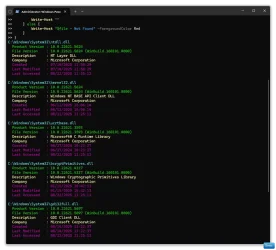
You could also paste this and hit enter.

Powershell:
$files = @(
    "C:\Windows\System32\ntdll.dll",
    "C:\Windows\System32\kernel32.dll",
    "C:\Windows\System32\ucrtbase.dll",
    "C:\Windows\System32\bcryptPrimitives.dll",
    "C:\Windows\System32\gdi32full.dll"
)

foreach ($file in $files) {
    if (Test-Path $file) {
        $item = Get-Item $file
        $info = $item.VersionInfo

        Write-Host "$file" -ForegroundColor Cyan
        Write-Host "  Product Version : $($info.ProductVersion)" -ForegroundColor Green
        Write-Host "  File Version    : $($info.FileVersion)" -ForegroundColor Green
        Write-Host "  Description     : $($info.FileDescription)" -ForegroundColor Yellow
        Write-Host "  Company         : $($info.CompanyName)" -ForegroundColor Yellow
        Write-Host "  Created         : $($item.CreationTime)" -ForegroundColor Magenta
        Write-Host "  Last Modified   : $($item.LastWriteTime)" -ForegroundColor Magenta
        Write-Host "  Last Accessed   : $($item.LastAccessTime)" -ForegroundColor Magenta
        Write-Host ""
    } else {
        Write-Host "$file - Not Found" -ForegroundColor Red
    }
}


Win-1833.webp
 
Last edited:

My Computers

System One System Two

  • OS
    Windows 11 Pro 25H2 Build 26200.8655
    Computer type
    PC/Desktop
    Manufacturer/Model
    Sin-built 2013
    CPU
    Intel(R) Core(TM) i7-4770K CPU @ 3.50GHz
    Motherboard
    ASUS ROG Maximus VI Formula
    Memory
    32.0 GB of I forget and the box is in storage.
    Graphics Card(s)
    Gigabyte nVidia GeForce GTX 1660 Super OC 6GB
    Sound Card
    Onboard thingy
    Monitor(s) Displays
    5 x LG 25MS500-B - 1 x 24MK430H-B - 1 x Wacom Pro 22" Touch Screen Tablet
    Screen Resolution
    All over the place
    Hard Drives
    Too many to list.
    OS on Samsung 1TB 870 QVO SATA
    PSU
    Silverstone 1500
    Case
    NZXT Phantom 820 Full-Tower Case
    Cooling
    Noctua NH-D15 Elite Class Dual Tower CPU Cooler / 6 x EziDIY 120mm / 2 x Corsair 140mm somethings / 1 x 140mm Thermaltake something / 2 x 200mm Corsair.
    Keyboard
    Corsair K95 / Logitech diNovo Edge Wireless
    Mouse
    Logitech: G402 / G502 / Mx Masters / Mx Air Cordless
    Internet Speed
    2000/500Mbps
    Browser
    All sorts
    Antivirus
    Kaspersky Premium
    Other Info
    ㅤㅤㅤㅤㅤㅤㅤㅤㅤㅤㅤㅤㅤㅤㅤㅤㅤㅤㅤㅤㅤㅤㅤㅤㅤㅤㅤㅤㅤㅤㅤㅤㅤㅤㅤㅤㅤㅤㅤㅤ⠀⠀⠀⠀⠀⠀⠀⠀⠀⠀
    TP-Link BE9300 WiFi 7 Bluetooth 5.4 (Archer TBE550E)
    TP-Link TX201 V1 2.5GB Lan

    Grandstream HT812 - VoIP
    ASUS DSL-AX82U - Mesh
    ASUS RT-AC68U - Mesh
    ASUS RT-BE88U Router

    Brother MFC-L2880DW Printer

    I’m on a horse.
  • Operating System
    Windows 11 Pro 25H2 Build 26200.8655
    Computer type
    Laptop
    Manufacturer/Model
    LENOVO Yoga 7 14IRL8 - 7i EVO OLED 14" Touchscreen i5 12 Core 16GB/512GB
    CPU
    Intel Core 12th Gen i5-1240P Processor (1.7 - 4.4GHz)
    Memory
    16GB LPDDR5 RAM
    Graphics card(s)
    Intel Iris Xe Graphics Processor
    Sound Card
    Optimized with Dolby Atmos®
    Screen Resolution
    QHD 2880 x 1800 OLED
    Hard Drives
    M.2 512GB
    Antivirus
    Defender / Malwarebytes
    Other Info
    …still on a horse.
What peaked your interest?
I was doing some rudimentary analysis after running a GOG installer with a seemingly legitimate digital signature, supposedly signed by GOG Sp. z o.o., on ‎Tuesday, ‎December ‎4, ‎2018 9:00:40 AM, with a cert issued by DigiCert, and found the timestamps showing up for some of the DLLs imported by system services I saw in procmon to be odd, not knowing that they're hash-based.

I also unpacked the installer using innoextract in effort to avoid elevating to admin to install the game, but it did not work so I assumed the script interpreter bundled within the installer that is executed during the installation process did something to get the game in a functional state and I was too impatient to bother to figure out what it does so I just ran the installer as an admin, and the game still doesn't work.

Below is a link to the .PML exported from Procmon, in a 7z archive. The capture was started before clicking the shortcut from the start menu, and paused after execution completed.

 
Last edited:

My Computer

System One

  • OS
    Windows 11
    Computer type
    PC/Desktop
Back
Top Bottom