
Solved Do I need to run DISM /Online /Cleanup-Image /RestoreHealth now?


idahosurge

Well-known member
Member
Local time
3:06 AM
Posts
53
OS
Windows 11
After MS forced an update to Win 11 on Dec 9th (I already did an update check on Dec 5th) I have been getting Kernel-Event Tracing errors in Event Viewer. One of them is MS.Windows.Remediation. I ran across this post
"Microsoft.Windows.Remediation" failed to start

I ran DISM /Online /Cleanup-Image /ScanHealth and got the below results. I am not sure if I need to run the /RestoreHealth since the below says it is repairable and it also say operation completed successfully.
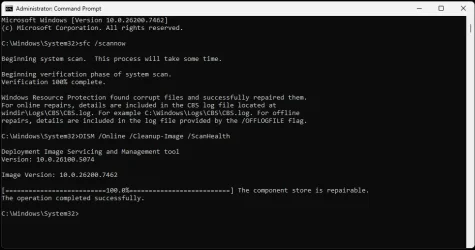
DISM Online Cleanup-Image Results.webp
 

My Computer

System One

  • OS
    Windows 11
    Computer type
    PC/Desktop
    Manufacturer/Model
    Custom
    CPU
    9800X3D
    Motherboard
    Asus Crosshair X870E Hero
    Memory
    GSkill Flare DDR5 64GB @ 30-40-40-96 @ 6000 MHz
    Graphics Card(s)
    Asus TUF OC Edition RTX 5080
    Monitor(s) Displays
    Samsung Odyessy G9 49" DQHD (VA Panel)
    Screen Resolution
    5120 * 1440
    Hard Drives
    Samsung 990Pro M.2 2280
    PSU
    Corsair HX 1000i
    Case
    Fractal Design Meshify 2XL
    Cooling
    Thermalright Peerless Assassin 140 Black
    Keyboard
    Corsair K100RGB
    Mouse
    Logitech G703
    Internet Speed
    1 GB
    Browser
    Firefox
    Antivirus
    ESET NOD32
Yes, and then run SFC /SCANNOW again.
 

My Computers

System One System Two

  • OS
    Windows 11 Pro 25H2 26200.8524
    Computer type
    Laptop
    Manufacturer/Model
    Acemagic LX15PRO
    CPU
    AMD Ryzen 7 5825U with Radeon Graphics
    Memory
    16GB
    Screen Resolution
    1920 x 1080
    Hard Drives
    SSD 2TB
    Internet Speed
    30 Mbps
    Browser
    Brave
    Antivirus
    Webroot Secure Anywhere
    Other Info
    System 3

    Acer Swift SF114-34 laptop
    OS Windows 11 Pro 26200.8524
    CPU Pentium Silver N6000
    RAM 4GB
    SSD Samsung 970 EVO Plus SSD 2TB (an upgrade)
  • Operating System
    Windows 11 Pro 23H2 22631.2506
    Computer type
    Laptop
    Manufacturer/Model
    HP Mini 210-1090NR PC (bought in late 2009!)
    CPU
    Atom N450 1.66GHz
    Memory
    2GB
    Browser
    Brave
    Antivirus
    Webroot

My Computer

System One

  • OS
    Windows 11
    Computer type
    PC/Desktop
    Manufacturer/Model
    Custom
    CPU
    9800X3D
    Motherboard
    Asus Crosshair X870E Hero
    Memory
    GSkill Flare DDR5 64GB @ 30-40-40-96 @ 6000 MHz
    Graphics Card(s)
    Asus TUF OC Edition RTX 5080
    Monitor(s) Displays
    Samsung Odyessy G9 49" DQHD (VA Panel)
    Screen Resolution
    5120 * 1440
    Hard Drives
    Samsung 990Pro M.2 2280
    PSU
    Corsair HX 1000i
    Case
    Fractal Design Meshify 2XL
    Cooling
    Thermalright Peerless Assassin 140 Black
    Keyboard
    Corsair K100RGB
    Mouse
    Logitech G703
    Internet Speed
    1 GB
    Browser
    Firefox
    Antivirus
    ESET NOD32
It is stuck at 62.3%, what do I do now?
 

My Computer

System One

  • OS
    Windows 11
    Computer type
    PC/Desktop
    Manufacturer/Model
    Custom
    CPU
    9800X3D
    Motherboard
    Asus Crosshair X870E Hero
    Memory
    GSkill Flare DDR5 64GB @ 30-40-40-96 @ 6000 MHz
    Graphics Card(s)
    Asus TUF OC Edition RTX 5080
    Monitor(s) Displays
    Samsung Odyessy G9 49" DQHD (VA Panel)
    Screen Resolution
    5120 * 1440
    Hard Drives
    Samsung 990Pro M.2 2280
    PSU
    Corsair HX 1000i
    Case
    Fractal Design Meshify 2XL
    Cooling
    Thermalright Peerless Assassin 140 Black
    Keyboard
    Corsair K100RGB
    Mouse
    Logitech G703
    Internet Speed
    1 GB
    Browser
    Firefox
    Antivirus
    ESET NOD32
Just wait, it's not stuck, it's just busy; it can stay on 62.3% for up to 30 minutes.
 

My Computers

System One System Two

  • OS
    Windows 11 Pro 25H2 26200.8524
    Computer type
    Laptop
    Manufacturer/Model
    Acemagic LX15PRO
    CPU
    AMD Ryzen 7 5825U with Radeon Graphics
    Memory
    16GB
    Screen Resolution
    1920 x 1080
    Hard Drives
    SSD 2TB
    Internet Speed
    30 Mbps
    Browser
    Brave
    Antivirus
    Webroot Secure Anywhere
    Other Info
    System 3

    Acer Swift SF114-34 laptop
    OS Windows 11 Pro 26200.8524
    CPU Pentium Silver N6000
    RAM 4GB
    SSD Samsung 970 EVO Plus SSD 2TB (an upgrade)
  • Operating System
    Windows 11 Pro 23H2 22631.2506
    Computer type
    Laptop
    Manufacturer/Model
    HP Mini 210-1090NR PC (bought in late 2009!)
    CPU
    Atom N450 1.66GHz
    Memory
    2GB
    Browser
    Brave
    Antivirus
    Webroot
Just wait, it's not stuck, it's just busy; it can stay on 62.3% for up to 30 minutes.
Thanks, left for 36 minutes and came back, it was done!
 

My Computer

System One

  • OS
    Windows 11
    Computer type
    PC/Desktop
    Manufacturer/Model
    Custom
    CPU
    9800X3D
    Motherboard
    Asus Crosshair X870E Hero
    Memory
    GSkill Flare DDR5 64GB @ 30-40-40-96 @ 6000 MHz
    Graphics Card(s)
    Asus TUF OC Edition RTX 5080
    Monitor(s) Displays
    Samsung Odyessy G9 49" DQHD (VA Panel)
    Screen Resolution
    5120 * 1440
    Hard Drives
    Samsung 990Pro M.2 2280
    PSU
    Corsair HX 1000i
    Case
    Fractal Design Meshify 2XL
    Cooling
    Thermalright Peerless Assassin 140 Black
    Keyboard
    Corsair K100RGB
    Mouse
    Logitech G703
    Internet Speed
    1 GB
    Browser
    Firefox
    Antivirus
    ESET NOD32
Does Scannow and ScanHealth just scan Windows 11 components or other MS components like Office and Edge?

Do they scan other software components like PDF24, games, ON1 Resize and other software I have installed?
 

My Computer

System One

  • OS
    Windows 11
    Computer type
    PC/Desktop
    Manufacturer/Model
    Custom
    CPU
    9800X3D
    Motherboard
    Asus Crosshair X870E Hero
    Memory
    GSkill Flare DDR5 64GB @ 30-40-40-96 @ 6000 MHz
    Graphics Card(s)
    Asus TUF OC Edition RTX 5080
    Monitor(s) Displays
    Samsung Odyessy G9 49" DQHD (VA Panel)
    Screen Resolution
    5120 * 1440
    Hard Drives
    Samsung 990Pro M.2 2280
    PSU
    Corsair HX 1000i
    Case
    Fractal Design Meshify 2XL
    Cooling
    Thermalright Peerless Assassin 140 Black
    Keyboard
    Corsair K100RGB
    Mouse
    Logitech G703
    Internet Speed
    1 GB
    Browser
    Firefox
    Antivirus
    ESET NOD32
Does Scannow and ScanHealth just scan Windows 11 components or other MS components like Office and Edge?

Do they scan other software components like PDF24, games, ON1 Resize and other software I have installed?
The scan functions only scans the MS image that was previously installed based on the build version.
No third party application or software is touched.
 

My Computers

System One System Two

  • OS
    All Branches but Release
    Computer type
    Laptop
    Manufacturer/Model
    Acer Nitro ANV15-51
    CPU
    AMD Ryzen 7 7735HS 3200-4500 Mhz 8 cores x 2
    Motherboard
    Sportage_RBH
    Memory
    32 GB DDR5
    Graphics Card(s)
    Radeon Graphic / NVIDIA GeForce RTX 4060 8 GB GDDR6
    Sound Card
    AMD/Realtek(R) Audio
    Monitor(s) Displays
    Integrated Monitor (15.3"vis)
    Screen Resolution
    FHD 1920X1080 16:9 144Hz
    Hard Drives
    KINGSTON OM8SEP4512Q-AA 1TB
    Western Digital 256GB
    PSU
    19V DC 6.32 A 120 W
    Cooling
    Dual Fans
    Mouse
    MS Bluetooth
    Internet Speed
    Fiber 1GB Cox -us & 1GB Orange-fr
    Browser
    Edge Canary- Firefox Nightly-Chrome Dev-Chrome Dev
    Antivirus
    Windows Defender
  • Operating System
    Windows 11 Beta
    Computer type
    Laptop
    Manufacturer/Model
    Asus X751BP
    CPU
    AMD A9-9420
    Memory
    8 GB of DDR4
    Graphics card(s)
    AMD Radeon R5
    Screen Resolution
    1600x900
    Hard Drives
    Seagate 1 TB
The scan functions only scans the MS image that was previously installed based on the build version.
No third party application or software is touched.
Thanks!
 

My Computer

System One

  • OS
    Windows 11
    Computer type
    PC/Desktop
    Manufacturer/Model
    Custom
    CPU
    9800X3D
    Motherboard
    Asus Crosshair X870E Hero
    Memory
    GSkill Flare DDR5 64GB @ 30-40-40-96 @ 6000 MHz
    Graphics Card(s)
    Asus TUF OC Edition RTX 5080
    Monitor(s) Displays
    Samsung Odyessy G9 49" DQHD (VA Panel)
    Screen Resolution
    5120 * 1440
    Hard Drives
    Samsung 990Pro M.2 2280
    PSU
    Corsair HX 1000i
    Case
    Fractal Design Meshify 2XL
    Cooling
    Thermalright Peerless Assassin 140 Black
    Keyboard
    Corsair K100RGB
    Mouse
    Logitech G703
    Internet Speed
    1 GB
    Browser
    Firefox
    Antivirus
    ESET NOD32
  • Like
Reactions: OAT
It is stuck at 62.3%, what do I do now?
I often get stuck at 62.3% and sometimes takes way over 30 mins. to finish.
I mostly use "tuneup.bat" every few days from here:

I've never tried this but I hear it is good:
 

My Computer

System One

  • OS
    Win 10 Pro 19045.6937 Win 11 25H2 VM
    Computer type
    Laptop
    Manufacturer/Model
    Dell Precicion 15 Workstation
    CPU
    Xeon W-10885M
    Motherboard
    Dell
    Memory
    64GB ECC DDR4 128GB max
    Graphics Card(s)
    Intel 1080p + Quadro RTX 5000 Max-Q 16GB 4K
    Sound Card
    onboard Realtec
    Monitor(s) Displays
    NA
    Screen Resolution
    1080p to 4k
    Hard Drives
    1 TB Samsung 9100 M2 SSD main
    2 TB Samsung 9100 M2 SSD storage
    500 GB Corsair T500 storage M2 SSD (6 TB max)
    PSU
    NA
    Case
    NA
    Cooling
    NA
    Keyboard
    backlit
    Mouse
    Logitec M720 Bluetooth Free scroll
    Internet Speed
    slow
    Browser
    Pale Moon 33.9.x.x - x64 AVX2 build
    Antivirus
    Windows Defender
Thanks, left for 36 minutes and came back, it was done!
I wish it could let us know it's not actually stuck like a pop-up after a certain amount of time that says "I'm not stuck" LOL

I likes the old days when you could see what it was doing as thousand of lined just scrolled by as it updated (no echo off)
You could never read it but at least you knew it was doing something
 

My Computers

System One System Two

  • OS
    Windows 11 (up to date)
    Computer type
    PC/Desktop
    Manufacturer/Model
    Custom
    CPU
    Intel i5 12400
    Motherboard
    Gigabyte Z690 UA
    Memory
    Corsair Vengeance LPX 16GB
    Graphics Card(s)
    On Board the Z690
    Sound Card
    On Board
    Monitor(s) Displays
    43" Samsung tu7000
    Screen Resolution
    2560 x 1440
    Hard Drives
    SAMSUNG SSD 1TB NVMe M.2
    PSU
    Thermaltake smart 500w 80+
    Case
    LIAN LANCOOL_205M
    Cooling
    Bunch of fans . . . :o) (lights dont work)
    Keyboard
    Unicomp: Ultra Classic White Buckling Spring USB
    Mouse
    M510
    Internet Speed
    50mbps on Ethernet
    Browser
    Fire Fox
    Antivirus
    Windows
    Other Info
    Love this computer but I still prefer Win-7 like I love my old Lazy Boy Recliner . . . it just feels better.
  • Operating System
    WIN-7-64BIT and Win-11 pro for testing on unsupported hardware
    Computer type
    PC/Desktop
    Manufacturer/Model
    Home built
    CPU
    i5-3570K CPU @ 3.40GHz, 3801 Mhz, 4 Core(s), 4 Logical Processor(s)
    Motherboard
    GA-Z77-HD3
    Memory
    16 GB - Crucial Ballistick 4GB PC3-14900 DDR3-1333 MHz
    Graphics card(s)
    NVIDIA GeForce GTX 1050
    Sound Card
    On Board
    Monitor(s) Displays
    ASUS VP278
    Screen Resolution
    1920 x 1080
    Hard Drives
    4 - internal Samsung 2.5" SSD, 1 WD HDD 7200 and some external drives
    PSU
    EVGA 550w
    Case
    Old Gygabyte Tower
    Cooling
    Yes
    Keyboard
    Unicomp - UNIOP4A USB (like the old IBM Model H that I started with)
    Mouse
    M510
    Internet Speed
    50mbps
    Browser
    Firefox
    Antivirus
    Windows
    Other Info
    The only thing it lack is USB-3.2 on the front face but it has 3.0 on the back
As most people using Windows know nothing about these commands, what do they do - I think they live happy without 🙂
If you look for problems You’l always be able to find some ..
 

My Computer

System One

  • OS
    Windows 11 Pro
    Computer type
    PC/Desktop
    Manufacturer/Model
    Homemade by me
    CPU
    Intel i5 12600K
    Motherboard
    MSI PRO Z690-A DDR4
    Memory
    G.Skill Ripjaws V DDR4 3600 MHz / PC4-28800 CL16 2x8 GB
    Graphics Card(s)
    Intel® UHD Graphics 770 (iGPU)
    Sound Card
    8-Channel (7.1) HD Audio
    Monitor(s) Displays
    Legion/Lenovo Y25-25
    Screen Resolution
    Full HD 1920 x 1080
    Hard Drives
    WD Black NVMe M.2 500 GB (system drive)
    Case
    Lian-Li
    Keyboard
    Old solid and heavy IBM🙂
    Mouse
    Logitech
    Internet Speed
    1000 mbit
    Antivirus
    Avast free
I often get stuck at 62.3% and sometimes takes way over 30 mins. to finish.
I mostly use "tuneup.bat" every few days from here:
How long it sits at 62.3% is all dependent on how many and how extensive the repairs it's making are. 😉
 

My Computers

System One System Two

  • OS
    Windows 11 25H2
    Computer type
    Laptop
    Manufacturer/Model
    Alienware 18 Area-51
    CPU
    Intel Core Ultra 9 275HX (24-Core)
    Motherboard
    Alienware
    Memory
    64GB DDR5 6400MT/s
    Graphics Card(s)
    NVIDIA GeForce RTX 5080 and Intel UHD Graphics
    Sound Card
    Onboard, Realtek high-performance Audio chips (ALC3329 & ALC1708))
    Monitor(s) Displays
    300HZ 18-inch QHD 500 nit Comfort View+
    Screen Resolution
    2560 x 1600
    Hard Drives
    2TB NVMe M.2 PCIe Gen 5 SSD
    Case
    Magnesium Alloy
    Cooling
    Advanced Cryo-Tech Quad-Fan Cooling system & large vapor chamber
    Keyboard
    Cherry MX ultra low profile mechanical keyboard with per key AlienFX RGB lighting
    Mouse
    Logitech MX Master 4
    Browser
    Vivaldi (main), Firefox, Chrome, Edge
    Antivirus
    MS Defender and Malwarebytes Free
  • Operating System
    Windows 11 25H2
    Computer type
    Laptop
    Manufacturer/Model
    Microsoft Surface Laptop 7
    CPU
    Qualcomm Snapdragon X Elite (12 Core) ARM based CPU
    Motherboard
    Microsoft Corp.
    Memory
    16GB LPDDR5
    Graphics card(s)
    Qualcomm Adreno X1-85
    Sound Card
    Omnisonic speakers with Dolby Atmos spatial sound
    Monitor(s) Displays
    120 Hz 13.8-inch 600 nit PixelSense Flow touchscreen
    Screen Resolution
    2304x1536
    Hard Drives
    1TB NVMe Gen 4 SSD
    Case
    Anodized Aluminum
    Cooling
    Traditional active cooling fan system
    Keyboard
    Mechanical QWERTY, backlit when in use
    Mouse
    Logitech MX Master 4 and Surface Arc Mouse
    Browser
    Vivaldi (main), Firefox, Chrome, Edge
    Antivirus
    MS Defender and Malwarebytes Free
Beware of the Restorehealth option. It caused issues on two of my PCs requiring recovery from a Reflect backup.
 

My Computer

System One

  • OS
    Windows 11 Pro
    Computer type
    PC/Desktop
    Manufacturer/Model
    Self build
    CPU
    Core i7-13700K
    Motherboard
    Asus TUF Gaming Plus WiFi Z790
    Memory
    64 GB Kingston Fury Beast DDR5
    Graphics Card(s)
    Gigabyte GeForce RTX 2060 Super Gaming OC 8G
    Sound Card
    Realtek S1200A
    Monitor(s) Displays
    Viewsonic VP2770 & Dell (secondary)
    Screen Resolution
    2560 x 1440
    Hard Drives
    Kingston KC3000 2TB NVME SSD & SATA HDDs & SSD
    PSU
    EVGA SuperNova G2 850W
    Case
    Nanoxia Deep Silence 1
    Cooling
    Noctua NH-D14
    Keyboard
    Microsoft Digital Media Pro
    Mouse
    Logitech Wireless
    Internet Speed
    80 Mb / s
    Browser
    Chrome
    Antivirus
    Defender, Malwarebytes Free & AdwCleaner
Back
Top Bottom


