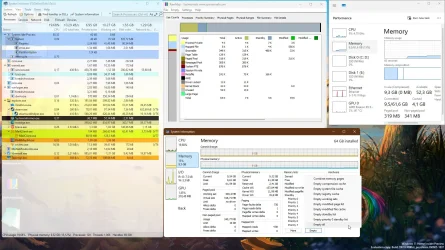
Do You Know About Rammap???


Lance1

Well-known member
Power User
VIP
Local time
2:39 AM
Posts
985
OS
Windows 11 Pro 23H2
I didn't till I watched this video. So my wife has been complaining that her web pages are really slow to open. I found this page and thought... I'm going run this on her laptop. I downloaded it to my Thumb drive. Ran it on the laptop which took 15 seconds and Presto!! Instant speedup! I also disabled Sysmain, formally known as "Superfetch" and Fast Startup. It made a world of difference! She is now happy. Happy Wife Happy Life... So I ran the same procedure on my main system and WOW! My system is so much faster then before. I plane on running Rammap once a week to keep my system snappy.

So what do you think? Would you run this on your build?? Here's the link to Rammap Don't worry It's built by Microsoft and provided free of charge.


My Computers My Computers

  • At a glance

    Windows 11 Pro 23H2Intel 12th Gen Intel Core i5-12600KF, 3686 MHzCORSAIR Vengeance 32GB (2 x 16GB) 288-Pin PC ...GIGABYTE GeForce RTX 4060, 3x Fans, 8GB GDDR6 OC
    OS
    Windows 11 Pro 23H2
    Computer type
    PC/Desktop
    Manufacturer/Model
    Custom Build By Lance1
    CPU
    Intel 12th Gen Intel Core i5-12600KF, 3686 MHz
    Motherboard
    GIGABYTE Z790 AORUS ELITE AX LGA 1700 Intel Z790 ATX
    Memory
    CORSAIR Vengeance 32GB (2 x 16GB) 288-Pin PC RAM DDR5 6400 (PC5 51200) Dual-Channel
    Graphics Card(s)
    GIGABYTE GeForce RTX 4060, 3x Fans, 8GB GDDR6 OC
    Sound Card
    AMD High Definition
    Monitor(s) Displays
    Samsung 32" 60Hz 4ms Curved PLS LED
    Screen Resolution
    1920 X 1080
    Hard Drives
    WD Blue NVME M.2 1T Boot Drive
    WD Blue SSD 1T
    WD Blue NVME M.2 2T
    PSU
    EVGA SuperNOVA 850 GT, 80 Plus Gold 850W, Fully Modular,
    Case
    Fractal Design Pop XL Air RGB Black TG ATX High-Airflow Clear Tempered Glass Window Full Tower
    Cooling
    Noctua NH-D15 chromax black, Dual Tower CPU Cooler with Dual NF-A15 PWM 140mm Fans (Black)
    Keyboard
    Devistator 3
    Mouse
    Inphic PM6 Pro
    Internet Speed
    Telus Fiber Optic: Download 332.7 Mbps / Upload 331.5 Mbps
    Browser
    Vivaldi (64bit)
    Antivirus
    Windows Defender
  • At a glance

    Window 11 ProIntel(R) Core(TM) i3-2310M CPU @ 2.10GHz4 GB DDR3Intel(R) HD Graphics 3000
    Operating System
    Window 11 Pro
    Computer type
    Laptop
    Manufacturer/Model
    DELL Inspiron N7110
    CPU
    Intel(R) Core(TM) i3-2310M CPU @ 2.10GHz
    Motherboard
    Dell Inc. 0YH79Y
    Memory
    4 GB DDR3
    Graphics card(s)
    Intel(R) HD Graphics 3000
    Sound Card
    High Definition Audio
    Monitor(s) Displays
    17.3 Inch Display
    Screen Resolution
    1600 X 900
    Hard Drives
    Samsung SSD 860 EVO 500GB
    Internet Speed
    Fiber Optic: Download 332.7 Mbps / Upload 331.5 Mbps
    Browser
    Vivaldi 64 bit
    Antivirus
    Windows Defender
    Other Info
    YA! This the old backup. In case things go south. It'll give me access to everything I need.
Disabling superfetch is only useful on underpowered systems.
 

My Computer My Computer

At a glance

Linux Mint
OS
Linux Mint
Computer type
Laptop
Manufacturer/Model
System76 Lemur Pro
Would you run this on your build??
Absolutely not! Snake-oil alarms bells.

If a system needs something like this to improve performance, then maybe the user should be looking elsewhere for a more permanent solution.
 

My Computers My Computers

  • At a glance

    Windows 11 2xH2 (latest update ... forever anal)Intel i5-124008GBNVIDIA GeForce GT730
    OS
    Windows 11 2xH2 (latest update ... forever anal)
    Computer type
    PC/Desktop
    Manufacturer/Model
    HP Slim S01
    CPU
    Intel i5-12400
    Memory
    8GB
    Graphics Card(s)
    NVIDIA GeForce GT730
    Sound Card
    OOBE
    Monitor(s) Displays
    Acer 32"
    Screen Resolution
    1920x1080
    Hard Drives
    512GB KIOXIA NVMe
    1TB SATA SSD
    PSU
    OOBE
    Case
    OOBE
    Cooling
    OOBE
    Keyboard
    BT
    Mouse
    BT
    Browser
    Brave FFox Chrome Opera
    Antivirus
    KIS
  • At a glance

    Windows 11 Pro 2xH2 (latest update ... 4ever ...i7-1165G7 @ 2.80GHzIntel Iris Xe Graphics
    Operating System
    Windows 11 Pro 2xH2 (latest update ... 4ever anal)
    Computer type
    Laptop
    Manufacturer/Model
    HP Pavillion 15
    CPU
    i7-1165G7 @ 2.80GHz
    Graphics card(s)
    Intel Iris Xe Graphics
    Hard Drives
    Samsung NVMe 512GB
    + numerous/multiple SSD Type C USB enclosures
    Internet Speed
    NBN FTTN 50
    Browser
    Brave
    Antivirus
    KIS
I am no expert in hardware nor how windows does what it does. However, I have always let the OS handle ram usage as it's designed to do. Although it looks like this cached RAM is being used, your operating system considers it available. If a newly opened program or game requires that memory, the system, if it's working as it is supposed to, will immediately wipe the cached data and give the space to the active app.
Now if one has a memory leak that's a different issue. A memory leak occurs when a computer program reserves space in RAM but fails to release it after it is no longer needed. In that case, the OS is unable to manage that space.

Would you run this on your build??
No because, thus far, I have had no need to be concerned about cached ram. I do have fast startup disabled. I try to make it a point to restart my system every day or two which clears cached files, processes, and kernel memory, allowing my system to start from scratch. But even if I forget to, I have never had a problem with ram usage which tells me windows is doing its job of handling caching.

She is now happy. Happy Wife Happy Life...
IMO if a system is under-equipped for any reason it is constantly swapping data which slows down and overloads the entire she-bang. Not enough ram, slow cpu, using HDD instead of SSD - all these affect each other and ultimately the entire level of performance the user gets.

If the laptop in your specs is your wife's computer, using Rammap is only a stopgap solution. It's no wonder her system bogs down if it has only 4gb of ram. You would make her happier by upgrading its ram to its 8gb max.
While I realize that laptop is 15 years old, IMO if one expects any performance at all in this day and time, 16 gb is the absolute minimum one should have, but even 8 is a big improvement over 4.
 

My Computers My Computers

  • At a glance

    Windows 11 Pro 25H2 26200.8655i9-10900 10 core 20 threads32 gbnone-Intel UHD Graphics 630
    OS
    Windows 11 Pro 25H2 26200.8655
    Computer type
    PC/Desktop
    Manufacturer/Model
    Dell Optiplex 7080
    CPU
    i9-10900 10 core 20 threads
    Motherboard
    DELL 0J37VM
    Memory
    32 gb
    Graphics Card(s)
    none-Intel UHD Graphics 630
    Sound Card
    Integrated Realtek
    Monitor(s) Displays
    Benq 27
    Screen Resolution
    2560x1440
    Hard Drives
    2x1tb Solidigm m.2 nvme /External drives 512gb Samsung m.2 sata+2tb Kingston m2.nvme
    PSU
    500w
    Case
    MT
    Cooling
    Dell Premium
    Keyboard
    Logitech wired
    Mouse
    Logitech wireless
    Internet Speed
    so slow I'm too embarrassed to tell
    Browser
    #1 Edge #2 Firefox
    Antivirus
    Defender+MWB Premium
  • At a glance

    Windows 11 Pro 24H2 26200.8457AMD Ryzen 7 6800U32 gbintegrated
    Operating System
    Windows 11 Pro 24H2 26200.8457
    Computer type
    PC/Desktop
    Manufacturer/Model
    Beelink Mini PC SER5
    CPU
    AMD Ryzen 7 6800U
    Memory
    32 gb
    Graphics card(s)
    integrated
    Sound Card
    integrated
    Monitor(s) Displays
    Benq 27
    Screen Resolution
    2560x1440
    Hard Drives
    1TB Crucial nvme
    Keyboard
    Logitech wired
    Mouse
    Logitech wireless
    Internet Speed
    still too embarrassed to tell
    Browser
    Firefox
    Antivirus
    Defender
    Other Info
    System 3 is non compliant Dell 9020 i7-4770/24gb ram Win11 PRO 26200.8457
Disabling superfetch is only useful on underpowered systems.
This is abought people with underpowered systems. I have 32 GIGS of DDR5 and my system showed renewed life. Look at my specs and explain that? You have no comment on Rammap.
 

My Computers My Computers

  • At a glance

    Windows 11 Pro 23H2Intel 12th Gen Intel Core i5-12600KF, 3686 MHzCORSAIR Vengeance 32GB (2 x 16GB) 288-Pin PC ...GIGABYTE GeForce RTX 4060, 3x Fans, 8GB GDDR6 OC
    OS
    Windows 11 Pro 23H2
    Computer type
    PC/Desktop
    Manufacturer/Model
    Custom Build By Lance1
    CPU
    Intel 12th Gen Intel Core i5-12600KF, 3686 MHz
    Motherboard
    GIGABYTE Z790 AORUS ELITE AX LGA 1700 Intel Z790 ATX
    Memory
    CORSAIR Vengeance 32GB (2 x 16GB) 288-Pin PC RAM DDR5 6400 (PC5 51200) Dual-Channel
    Graphics Card(s)
    GIGABYTE GeForce RTX 4060, 3x Fans, 8GB GDDR6 OC
    Sound Card
    AMD High Definition
    Monitor(s) Displays
    Samsung 32" 60Hz 4ms Curved PLS LED
    Screen Resolution
    1920 X 1080
    Hard Drives
    WD Blue NVME M.2 1T Boot Drive
    WD Blue SSD 1T
    WD Blue NVME M.2 2T
    PSU
    EVGA SuperNOVA 850 GT, 80 Plus Gold 850W, Fully Modular,
    Case
    Fractal Design Pop XL Air RGB Black TG ATX High-Airflow Clear Tempered Glass Window Full Tower
    Cooling
    Noctua NH-D15 chromax black, Dual Tower CPU Cooler with Dual NF-A15 PWM 140mm Fans (Black)
    Keyboard
    Devistator 3
    Mouse
    Inphic PM6 Pro
    Internet Speed
    Telus Fiber Optic: Download 332.7 Mbps / Upload 331.5 Mbps
    Browser
    Vivaldi (64bit)
    Antivirus
    Windows Defender
  • At a glance

    Window 11 ProIntel(R) Core(TM) i3-2310M CPU @ 2.10GHz4 GB DDR3Intel(R) HD Graphics 3000
    Operating System
    Window 11 Pro
    Computer type
    Laptop
    Manufacturer/Model
    DELL Inspiron N7110
    CPU
    Intel(R) Core(TM) i3-2310M CPU @ 2.10GHz
    Motherboard
    Dell Inc. 0YH79Y
    Memory
    4 GB DDR3
    Graphics card(s)
    Intel(R) HD Graphics 3000
    Sound Card
    High Definition Audio
    Monitor(s) Displays
    17.3 Inch Display
    Screen Resolution
    1600 X 900
    Hard Drives
    Samsung SSD 860 EVO 500GB
    Internet Speed
    Fiber Optic: Download 332.7 Mbps / Upload 331.5 Mbps
    Browser
    Vivaldi 64 bit
    Antivirus
    Windows Defender
    Other Info
    YA! This the old backup. In case things go south. It'll give me access to everything I need.
Absolutely not! Snake-oil alarms bells.

If a system needs something like this to improve performance, then maybe the user should be looking elsewhere for a more permanent solution.
Snake-oil??? Do you really understand how RAM works? Storing and holding memory slows your system down with less memory resource. Leaving you with your system with limited access to memory access for applications.
 

My Computers My Computers

  • At a glance

    Windows 11 Pro 23H2Intel 12th Gen Intel Core i5-12600KF, 3686 MHzCORSAIR Vengeance 32GB (2 x 16GB) 288-Pin PC ...GIGABYTE GeForce RTX 4060, 3x Fans, 8GB GDDR6 OC
    OS
    Windows 11 Pro 23H2
    Computer type
    PC/Desktop
    Manufacturer/Model
    Custom Build By Lance1
    CPU
    Intel 12th Gen Intel Core i5-12600KF, 3686 MHz
    Motherboard
    GIGABYTE Z790 AORUS ELITE AX LGA 1700 Intel Z790 ATX
    Memory
    CORSAIR Vengeance 32GB (2 x 16GB) 288-Pin PC RAM DDR5 6400 (PC5 51200) Dual-Channel
    Graphics Card(s)
    GIGABYTE GeForce RTX 4060, 3x Fans, 8GB GDDR6 OC
    Sound Card
    AMD High Definition
    Monitor(s) Displays
    Samsung 32" 60Hz 4ms Curved PLS LED
    Screen Resolution
    1920 X 1080
    Hard Drives
    WD Blue NVME M.2 1T Boot Drive
    WD Blue SSD 1T
    WD Blue NVME M.2 2T
    PSU
    EVGA SuperNOVA 850 GT, 80 Plus Gold 850W, Fully Modular,
    Case
    Fractal Design Pop XL Air RGB Black TG ATX High-Airflow Clear Tempered Glass Window Full Tower
    Cooling
    Noctua NH-D15 chromax black, Dual Tower CPU Cooler with Dual NF-A15 PWM 140mm Fans (Black)
    Keyboard
    Devistator 3
    Mouse
    Inphic PM6 Pro
    Internet Speed
    Telus Fiber Optic: Download 332.7 Mbps / Upload 331.5 Mbps
    Browser
    Vivaldi (64bit)
    Antivirus
    Windows Defender
  • At a glance

    Window 11 ProIntel(R) Core(TM) i3-2310M CPU @ 2.10GHz4 GB DDR3Intel(R) HD Graphics 3000
    Operating System
    Window 11 Pro
    Computer type
    Laptop
    Manufacturer/Model
    DELL Inspiron N7110
    CPU
    Intel(R) Core(TM) i3-2310M CPU @ 2.10GHz
    Motherboard
    Dell Inc. 0YH79Y
    Memory
    4 GB DDR3
    Graphics card(s)
    Intel(R) HD Graphics 3000
    Sound Card
    High Definition Audio
    Monitor(s) Displays
    17.3 Inch Display
    Screen Resolution
    1600 X 900
    Hard Drives
    Samsung SSD 860 EVO 500GB
    Internet Speed
    Fiber Optic: Download 332.7 Mbps / Upload 331.5 Mbps
    Browser
    Vivaldi 64 bit
    Antivirus
    Windows Defender
    Other Info
    YA! This the old backup. In case things go south. It'll give me access to everything I need.
RAMMap is a legitimate diagnostic tool designed for programmers or admins to analyze Windows memory usage. It's not intended to "free up" memory, but can be used to free certain types of Windows cache pages on demand.

If you haven't figured it out, the YouTube video belongs to a channel of AI-generated content. The guy in the video isn't a real person.

MS made an actual video on RAMMap for their Channel Nine series:
Defrag Tools: #6 - RAMMap

A common practice in performance optimization is to cache recent data. Just because a process is finished running, Windows doesn't immediately release the recent memory in the hope that maybe a future request might need it again. Instead of loading it off the relatively slower disk, it keeps old data lying around. Windows isn't stupid and runs out of memory just because it's caching.

Caches can be released, and assigned memory pages rotated out so new processes and new data can be read in. This is a normal process.

What RAMMap gives you is a way to temporarily instruct Windows to immediately release (flush) the cached pages. This makes the total reported memory usage drop. But you know what? Windows will gradually go back to its normal behavior and begin caching pages in memory.

Whenever there's a lot of free memory, Windows will try to use it for caching. All modern OS'es do that. If a program really needs more memory, then it will rotate out pages as needed. The YouTube video is the equivalent of a party trick.

If you stop Windows from doing its normal caching, overall system performance drops.
 

My Computer My Computer

At a glance

Windows 7
OS
Windows 7
I am no expert in hardware nor how windows does what it does. However, I have always let the OS handle ram usage as it's designed to do. Although it looks like this cached RAM is being used, your operating system considers it available. If a newly opened program or game requires that memory, the system, if it's working as it is supposed to, will immediately wipe the cached data and give the space to the active app.
Now if one has a memory leak that's a different issue. A memory leak occurs when a computer program reserves space in RAM but fails to release it after it is no longer needed. In that case, the OS is unable to manage that space.


No because, thus far, I have had no need to be concerned about cached ram. I do have fast startup disabled. I try to make it a point to restart my system every day or two which clears cached files, processes, and kernel memory, allowing my system to start from scratch. But even if I forget to, I have never had a problem with ram usage which tells me windows is doing its job of handling caching.


IMO if a system is under-equipped for any reason it is constantly swapping data which slows down and overloads the entire she-bang. Not enough ram, slow cpu, using HDD instead of SSD - all these affect each other and ultimately the entire level of performance the user gets.

If the laptop in your specs is your wife's computer, using Rammap is only a stopgap solution. It's no wonder her system bogs down if it has only 4gb of ram. You would make her happier by upgrading its ram to its 8gb max.
While I realize that laptop is 15 years old, IMO if one expects any performance at all in this day and time, 16 gb is the absolute minimum one should have, but even 8 is a big improvement over 4.
You made some good points yes. So my wife's Laptop is an HP and has 16 Gigs of DDR5. Total specs I have not on hand but the post is all abought memory access and making that memory free for access.
 

My Computers My Computers

  • At a glance

    Windows 11 Pro 23H2Intel 12th Gen Intel Core i5-12600KF, 3686 MHzCORSAIR Vengeance 32GB (2 x 16GB) 288-Pin PC ...GIGABYTE GeForce RTX 4060, 3x Fans, 8GB GDDR6 OC
    OS
    Windows 11 Pro 23H2
    Computer type
    PC/Desktop
    Manufacturer/Model
    Custom Build By Lance1
    CPU
    Intel 12th Gen Intel Core i5-12600KF, 3686 MHz
    Motherboard
    GIGABYTE Z790 AORUS ELITE AX LGA 1700 Intel Z790 ATX
    Memory
    CORSAIR Vengeance 32GB (2 x 16GB) 288-Pin PC RAM DDR5 6400 (PC5 51200) Dual-Channel
    Graphics Card(s)
    GIGABYTE GeForce RTX 4060, 3x Fans, 8GB GDDR6 OC
    Sound Card
    AMD High Definition
    Monitor(s) Displays
    Samsung 32" 60Hz 4ms Curved PLS LED
    Screen Resolution
    1920 X 1080
    Hard Drives
    WD Blue NVME M.2 1T Boot Drive
    WD Blue SSD 1T
    WD Blue NVME M.2 2T
    PSU
    EVGA SuperNOVA 850 GT, 80 Plus Gold 850W, Fully Modular,
    Case
    Fractal Design Pop XL Air RGB Black TG ATX High-Airflow Clear Tempered Glass Window Full Tower
    Cooling
    Noctua NH-D15 chromax black, Dual Tower CPU Cooler with Dual NF-A15 PWM 140mm Fans (Black)
    Keyboard
    Devistator 3
    Mouse
    Inphic PM6 Pro
    Internet Speed
    Telus Fiber Optic: Download 332.7 Mbps / Upload 331.5 Mbps
    Browser
    Vivaldi (64bit)
    Antivirus
    Windows Defender
  • At a glance

    Window 11 ProIntel(R) Core(TM) i3-2310M CPU @ 2.10GHz4 GB DDR3Intel(R) HD Graphics 3000
    Operating System
    Window 11 Pro
    Computer type
    Laptop
    Manufacturer/Model
    DELL Inspiron N7110
    CPU
    Intel(R) Core(TM) i3-2310M CPU @ 2.10GHz
    Motherboard
    Dell Inc. 0YH79Y
    Memory
    4 GB DDR3
    Graphics card(s)
    Intel(R) HD Graphics 3000
    Sound Card
    High Definition Audio
    Monitor(s) Displays
    17.3 Inch Display
    Screen Resolution
    1600 X 900
    Hard Drives
    Samsung SSD 860 EVO 500GB
    Internet Speed
    Fiber Optic: Download 332.7 Mbps / Upload 331.5 Mbps
    Browser
    Vivaldi 64 bit
    Antivirus
    Windows Defender
    Other Info
    YA! This the old backup. In case things go south. It'll give me access to everything I need.
@glasskuter makes a good point. As much as modern Windows tries to handle memory caches efficiently, some programs will behave badly.

Browsers can often suffer from memory leaks, due to bad programming. Today's browsers don't just display a static web page, they're asked to run complicated scripts in the background. So your browser is in effect a program running another set of programs, often assigned as multiple threads launched from the main browser process.

A memory leak is where a process asks Windows for more assigned memory, and receives it. Except when the process is done, it's expected to return (free) that memory or not ask for more memory than it really needs. Due to subtle bugs, a program will slowly forget about the memory it's already been assigned and keep asking for more. Eventually Windows begans to run low on unassigned memory.

If there's caching, then the demand for free memory will force the Windows caches to throw away (release) memory pages to free up room. The longer your browser runs, or the more sites you visit, the more memory is lost to leaks. The only fix for a memory leak is to exit a program, and restart it.

Other apps like Office or random media players tend to be more behaved and not leak memory. But browsers are by far, the worst ones at it. Having a tabbed browser doesn't help. It's very handy for the user, but each tab represents more memory consumed since you want to instantly switch between the different tabs. That begins to add up over time.

16 GB is considered more than enough for most desktop users. If her PC feels slow, you might need to investigate other performance issues like unneeded background processes.
 

My Computer My Computer

At a glance

Windows 7
OS
Windows 7
One would assume you did the usual to make her PC use less memory, like no startup programs and such...
Why does her system lag having 16GB? I used to have 16 GB, and while in some cases I was hitting 60% with many things open including OBS Studio, my system never experienced lag.

You even state you have DDR5 memory, you shouldn't have speed issues unless your CPU is horrible or your storage is some sort of eMMC slow and cheap thing... or a combo of both...
 

My Computers My Computers

  • At a glance

    Windows 11 Pro 25H2AMD Ryzen 5 5600G @ 3.9/4.4Ghz2 x 16 GB DDR4 Kingston Fury Beast 3200 MhzAMD Radeon RX 6600 XT MSI Mech 2X OC Edition ...
    OS
    Windows 11 Pro 25H2
    Computer type
    PC/Desktop
    Manufacturer/Model
    Built PC
    CPU
    AMD Ryzen 5 5600G @ 3.9/4.4Ghz
    Motherboard
    MSI B550M-PRO-WiFi Ver. 1.4
    Memory
    2 x 16 GB DDR4 Kingston Fury Beast 3200 Mhz
    Graphics Card(s)
    AMD Radeon RX 6600 XT MSI Mech 2X OC Edition 8 GB
    Sound Card
    Realtek High Definition Audio (Integrated)
    Monitor(s) Displays
    Samsung C50Rx 27" LED / HP S2031 20" LCD
    Screen Resolution
    1920 x 1080 px / 1600 x 900 px
    Hard Drives
    WD Blue SN570 NVME M.2 SSD [1 TB] -- External Drives: - WD Scorpion Blue 250 GB 5400 RPM (Data Backup) - Hitachi 500 GB 5400 RPM (Software / ISOs Backup) - Toshiba MQ01ABD100 1 TB 5400 RPM (OS Images) - HGST TravelStar 7K1000 1 TB, 7200 RPM USB 3.0 - ADATA SU800 2TB SSD USB 3.0
    PSU
    Corsair RM750e 750W Fully Modular
    Case
    Naceb Hydra NA-1602
    Cooling
    Naceb Orpheus x 3 (Front) + Naceb Cepheus 1200 RPM Max (Rear) + ThemalRight Assasin X 90 SE (CPU)
    Keyboard
    Logitech MK470 Wireless
    Mouse
    Logitech MK470 Wireless
    Internet Speed
    120 MB Symetrical
    Browser
    Firefox / Brave / Edge
    Antivirus
    Windows Defender
    Other Info
    - VMs: WMware Player - Windows 8.1 Pro x64 / Windows 11 Pro
    - Wacom Intuos Pro Small Tablet PTH-460
  • At a glance

    Windows 11 Pro 25H2AMD Ryzen 7 7730U @ 2.0/4.5 Ghz2 x 16 GB Kingston Fury Impact DDR4 3200 MhzRadeon (tm) Graphics Vega 8 (512 MB)
    Operating System
    Windows 11 Pro 25H2
    Computer type
    Laptop
    Manufacturer/Model
    HP Pavilion 15-eh3000la (80M53LA)
    CPU
    AMD Ryzen 7 7730U @ 2.0/4.5 Ghz
    Motherboard
    HP 8BC7
    Memory
    2 x 16 GB Kingston Fury Impact DDR4 3200 Mhz
    Graphics card(s)
    Radeon (tm) Graphics Vega 8 (512 MB)
    Sound Card
    Realtek High Definition Audio (Integrated)
    Monitor(s) Displays
    AU Optronics
    Screen Resolution
    1920 x 1080 px (125% size)
    Hard Drives
    WD Blue SN570 1TB NVME M.2 Drive
    PSU
    45 Watt Charger
    Cooling
    Laptop Cooling Pad
    Keyboard
    Free Wolf Foldable Portable Keyboard
    Mouse
    Free Wolf Wireless Mouse
    Internet Speed
    120 MB Symetrical
    Browser
    Firefox / Brave / Edge
    Antivirus
    Windows Defender
    Other Info
    - 41mWh battery.
    - Wacom Intuos Pro Small Tablet PTH-460
@glasskuter makes a good point. As much as modern Windows tries to handle memory caches efficiently, some programs will behave badly.

Browsers can often suffer from memory leaks, due to bad programming. Today's browsers don't just display a static web page, they're asked to run complicated scripts in the background. So your browser is in effect a program running another set of programs, often assigned as multiple threads launched from the main browser process.

A memory leak is where a process asks Windows for more assigned memory, and receives it. Except when the process is done, it's expected to return (free) that memory or not ask for more memory than it really needs. Due to subtle bugs, a program will slowly forget about the memory it's already been assigned and keep asking for more. Eventually Windows begans to run low on unassigned memory.

If there's caching, then the demand for free memory will force the Windows caches to throw away (release) memory pages to free up room. The longer your browser runs, or the more sites you visit, the more memory is lost to leaks. The only fix for a memory leak is to exit a program, and restart it.

Other apps like Office or random media players tend to be more behaved and not leak memory. But browsers are by far, the worst ones at it. Having a tabbed browser doesn't help. It's very handy for the user, but each tab represents more memory consumed since you want to instantly switch between the different tabs. That begins to add up over time.

16 GB is considered more than enough for most desktop users. If her PC feels slow, you might need to investigate other performance issues like unneeded background processes.
I'd say that the worst offender in this regard (memory leak) is Firefox... I mean, not always, but when they just decide to bork something, you could potentially face system freezes or hangs. I had one like months ago, because Firefox just decided to start eating RAM in the form of cache, to the point my system partially crashed because there was no more available memory for everything else. It was some sort of condition that made multimedia just cache infinitely until there was no more to grab... IIRC that was fixed in v142 or something...

Still no one never knows when they are going to break that again...

Don't get me wrong, I love the browser... it's just they tend to do this lol, I ignore if chromium based browsers suffer from this from time to time.
 

My Computers My Computers

  • At a glance

    Windows 11 Pro 25H2AMD Ryzen 5 5600G @ 3.9/4.4Ghz2 x 16 GB DDR4 Kingston Fury Beast 3200 MhzAMD Radeon RX 6600 XT MSI Mech 2X OC Edition ...
    OS
    Windows 11 Pro 25H2
    Computer type
    PC/Desktop
    Manufacturer/Model
    Built PC
    CPU
    AMD Ryzen 5 5600G @ 3.9/4.4Ghz
    Motherboard
    MSI B550M-PRO-WiFi Ver. 1.4
    Memory
    2 x 16 GB DDR4 Kingston Fury Beast 3200 Mhz
    Graphics Card(s)
    AMD Radeon RX 6600 XT MSI Mech 2X OC Edition 8 GB
    Sound Card
    Realtek High Definition Audio (Integrated)
    Monitor(s) Displays
    Samsung C50Rx 27" LED / HP S2031 20" LCD
    Screen Resolution
    1920 x 1080 px / 1600 x 900 px
    Hard Drives
    WD Blue SN570 NVME M.2 SSD [1 TB] -- External Drives: - WD Scorpion Blue 250 GB 5400 RPM (Data Backup) - Hitachi 500 GB 5400 RPM (Software / ISOs Backup) - Toshiba MQ01ABD100 1 TB 5400 RPM (OS Images) - HGST TravelStar 7K1000 1 TB, 7200 RPM USB 3.0 - ADATA SU800 2TB SSD USB 3.0
    PSU
    Corsair RM750e 750W Fully Modular
    Case
    Naceb Hydra NA-1602
    Cooling
    Naceb Orpheus x 3 (Front) + Naceb Cepheus 1200 RPM Max (Rear) + ThemalRight Assasin X 90 SE (CPU)
    Keyboard
    Logitech MK470 Wireless
    Mouse
    Logitech MK470 Wireless
    Internet Speed
    120 MB Symetrical
    Browser
    Firefox / Brave / Edge
    Antivirus
    Windows Defender
    Other Info
    - VMs: WMware Player - Windows 8.1 Pro x64 / Windows 11 Pro
    - Wacom Intuos Pro Small Tablet PTH-460
  • At a glance

    Windows 11 Pro 25H2AMD Ryzen 7 7730U @ 2.0/4.5 Ghz2 x 16 GB Kingston Fury Impact DDR4 3200 MhzRadeon (tm) Graphics Vega 8 (512 MB)
    Operating System
    Windows 11 Pro 25H2
    Computer type
    Laptop
    Manufacturer/Model
    HP Pavilion 15-eh3000la (80M53LA)
    CPU
    AMD Ryzen 7 7730U @ 2.0/4.5 Ghz
    Motherboard
    HP 8BC7
    Memory
    2 x 16 GB Kingston Fury Impact DDR4 3200 Mhz
    Graphics card(s)
    Radeon (tm) Graphics Vega 8 (512 MB)
    Sound Card
    Realtek High Definition Audio (Integrated)
    Monitor(s) Displays
    AU Optronics
    Screen Resolution
    1920 x 1080 px (125% size)
    Hard Drives
    WD Blue SN570 1TB NVME M.2 Drive
    PSU
    45 Watt Charger
    Cooling
    Laptop Cooling Pad
    Keyboard
    Free Wolf Foldable Portable Keyboard
    Mouse
    Free Wolf Wireless Mouse
    Internet Speed
    120 MB Symetrical
    Browser
    Firefox / Brave / Edge
    Antivirus
    Windows Defender
    Other Info
    - 41mWh battery.
    - Wacom Intuos Pro Small Tablet PTH-460
I have never got RAMMap to work, it shows nonsense, probably because it relies on scripts, which I have disabled.
I like System Informer Canary (digitally signed), it can replace task manager or support it with additional info, tools.

capture_06212026_091606.webp
I also disabled Sysmain, formally known as "Superfetch" and Fast Startup.
Yes, this is pretty much basics, it improves RAM and disk performance, no more unnecessary disk writes. 11 is not XP. 🙃
 

My Computer My Computer

At a glance

Home26H2CanAMD Ryzen 5 8600G (07/24)2x32GB Kingston FURY DDR5 5600 MHz CL36 @5200...ASROCK Radeon RX 6600 Challenger D 8G @48FPS ...
OS
Home26H2Can
Computer type
PC/Desktop
CPU
AMD Ryzen 5 8600G (07/24)
Motherboard
ASROCK B650M-HDV/M.2 (07/24) BIOS 4.21 AGESA ComboAM5 1.3.0.1 (04/26)
Memory
2x32GB Kingston FURY DDR5 5600 MHz CL36 @5200 CL36 (07/24)
Graphics Card(s)
ASROCK Radeon RX 6600 Challenger D 8G @48FPS (08/24)
Sound Card
Creative Sound BlasterX AE-5 Plus (05/24)
Monitor(s) Displays
24" Philips 24M1N3200ZS/00 (05/24)
Screen Resolution
1920×1080@165Hz via DP1.4
Hard Drives
Kingston KC3000 NVMe 2TB (05/24)
ADATA XPG GAMMIX S11 Pro 512GB (07/19)
PSU
Seasonic Core GM 550 Gold (04/24)
Case
Fractal Design Define 7 Mini with 3x Noctua NF-P14s/12@555rpm (04/24)
Cooling
Noctua NH-U12S with Noctua NF-P12 (04/24)
Keyboard
HP Pavilion Wired Keyboard 300 (07/24) + Rabalux 76017 Parker (01/24)
Mouse
Logitech M330 Silent Plus (01/26)
Internet Speed
500/100 Mbps via RouterOS (05/21) & TCP Optimizer
Browser
Edge, Brave for YouTube, LibreWolf for FB
Antivirus
NextDNS blocking 1/3 Traffic
Other Info
Phone: Motorola Moto G86 (02/26)
Backup: Hasleo Backup Suite (PreOS)
Headphones: Sennheiser RS170 (09/10)
Chair: Huzaro Force 4.4 Grey Mesh (05/24)
Notifier: Xiaomi Mi Band 9 Milanese (10/24)
FlexCore USB-C 3.2 Gen 1 (M) to LAN (F) (08/25)
Deleting caches is cutting off your nose to spite your face! If the cache is empty it is doing no good!
 

My Computers My Computers

  • At a glance

    Windows 11 Pro 25H2 26200.8655AMD Ryzen 7 5825U with Radeon Graphics16GB
    OS
    Windows 11 Pro 25H2 26200.8655
    Computer type
    Laptop
    Manufacturer/Model
    Acemagic LX15PRO
    CPU
    AMD Ryzen 7 5825U with Radeon Graphics
    Memory
    16GB
    Screen Resolution
    1920 x 1080
    Hard Drives
    SSD 2TB
    Internet Speed
    30 Mbps
    Browser
    Brave
    Antivirus
    Defender/Windows Security
    Other Info
    System 3

    Acer Swift SF114-34 laptop
    OS Windows 11 Pro 26200.8655
    CPU Pentium Silver N6000
    RAM 4GB
    BIOS v1.17
    SSD Samsung 970 EVO Plus SSD 2TB (an upgrade)
  • At a glance

    Windows 11 Pro 23H2 22631.2506Atom N450 1.66GHz2GB
    Operating System
    Windows 11 Pro 23H2 22631.2506
    Computer type
    Laptop
    Manufacturer/Model
    HP Mini 210-1090NR PC (bought in late 2009!)
    CPU
    Atom N450 1.66GHz
    Memory
    2GB
    Browser
    Brave
    Antivirus
    Webroot
Back
Top Bottom