
Navigation
Install the app
How to install the app on iOS
Follow along with the video below to see how to install our site as a web app on your home screen.
Note: This feature may not be available in some browsers.
More options
Style variation
System
Light
Dark
You are using an out of date browser. It may not display this or other websites correctly.
You should upgrade or use an alternative browser.
You should upgrade or use an alternative browser.
Do you scan your backups for malware?
- Thread starter Haydon
- Start date

- Local time
- 10:44 AM
- Posts
- 1,998
- OS
- Win-7-10-11Pro's
Hi,Where did OP say he never disconnects his backup drive? I do a backup weekly or monthly. If I realised that I had a bit of malware, how could I be sure that it wasn't in my last backup, just waiting to shoot its wad? I think the OP's question was valid.
Just by this part insinuates he leaves backup connected all the time otherwise why would he state this below
disconnect your backups when you scan your system for malware?
Leaving a backup drive connected leaves it just as at risk as the os drive.
The VM bit well if you think playing with a system image file is good practice we will agree to disagree

My Computer
At a glance
Win-7-10-11Pro's10900k & 9940x & 5930kTrident-Z Royal 4000c16 2x16gb & Trident-Z 36...Titan Xp & 1080ti FTW3 & evga 980ti gaming
- OS
- Win-7-10-11Pro's
- Computer type
- PC/Desktop
- Manufacturer/Model
- Acer 17" Nitro 7840sn/ 2x16gb 5600c40/ 4060/ stock 1tb-os/ 4tb sn850x
- CPU
- 10900k & 9940x & 5930k
- Motherboard
- z490-Apex & x299-Apex & x99-Sabertooth
- Memory
- Trident-Z Royal 4000c16 2x16gb & Trident-Z 3600c16 4x8gb & 3200c14 4x8gb
- Graphics Card(s)
- Titan Xp & 1080ti FTW3 & evga 980ti gaming
- Sound Card
- Onboard Realtek x3
- Monitor(s) Displays
- 1-AOC G2460PG 24"G-Sync 144Hz/ 2nd 1-ASUS VG248QE 24"/ 3rd LG 43" series
- Screen Resolution
- 1920-1080 not sure what the t.v is besides 43" class scales from 1920-1080 perfectly
- Hard Drives
- 2-WD-sn850x 4tb/ 970evo+500gb/ 980 pro 2tb.
- PSU
- 1000p2 & 1200p2 & 850p2
- Case
- D450 x2 & 1 Test bench in cherry Entertainment center
- Cooling
- Custom water loops x3 with 2x mora 360mm rads only 980ti gaming air cooled
- Keyboard
- G710+x3
- Mouse
- Redragon x3
- Internet Speed
- xfinity gigabyte
- Browser
- Firefox
- Antivirus
- mbam pro

No, I don't scan my backups for malware.
Microsoft Security (Defender) scans constantly.
I run these three backup methods concurrently.
1. Microsoft OneDrive
2. Microsoft File History
3. Macrium Reflect Full Image
Microsoft Security (Defender) scans constantly.
I run these three backup methods concurrently.
1. Microsoft OneDrive
2. Microsoft File History
3. Macrium Reflect Full Image
My Computers
-
At a glance
Windows 11 ProIntel Series 3 Core Ultra X9 388H64GB LPDDR5x 9600 MT/sIntel Arc graphics B390 Panther Lake- OS
- Windows 11 Pro
- Computer type
- Laptop
- Manufacturer/Model
- Dell XPS 16 DA16260
- CPU
- Intel Series 3 Core Ultra X9 388H
- Memory
- 64GB LPDDR5x 9600 MT/s
- Graphics Card(s)
- Intel Arc graphics B390 Panther Lake
- Monitor(s) Displays
- 16" 3.2K Tandem OLED Infinity Edge
- Screen Resolution
- 3200 x 2000 16:10 236 PPI
- Hard Drives
- 1 Terabyte M.2 PCIe NVMe SSD
- Case
- Black Anodized Aluminum
- Cooling
- Vapor Chamber Cooling
- Mouse
- None
- Internet Speed
- 942 Mbps Netgear Mesh + 2 Satellites
- Browser
- Microsoft Edge (Chromium)
- Antivirus
- Windows Security (Defender)
- Other Info
- NPU delivering 67 TOPS
Microsoft 365 subscription
Microsoft Office 365
Microsoft OneDrive 1TB Cloud
Microsoft Visual Studio
Microsoft Visual Studio Code
Microsoft Sysinternals Suite
Microsoft BitLocker
Microsoft Copilot
Dell Support Assist
Dell Command | Update
Macrium Reflect X subscription
1Password Password Manager
Amazon Kindle for PC
Lightroom/Photoshop subscription
Interactive Brokers Trader Workstation
-
At a glance
Windows 11 ProSnapdragon® X Elite (12 Core) with Hexagon NP...32GB LPDDR5x 8448 MT/sIntegrated Adreno GPU- Operating System
- Windows 11 Pro
- Computer type
- Laptop
- Manufacturer/Model
- Microsoft Surface Laptop 7
- CPU
- Snapdragon® X Elite (12 Core) with Hexagon NPU delivering 45 TOPS
- Memory
- 32GB LPDDR5x 8448 MT/s
- Graphics card(s)
- Integrated Adreno GPU
- Sound Card
- Omnisonic speakers with Dolby Atmos spatial sound
- Monitor(s) Displays
- 13.8″ PixelSense Flow touchscreen 120 Hz 600 NIT
- Screen Resolution
- 2304 × 1536 (201 PPI), 3:2 aspect ratio
- Hard Drives
- 1 TB PCIe NVMe Gen 4 SSD
- Case
- Black Anodized Aluminum
- Cooling
- Vapor Chamber Cooling
- Mouse
- None
- Internet Speed
- 942 Mbps Netgear Mesh + 2 Satellites
- Browser
- Microsoft Edge (Chromium)
- Antivirus
- Windows Security (Defender)
- Other Info
- Microsoft 365 subscription (Office)
Microsoft Office 365
Microsoft OneDrive 1TB Cloud
Microsoft Visual Studio 2026
Microsoft Visual Studio Code
Lightroom/Photoshop subscription
1Password Password Manager
Microsoft Sysinternals Suite
Amazon Kindle for PC
Microsoft BitLocker
Microsoft Copilot
Interactive Brokers Trader Workstation

- Local time
- 11:44 AM
- Posts
- 1,990
- OS
- Windows 10 Pro
Folks, what does Windows Defender do if it encounters a compressed file (like a Macrium Reflect image file)
a) Windows Defender recognizes that it is a compressed file and skips (does not scan the compressed file)
OR
b) Windows Defender scans the compressed file nonetheless
What does MalwareBytes do if it encounters a compressed file?
----------------------
BTW, I am the OP and I have 3 backup media that I rotate on a weekly basis. I just find it convenient to have 1 backup medium connected all the time.
a) Windows Defender recognizes that it is a compressed file and skips (does not scan the compressed file)
OR
b) Windows Defender scans the compressed file nonetheless
What does MalwareBytes do if it encounters a compressed file?
----------------------
BTW, I am the OP and I have 3 backup media that I rotate on a weekly basis. I just find it convenient to have 1 backup medium connected all the time.
My Computer
At a glance
Windows 10 Pro
- OS
- Windows 10 Pro
- Local time
- 11:44 AM
- Posts
- 1,990
- OS
- Windows 10 Pro
Even if you scan a mounted Macrium image, any changes done to it are lost/reverted when you unmount the image.
Scanning it is useless.....
Well, I would not say useless. I would thrash a backup that fails a malware scan, just like I would thrash a backup that fails a verification of some sort.. Better an ounce of prevention now than a pound of trouble later.
My Computer
At a glance
Windows 10 Pro
- OS
- Windows 10 Pro

- Local time
- 10:44 AM
- Posts
- 672
- OS
- Windows 10
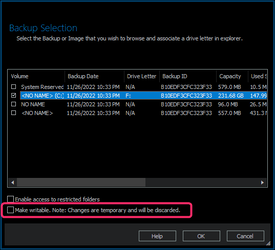
A Macrium image is not a standard compressed file. It can only be opened/mounted by Macrium itself.What does MalwareBytes do if it encounters a compressed file?
It would not thrash the image because all possible changes made by a malware detection would be discarded as soon as the image is unmounted.Well, I would not say useless. I would thrash a backup that fails a malware scan, just like I would thrash a backup that fails a verification of some sort..
So again a waste of time.
My Computer
At a glance
Windows 10
- OS
- Windows 10
- Local time
- 11:44 AM
- Posts
- 1,088
- OS
- Windows 11 Pro 25H2 26200.8894
I typically scan my systems with Windows Defender & Malwarebytes Premium prior to making the backup of my systems here.
Then make the backup, once its finished/verified, then i disconnect the backup drive, rotating out every other week the 8TB drives. In addition to some files on Onedrive.
In fact think i'll scan with the secondary 8TB drive connected tonight, and then do backup for this week on that one once it's finished with the scans i normally run
Overall think my backup practice has improved alot since 2005, when i didn't do too many backups at the time, and i did lose some files then after a very very my own fault infection at the time
Then make the backup, once its finished/verified, then i disconnect the backup drive, rotating out every other week the 8TB drives. In addition to some files on Onedrive.
In fact think i'll scan with the secondary 8TB drive connected tonight, and then do backup for this week on that one once it's finished with the scans i normally run
Overall think my backup practice has improved alot since 2005, when i didn't do too many backups at the time, and i did lose some files then after a very very my own fault infection at the time
My Computers
-
At a glance
Windows 11 Pro 25H2 26200.8894AMD Ryzen 7700X32GB DDR 5 RGB 5600MhzRadeon 7800XT- OS
- Windows 11 Pro 25H2 26200.8894
- Computer type
- PC/Desktop
- Manufacturer/Model
- PreBuilt
- CPU
- AMD Ryzen 7700X
- Motherboard
- MSI B650 VC WIfi Rev 1.0
- Memory
- 32GB DDR 5 RGB 5600Mhz
- Graphics Card(s)
- Radeon 7800XT
- Sound Card
- Onboard Audio
- Monitor(s) Displays
- Asus VG245H
- Screen Resolution
- 1920x1080
- Hard Drives
- Samsung 990 Pro 1TB Boot NVMe
Samsung 990 Pro 2TB Game NVMe
External
Western Digital Elements 500GB
Western Digital My Passport 2TB Blue
Western Digital My Passport 2TB Red
Toshiba 2TB in External Enclosure
Seagate 8TB in External Enclosure
Seagate 1TB Portable USB 3 External Drive
Western Digital My Book 8TB (Primary Backup drive)
Western Digital Black 4TB In External Enclosure
- PSU
- Seasonic Focus GX 750 Watt Power Supply
- Case
- Lian Li Lan Cool 216 ARGB Airflow
- Cooling
- 2 160MM Front, 1 140MM Rear Exhaust
- Keyboard
- Logitech G513
- Mouse
- Logitech G502 X
- Internet Speed
- Gigabit 1100Mb/35 Upload
- Browser
- MS Edge Chromium and Bing Search
- Antivirus
- Windows Defender, Malwarebytes Premium
- Other Info
- UEFI, Secure Boot, TPM 2.0, Macrium Reflect X
-
At a glance
Windows 11 Pro 25H2 26200.8894Ryzen 7 7735HS16GB DDR 5AMD Radeon™ 680M & Radeon 7700S- Operating System
- Windows 11 Pro 25H2 26200.8894
- Computer type
- Laptop
- Manufacturer/Model
- Asus TUF A16 Advantage Edition FA617NT.A16.R7700
- CPU
- Ryzen 7 7735HS
- Motherboard
- OEM Asus Motherboard
- Memory
- 16GB DDR 5
- Graphics card(s)
- AMD Radeon™ 680M & Radeon 7700S
- Sound Card
- Onboard
- Monitor(s) Displays
- 16inch FHD 165hz
- Screen Resolution
- 1920x1080
- Hard Drives
- 512GB NVMe Boot Drive
Samsung 990 Evo Plus 1TB Game NVMe
- PSU
- Laptop PSU
- Case
- Laptop Case
- Cooling
- OEM Cooling
- Keyboard
- OEM Laptop Keyboard
- Mouse
- Touchpad & G502 Hero
- Internet Speed
- Gigabit 1100 Download/35 Upload
- Browser
- MS Edge with Bing search
- Antivirus
- Windows Defender & Malwarebytes Premium
- Other Info
- Macrium Reflect X
- Local time
- 11:44 AM
- Posts
- 1,990
- OS
- Windows 10 Pro
A Macrium image is not a standard compressed file. It can only be opened/mounted by Macrium itself.
It would not thrash the image because all possible changes made by a malware detection would be discarded as soon as the image is unmounted.
So again a waste of time.
View attachment 48662
You misunderstood me on both issues.
On the first issue, the question is the same for both the Windows Defender and the MalwareBytes apps. Regardless of whether the anti-malware apps recognize the backup file as compressed or not, and without doing any decompression, do the anti-malware apps scan the compressed backup file or not?
(I myself think that the anti-malware apps do scan the compressed backup file, because malware can hide in compressed files too. I just like to have my thoughts verified or falsified)
On the second issue, it's not the app that is doing the thrashing, it's the human that does the thrashing, i.e. it's a human like me that puts any dubious backup file in the recycling bin. In other words, the human uses a malware scan (or a verification of some sort) as a useful tool to decide whether to delete a backup or to keep it.
My Computer
At a glance
Windows 10 Pro
- OS
- Windows 10 Pro
- Local time
- 10:44 AM
- Posts
- 672
- OS
- Windows 10
No, they are too large for any scanner to properly scan.malware apps recognize the backup file as compressed or not, and without doing any decompression, do the anti-malware apps scan the compressed backup file or not?
Do some basic disc cleanup and scan the system before backup.to decide whether to delete a backup or to keep it.
My Computer
At a glance
Windows 10
- OS
- Windows 10
- Local time
- 11:44 AM
- Posts
- 1,990
- OS
- Windows 10 Pro
No, they are too large for any scanner to properly scan.
What is the basis for saying 'compressed backup files cannot be properly scanned because they are too large?' Why is scanning time not simply commensurate with file size?
Do some basic disc cleanup and scan the system before backup.
That's what I already said in my OP or at least 'scanning the source' bit. But scanning the compressed backup file is another tool, and scanning the decompressed backup file is yet another tool, etc etc. This thread is to discuss all these tools.
My Computer
At a glance
Windows 10 Pro
- OS
- Windows 10 Pro

- Local time
- 4:44 PM
- Posts
- 8,865
- OS
- Windows 11 Pro + Win11 Canary VM.
Some of these posts seem to be confusing mounting an image with creating a vm with viboot.
Mounting an image as a drive means host pc scans the image, and will be faster but has a greater risk of infection of host if mounted drive is infected e.g. if an exe file is accidentally run. To be fair, risk is low but not different to risk of virus infection from any secondary drive. Key point is risk may low but is not zero.
Creating a viboot vm using viboot means the image is scanned by guest OS and risk of virus transfer to host OS is lower still than above, and virtually zero provided other external drives or network drives attached.
Also, with viboot, you can carry on safely using host whilst vm os being scanned.
Mounting an image as a drive means host pc scans the image, and will be faster but has a greater risk of infection of host if mounted drive is infected e.g. if an exe file is accidentally run. To be fair, risk is low but not different to risk of virus infection from any secondary drive. Key point is risk may low but is not zero.
Creating a viboot vm using viboot means the image is scanned by guest OS and risk of virus transfer to host OS is lower still than above, and virtually zero provided other external drives or network drives attached.
Also, with viboot, you can carry on safely using host whilst vm os being scanned.
My Computer
At a glance
Windows 11 Pro + Win11 Canary VM.I9 13th gen i9-13900H 2.60 GHZ16 GB solderedIntegrated Intel Iris XE
- OS
- Windows 11 Pro + Win11 Canary VM.
- Computer type
- Laptop
- Manufacturer/Model
- ASUS Zenbook 14
- CPU
- I9 13th gen i9-13900H 2.60 GHZ
- Motherboard
- Yep, Laptop has one.
- Memory
- 16 GB soldered
- Graphics Card(s)
- Integrated Intel Iris XE
- Sound Card
- Realtek built in
- Monitor(s) Displays
- laptop OLED screen
- Screen Resolution
- 2880x1800 touchscreen
- Hard Drives
- 1 TB NVME SSD (only weakness is only one slot)
- PSU
- Internal + 65W thunderbolt USB4 charger
- Case
- Yep, got one
- Cooling
- Stella Artois (UK pint cans - 568 ml) - extra cost.
- Keyboard
- Built in UK keybd
- Mouse
- Bluetooth , wireless dongled, wired
- Internet Speed
- 900 mbs (ethernet), wifi 6 typical 350-450 mb/s both up and down
- Browser
- Edge
- Antivirus
- Defender
- Other Info
- TPM 2.0, 2xUSB4 thunderbolt, 1xUsb3 (usb a), 1xUsb-c, hdmi out, 3.5 mm audio out/in combo, ASUS backlit trackpad (inc. switchable number pad)
Macrium Reflect Home V8
Office 365 Family (6 users each 1TB onedrive space)
Hyper-V (a vm runs almost as fast as my older laptop)

When people say thrashing, do they mean trashing? How odd!
My laptop only has 4GB of ram so ViBoot runs but oh so slow!
My laptop only has 4GB of ram so ViBoot runs but oh so slow!
My Computers
-
At a glance
Windows 11 Pro 25H2 26200.9550AMD Ryzen 7 5825U with Radeon Graphics16GB- OS
- Windows 11 Pro 25H2 26200.9550
- Computer type
- Laptop
- Manufacturer/Model
- Acemagic LX15PRO
- CPU
- AMD Ryzen 7 5825U with Radeon Graphics
- Motherboard
- BIOS CT_BI_AMI_LX15PRO_AB8139_A-004
- Memory
- 16GB
- Screen Resolution
- 1920 x 1080
- Hard Drives
- SSD 2TB
- Internet Speed
- 30 Mbps
- Browser
- Brave
- Antivirus
- Webroot SecureAnywhere Complete beta
-
At a glance
Windows 11 Pro 23H2 22631.2506Atom N450 1.66GHz2GB- Operating System
- Windows 11 Pro 23H2 22631.2506
- Computer type
- Laptop
- Manufacturer/Model
- HP Mini 210-1090NR PC (bought in late 2009!)
- CPU
- Atom N450 1.66GHz
- Memory
- 2GB
- Browser
- Brave
- Antivirus
- Webroot
-
Acer Swift SF114-34 laptop
OS Windows 11 Pro 26200.8894
CPU Pentium Silver N6000
RAM 4GB
BIOS v1.17
SSD Samsung 970 EVO Plus SSD 2TB (an upgrade)
- Local time
- 4:44 PM
- Posts
- 8,865
- OS
- Windows 11 Pro + Win11 Canary VM.
In computer science, thrashing occurs when a computer's virtual memory resources are overused, leading to a constant state of paging and page faults, inhibiting most application-level processing.[1] This causes the performance of the computer to degrade or collapse. The situation can continue indefinitely until either the user closes some running applications or the active processes free up additional virtual memory resources.When people say thrashing, do they mean trashing? How odd!
My laptop only has 4GB of ram so ViBoot runs but oh so slow!
With only 4GB and Viboot - you will be thrashing your pc.
My Computer
At a glance
Windows 11 Pro + Win11 Canary VM.I9 13th gen i9-13900H 2.60 GHZ16 GB solderedIntegrated Intel Iris XE
- OS
- Windows 11 Pro + Win11 Canary VM.
- Computer type
- Laptop
- Manufacturer/Model
- ASUS Zenbook 14
- CPU
- I9 13th gen i9-13900H 2.60 GHZ
- Motherboard
- Yep, Laptop has one.
- Memory
- 16 GB soldered
- Graphics Card(s)
- Integrated Intel Iris XE
- Sound Card
- Realtek built in
- Monitor(s) Displays
- laptop OLED screen
- Screen Resolution
- 2880x1800 touchscreen
- Hard Drives
- 1 TB NVME SSD (only weakness is only one slot)
- PSU
- Internal + 65W thunderbolt USB4 charger
- Case
- Yep, got one
- Cooling
- Stella Artois (UK pint cans - 568 ml) - extra cost.
- Keyboard
- Built in UK keybd
- Mouse
- Bluetooth , wireless dongled, wired
- Internet Speed
- 900 mbs (ethernet), wifi 6 typical 350-450 mb/s both up and down
- Browser
- Edge
- Antivirus
- Defender
- Other Info
- TPM 2.0, 2xUSB4 thunderbolt, 1xUsb3 (usb a), 1xUsb-c, hdmi out, 3.5 mm audio out/in combo, ASUS backlit trackpad (inc. switchable number pad)
Macrium Reflect Home V8
Office 365 Family (6 users each 1TB onedrive space)
Hyper-V (a vm runs almost as fast as my older laptop)

That's only going to work on known viruses and malware. The security program isn't going remove any viruses or malware that it doesn't know exist. A scan of the mounted image before using it to do a restore could find threats that wasn't know at the time the image was made. If it does, then one can decide if they want to use it or look for an image that isn't infected.Do some basic disc cleanup and scan the system before backup.
My Computers
-
At a glance
Windows 11 Pro 25H2Intel Core i7-10700K16GB (8GB PC4-19200 DDR4 SDRAM x2)NVIDIA GeForce GTX 1050 TI- OS
- Windows 11 Pro 25H2
- Computer type
- PC/Desktop
- Manufacturer/Model
- PowerSpec B746
- CPU
- Intel Core i7-10700K
- Motherboard
- ASRock Z490 Phantom Gaming 4/ax
- Memory
- 16GB (8GB PC4-19200 DDR4 SDRAM x2)
- Graphics Card(s)
- NVIDIA GeForce GTX 1050 TI
- Sound Card
- Realtek Audio
- Monitor(s) Displays
- #1. LG ULTRAWIDE 34" #2. AOC Q32G2WG3 32"
- Screen Resolution
- #1. 3440 X 1440 #2. 1920 x 1080
- Hard Drives
- NVMe WDC WDS100T2B0C-00PXH0 1TB
Samsung SSD 860 EVO 1TB
- PSU
- 750 Watts (62.5A)
- Case
- PowerSpec/Lian Li ATX 205
- Keyboard
- Logitech K270
- Mouse
- Logitech M185
- Browser
- Microsoft Edge and Firefox
- Antivirus
- Webroot SecureAnywhere CE 26.1
-
At a glance
Windows 11 Canary ChannelIntel Core i5-8400 CPU @ 2.80GHz16 MB DDR 4-2666- Operating System
- Windows 11 Canary Channel
- Computer type
- PC/Desktop
- Manufacturer/Model
- PowerSpec G156
- CPU
- Intel Core i5-8400 CPU @ 2.80GHz
- Motherboard
- AsusTeK Prime B360M-A
- Memory
- 16 MB DDR 4-2666
- Monitor(s) Displays
- 23" Speptre HDMI 75Hz
- Screen Resolution
- 1920x1080
- Hard Drives
- Samsung 970 EVO 500GB NVMe
- Keyboard
- Logitek K270
- Mouse
- Logitek M185
- Browser
- Firefox, Edge and Edge Canary
- Antivirus
- Windows Defender

- Local time
- 10:44 AM
- Posts
- 579
- OS
- WiN11 Pro
Just do a scan before you backup if you think you are infected...
My Computers
-
At a glance
WiN11 ProXeon E5450 3.0GHZ (OC 3.6GHZ)8GB (2GBX4)NVIDIA Quadro K2200 4GB- OS
- WiN11 Pro
- Computer type
- PC/Desktop
- Manufacturer/Model
- Custom 775 System
- CPU
- Xeon E5450 3.0GHZ (OC 3.6GHZ)
- Motherboard
- ASUS PQ5-EM
- Memory
- 8GB (2GBX4)
- Graphics Card(s)
- NVIDIA Quadro K2200 4GB
- Sound Card
- Onboard
- Monitor(s) Displays
- ASUS 24"
- Screen Resolution
- 1080p
- Hard Drives
- 1TB|750GB USB, 3 SSDs 2 240GB 1 128GB, 750GB HDD
- PSU
- 650WATT Rosewill
- Case
- Rosewill with side Window
- Cooling
- 5 Fans and a big HSK for cpu
- Keyboard
- Rosewill RGB
- Mouse
- Rosewill RGB
- Internet Speed
- AT&T 150MB DL\UP
- Browser
- FireFox
- Antivirus
- None
- Other Info
- I'm lucky to even be here after 6yrs from my car accident
-
At a glance
WiN10 LTSCi7 2670QM 2.20GHZ8GB (2X4GB) DUAL ChannelIntel HD Graphics 3000- Operating System
- WiN10 LTSC
- Computer type
- Laptop
- Manufacturer/Model
- Hp 8460p
- CPU
- i7 2670QM 2.20GHZ
- Motherboard
- Hp 161C
- Memory
- 8GB (2X4GB) DUAL Channel
- Graphics card(s)
- Intel HD Graphics 3000
- Sound Card
- Intel high Def (basically onboard)
- Screen Resolution
- 1366x768
- Hard Drives
- OS 128GB l Storage (caddy) 320GB
- PSU
- AC (IDK the watts)
- Browser
- Firefox
- Antivirus
- Defender
- Other Info
- A USB 3.0 in the Express Card Slot
I tried Malwarebytes on an image, and I can say that it didn't scan it. The scan took one second. I didn't actually time the scan on the mounted image but I do know it took way longer than one second.On the first issue, the question is the same for both the Windows Defender and the MalwareBytes apps. Regardless of whether the anti-malware apps recognize the backup file as compressed or not, and without doing any decompression, do the anti-malware apps scan the compressed backup file or not?
My Computers
-
At a glance
Windows 11 Pro 25H2Intel Core i7-10700K16GB (8GB PC4-19200 DDR4 SDRAM x2)NVIDIA GeForce GTX 1050 TI- OS
- Windows 11 Pro 25H2
- Computer type
- PC/Desktop
- Manufacturer/Model
- PowerSpec B746
- CPU
- Intel Core i7-10700K
- Motherboard
- ASRock Z490 Phantom Gaming 4/ax
- Memory
- 16GB (8GB PC4-19200 DDR4 SDRAM x2)
- Graphics Card(s)
- NVIDIA GeForce GTX 1050 TI
- Sound Card
- Realtek Audio
- Monitor(s) Displays
- #1. LG ULTRAWIDE 34" #2. AOC Q32G2WG3 32"
- Screen Resolution
- #1. 3440 X 1440 #2. 1920 x 1080
- Hard Drives
- NVMe WDC WDS100T2B0C-00PXH0 1TB
Samsung SSD 860 EVO 1TB
- PSU
- 750 Watts (62.5A)
- Case
- PowerSpec/Lian Li ATX 205
- Keyboard
- Logitech K270
- Mouse
- Logitech M185
- Browser
- Microsoft Edge and Firefox
- Antivirus
- Webroot SecureAnywhere CE 26.1
-
At a glance
Windows 11 Canary ChannelIntel Core i5-8400 CPU @ 2.80GHz16 MB DDR 4-2666- Operating System
- Windows 11 Canary Channel
- Computer type
- PC/Desktop
- Manufacturer/Model
- PowerSpec G156
- CPU
- Intel Core i5-8400 CPU @ 2.80GHz
- Motherboard
- AsusTeK Prime B360M-A
- Memory
- 16 MB DDR 4-2666
- Monitor(s) Displays
- 23" Speptre HDMI 75Hz
- Screen Resolution
- 1920x1080
- Hard Drives
- Samsung 970 EVO 500GB NVMe
- Keyboard
- Logitek K270
- Mouse
- Logitek M185
- Browser
- Firefox, Edge and Edge Canary
- Antivirus
- Windows Defender
That's only going to find known viruses and malware.Just do a scan before you backup if you think you are infected...
My Computers
-
At a glance
Windows 11 Pro 25H2Intel Core i7-10700K16GB (8GB PC4-19200 DDR4 SDRAM x2)NVIDIA GeForce GTX 1050 TI- OS
- Windows 11 Pro 25H2
- Computer type
- PC/Desktop
- Manufacturer/Model
- PowerSpec B746
- CPU
- Intel Core i7-10700K
- Motherboard
- ASRock Z490 Phantom Gaming 4/ax
- Memory
- 16GB (8GB PC4-19200 DDR4 SDRAM x2)
- Graphics Card(s)
- NVIDIA GeForce GTX 1050 TI
- Sound Card
- Realtek Audio
- Monitor(s) Displays
- #1. LG ULTRAWIDE 34" #2. AOC Q32G2WG3 32"
- Screen Resolution
- #1. 3440 X 1440 #2. 1920 x 1080
- Hard Drives
- NVMe WDC WDS100T2B0C-00PXH0 1TB
Samsung SSD 860 EVO 1TB
- PSU
- 750 Watts (62.5A)
- Case
- PowerSpec/Lian Li ATX 205
- Keyboard
- Logitech K270
- Mouse
- Logitech M185
- Browser
- Microsoft Edge and Firefox
- Antivirus
- Webroot SecureAnywhere CE 26.1
-
At a glance
Windows 11 Canary ChannelIntel Core i5-8400 CPU @ 2.80GHz16 MB DDR 4-2666- Operating System
- Windows 11 Canary Channel
- Computer type
- PC/Desktop
- Manufacturer/Model
- PowerSpec G156
- CPU
- Intel Core i5-8400 CPU @ 2.80GHz
- Motherboard
- AsusTeK Prime B360M-A
- Memory
- 16 MB DDR 4-2666
- Monitor(s) Displays
- 23" Speptre HDMI 75Hz
- Screen Resolution
- 1920x1080
- Hard Drives
- Samsung 970 EVO 500GB NVMe
- Keyboard
- Logitek K270
- Mouse
- Logitek M185
- Browser
- Firefox, Edge and Edge Canary
- Antivirus
- Windows Defender
- Local time
- 10:44 AM
- Posts
- 579
- OS
- WiN11 Pro
So in otherwards you think malware/viruses can infect backups? Unless you store the backup on the computer yes but if not then no unless I don't understand what you meanThat's only going to find known viruses and malware.
My Computers
-
At a glance
WiN11 ProXeon E5450 3.0GHZ (OC 3.6GHZ)8GB (2GBX4)NVIDIA Quadro K2200 4GB- OS
- WiN11 Pro
- Computer type
- PC/Desktop
- Manufacturer/Model
- Custom 775 System
- CPU
- Xeon E5450 3.0GHZ (OC 3.6GHZ)
- Motherboard
- ASUS PQ5-EM
- Memory
- 8GB (2GBX4)
- Graphics Card(s)
- NVIDIA Quadro K2200 4GB
- Sound Card
- Onboard
- Monitor(s) Displays
- ASUS 24"
- Screen Resolution
- 1080p
- Hard Drives
- 1TB|750GB USB, 3 SSDs 2 240GB 1 128GB, 750GB HDD
- PSU
- 650WATT Rosewill
- Case
- Rosewill with side Window
- Cooling
- 5 Fans and a big HSK for cpu
- Keyboard
- Rosewill RGB
- Mouse
- Rosewill RGB
- Internet Speed
- AT&T 150MB DL\UP
- Browser
- FireFox
- Antivirus
- None
- Other Info
- I'm lucky to even be here after 6yrs from my car accident
-
At a glance
WiN10 LTSCi7 2670QM 2.20GHZ8GB (2X4GB) DUAL ChannelIntel HD Graphics 3000- Operating System
- WiN10 LTSC
- Computer type
- Laptop
- Manufacturer/Model
- Hp 8460p
- CPU
- i7 2670QM 2.20GHZ
- Motherboard
- Hp 161C
- Memory
- 8GB (2X4GB) DUAL Channel
- Graphics card(s)
- Intel HD Graphics 3000
- Sound Card
- Intel high Def (basically onboard)
- Screen Resolution
- 1366x768
- Hard Drives
- OS 128GB l Storage (caddy) 320GB
- PSU
- AC (IDK the watts)
- Browser
- Firefox
- Antivirus
- Defender
- Other Info
- A USB 3.0 in the Express Card Slot
No! that's not what I think. If a system is infected with a new virus or malware and they are not in the security programs database yet, how is the security program supposed the threat exist. Why do you think security programs are constantly getting new security updates.So in otherwards you think malware/viruses can infect backups? Unless you store the backup on the computer yes but if not then no unless I don't understand what you mean
My Computers
-
At a glance
Windows 11 Pro 25H2Intel Core i7-10700K16GB (8GB PC4-19200 DDR4 SDRAM x2)NVIDIA GeForce GTX 1050 TI- OS
- Windows 11 Pro 25H2
- Computer type
- PC/Desktop
- Manufacturer/Model
- PowerSpec B746
- CPU
- Intel Core i7-10700K
- Motherboard
- ASRock Z490 Phantom Gaming 4/ax
- Memory
- 16GB (8GB PC4-19200 DDR4 SDRAM x2)
- Graphics Card(s)
- NVIDIA GeForce GTX 1050 TI
- Sound Card
- Realtek Audio
- Monitor(s) Displays
- #1. LG ULTRAWIDE 34" #2. AOC Q32G2WG3 32"
- Screen Resolution
- #1. 3440 X 1440 #2. 1920 x 1080
- Hard Drives
- NVMe WDC WDS100T2B0C-00PXH0 1TB
Samsung SSD 860 EVO 1TB
- PSU
- 750 Watts (62.5A)
- Case
- PowerSpec/Lian Li ATX 205
- Keyboard
- Logitech K270
- Mouse
- Logitech M185
- Browser
- Microsoft Edge and Firefox
- Antivirus
- Webroot SecureAnywhere CE 26.1
-
At a glance
Windows 11 Canary ChannelIntel Core i5-8400 CPU @ 2.80GHz16 MB DDR 4-2666- Operating System
- Windows 11 Canary Channel
- Computer type
- PC/Desktop
- Manufacturer/Model
- PowerSpec G156
- CPU
- Intel Core i5-8400 CPU @ 2.80GHz
- Motherboard
- AsusTeK Prime B360M-A
- Memory
- 16 MB DDR 4-2666
- Monitor(s) Displays
- 23" Speptre HDMI 75Hz
- Screen Resolution
- 1920x1080
- Hard Drives
- Samsung 970 EVO 500GB NVMe
- Keyboard
- Logitek K270
- Mouse
- Logitek M185
- Browser
- Firefox, Edge and Edge Canary
- Antivirus
- Windows Defender
Similar threads

Latest Support Threads
-
-
Xbox Microsoft Store game not visible in Windows Explorer
- Started by hispanico
- Replies: 0
-

-
Is the Administrator protection FINALLY has been rolled out? Take a look from the images.
- Started by win11freak
- Replies: 5
-
First look at 26H2: MS broke Win32k.sys, quality continues to degrade
- Started by Anixx
- Replies: 6

Latest Tutorials
-
 Accessibility Enable or Disable Auto Zoom Out for Narrator Math Reading Navigation in Windows 11
- Started by Brink
- Replies: 0
-
 Accessibility Change Narrator Math Reading Navigation Verbosity in Windows 11
- Started by Brink
- Replies: 0
-
 Accessibility Change Narrator Math Reading Navigation Mode in Windows 11
- Started by Brink
- Replies: 0
-
 Accessibility Change Narrator Math Reading Pause Factor in Windows 11
- Started by Brink
- Replies: 0
-
 Accessibility Change Narrator Math Reading Speech Rate in Windows 11
- Started by Brink
- Replies: 0