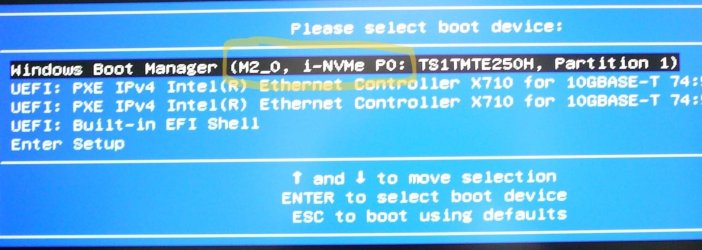
Here's a thing, while fiddling with my new build & trying to understand why the box will run OK from the boot menu but lock otherwise I noticed this:
BIOS cannot figure out which port is correct. I've contacted Gigabyte support.
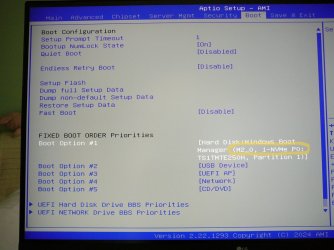
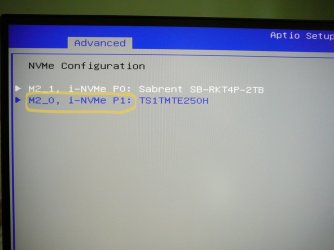
BIOS cannot figure out which port is correct. I've contacted Gigabyte support.
My Computer
At a glance
Win 11 Pro Workstation 25H2 26200.8039Xeon W7-3455256GbRTX 4500 ADA
- OS
- Win 11 Pro Workstation 25H2 26200.8039
- Computer type
- PC/Desktop
- Manufacturer/Model
- Manmade
- CPU
- Xeon W7-3455
- Motherboard
- Gigabyte MW83-RP0
- Memory
- 256Gb
- Graphics Card(s)
- RTX 4500 ADA
- Sound Card
- RealTek
- Monitor(s) Displays
- LG 32UN650P
- Screen Resolution
- 3840x2160
- Hard Drives
- Boot: Transcend TS1MTE250H. Storage: Sabrent SB-RKT4P. Backup: Toshiba MG08ADA600E
- PSU
- Corsair 850W
- Case
- BeQuiet 802
- Cooling
- Noctua D9
- Internet Speed
- 500Mb
- Browser
- Edge
- Antivirus
- Defender
- Other Info
- 25H2 26200.8039

 Apple 13" Macbook Pro 2020 (m1)