
Does anybody know how to change the icon for iCloud Drive in %USERPROFILE%?


jason404

Active member
Local time
8:00 AM
Posts
9
OS
Windows 11 Pro
I want to get rid of this disgusting iCloud Drive icon and replace it with one that I have which is the same shape and size as the other folder icons.

I did a search through the registry for any mentions of "icloud" and tried replacing the icon in places which seemed like they would do it, but with no luck.

The best location I have found is
Code:
HKEY_CLASSES_ROOT\CLSID\{C80299C8-C1A4-44FF-BA8A-EE5CD27BA743}\DefaultIcon
, but changing that didn't work.

Anybody got any ideas?
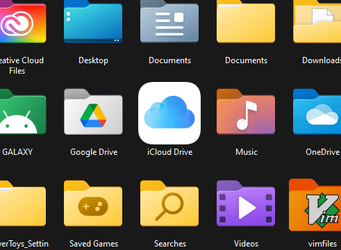
1665623417818.png
 
Windows Build/Version
Windows 11 (10.0.22621 N/A Build 22621)

My Computers My Computers

  • At a glance

    Windows 11 ProIntel Core i7-1270048 GiB
    OS
    Windows 11 Pro
    Computer type
    PC/Desktop
    Manufacturer/Model
    Lenovo ThinkStation P360 Ultra
    CPU
    Intel Core i7-12700
    Memory
    48 GiB
    Monitor(s) Displays
    2x Dell U2158D
    Screen Resolution
    2x QHD
    Keyboard
    ThinkPad Keyboard II Bluetooth
    Mouse
    Logitech MX Master 3
  • At a glance

    Windows 11 ProIntel Core i7-8650U24 GiB
    Operating System
    Windows 11 Pro
    Computer type
    Laptop
    Manufacturer/Model
    Lenovo ThinkPad T480s
    CPU
    Intel Core i7-8650U
    Memory
    24 GiB
    Screen Resolution
    1080p
Does right-clicking on it & selecting Properties reveal anything useful?

Denis
 

My Computer My Computer

At a glance

Windows 11 Home x64 Version 25H2 Build 26200....
OS
Windows 11 Home x64 Version 25H2 Build 26200.8037
Yes, you can change it in the same way you can for other folders there, but the change doesn't stick. That was the first thing I tried, but I tried again just now. This reminds me that I can try making a regshot just before and after changing the icon. I can them put some system level permissions on that reg key when I determine where it is. I'll wait for it to revert again before trying that.
 

My Computers My Computers

  • At a glance

    Windows 11 ProIntel Core i7-1270048 GiB
    OS
    Windows 11 Pro
    Computer type
    PC/Desktop
    Manufacturer/Model
    Lenovo ThinkStation P360 Ultra
    CPU
    Intel Core i7-12700
    Memory
    48 GiB
    Monitor(s) Displays
    2x Dell U2158D
    Screen Resolution
    2x QHD
    Keyboard
    ThinkPad Keyboard II Bluetooth
    Mouse
    Logitech MX Master 3
  • At a glance

    Windows 11 ProIntel Core i7-8650U24 GiB
    Operating System
    Windows 11 Pro
    Computer type
    Laptop
    Manufacturer/Model
    Lenovo ThinkPad T480s
    CPU
    Intel Core i7-8650U
    Memory
    24 GiB
    Screen Resolution
    1080p
What exactly was it letting you change? What type of file?
I have seen somebody else post that some cases where we'd expect it to be an icon are actually png files instead.
I think the WIn11 Calculator was the example they cited.
Whereas changing an icon [in,say, a shortcut] should hold permanently, I don't know how the png is called up. Perhaps it's hard-wired into the executable's code rather than being a setting.

Denis
 

My Computer My Computer

At a glance

Windows 11 Home x64 Version 25H2 Build 26200....
OS
Windows 11 Home x64 Version 25H2 Build 26200.8037

Latest Support Threads

Back
Top Bottom




