Does Cable Management Matter?


I just do cabling on the easiest way, be that front, or back; it's been serving me well for quite a few years:
I'm not fully understanding your post except that you're happy with the temps.
 

My Computers My Computers

  • At a glance

    Windows 11 Pro 25H2Intel Core i7-10700K16GB (8GB PC4-19200 DDR4 SDRAM x2)NVIDIA GeForce GTX 1050 TI
    OS
    Windows 11 Pro 25H2
    Computer type
    PC/Desktop
    Manufacturer/Model
    PowerSpec B746
    CPU
    Intel Core i7-10700K
    Motherboard
    ASRock Z490 Phantom Gaming 4/ax
    Memory
    16GB (8GB PC4-19200 DDR4 SDRAM x2)
    Graphics Card(s)
    NVIDIA GeForce GTX 1050 TI
    Sound Card
    Realtek Audio
    Monitor(s) Displays
    #1. LG ULTRAWIDE 34" #2. AOC Q32G2WG3 32"
    Screen Resolution
    #1. 3440 X 1440 #2. 1920 x 1080
    Hard Drives
    NVMe WDC WDS100T2B0C-00PXH0 1TB
    Samsung SSD 860 EVO 1TB
    PSU
    750 Watts (62.5A)
    Case
    PowerSpec/Lian Li ATX 205
    Keyboard
    Logitech K270
    Mouse
    Logitech M185
    Browser
    Microsoft Edge and Firefox
    Antivirus
    Webroot SecureAnywhere CE 26.1
  • At a glance

    Windows 11 Canary ChannelIntel Core i5-8400 CPU @ 2.80GHz16 MB DDR 4-2666
    Operating System
    Windows 11 Canary Channel
    Computer type
    PC/Desktop
    Manufacturer/Model
    PowerSpec G156
    CPU
    Intel Core i5-8400 CPU @ 2.80GHz
    Motherboard
    AsusTeK Prime B360M-A
    Memory
    16 MB DDR 4-2666
    Monitor(s) Displays
    23" Speptre HDMI 75Hz
    Screen Resolution
    1920x1080
    Hard Drives
    Samsung 970 EVO 500GB NVMe
    Keyboard
    Logitek K270
    Mouse
    Logitek M185
    Browser
    Firefox, Edge and Edge Canary
    Antivirus
    Windows Defender
Cable management is important for one reason only; your airflow into your casing.
I have to place a note to my previous comment. I saw the video where someone explained that cable management doesn't matter even if you block everything. True until a certain point. His test is the wrong one. He is using Furmark. This is a GPU stresstest. You can look at your CPU temp as much as you want it will be the same. In both cases as well the CPU as the GPU are using a heatpipe solution which dissipate it's heat to large surface of many aluminum plates. It can hold it's own without any fans. The test shown does not change so the results are the same. If they heatpipe/plates can handle their own heat dissipation nothing will change. You can block everything. It does not matter.

It becomes a different issue if the heatpipe/blades solution can't handle the heat anymore. Yes in this case fans are needed to cool things down. And if it does not do it quickly then it's ramping up the fan speeds. GPU card does have a advantage. Their surface area are much greater then a tower block onto the CPU. Those GPU card has grown through time from 1 to 2 or even 3 slot cards. The heatpipe/plates are getting bigger and there has to be room for 1,2 or 3 fans to cool things down. If you use normal speeds for the motherboard, CPU and GPU cable management is not needed. But if your are overclocking things seriously cable management and the right airflow in your system becomes a point to keep things tidy. No 28 pin flat cable running in front of a fan. Just using tyraps and pushing out of the way is also cable management.

It's now important which much cases which uses bling material like water-cooling with fluorescent water and multicolor fans and a transparent window to keep the room where the motherboard is sitting free of much of cables. So many cases has a separate chamber on the other side of the motherboard chamber to keep the motherboard area tidy with only cables surfacing to their connectors. It's just like Ghot showed us with his picture.

The choice of case is more important for the airflow then cable management. The designers do have solutions for that. I like cases where the user can choose. Some designer features are fixed for a reason. If I look at my Be Quiet Pure Base 600 case I can see what the designers intended. It has no window to look at the inside. (not needed. The case is sitting left of my monitor on my desk. So a left panel window has no use.) It has large 2 vertical small slots at the front as an air intake. At the bottom there is one filtered air outtake for my PSU. That's why the case is raised from the table by 2,5 cm. It has a plastic cover on top which I have raised by 1 cm to use it as an air intake also. In the case their are two fans which draw air from outside into my case. A big fan at back pushes all the air outside. The rest of the case front and sides are brushed aluminum. This case have 1 feature that has be gone; 2 5,25 drive bays for old-school things like a Blu-ray/DVD burner. Many cases don't have these anymore because it's place is been taken by a large 3 fan multicolor fan option. The whole front is one big air intake to be useful and to be visible.
 

My Computers My Computers

  • At a glance

    Win 11 Pro "25H2" Build 26200.8653, Zorin OS ProIntel® Core™ i7-12700KF 12th Gen. (S1700)32GB DDR5 5600-36 Vengeance (2x16)PCIe4.0 Asus NVIDIA RTX3060Ti
    OS
    Win 11 Pro "25H2" Build 26200.8653, Zorin OS Pro
    Computer type
    PC/Desktop
    Manufacturer/Model
    Self built
    CPU
    Intel® Core™ i7-12700KF 12th Gen. (S1700)
    Motherboard
    ASUS Prime Z690-A, BIOS v4505 (Z690 Intel Chipset)
    Memory
    32GB DDR5 5600-36 Vengeance (2x16)
    Graphics Card(s)
    PCIe4.0 Asus NVIDIA RTX3060Ti
    Sound Card
    Onboard; Realtek
    Monitor(s) Displays
    34" LG 34UC79G-B Curved 21:9 144Hz
    Screen Resolution
    2560x1080 (No HDR)
    Hard Drives
    250Gb Samsung 870PRO NVMe (Win 11 Pro)
    1Tb Samsung 980PRO NVMe
    1Tb Samsung 970EVO NVMe
    2Tb Samsung 990PRO NVMe with heatsink.
    4Tb WDC WD40EZRZ Blue SATA (Int.)
    4Tb WDC WD40EZRZ Blue SATA (Int.)
    3Tb WDC WD30EFRZ Red SATA (Int.)
    256Gb Samsung 840PRO SSD (RHEL 9,5)
    256Gb Samsung 850PRO SSD (Zorin OS Pro 18)
    PSU
    Coolermaster 850W V2 Gold with internal 12cm exaust fan
    Case
    Be-Quiet Pure Base 600.
    Cooling
    3x Be-Quiet! 12/14cm "Silent Wings 4" casefans, 1x Arctic Freezer i35 CPU towerblock with fan.
    Keyboard
    Steelseries APEX 7 keyboard.
    Mouse
    Logitech G-502 Hero
    Internet Speed
    1Gb
    Browser
    Brave
    Antivirus
    F-Secure
    Other Info
    No Noise system.
    256Gb Kingston Travler USB 3.0 drive.
    64Gb Sandisk USB 3.2 drive. (Ventoy)
    8Gb Philips USB 3.0 drive. (Win. Inst.)
    8Gb Philips USB 3.0 drive. (Rescue disk)
    2Tb WD USB 3.0 Passport drive.
    USB Ext. 500Gb WD SATA drive.
    External USB 3.0 C.A. CD/DVD* burner.
  • At a glance

    Windows 11 Pro 25H2Intel® Core™ i7-6700K 6th Gen. (S1151)32Gb DDR4 2400 Corsair Vengeance (4x8)ASUS GeForce GTX1080
    Operating System
    Windows 11 Pro 25H2
    Computer type
    PC/Desktop
    Manufacturer/Model
    Selfbuild
    CPU
    Intel® Core™ i7-6700K 6th Gen. (S1151)
    Motherboard
    ASUS Maximus VIII Ranger (Intel Chipset Z170)
    Memory
    32Gb DDR4 2400 Corsair Vengeance (4x8)
    Graphics card(s)
    ASUS GeForce GTX1080
    Sound Card
    Onboard; Realtek
    Monitor(s) Displays
    LG IPS277L 27" WideLED, IPS
    Screen Resolution
    1920x1080
    Hard Drives
    Samsung 850 Pro SSD
    PSU
    Zalman ZM600-HP with internal exhaust fan. Heatpipes & Modular cables.
    Case
    Cooler Master Aero
    Cooling
    Scythe Mugen 4 dual fan towerblock.
    Keyboard
    Red Dragon
    Mouse
    Red Dragon
    Internet Speed
    1Gb
    Browser
    Chrome
    Antivirus
    F-Secure
I just do cabling on the easiest way, be that front, or back; it's been serving me well for quite a few years:
Nothing new here. We all reach those temperatures with no load. This had nothing to do with cable management. Not putting your system (overclocking) under real stress temperatures and temps are ramping up towards the shutdown temp of your CPU. Airflow and fans are important in this case. Under normal use? No.
 

My Computers My Computers

  • At a glance

    Win 11 Pro "25H2" Build 26200.8653, Zorin OS ProIntel® Core™ i7-12700KF 12th Gen. (S1700)32GB DDR5 5600-36 Vengeance (2x16)PCIe4.0 Asus NVIDIA RTX3060Ti
    OS
    Win 11 Pro "25H2" Build 26200.8653, Zorin OS Pro
    Computer type
    PC/Desktop
    Manufacturer/Model
    Self built
    CPU
    Intel® Core™ i7-12700KF 12th Gen. (S1700)
    Motherboard
    ASUS Prime Z690-A, BIOS v4505 (Z690 Intel Chipset)
    Memory
    32GB DDR5 5600-36 Vengeance (2x16)
    Graphics Card(s)
    PCIe4.0 Asus NVIDIA RTX3060Ti
    Sound Card
    Onboard; Realtek
    Monitor(s) Displays
    34" LG 34UC79G-B Curved 21:9 144Hz
    Screen Resolution
    2560x1080 (No HDR)
    Hard Drives
    250Gb Samsung 870PRO NVMe (Win 11 Pro)
    1Tb Samsung 980PRO NVMe
    1Tb Samsung 970EVO NVMe
    2Tb Samsung 990PRO NVMe with heatsink.
    4Tb WDC WD40EZRZ Blue SATA (Int.)
    4Tb WDC WD40EZRZ Blue SATA (Int.)
    3Tb WDC WD30EFRZ Red SATA (Int.)
    256Gb Samsung 840PRO SSD (RHEL 9,5)
    256Gb Samsung 850PRO SSD (Zorin OS Pro 18)
    PSU
    Coolermaster 850W V2 Gold with internal 12cm exaust fan
    Case
    Be-Quiet Pure Base 600.
    Cooling
    3x Be-Quiet! 12/14cm "Silent Wings 4" casefans, 1x Arctic Freezer i35 CPU towerblock with fan.
    Keyboard
    Steelseries APEX 7 keyboard.
    Mouse
    Logitech G-502 Hero
    Internet Speed
    1Gb
    Browser
    Brave
    Antivirus
    F-Secure
    Other Info
    No Noise system.
    256Gb Kingston Travler USB 3.0 drive.
    64Gb Sandisk USB 3.2 drive. (Ventoy)
    8Gb Philips USB 3.0 drive. (Win. Inst.)
    8Gb Philips USB 3.0 drive. (Rescue disk)
    2Tb WD USB 3.0 Passport drive.
    USB Ext. 500Gb WD SATA drive.
    External USB 3.0 C.A. CD/DVD* burner.
  • At a glance

    Windows 11 Pro 25H2Intel® Core™ i7-6700K 6th Gen. (S1151)32Gb DDR4 2400 Corsair Vengeance (4x8)ASUS GeForce GTX1080
    Operating System
    Windows 11 Pro 25H2
    Computer type
    PC/Desktop
    Manufacturer/Model
    Selfbuild
    CPU
    Intel® Core™ i7-6700K 6th Gen. (S1151)
    Motherboard
    ASUS Maximus VIII Ranger (Intel Chipset Z170)
    Memory
    32Gb DDR4 2400 Corsair Vengeance (4x8)
    Graphics card(s)
    ASUS GeForce GTX1080
    Sound Card
    Onboard; Realtek
    Monitor(s) Displays
    LG IPS277L 27" WideLED, IPS
    Screen Resolution
    1920x1080
    Hard Drives
    Samsung 850 Pro SSD
    PSU
    Zalman ZM600-HP with internal exhaust fan. Heatpipes & Modular cables.
    Case
    Cooler Master Aero
    Cooling
    Scythe Mugen 4 dual fan towerblock.
    Keyboard
    Red Dragon
    Mouse
    Red Dragon
    Internet Speed
    1Gb
    Browser
    Chrome
    Antivirus
    F-Secure
2009 actually. :-)


The entire motherboard tray comes out the back, with, all the components still on the motherboard.
Just unhook the cables.
I can rebuild the entire comp in 15-20 mins.
100% aluminum too... acts as a natural heat sink.

I'm keeping this case till I die. ^^


They don't make 'em like this anymore.
This case is from "back in the day when ships were wood and men were iron". :D
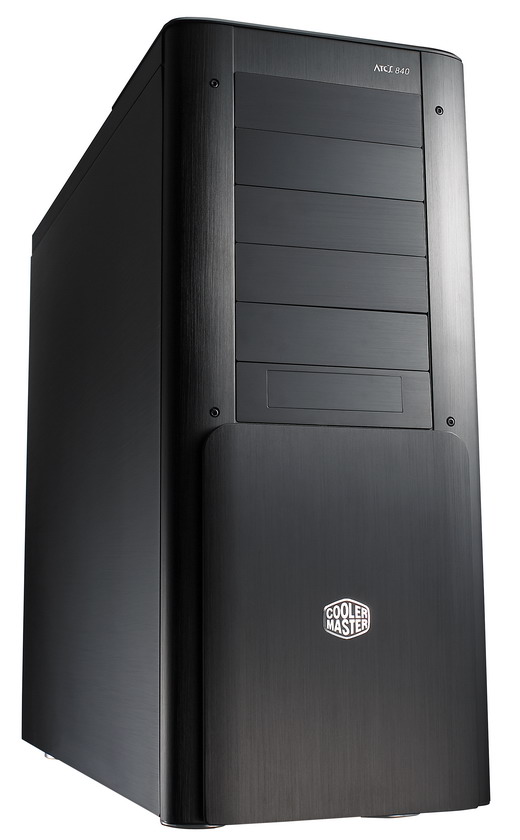
Yup. That's why I got the ATCS 840 too, instead of a newer fancy schmansy windowed case. (I have to give credit to someone in this forum for helping me get my hands on this exquisite case. He knows who he is.) I was going to put the older X99 Work Station board in it but changed my mind. Decided to put my X299 board inside it instead. At the moment I have a test board running inside it. I mean, it's sooo easy to swap out boards with this thing! Alas, I have too much going on here on the home front to tackle the X299 job now so I'll be building that one some time this winter. I have to agree: They just don't make 'em like they used to. This case is going nowhere until I give up the ghot. 😎
Cable management is important for one reason only; your airflow into your casing.
I'm going to have to respectfully disagree with you on that. Working in a rat's nest of wires and cables can be frustrating. When properly managed cables are easier to trace and replace or reroute or simply locate. Yes, airflow is important but there are a number of reasons why good cable management is important. Having wires dangling in front of fans can be a recipe for disaster, for example (and I'm not referring to mere obstruction of air flow). Having them numbered or labeled can also help save time. Proper cable management comes with a safety factor and it can help to preserve the life of your PC. Apart from esthetics it has practical aspects in addition to maintaining good airflow.

As for the original post: I've seen your work and I know how you labored over your build. You built your PC for yourself and IMO you did a great job of it. On my ThermalTake Level 10 GT some might say it looks horrendous but once the cover is on nobody has to look at it. I know where each wire goes and even if not all the wires run parallel or form tidy little geometric figures they're secure. That's what matters. IF it looks good to you then it's good enough because a lot of us walked with you through that build and we know you took a very practical approach. In fact, it's one of the nicest looking aquariums I've seen in some time. lol (J/K)
 

My Computer My Computer

At a glance

WIN 11, WIN 10, WIN 8.1, WIN 7 U, WIN 7 PRO, ...Intel i7 6900K and i9-7960X / AMD 3800X (8 core)128 GB CORSAIR DOMINATOR PLATINUM (B DIE)NVIDIA 1070 and RTX 3070
OS
WIN 11, WIN 10, WIN 8.1, WIN 7 U, WIN 7 PRO, WIN 7 HOME (32 Bit), LINUX MINT
Computer type
PC/Desktop
Manufacturer/Model
DIY, ASUS, and DELL
CPU
Intel i7 6900K and i9-7960X / AMD 3800X (8 core)
Motherboard
ASUS X99E-WS USB 3.1 and ASUS X299 SAGE
Memory
128 GB CORSAIR DOMINATOR PLATINUM (B DIE)
Graphics Card(s)
NVIDIA 1070 and RTX 3070
Sound Card
Crystal Sound (onboard)
Monitor(s) Displays
single Samsung 30" 4K and 8" aux monitor
Screen Resolution
4K and something equally attrocious. I'll be working on this.
Hard Drives
A, B, C, D, E, F, G, H, I, J, K, L, M, N, O, P, Q, R, S, T, U, V, W

Ports X, Y, and Z are reserved for USB access and removable drives.

Drive types consist of the following: Various mechanical hard drives bearing the brand names, Seagate, Toshiba, and Western Digital. Various NVMe drives bearing the brand names Kingston, Intel, Silicon Power, Crucial, Western Digital, and Team Group. Various SATA SSDs bearing various different brand names.

RAID arrays included:

LSI RAID 10 (WD Velociraptors) 1115.72 GB
LSI RAID 10 (WD SSDS) 463.80 GB

INTEL RAID 0 (KINGSTON HYPER X) System 447.14 GB
INTEL RAID 1 TOSHIBA ENTERPRIZE class Data 2794.52 GB
INTEL RAID 1 SEAGATE HYBRID 931.51 GB
PSU
SEVERAL. I prefer my Corsair Platinum HX1000i but I also like EVGA power supplies
Case
ThermalTake Level 10 GT (among others)
Cooling
Noctua is my favorite and I use it in my main. I also own various other coolers.
Keyboard
all kinds.
Mouse
all kinds
Internet Speed
360 mbps - 1 gbps (depending)
Browser
FIREFOX
Antivirus
KASPERSKY (no apologies)
Other Info
Gave Dell touch screen with Windows 11 to daughter and got me an OTVOC. Being a PC builder I own many desktop PCs as well. I am a father of five providing PCs, laptops, and tablets for all my family, most of which I have modified, rebuilt, or simply built from scratch. I do not own a cell phone, never have, never will.

Latest Support Threads

Back
Top Bottom