Drive not recognized


larrydonline

Well-known member
Member
VIP
Local time
10:38 AM
Posts
128
OS
Windows 11
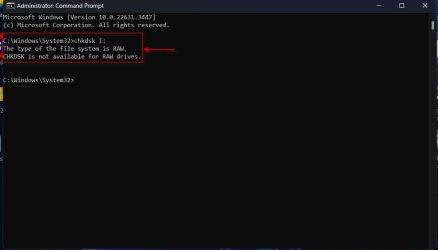
I have an external drive that was working fine until I left it overnight having files being copied to it. Today it stopped copying and gave me the 0x800701B1 error code. When I checked the disk it said it can't check raw disks. So some kind of corruption obviously happened.

Now it doesn't show up in File Explorer yet it does show in Disk Manager and there it says NTFS and says drive is Healthy and online. Yet even from that window Properties>check disk won't run. It doesn't even try to run it just ignores clicking on it. Is there any hope for this drive or should I just try to reformat it from Disk Manager? I think the cables must be OK or Disk Manager wouldn't recognize it either. I've rebooted with no change. It's a 7 TB WD easystore.
 

My Computer My Computer

At a glance

Windows 1112th Gen Intel(R) Core(TM) i9-12900K 3.20 GHz65262 Megabytes Usable Installed MemoryNVIDIA GeForce RTX 3070
OS
Windows 11
Computer type
PC/Desktop
Manufacturer/Model
Dell 8950
CPU
12th Gen Intel(R) Core(TM) i9-12900K 3.20 GHz
Motherboard
0DYKKV A00
Memory
65262 Megabytes Usable Installed Memory
Graphics Card(s)
NVIDIA GeForce RTX 3070
Sound Card
Multimedia Intel(R) Display Audio NVIDIA High Definition Audio NVIDIA Virtual Audio Device (Wave Extensible) (WDM) Realtek(R) Audio WsAudio_Device
Monitor(s) Displays
Dell
Mouse
Logitech
Internet Speed
D/L 120 mbps
Browser
Firefox
Antivirus
Malwarebytes
I have an external drive that was working fine until I left it overnight having files being copied to it. Today it stopped copying and gave me the 0x800701B1 error code. When I checked the disk it said it can't check raw disks. So some kind of corruption obviously happened.

Now it doesn't show up in File Explorer yet it does show in Disk Manager and there it says NTFS and says drive is Healthy and online. Yet even from that window Properties>check disk won't run. It doesn't even try to run it just ignores clicking on it. Is there any hope for this drive or should I just try to reformat it from Disk Manager? I think the cables must be OK or Disk Manager wouldn't recognize it either. I've rebooted with no change. It's a 7 TB WD easystore.
Sounds like warranty time if WD honors it and that is a big if these days
 

My Computer My Computer

At a glance

windows 11Intel i5-10600kf32gb corsair vengerance proAMD RX 6500XT
OS
windows 11
Computer type
PC/Desktop
Manufacturer/Model
Antec/Case
CPU
Intel i5-10600kf
Motherboard
GIGABYTE Z590 UD AC
Memory
32gb corsair vengerance pro
Graphics Card(s)
AMD RX 6500XT
Sound Card
onboard
Monitor(s) Displays
40" Hisense
Hard Drives
Samsung 850
Samsung 870
Seagate 2TB
PSU
EVGA GQ 750
Depending on exactly what error is occurring it could be a bad drive(or going bad) or it could be the drive interface electronics within the enclosure causing the issue with the drive actually being okay. You can try a few utilities to troubleshoot/repair but if unsuccessful you could go the RMA route or simply pull the drive from the enclosure to check it out.
 

My Computer My Computer

At a glance

Win 7/10/11
OS
Win 7/10/11
Computer type
PC/Desktop
Other Info
I'm a computer enthusiast so have quite a few systems that I run. More like an advanced hobby.

My Computer My Computer

At a glance

Windows 10Intel(R) Core(TM) i7-4800MQ CPU @ 2.70GHz16 GB Total: Manufacturer : Samsung MemoryTyp...NVIDIA Quadro K3100M; Intel(R) HD Graphics 4600
OS
Windows 10
Computer type
Laptop
Manufacturer/Model
HP
CPU
Intel(R) Core(TM) i7-4800MQ CPU @ 2.70GHz
Motherboard
Product : 190A Version : KBC Version 94.56
Memory
16 GB Total: Manufacturer : Samsung MemoryType : DDR3 FormFactor : SODIMM Capacity : 8GB Speed : 1600
Graphics Card(s)
NVIDIA Quadro K3100M; Intel(R) HD Graphics 4600
Sound Card
IDT High Definition Audio CODEC; PNP Device ID HDAUDIO\FUNC_01&VEN_111D&DEV_76E0
Hard Drives
Model Hitachi HTS727575A9E364
Antivirus
Microsoft Defender
Other Info
Mobile Workstation
I installed the Sea Tools app but once installed it would not run on my WIndows 11 home computer.
 

My Computer My Computer

At a glance

Windows 1112th Gen Intel(R) Core(TM) i9-12900K 3.20 GHz65262 Megabytes Usable Installed MemoryNVIDIA GeForce RTX 3070
OS
Windows 11
Computer type
PC/Desktop
Manufacturer/Model
Dell 8950
CPU
12th Gen Intel(R) Core(TM) i9-12900K 3.20 GHz
Motherboard
0DYKKV A00
Memory
65262 Megabytes Usable Installed Memory
Graphics Card(s)
NVIDIA GeForce RTX 3070
Sound Card
Multimedia Intel(R) Display Audio NVIDIA High Definition Audio NVIDIA Virtual Audio Device (Wave Extensible) (WDM) Realtek(R) Audio WsAudio_Device
Monitor(s) Displays
Dell
Mouse
Logitech
Internet Speed
D/L 120 mbps
Browser
Firefox
Antivirus
Malwarebytes

My Computer My Computer

At a glance

Windows 10Intel(R) Core(TM) i7-4800MQ CPU @ 2.70GHz16 GB Total: Manufacturer : Samsung MemoryTyp...NVIDIA Quadro K3100M; Intel(R) HD Graphics 4600
OS
Windows 10
Computer type
Laptop
Manufacturer/Model
HP
CPU
Intel(R) Core(TM) i7-4800MQ CPU @ 2.70GHz
Motherboard
Product : 190A Version : KBC Version 94.56
Memory
16 GB Total: Manufacturer : Samsung MemoryType : DDR3 FormFactor : SODIMM Capacity : 8GB Speed : 1600
Graphics Card(s)
NVIDIA Quadro K3100M; Intel(R) HD Graphics 4600
Sound Card
IDT High Definition Audio CODEC; PNP Device ID HDAUDIO\FUNC_01&VEN_111D&DEV_76E0
Hard Drives
Model Hitachi HTS727575A9E364
Antivirus
Microsoft Defender
Other Info
Mobile Workstation
I have an external drive that was working fine until I left it overnight having files being copied to it. Today it stopped copying and gave me the 0x800701B1 error code. When I checked the disk it said it can't check raw disks. So some kind of corruption obviously happened.

Now it doesn't show up in File Explorer yet it does show in Disk Manager and there it says NTFS and says drive is Healthy and online. Yet even from that window Properties>check disk won't run. It doesn't even try to run it just ignores clicking on it. Is there any hope for this drive or should I just try to reformat it from Disk Manager? I think the cables must be OK or Disk Manager wouldn't recognize it either. I've rebooted with no change. It's a 7 TB WD easystore.
Please post a screenshot of Windows Disk Management with only your faulty external disk plugged in. Drive showing RAW means the filesystem is corrupted. We can try and repair it with TestDisk.

Two such RAW drives successfully repaired and made accessible here.


As zbook suggested download and install the trial version of Hard Disk Sentinel and check the health of your external drive. Post a screenshot.


Sample screenshot:

14-04-2024 14-22-57.jpg
 

My Computers My Computers

  • At a glance

    Windows 11 Pro Version:25H2 OS Build: 26200.865512th Gen Intel core i5-1235U(Alder16*2 (32 GB) DDR 4-3200(1600MHz) Crucial Tech...Intel Iris Xe Graphics (Internal)
    OS
    Windows 11 Pro Version:25H2 OS Build: 26200.8655
    Computer type
    PC/Desktop
    Manufacturer/Model
    Beelink Mini PC Model: SEi12
    CPU
    12th Gen Intel core i5-1235U(Alder
    Motherboard
    SEi (manufactured by AZW)
    Memory
    16*2 (32 GB) DDR 4-3200(1600MHz) Crucial Technology
    Graphics Card(s)
    Intel Iris Xe Graphics (Internal)
    Sound Card
    Internal
    Monitor(s) Displays
    BenQ GW2283
    Screen Resolution
    1920*1080
    Hard Drives
    500GB NVME (Kingston SNV2S500G)
    1TB (Crucial CT1000BX500SSD1)
    PSU
    Power Brick 19V-6.32A , 120.08W
    Keyboard
    Dell KB3322Wi (Wireless)
    Mouse
    Dell WM118t (Wireless)
    Internet Speed
    4G/5G
    Browser
    MS Edge, Chrome
    Antivirus
    Malwarebytes Premium - Subscription
  • At a glance

    Windows 11 Home Version 25H2 Build 26200.8655Intel Core i3 8145UIntel Optane 16GB module + DDR 4 16GB (Optane...Intel UHD Graphics 620
    Operating System
    Windows 11 Home Version 25H2 Build 26200.8655
    Computer type
    PC/Desktop
    Manufacturer/Model
    Dell Inspiron 3280 AIO 22"
    CPU
    Intel Core i3 8145U
    Motherboard
    Dell inc. 027W48
    Memory
    Intel Optane 16GB module + DDR 4 16GB (Optane disabled.)
    Graphics card(s)
    Intel UHD Graphics 620
    Sound Card
    Internal
    Monitor(s) Displays
    Dell Monitor 22"
    Screen Resolution
    1920x1080
    Hard Drives
    Crucial CT1000BX500SSD1 ; 1000,2 GB
    PSU
    Power Brick
    Case
    All-in one
    Keyboard
    Dell Wireless KM636
    Mouse
    Dell Wireless KM 636
    Internet Speed
    4G
    Browser
    Edge, Chrome
    Antivirus
    Malwarebytes
    Other Info
    Upgraded from Windows 10 Home to Windows 11 Home on 28 Oct 2023
When I checked the disk it said it can't check raw disks. So some kind of corruption obviously happened.

Now it doesn't show up in File Explorer yet it does show in Disk Manager and there it says NTFS and says drive is Healthy and online. Yet even from that window Properties>check disk won't run. It doesn't even try to run it just ignores clicking on it.
I suspect a drive controller board fault. When that occurs, it's likely that scanners checking for sectors, will find nothing wrong.
I dealt with a Western Digital WD5000AAJS 500 GB SATA HDD from 2007 with a fault like that, and MHDD (DOS-based, sorry) finds nothing wrong when scanning!
 

My Computers My Computers

  • At a glance

    Windows 11 Pro x64 24H2Ryzen 9 5900X64 GB G.Skill RipJaws V F4-3200C16D-64GVKASRock Steel Legend Arc B580 12 GB
    OS
    Windows 11 Pro x64 24H2
    Computer type
    PC/Desktop
    CPU
    Ryzen 9 5900X
    Motherboard
    ASRock B550 PG Velocita (UEFI-BIOS 3.90)
    Memory
    64 GB G.Skill RipJaws V F4-3200C16D-64GVK
    Graphics Card(s)
    ASRock Steel Legend Arc B580 12 GB
    Monitor(s) Displays
    Alienware AW3423DWF OLED ultrawide
    Hard Drives
    Samsung 990 Pro 1 TB NVMe SSD
    PSU
    eVGA Supernova 750 G3
    Case
    Corsair 275R
    Internet Speed
    VTel FTTH 1 Gb down and 1 Gb up
  • At a glance

    Windows 11 Home x64 25H2Ryzen 7 5800X3D32 GB (2x16 GB G.Skill TridentZ Neo)Sapphire Nitro+ Radeon RX 6750 XT
    Operating System
    Windows 11 Home x64 25H2
    Computer type
    PC/Desktop
    CPU
    Ryzen 7 5800X3D
    Motherboard
    Asus ROG Strix B550-F Gaming (UEFI-BIOS version 3636)
    Memory
    32 GB (2x16 GB G.Skill TridentZ Neo)
    Graphics card(s)
    Sapphire Nitro+ Radeon RX 6750 XT
    Hard Drives
    Samsung 970 Pro 512 GB NVMe SSD
    PSU
    Corsair RM850x
    Case
    Fractal Focus G
I suspect a drive controller board fault. When that occurs, it's likely that scanners checking for sectors, will find nothing wrong.
I dealt with a Western Digital WD5000AAJS 500 GB SATA HDD from 2007 with a fault like that, and MHDD (DOS-based, sorry) finds nothing wrong when scanning!
Your suspicion, I would think, is unwarranted and misleading.

The OP's disk will more or less look like Disk 2 in the following screen shot where Drive I: is RAW . Its properties still shows it as NTFS. Check disk will not run on a RAW drive as shown in the next screenshot. That's all what the OP has reported.

14-04-2024 16-51-52.jpg
14-04-2024 16-58-35.jpg

This problem that has arisen due to file system corruption is amenable for correction and we can restore the file system to NTFS in most cases.

That is what I had successfully done in the two cases I had referenced in my previous post. Please do read those.

The problem you had faced years ago might have been quite different and its causative factor does not apply here.. Sorry to negate your thoughts on this.
 
Last edited:

My Computers My Computers

  • At a glance

    Windows 11 Pro Version:25H2 OS Build: 26200.865512th Gen Intel core i5-1235U(Alder16*2 (32 GB) DDR 4-3200(1600MHz) Crucial Tech...Intel Iris Xe Graphics (Internal)
    OS
    Windows 11 Pro Version:25H2 OS Build: 26200.8655
    Computer type
    PC/Desktop
    Manufacturer/Model
    Beelink Mini PC Model: SEi12
    CPU
    12th Gen Intel core i5-1235U(Alder
    Motherboard
    SEi (manufactured by AZW)
    Memory
    16*2 (32 GB) DDR 4-3200(1600MHz) Crucial Technology
    Graphics Card(s)
    Intel Iris Xe Graphics (Internal)
    Sound Card
    Internal
    Monitor(s) Displays
    BenQ GW2283
    Screen Resolution
    1920*1080
    Hard Drives
    500GB NVME (Kingston SNV2S500G)
    1TB (Crucial CT1000BX500SSD1)
    PSU
    Power Brick 19V-6.32A , 120.08W
    Keyboard
    Dell KB3322Wi (Wireless)
    Mouse
    Dell WM118t (Wireless)
    Internet Speed
    4G/5G
    Browser
    MS Edge, Chrome
    Antivirus
    Malwarebytes Premium - Subscription
  • At a glance

    Windows 11 Home Version 25H2 Build 26200.8655Intel Core i3 8145UIntel Optane 16GB module + DDR 4 16GB (Optane...Intel UHD Graphics 620
    Operating System
    Windows 11 Home Version 25H2 Build 26200.8655
    Computer type
    PC/Desktop
    Manufacturer/Model
    Dell Inspiron 3280 AIO 22"
    CPU
    Intel Core i3 8145U
    Motherboard
    Dell inc. 027W48
    Memory
    Intel Optane 16GB module + DDR 4 16GB (Optane disabled.)
    Graphics card(s)
    Intel UHD Graphics 620
    Sound Card
    Internal
    Monitor(s) Displays
    Dell Monitor 22"
    Screen Resolution
    1920x1080
    Hard Drives
    Crucial CT1000BX500SSD1 ; 1000,2 GB
    PSU
    Power Brick
    Case
    All-in one
    Keyboard
    Dell Wireless KM636
    Mouse
    Dell Wireless KM 636
    Internet Speed
    4G
    Browser
    Edge, Chrome
    Antivirus
    Malwarebytes
    Other Info
    Upgraded from Windows 10 Home to Windows 11 Home on 28 Oct 2023
Nothing I tried would cause the file system to recognize the drive so I eventually reformatted it. It still won't see it when connected to the USB.

So since this was to be, and had been, a backup drive only I plugged another drive, a 9 TB WD Elements into the same USB connection and while coping a 2.5 TB file onto it it stopped with the same error, which means basically that the file can't be found, after only coping about 85.6 GB. I tried to run scan disk and I got the same message as with the first drive. It sees it as RAW format. However this time File Explorer still sees it, as well as Device/Computer Manager, as NTFS. So I just continued to copy more files which went well. I did use a smaller batch, about 100 MGs.

So there seem to be several probabilities. Something about copying a huge 2+ TB file is too much for the system to handle flawlessly. Another possibility is that there could be something wrong with the USB connector since both drives were plugged in at the same hub. Yeah, I don't know if using a hub made a difference but it never has before. I was getting 150 Megs per second before it stopped working. What's even more intriguing to me is how Computer Manager sees the drive as NTFS while scan disk, whether accessed from DOS or from properties sees it as RAW. In the case of the first drive that failed Computer Manager saw it as NTFS while both File Explorer and Scan Disk saw it as RAW.

I ran that DISM utility from DOS and it says the drive is healthy. The Hard Disk Sentinel also says it's healthy. That's a great utility. It says the drive should last 1,000 days. It's been in use for 363 days.

I suppose I could have the one bad USB connector on my hub which has eight slots. Just theorizing I wonder if I use a different USB port if that could make scan disk to see it as NTFS or if once it thinks it's RAW it won't change its mind?

I thought about buying a new drive to replace the one the system won't see and spent hours reading Amazon reviews. It sure seems like a crap shoot. Every drive by every maker has people with bad experiences who say they'll never buy another and people who are happy as a lark with their experience with the drive. Well I'm currently running 3 WD Elements, 1 Hitachi, 4 Seagate Expansion Drives, and 2 Touros. I don't think 3 TB Hitachis or TOUROs are still being made. SS Drives cost too much.

If the Elements keeps letting me load it up I'll keep using it until it's nearly full then store it in my safe. I hope when I dig it out in two years that it will still be recognized by File Explorer.
 

My Computer My Computer

At a glance

Windows 1112th Gen Intel(R) Core(TM) i9-12900K 3.20 GHz65262 Megabytes Usable Installed MemoryNVIDIA GeForce RTX 3070
OS
Windows 11
Computer type
PC/Desktop
Manufacturer/Model
Dell 8950
CPU
12th Gen Intel(R) Core(TM) i9-12900K 3.20 GHz
Motherboard
0DYKKV A00
Memory
65262 Megabytes Usable Installed Memory
Graphics Card(s)
NVIDIA GeForce RTX 3070
Sound Card
Multimedia Intel(R) Display Audio NVIDIA High Definition Audio NVIDIA Virtual Audio Device (Wave Extensible) (WDM) Realtek(R) Audio WsAudio_Device
Monitor(s) Displays
Dell
Mouse
Logitech
Internet Speed
D/L 120 mbps
Browser
Firefox
Antivirus
Malwarebytes
For all test / steps make sure that images or share links are posted into this thread.
 

My Computer My Computer

At a glance

Windows 10Intel(R) Core(TM) i7-4800MQ CPU @ 2.70GHz16 GB Total: Manufacturer : Samsung MemoryTyp...NVIDIA Quadro K3100M; Intel(R) HD Graphics 4600
OS
Windows 10
Computer type
Laptop
Manufacturer/Model
HP
CPU
Intel(R) Core(TM) i7-4800MQ CPU @ 2.70GHz
Motherboard
Product : 190A Version : KBC Version 94.56
Memory
16 GB Total: Manufacturer : Samsung MemoryType : DDR3 FormFactor : SODIMM Capacity : 8GB Speed : 1600
Graphics Card(s)
NVIDIA Quadro K3100M; Intel(R) HD Graphics 4600
Sound Card
IDT High Definition Audio CODEC; PNP Device ID HDAUDIO\FUNC_01&VEN_111D&DEV_76E0
Hard Drives
Model Hitachi HTS727575A9E364
Antivirus
Microsoft Defender
Other Info
Mobile Workstation
Ha........ hub with eight slots. You never mentioned it before (Hmmm.... I should hereafter ask how the external drive is connected. Directly to the USB port/ through a hub/through a dock. My bad :-) ).

It is quite obvious now that your hub is responsible for corrupting the large capacity drives. The ports are unable supply the required power for the large capacity HDDs. Once it corrupts the filesystem and makes it RAW it won't reverse automatically unless you repair the file system corruption.. You must use a powered hub if you want to stay clear of this problem and do not keep any number of HDDs plugged into the hub.

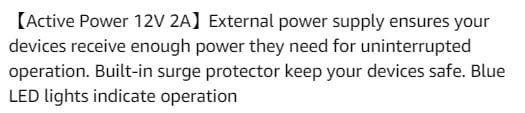
I use a QZ Active Powered USB hub 4 port USB hub with 12V 2A 24W Power Adapter USB 3.1 Gen 1. If I would be using more number of ports I will choose a hub with a higher powered adapter.

15-04-2024 11-57-06.jpg

15-04-2024 12-01-23.jpg
Once writing is interrupted due to lack of sufficient power, your HDD will get corrupted.
 
Last edited:

My Computers My Computers

  • At a glance

    Windows 11 Pro Version:25H2 OS Build: 26200.865512th Gen Intel core i5-1235U(Alder16*2 (32 GB) DDR 4-3200(1600MHz) Crucial Tech...Intel Iris Xe Graphics (Internal)
    OS
    Windows 11 Pro Version:25H2 OS Build: 26200.8655
    Computer type
    PC/Desktop
    Manufacturer/Model
    Beelink Mini PC Model: SEi12
    CPU
    12th Gen Intel core i5-1235U(Alder
    Motherboard
    SEi (manufactured by AZW)
    Memory
    16*2 (32 GB) DDR 4-3200(1600MHz) Crucial Technology
    Graphics Card(s)
    Intel Iris Xe Graphics (Internal)
    Sound Card
    Internal
    Monitor(s) Displays
    BenQ GW2283
    Screen Resolution
    1920*1080
    Hard Drives
    500GB NVME (Kingston SNV2S500G)
    1TB (Crucial CT1000BX500SSD1)
    PSU
    Power Brick 19V-6.32A , 120.08W
    Keyboard
    Dell KB3322Wi (Wireless)
    Mouse
    Dell WM118t (Wireless)
    Internet Speed
    4G/5G
    Browser
    MS Edge, Chrome
    Antivirus
    Malwarebytes Premium - Subscription
  • At a glance

    Windows 11 Home Version 25H2 Build 26200.8655Intel Core i3 8145UIntel Optane 16GB module + DDR 4 16GB (Optane...Intel UHD Graphics 620
    Operating System
    Windows 11 Home Version 25H2 Build 26200.8655
    Computer type
    PC/Desktop
    Manufacturer/Model
    Dell Inspiron 3280 AIO 22"
    CPU
    Intel Core i3 8145U
    Motherboard
    Dell inc. 027W48
    Memory
    Intel Optane 16GB module + DDR 4 16GB (Optane disabled.)
    Graphics card(s)
    Intel UHD Graphics 620
    Sound Card
    Internal
    Monitor(s) Displays
    Dell Monitor 22"
    Screen Resolution
    1920x1080
    Hard Drives
    Crucial CT1000BX500SSD1 ; 1000,2 GB
    PSU
    Power Brick
    Case
    All-in one
    Keyboard
    Dell Wireless KM636
    Mouse
    Dell Wireless KM 636
    Internet Speed
    4G
    Browser
    Edge, Chrome
    Antivirus
    Malwarebytes
    Other Info
    Upgraded from Windows 10 Home to Windows 11 Home on 28 Oct 2023
The hub does have its own power supply. I'm using most of the HDDs regularly and it's plugged into one of the best USB ports on the computer. However I don't do mass copying often so I suppose I should just be sure and have the two drives that are being coped from and to plugged directly into the computer. Lesson learned. Thanks.
 

My Computer My Computer

At a glance

Windows 1112th Gen Intel(R) Core(TM) i9-12900K 3.20 GHz65262 Megabytes Usable Installed MemoryNVIDIA GeForce RTX 3070
OS
Windows 11
Computer type
PC/Desktop
Manufacturer/Model
Dell 8950
CPU
12th Gen Intel(R) Core(TM) i9-12900K 3.20 GHz
Motherboard
0DYKKV A00
Memory
65262 Megabytes Usable Installed Memory
Graphics Card(s)
NVIDIA GeForce RTX 3070
Sound Card
Multimedia Intel(R) Display Audio NVIDIA High Definition Audio NVIDIA Virtual Audio Device (Wave Extensible) (WDM) Realtek(R) Audio WsAudio_Device
Monitor(s) Displays
Dell
Mouse
Logitech
Internet Speed
D/L 120 mbps
Browser
Firefox
Antivirus
Malwarebytes
Your suspicion, I would think, is unwarranted and misleading.
In my case with the mentioned faulty HDD, Chkdsk spits out a false insufficient-space error. It seems to fail before it even scans sectors, in my case. It also happens randomly, making me think the HDD I was checking, had a bad connection on the PCB.

Interestingly, I don't recall it saying "RAW", like the output that was shown, it went right to a false insufficient-space error on the HDD I almost kept. Perhaps because of Chkdsk being an earlier version, compared to what 10/11 has. That was back in no later than 2009.
 

My Computers My Computers

  • At a glance

    Windows 11 Pro x64 24H2Ryzen 9 5900X64 GB G.Skill RipJaws V F4-3200C16D-64GVKASRock Steel Legend Arc B580 12 GB
    OS
    Windows 11 Pro x64 24H2
    Computer type
    PC/Desktop
    CPU
    Ryzen 9 5900X
    Motherboard
    ASRock B550 PG Velocita (UEFI-BIOS 3.90)
    Memory
    64 GB G.Skill RipJaws V F4-3200C16D-64GVK
    Graphics Card(s)
    ASRock Steel Legend Arc B580 12 GB
    Monitor(s) Displays
    Alienware AW3423DWF OLED ultrawide
    Hard Drives
    Samsung 990 Pro 1 TB NVMe SSD
    PSU
    eVGA Supernova 750 G3
    Case
    Corsair 275R
    Internet Speed
    VTel FTTH 1 Gb down and 1 Gb up
  • At a glance

    Windows 11 Home x64 25H2Ryzen 7 5800X3D32 GB (2x16 GB G.Skill TridentZ Neo)Sapphire Nitro+ Radeon RX 6750 XT
    Operating System
    Windows 11 Home x64 25H2
    Computer type
    PC/Desktop
    CPU
    Ryzen 7 5800X3D
    Motherboard
    Asus ROG Strix B550-F Gaming (UEFI-BIOS version 3636)
    Memory
    32 GB (2x16 GB G.Skill TridentZ Neo)
    Graphics card(s)
    Sapphire Nitro+ Radeon RX 6750 XT
    Hard Drives
    Samsung 970 Pro 512 GB NVMe SSD
    PSU
    Corsair RM850x
    Case
    Fractal Focus G

Latest Support Threads

Back
Top Bottom