[DRIVERS] Intel Chipset/MEI/SATA/Serial IO/GNA (1xx/2xx/3xx/4xx/5xx)


thanks MoKiChU once again and good luck debgram2000 in solving your dilemma! believe me there is many settings I don't understand hehehe
 

My Computer My Computer

At a glance

windows 11Intel Core i5 12600KFCorsair DDR5-5600NVIDIA Geforce RTX 2060 SUPER
OS
windows 11
Computer type
PC/Desktop
CPU
Intel Core i5 12600KF
Motherboard
PRIME Z690-P
Memory
Corsair DDR5-5600
Graphics Card(s)
NVIDIA Geforce RTX 2060 SUPER
Monitor(s) Displays
BenQ XL2420T
Screen Resolution
1080p
Hard Drives
Seagate FireCuda 530 ZP1000GM30013
I retry to explain to you a last time in another way :

If your BIOS is configured like that (Default/Recommended) :

BIOS > Advanced tab > System Agent (SA) Configuration > VMD setup menu :​
- Enable VMD controller : Enabled
- Map PCIE Storage under VMD : Disabled
- Map SATA Controller under VMD : Disabled


Your VMD is in AHCI/NVMe mode, so, your :

- SATA HDDs/SSDs in AHCI mode use Microsoft built-in "Standard SATA AHCI Controller" Driver + Intel VMD Driver for Intel VMD Controller device.​
- PCIe SSDs in NVMe mode use Microsoft built-in "Standard NVM Express Controller" Driver (Recommended for DirectStorage/RTX IO) or vendor specific NVMe Controller Driver + Intel VMD Driver for Intel VMD Controller device.​

If your BIOS is configured like that :

BIOS > Advanced tab > System Agent (SA) Configuration > VMD setup menu :​
- Enable VMD controller : Enabled
- Map PCIE Storage under VMD : Enabled
- Map SATA Controller under VMD : Enabled


Your VMD is in RAID mode (whatether you actually created a RAID or not), so, your :

- SATA/PCIe HDDs/SSDs in RAID mode use Intel VMD Driver for Intel VMD Managed Controller & Intel VMD Controller devices.​
ok thanks. This confuses me, I'm not sure what the hell the tech did, but each time I got it back a couple weeks later I get the black screen or the errors in event viewer. Thanks for your help
 

My Computer My Computer

At a glance

Windows 11Core i5 12600KF16.0 GBAMD Radeon RX 6700 XT
OS
Windows 11
Computer type
PC/Desktop
Manufacturer/Model
Personal build
CPU
Core i5 12600KF
Motherboard
Asus Tuf gaming Z690-Plus wifi D4
Memory
16.0 GB
Graphics Card(s)
AMD Radeon RX 6700 XT
Monitor(s) Displays
LG 24GM79G
Screen Resolution
1920 X 1080
Hard Drives
Samsung SSD 970 EVO Plus 1 TB, Samsung SSD 870 EVO 500GB, Samsung SSD 860 EVO 500GB
PSU
Corsair 740 watt
Case
CoolerMaster HAF
Keyboard
Logitech G513
Mouse
Logitech G 305
Internet Speed
Mbps 900.00
Browser
Chrome
Antivirus
Kaspersky Internet Security
Hi everyone,

- Intel Chipset Drivers :
Package : 10.1.19222.8341 WHQL [18/08/2022]​
Download : Link


- Intel MEI Drivers (Drivers Only) :
Drivers : 2240.3.4.0 WHQL [30/09/2022]​


Download : Link


- Intel SATA AHCI-RAID Drivers (Drivers Only) :
Drivers - 4xx/5xx : 18.37.6.1010 WHQL [19/09/2022]​
Drivers - 2xx/3xx : 17.11.3.1007 WHQL [30/09/2022]​
Drivers - 1xx : 17.7.1.1010 WHQL [02/03/2021]​
Download - 4xx/5xx : Link
Download - 2xx/3xx : Link
Download - 1xx : Link


- Intel VMD Drivers (Drivers Only) :
Drivers - 6xx/7xx : 19.5.1.1040 WHQL [25/08/2022]​
Download - 6xx/7xx : Link


OS requirements : Windows 10 64 bit or more recent.
Hardware requirements : Motherboards with Intel 1xx/2xx/3xx/4xx/5xx/6xx/7xx series chipsets (except Intel X299 chipset).


Ok I got that fixed I went into BIOS disabled those 2 booted in safe mode then rebooted again and the PC booted up right. When into the BIOS again and those 2 were disabled and my rapid storage off. Thanks for being patient with me. I try to find things on my own before I take into the shop my husband gets a little ticked when I have to keep taking it in. Thanks for your help.
 

My Computer My Computer

At a glance

Windows 11Core i5 12600KF16.0 GBAMD Radeon RX 6700 XT
OS
Windows 11
Computer type
PC/Desktop
Manufacturer/Model
Personal build
CPU
Core i5 12600KF
Motherboard
Asus Tuf gaming Z690-Plus wifi D4
Memory
16.0 GB
Graphics Card(s)
AMD Radeon RX 6700 XT
Monitor(s) Displays
LG 24GM79G
Screen Resolution
1920 X 1080
Hard Drives
Samsung SSD 970 EVO Plus 1 TB, Samsung SSD 870 EVO 500GB, Samsung SSD 860 EVO 500GB
PSU
Corsair 740 watt
Case
CoolerMaster HAF
Keyboard
Logitech G513
Mouse
Logitech G 305
Internet Speed
Mbps 900.00
Browser
Chrome
Antivirus
Kaspersky Internet Security
thanks MoKiChU once again and good luck debgram2000 in solving your dilemma! believe me there is many settings I don't understand hehehe
Thanks I got my NVME resolved now I'll see if if my black screen comes up but there was something mentioned it could be something else causing it.
 

My Computer My Computer

At a glance

Windows 11Core i5 12600KF16.0 GBAMD Radeon RX 6700 XT
OS
Windows 11
Computer type
PC/Desktop
Manufacturer/Model
Personal build
CPU
Core i5 12600KF
Motherboard
Asus Tuf gaming Z690-Plus wifi D4
Memory
16.0 GB
Graphics Card(s)
AMD Radeon RX 6700 XT
Monitor(s) Displays
LG 24GM79G
Screen Resolution
1920 X 1080
Hard Drives
Samsung SSD 970 EVO Plus 1 TB, Samsung SSD 870 EVO 500GB, Samsung SSD 860 EVO 500GB
PSU
Corsair 740 watt
Case
CoolerMaster HAF
Keyboard
Logitech G513
Mouse
Logitech G 305
Internet Speed
Mbps 900.00
Browser
Chrome
Antivirus
Kaspersky Internet Security
Ok I got that fixed I went into BIOS disabled those 2 booted in safe mode then rebooted again and the PC booted up right. When into the BIOS again and those 2 were disabled and my rapid storage off. Thanks for being patient with me. I try to find things on my own before I take into the shop my husband gets a little ticked when I have to keep taking it in. Thanks for your help.
You are welcome :D

BTW, no you know how to switch between them if you want. The Intel drivers perform slightly better than the Microsoft.
 
Last edited:

My Computers My Computers

  • At a glance

    Windows 11 ProIntel Core i9 14900K 5800/4500 P/E all core96GB (2x48) G.skill Ripjaws 6800 MT/s DDR5Asus ROG Strix 4070 Ti OC
    OS
    Windows 11 Pro
    Computer type
    PC/Desktop
    Manufacturer/Model
    DIY Photoshop/Audio/Game/tinker
    CPU
    Intel Core i9 14900K 5800/4500 P/E all core
    Motherboard
    Asus ROG Maximus Z790 Dark Hero
    Memory
    96GB (2x48) G.skill Ripjaws 6800 MT/s DDR5
    Graphics Card(s)
    Asus ROG Strix 4070 Ti OC
    Sound Card
    Bowers & Wilkins 606 S3 speakers; Audiolabs 7000a integrated amp; RSL 10S Mk2 sub; Creative Pebble Pro Minimilist
    Monitor(s) Displays
    Eizo CG2730 ColorEdge, ViewSonic VP2768, i1 Display Pro calibration puck
    Screen Resolution
    2560 x 1440p x 2
    Hard Drives
    WDC SN850X 4TB nvme, SN850 1TB nvme, SK-Hynix 2 TB P41 nvme,. Sabrent USB-C DS-SC5B 5-bay docking station: 6TB WDC Black, 6TB Ironwolf Pro; 2x 2TB WDC Black HDD
    PSU
    850W Seasonic Vertex PX-850 ATX 3.0/PCI-E 5.0
    Case
    Fractal Design North XL Mesh, Black Walnut
    Cooling
    EK Nucleus black 360 AIO w/Phanteks T30-120 fans, 2 Noctua NF-A14 Chromax case fan, 1 T30-120 fan cooling memory
    Keyboard
    Keychron Q3 Max TKL with custom GMK Redsuns Red Samuri keycaps, TX Stabs
    Mouse
    Logitech G305 wireless gaming
    Internet Speed
    575 Mb/s down | 25 Mb/s up
    Browser
    Firefox
    Antivirus
    Defender, Macrium Reflect X
    Other Info
    Phangkey Amaterasu V2 Desk Mat
  • At a glance

    Apple M1
    Computer type
    Laptop
    Manufacturer/Model
    💻 Apple 13" Macbook Pro 2020 (m1)
    CPU
    Apple M1
    Screen Resolution
    2560x1600
    Browser
    Firefox
Thank you for the update MoKiChU:cool:(y)
 

My Computers My Computers

  • At a glance

    Win10 Pro, Win10 Pro N, Win10 Home, Windows 8...Intel Core i9 9900K32 GB Quad Kit, G.Skill Trident Z RGB Series ...ASUS GeForce RTX 3090 ROG Strix O24G, 24576 M...
    OS
    Win10 Pro, Win10 Pro N, Win10 Home, Windows 8.1 Pro, Ubuntu
    Computer type
    PC/Desktop
    Manufacturer/Model
    ۞ΞЖ†ԘΜΞ۞
    CPU
    Intel Core i9 9900K
    Motherboard
    ASUS ROG Maximus X Hero
    Memory
    32 GB Quad Kit, G.Skill Trident Z RGB Series schwarz, DDR4-3866, 18-19-19-39-2T
    Graphics Card(s)
    ASUS GeForce RTX 3090 ROG Strix O24G, 24576 MB GDDR6X
    Sound Card
    (1) HD Webcam C270 (2) NVIDIA High Definition Audio (3) Realtek High Definition Audio
    Monitor(s) Displays
    BenQ BL2711U(4K) and a hp 27vx(1080p)
    Hard Drives
    C: Samsung 960 EVO NVMe M.2 SSD
    E: & O: Libraries & OneDrive-> Samsung 850 EVO 1TB
    D: Hyper-V VM's -> Samsung PM951 Client M.2 512Gb SSD
    G: System Images -> Samsung 860 Pro 2TB
    PSU
    Corsair HX1000i High Performance ATX Power Supply 80+ Platinum
    Case
    Phanteks Enthoo Pro TG
    Cooling
    Thermaltake Floe Riing RGB TT Premium-Edition 360mm and 2x120 Phantek& Halo front, and 1x140 Phanteks
    Keyboard
    Trust GTX THURA
    Mouse
    Trust GTX 148
    Internet Speed
    25+/5+ (+usually faster)
    Browser
    Edge; Chrome;
    Antivirus
    Windows Defender of course & Malwarebytes Anti-Exploit as an added layer between browser & OS
    Other Info
    Router: FRITZ!Box 7590 AX V2
    Sound system: SHARP HT-SBW460 Dolby Atmos Soundbar
    Webcam: Logitech BRIO ULTRA HD PRO WEBCAM 4K webcam with HDR
  • At a glance

    Windoes 10 HomeIntel Ii 6700K32GB DDR4 Corsair Vengeance Blue 3000MHzZOTAC GAMING GeForce RTX 1080 Ti AMP Extreme ...
    Operating System
    Windoes 10 Home
    Computer type
    PC/Desktop
    Manufacturer/Model
    Hyrican
    CPU
    Intel Ii 6700K
    Motherboard
    MSI Z170A PC MATE
    Memory
    32GB DDR4 Corsair Vengeance Blue 3000MHz
    Graphics card(s)
    ZOTAC GAMING GeForce RTX 1080 Ti AMP Extreme Core
    Sound Card
    Connected via HDMI from graics card to home theater system
    Monitor(s) Displays
    Samsung 50" Crystal UHD 4K TU7179 (2020)
    Screen Resolution
    4K
    Hard Drives
    two 256GB San Disk SSD Plus
    PSU
    Corsair 650W CX650M (80+ Bronze)
    Case
    Inwin 303
    Cooling
    Arctic Freezer i11 for CPU and 3 Corsair fans on top ans 3 on the bottom
    Keyboard
    Old generic from Lenovo
    Mouse
    Old generic from Lenovo
    Internet Speed
    25/5
    Browser
    Edge, Chrome
    Antivirus
    Windows Security(Defender)
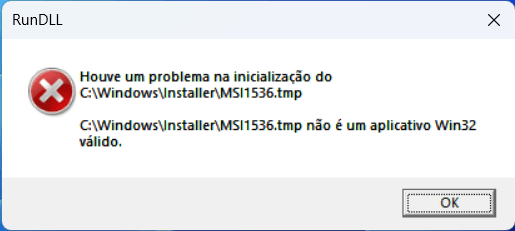
Hello friends, I'm panicking here. I just formatted the PC, installed Windows 11 Pro For Workstation, everything is ok. So I first updated Intel ME Consumer Firmware 16.1.25.2091 (previously had version 16.1.25.2020), reset the computer, look in the BIOS, the new version 16.1.25.2091 is there ok. Then I proceeded to install the Intel Chipset Drivers V10.1.19222.8341 and I am having this error in the attached image "MSI1536.tmp" saying that it is not a valid Win32 application, I tried to install it through the original Motherboard Drive and it gives the same error , I tried to install it through Armory Crate, it gave the same error. What can it be? I have BIOS 2204, previously everything worked before formatting, I made a few basic changes to the BIOS, one of them the most recent before formatting was in Boot\Secure State\OS Type\ from Other OS to Windows UEFI mode.

Do I need to change any drivers before this one? Shouldn't I have installed Armory Crate before and yes this Drive?
Any mesangem thank you to stop shaking here, thank you!
 

Attachments

  • 2023-01-12 (11).png
    2023-01-12 (11).png
    10.7 KB · Views: 11

My Computer My Computer

At a glance

Windows 11 64Bit Professional For WorkstationsIntel Core I9-12900KCorsair Vengeance 64GB 5200MHz CMK64GX5M2B520...ASUS ROG Strix Gaming GeForce RTX 3090 24GB OC
OS
Windows 11 64Bit Professional For Workstations
Computer type
PC/Desktop
Manufacturer/Model
Custom Built
CPU
Intel Core I9-12900K
Motherboard
Asus ROG MAXIMUS Z690 HERO
Memory
Corsair Vengeance 64GB 5200MHz CMK64GX5M2B5200C40 (2x32GB)
Graphics Card(s)
ASUS ROG Strix Gaming GeForce RTX 3090 24GB OC
Monitor(s) Displays
2X Dell UltraSharp 27" 4K U2723QE
Screen Resolution
3840 x 2160
Hard Drives
M.2 NVME Kingstom Fury Renegade 2TB
PSU
Corsair HX1200 80 Plus Platinum
Case
Corsair 7000X RGB Black Full Tower
Cooling
Rog Ryujin II 360
Keyboard
Microsoft
Mouse
Microsoft
Internet Speed
500 Mbps
Browser
Edge
Antivirus
KS
Other Info
Wacom Intuos 3 9x12 / SpaceMouse 3DConnexion / EATON DX 2KVA ON-Line UPS
Hello friends, I'm panicking here. I just formatted the PC, installed Windows 11 Pro For Workstation, everything is ok. So I first updated Intel ME Consumer Firmware 16.1.25.2091 (previously had version 16.1.25.2020), reset the computer, look in the BIOS, the new version 16.1.25.2091 is there ok. Then I proceeded to install the Intel Chipset Drivers V10.1.19222.8341 and I am having this error in the attached image "MSI1536.tmp" saying that it is not a valid Win32 application, I tried to install it through the original Motherboard Drive and it gives the same error , I tried to install it through Armory Crate, it gave the same error. What can it be? I have BIOS 2204, previously everything worked before formatting, I made a few basic changes to the BIOS, one of them the most recent before formatting was in Boot\Secure State\OS Type\ from Other OS to Windows UEFI mode.

Do I need to change any drivers before this one? Shouldn't I have installed Armory Crate before and yes this Drive?
Any mesangem thank you to stop shaking here, thank you!
Before you read, you should know that I also use Windows 11 Pro for Workstations (see my hardware)
I'd like to ask if you installed any other software before upgrading MEI and chipset software? I also want to ask if you had everything connected to your PC when installing Windows? In your situation, I would have EVERYTHING disconnected except for a regular mouse and keyboard. I would also install Intel MEI and Intel Chipset device software before anything else. I would also like you to see if there is newer firmware for your NVMe drives and sata drives. Both drives have their own software to do that. Lastly, in this case, I would not use an altered version of Windows.

I also want to say the ReFS is not the issue here as Windows cannot be installed on a ReFS filing system.
 

My Computer My Computer

At a glance

Windows 11 Pro for WorkstationsIntel® Core™ i9-9900KCorsair Vengeance RGB Pro 128GB (4x32GB) ‎CMW...Nvidia GeForce RTX 3080 TI Founders Edition
OS
Windows 11 Pro for Workstations
Computer type
PC/Desktop
Manufacturer/Model
Custom Built (ASUS, Intel, Nvidia, Creative Labs, Corsair, Seasonic, Lian Li)
CPU
Intel® Core™ i9-9900K
Motherboard
ASUS ROG MAXIMUS XI EXTREME
Memory
Corsair Vengeance RGB Pro 128GB (4x32GB) ‎CMW128GX4M4E3200C16
Graphics Card(s)
Nvidia GeForce RTX 3080 TI Founders Edition
Sound Card
Creative Sound Blaster AE-9
Monitor(s) Displays
ASUS ROG Swift PG32UQXR Mini LED backlit & HDR1000
Screen Resolution
3840 x 2160 (4K)
Hard Drives
Samsung 970 Pro 1TB
Samsung 980 Pro 1TB
PSU
Seasonic Prime TX 1000
Case
Lian Li 011 Dynamic XL ROG Edition
Cooling
ASUS ROG STRIX LC II 360 ARGB AIO, 10x UNI FAN SL-INFINITY Fans
Keyboard
Razer Huntsman Elite (Silent keys)
Mouse
Logitech MX Master 3s
Internet Speed
1024 Mb/s Down and 40 Mb/s Up
Browser
Microsoft Edge
Antivirus
Windows Defender
Other Info
Speakers: Vanatoo Transparent One Encore with a REL HT/1003 Subwoofer
  • Like
Reactions: 3DG
Thanks for the feedback MoKiChU!

It follows in topics listed for better understanding and if you can briefly respond to them in your time, thank you:

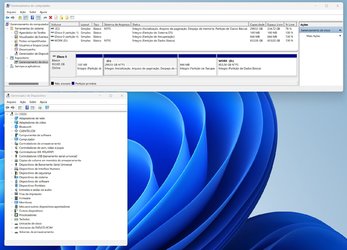
1. It does make sense what you write about that the error could be this because I am using Windows 11 Pro for Workstations, I didn't know that and I read a little bit about the ReFS File System, I didn't understand if the HD formatting system is "ReFS" instead of "NTSF" or is it something internal to the file system and management of this Windows 11 Pro for Workstations? I ask this because I looked in the hard drive preferences and it is in NTSF (see the Devices.jpg screen).

2. This is the second formatting with the same Windows 11 Pro for Workstations, on the first formatting I installed the drivers in a haphazard and disorganized way but I did not have this reported error of "MSI1536.tmp not a valid Win32 application" I tested my main programs and everything worked good (Windows with ISO from August/2022) (Armoury Crate behaves strangely). Analyze this from this second formatting, I tried to create a Drivers installation logic with vase on your information and also JohnAb's, I have BIOS at 2204, Intel ME Firmware at 16.1.25.2091, in BIOS I use X.M.P. in XMP Enabled in XMP I, I have GNA Enabled and ReSize Bar Enabled, and Boot\Secure StateOS Type\ from Other OS to Windows UEFI mode, and in System Agent (SA) VMD in default Enabled/Disabled/Disabled, and nothing else overclocked or changed. This is the order of my installation:

2.1) Formatting, installing Windows 11 Pro for Workstations / Original ISO from December/2022, purchased and activated by key / I partitioned the 1TB M.2 into 300GB for C:, formatted and installed the OS.

2.2) Entering Windows I opened Armoury Crate, installed it, and got the first error "Error Code 102", so I used this technique: Armoury Crate Error Code 102 How To Fix It
and the AC installation went fine.

2.3) I closed the Armoury Crate and proceeded with the installation of the drivers in the sequence below, it is here that I ask your greater attention to see if I forgot something or I should install before some other drive to avoid the error "MSI1536.tmp not a valid Win32 application", I tell you this MoKiChU, because look that in the end the drive "02A Intel Chipset Drivers V10.1.19222.8341" was successfully installed "apparently", look at the sequence and the notes (Drivers MoKiChU):

01A Intel ME Consumer Firmware - Intel ME V16.1.25.2091 - 01.12.2022 / OK (previously I had Intel ME V16.1.25.2020)
02A Intel Chipset Drivers V10.1.19222.8341 - 18.08.2022 / ERROR / Followed by installing the other drivers below:
03A Intel MEI Drivers (Drivers Only) - Intel MEI V2247.3.5.0 - 16.11.2022 / OK
04A Intel VMD Drivers (Drivers Only) V19.5.1.1040 - 25.08.2022 / OK
05A Intel GNA Drivers (Drivers Only) V3.0.0.1457 - 26.11.2021 / OK
06A Intel Serial IO Drivers (Drivers Only) V30.100.2237.26 - 06.09.2022 / OK
07A Intel Thunderbolt Drivers (Drivers Only) V1.41.1340.0 - 14.09.2022 / OK
08A Intel Ethernet Drivers (Drivers Only) V2.1.2.3 - 21.09.2022 / OK
09A Intel WiFi Drivers (Drivers Only) V22.200.0.3 - 14.12.2022 / OK
10A Intel Bluetooth Drivers (Drivers Only) V22.200.0.2 - 15.12.2022 / OK
11A Realtek USB Audio Drivers (UAD ASUS ROG SS3-DTS V6.3.9600.2347 - 03.11.2022 / OK

Attention here: I ran CCleaner V6.07.10191 64Bit Portable, did a complete cleanup, included Registry, then tried to re-install 02A Intel Chipset Drivers V10.1.19222.8341 - 18.08.2022 / OK Installed correctly.

12A Installed the latest NVidia Studio Drive / OK / ReSize Bar OK
13A Intel Driver And Support Assistant Installer / OK / Report generated 100% correct all Drivers updated

3. With each Drive installation, if the system does not automatically reset itself, I manually reset it.

4. I checked for updates through Windows Update, they had a few things, I updated and reset, in Windows Update/Advanced Options still shows Microsoft HIDClass (should I install?) and AsusTek Computer INC Firmware 10.1.2.1720 (this is that problematic BIOS, don't install that, correct? How do I remove this from Windows Update? Or I don't need to worry, it will not install automatically right?

5. About the Armoury Crate, it behaves strangely, same things happened in the first formatting, in the tab "Devices" hour disappears the RTX Video Card, I reset it then it appears, the Fan Xpert was working, appeared the fans and now out of nowhere when I click on it the screen is in black and nothing appears (in the first formatting never appeared anything on this screen), which leads me to the main question:

6. Should I try something else regarding the Drivers sequence (since 02A was installed after all the others, but I have Armoury Crate instability) or forget all about it and start buying the "normal" Windows Pro 64Bits?

Thanks MoKiChU, you are our great North, we are grateful and ASUS should hire you to manage the Drivers!

 

Attachments

  • Devices.jpg
    Devices.jpg
    223.9 KB · Views: 6

My Computer My Computer

At a glance

Windows 11 64Bit Professional For WorkstationsIntel Core I9-12900KCorsair Vengeance 64GB 5200MHz CMK64GX5M2B520...ASUS ROG Strix Gaming GeForce RTX 3090 24GB OC
OS
Windows 11 64Bit Professional For Workstations
Computer type
PC/Desktop
Manufacturer/Model
Custom Built
CPU
Intel Core I9-12900K
Motherboard
Asus ROG MAXIMUS Z690 HERO
Memory
Corsair Vengeance 64GB 5200MHz CMK64GX5M2B5200C40 (2x32GB)
Graphics Card(s)
ASUS ROG Strix Gaming GeForce RTX 3090 24GB OC
Monitor(s) Displays
2X Dell UltraSharp 27" 4K U2723QE
Screen Resolution
3840 x 2160
Hard Drives
M.2 NVME Kingstom Fury Renegade 2TB
PSU
Corsair HX1200 80 Plus Platinum
Case
Corsair 7000X RGB Black Full Tower
Cooling
Rog Ryujin II 360
Keyboard
Microsoft
Mouse
Microsoft
Internet Speed
500 Mbps
Browser
Edge
Antivirus
KS
Other Info
Wacom Intuos 3 9x12 / SpaceMouse 3DConnexion / EATON DX 2KVA ON-Line UPS
Thanks for the feedback MoKiChU!

It follows in topics listed for better understanding and if you can briefly respond to them in your time, thank you:

1. It does make sense what you write about that the error could be this because I am using Windows 11 Pro for Workstations, I didn't know that and I read a little bit about the ReFS File System, I didn't understand if the HD formatting system is "ReFS" instead of "NTSF" or is it something internal to the file system and management of this Windows 11 Pro for Workstations? I ask this because I looked in the hard drive preferences and it is in NTSF (see the Devices.jpg screen).

2. This is the second formatting with the same Windows 11 Pro for Workstations, on the first formatting I installed the drivers in a haphazard and disorganized way but I did not have this reported error of "MSI1536.tmp not a valid Win32 application" I tested my main programs and everything worked good (Windows with ISO from August/2022) (Armoury Crate behaves strangely). Analyze this from this second formatting, I tried to create a Drivers installation logic with vase on your information and also JohnAb's, I have BIOS at 2204, Intel ME Firmware at 16.1.25.2091, in BIOS I use X.M.P. in XMP Enabled in XMP I, I have GNA Enabled and ReSize Bar Enabled, and Boot\Secure StateOS Type\ from Other OS to Windows UEFI mode, and in System Agent (SA) VMD in default Enabled/Disabled/Disabled, and nothing else overclocked or changed. This is the order of my installation:

2.1) Formatting, installing Windows 11 Pro for Workstations / Original ISO from December/2022, purchased and activated by key / I partitioned the 1TB M.2 into 300GB for C:, formatted and installed the OS.

2.2) Entering Windows I opened Armoury Crate, installed it, and got the first error "Error Code 102", so I used this technique: Armoury Crate Error Code 102 How To Fix It
and the AC installation went fine.

2.3) I closed the Armoury Crate and proceeded with the installation of the drivers in the sequence below, it is here that I ask your greater attention to see if I forgot something or I should install before some other drive to avoid the error "MSI1536.tmp not a valid Win32 application", I tell you this MoKiChU, because look that in the end the drive "02A Intel Chipset Drivers V10.1.19222.8341" was successfully installed "apparently", look at the sequence and the notes (Drivers MoKiChU):

01A Intel ME Consumer Firmware - Intel ME V16.1.25.2091 - 01.12.2022 / OK (previously I had Intel ME V16.1.25.2020)
02A Intel Chipset Drivers V10.1.19222.8341 - 18.08.2022 / ERROR / Followed by installing the other drivers below:
03A Intel MEI Drivers (Drivers Only) - Intel MEI V2247.3.5.0 - 16.11.2022 / OK
04A Intel VMD Drivers (Drivers Only) V19.5.1.1040 - 25.08.2022 / OK
05A Intel GNA Drivers (Drivers Only) V3.0.0.1457 - 26.11.2021 / OK
06A Intel Serial IO Drivers (Drivers Only) V30.100.2237.26 - 06.09.2022 / OK
07A Intel Thunderbolt Drivers (Drivers Only) V1.41.1340.0 - 14.09.2022 / OK
08A Intel Ethernet Drivers (Drivers Only) V2.1.2.3 - 21.09.2022 / OK
09A Intel WiFi Drivers (Drivers Only) V22.200.0.3 - 14.12.2022 / OK
10A Intel Bluetooth Drivers (Drivers Only) V22.200.0.2 - 15.12.2022 / OK
11A Realtek USB Audio Drivers (UAD ASUS ROG SS3-DTS V6.3.9600.2347 - 03.11.2022 / OK

Attention here: I ran CCleaner V6.07.10191 64Bit Portable, did a complete cleanup, included Registry, then tried to re-install 02A Intel Chipset Drivers V10.1.19222.8341 - 18.08.2022 / OK Installed correctly.

12A Installed the latest NVidia Studio Drive / OK / ReSize Bar OK
13A Intel Driver And Support Assistant Installer / OK / Report generated 100% correct all Drivers updated

3. With each Drive installation, if the system does not automatically reset itself, I manually reset it.

4. I checked for updates through Windows Update, they had a few things, I updated and reset, in Windows Update/Advanced Options still shows Microsoft HIDClass (should I install?) and AsusTek Computer INC Firmware 10.1.2.1720 (this is that problematic BIOS, don't install that, correct? How do I remove this from Windows Update? Or I don't need to worry, it will not install automatically right?

5. About the Armoury Crate, it behaves strangely, same things happened in the first formatting, in the tab "Devices" hour disappears the RTX Video Card, I reset it then it appears, the Fan Xpert was working, appeared the fans and now out of nowhere when I click on it the screen is in black and nothing appears (in the first formatting never appeared anything on this screen), which leads me to the main question:

6. Should I try something else regarding the Drivers sequence (since 02A was installed after all the others, but I have Armoury Crate instability) or forget all about it and start buying the "normal" Windows Pro 64Bits?

Thanks MoKiChU, you are our great North, we are grateful and ASUS should hire you to manage the Drivers!
I use Windows 10 pro for workstations and no that's not the issue. By the way the video card issue in armory crate seems to be a bug. I think it's a Windows update that's affecting some people. Also armory crate should not be installed before the drivers. I'm getting the impression of that's what you did.
 

My Computer My Computer

At a glance

Windows 11 Pro for WorkstationsIntel® Core™ i9-9900KCorsair Vengeance RGB Pro 128GB (4x32GB) ‎CMW...Nvidia GeForce RTX 3080 TI Founders Edition
OS
Windows 11 Pro for Workstations
Computer type
PC/Desktop
Manufacturer/Model
Custom Built (ASUS, Intel, Nvidia, Creative Labs, Corsair, Seasonic, Lian Li)
CPU
Intel® Core™ i9-9900K
Motherboard
ASUS ROG MAXIMUS XI EXTREME
Memory
Corsair Vengeance RGB Pro 128GB (4x32GB) ‎CMW128GX4M4E3200C16
Graphics Card(s)
Nvidia GeForce RTX 3080 TI Founders Edition
Sound Card
Creative Sound Blaster AE-9
Monitor(s) Displays
ASUS ROG Swift PG32UQXR Mini LED backlit & HDR1000
Screen Resolution
3840 x 2160 (4K)
Hard Drives
Samsung 970 Pro 1TB
Samsung 980 Pro 1TB
PSU
Seasonic Prime TX 1000
Case
Lian Li 011 Dynamic XL ROG Edition
Cooling
ASUS ROG STRIX LC II 360 ARGB AIO, 10x UNI FAN SL-INFINITY Fans
Keyboard
Razer Huntsman Elite (Silent keys)
Mouse
Logitech MX Master 3s
Internet Speed
1024 Mb/s Down and 40 Mb/s Up
Browser
Microsoft Edge
Antivirus
Windows Defender
Other Info
Speakers: Vanatoo Transparent One Encore with a REL HT/1003 Subwoofer
  • Like
Reactions: 3DG
6. Should I try something else regarding the Drivers sequence (since 02A was installed after all the others, but I have Armoury Crate instability) or forget all about it

Hi,

The Intel Chipset Drivers are called drivers but they are not really drivers, they have nothing functional/active, they just serve to recognize the product names in Device Manager to identify/index all the pieces of the chipset, but Intel Chipset Drivers conflicts can generate system malfunction.

To avoid Intel Chipset Drivers conflicts :

- Intel Chipset Drivers from Windows Update - Optional updates must not be installed if you use .exe installer.
- Intel Serial IO Drivers & Intel GNA Drivers must not be installed before Intel Chipset Drivers.​

So,

- Follow this process to cleanup :

- Uninstall your current Intel Chipset Drivers package, Intel Serial IO Drivers package & Intel GNA Drivers package if you have any installed (via Start > Settings > Apps) then restart your PC.
- Launch Driver Store Explorer (Right click on "Rapr.exe" > Run as administrator) > Check the boxes of gna.inf & check the boxes of all versions of Intel drivers which .inf contains system word or start with ialpss2 word in the System device category (if you find them).
- Check the box "Force Deletion" then click on the "Delete Driver" button then restart your PC.​

- Install Intel Chipset Drivers package :

From the first post of this thread.

- Intel Chipset Drivers

- Install Intel Serial IO Drivers package :

[DRIVERS] Intel Serial IO (3xx/4xx/5xx/6xx/7xx)

- Intel Serial IO Drivers (Drivers Only) :​
Drivers - 6xx/7xx​

- Install Intel GNA Drivers package :

[DRIVERS] Intel GNA (5xx/6xx/7xx)


Once this is done, you can update your Intel Chipset Drivers, Intel Serial IO Drivers & Intel GNA Drivers in the order you want when new ones will be released (do an update on top of the older), but don't update Intel Chipset Drivers from Windows Update - Optional updates.

start buying the "normal" Windows Pro 64Bits?

No, no need it's fine since you don't use ReFS. Because if you were using ReFS :

8LwfnNF.png

Source : Resilient File System (ReFS) overview
 
Last edited:

My Computer My Computer

At a glance

Windows 11 ProAMD Ryzen 7 7800X3DG.Skill Trident Z5 Neo RGB DDR5 6000MHz CL30 ...ASUS ROG Strix RTX 4080 OC
OS
Windows 11 Pro
Computer type
PC/Desktop
CPU
AMD Ryzen 7 7800X3D
Motherboard
ASUS ROG Strix B650E-F Gaming WiFi
Memory
G.Skill Trident Z5 Neo RGB DDR5 6000MHz CL30 - 32GB (2 x 16GB)
Graphics Card(s)
ASUS ROG Strix RTX 4080 OC
Monitor(s) Displays
ASUS ROG Strix XG35VQ
Screen Resolution
3440 x 1440 Full RGB @ 100Hz
Hard Drives
SSD Samsung 990 PRO 1TB
SSD Samsung 970 EVO Plus 500GB
PSU
Seasonic Focus GX 850W ATX 3.0
Case
NZXT H5 Flow
Cooling
NZXT Kraken X53
Keyboard
Logitech G513
Mouse
Logitech G502
  • Like
Reactions: 3DG
Thanks MoKiChU and Jesseinsf!

Jesseinsf:
Great to know that you also use Windows 11 Pro for Workstations (very consistent working with heavy apps and files, manages memory loads/unloads perfectly). That, I don't have anything else plugged in, just keyboard and mouse, then I'll put in other SSD, HDs and peripherals. Yes, I installed the Armoury Crate before everything and failed, I will install it last then. I'll look on the manufacturer's website to see if they have recent Firmware for the XPG M.2 S70 Blade and install. Question about that, do I install this updated Firmware now if I have it and if I format again, should I reinstall this Firmware again or will it already be updated forever?

MoKiChU:
"Intel Serial IO drivers and Intel GNA drivers should not be installed before Intel chipset drivers" Perfect, starting with that, so I prefer to format again and get this right. Thanks for this tool "Driver Store Explorer" and the uninstall explanation, I will keep this information in case I need it in the future.

About re-formatting, look if it is right like this, following your information:

1. I update the Firmware of the M.2 / SSD Toolbox Software for Firmware Update ADATA_SSDToolBoxSetup.5.0.16 - 19.09.2022 (I just saw this).
2. Disable in BIOS the Armoury Crate installation boot / Install Armoury Crate after all NVidia Studio Drivers and Drivers.
3. Format and reinstall Windows 11 Pro for Workstations.
4. Here the biggest doubt: Do I first do the full Windows Update (ok, never use Windows Update - Optional updates) and then the Drivers indicated above by you MoKiChU? Or do I start with your Drivers first?

5. The new Drivers sequence would be this, can you confirm by damaging an ok or by repositioning (thanks):

01A Intel ME Consumer Firmware - Intel ME V16.1.25.2091 - 01.12.2022 / This one I don't need to install again, but it's already installed in the BIOS.
02A Intel Chipset Drivers V10.1.19222.8341 - 18.08.2022 / I'll try without installing Armory Crate first to see if I avoid the "MSI1536.tmp" error.
03A Intel Serial IO Drivers (Drivers Only) V30.100.2237.26 - 06.09.2022
04A Intel GNA Drivers (Drivers Only) V3.0.0.1457 - 26.11.2021
05A Intel MEI Drivers (Drivers Only) - Intel MEI V2247.3.5.0 - 16.11.2022
06A Intel VMD Drivers (Drivers Only) V19.5.1.1040 - 25.08.2022
07A Intel Thunderbolt Drivers (Drivers Only) V1.41.1340.0 - 14.09.2022
08A Intel Ethernet Drivers (Drivers Only) V2.1.2.3 - 21.09.2022
09A Intel WiFi Drivers (Drivers Only) V22.200.0.3 - 14.12.2022
10A Intel Bluetooth Drivers (Drivers Only) V22.200.0.2 - 15.12.2022
11A Realtek USB Audio Drivers (UAD ASUS ROG SS3-DTS V6.3.9600.2347 - 03.11.2022

Thank you very much, I look forward to resuming the formatting here after the response and will get back to you.
 

My Computer My Computer

At a glance

Windows 11 64Bit Professional For WorkstationsIntel Core I9-12900KCorsair Vengeance 64GB 5200MHz CMK64GX5M2B520...ASUS ROG Strix Gaming GeForce RTX 3090 24GB OC
OS
Windows 11 64Bit Professional For Workstations
Computer type
PC/Desktop
Manufacturer/Model
Custom Built
CPU
Intel Core I9-12900K
Motherboard
Asus ROG MAXIMUS Z690 HERO
Memory
Corsair Vengeance 64GB 5200MHz CMK64GX5M2B5200C40 (2x32GB)
Graphics Card(s)
ASUS ROG Strix Gaming GeForce RTX 3090 24GB OC
Monitor(s) Displays
2X Dell UltraSharp 27" 4K U2723QE
Screen Resolution
3840 x 2160
Hard Drives
M.2 NVME Kingstom Fury Renegade 2TB
PSU
Corsair HX1200 80 Plus Platinum
Case
Corsair 7000X RGB Black Full Tower
Cooling
Rog Ryujin II 360
Keyboard
Microsoft
Mouse
Microsoft
Internet Speed
500 Mbps
Browser
Edge
Antivirus
KS
Other Info
Wacom Intuos 3 9x12 / SpaceMouse 3DConnexion / EATON DX 2KVA ON-Line UPS
Thanks MoKiChU and Jesseinsf!

Jesseinsf:
Great to know that you also use Windows 11 Pro for Workstations (very consistent working with heavy apps and files, manages memory loads/unloads perfectly). That, I don't have anything else plugged in, just keyboard and mouse, then I'll put in other SSD, HDs and peripherals. Yes, I installed the Armoury Crate before everything and failed, I will install it last then. I'll look on the manufacturer's website to see if they have recent Firmware for the XPG M.2 S70 Blade and install. Question about that, do I install this updated Firmware now if I have it and if I format again, should I reinstall this Firmware again or will it already be updated forever?

You don't need to install any same firmware again, only once.

MoKiChU:
"Intel Serial IO drivers and Intel GNA drivers should not be installed before Intel chipset drivers" Perfect, starting with that, so I prefer to format again and get this right. Thanks for this tool "Driver Store Explorer" and the uninstall explanation, I will keep this information in case I need it in the future.

About re-formatting, look if it is right like this, following your information:

1. I update the Firmware of the M.2 / SSD Toolbox Software for Firmware Update ADATA_SSDToolBoxSetup.5.0.16 - 19.09.2022 (I just saw this).
2. Disable in BIOS the Armoury Crate installation boot / Install Armoury Crate after all NVidia Studio Drivers and Drivers.
3. Format and reinstall Windows 11 Pro for Workstations.
4. Here the biggest doubt: Do I first do the full Windows Update (ok, never use Windows Update - Optional updates) and then the Drivers indicated above by you MoKiChU? Or do I start with your Drivers first?

Drivers first then Windows Update.

5. The new Drivers sequence would be this, can you confirm by damaging an ok or by repositioning (thanks):

01A Intel ME Consumer Firmware - Intel ME V16.1.25.2091 - 01.12.2022 / This one I don't need to install again, but it's already installed in the BIOS.
02A Intel Chipset Drivers V10.1.19222.8341 - 18.08.2022 / I'll try without installing Armory Crate first to see if I avoid the "MSI1536.tmp" error.
03A Intel Serial IO Drivers (Drivers Only) V30.100.2237.26 - 06.09.2022
04A Intel GNA Drivers (Drivers Only) V3.0.0.1457 - 26.11.2021
05A Intel MEI Drivers (Drivers Only) - Intel MEI V2247.3.5.0 - 16.11.2022
06A Intel VMD Drivers (Drivers Only) V19.5.1.1040 - 25.08.2022
07A Intel Thunderbolt Drivers (Drivers Only) V1.41.1340.0 - 14.09.2022
08A Intel Ethernet Drivers (Drivers Only) V2.1.2.3 - 21.09.2022
09A Intel WiFi Drivers (Drivers Only) V22.200.0.3 - 14.12.2022
10A Intel Bluetooth Drivers (Drivers Only) V22.200.0.2 - 15.12.2022
11A Realtek USB Audio Drivers (UAD ASUS ROG SS3-DTS V6.3.9600.2347 - 03.11.2022

Thank you very much, I look forward to resuming the formatting here after the response and will get back to you.

Correct. You will then have to install your NVIDIA GeForce GPU Drivers and install Armoury Crate.
 

My Computer My Computer

At a glance

Windows 11 ProAMD Ryzen 7 7800X3DG.Skill Trident Z5 Neo RGB DDR5 6000MHz CL30 ...ASUS ROG Strix RTX 4080 OC
OS
Windows 11 Pro
Computer type
PC/Desktop
CPU
AMD Ryzen 7 7800X3D
Motherboard
ASUS ROG Strix B650E-F Gaming WiFi
Memory
G.Skill Trident Z5 Neo RGB DDR5 6000MHz CL30 - 32GB (2 x 16GB)
Graphics Card(s)
ASUS ROG Strix RTX 4080 OC
Monitor(s) Displays
ASUS ROG Strix XG35VQ
Screen Resolution
3440 x 1440 Full RGB @ 100Hz
Hard Drives
SSD Samsung 990 PRO 1TB
SSD Samsung 970 EVO Plus 500GB
PSU
Seasonic Focus GX 850W ATX 3.0
Case
NZXT H5 Flow
Cooling
NZXT Kraken X53
Keyboard
Logitech G513
Mouse
Logitech G502
  • Like
Reactions: 3DG
Thank you perfect MoKiChU! One last question before restarting the formatting here, about "First the drivers and then Windows Update" I must leave the internet cable connected to enter with the Key and count with Microsoft correctly, after that until what time do I leave the cable connected internet? Because I noticed that after I entered Windows for the first time, and I tried to install Armory Crate which gave an error and then Chipset Drivers V10.1.19222.8341 which also gave an error, I reset the computer, and I saw the screen that was to wait for Windows to be updated, so I ask if it is not to update Windows before the Drivers at which point should I disconnect the internet cable since it updates automatically?
 

My Computer My Computer

At a glance

Windows 11 64Bit Professional For WorkstationsIntel Core I9-12900KCorsair Vengeance 64GB 5200MHz CMK64GX5M2B520...ASUS ROG Strix Gaming GeForce RTX 3090 24GB OC
OS
Windows 11 64Bit Professional For Workstations
Computer type
PC/Desktop
Manufacturer/Model
Custom Built
CPU
Intel Core I9-12900K
Motherboard
Asus ROG MAXIMUS Z690 HERO
Memory
Corsair Vengeance 64GB 5200MHz CMK64GX5M2B5200C40 (2x32GB)
Graphics Card(s)
ASUS ROG Strix Gaming GeForce RTX 3090 24GB OC
Monitor(s) Displays
2X Dell UltraSharp 27" 4K U2723QE
Screen Resolution
3840 x 2160
Hard Drives
M.2 NVME Kingstom Fury Renegade 2TB
PSU
Corsair HX1200 80 Plus Platinum
Case
Corsair 7000X RGB Black Full Tower
Cooling
Rog Ryujin II 360
Keyboard
Microsoft
Mouse
Microsoft
Internet Speed
500 Mbps
Browser
Edge
Antivirus
KS
Other Info
Wacom Intuos 3 9x12 / SpaceMouse 3DConnexion / EATON DX 2KVA ON-Line UPS
Thank you perfect MoKiChU! One last question before restarting the formatting here, about "First the drivers and then Windows Update" I must leave the internet cable connected to enter with the Key and count with Microsoft correctly, after that until what time do I leave the cable connected internet? Because I noticed that after I entered Windows for the first time, and I tried to install Armory Crate which gave an error and then Chipset Drivers V10.1.19222.8341 which also gave an error, I reset the computer, and I saw the screen that was to wait for Windows to be updated, so I ask if it is not to update Windows before the Drivers at which point should I disconnect the internet cable since it updates automatically?

Follow this :

- Stay with your Ethernet cable plugged​
- Once you reach the sign-in page, unplug your Ethernet cable​
- Open cmd with Shift + F10 and type OOBE\BYPASSNRO (your PC will restart)​
- "I don't have Internet" > “Create One!” to create a Local account​
- Plug your Ethernet cable then Activate Windows and link your Local account to your Microsoft account once your drivers are installed.​
 
Last edited:

My Computer My Computer

At a glance

Windows 11 ProAMD Ryzen 7 7800X3DG.Skill Trident Z5 Neo RGB DDR5 6000MHz CL30 ...ASUS ROG Strix RTX 4080 OC
OS
Windows 11 Pro
Computer type
PC/Desktop
CPU
AMD Ryzen 7 7800X3D
Motherboard
ASUS ROG Strix B650E-F Gaming WiFi
Memory
G.Skill Trident Z5 Neo RGB DDR5 6000MHz CL30 - 32GB (2 x 16GB)
Graphics Card(s)
ASUS ROG Strix RTX 4080 OC
Monitor(s) Displays
ASUS ROG Strix XG35VQ
Screen Resolution
3440 x 1440 Full RGB @ 100Hz
Hard Drives
SSD Samsung 990 PRO 1TB
SSD Samsung 970 EVO Plus 500GB
PSU
Seasonic Focus GX 850W ATX 3.0
Case
NZXT H5 Flow
Cooling
NZXT Kraken X53
Keyboard
Logitech G513
Mouse
Logitech G502
  • Like
Reactions: 3DG
Hi,

The Intel Chipset Drivers are called drivers but they are not really drivers, they have nothing functional/active, they just serve to recognize the product names in Device Manager to identify/index all the pieces of the chipset, but Intel Chipset Drivers conflicts can generate system malfunction.

To avoid Intel Chipset Drivers conflicts :

- Intel Chipset Drivers from Windows Update - Optional updates must not be installed if you use .exe installer.​
- Intel Serial IO Drivers & Intel GNA Drivers must not be installed before Intel Chipset Drivers.​

So,

- Follow this process to cleanup :

- Uninstall your current Intel Chipset Drivers package, Intel Serial IO Drivers package & Intel GNA Drivers package if you have any installed (via Start > Settings > Apps) then restart your PC.​
- Launch Driver Store Explorer (Right click on "Rapr.exe" > Run as administrator) > Check the boxes of gna.inf & check the boxes of all versions of Intel drivers which .inf contains system word or start with ialpss2 word in the System device category (if you find them).​
- Check the box "Force Deletion" then click on the "Delete Driver" button then restart your PC.​

- Install Intel Chipset Drivers package :

From the first post of this thread.​
- Intel Chipset Drivers


- Install Intel Serial IO Drivers package :

- Intel Serial IO Drivers (Drivers Only) :​
Drivers - 6xx/7xx​


- Install Intel GNA Drivers package :

Once this is done, you can update your Intel Chipset Drivers, Intel Serial IO Drivers & Intel GNA Drivers in the order you want when new ones will be released (do an update on top of the older), but don't update Intel Chipset Drivers from Windows Update - Optional updates.​
No, no need it's fine since you don't use ReFS. Because if you were using ReFS :​
You don't have to delete old drivers. You can just run the installer with the "-OVERALL" flag in cmd which will force override drivers from Windows Update
 

My Computer My Computer

At a glance

.
OS
.
You don't have to delete old drivers. You can just run the installer with the "-OVERALL" flag in cmd which will force override drivers from Windows Update

Hi

I do not advise you to use "-overall", this will effectively overwrite the Intel Chipset Drivers from Windows Update - Optional updates but will also install all the chipset drivers contained in the package whether they are dedicated to your motherboard or not.
 

My Computer My Computer

At a glance

Windows 11 ProAMD Ryzen 7 7800X3DG.Skill Trident Z5 Neo RGB DDR5 6000MHz CL30 ...ASUS ROG Strix RTX 4080 OC
OS
Windows 11 Pro
Computer type
PC/Desktop
CPU
AMD Ryzen 7 7800X3D
Motherboard
ASUS ROG Strix B650E-F Gaming WiFi
Memory
G.Skill Trident Z5 Neo RGB DDR5 6000MHz CL30 - 32GB (2 x 16GB)
Graphics Card(s)
ASUS ROG Strix RTX 4080 OC
Monitor(s) Displays
ASUS ROG Strix XG35VQ
Screen Resolution
3440 x 1440 Full RGB @ 100Hz
Hard Drives
SSD Samsung 990 PRO 1TB
SSD Samsung 970 EVO Plus 500GB
PSU
Seasonic Focus GX 850W ATX 3.0
Case
NZXT H5 Flow
Cooling
NZXT Kraken X53
Keyboard
Logitech G513
Mouse
Logitech G502

My Computer My Computer

At a glance

Windows 11 ProIntel Core i9 12900KFCorsair 64GB DDR5 Vengeance C40 5200MhzASUS GeForce RTX 3090 ROG Strix OC 24GB
OS
Windows 11 Pro
Computer type
PC/Desktop
Manufacturer/Model
Custom Build
CPU
Intel Core i9 12900KF
Motherboard
ASUS ROG Maximus Z690 Hero
Memory
Corsair 64GB DDR5 Vengeance C40 5200Mhz
Graphics Card(s)
ASUS GeForce RTX 3090 ROG Strix OC 24GB
Sound Card
OnBoard
Monitor(s) Displays
Acer Predator XB323UGP 32" QHD G-SYNC-C 144Hz 1MS IPS LED
Screen Resolution
2560 x 1440
Hard Drives
1x Samsung 980 Pro Series Gen4 250GB M.2 NVMe
1x Samsung 980 Pro Series Gen4 500GB M.2 NVMe
2x Samsung 980 Pro Series Gen4 2TB M.2 NVMe
PSU
Corsair AX1200i 1200W 80PLUS Titanium Modular
Case
Corsair 4000D Black Case w/ Tempered Glass Side Panel
Cooling
Noctua NH-U12A Chromax Black CPU Cooler, 4x Noctua 120mm Fans
Keyboard
Logitech MK545
Mouse
Logitech MX Master 3
Internet Speed
Fixed Wireless 150mbps/75mbps
Browser
Firefox
Antivirus
Kaspersky
Other Info
Thrustmaster TS-PC RACER
Fanatec CSL Elite Pedals with the Load Cell Kit
Yamaha Amp with Bose Speakers

My Computers My Computers

  • At a glance

    Win10 Pro, Win10 Pro N, Win10 Home, Windows 8...Intel Core i9 9900K32 GB Quad Kit, G.Skill Trident Z RGB Series ...ASUS GeForce RTX 3090 ROG Strix O24G, 24576 M...
    OS
    Win10 Pro, Win10 Pro N, Win10 Home, Windows 8.1 Pro, Ubuntu
    Computer type
    PC/Desktop
    Manufacturer/Model
    ۞ΞЖ†ԘΜΞ۞
    CPU
    Intel Core i9 9900K
    Motherboard
    ASUS ROG Maximus X Hero
    Memory
    32 GB Quad Kit, G.Skill Trident Z RGB Series schwarz, DDR4-3866, 18-19-19-39-2T
    Graphics Card(s)
    ASUS GeForce RTX 3090 ROG Strix O24G, 24576 MB GDDR6X
    Sound Card
    (1) HD Webcam C270 (2) NVIDIA High Definition Audio (3) Realtek High Definition Audio
    Monitor(s) Displays
    BenQ BL2711U(4K) and a hp 27vx(1080p)
    Hard Drives
    C: Samsung 960 EVO NVMe M.2 SSD
    E: & O: Libraries & OneDrive-> Samsung 850 EVO 1TB
    D: Hyper-V VM's -> Samsung PM951 Client M.2 512Gb SSD
    G: System Images -> Samsung 860 Pro 2TB
    PSU
    Corsair HX1000i High Performance ATX Power Supply 80+ Platinum
    Case
    Phanteks Enthoo Pro TG
    Cooling
    Thermaltake Floe Riing RGB TT Premium-Edition 360mm and 2x120 Phantek& Halo front, and 1x140 Phanteks
    Keyboard
    Trust GTX THURA
    Mouse
    Trust GTX 148
    Internet Speed
    25+/5+ (+usually faster)
    Browser
    Edge; Chrome;
    Antivirus
    Windows Defender of course & Malwarebytes Anti-Exploit as an added layer between browser & OS
    Other Info
    Router: FRITZ!Box 7590 AX V2
    Sound system: SHARP HT-SBW460 Dolby Atmos Soundbar
    Webcam: Logitech BRIO ULTRA HD PRO WEBCAM 4K webcam with HDR
  • At a glance

    Windoes 10 HomeIntel Ii 6700K32GB DDR4 Corsair Vengeance Blue 3000MHzZOTAC GAMING GeForce RTX 1080 Ti AMP Extreme ...
    Operating System
    Windoes 10 Home
    Computer type
    PC/Desktop
    Manufacturer/Model
    Hyrican
    CPU
    Intel Ii 6700K
    Motherboard
    MSI Z170A PC MATE
    Memory
    32GB DDR4 Corsair Vengeance Blue 3000MHz
    Graphics card(s)
    ZOTAC GAMING GeForce RTX 1080 Ti AMP Extreme Core
    Sound Card
    Connected via HDMI from graics card to home theater system
    Monitor(s) Displays
    Samsung 50" Crystal UHD 4K TU7179 (2020)
    Screen Resolution
    4K
    Hard Drives
    two 256GB San Disk SSD Plus
    PSU
    Corsair 650W CX650M (80+ Bronze)
    Case
    Inwin 303
    Cooling
    Arctic Freezer i11 for CPU and 3 Corsair fans on top ans 3 on the bottom
    Keyboard
    Old generic from Lenovo
    Mouse
    Old generic from Lenovo
    Internet Speed
    25/5
    Browser
    Edge, Chrome
    Antivirus
    Windows Security(Defender)
Hi everyone,

- Intel Chipset Drivers :
Package : 10.1.19284.8351 WHQL [20/10/2022]​
Download : Link


Thread updated.
Don't know why but this update gives me a blue screen on boot for INACCESSIBLE_BOOT_DEVICE. Tried to install twice with the same results and had to do a system restore in order to boot back into Windows 11.
 
Last edited:

My Computer My Computer

At a glance

Windows 11 ProIntel i9-13900KFCorsair Dominator Platinum RGB DDR5 32GB (2x1...nVIDIA GeForce RTX 3090 Founders Edition
OS
Windows 11 Pro
Computer type
PC/Desktop
Manufacturer/Model
Custom
CPU
Intel i9-13900KF
Motherboard
ASUS ROG Strix Z790-E Gaming WiFi
Memory
Corsair Dominator Platinum RGB DDR5 32GB (2x16GB) 6200MHz C36
Graphics Card(s)
nVIDIA GeForce RTX 3090 Founders Edition
Monitor(s) Displays
CORSAIR XENEON FLEX 45WQHD240 45-Inch OLED & CORSAIR XENEON 32QHD240 32-Inch IPS
Screen Resolution
3440 x1440
Hard Drives
Corsair MP600 PRO NH 2TB
PSU
Corsair HX1000i
Case
Corsair 7000D AIRFLOW
Cooling
Corsair iCUE H170i ELITE LCD Display
Keyboard
Corsair K100 RGB Optical-Mechanical Gaming Keyboard — CORSAIR OPX Switch
Mouse
Corsair M65 RGB ULTRA WIRELESS
Internet Speed
1.2GB
Browser
Edge
Antivirus
MS Defender

Latest Support Threads

Back
Top Bottom