Duplicate User Accounts in the Windows 11 Login Screen


Local time
11:24 AM
Posts
5
OS
Windows 11 25H2 26200.8246
After the last two windows updates I wound up with duplicate accounts in my windows 11 login. "The user name or password is incorrect, try again". I can select the correct one and enter my pin and login but there is no automatic login anymore. I have tried changing things in netplwiz with no effect and other thinks that have come up on the internet but nothing seem to work. Any suggestions?
 

My Computer

System One

  • OS
    Windows 11 25H2 26200.8246
    Computer type
    PC/Desktop
    Manufacturer/Model
    Self Built ASUS MOTHERBOARD in ACER CASE
    CPU
    AMD Pro 4650G
    Motherboard
    ASUS PRO B550M-A
    Memory
    64 gb @3700 mhz
    Graphics Card(s)
    ON CPU
    Sound Card
    None
    Monitor(s) Displays
    ACER 21.5
    Screen Resolution
    3850 x 2140
    Hard Drives
    Bootdrive Samsung Pro 990 1tb nvme, Backup drive Samsung 980 1tb nvme, Crucial 1tb 2.5 ssd, Crucial 500gb 2.5 ssd
    PSU
    500 80 plus
    Case
    ACER
    Cooling
    1 x 90mm, 2 x 120mm
    Keyboard
    Microsoft 3050 wireless
    Mouse
    Microsoft 3050 wireless
    Internet Speed
    1000 mbs
    Browser
    Edge
    Antivirus
    Microsoft
I have noticed a similar issue since the last update.
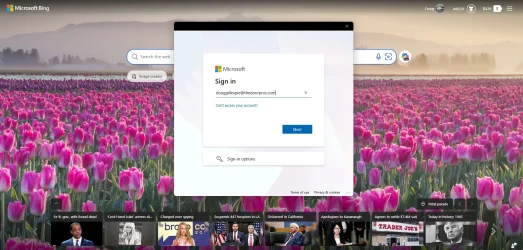
My PC logs directly into windows so no issue there however when I click on my browser (Edge) the Microsoft account window pops up and no matter what I do it will tell me that the info is wrong and not let me log in. It also comes up with an email address that I haven't used for a while now.
So, I simply close the windows (2 clicks) and continue in Edge, but this happens every time I open the browser and its very annoying.
Any suggestions would be gratefully appreciated.
Regards,
Doug.
 

Attachments

  • Screenshot 2026-04-16 092711.webp
    Screenshot 2026-04-16 092711.webp
    195.8 KB · Views: 1

My Computer

System One

  • OS
    Windows 11
    Computer type
    PC/Desktop
    Manufacturer/Model
    HP Pro Tower
    CPU
    12th Gen Intel i3 12100
    Motherboard
    Not known
    Memory
    32 GB
    Graphics Card(s)
    128 MB
    Monitor(s) Displays
    Samsung
    Hard Drives
    11.15 TB
    Browser
    EDGE
I have no other users listed but on logon screen it shows two.


My Computer

System One

  • OS
    Windows 11 25H2 26200.8246
    Computer type
    PC/Desktop
    Manufacturer/Model
    Self Built ASUS MOTHERBOARD in ACER CASE
    CPU
    AMD Pro 4650G
    Motherboard
    ASUS PRO B550M-A
    Memory
    64 gb @3700 mhz
    Graphics Card(s)
    ON CPU
    Sound Card
    None
    Monitor(s) Displays
    ACER 21.5
    Screen Resolution
    3850 x 2140
    Hard Drives
    Bootdrive Samsung Pro 990 1tb nvme, Backup drive Samsung 980 1tb nvme, Crucial 1tb 2.5 ssd, Crucial 500gb 2.5 ssd
    PSU
    500 80 plus
    Case
    ACER
    Cooling
    1 x 90mm, 2 x 120mm
    Keyboard
    Microsoft 3050 wireless
    Mouse
    Microsoft 3050 wireless
    Internet Speed
    1000 mbs
    Browser
    Edge
    Antivirus
    Microsoft
Disable auto login (netplwiz). Restart and re-nable it.
 

My Computers

System One System Two

  • OS
    Windows 11 Pro 25H2
    Computer type
    PC/Desktop
    Manufacturer/Model
    Dell Optiplex 7080
    CPU
    i9-10900 10 core 20 threads
    Motherboard
    DELL 0J37VM
    Memory
    32 gb
    Graphics Card(s)
    none-Intel UHD Graphics 630
    Sound Card
    Integrated Realtek
    Monitor(s) Displays
    Benq 27
    Screen Resolution
    2560x1440
    Hard Drives
    2x1tb Solidigm m.2 nvme /External drives 512gb Samsung m.2 sata+2tb Kingston m2.nvme
    PSU
    500w
    Case
    MT
    Cooling
    Dell Premium
    Keyboard
    Logitech wired
    Mouse
    Logitech wireless
    Internet Speed
    so slow I'm too embarrassed to tell
    Browser
    #1 Edge #2 Firefox
    Antivirus
    Defender+MWB Premium
  • Operating System
    Windows 11 Pro 24H2 26200.8457
    Computer type
    PC/Desktop
    Manufacturer/Model
    Beelink Mini PC SER5
    CPU
    AMD Ryzen 7 6800U
    Memory
    32 gb
    Graphics card(s)
    integrated
    Sound Card
    integrated
    Monitor(s) Displays
    Benq 27
    Screen Resolution
    2560x1440
    Hard Drives
    1TB Crucial nvme
    Keyboard
    Logitech wired
    Mouse
    Logitech wireless
    Internet Speed
    still too embarrassed to tell
    Browser
    Firefox
    Antivirus
    Defender
    Other Info
    System 3 is non compliant Dell 9020 i7-4770/24gb ram Win11 PRO 26200.8457
Tried that. Doesn't work. Disabled auto logon then tried set up again, doesn't work. Nothing I do seems to change anything. Thank you for your answer
 

My Computer

System One

  • OS
    Windows 11 25H2 26200.8246
    Computer type
    PC/Desktop
    Manufacturer/Model
    Self Built ASUS MOTHERBOARD in ACER CASE
    CPU
    AMD Pro 4650G
    Motherboard
    ASUS PRO B550M-A
    Memory
    64 gb @3700 mhz
    Graphics Card(s)
    ON CPU
    Sound Card
    None
    Monitor(s) Displays
    ACER 21.5
    Screen Resolution
    3850 x 2140
    Hard Drives
    Bootdrive Samsung Pro 990 1tb nvme, Backup drive Samsung 980 1tb nvme, Crucial 1tb 2.5 ssd, Crucial 500gb 2.5 ssd
    PSU
    500 80 plus
    Case
    ACER
    Cooling
    1 x 90mm, 2 x 120mm
    Keyboard
    Microsoft 3050 wireless
    Mouse
    Microsoft 3050 wireless
    Internet Speed
    1000 mbs
    Browser
    Edge
    Antivirus
    Microsoft
Try this. Settings > Accounts > Sign-in options toggle off "Use my sign-in info to automatically finish setting up after an update". Restart your computer to apply the change, which usually removes the duplicate entry
 

My Computers

System One System Two

  • OS
    Windows 11 Pro 25H2
    Computer type
    PC/Desktop
    Manufacturer/Model
    Dell Optiplex 7080
    CPU
    i9-10900 10 core 20 threads
    Motherboard
    DELL 0J37VM
    Memory
    32 gb
    Graphics Card(s)
    none-Intel UHD Graphics 630
    Sound Card
    Integrated Realtek
    Monitor(s) Displays
    Benq 27
    Screen Resolution
    2560x1440
    Hard Drives
    2x1tb Solidigm m.2 nvme /External drives 512gb Samsung m.2 sata+2tb Kingston m2.nvme
    PSU
    500w
    Case
    MT
    Cooling
    Dell Premium
    Keyboard
    Logitech wired
    Mouse
    Logitech wireless
    Internet Speed
    so slow I'm too embarrassed to tell
    Browser
    #1 Edge #2 Firefox
    Antivirus
    Defender+MWB Premium
  • Operating System
    Windows 11 Pro 24H2 26200.8457
    Computer type
    PC/Desktop
    Manufacturer/Model
    Beelink Mini PC SER5
    CPU
    AMD Ryzen 7 6800U
    Memory
    32 gb
    Graphics card(s)
    integrated
    Sound Card
    integrated
    Monitor(s) Displays
    Benq 27
    Screen Resolution
    2560x1440
    Hard Drives
    1TB Crucial nvme
    Keyboard
    Logitech wired
    Mouse
    Logitech wireless
    Internet Speed
    still too embarrassed to tell
    Browser
    Firefox
    Antivirus
    Defender
    Other Info
    System 3 is non compliant Dell 9020 i7-4770/24gb ram Win11 PRO 26200.8457
I've tried this after unchecking it then rebooting computer it's turned back on and nothing new happens. Thank you for the suggestion though.
 

My Computer

System One

  • OS
    Windows 11 25H2 26200.8246
    Computer type
    PC/Desktop
    Manufacturer/Model
    Self Built ASUS MOTHERBOARD in ACER CASE
    CPU
    AMD Pro 4650G
    Motherboard
    ASUS PRO B550M-A
    Memory
    64 gb @3700 mhz
    Graphics Card(s)
    ON CPU
    Sound Card
    None
    Monitor(s) Displays
    ACER 21.5
    Screen Resolution
    3850 x 2140
    Hard Drives
    Bootdrive Samsung Pro 990 1tb nvme, Backup drive Samsung 980 1tb nvme, Crucial 1tb 2.5 ssd, Crucial 500gb 2.5 ssd
    PSU
    500 80 plus
    Case
    ACER
    Cooling
    1 x 90mm, 2 x 120mm
    Keyboard
    Microsoft 3050 wireless
    Mouse
    Microsoft 3050 wireless
    Internet Speed
    1000 mbs
    Browser
    Edge
    Antivirus
    Microsoft

Latest Support Threads

Back
Top Bottom