Edge taking a long time to restore tabs, and using masses of RAM


MrYossu

Well-known member
Member
Local time
8:07 AM
Posts
113
OS
Win11
I generally have two Edge windows open, one with tab groups for various projects, etc, and a second window for random pages I have open. I'm a bit lazy, and usually leave lost of tabs open, so the primary window has around 600 tabs open (🫨), and the secondary one has around 70 open. However, this has never caused me any issues, and Edge has always started up quickly, and never used that much RAM. I tend to leave the PC on the whole time, so most of these tabs are sleeping to save resources.

For some reason, when I came back to my PC today, the second window had closed. Normally if this happens, pressing Ctrl-Shft-T reopens it. However, this time it didn't. It just opened a few random pages, each in a separate window, until nothing more happened.

I have a nightly disk image running, so I renamed the C:\Users\MyUser\AppData\Local\Microsoft\Edge\User Data folder to something else, and copied the folder from last night's backup.

When I started Edge, it opened up the primary window with all my tab groups, but not the second. I did Ctrl-Shft-T, and a second window opened with what looks like the right tabs, but both Edge windows showed as not responding. I decided to leave it and see what happened. After a while, the Edge windows became responsive, but if I click on a tab, the page takes a very long time to do load.

I can see in Task Manager that Edge is using around 50% of the CPU, and about 64Gb of RAM. I have 96Gb, so the PC is still usable, but the RAM is steadily going up, so it's likely to cause some problems soon.

I have Edge version Version 135.0.3179.54 (Official build) (64-bit) on Windows 11, version 24H2 (OS Build 26100.3476)

Anyone any idea what might be going on?
 
Windows Build/Version
Windows 11, version 24H2 (OS Build 26100.3476)

My Computer My Computer

At a glance

Win11AMD Ryzen 9 3900X96Gb2047MB NVIDIA NVS 510
OS
Win11
CPU
AMD Ryzen 9 3900X
Motherboard
Aorus X570 Elite
Memory
96Gb
Graphics Card(s)
2047MB NVIDIA NVS 510
Monitor(s) Displays
ASUS PB278 (2560x1440@59Hz), DELL S2721DS (2560x1440@59Hz), F22 (1920x1080@60Hz), DELL E2311H (1920x1080@60Hz)
Hard Drives
931GB Force MP600 primary drive
931GB Western Digital WDC WD10EALX-759BA1 data drive
5589GB Seagate Backup+ Hub BK SCSI Disk Device (USB (SATA)) external backup
Other Info
See http://speccy.piriform.com/results/a0tsEUMm6hE5R4aEwpTCg3a for full specs
You mentioned this huge number of tabs but you did not mention what add-ons you have in Edge. Though I can not imagine running that many open tabs, nor can I imagine the need to do so, the more (and type) of add-ons your run, the more ram is used. Even in a sleeping tab, I believe that the add-ons still use ram. Someone can correct me if I am wrong about that.

I have tested browser ram usage with add-ons both active and disabled. Add-ons are ram hogs.
 

My Computers My Computers

  • At a glance

    Windows 11 Pro 26H2 26300.9457i9-10900 10 core 20 threads32 gbnone-Intel UHD Graphics 630
    OS
    Windows 11 Pro 26H2 26300.9457
    Computer type
    PC/Desktop
    Manufacturer/Model
    Dell Optiplex 7080
    CPU
    i9-10900 10 core 20 threads
    Motherboard
    DELL 0J37VM
    Memory
    32 gb
    Graphics Card(s)
    none-Intel UHD Graphics 630
    Sound Card
    Integrated Realtek
    Monitor(s) Displays
    Benq 27
    Screen Resolution
    2560x1440
    Hard Drives
    2x1tb Solidigm m.2 nvme /External drives 512gb Samsung m.2 sata+2tb Kingston m2.nvme
    PSU
    500w
    Case
    MT
    Cooling
    Dell Premium
    Keyboard
    Logitech wired
    Mouse
    Logitech wireless
    Internet Speed
    so slow I'm too embarrassed to tell
    Browser
    #1 Edge #2 Firefox
    Antivirus
    Defender+MWB Premium
  • At a glance

    Windows 11 Pro 24H2 26200.9457AMD Ryzen 7 6800U32 gbintegrated
    Operating System
    Windows 11 Pro 24H2 26200.9457
    Computer type
    PC/Desktop
    Manufacturer/Model
    Beelink Mini PC SER5
    CPU
    AMD Ryzen 7 6800U
    Memory
    32 gb
    Graphics card(s)
    integrated
    Sound Card
    integrated
    Monitor(s) Displays
    Benq 27
    Screen Resolution
    2560x1440
    Hard Drives
    1TB Crucial nvme
    Keyboard
    Logitech wired
    Mouse
    Logitech wireless
    Internet Speed
    still too embarrassed to tell
    Browser
    Firefox
    Antivirus
    Defender
  • System 3 is non compliant Dell 9020 i7-4770/24gb ram Win11 PRO 26200.9457
700 tabs.
What a trainwreck.
Good luck sorting it out.
 

My Computer My Computer

At a glance

Windows 11 Home X-lite versionIntel Core i5 (3rd Gen) 3570 / 3.4 GHz32 GB of 1600 MHz non-ECC DDR3 SDRAMIntel HD Graphics 2500 Dynamic Video Memory
OS
Windows 11 Home X-lite version
Computer type
PC/Desktop
Manufacturer/Model
Dell OptiPlex 9010
CPU
Intel Core i5 (3rd Gen) 3570 / 3.4 GHz
Motherboard
Intel Q77 Express
Memory
32 GB of 1600 MHz non-ECC DDR3 SDRAM
Graphics Card(s)
Intel HD Graphics 2500 Dynamic Video Memory
Monitor(s) Displays
22" veiwsonic
600+ tabs!?!?!? Ridiculous!!!
 

My Computers My Computers

  • At a glance

    Windows 11 Pro
    OS
    Windows 11 Pro
    Computer type
    PC/Desktop
    Manufacturer/Model
    ASUS ROG Strix
  • At a glance

    Windows 11 Pro
    Operating System
    Windows 11 Pro
    Computer type
    Laptop
    Manufacturer/Model
    ASUS VivoBook
  • ASUS VivoBook 'Lite' ~ Windows 11 Home
I decided to leave it and see what happened. After a while, the Edge windows became responsive, but if I click on a tab, the page takes a very long time to do load.
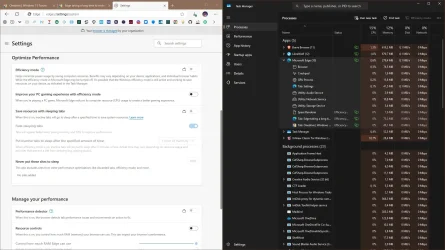
Efficiency mode and sleeping tabs can cause the lag. Try to disable them, Windows will force it's own Efficiency mode.
 

Attachments

  • capture_04092025_135107.webp
    capture_04092025_135107.webp
    168.8 KB · Views: 3

My Computer My Computer

At a glance

Home2FH2CanAMD Ryzen 5 8600G (07/24)2x32GB Kingston FURY DDR5 5600 MHz CL36 @5200...ASROCK Radeon RX 6600 Challenger D 8G @48FPS ...
OS
Home2FH2Can
Computer type
PC/Desktop
CPU
AMD Ryzen 5 8600G (07/24)
Motherboard
ASROCK B650M-HDV/M.2 (07/24) BIOS 4.43 AGESA ComboAM5 1.3.0.1b Patch A (07/26)
Memory
2x32GB Kingston FURY DDR5 5600 MHz CL36 @5200 CL40 (07/24)
Graphics Card(s)
ASROCK Radeon RX 6600 Challenger D 8G @48FPS (08/24)
Sound Card
Creative Sound BlasterX AE-5 Plus (05/24)
Monitor(s) Displays
24" Philips 24M1N3200ZS/00 (05/24)
Screen Resolution
1920Ă—1080@165Hz via DP1.4
Hard Drives
Kingston KC3000 NVMe 2TB (05/24)
ADATA XPG GAMMIX S11 Pro 512GB (07/19)
PSU
Seasonic Core GM 550 Gold (04/24)
Case
Fractal Design Define 7 Mini with 3x Noctua NF-P14s/12@555rpm (04/24)
Cooling
Noctua NH-U12S with Noctua NF-P12 (04/24)
Keyboard
HP Pavilion Wired Keyboard 300 (07/24) + Rabalux 76017 Parker (01/24)
Mouse
Logitech M330 Silent Plus (07/26)
Internet Speed
500/100 Mbps via RouterOS (05/21) & TCP Optimizer
Browser
Edge, Brave for YouTube, LibreWolf for FB
Antivirus
NextDNS blocking 50% Traffic
Other Info
Phone: Motorola Moto G86 (02/26)
Backup: Hasleo Backup Suite (PreOS)
Headphones: Sennheiser RS170 (09/10)
Chair: Huzaro Force 4.4 Grey Mesh (05/24)
Notifier: Xiaomi Mi Band 9 Milanese (10/24)
FlexCore USB-C 3.2 Gen 1 (M) to LAN (F) (08/25)
Wow, some strong feelings here! I know many people who have this many tabs open, seems to be common amongst software devs.

Anyway, Windows rebooted itself last night, and Edge started up as quickly as usual, with both window, all tabs and a sensible amount of RAM, so whatever it was seems to have righted itself.
 

My Computer My Computer

At a glance

Win11AMD Ryzen 9 3900X96Gb2047MB NVIDIA NVS 510
OS
Win11
CPU
AMD Ryzen 9 3900X
Motherboard
Aorus X570 Elite
Memory
96Gb
Graphics Card(s)
2047MB NVIDIA NVS 510
Monitor(s) Displays
ASUS PB278 (2560x1440@59Hz), DELL S2721DS (2560x1440@59Hz), F22 (1920x1080@60Hz), DELL E2311H (1920x1080@60Hz)
Hard Drives
931GB Force MP600 primary drive
931GB Western Digital WDC WD10EALX-759BA1 data drive
5589GB Seagate Backup+ Hub BK SCSI Disk Device (USB (SATA)) external backup
Other Info
See http://speccy.piriform.com/results/a0tsEUMm6hE5R4aEwpTCg3a for full specs

Latest Support Threads

Back
Top Bottom