Edit 'Dim Display' in Power Options not working


tlatch52

Member
Local time
12:58 PM
Posts
2
OS
Windows 11
I'm running the latest Windows 11, had this issue with every Win 11 version so far though.

You can add 'Dim Display' to power options if your PC doesn't already have it: How to show or hide Dim display after from Power Options in Windows 11/10

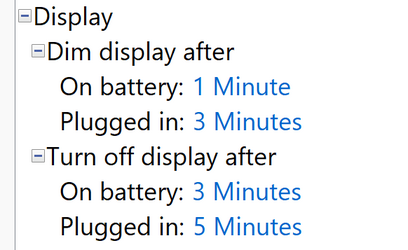
I've been able to get the option added without issue. However, when I edit the time by setting it to 1 minute (preferred) it does not work. Instead the laptop brightness functions as normal until it gets close to the 3 minute sleep timer. Is there any way to override this? I'd like the laptop screen to stay on for 3 minutes on battery as normal, but I would like it to dim much sooner.
1665162750597.png

Thanks,
 

My Computer My Computer

At a glance

Windows 11i7 10765g16gb ddr4i7 10765g integrated
OS
Windows 11
Computer type
Laptop
Manufacturer/Model
Dell
CPU
i7 10765g
Motherboard
oem pcie-3/lpddr4-soldered/m.2-removable
Memory
16gb ddr4
Graphics Card(s)
i7 10765g integrated
Sound Card
n/a
Monitor(s) Displays
built-in Dell 13inch 4K touch 16:10
Screen Resolution
3840x2400
Hard Drives
1tb crucial m.2 nvme m5
Cooling
repasted arctic silver cpu/gpu die / thermal pads heat pipes
Mouse
apple magic mouse w/ utility
Internet Speed
200mbps down / 10 mbps up
Browser
all
Antivirus
default microsft
Hello and welcome to the forum.

Just a thought. It might be conflicting with the nightlight setting. See if you have nightlight on. Settings-display-nightlight

Also, I looked at the article you mentioned. It makes this confusing statement:
"By default, Windows 11/10 dims the laptop’s display automatically after 1 minute. If your device supports this functionality, you need to check the aforementioned setting for possible changes."

I read Brink's tutorial here Add or Remove Dim display after from Power Options in Windows
He states it this way which doesn't make it any clearer for me, but I do think this may come into play with your issue. See if it makes sense to you. I don't own a laptop to test with.

"If you did not originally have the Dim display after setting available, then it means it is not supported on your computer. Instead, the display will automatically dim by the set Dimmed display brightness percentage exactly 10 seconds before the specified Turn off display after time.
If Dim display after is set to 0 minutes, then the display will not dim."

I read both articles to say if you did not have this setting originally, it means the setting is not supported for your device. Could it be your laptop is not supported?
 

My Computers My Computers

  • At a glance

    Windows 11 Pro 25H2 26200.9168i9-10900 10 core 20 threads32 gbnone-Intel UHD Graphics 630
    OS
    Windows 11 Pro 25H2 26200.9168
    Computer type
    PC/Desktop
    Manufacturer/Model
    Dell Optiplex 7080
    CPU
    i9-10900 10 core 20 threads
    Motherboard
    DELL 0J37VM
    Memory
    32 gb
    Graphics Card(s)
    none-Intel UHD Graphics 630
    Sound Card
    Integrated Realtek
    Monitor(s) Displays
    Benq 27
    Screen Resolution
    2560x1440
    Hard Drives
    2x1tb Solidigm m.2 nvme /External drives 512gb Samsung m.2 sata+2tb Kingston m2.nvme
    PSU
    500w
    Case
    MT
    Cooling
    Dell Premium
    Keyboard
    Logitech wired
    Mouse
    Logitech wireless
    Internet Speed
    so slow I'm too embarrassed to tell
    Browser
    #1 Edge #2 Firefox
    Antivirus
    Defender+MWB Premium
  • At a glance

    Windows 11 Pro 24H2 26200.9168AMD Ryzen 7 6800U32 gbintegrated
    Operating System
    Windows 11 Pro 24H2 26200.9168
    Computer type
    PC/Desktop
    Manufacturer/Model
    Beelink Mini PC SER5
    CPU
    AMD Ryzen 7 6800U
    Memory
    32 gb
    Graphics card(s)
    integrated
    Sound Card
    integrated
    Monitor(s) Displays
    Benq 27
    Screen Resolution
    2560x1440
    Hard Drives
    1TB Crucial nvme
    Keyboard
    Logitech wired
    Mouse
    Logitech wireless
    Internet Speed
    still too embarrassed to tell
    Browser
    Firefox
    Antivirus
    Defender
  • System 3 is non compliant Dell 9020 i7-4770/24gb ram Win11 PRO 26200.9168
Dim display is a capability of several display drivers.
If your display driver has it then it can be manipulated in Power options.
If your display driver does not have this capability then you cannot do anything about it.

All the best,
Denis


Welcome to ElevenForum.

It's really worth making time to browse through the Tutorial index - there's a shortcut to it at the top of every page [within the Tutorials dropdown list].
- At the foot of the Tutorial index is a shortcut to download it as a spreadsheet.
- I download a new copy each month.
- By downloading it as a spreadsheet I can benefit from Excel's excellent filtering capabilities when I search for topics of interest.
- Tutorials are also listed at Tutorials - there's a shortcut to that at the top of every page.

You can search ElevenForum using the search box in the top-right corner of all ElevenForum webpages or using Advanced Search - ElevenForum
- You can also search ElevenForum threads in many general search engines, such as Google, by adding site:elevenforum.com after your search term. For example,
Taskbar setup site:elevenforum.com
- [This is what the search box in the top-right corner of ElevenForum webpages does automatically]
 

My Computer My Computer

At a glance

Windows 11 Home x64 Version 25H2 Build 26200....
OS
Windows 11 Home x64 Version 25H2 Build 26200.9168
@Try3 Well, that was a simple explanation. Both of those articles need to say it your way instead of making it clear as mud.
 

My Computers My Computers

  • At a glance

    Windows 11 Pro 25H2 26200.9168i9-10900 10 core 20 threads32 gbnone-Intel UHD Graphics 630
    OS
    Windows 11 Pro 25H2 26200.9168
    Computer type
    PC/Desktop
    Manufacturer/Model
    Dell Optiplex 7080
    CPU
    i9-10900 10 core 20 threads
    Motherboard
    DELL 0J37VM
    Memory
    32 gb
    Graphics Card(s)
    none-Intel UHD Graphics 630
    Sound Card
    Integrated Realtek
    Monitor(s) Displays
    Benq 27
    Screen Resolution
    2560x1440
    Hard Drives
    2x1tb Solidigm m.2 nvme /External drives 512gb Samsung m.2 sata+2tb Kingston m2.nvme
    PSU
    500w
    Case
    MT
    Cooling
    Dell Premium
    Keyboard
    Logitech wired
    Mouse
    Logitech wireless
    Internet Speed
    so slow I'm too embarrassed to tell
    Browser
    #1 Edge #2 Firefox
    Antivirus
    Defender+MWB Premium
  • At a glance

    Windows 11 Pro 24H2 26200.9168AMD Ryzen 7 6800U32 gbintegrated
    Operating System
    Windows 11 Pro 24H2 26200.9168
    Computer type
    PC/Desktop
    Manufacturer/Model
    Beelink Mini PC SER5
    CPU
    AMD Ryzen 7 6800U
    Memory
    32 gb
    Graphics card(s)
    integrated
    Sound Card
    integrated
    Monitor(s) Displays
    Benq 27
    Screen Resolution
    2560x1440
    Hard Drives
    1TB Crucial nvme
    Keyboard
    Logitech wired
    Mouse
    Logitech wireless
    Internet Speed
    still too embarrassed to tell
    Browser
    Firefox
    Antivirus
    Defender
  • System 3 is non compliant Dell 9020 i7-4770/24gb ram Win11 PRO 26200.9168
Well, that was a simple explanation
Well, I've experienced it.
I thought it was a pretty useless feature.
I turned it off. I didn't really see the point of it at all.

Being absent from Power options does not mean the Dim display after capability does not exist.
I had a laptop with a screen that dimmed after 30 secs but it did not have a Dim display after entry in its Power options. But PowerCfg reports did show that Dim display after had been set up.
I also have computers for which Dim display after settings exist in the power plan but have no effect because the driver does not support the capability so checking for the relevant settings with PowerCfg is pointless.


Denis
 
Last edited:

My Computer My Computer

At a glance

Windows 11 Home x64 Version 25H2 Build 26200....
OS
Windows 11 Home x64 Version 25H2 Build 26200.9168
Ah interesting, thanks for your replies. I think I managed to get it to work in Windows 10 a while back but can’t remember for sure. Thanks Dell

I’ll try the display driver straight from the Intel website instead of the Dell driver to see if that makes any difference… doubt it but worth a try I guess.
 

My Computer My Computer

At a glance

Windows 11i7 10765g16gb ddr4i7 10765g integrated
OS
Windows 11
Computer type
Laptop
Manufacturer/Model
Dell
CPU
i7 10765g
Motherboard
oem pcie-3/lpddr4-soldered/m.2-removable
Memory
16gb ddr4
Graphics Card(s)
i7 10765g integrated
Sound Card
n/a
Monitor(s) Displays
built-in Dell 13inch 4K touch 16:10
Screen Resolution
3840x2400
Hard Drives
1tb crucial m.2 nvme m5
Cooling
repasted arctic silver cpu/gpu die / thermal pads heat pipes
Mouse
apple magic mouse w/ utility
Internet Speed
200mbps down / 10 mbps up
Browser
all
Antivirus
default microsft

My Computer My Computer

At a glance

Windows 11 Home x64 Version 25H2 Build 26200....
OS
Windows 11 Home x64 Version 25H2 Build 26200.9168

Latest Support Threads

Back
Top Bottom